2008 MERCEDES-BENZ CLS COUPE fog light
[x] Cancel search: fog lightPage 10 of 329

7
Temperature display (on-board
computer)
. . . . . . . . . . . . . . . . . . . 116
Topping up . . . . . . . . . . . . . . . . . . . 195
ESP ®
(Electronic Stability Program) . 59
Activating/deactivating . . . . . . . . . . 59
Display message . . . . . . . . . . 222, 231
Warning lamp . . . . . . . . . . . . . . 59, 244
Exterior lighting
Delayed switch-off (on-board
computer) . . . . . . . . . . . . . . . . . . . 126
Exterior mirror parking position
Storing . . . . . . . . . . . . . . . . . . . . 85, 87
Exterior mirrors
Adjusting . . . . . . . . . . . . . . . . . . . . . 84
Anti-dazzle mode (automatic) . . . . . 85
Folding in/out (automatically) . . . . . 84
Folding in/out (electrically) . . . . . . . 84
Folding in when locking (on-board
computer) . . . . . . . . . . . . . . . . . . . 128
Malfunction . . . . . . . . . . . . . . . . . . 260
Parking position . . . . . . . . . . . . . 85, 87
Resetting . . . . . . . . . . . . . . . . . . . . . 84
Storing settings . . . . . . . . . . . . . . . . 86
Exterior view
Overview . . . . . . . . . . . . . . . . . . . . . 20 F
Fire extinguisher
. . . . . . . . . . . . . . . . 217
First-aid kit . . . . . . . . . . . . . . . . . . . . . 216 Flat tyre
MOExtended run-flat system
. . . . . 287
Preparing the vehicle . . . . . . . . . . . 276
TIREFIT kit . . . . . . . . . . . . . . . . . . . 277
Floormat . . . . . . . . . . . . . . . . . . . . . . . 187
Foglamps
Display message . . . . . . . . . . . . . . 235
Fording . . . . . . . . . . . . . . . . . . . . . . . . 208
Frequencies Garage door opener . . . . . . . . . . . . 319
Telephone . . . . . . . . . . . . . . . . . . . 300
Front airbag . . . . . . . . . . . . . . . . . . . . . 46
Front-passenger airbag . . . . . . . . . . . . 46
Fuel . . . . . . . . . . . . . . . . . . . . . . . . . . . 311
Diesel . . . . . . . . . . . . . . . . . . . . . . . 192
Display message . . . . . . . . . . . . . . 231
Loss . . . . . . . . . . . . . . . . . . . . . . . . 253
Petrol . . . . . . . . . . . . . . . . . . . . . . . 191
Fuel consumption . . . . . . . . . . . 312, 313
Fuel filler flap Opening/closing . . . . . . . . . . . . . . 190
Fuel line
Malfunction . . . . . . . . . . . . . . . . . . 253
Fuel tank
Malfunction . . . . . . . . . . . . . . . . . . 253
Range (on-board computer) . . . . . . 130
Fuse allocation chart . . . . . . . . . . . . 295
Fuse box Boot . . . . . . . . . . . . . . . . . . . . . . . . 296
Dashboard . . . . . . . . . . . . . . . . . . . 296 Fuses
. . . . . . . . . . . . . . . . . . . . . . . . . . 295 G
Garage door Opening/closing
(with the remote
control) . . . . . . . . . . . . . . . . . . . . . 187
Garage door opener . . . . . . . . . . . . . . 186
Clearing the memory . . . . . . . . . . . 187
Frequencies . . . . . . . . . . . . . . . . . . 319
Programming the remote control . . 186
Gear indicator (on-board computer) 116
Gearshift program Manual . . . . . . . . . . . . . . . . . . . . . . 108
Genuine Mercedes-Benz parts . . . . . 298
Glove compartment . . . . . . . . . . . . . . 177
Gross vehicle weight, maximum
permissible . . . . . . . . . . . . . . . . . . . . . 310 H
Headlamp Misting up
. . . . . . . . . . . . . . . . . . . 259
Headlamp mode (automatic) . . . . . . . 92
Headlamps Cleaning . . . . . . . . . . . . . . . . . . . . . 212
Cleaning system . . . . . . . . . . . . . . . . 95
Headlamps delayed switch-off
see Exterior lighting delayed switch-off Index
219_AKB; 2; 4, en-GB
mkalafa,
2007-11-13T09:28:36+01:00 - Seite 7
Page 12 of 329

9
Lights
Constant headlamp mode . . . . . . . . 92
Cornering light function . . . . . . . . . . 95
Dipped-beam headlamps . . . . . . . . . 92
Front foglamps . . . . . . . . . . . . . . . . . 93
Hazard warning lamps . . . . . . . . . . . 94
Headlamp flasher . . . . . . . . . . . . . . . 94
Headlamp range . . . . . . . . . . . . . . . . 95
Light switch . . . . . . . . . . . . . . . . . . . 91
Main-beam headlamps . . . . . . . . . . . 94
Rear foglamp . . . . . . . . . . . . . . . . . . 93
Switching off (display message) . . . 235
Turn signals . . . . . . . . . . . . . . . . . . . 94
LIM indicator lamp . . . . . . . . . . . . . . 133
Load compartment load, maximum
. . . . . . . . . . . . . . . . . . . . . . . . . . . . . . . 310
Loading guidelines . . . . . . . . . . . . . . 176
Locking Automatic . . . . . . . . . . . . . . . . . . . . . 69
Emergency locking . . . . . . . . . . . . . 267
From the inside (central locking
button) . . . . . . . . . . . . . . . . . . . . . . . 70
Luggage net . . . . . . . . . . . . . . . . . . . . 176
Lumbar support . . . . . . . . . . . . . . . . . . 78
Luxury head restraint . . . . . . . . . . 76, 77 M
Main-beam headlamps Display message
. . . . . . . . . . . . . . 235
Main fuse box . . . . . . . . . . . . . . . . . . . 296
Maintenance Battery . . . . . . . . . . . . . . . . . . . . . . 288
Malfunction memory
see Message memory menu
Manual gearshift program . . . . . . . . 108
Massage function (PULSE) . . . . . . . . . 80
Maximum speed Technical data . . . . . . . . . . . . . . . . 303
Memory card
Operation (on-board computer) . . . 119
Memory function . . . . . . . . . . . . . . . . . 86
Menu
DISTRONIC . . . . . . . . . . . . . . . . . . . 139
Menu (on-board computer) . . . . . . . . 114
AMG . . . . . . . . . . . . . . . . . . . . . . . . 116
Audio . . . . . . . . . . . . . . . . . . . . . . . 118
DVD . . . . . . . . . . . . . . . . . . . . . . . . 120
Message memory . . . . . . . . . . . . . . 121
Navigation . . . . . . . . . . . . . . . . . . . 120
Resetting to factory settings . . . . . 121
Settings . . . . . . . . . . . . . . . . . . . . . 121
Standard display . . . . . . . . . . . . . . 115
Submenu overview . . . . . . . . . . . . . 122
Telephone . . . . . . . . . . . . . . . . . . . 130 Trip computer
. . . . . . . . . . . . . . . . 129
TV . . . . . . . . . . . . . . . . . . . . . . . . . . 119
Message
see Message memory menu
Minispare emergency spare wheel
Storage location . . . . . . . . . . . . . . . 218
Technical data . . . . . . . . . . . . . . . . 308
Mirror
Sun visor . . . . . . . . . . . . . . . . . . . . 180
Mobile phone . . . . . . . . . . . . . . . . . . . 183
Bracket . . . . . . . . . . . . . . . . . . . . . 183
Display message . . . . . . . . . . . . . . 240
Installation . . . . . . . . . . . . . . . . . . . 299
Own number sending . . . . . . . . . . . 184
Run-on time . . . . . . . . . . . . . . . . . . 184
Telephone menu (on-board com-
puter) . . . . . . . . . . . . . . . . . . . . . . . 130
Modifying the programming
Key . . . . . . . . . . . . . . . . . . . . . . . . . . 66
KEYLESS GO key . . . . . . . . . . . . . . . 68
MOExtended run-flat system* . 199, 287
MP3 Operation (on-board computer) . . . 119
Multi-contour seat . . . . . . . . . . . . . . . . 79
Multi-function display . . . . . . . . 110, 112
Multi-function steering wheel . . . . . 111
Overview . . . . . . . . . . . . . . . . . . . . . 30 Index
219_AKB; 2; 4, en-GB
mkalafa,
2007-11-13T09:28:36+01:00 - Seite 9
Page 95 of 329
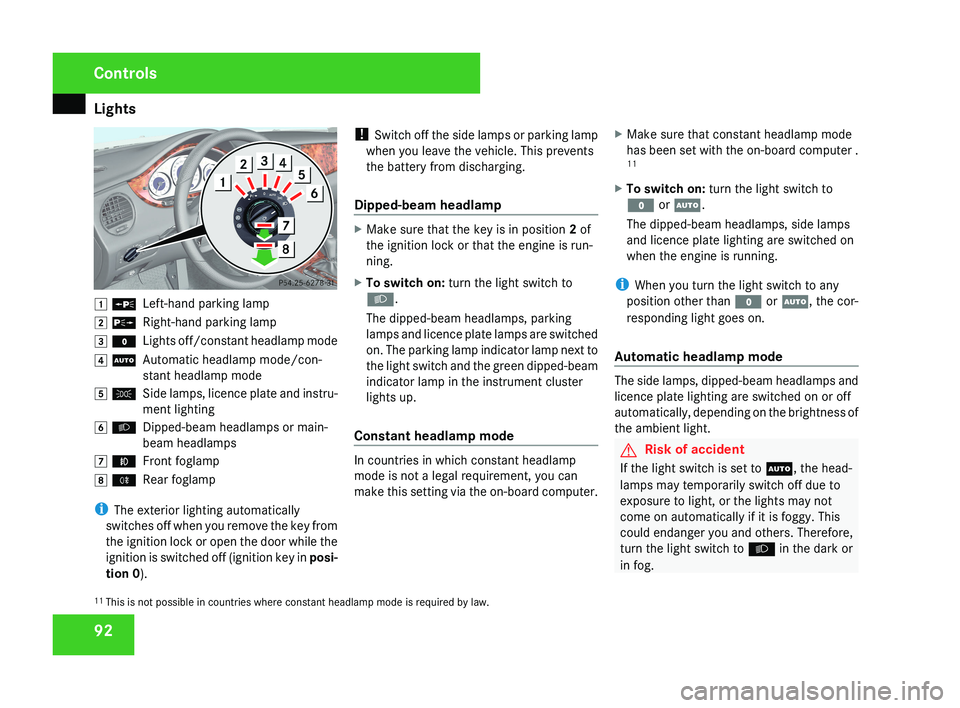
Lights
92$ a
Left-hand parking lamp
% g Right-hand parking lamp
& M Lights off/constant headlamp mode
( U Automatic headlamp mode/con-
stant headlamp mode
) C Side lamps, licence plate and instru-
ment lighting
* B Dipped-beam headlamps or main-
beam headlamps
, ¥ Front foglamp
. † Rear foglamp
i The exterior lighting automatically
switches off when you remove the key from
the ignition lock or open the door while the
ignition is switched off (ignition key in posi-
tion 0 ). !
Switch off the side lamps or parking lamp
when you leave the vehicle. This prevents
the battery from discharging.
Dipped-beam headlamp
X Make sure that the key is in position 2 of
the ignition lock or that the engine is run-
ning.
X To switch on: turn the light switch to
B.
The dipped-beam headlamps, parking
lamps and licence plate lamps are switched
on. The parking lamp indicator lamp next to
the light switch and the green dipped-beam
indicator lamp in the instrument cluster
lights up.
Constant headlamp mode
In countries in which constant headlamp
mode is not a legal requirement, you can
make this setting via the on-board computer. X
Make sure that constant headlamp mode
has been set with the on-board computer .
11
X To switch on: turn the light switch to
M or U.
The dipped-beam headlamps, side lamps
and licence plate lighting are switched on
when the engine is running.
i When you turn the light switch to any
position other than M or U, the cor-
responding light goes on.
Automatic headlamp mode
The side lamps, dipped-beam headlamps and
licence plate lighting are switched on or off
automatically, depending on the brightness of
the ambient light.
G Risk of accident
If the light switch is set to U, the head-
lamps may temporarily switch off due to
exposure to light, or the lights may not
come on automatically if it is foggy. This
could endanger you and others. Therefore,
turn the light switch to B in the dark or
in fog.
11 This is not possible in countries where constant headlamp mode is required by law.
Controls
219_AKB; 2; 4, en-GB
mkalafa,
2007-11-13T09:28:36+01:00 - Seite 92
Page 96 of 329
Lights
93The automatic headlamp feature is only an
aid.
The driver is responsible for the vehicle
lighting at all times. G
Risk of accident
When it is dark or foggy, turn the light
switch quickly from U to B. You
could otherwise cause an accident if the
headlamps were to switch off temporarily.
X To switch on: turn the light switch to
U.
The side lamps are switched on and off
automatically when the key is in position
1 in the ignition lock.
The dipped-beam headlamps, side lamps
and licence plate lighting are switched on
automatically when the engine is running.
When the dipped-beam headlamps are
switched
on, the indicator lamp next to the
light switch and the green dipped-beam
indicator lamp in the instrument cluster
light up. Front foglamps/rear foglamp G
Risk of accident
If you suspect that driving conditions will be
foggy, turn the light switch to B before
you start your journey. Otherwise, your
vehicle may not be visible and you could
therefore endanger yourself and others. G
Risk of accident
When it is dark or foggy, turn the light
switch quickly from U to B. You
could otherwise cause an accident if the
headlamps were to switch off temporarily.
i When the light switch is set to U you
cannot switch on the front or rear fog-
lamps.
X Make sure that the key is in position 2 in
the ignition lock.
X To switch on the front foglamps: turn
the
light switch to the B or C position.
X Pull the light switch out to the first stop.
The ¥ green indicator lamp next to the
light switch lights up. X
To switch on the rear foglamp: turn the
light switch to the B position.
X Pull the light switch out to the second stop.
The †
yellow indicator lamp next to the
light switch lights up.
X To switch off the front foglamps/rear
foglamp: push in the light switch to the
stop.
The
corresponding indicator lamp goes out. Controls
219_AKB; 2; 4, en-GB
mkalafa,
2007-11-13T09:28:36+01:00 - Seite 93
Page 98 of 329
Lights
95Adjusting the headlamp range (vehi-
cles with halogen headlamps)
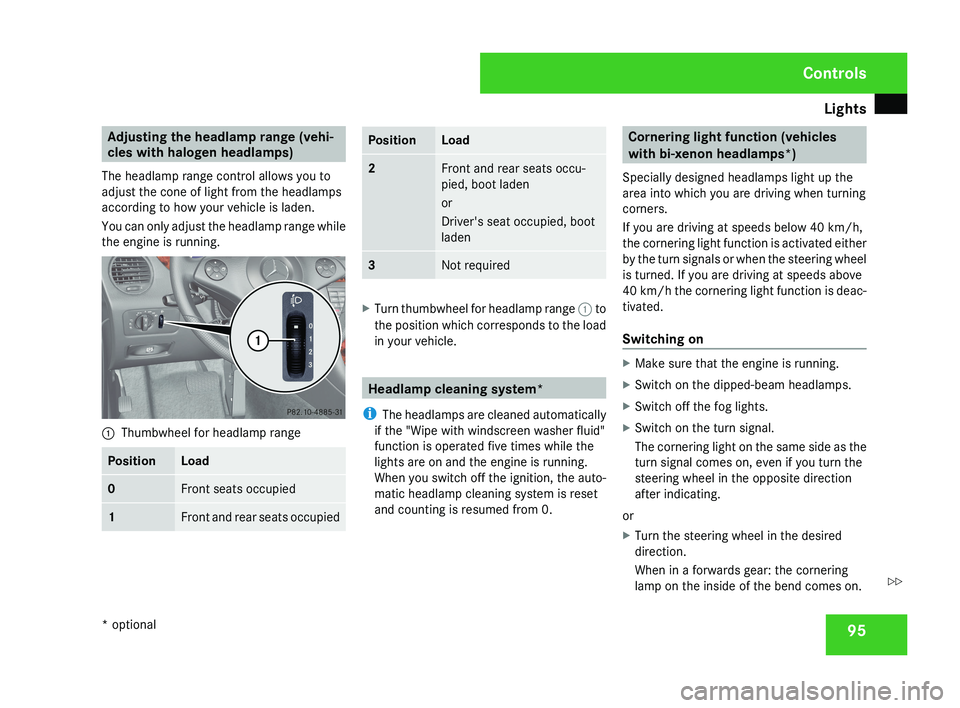
The headlamp range control allows you to
adjust the cone of light from the headlamps
according to how your vehicle is laden.
You can only adjust the headlamp range while
the engine is running.1 Thumbwheel for headlamp range
PositionLoad
0Front seats occupied
1Front and rear seats occupied
PositionLoad
2Front and rear seats occu-
pied, boot laden
or
Driver's seat occupied, boot
laden
3Not required
X
Turn thumbwheel for headlamp range 1 to
the position which corresponds to the load
in your vehicle.
Headlamp cleaning system*
i The headlamps are cleaned automatically
if the "Wipe with windscreen washer fluid"
function is operated five times while the
lights are on and the engine is running.
When you switch off the ignition, the auto-
matic headlamp cleaning system is reset
and counting is resumed from 0.
Cornering light function (vehicles
with bi-xenon headlamps*)
Specially designed headlamps light up the
area into which you are driving when turning
corners.
If you are driving at speeds below 40 km/h,
the cornering light function is activated either
by the turn signals or when the steering wheel
is turned. If you are driving at speeds above
40 km/h the cornering light function is deac-
tivated.
Switching on
X Make sure that the engine is running.
X Switch on the dipped-beam headlamps.
X Switch off the fog lights.
X Switch on the turn signal.
The cornering light on the same side as the
turn signal comes on, even if you turn the
steering wheel in the opposite direction
after indicating.
or
X Turn the steering wheel in the desired
direction.
When in a forwards gear: the cornering
lamp on the inside of the bend comes on.
Controls
* optional
219_AKB; 2; 4, en-GB
mkalafa,
2007-11-13T09:28:36+01:00 - Seite 95
Z
Page 128 of 329
On-board computer
125
X
Press the è or · button to select the
Settings... menu.
X Press the j
button to call up the selec-
tion of submenus.
X Press the æ
or ç button to select the
Time/Date submenu.
Setting the time
X Use j to select Clock, hours Con-
firm by press. R (or Clock, minutes
Confirm by press. R).
X Press the æ or ç button to set a
value.
X Press the reset button on the left of the
instrument cluster.
The set time is stored.
Setting the date
X Press the j
button to select Set date
Day (or Set date Month or Set date
Year).
X Press the æ or ç button to set the
values.
X Press the j, è or ÿ button to
select a different display. Setting constant headlamp mode If you have set constant headlamp mode and
the light switch is in position M orU,
the
side lamps, dipped-beam headlamps and
licence plate lighting are switched on auto-
matically when the engine is running. Turning
the light switch to a different position
switches on the corresponding lights.
For safety reasons, it is only possible to set
this function when the vehicle is stationary.
In countries in which constant headlamp
mode is a legal requirement, Constant is the
factory setting.
X Press the è
or · button to select the
Settings... menu.
X Press the j
button to call up the selec-
tion of submenus.
X Press the æ
or ç button to select the
Lighting submenu.
X Press the j button to select Headlamp
mode.
X Press the æ or ç button to set the
mode
for the headlamps to Manual or Con-
stant (constant headlamp mode).
X Press the j, è or ÿ button to
select a different display. Switching the surround lighting on or
off If the surround lighting is switched on, the
following lights will be switched on automat-
ically
in the dark after you have unlocked the
vehicle using the key:
R the side lamps
R the tail lamps
R the licence plate lighting
R the front foglamps
R the lights* in the exterior mirrors
The surround lighting switches off automati-
cally if you open the driver's door or after 40
seconds.
X Press the è
or · button to select the
Settings... menu.
X Press the j
button to call up the selec-
tion of submenus.
X Press the æ
or ç button to select the
Lighting submenu.
X Press the j button to select the Sur-
round lighting function. Controls
* optional
219_AKB; 2; 4, en-GB
mkalafa,
2007-11-13T09:28:36+01:00 - Seite 125 Z
Page 129 of 329
On-board computer
126
X
Press the æ or ç button to switch
the Surround lighting function on or
off.
X Press the j, è or ÿ button to
select a different display.
Setting the ambient lighting X
Press the è or · button to select the
Settings... menu.
X Press the j
button to call up the selec-
tion of submenus.
X Press the æ
or ç button to select the
Lighting submenu.
X Press the j button to select Ambient
light.
X Press the æ
or ç button to adjust the
brightness to any level from 0 (off) to 5
(bright).
X Press the j, è or ÿ button to
select a different display.
Activating or deactivating the exterior
lighting delayed switch-off You can set whether the exterior lighting
should remain on for 15 seconds after the doors are closed when it is dark using the
Headlamps delayed switch-off function.
If none of the doors are opened after the
engine
is switched off or if an open door is not
closed, the exterior lighting goes out after
60 seconds.
When you have set a delayed switch-off time
and then switch off the engine, the following
remain lit:
R the side lamps
R the tail lamps
R the licence plate lighting
R the front foglamps
R the lights* in the exterior mirrors
X Press the è
or · button to select the
Settings... menu.
X Press the j
button to call up the selec-
tion of submenus.
X Press the æ
or ç button to select the
Lighting submenu.
X Press the j
button to select Headlamps
delayed switch-off. X
Press the æ or ç button to activate
or deactivate the Headlamps delayed
switch-off feature.
X Press the j, è or ÿ button to
select a different display.
To temporarily deactivate the delayed switch-
off:
X Before leaving the vehicle, turn the key to
position 0 in the ignition lock.
X Turn the key to position 2 in the ignition
lock and back to position 0.
Delayed
switch-off is deactivated. It is reac-
tivated as soon as you start the engine
again.
Activating or deactivating the interior
lighting delayed switch-off The
Interior
lighting delayed switch-
off function allows you to set whether the
interior lighting should remain on for 10 sec-
onds after the key is removed from the igni-
tion lock when it is dark.
X Press the è
or · button to select the
Settings... menu.
X Press the j
button to call up the selec-
tion of submenus. Controls
* optional
219_AKB; 2; 4, en-GB
mkalafa,
2007-11-13T09:28:36+01:00 - Seite 126
Page 136 of 329
Driving systems
133Cruise control is only an aid designed to
assist driving. You are responsible for the
vehicle's speed and for braking in good
time.
G
Risk of accident
Do not use cruise control:
R in road and traffic conditions which do
not allow you to maintain a constant
speed (e.g. heavy traffic or winding
roads). You could otherwise cause an
accident.
R on slippery roads. Braking or accelerat-
ing could cause the drive wheels to lose
traction and the vehicle could then skid.
R when there is poor visibility, e.g. due to
fog, heavy rain or snow
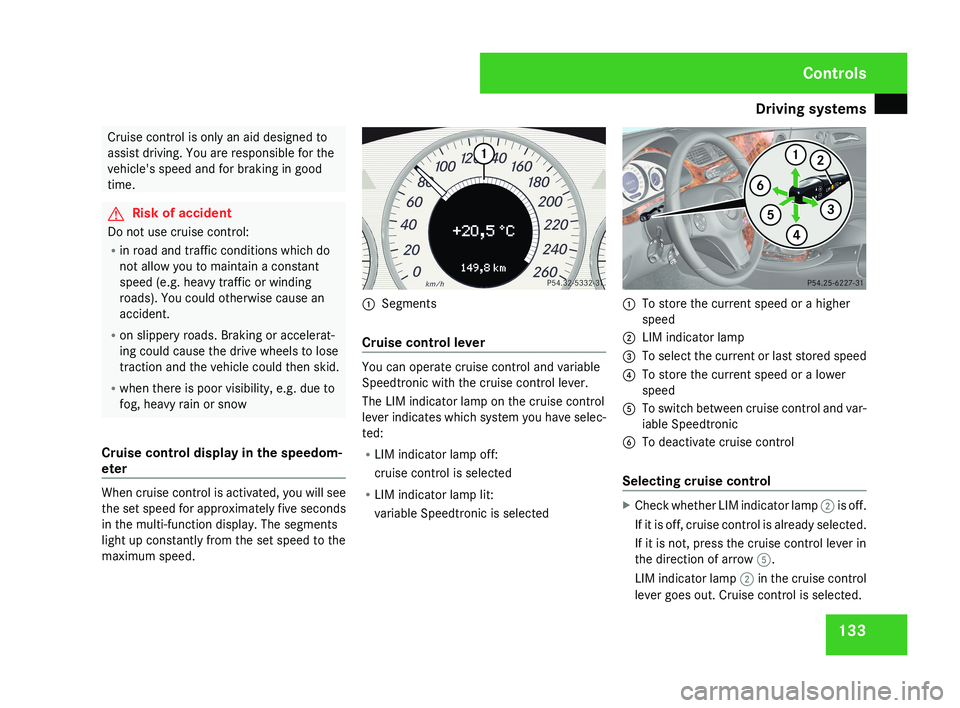
Cruise control display in the speedom-
eter When cruise control is activated, you will see
the set speed for approximately five seconds
in the multi-function display. The segments
light up constantly from the set speed to the
maximum speed. 1
Segments
Cruise control lever You can operate cruise control and variable
Speedtronic with the cruise control lever.
The LIM indicator lamp on the cruise control
lever indicates which system you have selec-
ted:
R
LIM indicator lamp off:
cruise control is selected
R LIM indicator lamp lit:
variable Speedtronic is selected 1
To store the current speed or a higher
speed
2 LIM indicator lamp
3 To select the current or last stored speed
4 To store the current speed or a lower
speed
5 To switch between cruise control and var-
iable Speedtronic
6 To deactivate cruise control
Selecting cruise control X
Check whether LIM indicator lamp 2 is off.
If it is off, cruise control is already selected.
If it is not, press the cruise control lever in
the direction of arrow 5.
LIM indicator lamp 2 in the cruise control
lever goes out. Cruise control is selected. Controls
219_AKB; 2; 4, en-GB
mkalafa,
2007-11-13T09:28:36+01:00 - Seite 133