2008 INFINITI FX35 engine control system
[x] Cancel search: engine control systemPage 817 of 3924

INTELLIGENT KEY SYSTEMBL-83
< SERVICE INFORMATION >
C
DE
F
G H
J
K L
M A
B
BL
N
O P
Intelligent Key remote controller button and door reques t switch operations change the engine startup function
settings (startup enabled/disabled) for each Intelligent Key independently.
Settings Change Procedure1. With the ignition switch is in the LOCK positi on (ignition knob not pressed), hold down both the LOCK and
UNLOCK remote control buttons on the Intelligent Key at the same time for at least 10 seconds (The yard-
stick is that the Intelligent Key LED flashes 20 times.)
2. Within 5 seconds of releasing the Intelligent Key remote controller buttons, press the driver door request
switch.
3. The KEY warning lamp in combination meter lights up for 3 seconds (engine starting enabled → starting
disabled: lights up red, engine starting disabled → flashes green). This completes the settings change.
Changing Settings Using CONSULT-III
The settings for the Intelligent Key system func tions can be changed using CONSULT-III (WORK SUPPORT).
Refer to BL-104, "
CONSULT-III Application Item".
NOTE:
Once a function setting is changed, it will remain effective even if the battery is disconnected.
Changing Settings Using Display Unit
The settings of the Intelligent Key system can be changed, using CONSULT-III, display unit, Intelligent Key
and door request switch in the cent er of the instrument panel.
NOTE:
Once a function setting is changed, it will remain effective even if the battery is disconnected.
INTELLIGENT KEY REGISTRATION
Intelligent Key-ID registration is executed using the CONSULT-III. Up to 4 can be registered.
CAUTION:
After a new Intelligent Key-ID is regi stered, be sure to check the function.
When registering an additional Intelligent Key-ID , take any Intelligent Keys already registered and
Intelligent Keys for any other vehicles out of the vehicle before starting.
CONSULT-III can be used to check and delete Intelligent Key-IDs.
For future information, see the CO NSULT-III Operation Manual NATS.
STEERING LOCK UNIT REGISTRATION
Steering Lock Unit ID Registration
CAUTION:
The method for registering a steering lock unit ID depends on the status of the steering lock unit and
Intelligent Key unit (new or old unit).
After registration is completed, press ignition knob with a portable unit in the vehicle so that it can
be rotated, and confirm that it cannot be rotated even when ignition switch is pressed without a por-
table unit in the vehicle.
For further information, see the CONS ULT-III Operation Manual NATS.
CAN Communication System DescriptionINFOID:0000000001327838
CAN (Controller Area Network) is a serial communication li ne for real time application. It is an on-vehicle mul-
tiplex communication line with high data communication speed and excellent error detection ability. Many elec-
tronic control units are equipped onto a vehicle, and each control unit shares information and links with other
control units during operation (not independent). In CAN communication, control units are connected with 2
communication lines (CAN H line, CAN L line) allowing a high rate of information transmission with less wiring.
Each control unit transmits/receives data but selectively reads required data only.
Setting item Description
Intelligent Key Lock Response-Sound The sound pattern of the Intelligent Key operation can be set as desired. (Setting value:
OFF, Beeper or Horn chirp)
Intelligent Key Unlock Response-Beep
Sound The beep sound when unlocking door with the Intelligent Key operation can be turned ON
or OFF.
Intelligent Key Engine Start Function This function can be performed to ON or OFF.
Intelligent Key Lock/Unlock Function The door handle request switch lock/unlock operation with the Intelligent Key can be can-
celed or activated.
Return All Settings to Default The all settings made by VEHICLE ELECTRONICS will return to default.
3AA93ABC3ACD3AC03ACA3AC03AC63AC53A913A773A893A873A873A8E3A773A983AC73AC93AC03AC3
3A893A873A873A8F3A773A9D3AAF3A8A3A8C3A863A9D3AAF3A8B3A8C
Page 840 of 3924

BL-106
< SERVICE INFORMATION >
INTELLIGENT KEY SYSTEM
Trouble Diagnosis Symptom Chart
INFOID:0000000001327851
ALL FUNCTIONS OF THE INTELLIGENT KEY ARE NOT OPERATING
Selective door unlock function using Intelli-
gent Key remote controller button operation ××× ×××
Door lock/unlock operation using mechani-
cal key ×
Ignition knob rotation permission using In-
telligent Key ××× × × × × ×
Ignition knob rotation permission using me-
chanical key ×× × × ×× ×
Engine start using Intelligent Key × × × ××× ×××
Engine start using mechanical key ×× ×× ×××
Key reminder door lock operation ××××××××
Selector lever reminder operation ×× ××× ×
Ignition switch return forgotten warning ××× × × × ×
Ignition key warning (when using mechani-
cal key) ××××
Ignition switch OFF position warning (for in-
side car: when door closed) ×××× × × ×
Ignition switch OFF position warning (for
outside car: when door opened/closed) ×××× × ×× × ××
Warning for removal of Intelligent Key to
outside the car (when door open/closed) ××× × × ×× × × ×
Warning for removal of Intelligent Key to
outside the car (from window) ××× × × × × ×
Door lock non-operation warning × ××× ××× × ×
Intelligent key low battery warning ×× ×××
Will not operate if there is a malfunction in
the area where there is a ×.
Intelligent Key
Key switch
Ignition knob switch ACC switch
Ignition switch
Door unlock sensor
Door switch
Door request switch
Inside key antenna
Out side key antenna
Intelligent Key warning buzzer Intelligent Key unit
CAN communication system
BCM
Combination meter
Steering lock unitSto p l am p s w it ch Detention switch
Passenger side select unlock relay
Symptom Diagnoses service procedure Refer to page
“KEY” and “P shift” warning lamps in combination
meter do not light up at all. 1.
Check Intelligent Key unit power supply and ground cir-
cuit B L - 111
2. Check CAN co
mmunication BCS-13
3. Replace Intelligent Key unit BL-130
3AA93ABC3ACD3AC03ACA3AC03AC63AC53A913A773A893A873A873A8E3A773A983AC73AC93AC03AC3
3A893A873A873A8F3A773A9D3AAF3A8A3A8C3A863A9D3AAF3A8B3A8C
Page 841 of 3924
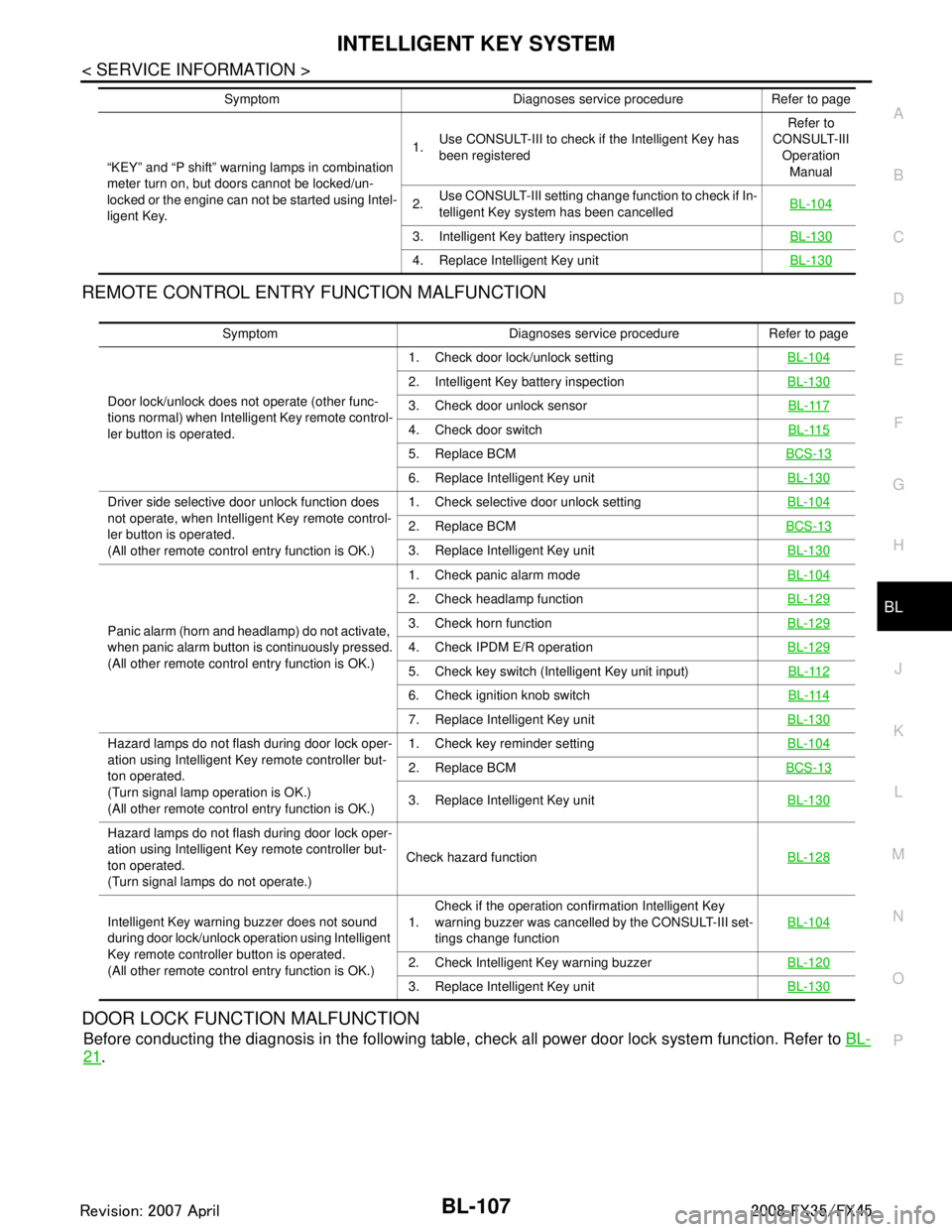
INTELLIGENT KEY SYSTEMBL-107
< SERVICE INFORMATION >
C
DE
F
G H
J
K L
M A
B
BL
N
O P
REMOTE CONTROL ENTRY FUNCTION MALFUNCTION
DOOR LOCK FUNCTION MALFUNCTION
Before conducting the diagnosis in the following table, check all power door lock system function. Refer to BL-
21.
“KEY” and “P shift” warning lamps in combination
meter turn on, but doors cannot be locked/un-
locked or the engine can not be started using Intel-
ligent Key. 1.
Use CONSULT-III to check if the Intelligent Key has
been registered Refer to
CONSULT-III
Operation Manual
2. Use CONSULT-III setting change function to check if In-
telligent Key system has been cancelled BL-104
3. Intelligent Key battery inspection
BL-130
4. Replace Intelligent Key unitBL-130
Symptom Diagnoses service procedure Refer to page
Symptom Diagnoses service procedure Refer to page
Door lock/unlock does not operate (other func-
tions normal) when Intelligent Key remote control-
ler button is operated. 1. Check door lock/unlock setting
BL-104
2. Intelligent Key battery inspectionBL-130
3. Check door unlock sensor BL-117
4. Check door switchBL-115
5. Replace BCMBCS-13
6. Replace Intelligent Key unit BL-130
Driver side selective door unlock function does
not operate, when Intelligent Key remote control-
ler button is operated.
(All other remote control entry function is OK.) 1. Check selective door unlock setting
BL-104
2. Replace BCMBCS-13
3. Replace Intelligent Key unit BL-130
Panic alarm (horn and headlamp) do not activate,
when panic alarm button is continuously pressed.
(All other remote control entry function is OK.) 1. Check panic alarm mode
BL-104
2. Check headlamp functionBL-129
3. Check horn functionBL-129
4. Check IPDM E/R operationBL-129
5. Check key switch (Intelligent Key unit input) BL-112
6. Check ignition knob switchBL-114
7. Replace Intelligent Key unitBL-130
Hazard lamps do not flash during door lock oper-
ation using Intelligent Key remote controller but-
ton operated.
(Turn signal lamp operation is OK.)
(All other remote control entry function is OK.) 1. Check key reminder setting
BL-104
2. Replace BCMBCS-13
3. Replace Intelligent Key unit BL-130
Hazard lamps do not flash during door lock oper-
ation using Intelligent Key remote controller but-
ton operated.
(Turn signal lamps do not operate.)Check hazard function
BL-128
Intelligent Key warning buzzer does not sound
during door lock/unlock operation using Intelligent
Key remote controller button is operated.
(All other remote control entry function is OK.) 1.
Check if the operation confirmation Intelligent Key
warning buzzer was cancelled by the CONSULT-III set-
tings change function
BL-104
2. Check Intelligent Key warning buzzer
BL-120
3. Replace Intelligent Key unitBL-130
3AA93ABC3ACD3AC03ACA3AC03AC63AC53A913A773A893A873A873A8E3A773A983AC73AC93AC03AC3
3A893A873A873A8F3A773A9D3AAF3A8A3A8C3A863A9D3AAF3A8B3A8C
Page 842 of 3924

BL-108
< SERVICE INFORMATION >
INTELLIGENT KEY SYSTEM
ENGINE START FUNCTION MALFUNCTION
Intelligent Key Operation Inspection
Symptom Diagnoses service procedure Refer to page
Door lock/unlock does not operate when door
request switch operation is used (power door
lock system is normal). 1. Check door lock/unlock setting
BL-104
2. Check outside key antennaBL-121
3. Intelligent Key battery inspectionBL-130
4. Replace Intelligent Key unitBL-130
Door lock/unlock do not operate using door re-
quest switch operated (power door lock system
is normal).1. Check door switch
BL-1152. Check key switch (Intelligent Key unit input)BL-112
3. Check ignition knob switchBL-114
4. Replace Intelligent Key unitBL-130
Driver side selective door unlock function does
not operate, when door request switch is operat-
ed.
(All other door lock function is OK.)1. Check selective door unlock setting
BL-104
2. Replace BCMBCS-13
Passenger side selective door unlock function
does not operate, when door request switch is
operated.
(All other door lock function is OK.)1. Check selective door unlock setting
BL-104
2. Check passenger side select unlock relayBL-128
3. Replace Intelligent Key unitBL-130
Hazard lamps do not flash during door lock op-
eration using door request switch operated.
(Turn signal lamp operation is normal.)
(All other door lock function is OK.)1. Check key reminder setting
BL-104
2. Replace BCMBCS-13
3. Replace Intelligent Key unit BL-130
Hazard lamps do not flash during door lock op-
eration using door request switch operated.
(Turn signal lamps do not operate.)Check hazard function
BL-128
Intelligent Key warning buzzer does not sound
during door lock/unlock operation using Intelli-
gent Key (regardless of whether Intelligent Key
remote controller button or request switch oper-
ation is used). 1. Check if the operation confirmation Intelligent Key
warning buzzer was cancelled by the CONSULT-III
settings change function BL-104
2. Check Intelligent Key warning buzzer
BL-120
3. Replace Intelligent Key unitBL-130
Door lock/unlock operation confirmation Intelli-
gent Key warning buzzer sounds, but door lock
actuator does not operate. (And hazard lamps
do not flash.)1. Check CAN communication
BCS-13
2. Replace Intelligent Key unit BL-130
3AA93ABC3ACD3AC03ACA3AC03AC63AC53A913A773A893A873A873A8E3A773A983AC73AC93AC03AC3
3A893A873A873A8F3A773A9D3AAF3A8A3A8C3A863A9D3AAF3A8B3A8C
Page 920 of 3924

BL-186
< SERVICE INFORMATION >
IVIS (INFINITI VEHICLE IMMOBILIZER SYSTEM-NATS)
In the vehicle with Intelligent Key system, security indicator always flashes with mechanical key removed
condition (key switch OFF) and ignition knob rel eased condition on LOCK position (ignition knob switch
OFF).
Therefore, IVIS (NATS) warns outsiders that t he vehicle is equipped with the anti-theft system.
If system detects malfunction, it turns on secu rity indicator in ignition switch ON position.
If the owner requires, mechanical key ID can be registered for up to 5 keys.
During trouble diagnosis or when the following parts have been replaced, and if ignition key or mechanical
key is added, registration* is required.
*: All keys kept by the owner of the vehicle s hould be registered with ignition key or mechanical key.
-ECM
-BCM
- Ignition key (models without Intelligent Key system)
- Mechanical key (models with Intelligent Key system)
IVIS (NATS) trouble diagnoses, system initialization and addi tional registration of other IVIS (NATS) ignition
key or mechanical key IDs must be carried out usi ng CONSULT-III hardware and CONSULT-III IVIS (NATS)
software. When IVIS (NATS) initialization has been comple ted, the ID of the inserted ignition key or mechan-
ical key or mechanical key IDs can be carried out.
Regarding the procedures of IVIS (NATS) initializati on and ignition key or mechanical key ID registration,
refer to CONSULT-III operat ion manual, NATS-IVIS/NVIS.
SECURITY INDICATOR
Warns that the vehicle has IVIS (NATS).
In the vehicle without Intelligent Key system, security indicator always flashes with other than ignition switch
ON or START position. In the vehicle with Intelligent Key system, security indicator always flashes with
mechanical key removed condition (key switch OFF) and ignition knob released condition on LOCK position
(ignition knob switch OFF).
NOTE:
Because security indicator is highly efficient, the battery is barely affected.
Condition of Security Indicator
WITHOUT INTELLIGENT KEY SYSTEM
WITH INTELLIGENT KEY SYSTEM
In ignition knob operation with Intelligent Key, it always turns on with pushing ignition knob, and always flashes with ignition knob released (ignition knob swit ch OFF) condition on ignition knob “LOCK” position.
In ignition knob operation with mechanical key, it turns off on the condition that mechanical key is inserted in
key cylinder, and always flashes with ignition knob released (ignition knob switch OFF) condition on
mechanical key removed condition.
System CompositionINFOID:0000000001327924
The immobilizer function of the IVIS (NATS) consists of the following:
Ignition key (models without Intelligent Key system)
Mechanical key (models with Intelligent Key system)
NATS antenna amp.
Steering lock unit. (models with Intelligent Key system)
BCM
Intelligent Key unit (models with Intelligent Key system)
Engine control module (ECM)
Security indicator
NOTE:
Security indicator
condition Ignition key
Operation or condition of ignition key
Ignition switch: ON position Ignition switch:
ACC position Ignition switch:
OFF position
(Key is inserted.) Ignition switch:
OFF position (Re- move key.)
Register key OFF Flashing Flashing Flashing
Ignition key not
registered ON Flashing Flashing Flashing
3AA93ABC3ACD3AC03ACA3AC03AC63AC53A913A773A893A873A873A8E3A773A983AC73AC93AC03AC3
3A893A873A873A8F3A773A9D3AAF3A8A3A8C3A863A9D3AAF3A8B3A8C
Page 921 of 3924

IVIS (INFINITI VEHICLE IMMOBILIZER SYSTEM-NATS)
BL-187
< SERVICE INFORMATION >
C
D E
F
G H
J
K L
M A
B
BL
N
O P
The communication between ECM, BCM and/or Intelligent K ey unit uses the CAN communication sys-
tem.
ECM Re-Communicating FunctionINFOID:0000000001327925
Performing following procedure can automatically per form re-communication of ECM and BCM or Intelligent
Key unit, but only when the ECM has been replaced with a new one (*1).
*1: New one means a virgin ECM which has never been energized on-board.
(In this step, initialization procedur e by CONSULT-III is not necessary)
NOTE:
When registering new Key IDs or replacing the ECM other than brand new, refer to CONSULT-III
Operation Manual NATS-IVIS/NVIS.
If multiple keys are attached to the key holder, separate them before work.
Distinguish keys with unregistered key ID from those with registered ID.
1. Install ECM.
2. Using a registered key (*2), turn ignition switch to “ON”. *2: To perform this step, use the key that has been used before performing ECM replacement.
3. Maintain ignition switch in “ON” position for at least 5 seconds.
4. Turn ignition switch to “OFF”.
5. Start engine. If engine can be started, procedure is completed.
If engine cannot be started, refer to CONSULT-III O peration Manual NATS-IVIS/NVIS and initialize control
unit.
PIIA6948E
3AA93ABC3ACD3AC03ACA3AC03AC63AC53A913A773A893A873A873A8E3A773A983AC73AC93AC03AC3
3A893A873A873A8F3A773A9D3AAF3A8A3A8C3A863A9D3AAF3A8B3A8C
Page 1016 of 3924

BRC-1
BRAKES
C
DE
G H
I
J
K L
M
SECTION BRC
A
B
BRC
N
O P
CONTENTS
BRAKE CONTROL SYSTEM
VDC/TCS/ABS
SERVICE INFORMATION .. ..........................
3
DTC INDEX ..................................................... .....3
C1101-C1116 ...................................................... ......3
C1120-C1136 ............................................................3
C1140-C1170 ............................................................3
U1000 ........................................................................4
PRECAUTIONS ...................................................5
Precaution for Supplemental Restraint System
(SRS) "AIR BAG" and "SEAT BELT PRE-TEN-
SIONER" ............................................................. ......
5
Precaution for Brake System ....................................5
Precaution for Brake Control .....................................5
PREPARATION ...................................................7
Special Service Tool ........................................... ......7
Commercial Service Tool ..........................................7
ON-VEHICLE SERVICE ......................................8
Adjustment of Steering Angle Sensor Neutral Po-
sition .................................................................... ......
8
Calibration of Decel G Sensor (AWD Models) ..........8
SYSTEM DESCRIPTION ................................ ....10
Schematic ........................................................... ....10
Functions .................................................................10
Fail-Safe Function ...................................................11
Hydraulic Circuit Diagram .......................................12
CAN Communication ...............................................12
TROUBLE DIAGNOSIS .....................................13
Fail-Safe Function ............................................... ....13
How to Proceed with Diagnosis ..............................13
Component Part Location .......................................16
Schematic ...............................................................17
Wiring Diagram - VDC - ..........................................18
Control Unit Input/Output Signal Standard ..............23
CONSULT-III Functions (ABS) ................................26
Self-Diagnosis ..................................................... ....26
Data Monitor ........................................................ ....28
Active Test ...............................................................30
For Fast and Accurate Diagnosis ............................31
Basic Inspection ......................................................32
TROUBLE DIAGNOSIS FOR SYSTEM ............34
DTC C1101 RR RH SENSOR-1 ..............................34
DTC C1102 RR LH SENSOR-1 ..............................35
DTC C1103 FR RH SENSOR-1 ..............................35
DTC C1104 FR LH SENSOR-1 ...............................35
DTC C1105 RR RH SENSOR-2 ..............................36
DTC C1106 RR LH SENSOR-2 ..............................36
DTC C1107 FR RH SENSOR-2 ..............................36
DTC C1108 FR LH SENSOR-2 ...............................36
DTC C1109 BATTERY VOLTAGE [ABNORMAL] ....36
DTC C1110 CONTROLLER FAILURE ....................37
DTC C1111 PUMP MOTOR ....................................37
DTC C1113 G-SENSOR .........................................38
DTC C1115 ABS SENSOR [ABNORMAL SIG-
NAL] .........................................................................
39
DTC C1116 STOP LAMP SW .................................39
DTC C1120 FR LH IN ABS SOL .............................40
DTC C1121 FR LH OUT ABS SOL .........................41
DTC C1122 FR RH IN ABS SOL ......................... ....41
DTC C1123 FR RH OUT ABS SOL .........................42
DTC C1124 RR LH IN ABS SOL .............................42
DTC C1125 RR LH OUT ABS SOL ..................... ....42
DTC C1126 RR RH IN ABS SOL ............................42
DTC C1127 RR RH OUT ABS SOL ........................42
DTC C1130 ENGINE SIGNAL 1 .......................... ....42
DTC C1131 ENGINE SIGNAL 2 ..............................42
DTC C1132 ENGINE SIGNAL 3 ..............................42
DTC C1133 ENGINE SIGNAL 4 ..............................42
DTC C1136 ENGINE SIGNAL 6 ..............................42
DTC C1140 ACTUATOR RLY .................................43
DTC C1142 PRESS SEN CIRCUIT ........................43
DTC C1143 ST ANG SEN CIRCUIT ................... ....44
DTC C1144 ST ANG SEN SIGNAL .........................45
DTC C1145 YAW RATE SENSOR ..........................46
DTC C1146 SIDE G-SEN CIRCUIT ........................46
DTC C1155 BR FLUID LEVEL LOW .......................46
3AA93ABC3ACD3AC03ACA3AC03AC63AC53A913A773A893A873A873A8E3A773A983AC73AC93AC03AC3
3A893A873A873A8F3A773A9D3AAF3A8A3A8C3A863A9D3AAF3A8B3A8C
Page 1020 of 3924
![INFINITI FX35 2008 Service Manual
PRECAUTIONSBRC-5
< SERVICE INFORMATION > [VDC/TCS/ABS]
C
D
E
G H
I
J
K L
M A
B
BRC
N
O P
PRECAUTIONS
Precaution for Supplemental Restraint System (SRS) "AIR BAG" and "SEAT BELT
PRE-TENSIONER"
INFOI](/manual-img/42/57017/w960_57017-1019.png "INFINITI FX35 2008 Service Manual
PRECAUTIONSBRC-5
< SERVICE INFORMATION > [VDC/TCS/ABS]
C
D
E
G H
I
J
K L
M A
B
BRC
N
O P
PRECAUTIONS
Precaution for Supplemental Restraint System (SRS) \"AIR BAG\" and \"SEAT BELT
PRE-TENSIONER\"
INFOI")
PRECAUTIONSBRC-5
< SERVICE INFORMATION > [VDC/TCS/ABS]
C
D
E
G H
I
J
K L
M A
B
BRC
N
O P
PRECAUTIONS
Precaution for Supplemental Restraint System (SRS) "AIR BAG" and "SEAT BELT
PRE-TENSIONER"
INFOID:0000000001612923
The Supplemental Restraint System such as “A IR BAG” and “SEAT BELT PRE-TENSIONER”, used along
with a front seat belt, helps to reduce the risk or severi ty of injury to the driver and front passenger for certain
types of collision. This system includes seat belt switch inputs and dual stage front air bag modules. The SRS
system uses the seat belt switches to determine the front air bag deployment, and may only deploy one front
air bag, depending on the severity of a collision and whether the front occupants are belted or unbelted.
Information necessary to service the system safely is included in the “SUPPLEMENTAL RESTRAINT SYS-
TEM” and “SEAT BELTS” of this Service Manual.
WARNING:
• To avoid rendering the SRS inoper ative, which could increase the risk of personal injury or death in
the event of a collision which would result in air bag inflation, all maintenance must be performed by
an authorized NISSAN/INFINITI dealer.
Improper maintenance, including in correct removal and installation of the SRS, can lead to personal
injury caused by unintentional act ivation of the system. For removal of Spiral Cable and Air Bag
Module, see the “SUPPLEMEN TAL RESTRAINT SYSTEM”.
Do not use electrical test equipm ent on any circuit related to the SRS unless instructed to in this
Service Manual. SRS wiring harnesses can be identi fied by yellow and/or orange harnesses or har-
ness connectors.
Precaution for Brake SystemINFOID:0000000001327654
Recommended fluid is brake fluid “DOT 3”. Refer to MA-9.
Do not reuse drained brake fluid.
Be careful not to splash brake fluid on painted areas such as body. If brake fluid is splashed, wipe it off and flush area with water immediately.
Do not use mineral oils such as gasoline or kerosene to clean. They will ruin rubber parts and cause improper operation.
Using a flare nut crowfoot and torque wrench, securely tighten brake tube flare nuts.
Brake system is an important safe ty part. If a brake fluid leak is
detected, always disassemble the affected part. If a malfunction is
detected, replace part with a new one.
Before working, turn ignition switch OFF and disconnect electrical
connectors of ABS actuator and elec tric unit (control unit) or bat-
tery negative terminal.
When installing brake piping, be sure to check torque.
WARNING:
Clean brake pads and shoes with a waste cloth, then wipe with
a dust collector.
Precaution for Brake ControlINFOID:0000000001327655
During VDC/TCS/ABS operation, brake pedal lightly vi brates and a mechanical noise may be heard. This is
normal.
Just after starting vehicle after turning ignition switch ON, brake pedal may vibrate or motor operating noise
may be heard from engine room. This is a normal status of operation check.
Stopping distance may be longer than that of vehicles without ABS when vehicle drives on rough, gravel, or
snow-covered (fresh, deep snow) roads.
When an error is indicated by ABS or another warning lamp, collect all necessary information from customer
(what symptoms are present under what conditions) and check for simple causes before starting diagnostic
servicing. Besides electrical system inspection, c heck booster operation, brake fluid level, and fluid leaks.
If tire size and type are used in an improper combinat ion, or brake pads are not Genuine NISSAN parts,
stopping distance or steering stability may deteriorate.
If there is a radio, antenna, or antenna lead-in wire (including wiring) near control module, VDC/TCS/ABS
function may have a malfunction or error.
If aftermarket parts (car stereo, CD player, etc.) have been installed, check for incidents such as harness
pinches, open circuits, and improper wiring.
SBR686C
3AA93ABC3ACD3AC03ACA3AC03AC63AC53A913A773A893A873A873A8E3A773A983AC73AC93AC03AC3
3A893A873A873A8F3A773A9D3AAF3A8A3A8C3A863A9D3AAF3A8B3A8C