2008 INFINITI FX35 mount
[x] Cancel search: mountPage 1009 of 3924
REAR DISC BRAKEBR-25
< SERVICE INFORMATION >
C
DE
G H
I
J
K L
M A
B
BR
N
O P
WARNING:
Clean dust on caliper and brake pad with a vacuum du st collector to minimize the hazard of airborne
particles or other materials.
CAUTION:
While removing cylinder body, never depr ess brake pedal because piston will pop out.
It is not necessary to remove bolts on torq ue member and brake hose except for disassembly or
replacement of caliper assembly. In this case, hang cylinder body with a wire so as not to stretch
brake hose.
Do not damage piston boot.
If any shim is subject to serious corrosion, replace it with a new one.
Always replace shims and shim covers as a set when replacing brake pads.
Keep rotor clean, from brake fluid.
Burnish brake contact surface after refinishing or replacing rotors, after replacing pads, or if a soft
pedal occurs at very low mileage. Refer to BR-29, "
Brake Burnishing Procedure".
Removal and Installation of Brake PadINFOID:0000000001327635
REMOVAL
1. Remove tires from vehicle with power tool.
2. Remove sliding pin bolt (one on top).
3. Suspend cylinder body with a wire, and remove pads, pad retainers, shim from torque member.
INSTALLATION
1. Apply PBC (Poly Butyl Cuprysil) grease or silic one-based grease to the backside of pad and to both sides
of shim, and install inner shim and shim cover to inner pad, and install the outer shim to outer pad.
2. Install pad retainer and mount pad assemblies to torque member.
3. Push piston in so that pad is firmly installed and mount cylinder body to torque member. CAUTION:
When replacing pads with new ones, press in piston until pads can be installed. In this case, care-
fully monitor brake fluid level in reservoir tank because brake fluid will return to master cylinder
reservoir tank.
4. Install sliding pin bolt (one on top) and tighten to the specified torque. Refer to BR-24, "
Component".
5. Check brake for drag.
6. Install tires to the vehicle.
Removal and Installation of Brake Caliper AssemblyINFOID:0000000001327636
REMOVAL
1. Remove tires from vehicle with power tool.
2. Fasten disc rotor using wheel nut.
3. Drain brake fluid. Refer to BR-8, "
Drain and Refill".
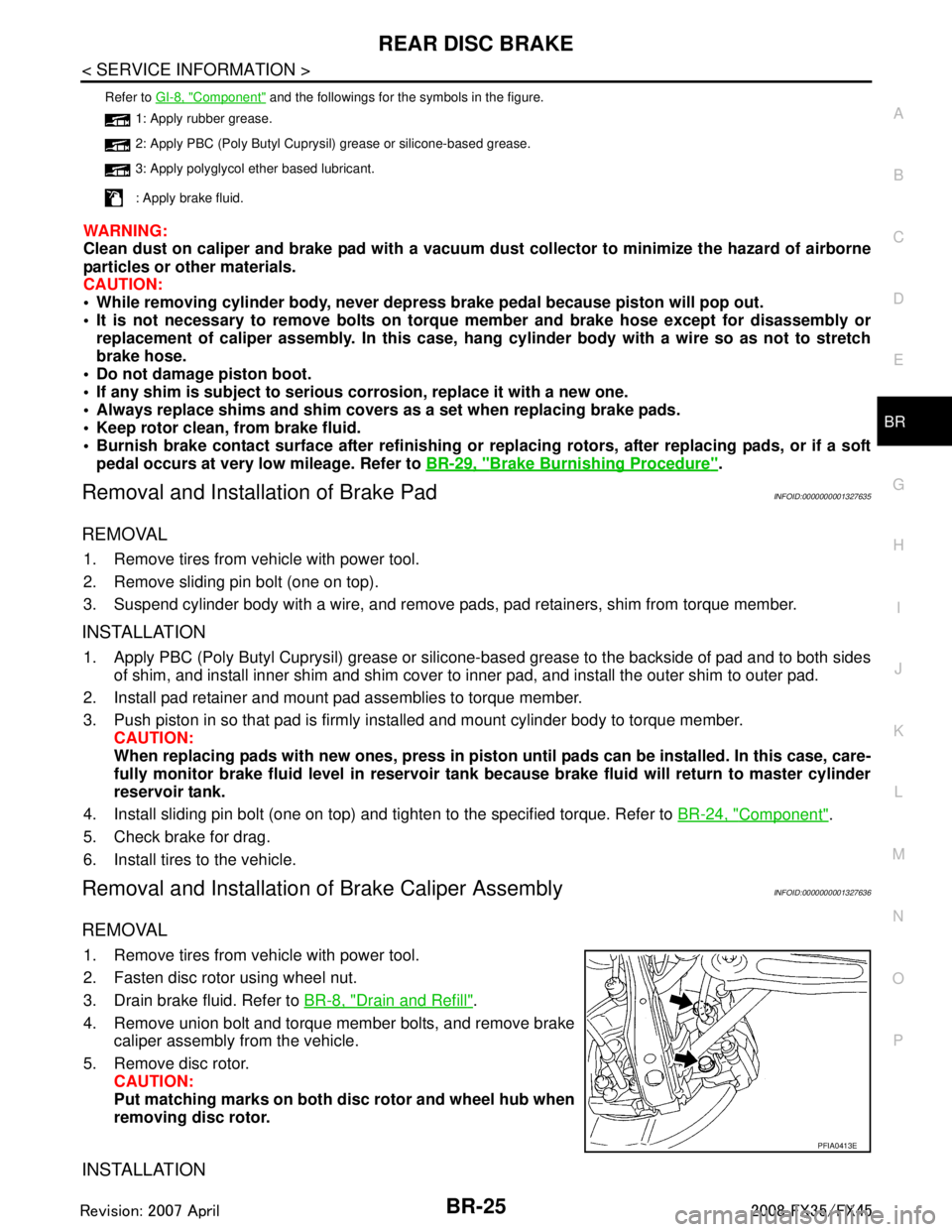
4. Remove union bolt and torque member bolts, and remove brake caliper assembly from the vehicle.
5. Remove disc rotor. CAUTION:
Put matching marks on both disc rotor and wheel hub when
removing disc rotor.
INSTALLATION
Refer to GI-8, "Component" and the followings for the symbols in the figure.
1: Apply rubber grease.
2: Apply PBC (Poly Butyl Cuprysil) grease or silicone-based grease.
3: Apply polyglycol ether based lubricant.
: Apply brake fluid.
PFIA0413E
3AA93ABC3ACD3AC03ACA3AC03AC63AC53A913A773A893A873A873A8E3A773A983AC73AC93AC03AC3
3A893A873A873A8F3A773A9D3AAF3A8A3A8C3A863A9D3AAF3A8B3A8C
Page 1010 of 3924
BR-26
< SERVICE INFORMATION >
REAR DISC BRAKE
CAUTION:
Refill with new brake fluid “DOT 3”.
Do not reuse drained brake fluid.
1. Install disc rotor.CAUTION:
Align the matching marks of disc rotor and wheel hub, which were marked at the time of removal
when reusing disc rotor.
2. Install caliper assembly to the vehicle, and tighten bolts to the specified torque. Refer to BR-24, "
Compo-
nent".
CAUTION:
Before installing caliper assembly to the vehicle , wipe off oil and grease on washer seats on axle
assembly and mounting surface of caliper assembly.
3. Install brake hose to caliper assembly and tighten union bolt to the specified torque. Refer to BR-24,
"Component".
CAUTION:
Do not reuse copper washer for union bolts.
Securely install brake hose to protrusion on caliper assembly.
4. After installing caliper assembly, refill with new brake fluid and bleed air. Refer to BR-8, "
Bleeding Brake
System".
5. Install tires to the vehicle.
Disassembly and Assembly of Brake Caliper AssemblyINFOID:0000000001327637
NOTE:
Do not remove torque member, brake pads, shims, shim cover and pad retainers, when disassembling or
assembling cylinder body.
DISASSEMBLY
1. Remove sliding pin bolts, and then remove brake pads, shims, shim cover, and pad retainer from torque
member and cylinder.
CAUTION:
Do not drop brake pads, shims, shim cover and pad retainer from torque member.
2. Remove sliding pin boot from torque member.
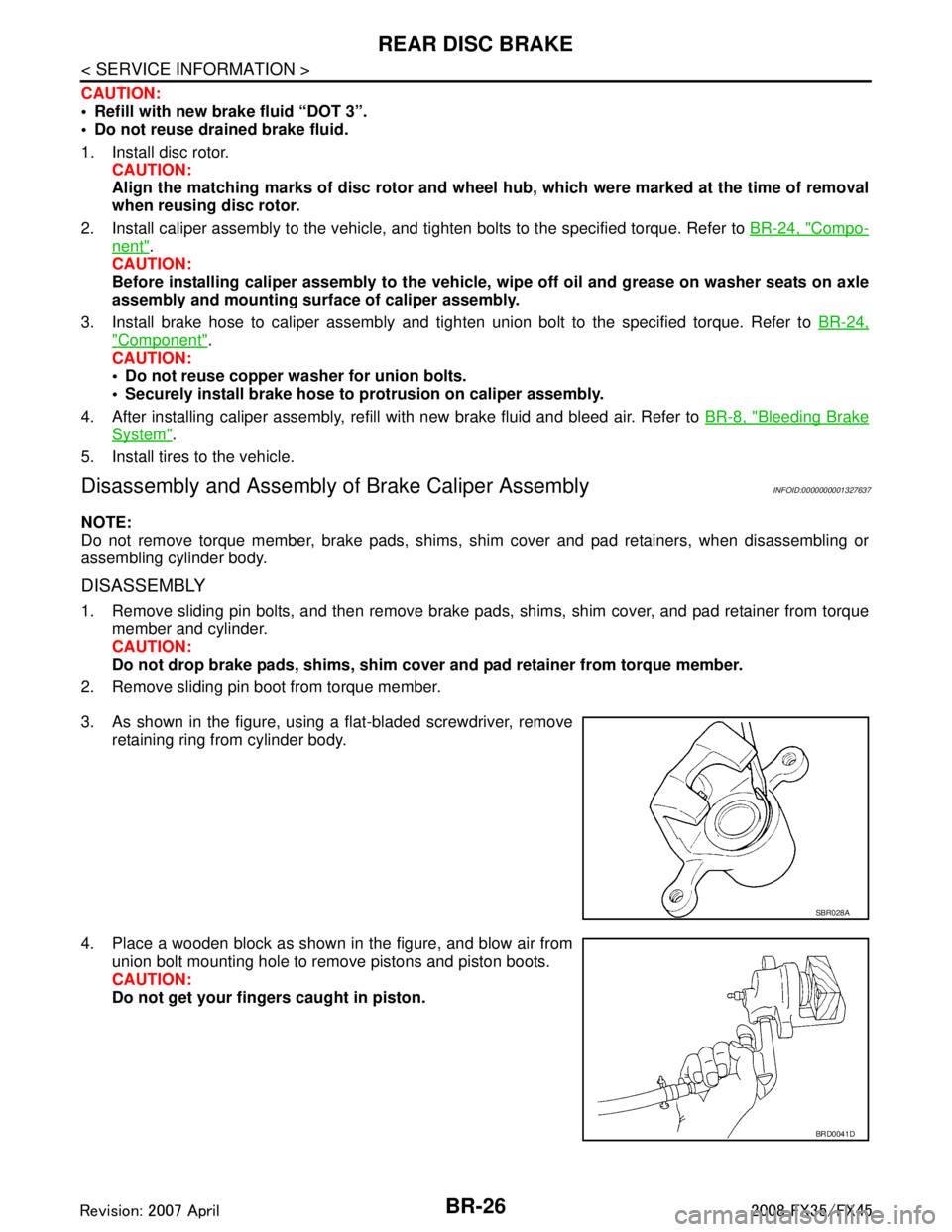
3. As shown in the figure, using a flat-bladed screwdriver, remove retaining ring from cylinder body.
4. Place a wooden block as shown in the figure, and blow air from union bolt mounting hole to remove pistons and piston boots.
CAUTION:
Do not get your fingers caught in piston.
SBR028A
BRD0041D
3AA93ABC3ACD3AC03ACA3AC03AC63AC53A913A773A893A873A873A8E3A773A983AC73AC93AC03AC3
3A893A873A873A8F3A773A9D3AAF3A8A3A8C3A863A9D3AAF3A8B3A8C
Page 1012 of 3924
BR-28
< SERVICE INFORMATION >
REAR DISC BRAKE
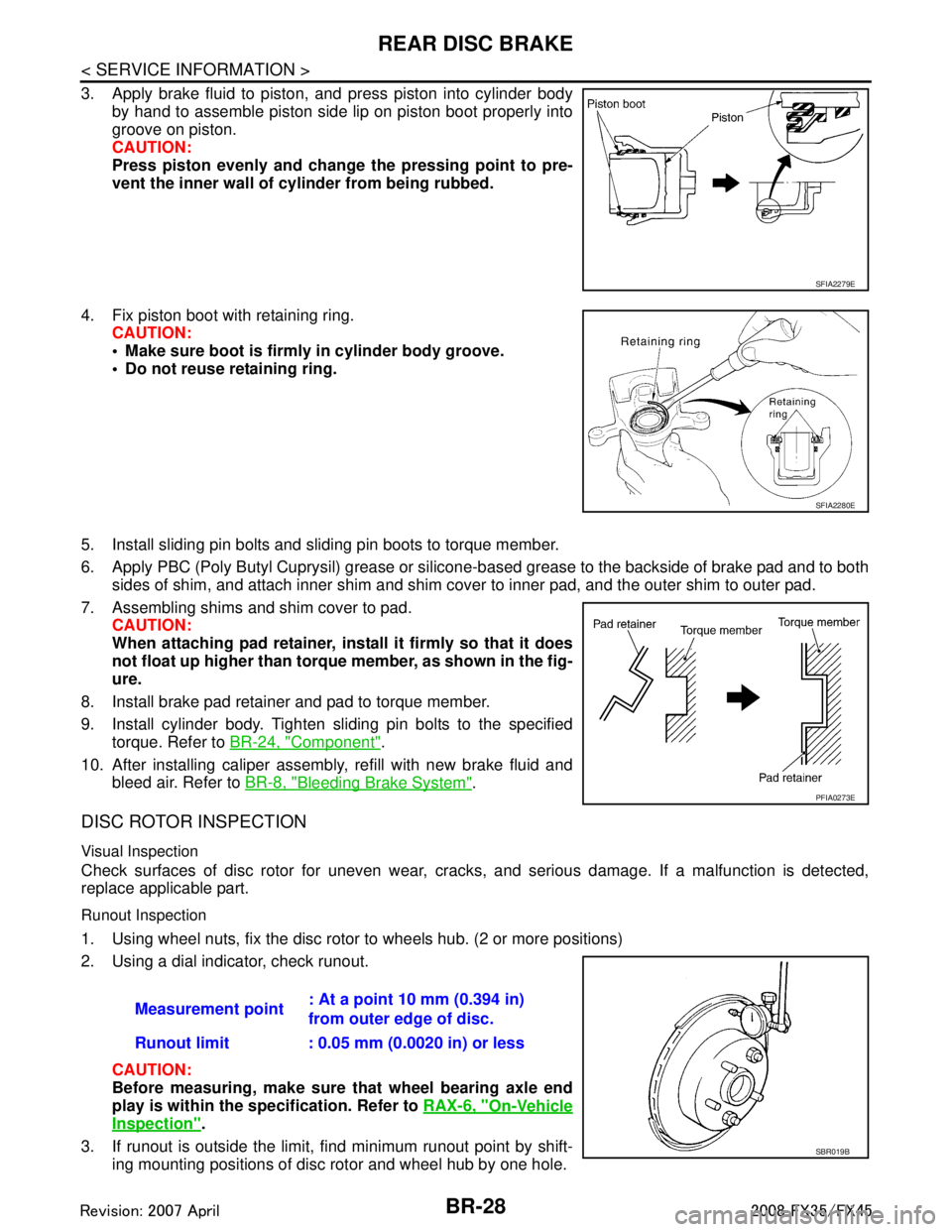
3. Apply brake fluid to piston, and press piston into cylinder bodyby hand to assemble piston side lip on piston boot properly into
groove on piston.
CAUTION:
Press piston evenly and change the pressing point to pre-
vent the inner wall of cylinder from being rubbed.
4. Fix piston boot with retaining ring. CAUTION:
Make sure boot is firmly in cylinder body groove.
Do not reuse retaining ring.
5. Install sliding pin bolts and sliding pin boots to torque member.
6. Apply PBC (Poly Butyl Cuprysil) grease or silicone- based grease to the backside of brake pad and to both
sides of shim, and attach inner shim and shim cover to inner pad, and the outer shim to outer pad.
7. Assembling shims and shim cover to pad. CAUTION:
When attaching pad retainer, inst all it firmly so that it does
not float up higher than torque member, as shown in the fig-
ure.
8. Install brake pad retainer and pad to torque member.
9. Install cylinder body. Tighten sliding pin bolts to the specified torque. Refer to BR-24, "
Component".
10. After installing caliper assembly, refill with new brake fluid and bleed air. Refer to BR-8, "
Bleeding Brake System".
DISC ROTOR INSPECTION
Visual Inspection
Check surfaces of disc rotor for uneven wear, cra cks, and serious damage. If a malfunction is detected,
replace applicable part.
Runout Inspection
1. Using wheel nuts, fix the disc rotor to wheels hub. (2 or more positions)
2. Using a dial indicator, check runout.
CAUTION:
Before measuring, make sure that wheel bearing axle end
play is within the specification. Refer to RAX-6, "
On-Vehicle
Inspection".
3. If runout is outside the limit, find minimum runout point by shift- ing mounting positions of disc rotor and wheel hub by one hole.
SFIA2279E
SFIA2280E
PFIA0273E
Measurement point : At a point 10 mm (0.394 in)
from outer edge of disc.
Runout limit : 0.05 mm (0.0020 in) or less
SBR019B
3AA93ABC3ACD3AC03ACA3AC03AC63AC53A913A773A893A873A873A8E3A773A983AC73AC93AC03AC3
3A893A873A873A8F3A773A9D3AAF3A8A3A8C3A863A9D3AAF3A8B3A8C
Page 1021 of 3924
![INFINITI FX35 2008 Service Manual
BRC-6
< SERVICE INFORMATION >[VDC/TCS/ABS]
PRECAUTIONS
If the following components are replaced with non-genui
ne components or converted, VDC OFF indicator
lamp and SLIP indicator lamp may turn on](/manual-img/42/57017/w960_57017-1020.png "INFINITI FX35 2008 Service Manual
BRC-6
< SERVICE INFORMATION >[VDC/TCS/ABS]
PRECAUTIONS
If the following components are replaced with non-genui
ne components or converted, VDC OFF indicator
lamp and SLIP indicator lamp may turn on")
BRC-6
< SERVICE INFORMATION >[VDC/TCS/ABS]
PRECAUTIONS
If the following components are replaced with non-genui
ne components or converted, VDC OFF indicator
lamp and SLIP indicator lamp may turn on or the VDC system may not operate properly. Components
related to suspension (shock absorber, strut, spring, bushing, etc.), Tires, wheels (exclude specified size),
components related to brake (pad, rotor, caliper, etc. ), components related to engine (muffler, ECM, etc.),
components related to body reinforcement (roll bar, tower bar, etc.).
Driving in the condition of breakage or excessive wear of suspension, tires or components related to the
brakes may cause VDC OFF indicator lamp and SLIP indicator lamp turn on, and the VDC system may not
operate properly.
When the TCS or VDC is activated by sudden accele ration or sudden turn, some noise may occur. The
noise is a result of the normal operation of the TCS and VDC.
When driving on roads which have extreme slopes (s uch as mountainous roads) or high banks (such as
sharp carves on a freeway), the VDC may not operate nor mally, or VDC OFF indicator lamp and SLIP indi-
cator lamp may turn on. However, this is not a malfunction, if normal operation can be resumed after restart-
ing engine.
Sudden turns (such as spin turns, acceleration turns) , drifting, etc. When VDC function is OFF (VDC OFF
SW ON) may cause the G sensor system indicate a malf unction. However, this is not a malfunction, if nor-
mal operation can be resumed after restarting engine.
Change 4 tires at a time. Be sure to use specified- size tires that have the same brand name and pattern.
Wheel sensor errors can be detected be self-diagnosis when tires have wide abrasion variations or the size
is different from the genuine tires.
3AA93ABC3ACD3AC03ACA3AC03AC63AC53A913A773A893A873A873A8E3A773A983AC73AC93AC03AC3
3A893A873A873A8F3A773A9D3AAF3A8A3A8C3A863A9D3AAF3A8B3A8C
Page 1025 of 3924
![INFINITI FX35 2008 Service Manual
BRC-10
< SERVICE INFORMATION >[VDC/TCS/ABS]
SYSTEM DESCRIPTION
SYSTEM DESCRIPTION
SchematicINFOID:0000000001327660
FunctionsINFOID:0000000001327661
VDC
In addition to the TCS/ABS function, the driv](/manual-img/42/57017/w960_57017-1024.png "INFINITI FX35 2008 Service Manual
BRC-10
< SERVICE INFORMATION >[VDC/TCS/ABS]
SYSTEM DESCRIPTION
SYSTEM DESCRIPTION
SchematicINFOID:0000000001327660
FunctionsINFOID:0000000001327661
VDC
In addition to the TCS/ABS function, the driv")
BRC-10
< SERVICE INFORMATION >[VDC/TCS/ABS]
SYSTEM DESCRIPTION
SYSTEM DESCRIPTION
SchematicINFOID:0000000001327660
FunctionsINFOID:0000000001327661
VDC
In addition to the TCS/ABS function, the driver
steering amount and brake operation amount are detected
from steering angle sensor and pressure sensor, and the vehicle's driving status (amount of under steering /
over steering) is determined from information from G s ensor, wheel sensor, etc., and this information is used
to improve vehicle stability by controlling the braking and engine power to all four wheels.
SLIP indicator lamp flashes to inform the driver of VDC operation.
During VDC operation, body and brake pedal lightly vibrate and mechanical noises may be heard. This is
normal.
ABS warning lamp, VDC OFF indicator lamp, and SLIP indicator lamp might turn on when vehicle is subject
to strong shaking or large vibration, such as when vehi cle is on a turn table, a ship or a steep slope such as
bank while engine is running. In this case, restart engine on a normal road, and if ABS warning lamp, VDC
OFF indicator lamp, and SLIP indicator lamp turn off, there is no malfunction.
TCS
The wheel spin of the drive wheels is detected by ABS actuator and electric unit (control unit) from the wheel
speed signals from four wheels, so if wheel spin occurs , drive wheel right and left brake fluid pressure con-
trol and engine fuel cut are performed while throttle value is restricted to reduce the engi\
ne torque and
decrease the amount of wheel spin. In addition, the degree throttle is opened is controlled to achieve the
optimum engine torque.
Depending on road circumstances, the driver may have a sluggish feel. This is normal, because the opti-
mum traction has the highest priority under TCS operation.
TCS may be activated any time vehicle suddenly accelerates, suddenly down/upshifts, or is driven on a road with a varying surface friction coefficient.
During TCS operation, it informs a driver of sy stem operation by flashing SLIP indicator lamp.
ABS
The Anti-Lock Braking System is a function that detec ts wheel revolution while braking, and it improves han-
dling stability during sudden braking by electrically prev enting 4 wheel lock. Maneuverability is also improved
for avoiding obstacles.
If the electrical system malfunc tions, then the fail-safe function star ts, the ABS becomes inoperative, and
ABS warning lamp turns on.
Electrical system diagnosis by CONSULT-III is available.
During ABS operation, brake pedal lightly vibrates and a mechanical noise may be heard. This is normal.
When starting engine, or just after starting vehicle, brake pedal may vibrate or motor operating noises may be heard from engine compartment. This is a normal status of operation check.
SFIA1160E
3AA93ABC3ACD3AC03ACA3AC03AC63AC53A913A773A893A873A873A8E3A773A983AC73AC93AC03AC3
3A893A873A873A8F3A773A9D3AAF3A8A3A8C3A863A9D3AAF3A8B3A8C
Page 1046 of 3924
![INFINITI FX35 2008 Service Manual
TROUBLE DIAGNOSISBRC-31
< SERVICE INFORMATION > [VDC/TCS/ABS]
C
D
E
G H
I
J
K L
M A
B
BRC
N
O P
When active test is performed while depressing, t he pedal depression amount will change. This is nor](/manual-img/42/57017/w960_57017-1045.png "INFINITI FX35 2008 Service Manual
TROUBLE DIAGNOSISBRC-31
< SERVICE INFORMATION > [VDC/TCS/ABS]
C
D
E
G H
I
J
K L
M A
B
BRC
N
O P
When active test is performed while depressing, t he pedal depression amount will change. This is nor")
TROUBLE DIAGNOSISBRC-31
< SERVICE INFORMATION > [VDC/TCS/ABS]
C
D
E
G H
I
J
K L
M A
B
BRC
N
O P
When active test is performed while depressing, t he pedal depression amount will change. This is normal.
“TEST IS STOPPED” is displayed 10 seconds after operation start.
After “TEST IS STOPPED” is displayed, touch “BACK” and perform test again.
TEST ITEM
Solenoid Valve
NOTE:
The example shown is for the front right wheel. The procedure for the other wheels is the same as given
below.
When performing an active test of the ABS function, se lect the main item for each test item. In addition,
when performing an active test of the VDC/TCS function, select the item menu for each test item.
For the ABS solenoid valve, touch “UP” “KEEP” “DOWN”, and for the ABS solenoid valve (ACT), touch “UP”
“ACTUATOR UP” “ACTUATOR KEEP”, and check to make su re that all solenoid valve (in, out) are operating
as given in the table below.
*: ON for 1 to 2 seconds after the touch, and then OFF
ABS Motor
Touch “ON” and “OFF” on the screen. Make sure AB S motor relay operates as shown in table below.
For Fast and Accurate DiagnosisINFOID:0000000001327675
PRECAUTIONS FOR DIAGNOSIS
Before performing diagnosis, always read precautions. Refer to BRC-13, "How to Proceed with Diagnosis".
If ABS actuator and electric unit (control unit), steer ing angle sensor, steering system parts or suspension
system parts have been replaced, or if alignment has been adjusted, be sure to adjust neutral position of
steering angle sensor before driving. Refer to BRC-8, "
Adjustment of Steering Angle Sensor Neutral Posi-
tion".
After diagnosis is finished, be sure to erase memory. Refer to BRC-26, "
Self-Diagnosis".
When checking continuity and voltage between units, be sure to check for disconnection, looseness, bend,
or collapse of connector terminals. If any malfuncti on is found, repair or replace connector terminals.
For intermittent symptoms, possible cause is malfunc tion in harness, harness connector, or terminals. Move
harness, harness connector, and terminals to check for poor connections.
If a circuit tester is used for the check, be ca reful not to forcibly extend any connector terminal.
To use CONSULT-III to perform self-diagnosis of ABS act uator and electric unit (control unit), active tests, or
work support, first stop work, then connect CONSULT-III and select “ABS”.
While self-diagnostic results of CONSULT-III shows malf unction, if CONSULT-III active test is performed, an
engine system error may be indicated. In this case, start engine to resume the normal screen.
VDC/TCS/ABS system electronica lly controls brake operation and engine output. The following symptoms
may be caused by normal operations:
Operation ABS solenoid valve ABS so
lenoid valve (ACT)
UP KEEP DOWN UP ACTUATOR
UP ACTUATOR
KEEP
FR RH IN SOL OFF ON ON OFF OFF OFF
FR RH OUT SOL OFF OFF ON* OFF OFF OFF
CV 1 OFF OFF OFF OFF ON ON
SV 1 OFF OFF OFF OFF ON* OFF
Operation ON OFF
MOTOR RELAY ON OFF
ACTUATOR RLY ON ON
3AA93ABC3ACD3AC03ACA3AC03AC63AC53A913A773A893A873A873A8E3A773A983AC73AC93AC03AC3
3A893A873A873A8F3A773A9D3AAF3A8A3A8C3A863A9D3AAF3A8B3A8C
Page 1047 of 3924
![INFINITI FX35 2008 Service Manual
BRC-32
< SERVICE INFORMATION >[VDC/TCS/ABS]
TROUBLE DIAGNOSIS
Basic Inspection
INFOID:0000000001327676
BRAKE FLUID AMOUNT, LEAKS, AND BRAKE PADS INSPECTION
1. Check fluid level in the brake reservoir](/manual-img/42/57017/w960_57017-1046.png "INFINITI FX35 2008 Service Manual
BRC-32
< SERVICE INFORMATION >[VDC/TCS/ABS]
TROUBLE DIAGNOSIS
Basic Inspection
INFOID:0000000001327676
BRAKE FLUID AMOUNT, LEAKS, AND BRAKE PADS INSPECTION
1. Check fluid level in the brake reservoir")
BRC-32
< SERVICE INFORMATION >[VDC/TCS/ABS]
TROUBLE DIAGNOSIS
Basic Inspection
INFOID:0000000001327676
BRAKE FLUID AMOUNT, LEAKS, AND BRAKE PADS INSPECTION
1. Check fluid level in the brake reservoir tank. If fluid level is low, refill brake fluid.
2. Check brake piping and around ABS actuator and electric uni t (control unit) for leaks. If there is leaking or
oozing fluid, check the following items.
If ABS actuator and electric unit (control unit) connec tion is loose, tighten piping to the specified torque
and re-perform the leak inspection to make sure there are no leaks.
If there is damage to the connection flare nut or AB S actuator and electric unit (control unit) screw,
replace the damaged part and re-perform the leak inspection to make sure there are no leaks.
When there is fluid leaking or oozing from a part other than ABS actuator and electric unit (control unit)
connection, if fluid is just oozing out, use a clean cl oth to wipe off the oozing fluid and re-check for leaks.
If fluid is still oozing out, replace the damaged part.
When there is fluid leaking or oozing at ABS actuator and electric unit (control unit), if fluid is just oozing
out, use a clean cloth to wipe off oozing fluid and re-che ck for leaks. If fluid is still oozing out, replace
ABS actuator and electric unit (control unit) body.
CAUTION:
ABS actuator and electric unit (contr ol unit) body can not be disassembled.
3. Check brake pad degree of wear. Refer to BR-18, "
On-Vehicle Inspection" in “Front Disc Brake” and BR-
24, "On-Vehicle Inspection" in “Rear Disc Brake”
POWER SYSTEM TERMINAL LOOSENESS AND BATTERY INSPECTION
Make sure battery positive cable, negative cabl e and ground connection are not loose. If looseness is
detected, tighten the cables. In additi on, check the battery voltage to make sure it has not dropped and alter-
nator is normal.
ABS WARNING LAMP, VDC OFF INDICATOR LAMP, SLIP INDICATOR LAMP AND BRAKE WARN-
ING LAMP INSPECTION
Symptom Symptom description Result
Motor operation noise This is noise of motor in
side ABS actuator and electr ic unit (control unit).
Slight noise may occur during VDC, TCS, and ABS operation.
Normal
When the vehicle speed goes over 20 km/h (12.5 MPH), motor and valves
operating noise may be heard. It happens only once after ignition switch is
ON. This is a normal status of the system operation check.
System operation check noise When engine starts, slight “click” noise may be heard from engine room.
This is normal and is part of system operation check. Normal
VDC/TCS operation
(SLIP indicator lamp blinking) TCS may activate momentarily if wheel speed changes when driving over
location where friction coefficient varies, when up/downshifting, or when ful-
ly depressing accelerator pedal.
Normal
Cancel the VDC/TCS
function for the inspec-
tion on a chassis dyna-
mometer.
For inspection of speedometer or other instruments, press VDC OFF switch
to turn VDC/TCS function off.
When accelerator pedal is depressed on a chassis dynamometer (fixed
front-wheel type), vehicle speed will not increase. This is not normal. It is re-
sult of TCS being activated by stationary front wheels. Warning lamp may
also illuminate to indicate “sensor system error”. This is also normal, and is
the result of the stationary front wheels being detected. To be certain, restart
engine, and drive vehicle at 30 km/h (19 MPH) or more. Make sure warning
lamp does not illuminate.
ABS operation
(Longer stopping distance) On roads with low friction coefficients, such as snowy roads or gravel roads,
vehicles with ABS may require a longer stopping distance. Therefore, when
driving on such roads, avoid overconfidence and keep speed sufficiently
low.
Normal
Insufficient feeling of accelera-
tion Depending on road conditions, driver may feel that feeling of acceleration is
insufficient. This is because traction control, which controls engine and
brakes to achieve optimal traction, has the highest priority (for safety). As a
result, there may be times when acceleration is slightly less than usual for
the same accelerator pedal operation.
Normal
3AA93ABC3ACD3AC03ACA3AC03AC63AC53A913A773A893A873A873A8E3A773A983AC73AC93AC03AC3
3A893A873A873A8F3A773A9D3AAF3A8A3A8C3A863A9D3AAF3A8B3A8C
Page 1049 of 3924
![INFINITI FX35 2008 Service Manual
BRC-34
< SERVICE INFORMATION >[VDC/TCS/ABS]
TROUBLE DIAGNOSIS FOR SYSTEM
TROUBLE DIAGNOSIS FOR SYSTEM
DTC C1101 RR RH SENSOR-1INFOID:0000000001327677
After using the CONSULT-III SELF-DIAG RESULTS to](/manual-img/42/57017/w960_57017-1048.png "INFINITI FX35 2008 Service Manual
BRC-34
< SERVICE INFORMATION >[VDC/TCS/ABS]
TROUBLE DIAGNOSIS FOR SYSTEM
TROUBLE DIAGNOSIS FOR SYSTEM
DTC C1101 RR RH SENSOR-1INFOID:0000000001327677
After using the CONSULT-III SELF-DIAG RESULTS to")
BRC-34
< SERVICE INFORMATION >[VDC/TCS/ABS]
TROUBLE DIAGNOSIS FOR SYSTEM
TROUBLE DIAGNOSIS FOR SYSTEM
DTC C1101 RR RH SENSOR-1INFOID:0000000001327677
After using the CONSULT-III SELF-DIAG RESULTS to
determine the location of the malfunctioning wheel sen-
sor, check all areas to determine the component to be replaced.
CAUTION:
Do not measure the resistance value and also vo ltage between sensor terminal with tester etc.,
because sensor is an active sensor.
Do not expand terminal of connector with a tester terminal stick, when it does the inspection with
tester.
INSPECTION PROCEDURE
1.CHECK TIRE
Check air pressure, wear and size.
Are air pressure, wear, and size within the standard values?
YES >> GO TO 2.
NO >> Adjust air pressure, or replace tire.
2.CHECK SENSOR AND SENSOR ROTOR
Check condition of the sensor mount (for looseness, etc.).
Check surface of front sensor rotor rubber for damage.
Check rear sensor rotor for damage.
OK or NG
OK >> GO TO 3.
NG >> Repair sensor mount or replace sensor rotor.
3.CHECK SELF-DIAGNOSTIC RESULTS
Check the self-diagnostic results.
Is the above displayed in the self-diagnosis display items?
YES >> GO TO 4.
NO >> INSPECTION END
4.CHECK CONNECTOR
1. Disconnect ABS actuator and electric unit (control unit) connector and malfunctioning wheel sensor con-
nector E46 (FR-LH), E33 (FR-RH) or B69 (RR). Chec k terminal for deformation, open circuit, poor con-
tact, etc., and repair or replace if any malfunctioning condition is found.
2. Reconnect connectors, drive at a speed of approximatel y 30 km/h (19 MPH) or more for approximately 1
minute, and perform self-diagnosis.
OK or NG
OK >> Connector terminal contact is loose, damaged, open or shorted.
NG >> GO TO 5.
5.CHECK WHEEL SENSOR HARNESS
Self-diagnostic results
FR RH SENSOR-1,-2
FR LH SENSOR- 1,-2
RR RH SENSOR-1,-2
RR LH SENSOR-1,- 2
ABS SENSOR [ABNORMAL SIGNAL]
3AA93ABC3ACD3AC03ACA3AC03AC63AC53A913A773A893A873A873A8E3A773A983AC73AC93AC03AC3
3A893A873A873A8F3A773A9D3AAF3A8A3A8C3A863A9D3AAF3A8B3A8C