2007 MITSUBISHI LANCER EVOLUTION lock
[x] Cancel search: lockPage 1367 of 1449

SWS -Troubleshooting54B-3
INPUT SIGNAL CHECK
1. Check the inputs using MUT-II or a voltmeter. (Refer to GROUP 00 - How to Use
Troubleshooting/Inspection Service Points.)
2. The following input signals can be checked using MUT-II or a voltmeter connected to the diagnosis
connector.
NOTE
When fault is detected during input signal inspection, refer to Trouble Symptom Chart to perform
troubleshooting. (Refer to P.54B-7).
Input Signal Check Function
Input signalBuzzer operation condition
Ignition switch (ACC)When ignition switch turned from “LOCK” (OFF)
to ACC.
Ignition switch (IG1)When ignition switch turned from “ACC” to “ON”.
Hazard warning lamp switchWhen switch turned from OFF to ON.
Rear fog lamp switch
Driver’s door switchWhen driver’s door opened from closed
All door switchesWhen any door opened when all doors were
closed.
Driver’s door lock actuatorWhen the driver’s side key cylinder or inside lock
knob is moved from the locked to unlocked
position or vice versa.
Vehicle speed signalVehicle speed changes from less than 10 km/h to
10 km/h or more.
Column switchesTail lamp switchWhen lighting switch turned from automatic
lighting to tail lamp position.
Headlamp switchWhen lighting switch turned from tail lamp to
headlamp position.
Dimmer switchWhen switch turned from OFF to ON.
Passing switch
Left-hand turn signal lamp switch
Right-hand turn signal lamp switch
Windshield mist wiper switch
Windshield wiper intermittent timing switch
Windshield wiper LO speed switch
Windshield wiper HI speed switch
Windshield washer switchWhen switch turned from OFF to ON.
Power window
main switchAll switchesWhen switch turned from OFF to ON.
DIAGNOSIS CODE CHART
Code No.Diagnosis itemReference page
11ETACS-ECU-related failure54B-4
12Column switch-related failure or fault in connecting to ETACS-ECU54B-4
13Front-ECU-related failure or fault in connecting to ETACS-ECU54B-5
21Short circuit in communication lines54B-6
Page 1371 of 1449

SWS -Troubleshooting54B-7
TROUBLE SYMPTOM CHART
Trouble symptomInspection
procedureReference
page
No communication with MUT-IIA-154B-10
BuzzersLights left ON reminder warning function not working normally.B-154B-10
Central lockingCentral door locking system not working at all.C-154B-11g
Some doors not locking or unlocking.C-254B-11
Power windowPower windows not working at all.D-154B-12
Power windows are not operated with the power window main
switch.
Driver’s power window not responding to power window main
switch.D-254B-13
Windows not responding to passenger or rear power window
switches.D-354B-14
Passenger or rear power windows not responding to power window
main switch.D-454B-15
Power window timer function not working normally.D-554B-15
While the window is winding up, it suddenly starts coming down
again.D-654B-16
Safety mechanism (to prevent jamming of fingers, etc.) not
working.D-754B-16
Windshield wipers
dh
The windshield wipers do not work at all.E-154B-17p
and washerThe windshield wipers only operate at LO speed (though the wipers
and washer can be switched OFF).E-254B-17
The windshield wipers do not respond to any switch position.E-354B-18
The windshield wipers do not stop in the normal predetermined
position.E-454B-18
The windshield washer does not work at all.E-554B-19
Windshield wipers are not operated with the switch in INT,
WASHER and MIST positions, and operated in a low mode with the
switch in Lo and Hi positions.E-654B-19
Headlamps, tail lampsExcept for lighting switch“OFF,” the headlamps only respond to the
“low-beam” position.
F-154B-20
The tail lamps do not work.F-254B-20
The headlamps (low-beam) do not light.F-354B-21
The headlamps (high-beam) do not light.F-454B-21
The headlamps (low or high-beam) do not work when the passing
switch is ON.F-554B-22
The headlamp automatic cut-off function is not working normally.F-654B-22
Rear fog lampRear fog lamp is not properly illuminated.G-154B-23
Flasher timerThe turn signal lamps do not light.H-154B-24
The hazard warning lamps do not light up.H-254B-24
Room lampsThe room lamps do not come ON or OFF normally.I-154B-25
Page 1372 of 1449

SWS -TroubleshootingSWS -Troubleshooting54B-8
DEFECTS FOUND BY INPUT SIGNAL CHECK
When a fault is identified in an input signal check, use the following table to investigate the fault.
Trouble symptomInspection
procedureReference
page
No ignition switch (ACC) signal input to ETACS-ECU.J-154B-26
No ignition switch (IG1) signal input to ETACS-ECU.J-254B-26
No hazard warning lamp switch signal input to ETACS-ECU.J-354B-27
No rear fog lamp switch signal input to ETACS-ECU.J-454B-28
No driver’s door switch signal input to ETACS-ECU.J-554B-29
No door switch signals input to ETACS-ECU.
No driver’s door lock actuator signal input to ETACS-ECU.J-654B-30
Column switchesNo tail lamp switch signal input to ETACS-ECU.J-754B-31
No headlamp switch signal input to ETACS-ECU.
No dimmer switch signal input to ETACS-ECU.
No passing switch signal input to ETACS-ECU.
No turn signal lamp left-hand switch signal input to
ETACS-ECU.
No turn signal lamp right-hand switch signal input to
ETACS-ECU.
Column switchesNo windshield mist wiper switch signal input to ETACS-ECU.J-854B-31
No windshield wiper intermittent switch signal input to
ETACS-ECU.
No windshield low-speed wiper switch signal input to
ETACS-ECU.
No windshield high-speed wiper switch signal input to
ETACS-ECU.
No windshield washer switch signal input to ETACS-ECU.
Power window main switchNo power window main switch signal input to ETACS-ECU.J-954B-32
When the ignition switch is in the LOCK (OFF) position, no functions work normally.K-154B-33
ETACS-ECU battery power supply circuit control check.
NOTE
A diagnosis code is output for front-ECU and column switch battery power supply circuit control abnormalities.
Apply the diagnosis code inspection procedures to address these abnormalities.
Page 1373 of 1449

SWS -Troubleshooting54B-9
Input Signal Inspection Procedure Nos. by Function
When more than one SWS function fails at the same time, run checks based on the following table.
(The table lists only input signals and functions in which multiple faults can occur.)
FunctionJ-1J-2J-3J-5J-6J-7J-8
Driver’s doorAll doors
Central locking
controlF
Power window controlF
Power window timerFF
Windshield wiper
and washer controlFF
Rear wiper and
washer controlFF
Headlamp controlF
Rear fog lamp controlF
Tail lamp controlF
Headlamp automatic
turn-offFFF
Turn signal lamp
controlFF
Hazard warning lamp
controlF
Room lamp controlFFF
Page 1374 of 1449
SWS -Troubleshooting54B-10
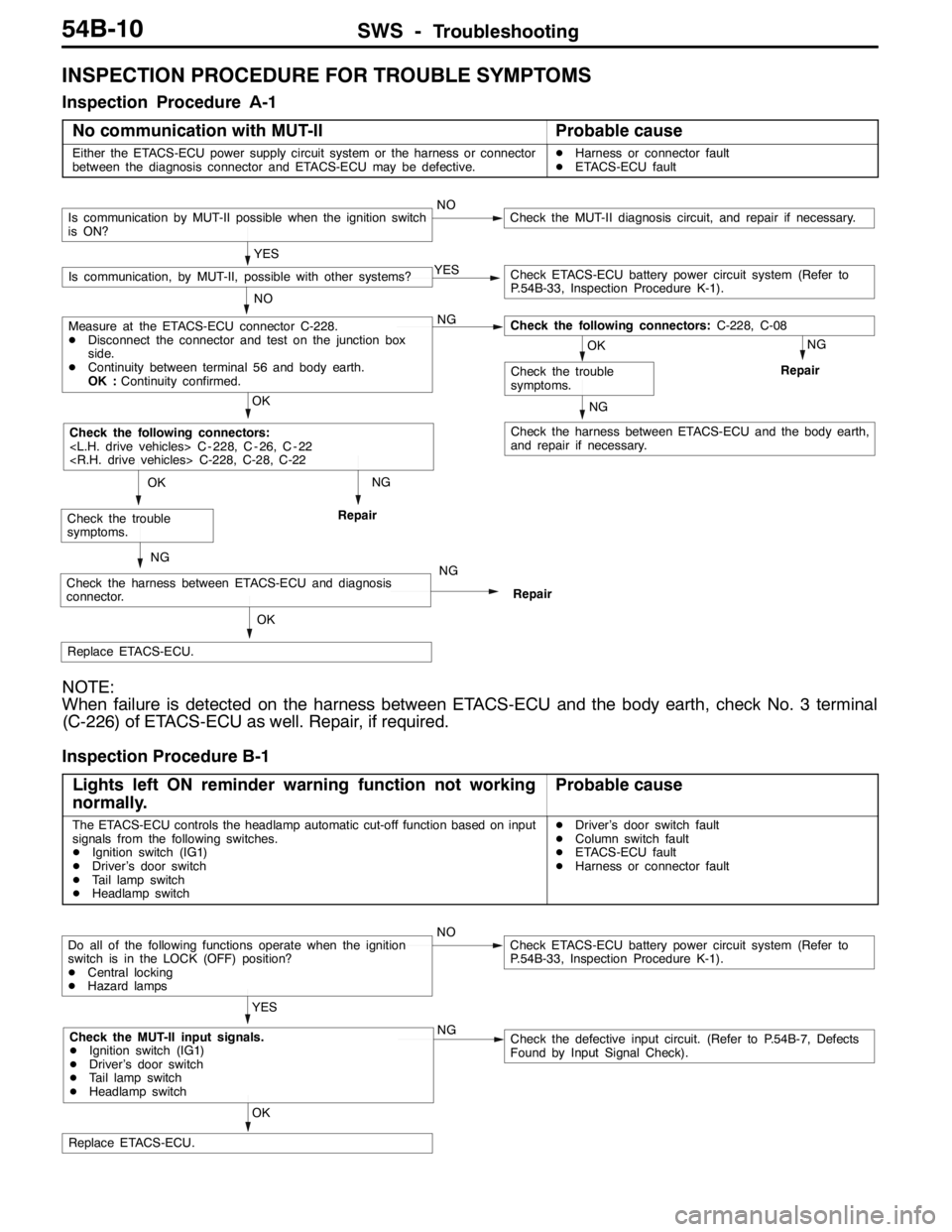
INSPECTION PROCEDURE FOR TROUBLE SYMPTOMS
Inspection Procedure A-1
No communication with MUT-II
Probable cause
Either the ETACS-ECU power supply circuit system or the harness or connector
between the diagnosis connector and ETACS-ECU may be defective.DHarness or connector fault
DETACS-ECU fault
NG
Check the harness between ETACS-ECU and the body earth,
and repair if necessary.
NG
Repair
NG
Repair
OK
Replace ETACS-ECU.
NG
Check the harness between ETACS-ECU and diagnosis
connector.NG
Repair
OK
Check the trouble
symptoms.
OK
Check the following connectors:
OK
Check the trouble
symptoms.
NO
Measure at the ETACS-ECU connector C-228.
DDisconnect the connector and test on the junction box
side.
DContinuity between terminal 56 and body earth.
OK :Continuity confirmed.NGCheck the following connectors:C-228, C-08
YES
Is communication, by MUT-II, possible with other systems?YESCheck ETACS-ECU battery power circuit system (Refer to
P.54B-33, Inspection Procedure K-1).
Is communication by MUT-II possible when the ignition switch
is ON?NOCheck the MUT-II diagnosis circuit, and repair if necessary.
NOTE:
When failure is detected on the harness between ETACS-ECU and the body earth, check No. 3 terminal
(C-226) of ETACS-ECU as well. Repair, if required.
Inspection Procedure B-1
Lights left ON reminder warning function not working
normally.
Probable cause
The ETACS-ECU controls the headlamp automatic cut-off function based on input
signals from the following switches.
DIgnition switch (IG1)
DDriver’s door switch
DTail lamp switch
DHeadlamp switchDDriver’s door switch fault
DColumn switch fault
DETACS-ECU fault
DHarness or connector fault
OK
Replace ETACS-ECU.
YES
Check the MUT-II input signals.
DIgnition switch (IG1)
DDriver’s door switch
DTail lamp switch
DHeadlamp switchNGCheck the defective input circuit. (Refer to P.54B-7, Defects
Found by Input Signal Check).
Do all of the following functions operate when the ignition
switch is in the LOCK (OFF) position?
DCentral locking
DHazard lampsNOCheck ETACS-ECU battery power circuit system (Refer to
P.54B-33, Inspection Procedure K-1).
Page 1375 of 1449
SWS -Troubleshooting54B-11
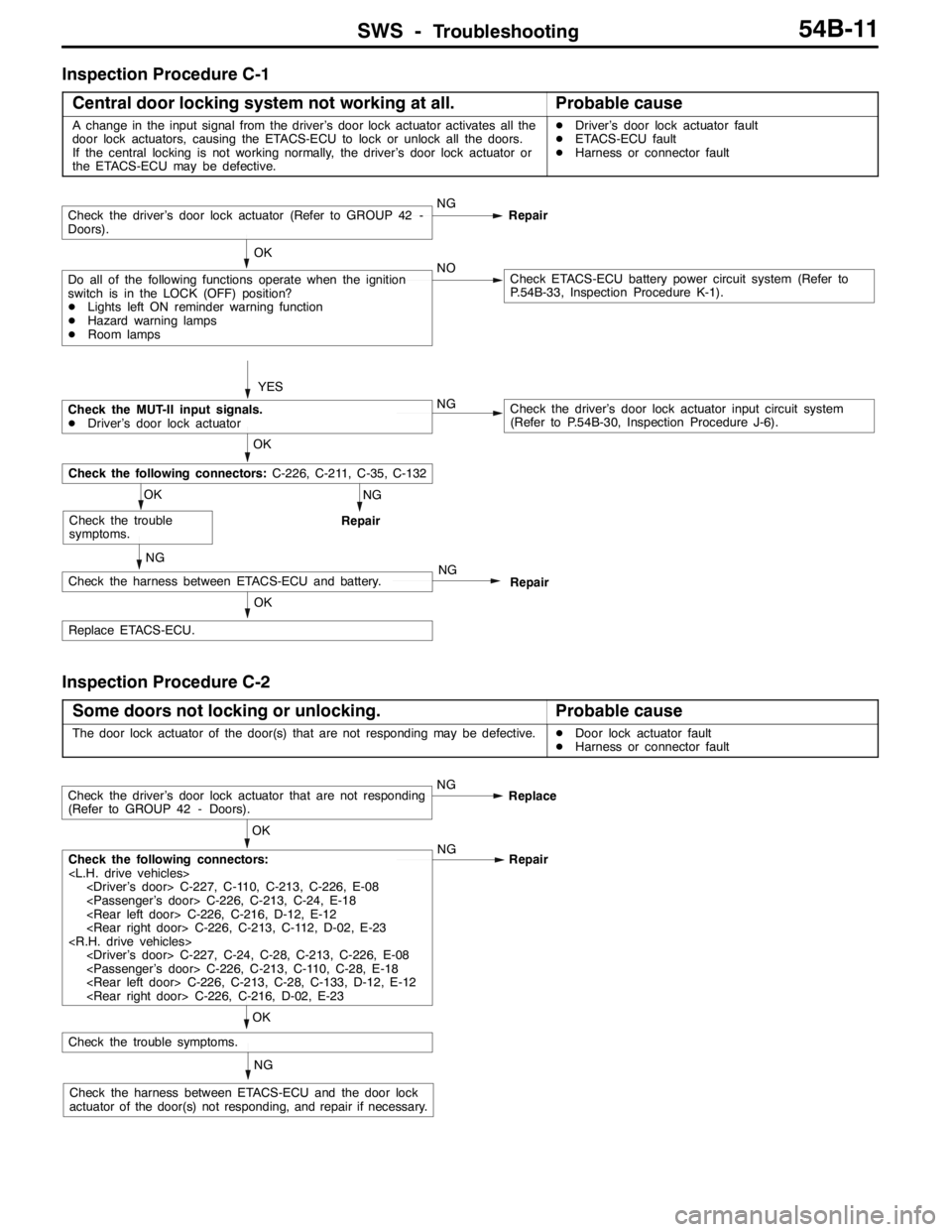
Inspection Procedure C-1
Central door locking system not working at all.
Probable cause
A change in the input signal from the driver’s door lock actuator activates all the
door lock actuators, causing the ETACS-ECU to lock or unlock all the doors.
If the central locking is not working normally, the driver’s door lock actuator or
the ETACS-ECU may be defective.DDriver’s door lock actuator fault
DETACS-ECU fault
DHarness or connector fault
NG
Repair
OK
Replace ETACS-ECU.
NG
Check the harness between ETACS-ECU and battery.NG
Repair
OK
Check the trouble
symptoms.
OK
Check the following connectors:C-226, C-211, C-35, C-132
YES
Check the driver’s door lock actuator (Refer to GROUP 42 -
Doors).NG
Repair
Do all of the following functions operate when the ignition
switch is in the LOCK (OFF) position?
DLights left ON reminder warning function
DHazard warning lamps
DRoom lampsNOCheck ETACS-ECU battery power circuit system (Refer to
P.54B-33, Inspection Procedure K-1). OK
Check the MUT-II input signals.
DDriver’s door lock actuatorNGCheck the driver’s door lock actuator input circuit system
(Refer to P.54B-30, Inspection Procedure J-6).
Inspection Procedure C-2
Some doors not locking or unlocking.
Probable cause
The door lock actuator of the door(s) that are not responding may be defective.DDoor lock actuator fault
DHarness or connector fault
NG
Check the harness between ETACS-ECU and the door lock
actuator of the door(s) not responding, and repair if necessary.
OK
Check the trouble symptoms.
OK
Check the following connectors:
Repair
Check the driver’s door lock actuator that are not responding
(Refer to GROUP 42 - Doors).NG
Replace
Page 1377 of 1449
SWS -Troubleshooting54B-13
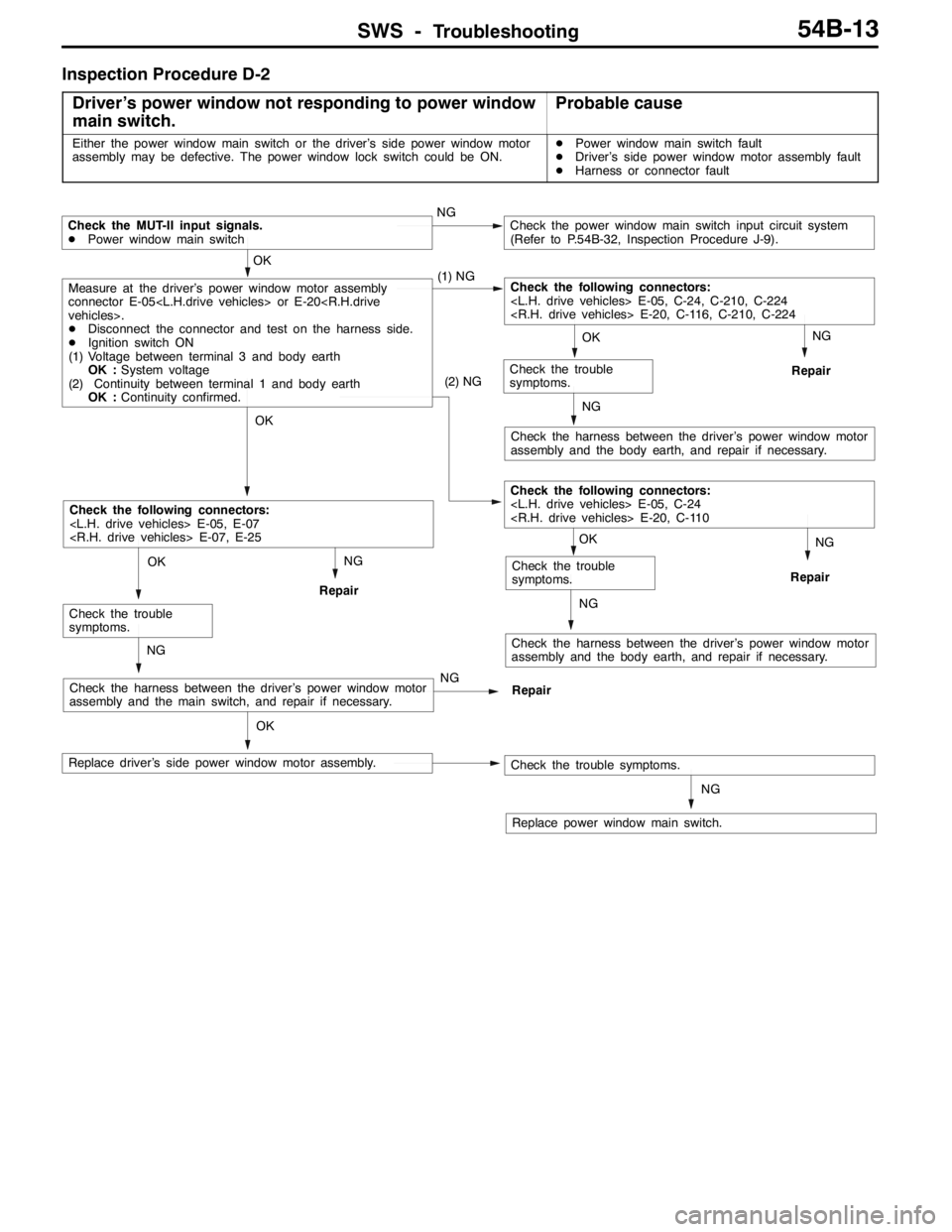
Inspection Procedure D-2
Driver’s power window not responding to power window
main switch.
Probable cause
Either the power window main switch or the driver’s side power window motor
assembly may be defective. The power window lock switch could be ON.DPower window main switch fault
DDriver’s side power window motor assembly fault
DHarness or connector fault
NG
Replace power window main switch.
OK
Replace driver’s side power window motor assembly.
NG
Check the harness between the driver’s power window motor
assembly and the body earth, and repair if necessary.
NG
Repair
OK
Check the trouble
symptoms.
(2) NG
Check the following connectors:
NG
Repair
NG
Check the harness between the driver’s power window motor
assembly and the body earth, and repair if necessary.
NG
Repair
OK
Check the trouble
symptoms.
NG
Check the harness between the driver’s power window motor
assembly and the main switch, and repair if necessary.NG
Repair
OK
Check the trouble
symptoms.
OK
Check the following connectors:
OK
Measure at the driver’s power window motor assembly
connector E-05
DDisconnect the connector and test on the harness side.
DIgnition switch ON
(1) Voltage between terminal 3 and body earth
OK :System voltage
(2) Continuity between terminal 1 and body earth
OK :Continuity confirmed.(1) NGCheck the following connectors:
Check the MUT-II input signals.
DPower window main switchNGCheck the power window main switch input circuit system
(Refer to P.54B-32, Inspection Procedure J-9).
Check the trouble symptoms.
Page 1378 of 1449
SWS -Troubleshooting54B-14
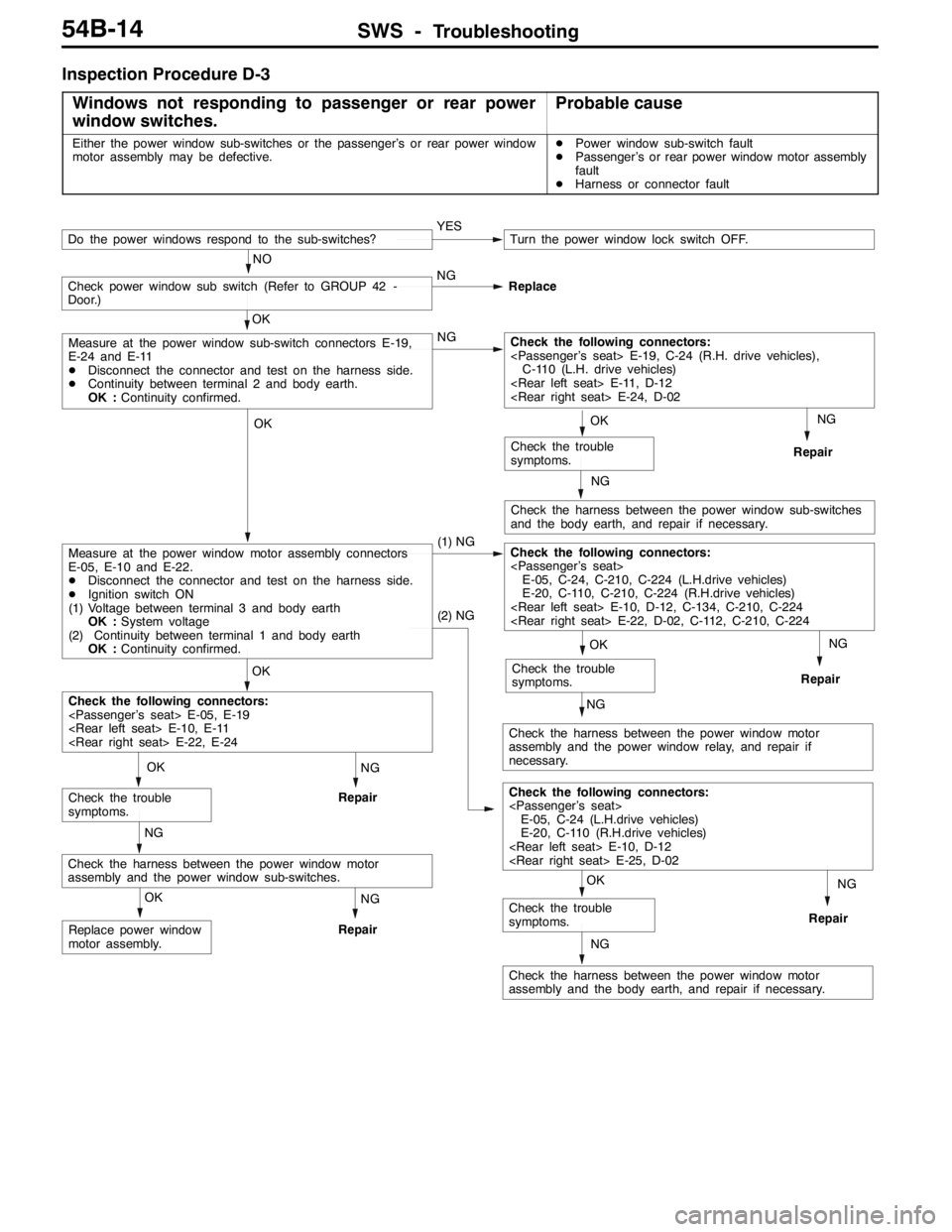
Inspection Procedure D-3
Windows not responding to passenger or rear power
window switches.
Probable cause
Either the power window sub-switches or the passenger’s or rear power window
motor assembly may be defective.DPower window sub-switch fault
DPassenger’s or rear power window motor assembly
fault
DHarness or connector fault
NG
Repair
NG
Check the harness between the power window sub-switches
and the body earth, and repair if necessary.
NG
Repair
NG
Check the harness between the power window motor
assembly and the power window relay, and repair if
necessary.NG
Repair
NG
Check the harness between the power window motor
assembly and the body earth, and repair if necessary.
NG
Repair
OK
Replace power window
motor assembly.
NG
Repair
NG
Check the harness between the power window motor
assembly and the power window sub-switches.
OK
Check the trouble
symptoms.
OK
Check the trouble
symptoms.
(2) NG
Check the following connectors:
E-05, C-24 (L.H.drive vehicles)
E-20, C-110 (R.H.drive vehicles)
OK
Check the trouble
symptoms.
OK
Check the trouble
symptoms.
OK
Check the following connectors:
OK
Measure at the power window motor assembly connectors
E-05, E-10 and E-22.
DDisconnect the connector and test on the harness side.
DIgnition switch ON
(1) Voltage between terminal 3 and body earth
OK :System voltage
(2) Continuity between terminal 1 and body earth
OK :Continuity confirmed.(1) NGCheck the following connectors:
E-05, C-24, C-210, C-224 (L.H.drive vehicles)
E-20, C-110, C-210, C-224 (R.H.drive vehicles)
OK
Measure at the power window sub-switch connectors E-19,
E-24 and E-11
DDisconnect the connector and test on the harness side.
DContinuity between terminal 2 and body earth.
OK :Continuity confirmed.NGCheck the following connectors:
C-110 (L.H. drive vehicles)
Check power window sub switch (Refer to GROUP 42 -
Door.)NG
Replace
YESTurn the power window lock switch OFF.
NO
Do the power windows respond to the sub-switches?