Page 1306 of 1449

SRS -Seat Belt with Pre-tensioner52B-62
INSTALLATION SERVICE POINTS
"AAPRE-INSTALLATION INSPECTION
1. Pre-installation inspection must be carried out even when
installing a new seat belt with pre-tensioner. (Refer to
Inspections.)
Caution
If the seat belt with pre-tensioner is discarded, discard
it after operating the seat belt pre-tensioner according
to the specified procedure. (Refer to P.52B-64.)
2. Connect the negative ( - ) terminal of the battery.
3. Connect the MUT-II to the diagnosis connector (16 pin).
Caution
Connection and disconnection of the MUT-II must be
carried out after turning the ignition switch to the
LOCK (OFF) position.
4. Turn the ignition switch to ON position.
5. Check that there is no abnormality except for open circuit
in the seat belt pre-tensioner after reading diagnostic
codes.
6. Turn the ignition key to LOCK (OFF) position.
7. Release the negative ( - ) terminal cable of the battery
and wrap a tape around it for insulation.
Caution
Wait for at least 60 seconds after disconnecting the
negative ( - ) battery cable before starting any
operation. (Refer to P.52B-3.)
"BAPOST-INSTALLATION INSPECTION
1. Turn the ignition switch to the ON position.
2. Check that the SRS warning lamp illuminates for 6 to
8 seconds and goes out.
3. Carry out troubleshooting if the lamp does not go out.
(Refer to P.52B-6.)
SRS warning lamp
Page 1309 of 1449
SRS -AirBagModuleandSeatBeltPre-tensioner
Disposal Procedures52B-65
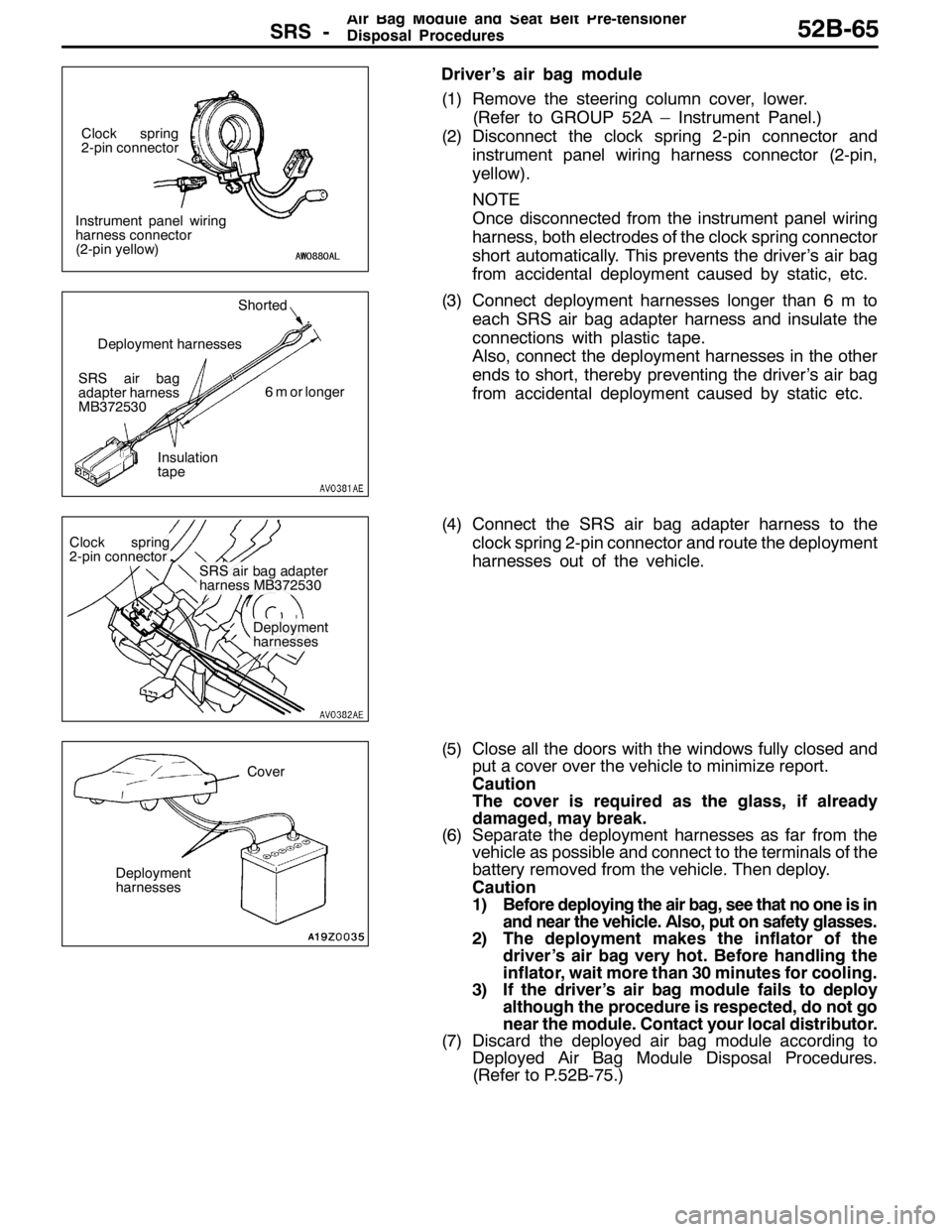
Driver’s air bag module
(1) Remove the steering column cover, lower.
(Refer to GROUP 52A – Instrument Panel.)
(2) Disconnect the clock spring 2-pin connector and
instrument panel wiring harness connector (2-pin,
yellow).
NOTE
Once disconnected from the instrument panel wiring
harness, both electrodes of the clock spring connector
short automatically. This prevents the driver’s air bag
from accidental deployment caused by static, etc.
(3) Connect deployment harnesses longer than 6 m to
each SRS air bag adapter harness and insulate the
connections with plastic tape.
Also, connect the deployment harnesses in the other
ends to short, thereby preventing the driver’s air bag
from accidental deployment caused by static etc.
(4) Connect the SRS air bag adapter harness to the
clock spring 2-pin connector and route the deployment
harnesses out of the vehicle.
(5) Close all the doors with the windows fully closed and
put a cover over the vehicle to minimize report.
Caution
The cover is required as the glass, if already
damaged, may break.
(6) Separate the deployment harnesses as far from the
vehicle as possible and connect to the terminals of the
battery removed from the vehicle. Then deploy.
Caution
1) Before deploying the air bag, see that no one is in
and near the vehicle. Also, put on safety glasses.
2) The deployment makes the inflator of the
driver’s air bag very hot. Before handling the
inflator, wait more than 30 minutes for cooling.
3) If the driver’s air bag module fails to deploy
although the procedure is respected, do not go
near the module. Contact your local distributor.
(7) Discard the deployed air bag module according to
Deployed Air Bag Module Disposal Procedures.
(Refer to P.52B-75.)
Instrument panel wiring
harness connector
(2-pin yellow)Clock spring
2-pin connector
SRS air bag
adapter harness
MB372530Shorted
6 m or longer
Insulation
tape Deployment harnesses
Clock spring
2-pin connector
SRS air bag adapter
harness MB372530
Deployment
harnesses
Cover
Deployment
harnesses
Page 1323 of 1449

54A-3
SIDE TURN-SIGNAL LAMP 31............
SPECIAL TOOL 31............................
SIDE TURN-SIGNAL LAMP 31..................
ROOM LAMP 31.........................
TROUBLESHOOTING 31.......................
REAR COMBINATION LAMP 32...........
SPECIAL TOOL 32............................
TROUBLESHOOTING 32.......................
REAR COMBINATION LAMP 32................
HIGH-MOUNTED STOP LAMP 34.........
ON-VEHICLE SERVICE 34......................
High-mounted Stop Lamp Bulb Replacement 34.
HIGH-MOUNTED STOP LAMP 34................
LICENCE PLATE LAMP 35...............
ON-VEHICLE SERVICE 35.....................
License Plate Lamp Replacement 35...........
LICENCE PLATE LAMP 35.....................
HAZARD WARNING LAMP SWITCH 36....
SPECIAL TOOL 36............................
HAZARD WARNING LAMP SWITCH 36.........
HORN 37................................
CIGARETTE LIGHTER 37.................
COLUMN SWITCH 38....................
SPECIAL TOOL 38............................
COLUMN SWITCH 38..........................
CLOCK 40...............................
SPECIAL TOOL 40............................
CLOCK 40....................................
POLE ANTENNA 41......................
ROOF ANTENNA 42......................
DEFOGGER 42...........................
TROUBLESHOOTING 42......................
ON-VEHICLE SERVICE 43.....................
Printed Heater Check 43......................
Defogger Relay Continuity Check 43...........
DEFOGGER SWITCH 43.......................
Page 1331 of 1449
CHASSIS ELECTRICAL -Ignition Switch and Immobilizer System54A-11
IGNITION SWITCH
REMOVAL AND INSTALLATION
7
6
15 32
4
8
Removal steps
1. Lower column cover (Refer to GROUP
52A - Instrument Panel.)
2. Upper column cover (Refer to GROUP
52A - Instrument Panel.)
3. Steering Wheel (Refer to GROUP
37A.)
4. Clock spring column switch assembly
(Refer to GROUP 37A - Steering
Shaft.)AA"5. Steering lock cylinder
6. Ignition switch
7. Key reminder switch
8. Immobilizer-ECU
REMOVAL SERVICE POINT
AA"STEERING LOCK CYLINDER REMOVAL
1. Insert key into steering lock cylinder to turn ignition key
to “ACC” position.
2. Insert locking pin with small plus screwdriver, etc., and
remove steering lock cylinder.
Locking pin
Page 1332 of 1449
CHASSIS ELECTRICAL -Ignition Switch and Immobilizer System54A-12
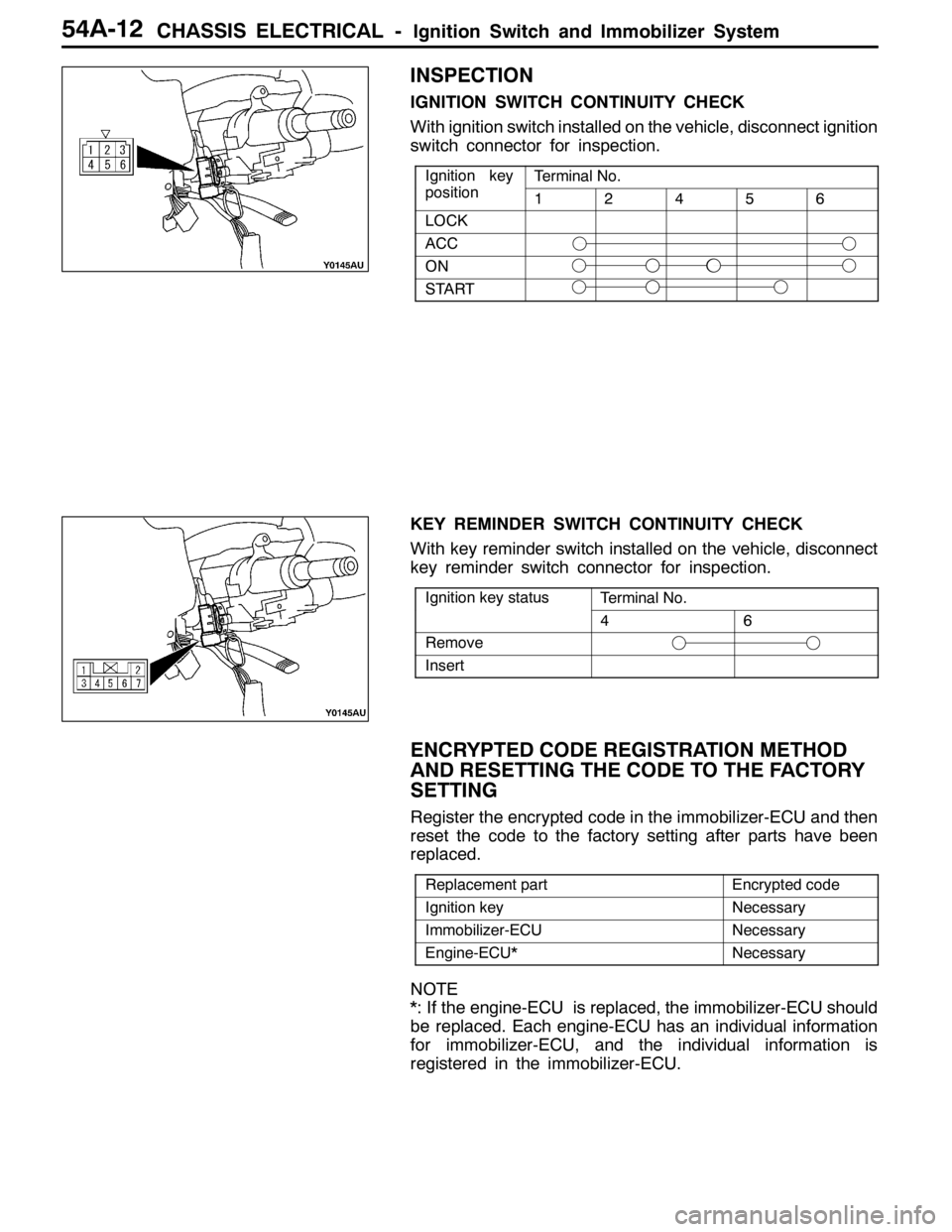
INSPECTION
IGNITION SWITCH CONTINUITY CHECK
With ignition switch installed on the vehicle, disconnect ignition
switch connector for inspection.
Ignition key
iti
Terminal No.gy
position12456
LOCK
ACC
ON
START
KEY REMINDER SWITCH CONTINUITY CHECK
With key reminder switch installed on the vehicle, disconnect
key reminder switch connector for inspection.
Ignition key statusTerminal No.gy
46
Remove
Insert
ENCRYPTED CODE REGISTRATION METHOD
AND RESETTING THE CODE TO THE FACTORY
SETTING
Register the encrypted code in the immobilizer-ECU and then
reset the code to the factory setting after parts have been
replaced.
Replacement partEncrypted code
Ignition keyNecessary
Immobilizer-ECUNecessary
Engine-ECU*Necessary
NOTE
*: If the engine-ECU is replaced, the immobilizer-ECU should
be replaced. Each engine-ECU has an individual information
for immobilizer-ECU, and the individual information is
registered in the immobilizer-ECU.
Page 1333 of 1449
CHASSIS ELECTRICAL -Ignition Switch and Immobilizer System54A-13
ENCRYPTED CODE REGISTRATION METHOD
If using an ignition key that has just been newly purchased,
or if the immobilizer-ECU has been replaced, you will need
to register the encrypted codes for each ignition key being
used into the immobilizer-ECU. (A maximum of eight different
encrypted codes can be registered.)
Moreover, when the immobilizer-ECU has been replaced, you
will need to use the MUT-IIto register the password that
the user specifies into the immobilizer-ECU. (Refer to the
MUT-IIinstruction manual for instructions on using the MUT-II.)
Caution
Because registering of the encrypted codes is carried
out after all previously-registered codes have been
erased, you should have ready all of the ignition keys
that have already been registered.
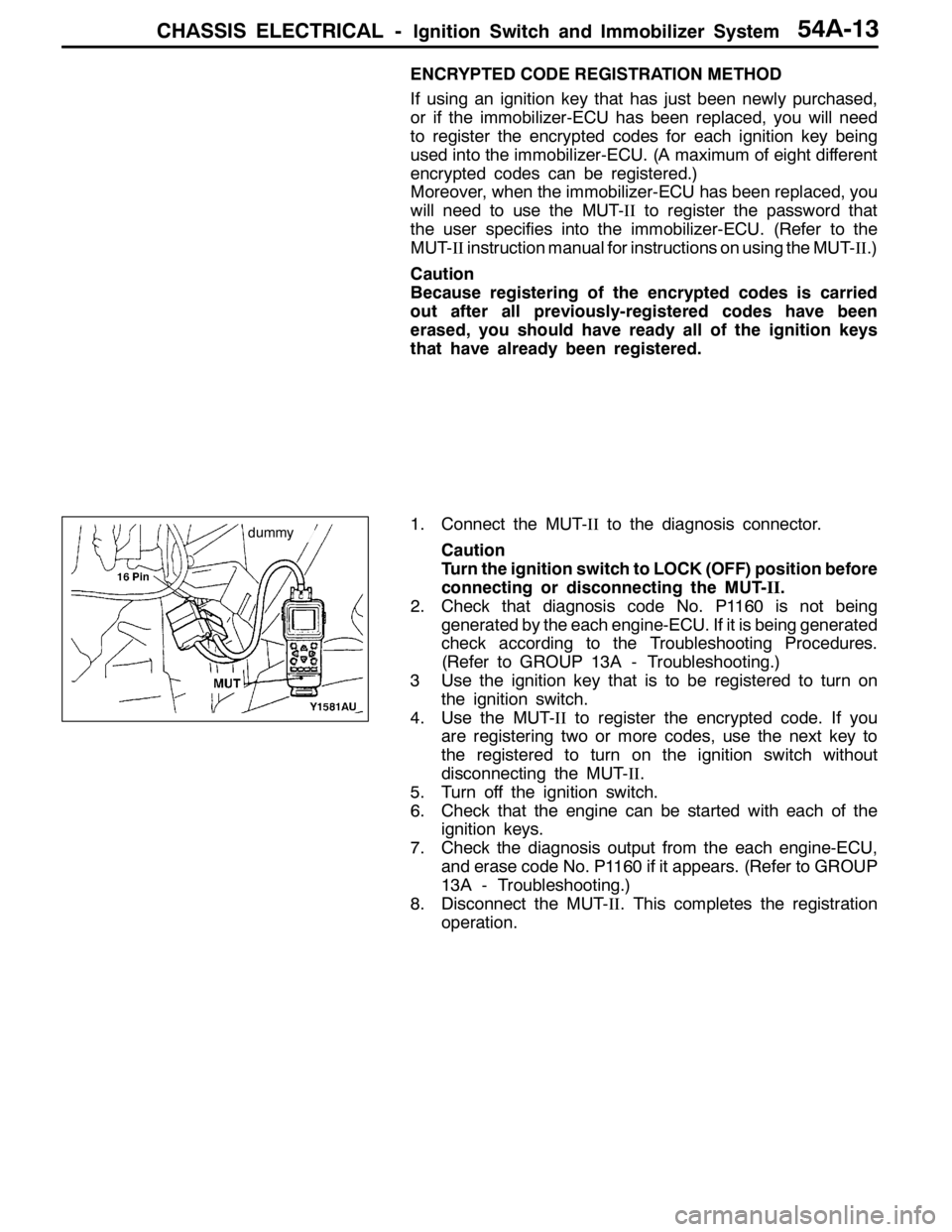
1. Connect the MUT-IIto the diagnosis connector.
Caution
Turn the ignition switch to LOCK (OFF) position before
connecting or disconnecting the MUT-II.
2. Check that diagnosis code No. P1160 is not being
generated by the each engine-ECU. If it is being generated
check according to the Troubleshooting Procedures.
(Refer to GROUP 13A - Troubleshooting.)
3 Use the ignition key that is to be registered to turn on
the ignition switch.
4. Use the MUT-IIto register the encrypted code. If you
are registering two or more codes, use the next key to
the registered to turn on the ignition switch without
disconnecting the MUT-II.
5. Turn off the ignition switch.
6. Check that the engine can be started with each of the
ignition keys.
7. Check the diagnosis output from the each engine-ECU,
and erase code No. P1160 if it appears. (Refer to GROUP
13A - Troubleshooting.)
8. Disconnect the MUT-II. This completes the registration
operation.
dummy
Page 1360 of 1449
CHASSIS ELECTRICAL-Clock54A-40
CLOCK
SPECIAL TOOL
ToolNumberNameUse
MB990784Ornament removerCenter panel assembly and center air outlet
panel removal
CLOCK
REMOVAL AND INSTALLATION
2
3 4
1
Removal steps
1. Center panel assembly (Refer to
GROUP 52A - Instrument Panel.)
2. Meter bezel (Refer to P.54A-22.)3. Center air outlet panel (Refer to
GROUP 52A - Instrument Panel.)
4. Clock
Page 1361 of 1449
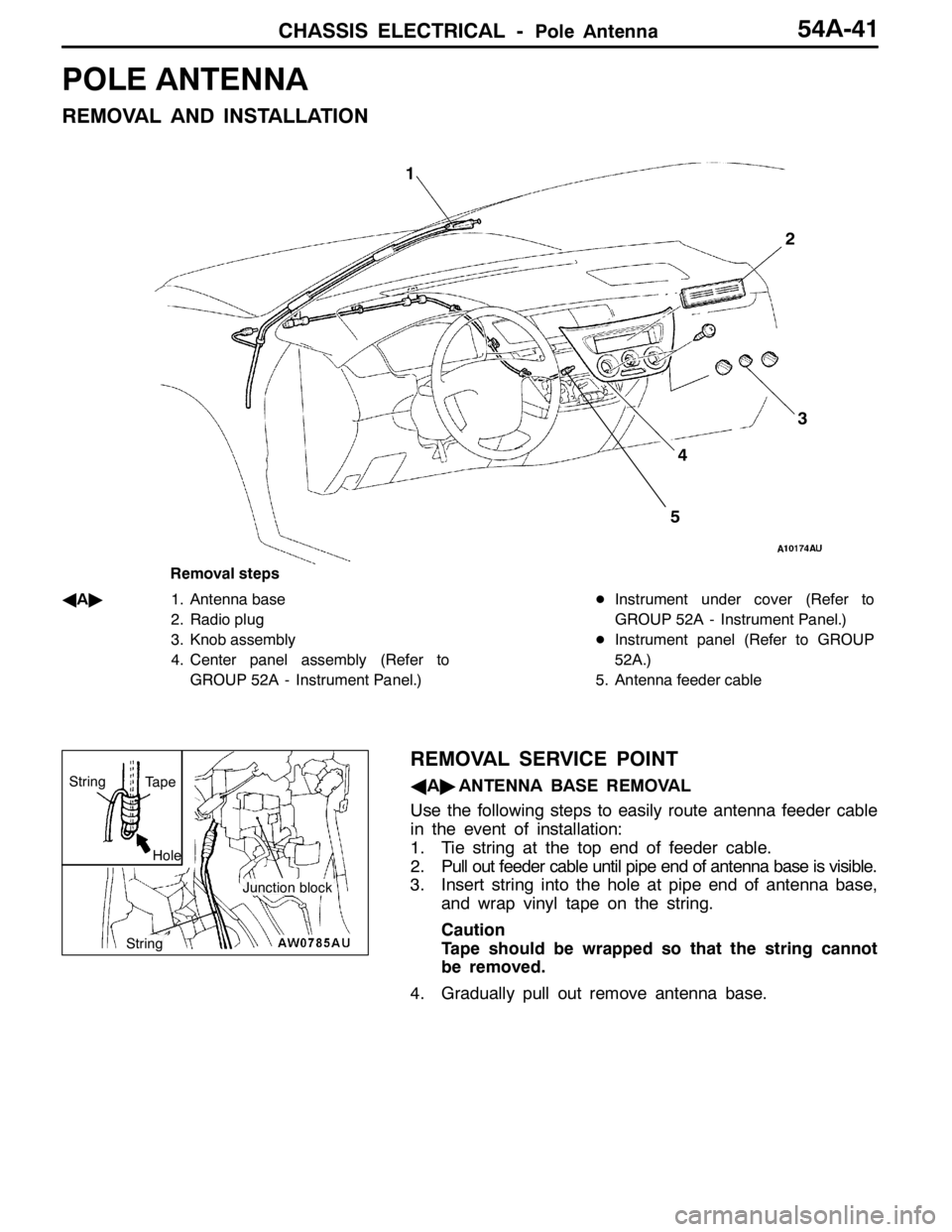
CHASSIS ELECTRICAL -Pole Antenna54A-41
POLE ANTENNA
REMOVAL AND INSTALLATION
3 1
2
4
5
Removal steps
A
A"1. Antenna base
2. Radio plug
3. Knob assembly
4. Center panel assembly (Refer to
GROUP 52A - Instrument Panel.)DInstrument under cover (Refer to
GROUP 52A - Instrument Panel.)
DInstrument panel (Refer to GROUP
52A.)
5. Antenna feeder cable
REMOVAL SERVICE POINT
AA"ANTENNA BASE REMOVAL
Use the following steps to easily route antenna feeder cable
in the event of installation:
1. Tie string at the top end of feeder cable.
2. Pull out feeder cable until pipe end of antenna base is visible.
3. Insert string into the hole at pipe end of antenna base,
and wrap vinyl tape on the string.
Caution
Tape should be wrapped so that the string cannot
be removed.
4. Gradually pull out remove antenna base.
Hole
Tape
Junction block
String
String