Page 186 of 464

17. Navigation Screen / Rear View Camera — If
Equipped
The navigation system provides maps, turn identifica-
tion, selection menus and instructions for selecting a
variety of destinations and routes. Refer to your “Navi-
gation User’s Manual” for detailed operating instruc-
tions.
The Rear View Camera system uses the Navigator Screen
to display the area behind the vehicle. Camera view will
display only while the vehicle is in R (Reverse).
18. Front Fog Light Indicator — If Equipped
This light shows the front fog lights are ON.
19. Oil Pressure Warning Light
This light shows low engine oil pressure. The light
should turn on momentarily when the engine is
started. If the light turns on while driving, stop thevehicle and shut off the engine as soon as possible. A
continuous chime will sound when this light turns on.
Do not operate the vehicle until the cause is corrected.
This light does not show how much oil is in the engine.
The engine oil level must be checked under the hood.
20. Seat Belt Reminder Light
When the ignition switch is first turned ON, this
light will turn on for 5 to 8 seconds as a bulb check.
During the bulb check, if the driver’s seat belt is
unbuckled, a chime will sound. After the bulb check or
when driving, if the driver seat belt remains unbuckled,
the Seat Belt Warning Light will flash or remain on
continuously. Refer to�Enhanced Driver Seat Belt Re-
minder System (BeltAlert™)�in the Occupant Restraints
section for more information.
186 UNDERSTANDING YOUR INSTRUMENT PANEL
Page 188 of 464

CAUTION!
The Tire Pressure Monitoring System (TPMS) has
been optimized for the original equipment tires and
wheels. TPMS pressures and warning have been
established for the tire size equipped on your ve-
hicle. Undesirable system operation or sensor dam-
age may result when using replacement equipment
that is not of the same size, type, and / or style.
Aftermarket wheels can cause sensor damage. Do
not use tire sealant from a can, or balance beads if
your vehicle is equipped with a TPMS, as damage to
the sensors may result.
22. Airbag Light
This light turns on and remains on for 6 to 8
seconds as a bulb check when the ignition
switch is first turned ON. If the light is not on
during starting, stays on, or turns on while
driving, have the system inspected by an authorized
dealer as soon as possible.
23. Electronic Vehicle Information Center Display — If
Equipped
When the appropriate conditions exist, this display
shows the Electronic Vehicle Information Center (EVIC)
messages.
24. Engine Temperature Warning Light
This light warns of an overheated engine condi-
tion. If this light is accompanied by a continuous
chime, the engine temperature is critically hot, and
the vehicle should be turned off immediately. The vehicle
should be serviced as soon as possible.
188 UNDERSTANDING YOUR INSTRUMENT PANEL
Page 189 of 464

25. Liftgate Ajar — If Equipped
This light turns on if the liftgate is not com-
pletely closed.
26. Door Ajar Light — If Equipped
This light turns on if a door is not completely
closed.
27. Washer Fluid Light — If Equipped
This light turns on when the washer fluid level
falls below approximately 1/4 filled. The light will
remain on until fluid is added.
28. Electronic Stability Program (ESP) Warning
Light/Brake Assist System (BAS) Warning Light — If
Equipped
The malfunction indicator for the ESP is com-
bined with the BAS indicator. The yellow
“ESP/BAS Warning Lamp” and the yellow“ESP/TCS Indicator Light” in the instrument cluster both
come on when the ignition switch is turned to the “ON”
position. They should both go out with the engine
running. If the “ESP/BAS Warning Lamp” comes on
continuously with the engine running, a malfunction has
been detected in either the ESP or BAS system, or both. If
this light remains on after several ignition cycles, and the
vehicle has been driven several miles at speeds greater
than 30 mph (48 km/h), see your authorized dealer as
soon as possible to have the problem diagnosed and
corrected.
The “ESP/BAS Warning Lamp”:
— The “ESP Indicator Light” and the “ESP/BAS Warning
Lamp” come on momentarily each time the ignition
switch is turned ON.
— Each time the ignition is turned ON, the ESP System
will be ON even if it was turned off previously.
UNDERSTANDING YOUR INSTRUMENT PANEL 189
4
Page 190 of 464

— The ESP Control System will make buzzing or clicking
sounds when it is active. This is normal; the sounds will
stop when ESP becomes inactive following the maneuver
that caused the ESP activation.
29. Electronic Throttle Control (ETC.) Light
This light informs you of a problem with the
Electronic Throttle Control system. If a prob-
lem is detected the light will come on while the
engine is running. Cycle the ignition key when
the vehicle has completely stopped and the gear selector
is placed in the PARK position. The light should turn off.
If the light remains lit with the engine running your
vehicle will usually be drivable, however, see your dealer
for service as soon as possible. If the light is flashing
when the engine is running, immediate service is re-
quired and you may experience reduced performance, an
elevated/rough idle or engine stall and your vehicle may
require towing. The light will come on when the ignitionis first turned on and remain on briefly as a bulb check.
If the light does not come on during starting, have the
system checked by an authorized dealer.
30. All-Wheel-Drive Failure Indicator Light — If AWD
equipped
This light monitors the All-Wheel-Drive
(AWD) system.
When lit solid:There is an AWD system fault. AWD
performance will be at a reduced level. Service the AWD
system soon.
When blinking:The AWD system is temporarily dis-
abled due to overload condition.
190 UNDERSTANDING YOUR INSTRUMENT PANEL
Page 195 of 464

Sound Horn On Lock?
When this feature is selected a short horn sound will
occur when the remote keyless entry “Lock” button is
pressed. This feature may be selected with or without the
flash lights on lock/unlock feature. Pressing the STEP
button when in this display will select “Yes” or “No.”
Flash Lights On Lock/Unlock?
When this feature is selected, the front and rear turn
signals will flash when the doors are locked or unlocked
using the remote keyless entry transmitter. This feature
may be selected with or without the sound horn on lock
feature selected. Pressing the STEP button when in this
display will select “Yes” or “No.”
Headlamp Delay
When this feature is selected the driver can choose, when
exiting the vehicle, to have the headlamps remain on for
30, 60, or 90 seconds, or not remain on. Pressing the STEP
button when in this display will select 30, 60, 90, or OFF.
Headlamp On With Wipers? (Available with Auto
Headlights Only)
When this feature is selected and the headlight switch
has at least once been moved to the AUTO position, the
headlights will turn on in approximately 10 seconds
when the wipers are turned on. The headlights will also
turn off when the wipers are turned off if they were
turned on in this way. Pressing the STEP button when in
this display will select “Yes” or “No.”
NOTE:Turning the headlights on during the daytime
causes the instrument panel lights to dim. To increase the
brightness, refer to “Lights” in this section.
Service Interval
When this feature is selected a service interval between
2,000 miles (3 200 km) and 6, 000 miles (10 000 km) in 500
mile (800 km) increments may be selected. Pressing the
STEP button when in this display will select distances
between 2,000 miles (3 200 km) and 6, 000 miles (10 000
km) in 500 mile (800 km) increments.
UNDERSTANDING YOUR INSTRUMENT PANEL 195
4
Page 196 of 464
Reset Service Distance (Displays Only if Service
Interval was Changed)
When this feature is selected the current accumulated
service distance can be reset to the newly selected service
interval. Pressing the STEP button when in this display
will select “Yes” or “No.”
Power Accessory Delay?
When this feature is selected, the power window
switches, radio, hands–free system, DVD video system,
power sunroof, and power outlets will remain active for
up to 45 seconds after the ignition switch has been turned
off. Opening a vehicle door or liftgate will cancel this
feature.
Easy Exit Seat? (Available with Memory Seat Only)
This feature provides automatic driver’s seat positioning
which will enhance driver mobility out of and into the
vehicle.
The Easy Entry Easy Exit feature is not enabled when the
vehicle is delivered from the factory. The Easy Entry Easy
Exit feature is enabled (or later disabled) through the
programmable features in the Electronic Vehicle Informa-
tion Center (EVIC). Pressing the STEP button when in this
display will select “Yes” or “No.” The seat will return to the
memorized seat location (if REMOTE LINK TO MEMORY
is set to YES) when the remote keyless entry transmitter is
used to unlock the door. For more information refer to
“Easy Entry/Exit Seat in the Driver Memory Seat section.
Tilt Mirrors in Reverse? (Available with Memory
Seat Only)
When this feature is selected the outside mirrors will
move slightly downward from the present position when
the vehicle is shifted into the Reverse position. The
outside mirrors will then return to the original position
when the vehicle is shifted out of Reverse position.
Pressing the STEP button when in this display will select
�Ye s�or�No�.
196 UNDERSTANDING YOUR INSTRUMENT PANEL
Page 201 of 464
Electrical Disturbances
Radio waves may pick up electrical disturbances during
transmission. They mainly affect the wave amplitude,
and thus remain a part of the AM reception. They
interfere very little with the frequency variations that
carry the FM signal.
AM Reception
AM sound is based on wave amplitude, so AM reception
can be disrupted by such things as lightning, power lines
and neon signs.
FM Reception
Because FM transmission is based on frequency varia-
tions, interference that consists of amplitude variations
can be filtered out, leaving the reception relatively clear,
which is the major feature of FM radio.
NOTE:The radio, steering wheel radio controls (if
equipped), and 6 disc CD/DVD changer (if equipped)
will remain active for up to 10 minutes after the ignition
switch has been turned off. Opening a vehicle front door
will cancel this feature.
UNDERSTANDING YOUR INSTRUMENT PANEL 201
4
Page 222 of 464
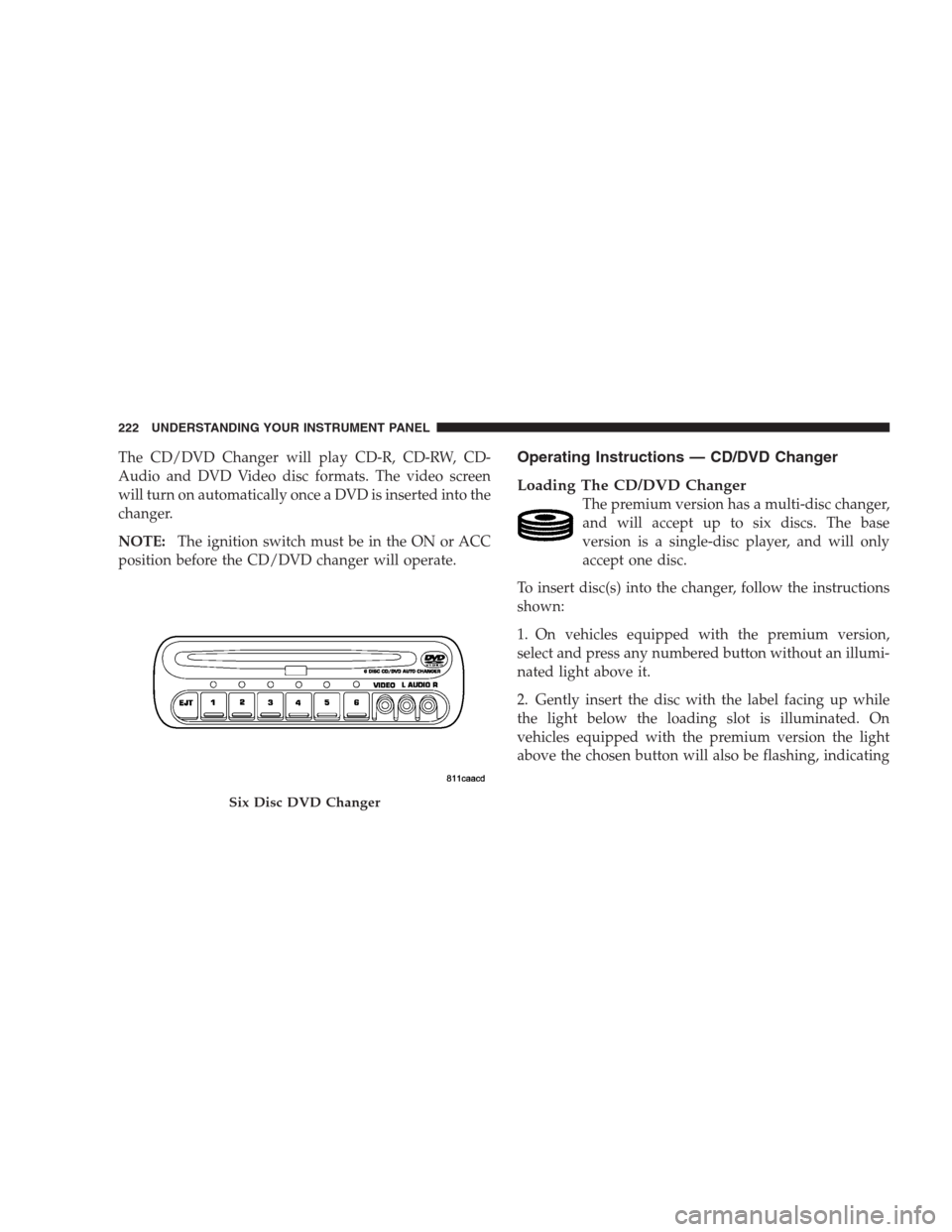
The CD/DVD Changer will play CD-R, CD-RW, CD-
Audio and DVD Video disc formats. The video screen
will turn on automatically once a DVD is inserted into the
changer.
NOTE:The ignition switch must be in the ON or ACC
position before the CD/DVD changer will operate.Operating Instructions — CD/DVD Changer
Loading The CD/DVD Changer
The premium version has a multi-disc changer,
and will accept up to six discs. The base
version is a single-disc player, and will only
accept one disc.
To insert disc(s) into the changer, follow the instructions
shown:
1. On vehicles equipped with the premium version,
select and press any numbered button without an illumi-
nated light above it.
2. Gently insert the disc with the label facing up while
the light below the loading slot is illuminated. On
vehicles equipped with the premium version the light
above the chosen button will also be flashing, indicating
Six Disc DVD Changer
222 UNDERSTANDING YOUR INSTRUMENT PANEL