Page 89 of 464
CAUTION!
To avoid damage to the mirror during cleaning,
never spray any cleaning solution directly onto the
mirror. Apply the solution onto a clean cloth and
wipe the mirror clean.
Driver’s Side Outside Mirror Auto Dimmer — If
Equipped
This mirror automatically adjusts for annoying headlight
glare from vehicles behind you. You can turn this feature
on or off by pressing the button at the base of the
Rearview Mirror.
Exterior Mirrors Folding Feature
All exterior mirrors are hinged and may be moved either
forward or rearward to resist damage. The hinges have
three detent positions; full forward, full rearward, and
normal.
Outside Mirror — Driver’s Side
Adjust the outside mirror to center on the adjacent lane of
traffic, with a slight overlap of the view obtained on the
inside mirror.
Automatic Dimming Mirror
UNDERSTANDING THE FEATURES OF YOUR VEHICLE 89
3
Page 91 of 464
Press the rocker switch to the L or R for Left or Right
mirror selection. Use the center off position to guard
against accidentally moving a mirror position.
Select a mirror and press one of the four arrows for the
direction you want the mirror to move.
Power mirror preselected positions can be controlled by
the optional Driver Memory Seat Feature. Refer to
“Driver Memory Seat” in section 3 of this manual.
Heated Remote Control Mirrors
These mirrors are heated to melt frost or ice. This feature
is activated whenever you turn on the Rear Window
Defrost.
Illuminated Vanity Mirrors
An illuminated vanity mirror is on the sun visor. To use
the mirror, rotate the sun visor down and swing the
mirror cover upward. The lights turn on automatically.
Closing the mirror cover turns off the lights.
Sun Visor Extension
The sun visors may be pulled out to provide extended
coverage of the side glass.
HANDS–FREE COMMUNICATION (UConnect™) —
IF EQUIPPED
UConnect™ is a voice-activated, hands-free, in- vehicle
communications system. UConnect™ allows you to dial
a phone number with your cellular phone using simple
voice commands (e.g.,�Call”�“Mike”�”Work�or�Dial”
�“248-555-1212�). Your cellular phone’s audio is trans-
mitted through your vehicle’s audio system; the system
will automatically mute your radio when using the
UConnect™ system.
NOTE:The UConnect™ system use requires a cellular
phone equipped with the Bluetooth�Hands-Free Profile,�
version 0.96 or higher. See www.chrysler.com/uconnect
for supported phones.
UNDERSTANDING THE FEATURES OF YOUR VEHICLE 91
3
Page 103 of 464
Emergency Assistance
If you are in an emergency and the mobile phone is
reachable:
•Pick up the phone and manually dial the emergency
number for your area.
If the phone is not reachable and the UConnect™ system
is operational, you may reach the emergency number as
follows:
•Press the ’Phone’ button to begin.
•After the�Ready�prompt and the following beep, say
�Emergency�and the UConnect™ system will instruct
the paired cellular phone to call the emergency num-
ber. This feature is only supported in the USA.
NOTE:The emergency number dialed is based on the
Country where the vehicle is purchased (911 for USA and
Canada and 060 for Mexico). The number dialed may not
be applicable with the available cellular service and area.The UConnect™ system does slightly lower your chances
of successfully making a phone call as to that for the cell
phone directly.
Your phone must be turned on and paired to the UCon-
nect™ system to allow use of this vehicle feature in
emergency situations when the cell phone has network
coverage and stays paired to the UConnect™ system.
Towing Assistance
If you need towing assistance,
•Press the ’Phone’ button to begin.
•After the�Ready�prompt and the following beep, say
�Towing Assistance.�
NOTE:The Towing Assistance number dialed is based
on the Country where the vehicle is purchased (1-800-
528-2069 for USA, 1-877-213-4525 for Canada, 55-14-3454
for Mexico city and 1-800-712-3040 for outside Mexico
city in Mexico).
UNDERSTANDING THE FEATURES OF YOUR VEHICLE 103
3
Page 117 of 464
Press the switch once to select a heat setting (high or low)
and press the switch a second time in the same direction
to turn the heated seat off. The indicator light will show
when LOW or HIGH heat is ON.
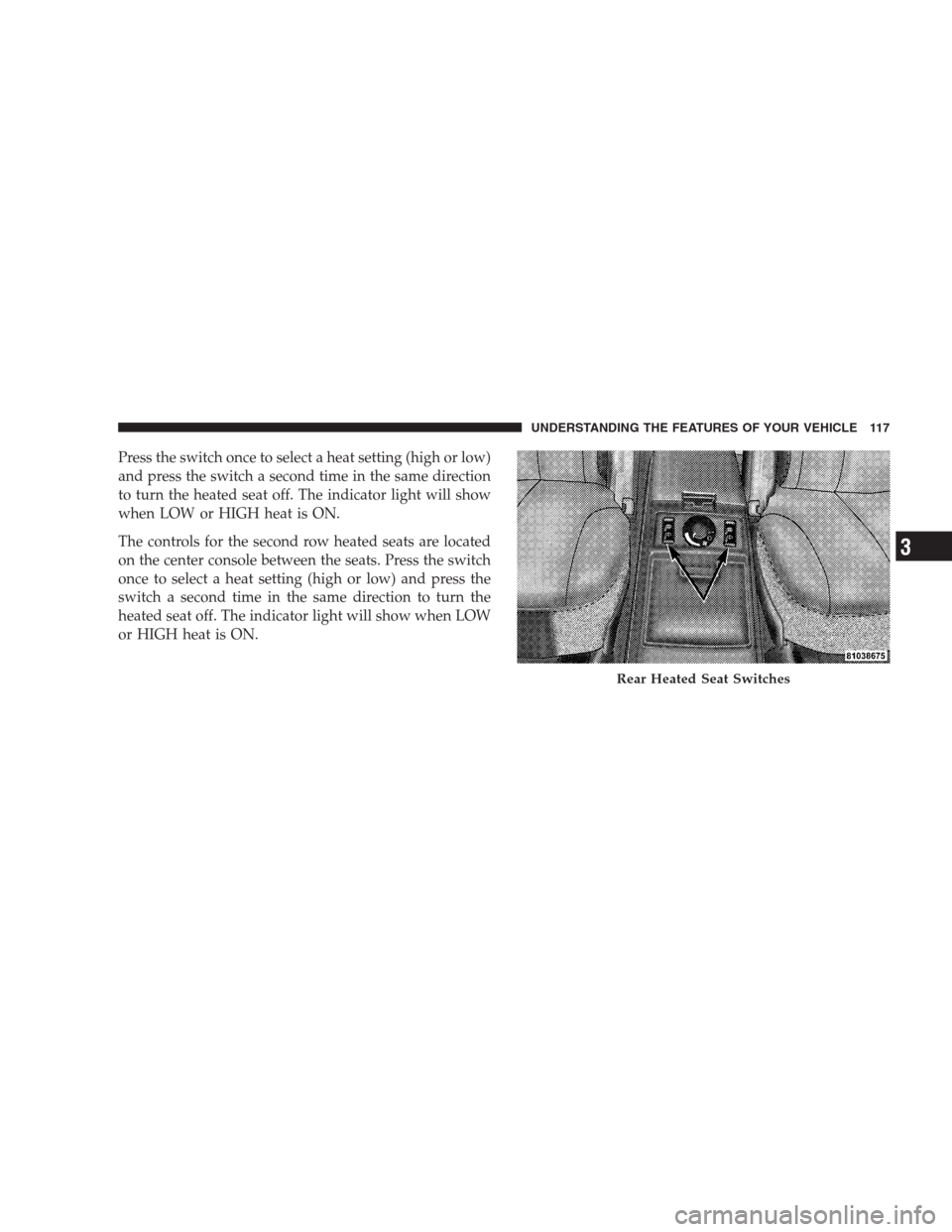
The controls for the second row heated seats are located
on the center console between the seats. Press the switch
once to select a heat setting (high or low) and press the
switch a second time in the same direction to turn the
heated seat off. The indicator light will show when LOW
or HIGH heat is ON.
Rear Heated Seat Switches
UNDERSTANDING THE FEATURES OF YOUR VEHICLE 117
3
Page 118 of 464
NOTE:
•If the lights in the second row heated seat switch begin
to flash when the switch is pressed, it indicates that the
heated seat is not functioning properly and that ser-
vice is required. See your authorized dealer for service.
•Once a heat setting is selected, heat will be felt within
2 to 3 minutes.
•The heated seats will turn off when the ignition switch
is turned to the OFF position.
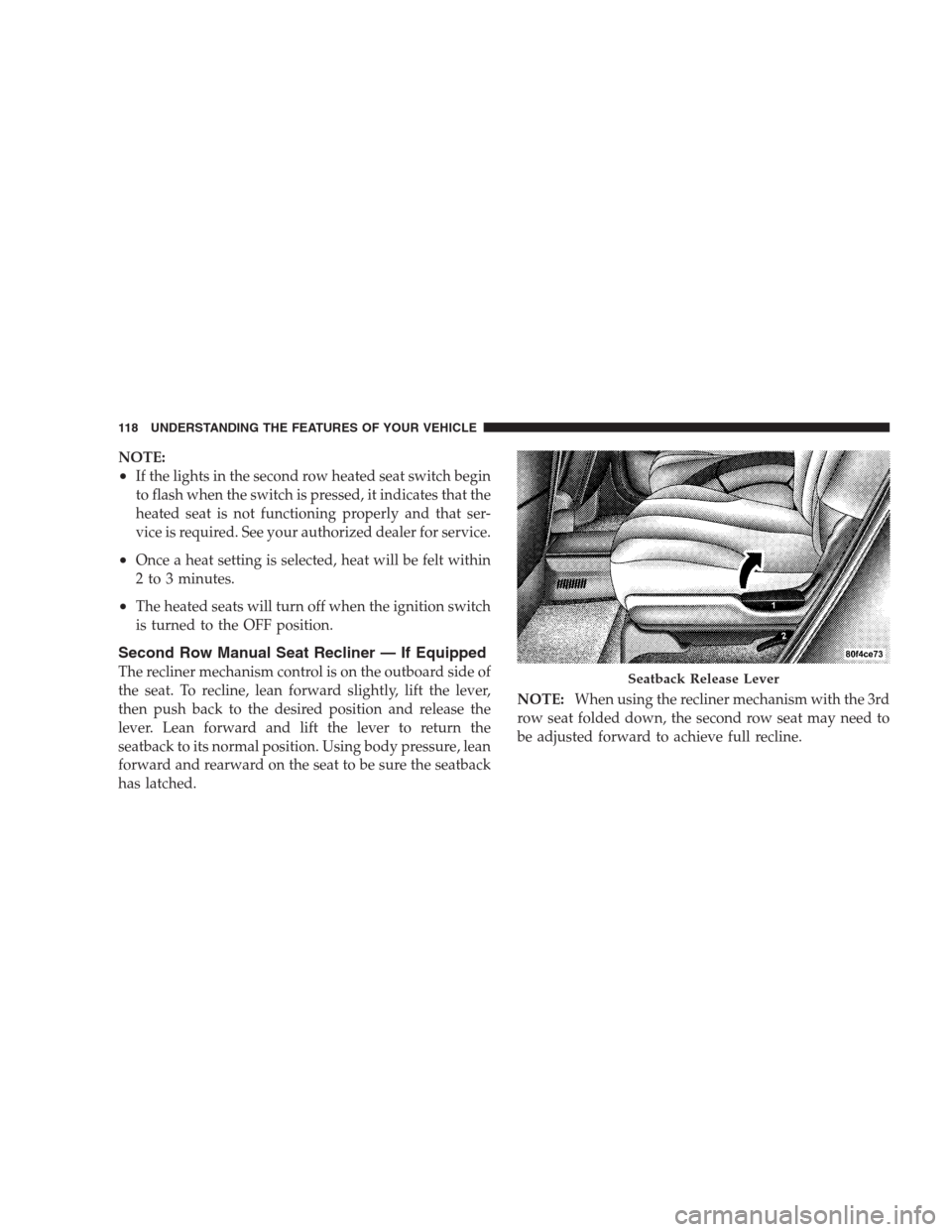
Second Row Manual Seat Recliner — If Equipped
The recliner mechanism control is on the outboard side of
the seat. To recline, lean forward slightly, lift the lever,
then push back to the desired position and release the
lever. Lean forward and lift the lever to return the
seatback to its normal position. Using body pressure, lean
forward and rearward on the seat to be sure the seatback
has latched.NOTE:When using the recliner mechanism with the 3rd
row seat folded down, the second row seat may need to
be adjusted forward to achieve full recline.Seatback Release Lever
118 UNDERSTANDING THE FEATURES OF YOUR VEHICLE
Page 128 of 464
Your vehicle has been delivered with two remote keyless
entry transmitters. One or both transmitters can be linked
to either memory position. Up to eight remote keyless
entry transmitters can be used with your vehicle. The
memory seat system can also accommodate up to eight
transmitters linked to either of the two stored seat
positions or any combination of the two positions.
To Program Memory Seat Buttons & RKE
Transmitters, Follow These Steps:
1. Turn the ignition switch to the ON position.
2. Select Remote Linked to Memory from the EVIC and
enter “Yes”.
3. Use the seat, mirror and adjustable pedal switches to
adjust the seat, recliner, side view mirrors and adjustable
pedals to the desired positions.
4. Set the radio station presets.5. Turn the ignition switch to the OFF position and
remove the key.
6. Press and release the SET (S) button located on the
driver’s door. A light in the button will flash telling you
that you are in the set memory mode. You have five
seconds to complete the next step.
7. Within 5 seconds, press and release button 1 or 2 on
the driver’s door. A chime will sound signaling you that
the driver memory has been set. A message will also be
displayed in the Electronic Vehicle Information Center
(EVIC), indicating a position has been set.
8. Within 5 seconds, press and release the LOCK button
on one of the Remote Keyless Entry Transmitters. A
chime will sound signaling you that the transmitter has
been successfully linked. A message will also be dis-
played in the Electronic Vehicle Information Center
(EVIC), indicating the transmitter has been linked.
128 UNDERSTANDING THE FEATURES OF YOUR VEHICLE
Page 129 of 464
Repeat the above steps for the second position using the
other driver’s door numbered button and Remote Key-
less Entry Transmitter.
Each time the SET (S) button and a numbered button are
pressed, you erase the old memory and store a new one.
To Disable A Transmitter Link, Follow These Steps:
1. Select “Remote Linked To Memory” from the Elec-
tronic Vehicle Information Center, Customer Program-
mable features.
2. Turn the ignition switch to the OFF position and
remove the key.
3. Press and release the SET (S) button located on the
driver’s door. A light in the button will flash telling you
that you are in the set memory mode. You have five
seconds to complete the next step.4. Within 5 seconds, press and release button 1 or 2 on
the driver’s door. A chime will sound signaling you that
the driver memory has been set. A message will also be
displayed in the Electronic Vehicle Information Center
(EVIC), indicating a position has been set.
5. Within 5 seconds, press and release the UNLOCK
button on the remote keyless entry transmitters. A chime
will sound signaling you that the transmitter link has
been successfully disabled. A message will also be dis-
played in the Electronic Vehicle Information Center
(EVIC), indicating the transmitter has been disabled.
To disable another transmitter from memory positions 1
or 2, repeat steps 1– 4 for each transmitter.
NOTE:This function can be selected using the “Cus-
tomer Programmable Features” in the Electronic Vehicle
Information Center (EVIC) section, Otherwise see your
authorized dealer.
UNDERSTANDING THE FEATURES OF YOUR VEHICLE 129
3
Page 131 of 464

Tilt Mirrors in Reverse (Available with Memory
Seat Only) — If Equipped
This additional feature provides automatic outside mir-
ror positioning which will aid the driver’s view of the
ground rearward of the front doors. The outside mirrors
will move slightly downward from the present position
when the vehicle is shifted into the Reverse position. The
outside mirrors will then return to the original position
when the vehicle is shifted out of Reverse position. Each
stored memory setting will have an associated Tilt Mir-
rors in Reverse position.
NOTE:The Tilt Mirrors in Reverse feature is not en-
abled when delivered from the factory. The Tilt Mirrors in
Reverse feature can be enabled or disabled through the
customer programmable features in the Electronic Ve-
hicle Information Center (EVIC), refer to “Tilt Mirrors in
Reverse?” under “Use Factory Settings”.
TO OPEN AND CLOSE THE HOOD
To open the hood, two latches must be released. First pull
the hood release lever located under the left side of the
instrument panel.
Hood Release Lever
UNDERSTANDING THE FEATURES OF YOUR VEHICLE 131
3