Page 1339 of 2000
GF1A TRANSFER – ACTIVE TORQUE CONTROL 4WD SYSTEMTF–11
TF
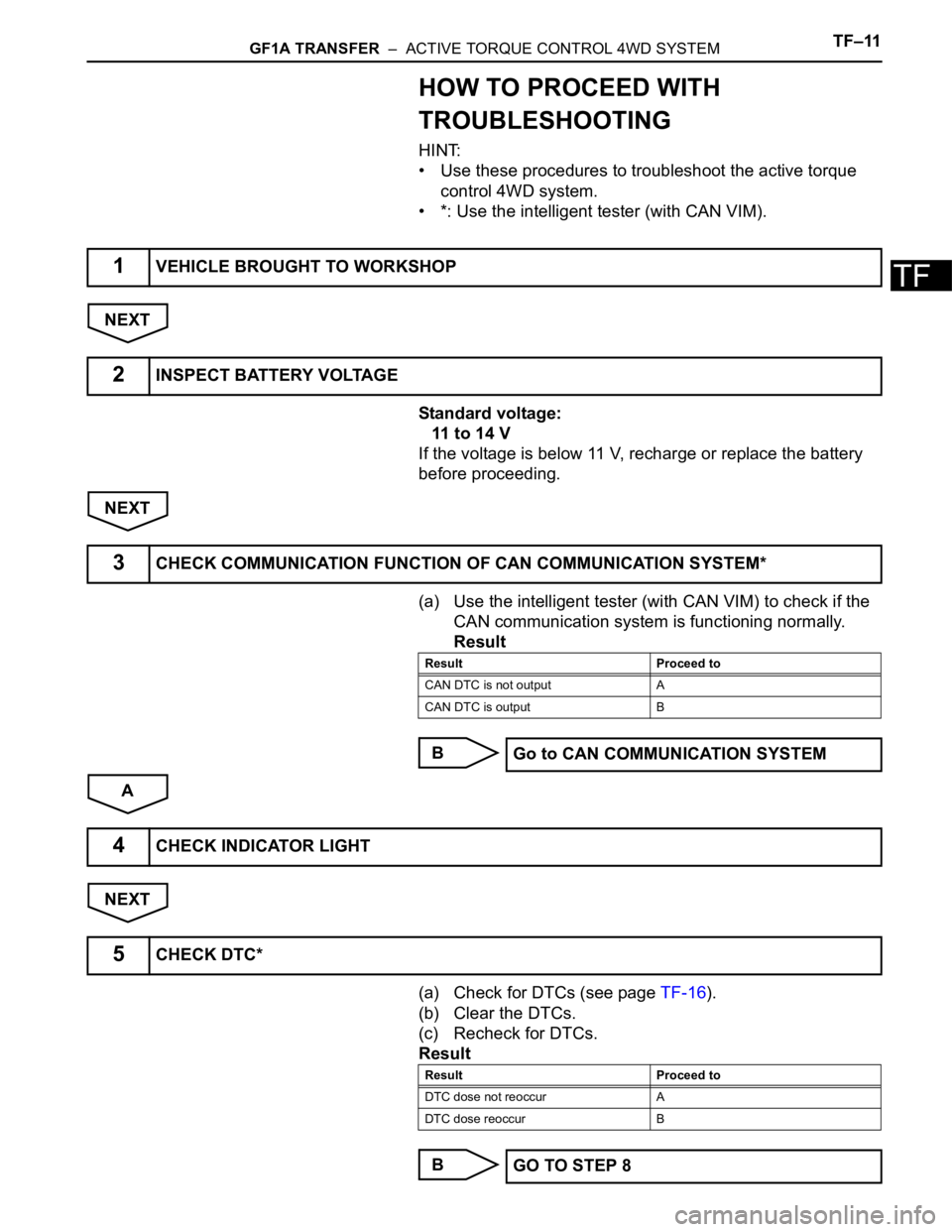
HOW TO PROCEED WITH
TROUBLESHOOTING
HINT:
• Use these procedures to troubleshoot the active torque
control 4WD system.
• *: Use the intelligent tester (with CAN VIM).
NEXT
Standard voltage:
11 to 14 V
If the voltage is below 11 V, recharge or replace the battery
before proceeding.
NEXT
(a) Use the intelligent tester (with CAN VIM) to check if the
CAN communication system is functioning normally.
Result
B
A
NEXT
(a) Check for DTCs (see page TF-16).
(b) Clear the DTCs.
(c) Recheck for DTCs.
Result
B
1VEHICLE BROUGHT TO WORKSHOP
2INSPECT BATTERY VOLTAGE
3CHECK COMMUNICATION FUNCTION OF CAN COMMUNICATION SYSTEM*
Result Proceed to
CAN DTC is not output A
CAN DTC is output B
Go to CAN COMMUNICATION SYSTEM
4CHECK INDICATOR LIGHT
5CHECK DTC*
Result Proceed to
DTC dose not reoccur A
DTC dose reoccur B
GO TO STEP 8
Page 1340 of 2000
TF–12GF1A TRANSFER – ACTIVE TORQUE CONTROL 4WD SYSTEM
TF
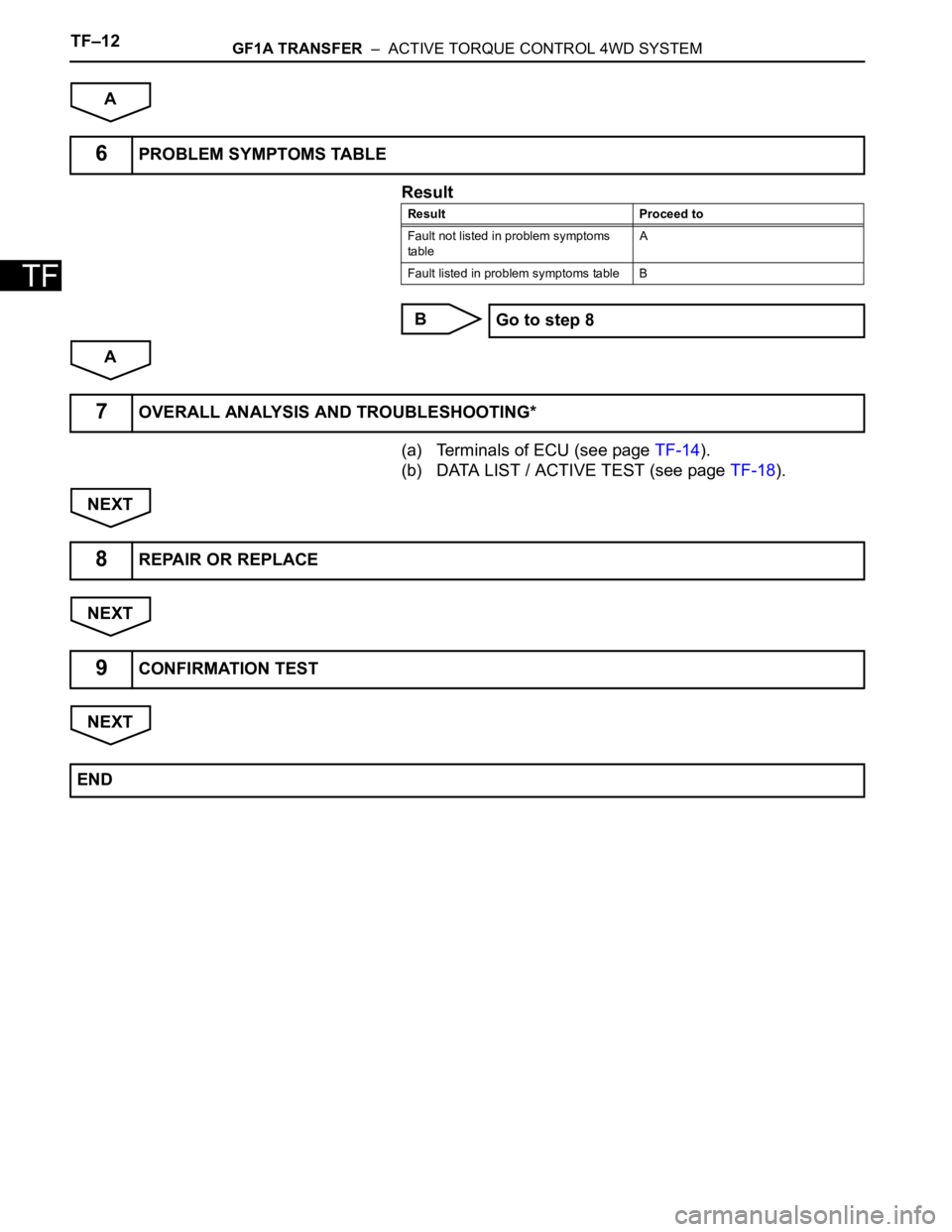
A
Result
B
A
(a) Terminals of ECU (see page TF-14).
(b) DATA LIST / ACTIVE TEST (see page TF-18).
NEXT
NEXT
NEXT
6PROBLEM SYMPTOMS TABLE
Result Proceed to
Fault not listed in problem symptoms
tableA
Fault listed in problem symptoms table B
Go to step 8
7OVERALL ANALYSIS AND TROUBLESHOOTING*
8REPAIR OR REPLACE
9CONFIRMATION TEST
END
Page 1341 of 2000

GF1A TRANSFER – ACTIVE TORQUE CONTROL 4WD SYSTEMTF–13
TF
TEST MODE PROCEDURE
1. DESCRIPTION
HINT:
When using a chassis dynamometer, brake tester, etc. to
perform a vehicle test, activate test mode to avoid a
"different tire diameter installed" incorrect judgment.
Test mode does not have a 4WD parameter. Test mode
is activated because it will prohibit a different tire
diameter judgment.
2. ACTIVATE TEST MODE
HINT:
Activate test mode before using a chassis dynamometer,
brake tester, etc. to perform a vehicle test.
(a) Check that the ignition switch is OFF.
(b) Use either of the following methods to change the
4WD ECU to test mode.
(1) Test mode activation through intelligent tester
(with CAM VIM).
• Connect the intelligent tester (with CAM VIM)
to the DLC3 connector and turn the ignition
switch ON. Using the test mode activation
function (mode 10), activate test mode.
(2) Test mode activation by shorting TS terminal
• With the ignition switch OFF, short-circuit the
TS and CG terminals of the DLC3 connector.
Then turn the ignition switch ON to activate
test mode.
NOTICE:
When the ignition switch is turned from
OFF to ON, the 4WD indicator light will
illuminate for 4 seconds. Then it will turn
off.
4WD Lock Mode indicator
HINT:
When the ignition switch is ON and the 4WD
lock switch is turned from OFF to ON, the
4WD lock mode indicator blinks twice and
then illuminates.
If the indicator does not illuminate, check the
bulb for burnout. Also, inspect the wire
harness between the 4WD ECU and
combination meter.
Control Status 4WD Control Status
During test mode Different tire diameter malfunction judgment (detection that tire
diameter of 4 wheels are not same) is not performed.
Other than above item, normal control is performed.
- 4WD lock switch OFF (4WD auto mode status)
- 4WD lock switch ON (4WD lock mode status)
4WD Lock Switch OFF Illuminates for 4 seconds, then turns
OFF
4WD Lock Switch ON Remains illuminated
Page 1342 of 2000
TF–14GF1A TRANSFER – ACTIVE TORQUE CONTROL 4WD SYSTEM
TF
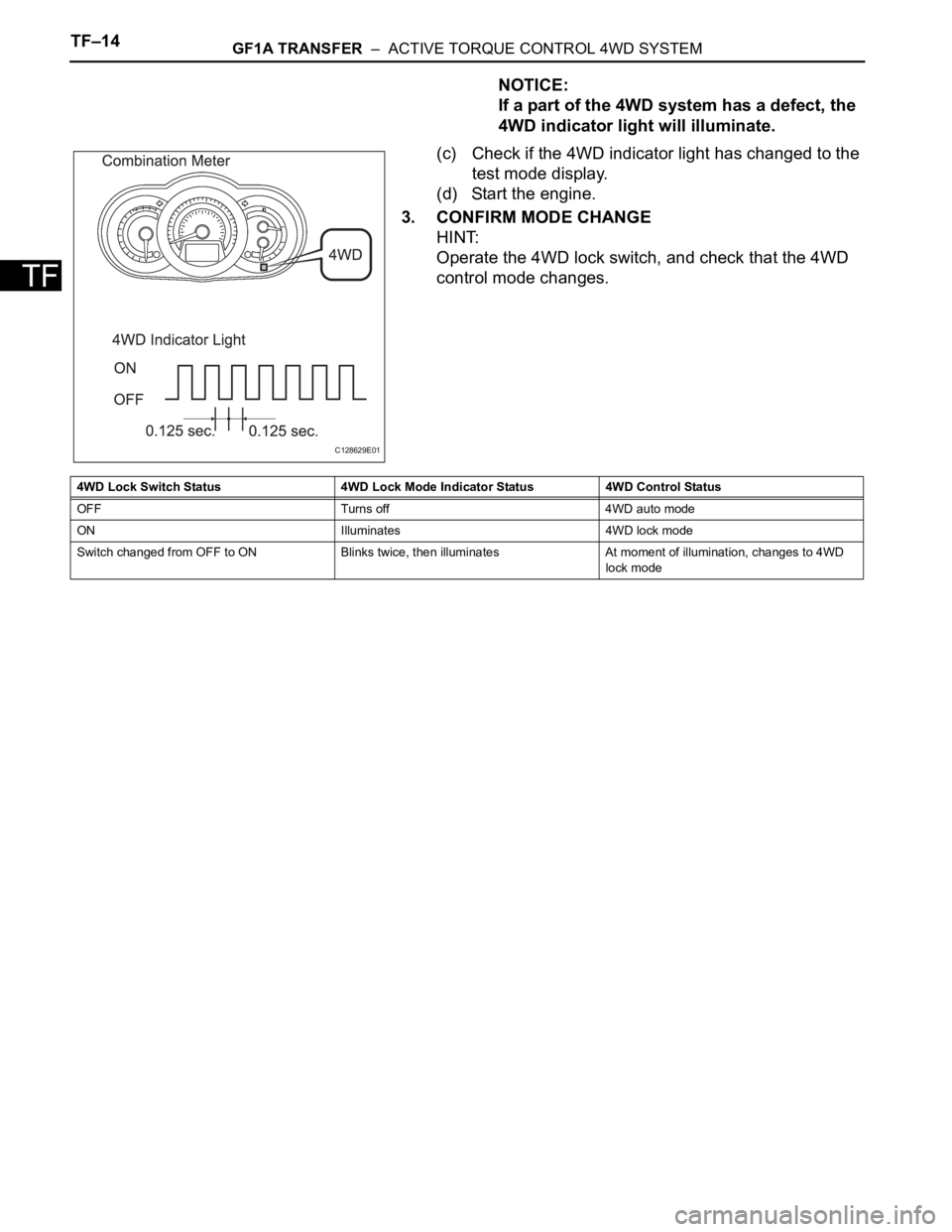
NOTICE:
If a part of the 4WD system has a defect, the
4WD indicator light will illuminate.
(c) Check if the 4WD indicator light has changed to the
test mode display.
(d) Start the engine.
3. CONFIRM MODE CHANGE
HINT:
Operate the 4WD lock switch, and check that the 4WD
control mode changes.
C128629E01
4WD Lock Switch Status 4WD Lock Mode Indicator Status 4WD Control Status
OFF Turns off 4WD auto mode
ON Illuminates 4WD lock mode
Switch changed from OFF to ON Blinks twice, then illuminates At moment of illumination, changes to 4WD
lock mode
Page 1343 of 2000

GF1A TRANSFER – ACTIVE TORQUE CONTROL 4WD SYSTEMTF–15
TF
PROBLEM SYMPTOMS TABLE
HINT:
• Use the table below to help determine the cause of the
problem symptom. The potential causes of the symptoms
are listed in order of probability in the "Suspected area"
column of the table. Check each symptom by checking the
suspected areas in the order they are listed. Replace parts
as necessary.
• Inspect the fuses and relays related to this system before
inspecting the suspected areas below.
Active torque control 4WD system
HINT:
*:When driving 4WD mode, the vehicle is hard to turn, as if
the brakes were applied, due to the rotational difference
between the front and rear tires while turning.
Symptom Suspected area See page
Phenomenon of tight-corner braking*1.Steering angle sensor circuitTF-27
2.Linear solenoid circuitTF-30
3.4WD control ECU
4WD indicator light remains ON 4WD indicator light circuitTF-36
4WD indicator light does not come ON 4WD indicator light circuitTF-40
The system is in the DTC output mode although
terminals TC and CG of the DLC3 are not short
circuited1.TC and CG terminal circuitTF-42
2.4WD indicator light circuit
The system is not in the DTC output mode although
terminals TC and CG of the DLC3 are not short
circuited1.TC and CG terminal circuitTF-42
2.4WD indicator light circuit
Page 1344 of 2000
TF–16GF1A TRANSFER – ACTIVE TORQUE CONTROL 4WD SYSTEM
TF
TERMINALS OF ECU
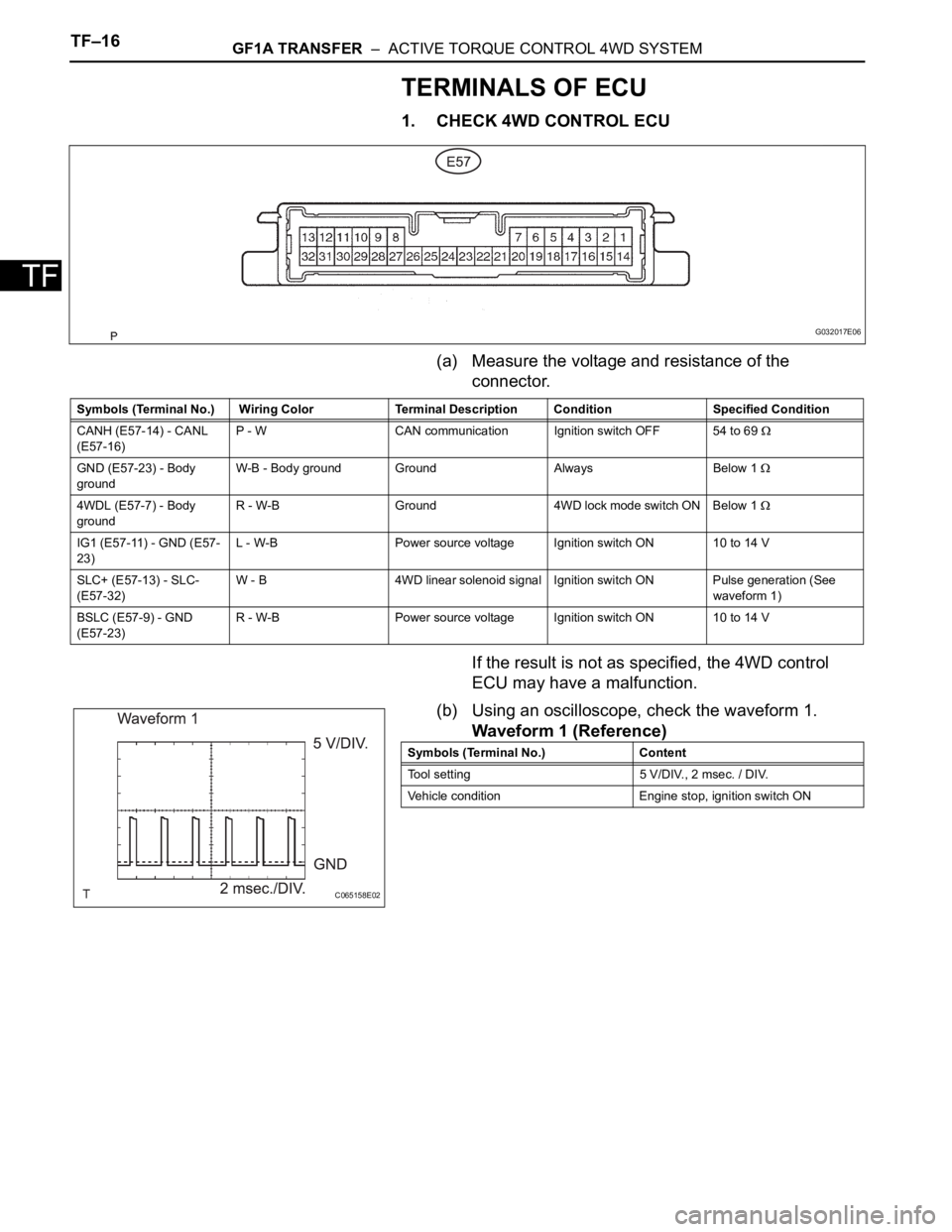
1. CHECK 4WD CONTROL ECU
(a) Measure the voltage and resistance of the
connector.
If the result is not as specified, the 4WD control
ECU may have a malfunction.
(b) Using an oscilloscope, check the waveform 1.
Waveform 1 (Reference)
G032017E06
Symbols (Terminal No.) Wiring Color Terminal Description Condition Specified Condition
CANH (E57-14) - CANL
(E57-16)P - W CAN communication Ignition switch OFF 54 to 69
GND (E57-23) - Body
groundW-B - Body ground Ground Always Below 1
4WDL (E57-7) - Body
groundR - W-B Ground 4WD lock mode switch ON Below 1
IG1 (E57-11) - GND (E57-
23)L - W-B Power source voltage Ignition switch ON 10 to 14 V
SLC+ (E57-13) - SLC-
(E57-32)W - B 4WD linear solenoid signal Ignition switch ON Pulse generation (See
waveform 1)
BSLC (E57-9) - GND
(E57-23)R - W-B Power source voltage Ignition switch ON 10 to 14 V
C065158E02
Symbols (Terminal No.) Content
Tool setting 5 V/DIV., 2 msec. / DIV.
Vehicle condition Engine stop, ignition switch ON
Page 1345 of 2000
GF1A TRANSFER – ACTIVE TORQUE CONTROL 4WD SYSTEMTF–17
TF
DIAGNOSIS SYSTEM
1. DESCRIPTION
Active torque control 4WD system data can be read in
the Data Link Connector 3 (DLC3) of the vehicle. When
the system seems to be malfunctioning, use the
intelligent tester (with CAN VIM) to check for
malfunctions and perform repairs. Therefore when there
seems to be a problem with the active torque control
4WD, use the intelligent tester (with CAN VIM) or SST to
check and troubleshoot it.
SST 09843-18040
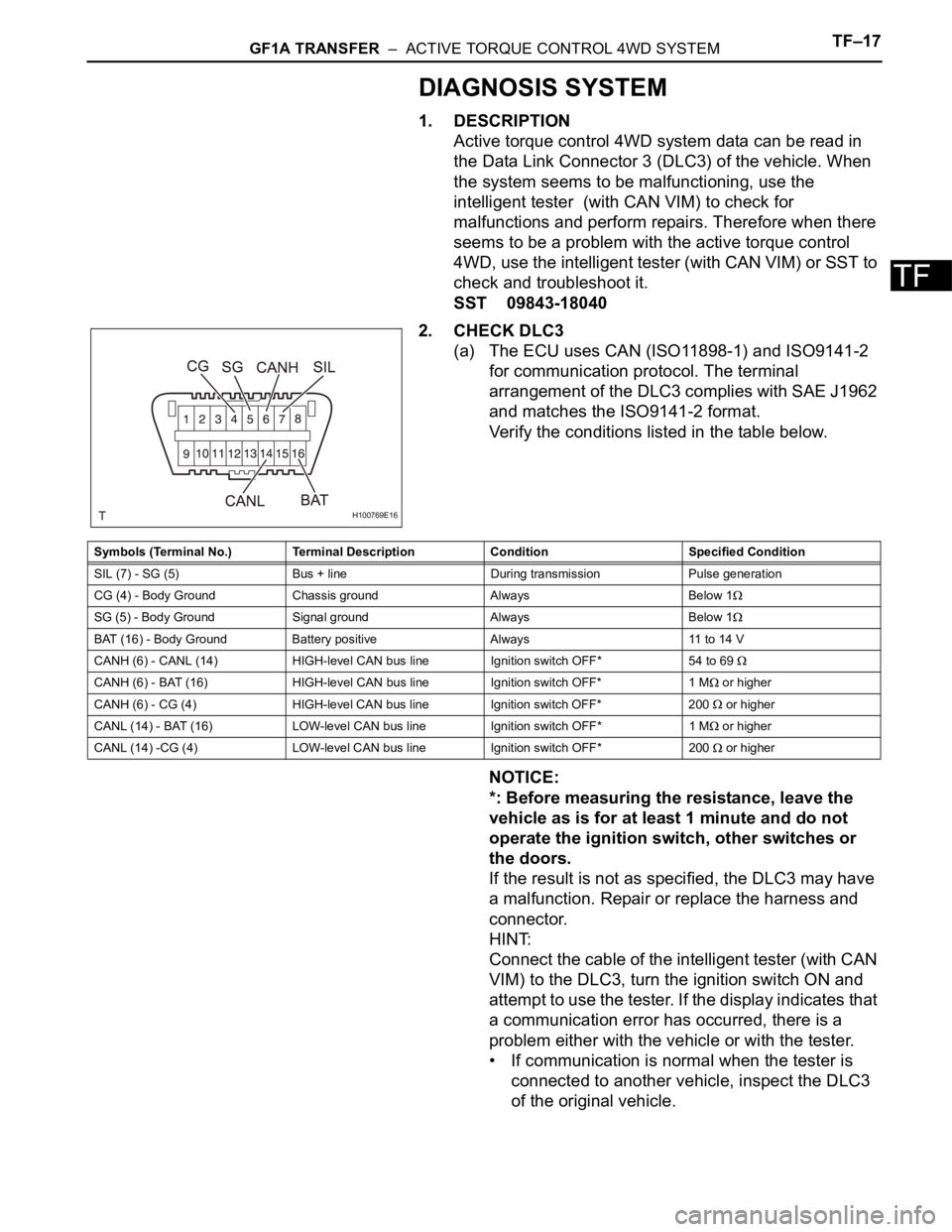
2. CHECK DLC3
(a) The ECU uses CAN (ISO11898-1) and ISO9141-2
for communication protocol. The terminal
arrangement of the DLC3 complies with SAE J1962
and matches the ISO9141-2 format.
Verify the conditions listed in the table below.
NOTICE:
*: Before measuring the resistance, leave the
vehicle as is for at least 1 minute and do not
operate the ignition switch, other switches or
the doors.
If the result is not as specified, the DLC3 may have
a malfunction. Repair or replace the harness and
connector.
HINT:
Connect the cable of the intelligent tester (with CAN
VIM) to the DLC3, turn the ignition switch ON and
attempt to use the tester. If the display indicates that
a communication error has occurred, there is a
problem either with the vehicle or with the tester.
• If communication is normal when the tester is
connected to another vehicle, inspect the DLC3
of the original vehicle.
H100769E16
Symbols (Terminal No.) Terminal Description Condition Specified Condition
SIL (7) - SG (5) Bus + line During transmission Pulse generation
CG (4) - Body Ground Chassis ground Always Below 1
SG (5) - Body Ground Signal ground Always Below 1
BAT (16) - Body Ground Battery positive Always 11 to 14 V
CANH (6) - CANL (14) HIGH-level CAN bus line Ignition switch OFF* 54 to 69
CANH (6) - BAT (16) HIGH-level CAN bus line Ignition switch OFF* 1 M or higher
CANH (6) - CG (4) HIGH-level CAN bus line Ignition switch OFF* 200
or higher
CANL (14) - BAT (16) LOW-level CAN bus line Ignition switch OFF* 1 M
or higher
CANL (14) -CG (4) LOW-level CAN bus line Ignition switch OFF* 200
or higher
Page 1346 of 2000
TF–18GF1A TRANSFER – ACTIVE TORQUE CONTROL 4WD SYSTEM
TF
• If communication is still not possible when the
tester is connected to another vehicle, the
problem may be in the tester itself. Consult the
Service Department listed in the tester's
instruction manual.
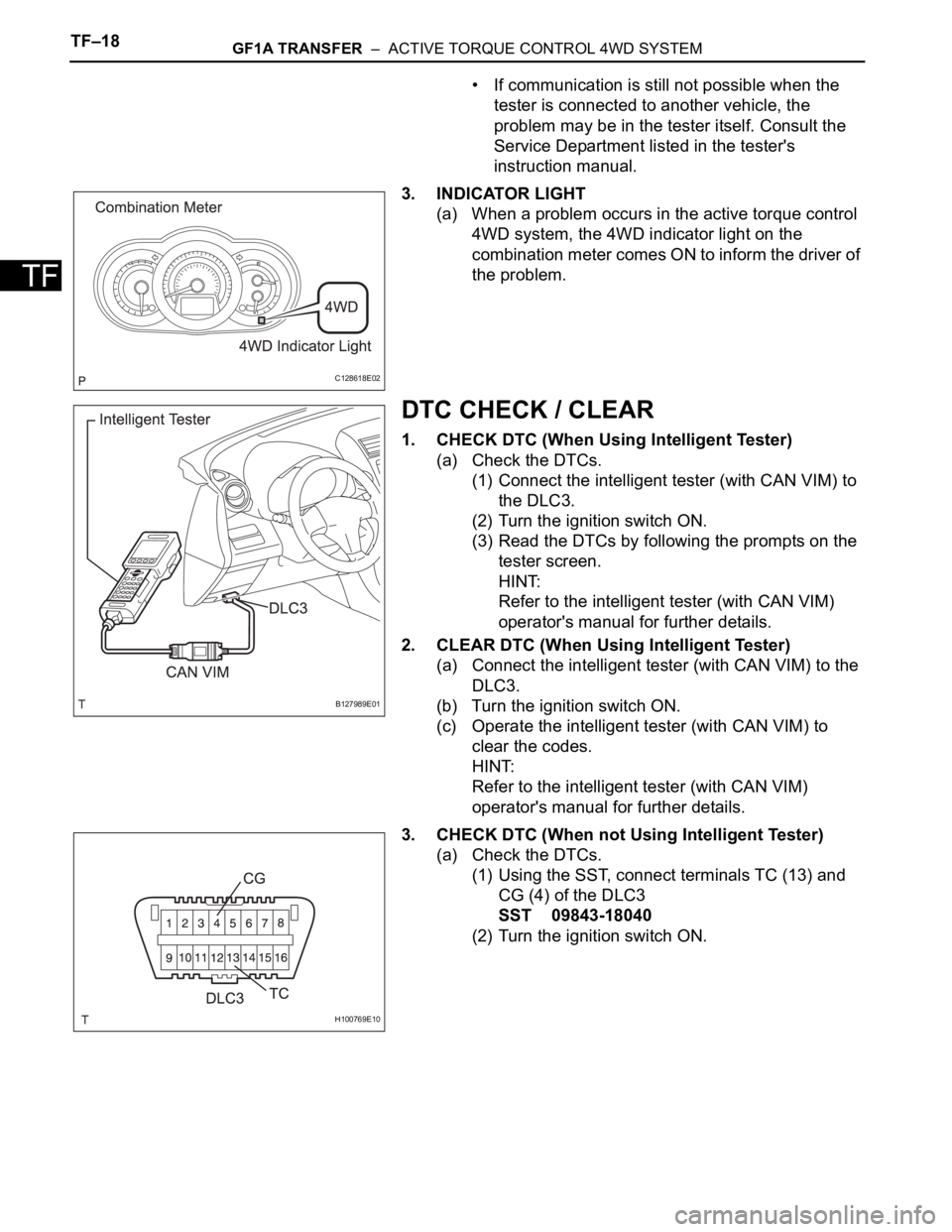
3. INDICATOR LIGHT
(a) When a problem occurs in the active torque control
4WD system, the 4WD indicator light on the
combination meter comes ON to inform the driver of
the problem.
DTC CHECK / CLEAR
1. CHECK DTC (When Using Intelligent Tester)
(a) Check the DTCs.
(1) Connect the intelligent tester (with CAN VIM) to
the DLC3.
(2) Turn the ignition switch ON.
(3) Read the DTCs by following the prompts on the
tester screen.
HINT:
Refer to the intelligent tester (with CAN VIM)
operator's manual for further details.
2. CLEAR DTC (When Using Intelligent Tester)
(a) Connect the intelligent tester (with CAN VIM) to the
DLC3.
(b) Turn the ignition switch ON.
(c) Operate the intelligent tester (with CAN VIM) to
clear the codes.
HINT:
Refer to the intelligent tester (with CAN VIM)
operator's manual for further details.
3. CHECK DTC (When not Using Intelligent Tester)
(a) Check the DTCs.
(1) Using the SST, connect terminals TC (13) and
CG (4) of the DLC3
SST 09843-18040
(2) Turn the ignition switch ON.
C128618E02
B127989E01
H100769E10