2006 MERCEDES-BENZ SPRINTER glove box
[x] Cancel search: glove boxPage 941 of 2305

The ECM continually monitors the fuel and emis-
sions system circuits and sensors to decide whether
the system is in good operating condition. The ECM
then sends the proper lamp-on or lamp-off messages
to the instrument cluster. If the instrument cluster
turns on the MIL after the bulb test, it may indicate
that a malfunction has occurred and that the fuel
and emissions systems may require service. For
proper diagnosis of the fuel and emissions systems,
the ECM, the CAN data bus, or the electronic mes-
sage inputs to the instrument cluster that control the
MIL, a diagnostic scan tool is required. Refer to the
appropriate diagnostic information.
MULTI - FUNCTION INDICA-
TOR
DESCRIPTION
A multi-function indicator is standard equipment
on all instrument clusters. The multi-function indica-
tor is located near the lower edge of the instrument
cluster, directly below the speedometer. The multi-
function indicator consists of a Liquid Crystal Dis-
play (LCD) unit and four push button-controlled
switches that are soldered onto the instrument clus-
ter electronic circuit board. The LCD is visible
through a large rectangular cutout in the instrument
cluster overlay, while the four switch push buttons
extend through a black plastic switch bezel located
on the cluster lens directly below the LCD. The four
multi-function indicator push buttons allow the vehi-
cle operator to configure and adjust several of the
display features. The buttons are labeled from left to
right: ªmiº (miles) or ªkmº (kilometers), an icon
depicting an analog clock face (clock), ª2º (minus),
and ª+º (plus).
The multi-function indicator LCD displays both
alpha-numeric characters and numerous icons to pro-
vide information to the vehicle operator. The indica-
tions of the multi-function indicator are not visible
when the LCD is not illuminated. When illuminated
the indications appear as dark characters and icons
silhouetted against an amber field. When the exterior
lighting is turned Off, the display is illuminated at
maximum brightness. When the exterior lighting is
turned On the display illumination level can be
adjusted in concert with the cluster general illumina-
tion lighting using the ª+º (plus) and ª2º (minus)
multi-function indicator push buttons. The multi-
function indicator LCD unit and push button
switches are serviced as a unit with the instrument
cluster.
OPERATION
The multi-function indicator has several display
capabilities including odometer, trip odometer, clock,engine oil level data, gear selector indicator
(PRNDL), certain diagnostic information and, on
vehicles so equipped, an optional Active Service SYS-
Tem (ASSYST) engine oil maintenance indicator and
an optional outside ambient temperature indicator.
The multi-function indicator is completely controlled
by the instrument cluster logic circuit, and that logic
will allow this indication to be viewed whenever the
multi-function indicator Liquid Crystal Display
(LCD) is activated. Therefore, the indicator remains
functional regardless of the ignition switch position.
With the ignition switch in the Off or Accessory posi-
tions and the key removed from the ignition lock cyl-
inder, the display is activated when the park lamps
are turned On or, for about thirty seconds after any
one of the multi-function indicator switch push but-
tons is depressed. Otherwise, the display unit is
active for about thirty seconds after the key is
inserted into the ignition lock cylinder, and inactive
about thirty seconds after the key is removed from
the ignition lock cylinder.
The multi-function indicator ªmiº (miles) or
ªkmº(kilometers) switch push button is used to con-
trol the odometer/trip odometer display modes. The
multi-function indicator clock switch push button is
used to control the clock/outside temperature display
modes. The multi-function indicator ª+º (plus) and
ª2º (minus) switch push buttons are used to adjust
the cluster general illumination dimming level, the
clock, and other cluster settings. See the owner's
manual in the vehicle glove box for more information
on the features, use, operation and setting proce-
dures for the various standard and optional multi-
function indicator displays.
Proper testing of the multi-function indicator LCD
unit, the CAN data bus and the electronic data bus
message inputs to the instrument cluster that control
some of the multi-function indicator functions
requires the use of a diagnostic scan tool. Refer to
the appropriate diagnostic information. Additional
details for the odometer/trip odometer, the clock, the
gear selector indicator, the ambient temperature indi-
cator and the ASSYST warning and reminder func-
tions of the multi-function indicator may be found
elsewhere in this service information.
ODOMETER
DESCRIPTION
An odometer and trip odometer are standard
equipment in all instrument clusters. The odometer
and trip odometer values are displayed on the left
side of the multi-function indicator Liquid Crystal
Display (LCD). The LCD is soldered onto the cluster
electronic circuit board and is visible through a win-
dow with a clear lens located near the lower edge of
8J - 22 INSTRUMENT CLUSTERVA
Page 945 of 2305

received by the cluster from the Engine Control Mod-
ule (ECM) over the Controller Area Network (CAN)
data bus. The tachometer is an air core magnetic
unit that receives battery current on the instrument
cluster electronic circuit board when the instrument
cluster detects that the ignition switch is in the On
position. The cluster is programmed to move the
gauge needle back to the low end of the scale after
the ignition switch is turned to the Off position. The
instrument cluster circuitry controls the gauge nee-
dle position and provides the following features:
²Engine Speed Message- Each time the cluster
receives an engine speed message from the ECM it
will calculate the correct engine speed reading and
position the gauge needle at that relative speed posi-
tion on the gauge scale. The gauge needle will con-
tinually be repositioned at the relative engine speed
position on the gauge scale until the engine stops
running, or until the ignition switch is turned to the
Off position, whichever occurs first.
²Communication Error- If the cluster fails to
receive an engine speed message, it will hold the
gauge needle at the last indication for about three
seconds, or until the ignition switch is turned to the
Off position, whichever occurs first. After three sec-
onds, the gauge needle will return to the left end of
the gauge scale.
The ECM continually monitors the crankshaft posi-
tion sensor to determine the engine speed. The ECM
then sends the proper engine speed messages to the
instrument cluster. For proper diagnosis of the
crankshaft position sensor, the ECM, the CAN data
bus, or the electronic message inputs to the instru-
ment cluster that control the tachometer, a diagnos-
tic scan tool is required. Refer to the appropriate
diagnostic information.
TRACTION CONTROL INDICA-
TOR
DESCRIPTION
A traction control (ASR) indicator is standard
equipment on all instrument clusters. The traction
control indicator is located near the center of the
speedometer in the instrument cluster. The traction
control indicator consists of an ª!º (exclamation point)
imprinted within a triangular cutout in the opaque
layer of the instrument cluster overlay. The dark
outer layer of the overlay prevents the indicator from
being clearly visible when it is not illuminated. An
amber Light Emitting Diode (LED) behind the cutout
in the opaque layer of the overlay causes the excla-
mation point to appear silhouetted against an amber
field through the translucent outer layer of the over-
lay when the indicator is illuminated from behind by
the LED, which is soldered onto the instrument clus-ter electronic circuit board. The traction control indi-
cator is serviced as a unit with the instrument
cluster.
OPERATION
The traction control (ASR) indicator gives several
indications to the vehicle operator concerning the
operating status of the traction control (ASR) system.
The traction control indicator is controlled by a tran-
sistor on the instrument cluster circuit board based
upon cluster programming and electronic messages
received by the cluster from the Controller Anti-lock
Brake (CAB) over the Controller Area Network
(CAN) data bus. The traction control indicator Light
Emitting Diode (LED) is completely controlled by the
instrument cluster logic circuit, and that logic will
only allow this indicator to operate when the instru-
ment cluster detects that the ignition switch is in the
On position. Therefore, the LED will always be off
when the ignition switch is in any position except
On. The LED only illuminates when it is provided a
path to ground by the instrument cluster transistor.
The instrument cluster will turn on the traction con-
trol indicator for the following reasons:
²Bulb Test- Each time the ignition switch is
turned to the On position the traction control indica-
tor is illuminated for about two seconds as a bulb
test.
²Traction Control (ASR) Indicator Lamp-On
Message- Each time the cluster receives a traction
control indicator lamp-on message from the CAB, the
indicator will be illuminated. This indicator can be
flashed on and off, or illuminated solid, as dictated
by the CAB message. The indicator is illuminated
solid when the traction control system has been deac-
tivated; and is flashed when the traction control is
activated or when the driven wheels lose traction
with the traction control deactivated. The indicator
remains flashing or illuminated solid until the clus-
ter receives a lamp-off message from the CAB, or
until the ignition switch is turned to the Off position,
whichever occurs first.
The CAB continually monitors the traction control
(ASR) switch and the four wheel speed sensors to
determine the correct operating mode for the traction
control system. The CAB then sends the proper
lamp-on or lamp-off messages to the instrument clus-
ter. See the owner's manual in the vehicle glove box
for more information on the features, use, activation
and deactivation of the traction control (ASR) system.
For proper diagnosis of the traction control system,
the CAB, the CAN data bus, or the electronic mes-
sage inputs to the instrument cluster that control the
traction control indicator, a diagnostic scan tool is
required. Refer to the appropriate diagnostic infor-
mation.
8J - 26 INSTRUMENT CLUSTERVA
Page 946 of 2305

TRACTION CONTROL MAL-
FUNCTION INDICATOR
DESCRIPTION
A traction control (ASR) malfunction indicator is
standard equipment on all instrument clusters. The
traction control malfunction indicator is located near
the lower edge of the instrument cluster, to the right
of the multi-function indicator display. The traction
control malfunction indicator consists of an icon that
graphically depicts a tire and two skid marks
imprinted within a rectangular cutout in the opaque
layer of the instrument cluster overlay. The dark
outer layer of the overlay prevents the indicator from
being clearly visible when it is not illuminated. An
amber Light Emitting Diode (LED) behind the cutout
in the opaque layer of the overlay causes the icon to
appear silhouetted against an amber field through
the translucent outer layer of the overlay when the
indicator is illuminated from behind by the LED,
which is soldered onto the instrument cluster elec-
tronic circuit board. The traction control malfunction
indicator is serviced as a unit with the instrument
cluster.
OPERATION
The traction control (ASR) malfunction indicator
gives the vehicle operator an indication when the
traction control system is faulty or inoperative. This
indicator is controlled by a transistor on the instru-
ment cluster circuit board based upon cluster pro-
gramming and electronic messages received by the
cluster from the Controller Antilock Brake (CAB)
over the Controller Area Network (CAN) data bus.
The traction control malfunction indicator Light
Emitting Diode (LED) is completely controlled by the
instrument cluster logic circuit, and that logic will
only allow this indicator to operate when the instru-
ment cluster detects that the ignition switch is in the
On position. Therefore, the LED will always be off
when the ignition switch is in any position except
On. The LED only illuminates when it is provided a
path to ground by the instrument cluster transistor.
The instrument cluster will turn on the traction con-
trol malfunction indicator for the following reasons:
²Bulb Test- Each time the ignition switch is
turned to the On position the traction control indica-
tor is illuminated as a bulb test until the engine is
started.
²Traction Control (ASR) Malfunction Indica-
tor Lamp-On Message- Each time the cluster
receives a traction control malfunction indicator
lamp-on message from the CAB, the indicator will be
illuminated. The indicator remains illuminated until
the cluster receives a lamp-off message from the
CAB, or until the ignition switch is turned to the Off
position, whichever occurs first.The CAB continually monitors the traction control
(ASR) system circuits and sensors to decide whether
the system is in good operating condition. The CAB
then sends the proper lamp-on or lamp-off messages
to the instrument cluster. If the CAB sends a
lamp-on message after the bulb test, it indicates that
the CAB has detected a system malfunction and that
the traction control (ASR) system has become inoper-
ative. The CAB will store a Diagnostic Trouble Code
(DTC) for any malfunction it detects. In addition, if
the traction control malfunction indicator is illumi-
nated, the CAB will deactivate an activated traction
control system and engine power output may be
reduced. See the owner's manual in the vehicle glove
box for more information on the features, use, activa-
tion and deactivation of the traction control (ASR)
system. For proper diagnosis of the traction control
system, the CAB, the CAN data bus, or the electronic
message inputs to the instrument cluster that control
the traction control malfunction indicator, a diagnos-
tic scan tool is required. Refer to the appropriate
diagnostic information.
TURN SIGNAL INDICATOR
DESCRIPTION
Two turn signal indicators, one right and one left,
are standard equipment on all instrument clusters.
The turn signal indicators are located near the upper
edge of the instrument cluster, one to each side of the
speedometer. Each turn signal indicator consists of a
arrow-shaped cutout of the International Control and
Display Symbol icon for ªTurn Warningº in the
opaque layer of the instrument cluster overlay. The
dark outer layer of the overlay prevents these icons
from being clearly visible when they are not illumi-
nated. A green Light Emitting Diode (LED) behind
each turn signal indicator cutout in the opaque layer
of the overlay causes the icon to appear in green
through the translucent outer layer of the overlay
when the indicator is illuminated from behind by the
LED, which is soldered onto the instrument cluster
electronic circuit board. The turn signal indicators
are serviced as a unit with the instrument cluster.
OPERATION
The turn signal indicators give an indication to the
vehicle operator that the turn signal (left or right
indicator flashing) or hazard warning (both left and
right indicators flashing) have been selected and are
operating. These indicators are controlled by transis-
tors on the instrument cluster electronic circuit board
based upon the cluster programming and a hard
wired input received by the cluster from the turn sig-
nal relay through the turn signal and hazard warn-
ing switch circuitry of the multi-function switch on
VAINSTRUMENT CLUSTER 8J - 27
Page 994 of 2305

travelling end-release seat belt buckles secured to
the inboard seat track. The driver side front seat belt
buckle of all models includes an integral seat belt
switch that detects whether its seat belt has been
fastened.
²Rear Seat Belts- All rear seating positions are
equipped with three-point seat belt systems. Each
rear seating position belt employs an integral seat
cushion frame mounted inertia latch-type retractor, a
fixed position upper seat back frame mounted turn-
ing loop, and a fixed lower seat belt anchor secured
to the seat cushion frame. All rear seat belts have
fixed end-release seat belt buckles that are also
secured to the seat cushion frame.
PASSIVE RESTRAINTS
A Next Generation driver airbag is standard facto-
ry-installed safety equipment on this model, while a
passenger side front airbag and side curtain airbags
are optional. This airbag system is a passive, inflat-
able, Supplemental Restraint System (SRS) and vehi-
cles with this equipment can be readily identified by
the ªSRS - AIRBAGº logo molded into the driver air-
bag trim cover in the center of the steering wheel
and, if the vehicle is so equipped, also into the pas-
senger airbag door on the instrument panel above
the glove box (Fig. 2). Vehicles with the airbag sys-
tem can also be identified by the airbag indicator,
which will illuminate in the instrument cluster for
about six seconds as a bulb test each time the igni-
tion switch is turned to the On position. A pyrotech-
nic-type seat belt tensioner is integral to the front
seat belt retractor mounted on the lower B-pillar on
the driver side, and to the passenger side retractor of
vehicles equipped with the optional passenger side
airbag.
The supplemental restraint system includes the
following major components, which are described in
further detail elsewhere in this service information:²Airbag Control Module- The Airbag Control
Module (ACM) is located on a mount on the floor
panel within the driver side seat riser, beneath the
driver seat in the passenger compartment.
²Airbag (SRS) Indicator- The airbag indicator
is integral to the ElectroMechanical Instrument Clus-
ter (EMIC), which is located on the instrument panel
in front of the driver.
²Clockspring- The clockspring is located near
the top of the steering column, directly beneath the
steering wheel.
²Driver Airbag- The driver airbag is located in
the center of the steering wheel, beneath the driver
airbag trim cover.
²Driver Knee Blocker- The structure of the
lower instrument panel serves as a knee blocker for
the driver.
²Passenger Airbag- The optional passenger air-
bag is located within the instrument panel, behind
the passenger airbag door on the instrument panel
above the glove box on the passenger side of the vehi-
cle.
²Passenger Knee Blocker- The structure of
the glove box door and the lower instrument panel
serve as a knee blocker for the front seat passenger.
²Seat Belt Tensioner- A seat belt tensioner is
integral to the driver side front seat belt retractor
unit, and to the passenger side front seat belt retrac-
tor unit on vehicles equipped with an optional pas-
senger airbag.
²Side Curtain Airbags- Optional side curtain
airbags are available for this model when it is also
equipped with dual front airbags. In vehicles
equipped with this option, a side curtain airbag is
located on the inside of the roof side rail within a
garnish molding that extends from the A-pillar to the
B-pillar above each front door opening within the
passenger compartment of the vehicle.
²Side Impact Sensor- Two side impact sensors
are used on vehicles equipped with the optional side
curtain airbags, one on each side of the vehicle. One
sensor is located near the front of each front door
step well, concealed behind the step well trim.
The ACM contains a central processing unit and
programming that allows it to communicate on a
serial data bus diagnostic circuit connected to the
16-way Data Link Connector (DLC) located below the
left end of the instrument panel. This method of com-
munication is used for initialization of the ACM and
for diagnosis of the SRS circuits and components
using a diagnostic scan tool.
Hard wired circuitry connects the supplemental
restraint system components to each other through
the electrical system of the vehicle. These hard wired
circuits are integral to several wire harnesses, which
are routed throughout the vehicle and retained by
many different methods. These circuits may be con-
nected to each other, to the vehicle electrical system,
Fig. 2 SRS Logo
VARESTRAINTS 8O - 3
Page 995 of 2305

and to the supplemental restraint system compo-
nents through the use of a combination of soldered
splices, splice block connectors, and many different
types of wire harness terminal connectors and insu-
lators. Refer to the appropriate wiring information.
The wiring information includes wiring diagrams,
proper wire and connector repair procedures, further
details on wire harness routing and retention, as well
as pin-out and location views for the various wire
harness connectors, splices and grounds.
OPERATION
ACTIVE RESTRAINTS
The primary passenger restraints in this or any
other vehicle are the standard equipment factory-in-
stalled seat belts. Seat belts are referred to as an
active restraint because the vehicle occupants are
required to physically fasten and properly adjust
these restraints in order to benefit from them. See
the owner's manual in the vehicle glove box for more
information on the features, use and operation of all
of the factory-installed active restraints.
PASSIVE RESTRAINTS
The passive restraints are referred to as a supple-
mental restraint system because they were designed
and are intended to enhance the protection for the
occupants of the vehicleonlywhen used in conjunc-
tion with the seat belts. They are referred to as pas-
sive restraints because the vehicle occupants are not
required to do anything to make them operate; how-
ever, the vehicle occupants must be wearing their
seat belts in order to obtain the maximum safety
benefit from the factory-installed supplemental
restraint system.
The supplemental restraint system electrical cir-
cuits are continuously monitored and controlled by a
microprocessor and software contained within the
Airbag Control Module (ACM). An airbag indicator in
the ElectroMechanical Instrument Cluster (EMIC)
illuminates for about four seconds as a bulb test each
time the ignition switch is turned to the On or Start
positions. Following the bulb test, the airbag indica-
tor is turned on or off by the ACM to indicate the
status of the supplemental restraint system. If the
airbag indicator comes on either solid or flashing at
any time other than during the bulb test, it indicates
that there is a problem in the supplemental restraint
system electrical circuits. Such a problem may cause
airbags not to deploy when required, or to deploy
when not required.
Deployment of the supplemental restraints
depends upon the angle and severity of an impact.
Deployment is not based upon vehicle speed; rather,
deployment is based upon the rate of deceleration as
measured by the forces of gravity (G force) upon the
impact sensor(s). When an impact is severe enough,the microprocessor in the ACM signals the inflator of
the appropriate airbag units to deploy their airbag
cushions. The front seat belt tensioners are provided
with a deployment signal by the ACM in conjunction
with the driver and passenger airbags.
During a frontal vehicle impact, the knee blockers
work in concert with properly fastened and adjusted
seat belts to restrain both the driver and the front
seat passenger in the proper position for an airbag
deployment. The knee blockers also absorb and dis-
tribute the crash energy from the driver and the
front seat passenger to the structure of the instru-
ment panel. The seat belt tensioners remove the
slack from the front seat belts to provide further
assurance that the driver and front seat passenger
are properly positioned and restrained for an airbag
deployment.
Typically, the vehicle occupants recall more about
the events preceding and following a collision than
they do of an airbag deployment itself. This is
because the airbag deployment and deflation occur so
rapidly. In a typical 48 kilometer-per-hour (30 mile-
per-hour) barrier impact, from the moment of impact
until the airbags are fully inflated takes only a few
milliseconds. Within one to two seconds from the
moment of impact, the airbags are almost entirely
deflated. The times cited for these events are approx-
imations, which apply only to a barrier impact at the
given speed. Actual times will vary somewhat,
depending upon the vehicle speed, impact angle,
severity of the impact, and the type of collision.
When the ACM monitors a problem in any of the
airbag system circuits or components, including the
seat belt tensioners, it stores a fault code or Diagnos-
tic Trouble Code (DTC) in its memory circuit and
sends a hard wired output to the EMIC to turn on
the airbag indicator. If the EMIC detects a problem
in the airbag indicator or airbag indicator circuit, the
cluster will flash the seatbelt indicator on and off.
Proper testing of the supplemental restraint system
components as well as the retrieval or erasure of a
DTC from the ACM requires the use of a diagnostic
scan tool. Refer to the appropriate diagnostic infor-
mation.
See the owner's manual in the vehicle glove box for
more information on the features, use and operation
of all of the factory-installed passive restraints.
8O - 4 RESTRAINTSVA
Page 1015 of 2305
(3) If the vehicle is so equipped, snap the plastic
cover over the screw that secures the front seat belt
buckle lower anchor to the inboard side of the seat
frame.
(4) On the driver side only, reconnect the seat belt
switch pigtail wire to the vehicle wire harness and
push the joined connectors through the clearance
hole in the seat riser cover.
(5) On the driver side only, route and secure the
seat belt switch pigtail wire to the seat frame with
wire ties.
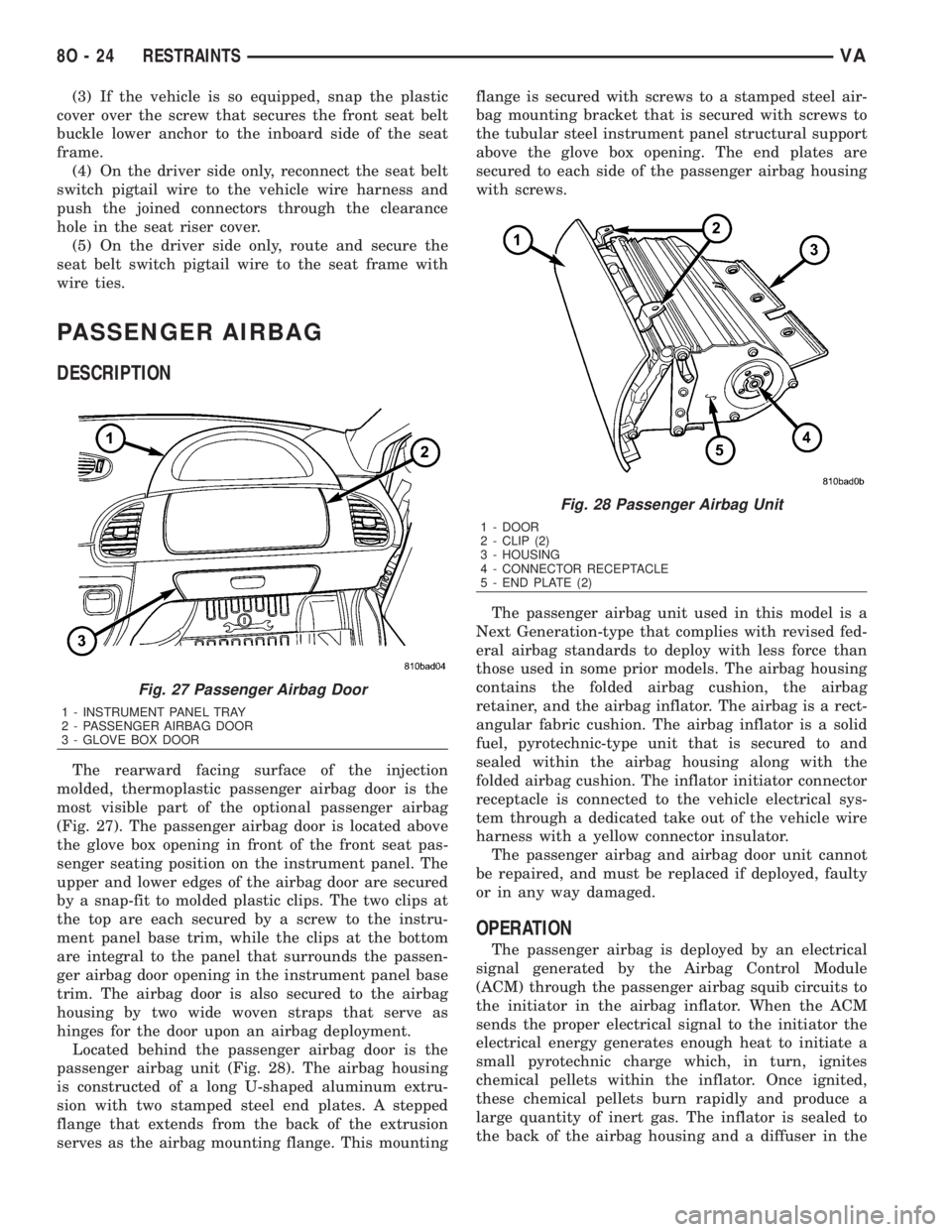
PASSENGER AIRBAG
DESCRIPTION
The rearward facing surface of the injection
molded, thermoplastic passenger airbag door is the
most visible part of the optional passenger airbag
(Fig. 27). The passenger airbag door is located above
the glove box opening in front of the front seat pas-
senger seating position on the instrument panel. The
upper and lower edges of the airbag door are secured
by a snap-fit to molded plastic clips. The two clips at
the top are each secured by a screw to the instru-
ment panel base trim, while the clips at the bottom
are integral to the panel that surrounds the passen-
ger airbag door opening in the instrument panel base
trim. The airbag door is also secured to the airbag
housing by two wide woven straps that serve as
hinges for the door upon an airbag deployment.
Located behind the passenger airbag door is the
passenger airbag unit (Fig. 28). The airbag housing
is constructed of a long U-shaped aluminum extru-
sion with two stamped steel end plates. A stepped
flange that extends from the back of the extrusion
serves as the airbag mounting flange. This mountingflange is secured with screws to a stamped steel air-
bag mounting bracket that is secured with screws to
the tubular steel instrument panel structural support
above the glove box opening. The end plates are
secured to each side of the passenger airbag housing
with screws.
The passenger airbag unit used in this model is a
Next Generation-type that complies with revised fed-
eral airbag standards to deploy with less force than
those used in some prior models. The airbag housing
contains the folded airbag cushion, the airbag
retainer, and the airbag inflator. The airbag is a rect-
angular fabric cushion. The airbag inflator is a solid
fuel, pyrotechnic-type unit that is secured to and
sealed within the airbag housing along with the
folded airbag cushion. The inflator initiator connector
receptacle is connected to the vehicle electrical sys-
tem through a dedicated take out of the vehicle wire
harness with a yellow connector insulator.
The passenger airbag and airbag door unit cannot
be repaired, and must be replaced if deployed, faulty
or in any way damaged.
OPERATION
The passenger airbag is deployed by an electrical
signal generated by the Airbag Control Module
(ACM) through the passenger airbag squib circuits to
the initiator in the airbag inflator. When the ACM
sends the proper electrical signal to the initiator the
electrical energy generates enough heat to initiate a
small pyrotechnic charge which, in turn, ignites
chemical pellets within the inflator. Once ignited,
these chemical pellets burn rapidly and produce a
large quantity of inert gas. The inflator is sealed to
the back of the airbag housing and a diffuser in the
Fig. 27 Passenger Airbag Door
1 - INSTRUMENT PANEL TRAY
2 - PASSENGER AIRBAG DOOR
3 - GLOVE BOX DOOR
Fig. 28 Passenger Airbag Unit
1 - DOOR
2 - CLIP (2)
3 - HOUSING
4 - CONNECTOR RECEPTACLE
5 - END PLATE (2)
8O - 24 RESTRAINTSVA
Page 1047 of 2305
other minor debris from the outside windshield glass
surface that might be encountered while driving the
vehicle under numerous types of inclement operating
conditions.
Two wiper systems are available: the standard
intermittent wipe system, or an optional automatic
wipe system. The vehicle operator initiates all wiper
and washer system functions with the multi-function
switch wiper control stalk that extends from the
right side of the steering column, just below the
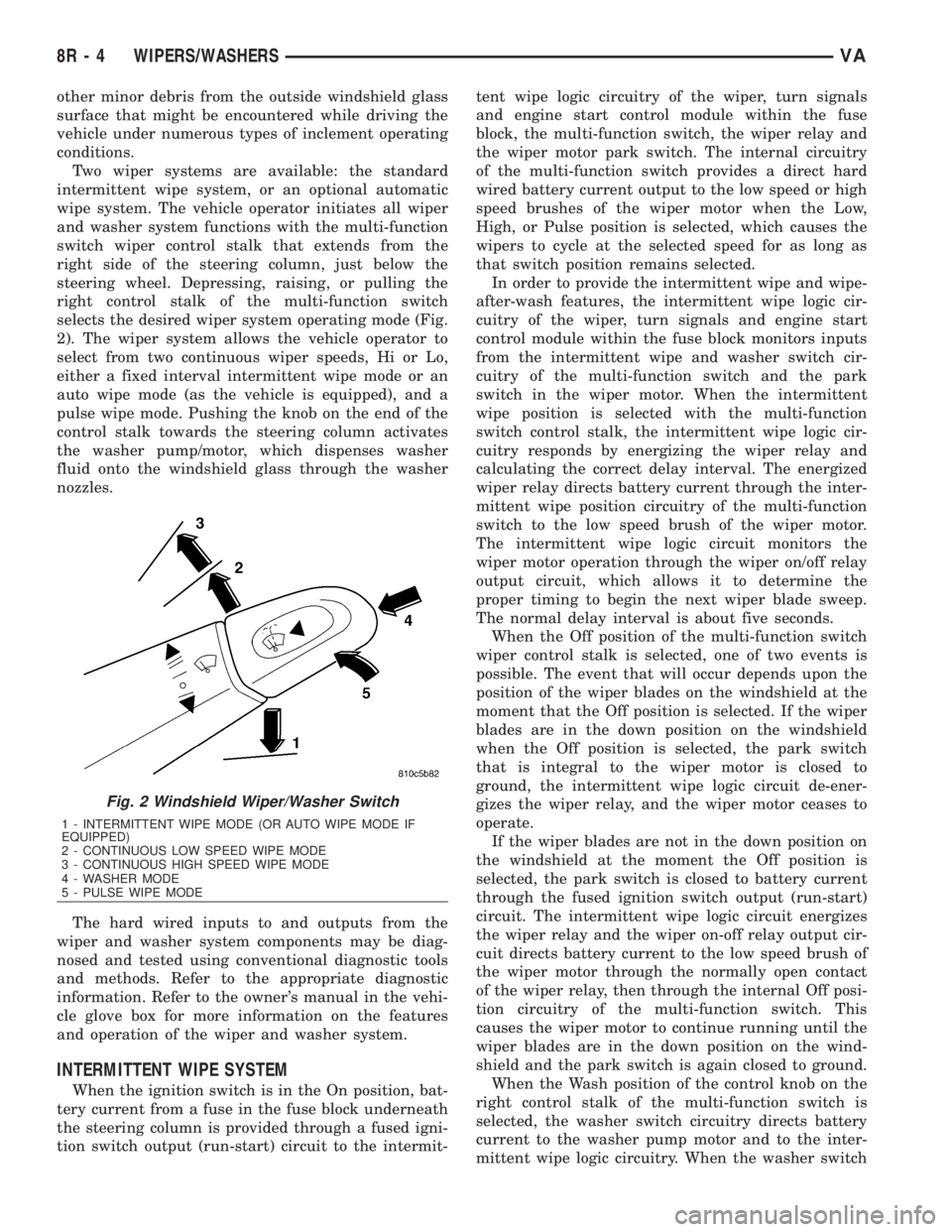
steering wheel. Depressing, raising, or pulling the
right control stalk of the multi-function switch
selects the desired wiper system operating mode (Fig.
2). The wiper system allows the vehicle operator to
select from two continuous wiper speeds, Hi or Lo,
either a fixed interval intermittent wipe mode or an
auto wipe mode (as the vehicle is equipped), and a
pulse wipe mode. Pushing the knob on the end of the
control stalk towards the steering column activates
the washer pump/motor, which dispenses washer
fluid onto the windshield glass through the washer
nozzles.
The hard wired inputs to and outputs from the
wiper and washer system components may be diag-
nosed and tested using conventional diagnostic tools
and methods. Refer to the appropriate diagnostic
information. Refer to the owner's manual in the vehi-
cle glove box for more information on the features
and operation of the wiper and washer system.
INTERMITTENT WIPE SYSTEM
When the ignition switch is in the On position, bat-
tery current from a fuse in the fuse block underneath
the steering column is provided through a fused igni-
tion switch output (run-start) circuit to the intermit-tent wipe logic circuitry of the wiper, turn signals
and engine start control module within the fuse
block, the multi-function switch, the wiper relay and
the wiper motor park switch. The internal circuitry
of the multi-function switch provides a direct hard
wired battery current output to the low speed or high
speed brushes of the wiper motor when the Low,
High, or Pulse position is selected, which causes the
wipers to cycle at the selected speed for as long as
that switch position remains selected.
In order to provide the intermittent wipe and wipe-
after-wash features, the intermittent wipe logic cir-
cuitry of the wiper, turn signals and engine start
control module within the fuse block monitors inputs
from the intermittent wipe and washer switch cir-
cuitry of the multi-function switch and the park
switch in the wiper motor. When the intermittent
wipe position is selected with the multi-function
switch control stalk, the intermittent wipe logic cir-
cuitry responds by energizing the wiper relay and
calculating the correct delay interval. The energized
wiper relay directs battery current through the inter-
mittent wipe position circuitry of the multi-function
switch to the low speed brush of the wiper motor.
The intermittent wipe logic circuit monitors the
wiper motor operation through the wiper on/off relay
output circuit, which allows it to determine the
proper timing to begin the next wiper blade sweep.
The normal delay interval is about five seconds.
When the Off position of the multi-function switch
wiper control stalk is selected, one of two events is
possible. The event that will occur depends upon the
position of the wiper blades on the windshield at the
moment that the Off position is selected. If the wiper
blades are in the down position on the windshield
when the Off position is selected, the park switch
that is integral to the wiper motor is closed to
ground, the intermittent wipe logic circuit de-ener-
gizes the wiper relay, and the wiper motor ceases to
operate.
If the wiper blades are not in the down position on
the windshield at the moment the Off position is
selected, the park switch is closed to battery current
through the fused ignition switch output (run-start)
circuit. The intermittent wipe logic circuit energizes
the wiper relay and the wiper on-off relay output cir-
cuit directs battery current to the low speed brush of
the wiper motor through the normally open contact
of the wiper relay, then through the internal Off posi-
tion circuitry of the multi-function switch. This
causes the wiper motor to continue running until the
wiper blades are in the down position on the wind-
shield and the park switch is again closed to ground.
When the Wash position of the control knob on the
right control stalk of the multi-function switch is
selected, the washer switch circuitry directs battery
current to the washer pump motor and to the inter-
mittent wipe logic circuitry. When the washer switch
Fig. 2 Windshield Wiper/Washer Switch
1 - INTERMITTENT WIPE MODE (OR AUTO WIPE MODE IF
EQUIPPED)
2 - CONTINUOUS LOW SPEED WIPE MODE
3 - CONTINUOUS HIGH SPEED WIPE MODE
4 - WASHER MODE
5 - PULSE WIPE MODE
8R - 4 WIPERS/WASHERSVA
Page 1998 of 2305
INSTRUMENT PANEL
TABLE OF CONTENTS
page page
CLUSTER BEZEL
REMOVAL.............................55
INSTALLATION.........................56
ACCESSORY SWITCH BEZEL
REMOVAL.............................56
INSTALLATION.........................56
INSTRUMENT PANEL CENTER BEZEL
REMOVAL.............................57
INSTALLATION.........................57
ASH RECEIVER
REMOVAL.............................57
INSTALLATION.........................57
CUP HOLDER
REMOVAL.............................57
INSTALLATION.........................58
GLOVE BOX
REMOVAL.............................58INSTALLATION.........................58
INSTRUMENT PANEL ASSEMBLY
REMOVAL.............................59
INSTALLATION.........................63
TOP COVER - CLUSTER
REMOVAL.............................64
INSTALLATION.........................64
TOP COVER - TRAY
REMOVAL.............................65
INSTALLATION.........................66
TOP COVER
REMOVAL.............................67
INSTALLATION.........................68
STEERING COLUMN OPENING COVER
REMOVAL.............................68
INSTALLATION.........................69
CLUSTER BEZEL
REMOVAL
WARNING: ON VEHICLES EQUIPPED WITH AIR-
BAGS, DISABLE THE AIRBAG SYSTEM BEFORE
ATTEMPTING ANY STEERING WHEEL, STEERING
COLUMN, SEAT BELT TENSIONER, OR INSTRU-
MENT PANEL COMPONENT DIAGNOSIS OR SER-
VICE. DISCONNECT AND ISOLATE THE BATTERY
NEGATIVE (GROUND) CABLE, THEN WAIT TWO
MINUTES FOR THE AIRBAG SYSTEM CAPACITOR
TO DISCHARGE BEFORE PERFORMING FURTHER
DIAGNOSIS OR SERVICE. THIS IS THE ONLY SURE
WAY TO DISABLE THE AIRBAG SYSTEM. FAILURE
TO TAKE THE PROPER PRECAUTIONS COULD
RESULT IN ACCIDENTAL AIRBAG DEPLOYMENT
AND POSSIBLE PERSONAL INJURY.
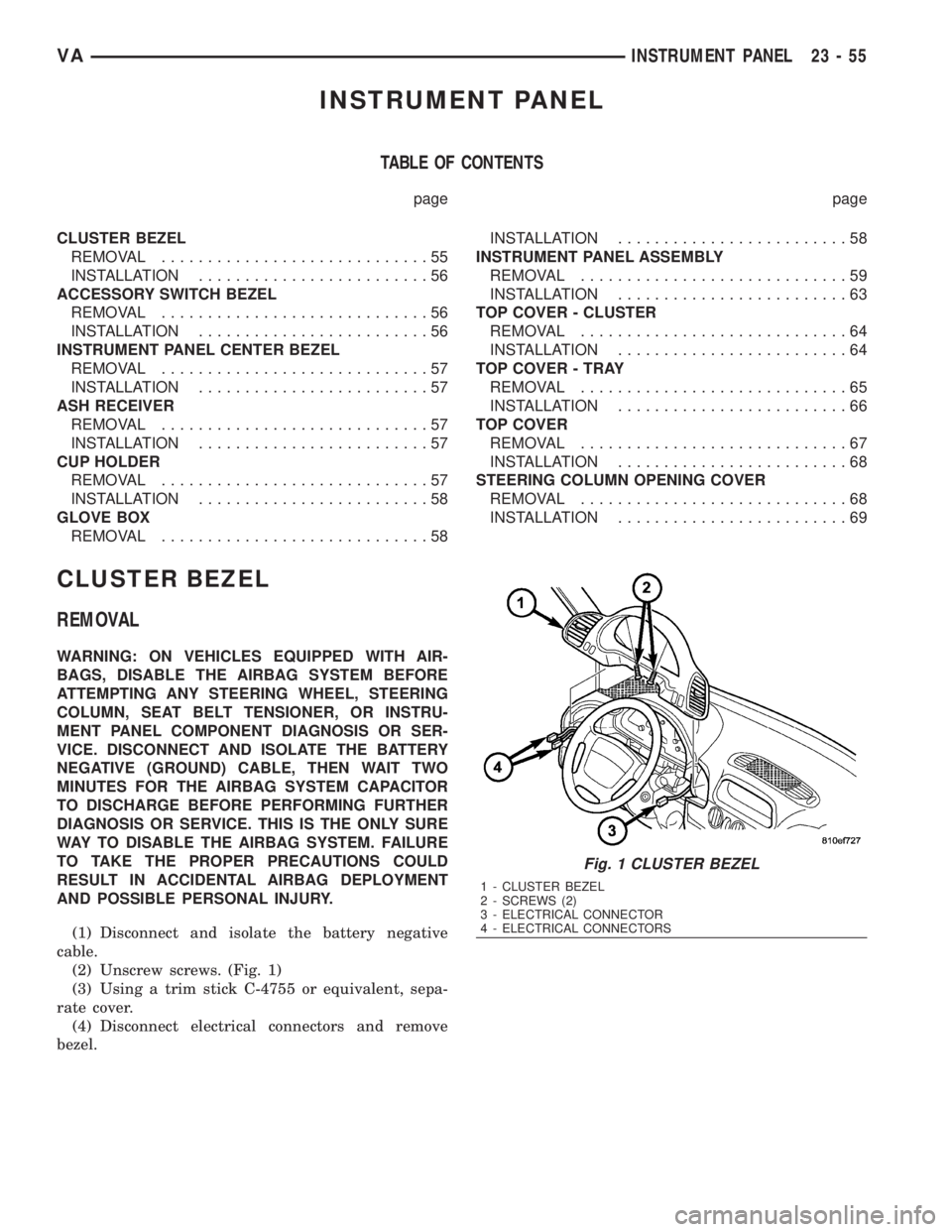
(1) Disconnect and isolate the battery negative
cable.
(2) Unscrew screws. (Fig. 1)
(3) Using a trim stick C-4755 or equivalent, sepa-
rate cover.
(4) Disconnect electrical connectors and remove
bezel.
Fig. 1 CLUSTER BEZEL
1 - CLUSTER BEZEL
2 - SCREWS (2)
3 - ELECTRICAL CONNECTOR
4 - ELECTRICAL CONNECTORS
VAINSTRUMENT PANEL 23 - 55