2006 LAND ROVER FRELANDER 2 CD changer
[x] Cancel search: CD changerPage 1754 of 3229
s tart fail ure or flameout, and decreas ed by one if a subs equent s tart is succes s ful . If t he event t imer i ncreas es t ot hree (over any number of drive cycl es), the cont rol module ent ers t he error lockout mode.Heat exchanger casing overheat: To prot ect t he s ys t em from exces s ive t emperatures , t he cont rol module ent erst he error l ockout mode if t he heat exchanger coolant temperat ure exceeds 125 °C (257 °F).Battery voltage out of limits: Error lockout wi ll occur if bat tery vol tage fall s bel ow 10.25 or ris es above 15.5 volt s .
The error lockout mode can be cleared usi ng the Land Rover approved di agnos ti c s ys t em, or by dis connect ing the bat terypower supply for a mi nimum of 10 s econds.
Remote Operation - Vehicles from 2009MY with FFBH Remote Control
The 868.3 MHz Radi o Frequency (RF) si gnal s t ransmit ted by the remote hands et are recei ved by the DAB/FFBH ant ennalocated i n t he LH rear s i de window. The s ignal s received by t he antenna are detected by t he FFBH receiver. A 'handshake's ignal is s ent back from the recei ver t o t he hands et t o confirm a val id on or off reques t and act ivate the handset LEDaccordi ngl y. The recei ver proces s es the s i gnal it recei ved and trans mi ts the appropriate si gnal s via a dedi cat ed bus t o theFFBH cont rol module.
• NOTE: The ‘handshake’ si gnal only confi rms hands et-receiver communi cat ions were s uccess ful , and not that t he FFBH hast urned on.
W hen t he FFBH is act ivated by the remote hands et, t he FFBH cont rol module will al low t he FFBH t o operate for 30 minutesor unt il an off request is received from t he remot e hands et or CJB. During t he 30 minut e period, the FFBH may operat e i neit her full l oad combus ti on, part load combus t ion or a controll ed idle phas e of operat ion, depending on t he t emperature oft he coolant i n t he heat exchanger.
Pre-burn Thresholds
The FFBH unit wi ll only acti vat e remotely if t he fol lowing thres hold condit ions are met:
Pre-burn batt ery vol tage check: ≥11.5V (volt age at FFBH terminals )Pre-burn coolant temperat ure check: ≤15°C (int ernal FFBH measurement )Pre-burn fuel l evel check: ≥7.5 lit ers (value s t ored i n FFBH at ignit ion off)
The fuel level val ue s tored wit hin t he FFBH unit i s only updated when t he engine i s running. W hen s t art ing t he FFBH viaremot e control wit h the engi ne off, the fuel l evel value us ed in the FFBH calculat ions wi ll be t hat s t ored at t he las t key offevent . It i s t herefore poss ibl e for t he FFBH t o fai l to operat e remotel y if t he engine was s t opped wi th a low fuel level; i ft he fuel tank i s s ubs equent ly refuell ed, the FFBH s t ored fuel l evel wil l st il l read l ow i f the engine has not been s tarteds ince refuel li ng.
If the FFBH does not act ivate due to low bat tery vol tage or l ow fuel l evel, t he FFBH cont rol module transmit s a mes s age ispass ed on t he medi um and high speed CAN bus es, vi a t he CJB to the i nst rument clus ter mes s age cent er which wil l dis playone of the foll owing mes s ages at i gnit ion on:
AUXILIARY HEATER UNAVAILABLE LOW FUELAUXILIARY HEATER UNAVAILABLE LOW BATTERY .
If bot h l ow fuel and low batt ery volt age mes sages are val id, t he ins trument cl ust er mes sage center wi ll alt ernate bet weent he two mes sages .
Remote Control ‘Park Heat’ to ATC ‘Supplementary Heat’ Transitions
• NOTE: The FFBH can s ti ll be acti vat ed by t he ATC module as previ ous l y descri bed
If the FFBH has been operated remot el y (‘park heat’) and the vehicl e is st art ed whilst the FFBH i s s ti ll act ive, it willt ransi ti on int o t he ATC-control led ‘s upplement ary heat’ mode if t he ATC request s i t.
Shoul d t he ATC t hen send a mess age t o t he FFBH to turn off, the FFBH will remain active if 30 minut es has not yetelaps ed from t he ori ginal remot e cont rol ‘park heat ’ request . Once t he remai nder of 30 mi nut es has elaps ed, t he FFBH wil lt urn off.
Swit chi ng Point Temperatures
W hen remotel y s tarted t he FFBH us es a different s et of s wit chi ng poi nt temperat ures t o t he normal ‘supplement al heat’mode. Thi s is because the remot e s tart feature can s tart the FFBH wi th the engine off – t hus different t hres hol ds arerequired t o opti mis e t he heati ng of the engine coolant.
Swit chi ng Point Temperatures
Page 1870 of 3229
ClockAntenna powerLight Emit t ing Di ode (LED) il lumi nat ion.
In transi t mode t he CAN port and t he ON/OFF s wit ch are t he only ci rcuit s that are left act ive.
The CAN port is l eft open to allow the EXIT from transi t mode s ignal to be received. The O N/OFF s wit ch is left act ive t oall ow feedback to the driver vi a t he head uni t LCD (liqui d crys tal dis play), t hat the unit is i n t ransi t mode s houl d t he dri veratt empt t o power up the head unit . This wi ll only occur when t he vehicle engine is runni ng and the bat tery is above 12.3Volt s.
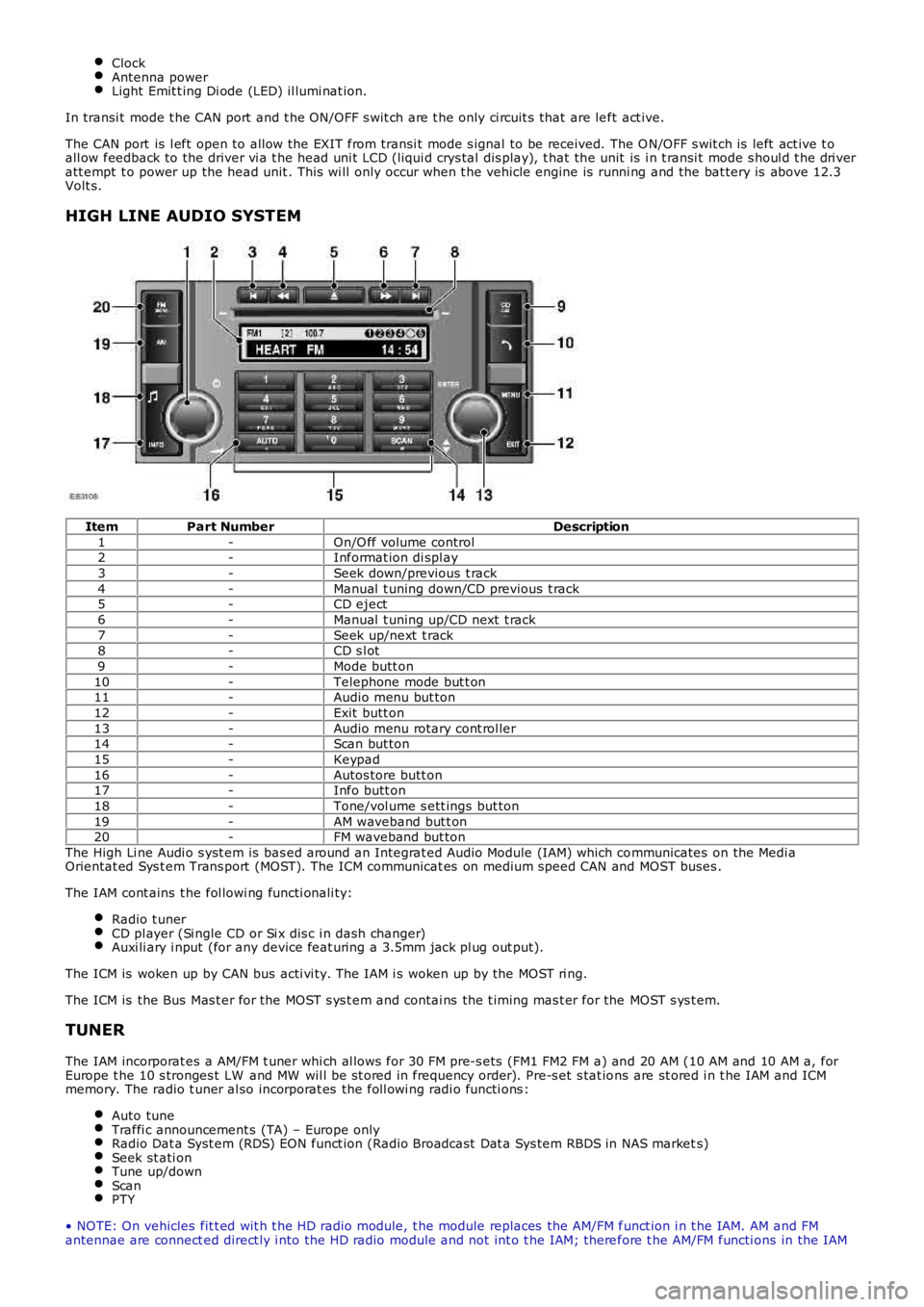
HIGH LINE AUDIO SYSTEM
ItemPart NumberDescription
1-On/O ff volume control2-Informat ion di spl ay
3-Seek down/previous t rack
4-Manual t uning down/CD previous t rack5-CD eject
6-Manual t uning up/CD next t rack
7-Seek up/next t rack8-CD s l ot
9-Mode butt on
10-Telephone mode but t on11-Audio menu but ton
12-Exit butt on
13-Audio menu rotary cont rol ler14-Scan but ton
15-Keypad
16-Autos tore butt on17-Info butt on
18-Tone/vol ume s ett ings but ton
19-AM waveband but t on20-FM waveband but ton
The High Li ne Audi o s yst em is bas ed around an Integrat ed Audio Module (IAM) which communicates on the Medi aOrientat ed Sys t em Trans port (MOST). The ICM communicat es on medium speed CAN and MOST buses .
The IAM cont ains t he fol lowi ng functi onali ty:
Radio t unerCD pl ayer (Si ngle CD or Si x dis c i n dash changer)Auxi li ary i nput (for any device feat uring a 3.5mm jack pl ug out put).
The ICM is woken up by CAN bus acti vi ty. The IAM i s woken up by the MOST ri ng.
The ICM is the Bus Mas t er for the MOST s ys t em and contai ns the t iming mas t er for the MOST s ys t em.
TUNER
The IAM incorporat es a AM/FM t uner whi ch al lows for 30 FM pre-s ets (FM1 FM2 FM a) and 20 AM (10 AM and 10 AM a, forEurope t he 10 s tronges t LW and MW wil l be st ored in frequency order). Pre-s et s tat ions are st ored i n t he IAM and ICMmemory. The radio t uner al so incorporat es the foll owi ng radi o functi ons :
Auto tuneTraffi c announcement s (TA) – Europe onlyRadio Dat a Syst em (RDS) EON funct ion (Radio Broadcast Dat a Sys tem RBDS in NAS markets)Seek st ati onTune up/downScanPTY
• NOTE: On vehicles fit t ed wit h t he HD radio module, t he module replaces the AM/FM funct ion i n t he IAM. AM and FMantennae are connect ed direct ly i nto the HD radio module and not int o t he IAM; therefore t he AM/FM functi ons in the IAM
Page 1871 of 3229
are di s abl ed.
CD PLAYER
The IAM CD pl ayer i s a 6 di sc mult i changer l ocat ed in the center of t he ins trument panel. The CD mult i changer is capabl eof playing commerci al CDs , CDRs , CDRW s and MP3 di scs .
Random Play
The random pl ay feat ure works in t wo di fferent ways :
Random play of t racks on a CDRandom play of all t racks on any CD i n t he autochanger
The s ingle di s c random feat ure plays all t he tracks on t he s elected CD in a random order. All t he t racks on that dis c wi ll beplayed before a new random s equence is pl ayed. If a new CD is s elected whi le in random mode, the random mode wi ll becancell ed and play wi ll commence from t he fi rs t t rack.
In mult i dis c mode t he IAM us es the current track as the firs t random t rack and wi ll t hen pl ay a furt her 2 tracks (ifavai lable) from thi s CD. The IAM wil l then randoml y s elect anot her CD, and pl ay 3 random tracks . Thi s s equence cont inuesunti l al l tracks from all CD's are played back.
MP3 Function
The CD pl ayer has t he capabil it y to play MP3 fil es . The MP3 di scs foll ow a format of fol ders and fil es wit hin t he fol der. It isals o pos si ble t o pl ace al l the fil es in the root di rectory on t he CD.
The random and repeat features foll ow t he normal CD random and repeat feat ure funct ions .
Automatic Volume Control (AVC)
AVC control s t he audi o volume in relati on t o vehi cl e s peed. As vehicle speed i ncreases t he audi o l evel is adjust ed t ocompens ate for extra road and vehicle noi s e. There are 4 s et t ings for AVC:
OffLowMediumHigh
The default s ett ing is medi um.
Changi ng the AVC level is acces s ed by a l ong pres s of the TONE but t on and sel ect ion of t he AVC us ing t he rot ary encodert o change t he level.
The vehi cl e s peed s ignal i s us ed to enable the ICM to calculat e t he vol ume adjus t ment required. The vehicle s peed s ignalis recei ved over t he medium s peed CAN. The s ignal is an average of t he four wheel s peed s ens or s i gnal s. Should an inval ids peed si gnal be recei ved t he AVC will not alt er the out put volume.
AVC i s cont rol led by t he audi o ampl ifi er.
CD Error Messages
W hen an CD error occurs , the IAM wil l al ert t he us er by s howing a dis play related to t he error. This wil l be dis played whilet he CD audio mode is s elected unt il t he error is correct ed. The CD rel at ed error does not affect other areas of t he IAM. Theus er i s able t o s elect a di fferent audi o s ource.
Error Message in IAM displayCause
Deck errorMechanical Error, CD s tuck, Servo rel at ed error, et c.Hot dis cInt ernal CD temperature too hi gh
Di sc unreadableInvalid Dis c, CD ROM ins erted, dis c i nserted ups ide-down, etc.
AUXILIARY SOCKET
Page 2747 of 3229
27
Quick start
R
Audio system
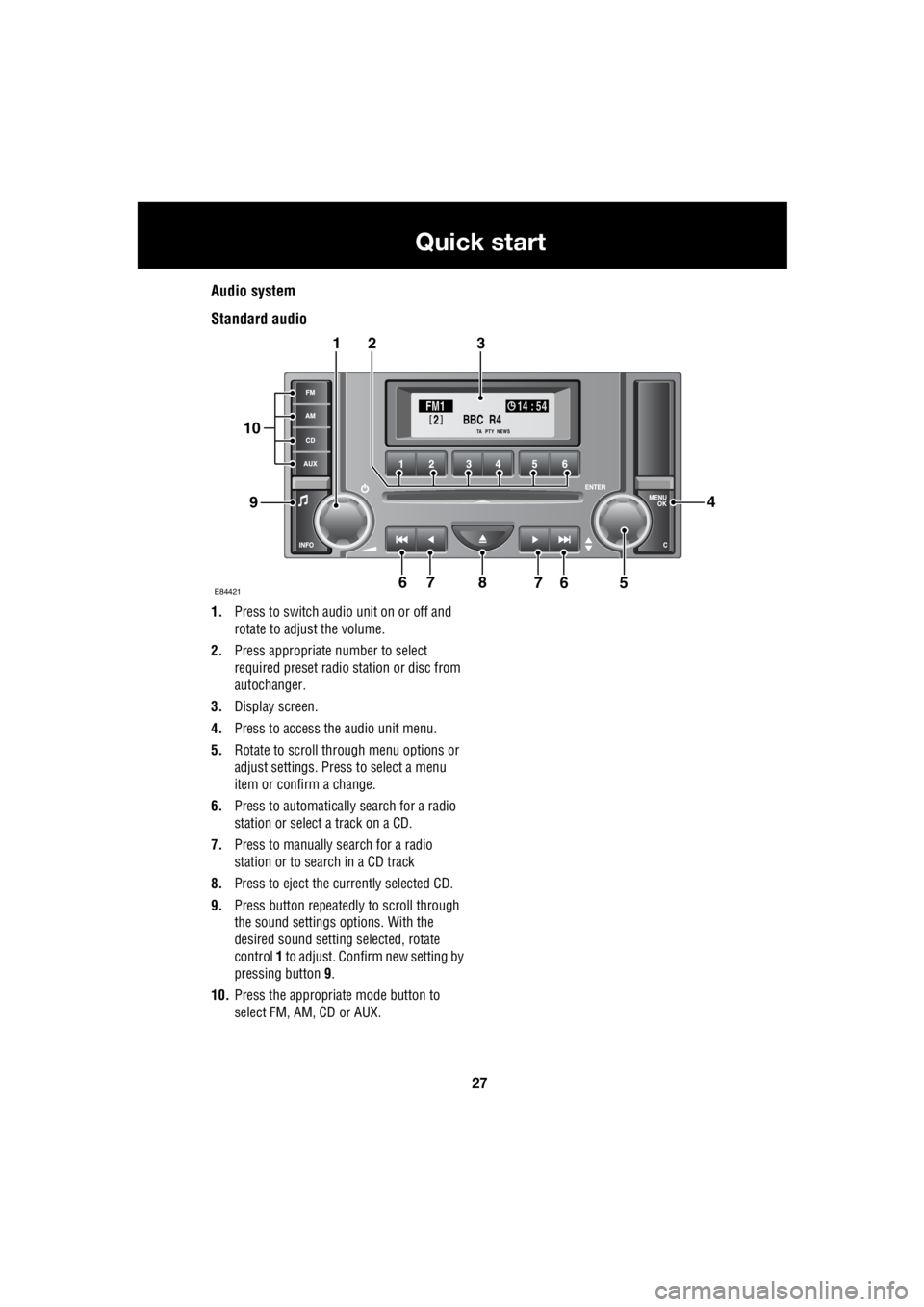
Standard audio
1. Press to switch audio unit on or off and
rotate to adjust the volume.
2. Press appropriate number to select
required preset radio station or disc from
autochanger.
3. Display screen.
4. Press to access the audio unit menu.
5. Rotate to scroll through menu options or
adjust settings. Press to select a menu
item or confirm a change.
6. Press to automatically search for a radio
station or select a track on a CD.
7. Press to manually search for a radio
station or to search in a CD track
8. Press to eject the currently selected CD.
9. Press button repeatedly to scroll through
the sound settings options. With the
desired sound setting selected, rotate
control 1 to adjust. Confirm new setting by
pressing button 9.
10. Press the appropriate mode button to
select FM, AM, CD or AUX.
BBC R4
2FM1 14 : 54
TA NEWSPTY
E844217
321
94
56768
10
Page 2748 of 3229
28
Quick start
L
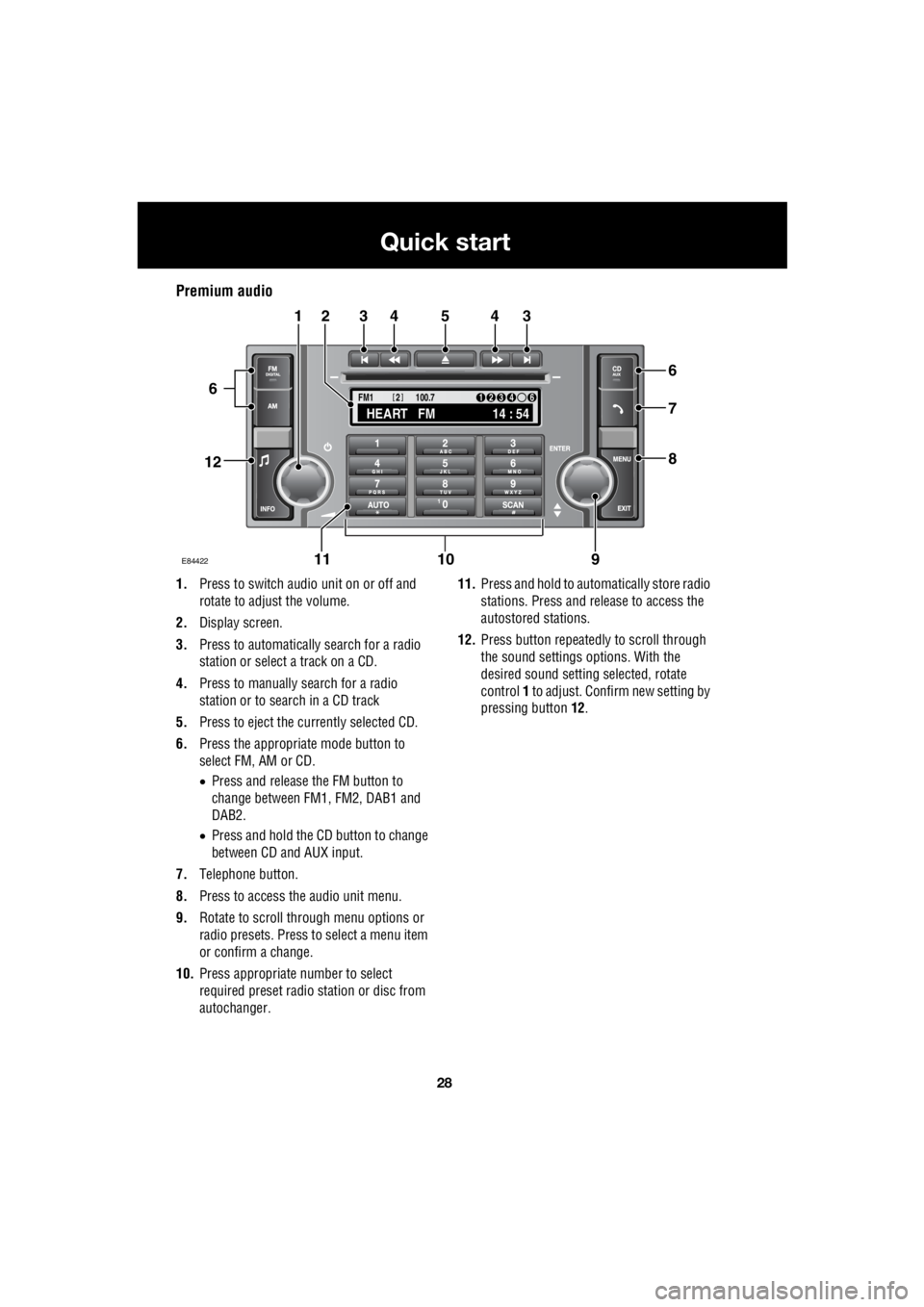
Premium audio
1. Press to switch audio unit on or off and
rotate to adjust the volume.
2. Display screen.
3. Press to automatically search for a radio
station or select a track on a CD.
4. Press to manually search for a radio
station or to search in a CD track
5. Press to eject the currently selected CD.
6. Press the appropriate mode button to
select FM, AM or CD.
• Press and release the FM button to
change between FM1, FM2, DAB1 and
DAB2.
• Press and hold the CD button to change
between CD and AUX input.
7. Telephone button.
8. Press to access the audio unit menu.
9. Rotate to scroll through menu options or
radio presets. Press to select a menu item
or confirm a change.
10. Press appropriate number to select
required preset radio station or disc from
autochanger. 11.
Press and hold to automatically store radio
stations. Press and release to access the
autostored stations.
12. Press button repeatedly to scroll through
the sound settings options. With the
desired sound setti ng selected, rotate
control 1 to adjust. Confir m new setting by
pressing button 12.
TA
NEWSPTY100.7
FM1
14 : 54
HEART FM
1234 6
2
E84422
34543
6
7
8
21
91011
12
6
Page 2750 of 3229
30
Quick start
L
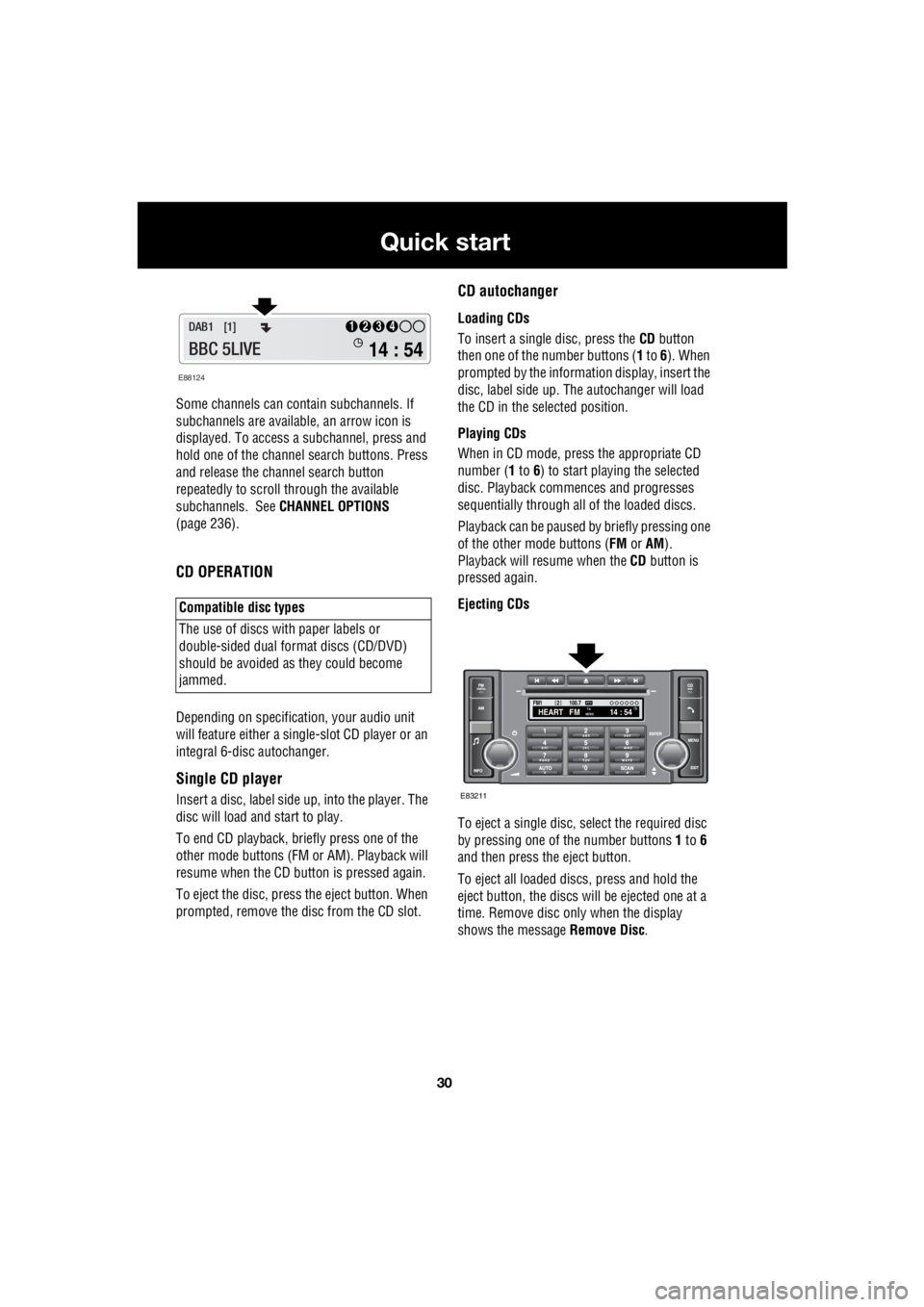
Some channels can co ntain subchannels. If
subchannels are availabl e, an arrow icon is
displayed. To access a subchannel, press and
hold one of the channel search buttons. Press
and release the channel search button
repeatedly to scroll through the available
subchannels. See CHANNEL OPTIONS
(page 236).
CD OPERATION
Depending on specification, your audio unit
will feature either a single- slot CD player or an
integral 6-disc autochanger.
Single CD player
Insert a disc, label side up, into the player. The
disc will load and start to play.
To end CD play back, briefly press one of the
other mode buttons (FM or AM). Playback will
resume when the CD button is pressed again.
To eject the disc, press the eject button. When
prompted, remove the disc from the CD slot.
CD autochanger
Loading CDs
To insert a single disc, press the CD button
then one of the number buttons ( 1 to 6). When
prompted by the information display, insert the
disc, label side up. The autochanger will load
the CD in the selected position.
Playing CDs
When in CD mode, press the appropriate CD
number ( 1 to 6) to start playing the selected
disc. Playback commences and progresses
sequentially through all of the loaded discs.
Playback can be paused by briefly pressing one
of the other mode buttons ( FM or AM).
Playback will re sume when the CD button is
pressed again.
Ejecting CDs
To eject a single disc, select the required disc
by pressing one of the number buttons 1 to 6
and then press the eject button.
To eject all loaded discs, press and hold the
eject button, the discs will be ejected one at a
time. Remove disc only when the display
shows the message Remove Disc.
Compatible disc types
The use of discs with paper labels or
double-sided dual format discs (CD/DVD)
should be avoided as they could become
jammed.
E88124
14 : 54
1234DAB1 [1]
BBC 5LIVE
100.7
2FM114 : 54TA
NEWSHEART FMPTY
E83211
Page 2965 of 3229
245
Compact disc player
R
Compact disc playerLOADING COMPACT DISCS
Note: Some music CD manufacturers are
using data encryption to copy-protect their
recordings and prevent the production of
counterfeit copies. These CDs differ from the
internationally agreed CD audio standard,
RedBook, a standard that serves as the
operating basis for all CD players and
changers. Copy-pro tected CDs may fail to play
in your CD changer or ma y be played subject to
various limitations, e. g. sound quality may be
impaired. If you do ex perience a problem, try
the CD in other player s before contacting the
CD vendor.
Loading a CD - Single disc player
To insert a disc into the player, make sure that
the label side of the di sc is facing upwards and
present the disc to the slot. Ease the disc into
the slot until the mech anism takes over and
draws the disc in fully.
Loading a CD - Six disc player
Press the CD mode button, then press the
numbered button of the position in which the
compact disc is to be stored ( 1 to 6). Make sure that the label side of the disc is
facing upwards then, when prompted, partially
insert the disc. The play er mechanism will draw
the disc in automatica lly and the disc number
will appear on the display.
Note: If there is a problem with a disc that has
been loaded (inserted upside down, wrong
format etc.), Disc unreadable or Disc error will
appear in the information display, and the disc
will be ejected. If the problem can be corrected
(disc upside down for example), then re-insert
the disc in the correct manner. If the problem
cannot be rectified, do not re-insert the disc.
There will be a pause while the player reads
information from the disc, then play will start at
the first track.
To load another CD, pr ess another numbered
button ( 1 to 6) and repeat the loading
procedure.
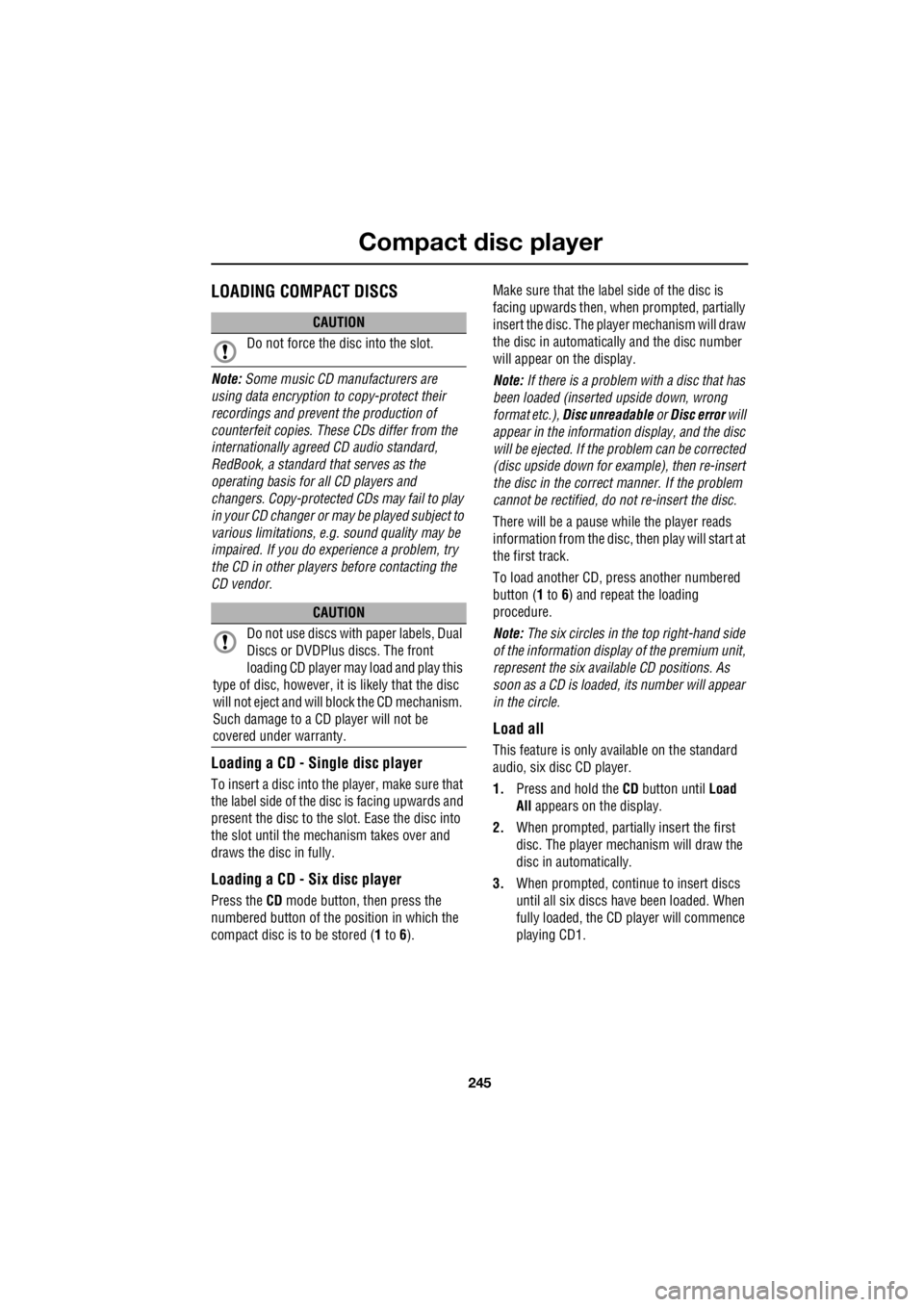
Note: The six circles in the top right-hand side
of the information display of the premium unit,
represent the six available CD positions. As
soon as a CD is loaded, its number will appear
in the circle.
Load all
This feature is only available on the standard
audio, six disc CD player.
1. Press and hold the CD button until Load
All appears on the display.
2. When prompted, partia lly insert the first
disc. The player mechanism will draw the
disc in automatically.
3. When prompted, conti nue to insert discs
until all six discs have been loaded. When
fully loaded, the CD player will commence
playing CD1.
CAUTION
Do not force the disc into the slot.
CAUTION
Do not use discs with paper labels, Dual
Discs or DVDPlus discs. The front
loading CD player may load and play this
type of disc, however, it is likely that the disc
will not eject and will block the CD mechanism.
Such damage to a CD player will not be
covered under warranty.
Page 2995 of 3229

Index
275
R
Preset buttons . . . . . . . . . . . . . . . . . . . . . 238 Recalling a preset channel . . . . . . . . . 239
Scrolling through presets . . . . . . . . . . 239
Storing channels as presets . . . . . . . . 238
Principle of operation Airbag deployment effects . . . . . . . . . . 61
Airbag operation . . . . . . . . . . . . . . . . . . 60
Airbags . . . . . . . . . . . . . . . . . . . . . . . . . 59
Before driving off-road . . . . . . . . . . . . 136
Brake pads . . . . . . . . . . . . . . . . . . . . . 123
Deployment and deflation . . . . . . . . . . . 60
Dynamic Stability Control (DSC) . . . . . 140
Gradient release control (GRC) . . . . . . 136
Introduction . . . . . . . . . . . . . . . . . . . . . 58
Roll stability control (RSC) . . . . . . . . . 140
Seat belt checks . . . . . . . . . . . . . . . . . . 55
Seat belt safety . . . . . . . . . . . . . . . . . . . 54
Seat belts . . . . . . . . . . . . . . . . . . . . . . . 54
Wet conditions . . . . . . . . . . . . . . . . . . 123
Priority programme type (PTY) . . . . . . . . 231 PTY search - Premium audio . . . . . . . 232
PTY seek - Standard audio . . . . . . . . . 233
PTY selection - Premium audio . . . . . 231Q
Quick start . . . . . . . . . . . . . . . . . . . . . . . . . . 7 Audio system . . . . . . . . . . . . . . . . . . . . . 27
Automatic transmission . . . . . . . . . . . . . 23
Bonnet . . . . . . . . . . . . . . . . . . . . . . . . . . . 9
CD autochanger . . . . . . . . . . . . . . . . . . . 30
CD OPERATION . . . . . . . . . . . . . . . . . . . 30
Clock setting . . . . . . . . . . . . . . . . . . . . . 31
Cruise control . . . . . . . . . . . . . . . . . . . . 24
DAB radio. . . . . . . . . . . . . . . . . . . . . . . . 29
Driving position memory . . . . . . . . . . . . 10
Engine starting . . . . . . . . . . . . . . . . . . . . . 8
Exterior lighting . . . . . . . . . . . . . . . . . . . 22
Facia. . . . . . . . . . . . . . . . . . . . . . . . . . . . 17
Gearshift interlocks . . . . . . . . . . . . . . . . 23
Heating and ventilation. . . . . . . . . . . . . . 14
Hill Descent Control (HDC) . . . . . . . . . . 25
Instrument pack . . . . . . . . . . . . . . . . . . . 19
Manual seat adjustment . . . . . . . . . . . . . 11
Master lock and unlock switches . . . . . . . 9
Overhead console . . . . . . . . . . . . . . . . . 12
Parking aid . . . . . . . . . . . . . . . . . . . . . . . 26
Passenger airbag deactivation . . . . . . . . 13
Power operated seat adjustment . . . . . . 10
Radio operation . . . . . . . . . . . . . . . . . . . 29
Remote control . . . . . . . . . . . . . . . . . . . . 7
Seat belts and Child restraints . . . . . . . . 13
Single CD player. . . . . . . . . . . . . . . . . . . 30
Steering column adjustment . . . . . . . . . 12
Steering column lock . . . . . . . . . . . . . . . 12
Tailgate . . . . . . . . . . . . . . . . . . . . . . . . . . 9
Telephone - Bluetooth system . . . . . . . . 31
Terrain Response system. . . . . . . . . . . . 25
Warning indicators (attention) . . . . . . . . 21
Warning indicators (information) . . . . . . 21
Windows and Door mirrors . . . . . . . . . . 11
Wipers and washers. . . . . . . . . . . . . . . . 22
R
Radio data system (RDS) . . . . . . . . . . . . . 228 Selecting RDS . . . . . . . . . . . . . . . . . . . 228
Radio reception . . . . . . . . . . . . . . . . . . . . 218
Rain sensor . . . . . . . . . . . . . . . . . . . . . . . . 87
Operation . . . . . . . . . . . . . . . . . . . . . . . . 88
Rear fog lamps . . . . . . . . . . . . . . . . . . . . . . 73