2005 LEXUS ES300 key
[x] Cancel search: keyPage 928 of 969
August 26, 2002IMMOBILIZER KEY CODE RESET ± SS002-01 Revised
Page 5 of 6
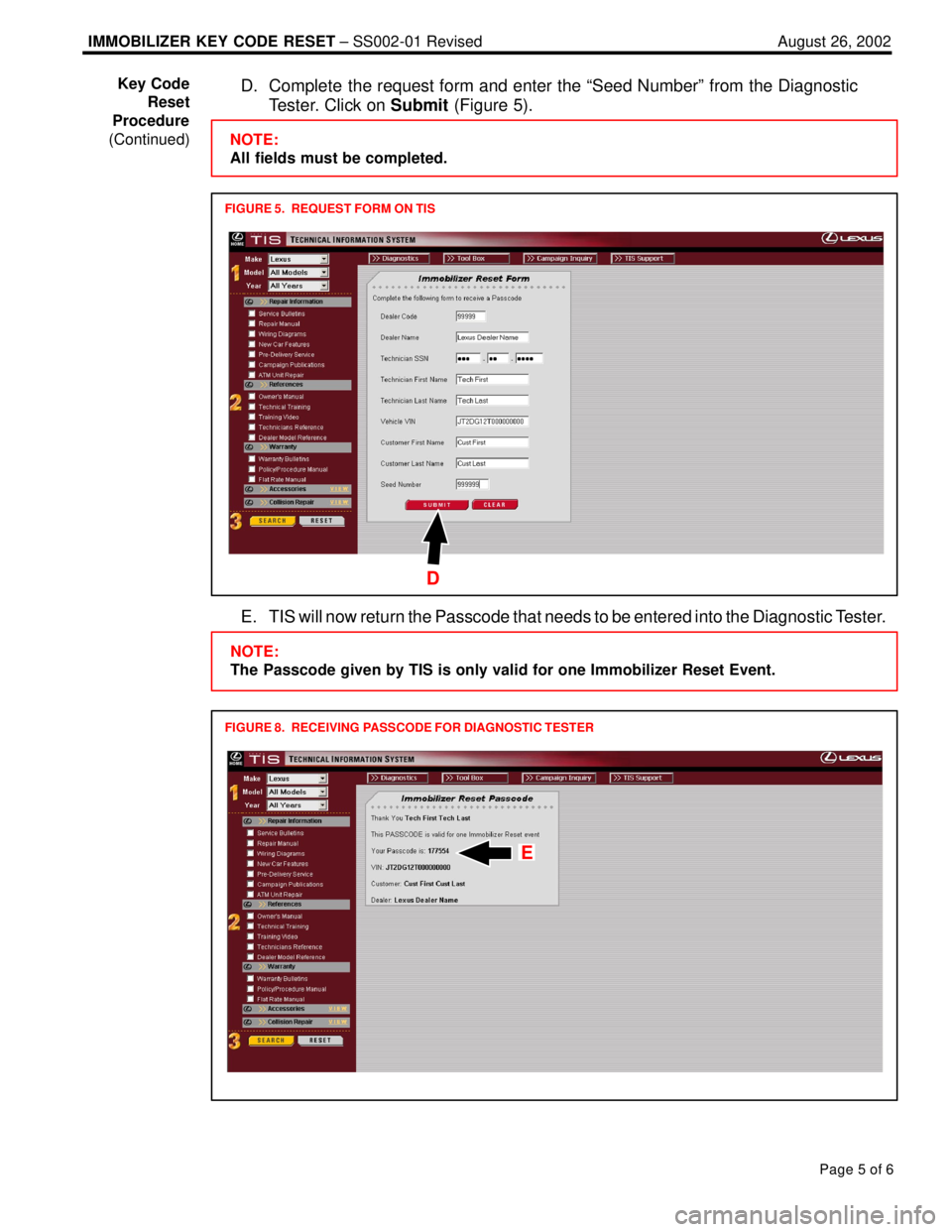
D. Complete the request form and enter the ªSeed Numberº from the Diagnostic
Tester. Click on Submit (Figure 5).
FIGURE 5. REQUEST FORM ON TIS
NOTE:
All fields must be completed.
D
E. TIS will now return the Passcode that needs to be entered into the Diagnostic Tester.
FIGURE 8. RECEIVING PASSCODE FOR DIAGNOSTIC TESTER
NOTE:
The Passcode given by TIS is only valid for one Immobilizer Reset Event.
E
Key Code
Reset
Procedure
(Continued)
Page 929 of 969
August 26, 2002IMMOBILIZER KEY CODE RESET ± SS002-01 Revised
Page 6 of 6
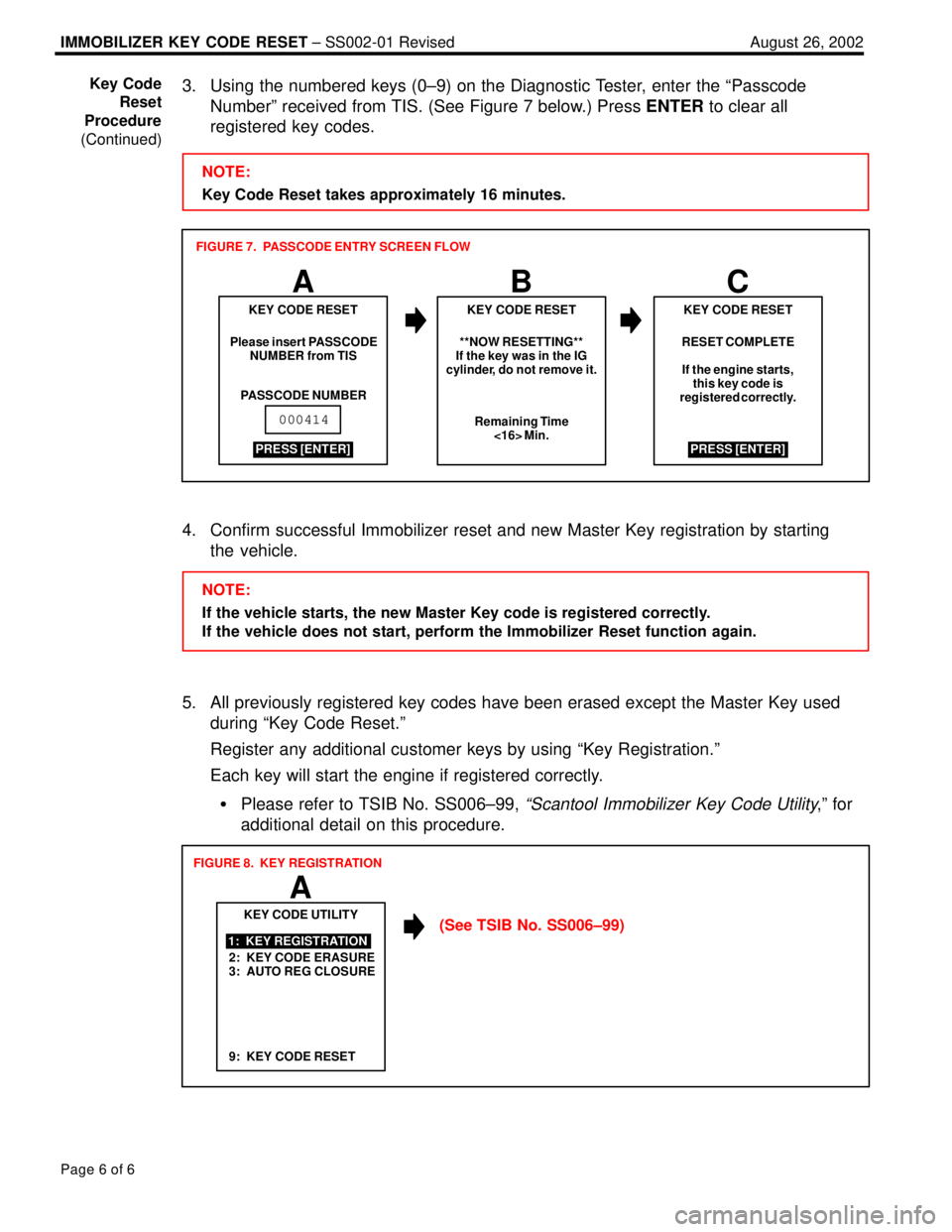
3. Using the numbered keys (0±9) on the Diagnostic Tester, enter the ªPasscode
Numberº received from TIS. (See Figure 7 below.) Press ENTER to clear all
registered key codes.
NOTE:
Key Code Reset takes approximately 16 minutes.
ABC
RESET COMPLETE
If the engine starts,
this key code is
registered correctly.
KEY CODE RESET
Please insert PASSCODE
NUMBER from TIS
PASSCODE NUMBERKEY CODE RESET KEY CODE RESET
**NOW RESETTING**
If the key was in the IG
cylinder, do not remove it.
Remaining Time
<16> Min.
PRESS [ENTER]
000414
PRESS [ENTER] FIGURE 7. PASSCODE ENTRY SCREEN FLOW
4. Confirm successful Immobilizer reset and new Master Key registration by starting
the vehicle.
NOTE:
If the vehicle starts, the new Master Key code is registered correctly.
If the vehicle does not start, perform the Immobilizer Reset function again.
5. All previously registered key codes have been erased except the Master Key used
during ªKey Code Reset.º
Register any additional customer keys by using ªKey Registration.º
Each key will start the engine if registered correctly.
Please refer to TSIB No. SS006±99,
ªScantool Immobilizer Key Code Utility,º for
additional detail on this procedure.
2: KEY CODE ERASURE
3: AUTO REG CLOSUREKEY CODE UTILITY
1: KEY REGISTRATION
A
FIGURE 8. KEY REGISTRATION
9: KEY CODE RESET
(See TSIB No. SS006±99) Key Code
Reset
Procedure
(Continued)
Page 932 of 969
Lexus Supports ASE CertificationPage 1 of 14
Title:
DIAGNOSTIC TESTER
IMMOBILIZER FUNCTIONS
Models:
Applicable ES 330, GS 300, GS 430, GX 470,
LS 430, LX 470, RX 330, & SC 430
Technical Service
Information Bulletin
July 6, 2001
SS005-01
TSIB REVISION NOTICE:
August 26, 2005: The model years for each model have been specifically defined
in the ªApplicable Vehiclesº section. The following vehicles have been added to
the ªApplicable Vehiclesº section: ES 330, GS 300, GS 430, and RX 330.
The ªRequired SSTsº section has been updated.
January 9, 2003: GX 470 and LX 470 have been added to Applicable Vehicles.
The ªRequired SSTsº section has been updated to the current version software.
Screen flows revised (screen C and D) in Figures 1 (screen C and D), 2 (screen C),
3 (screen C), 4 (screen C and G), and 9 (screen A).
The information contained in this TSIB supercedes the original SS005±01.
Previous versions of this TSIB should be discarded.
The Diagnostic Tester incorporates support for Immobilizer system service. This bulletin
covers the following Immobilizer functions available using the Diagnostic Tester:
Transponder Key Type
Transponder Code Registration
Transponder Code Erasure
Transponder ECU Reset
Transponder ECU Replacement
Engine ECU Replacement
NOTE:
The available functions and procedures for the models listed in this TSIB differ
slightly from previous models and other Immobilizer systems currently in use on
Lexus vehicles.
OP CODEDESCRIPTIONTIMEOFPT1T2
N/ANot Applicable to Warranty ±±±±
SPECIAL SERVICE TOOLS
Introduction
Warranty
Information
Page 933 of 969
DIAGNOSTIC TESTER IMMOBILIZER FUNCTIONS ± SS005-01 Revised July 6, 2001
Page 2 of 14
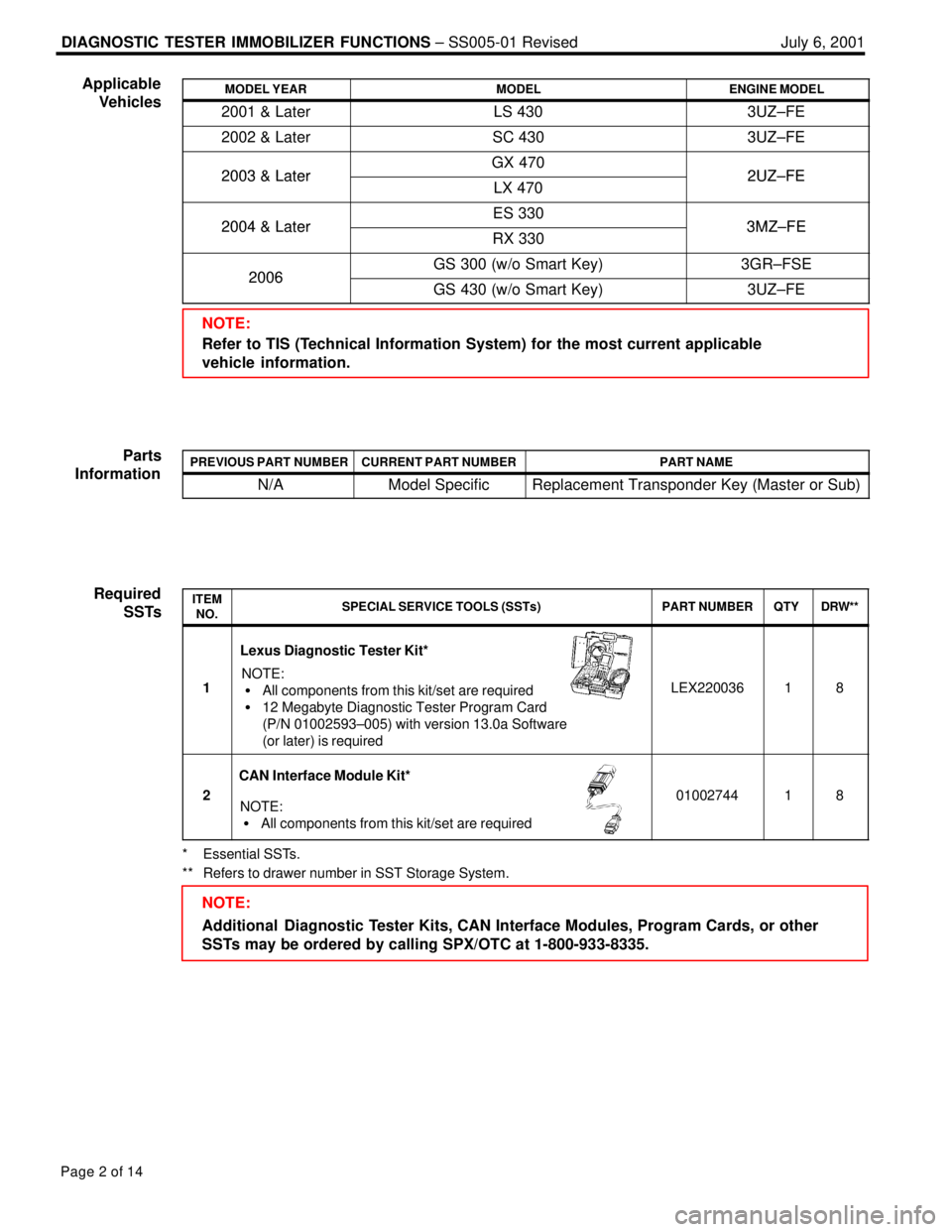
MODEL YEARMODELENGINE MODEL
2001 & LaterLS 4303UZ±FE
2002 & LaterSC 4303UZ±FE
2003 & LaterGX 4702UZ±FE2003 & LaterLX 4702UZ±FE
2004 & LaterES 3303MZ±FE2004 & LaterRX 3303MZ±FE
2006GS 300 (w/o Smart Key)3GR±FSE2006GS 430 (w/o Smart Key)3UZ±FE
NOTE:
Refer to TIS (Technical Information System) for the most current applicable
vehicle information.
PREVIOUS PART NUMBERCURRENT PART NUMBERPART NAME
N/AModel SpecificReplacement Transponder Key (Master or Sub)
ITEM
NO.SPECIAL SERVICE TOOLS (SSTs)PART NUMBERQTYDRW**
1
Lexus Diagnostic Tester Kit*
NOTE:
All components from this kit/set are required
12 Megabyte Diagnostic Tester Program Card
(P/N 01002593±005) with version 13.0a Software
(or later) is requiredLEX22003618
2
CAN Interface Module Kit*
NOTE:
All components from this kit/set are required0100274418
* Essential SSTs.
** Refers to drawer number in SST Storage System.
NOTE:
Additional Diagnostic Tester Kits, CAN Interface Modules, Program Cards, or other
SSTs may be ordered by calling SPX/OTC at 1-800-933-8335. Applicable
Vehicles
Parts
Information
Required
SSTs
Page 934 of 969

DIAGNOSTIC TESTER IMMOBILIZER FUNCTIONS ± SS005-01 Revised July 6, 2001
Page 3 of 14
1. Transponder Key Type
Before any Immobilizer functions are performed, verify the type of transponder key
that you are attempting to use for the service operation. Some functions may only be
performed with a registered Master Key.
2. Transponder Code Registration
This function allows the registration of additional transponder keys (Master or Sub)
using a registered Master Key.
3. Transponder Code Erasure
This function allows the user to erase all the transponder keys except the registered
Master Key used during this function.
4. Transponder ECU Reset
This function allows the registration of a new Master Key even if all original Master
Keys are lost. Once the Immobilizer system is reset, all previous registered keys will
be erased.
5. Transponder ECU Replacement
When the Transponder ECU is replaced, the transponder keys must be registered to
the new ECU, auto registration closed, and ECU communication completed.
6. Engine ECU Replacement
When the Engine ECU is replaced, ECU communication must be completed to
synchronize an encrypted security code between the engine and Transponder ECUs.Function
Description
Page 935 of 969
DIAGNOSTIC TESTER IMMOBILIZER FUNCTIONS ± SS005-01 Revised July 6, 2001
Page 4 of 14
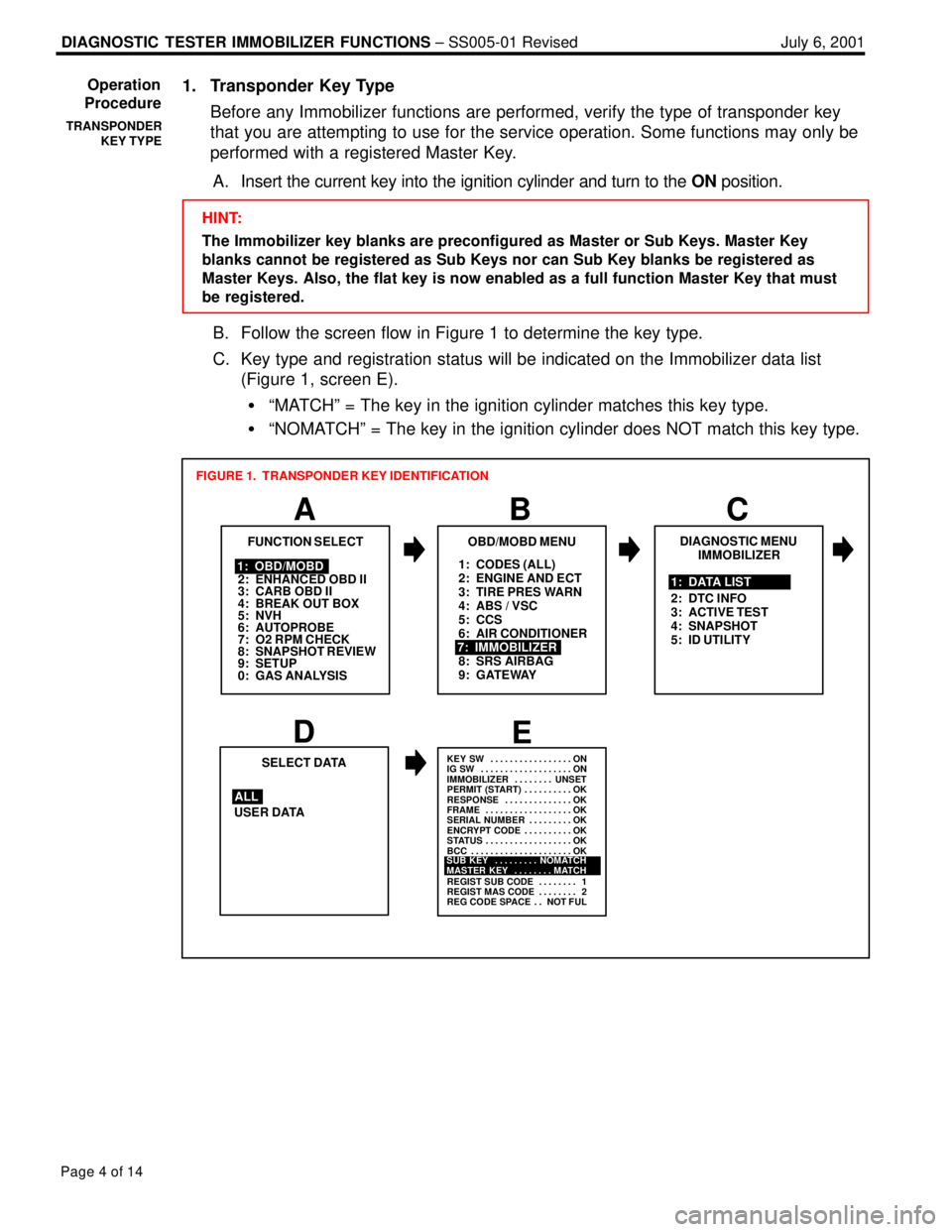
1. Transponder Key Type
Before any Immobilizer functions are performed, verify the type of transponder key
that you are attempting to use for the service operation. Some functions may only be
performed with a registered Master Key.
A. Insert the current key into the ignition cylinder and turn to the ON position.
HINT:
The Immobilizer key blanks are preconfigured as Master or Sub Keys. Master Key
blanks cannot be registered as Sub Keys nor can Sub Key blanks be registered as
Master Keys. Also, the flat key is now enabled as a full function Master Key that must
be registered.
B. Follow the screen flow in Figure 1 to determine the key type.
C. Key type and registration status will be indicated on the Immobilizer data list
(Figure 1, screen E).
ªMATCHº = The key in the ignition cylinder matches this key type.
ªNOMATCHº = The key in the ignition cylinder does NOT match this key type.
1: CODES (ALL)
2: ENGINE AND ECT
3: TIRE PRES WARN
4: ABS / VSC
5: CCS
6: AIR CONDITIONER
8: SRS AIRBAG
9: GATEWAY
A
FUNCTION SELECT
B
1: OBD/MOBD
2: ENHANCED OBD II
3: CARB OBD II
4: BREAK OUT BOX
5: NVH
6: AUTOPROBE
7: O2 RPM CHECK
8: SNAPSHOT REVIEW
9: SETUP
0: GAS ANALYSIS
OBD/MOBD MENU
7: IMMOBILIZER
FIGURE 1. TRANSPONDER KEY IDENTIFICATION
DE
USER DATASELECT DATA
ALL
KEY SW ON. . . . . . . . . . . . . . . . .
IG SW ON. . . . . . . . . . . . . . . . . . .
IMMOBILIZER UNSET. . . . . . . .
PERMIT (START) OK. . . . . . . . . .
RESPONSE OK. . . . . . . . . . . . . .
FRAME OK. . . . . . . . . . . . . . . . . .
SERIAL NUMBER OK. . . . . . . . .
ENCRYPT CODE OK. . . . . . . . . .
STATUS OK. . . . . . . . . . . . . . . . . .
BCC OK. . . . . . . . . . . . . . . . . . . . .
REGIST SUB CODE 1. . . . . . . .
REGIST MAS CODE 2. . . . . . . .
REG CODE SPACE NOT FUL. .
SUB KEY NOMATCH. . . . . . . . .
MASTER KEY MATCH. . . . . . . .
C
DIAGNOSTIC MENU
IMMOBILIZER
1: DATA LIST
2: DTC INFO
3: ACTIVE TEST
4: SNAPSHOT
5: ID UTILITY
Operation
Procedure
TRANSPONDER
KEY TYPE
Page 936 of 969

DIAGNOSTIC TESTER IMMOBILIZER FUNCTIONS ± SS005-01 Revised July 6, 2001
Page 5 of 14
2. Transponder Code Registration
This function allows the normal registration of additional transponder keys (Master or
Sub) using a registered Master Key.
NOTE:
This function requires the use of one registered Master Key. The use of a Sub Key will
NOT complete Transponder Code Registration. Attempting registration of additional
keys with only a Sub Key will result in errors and incomplete registration.
HINT:
The Immobilizer key blanks are preconfigured as Master or Sub Keys. Master Key
blanks cannot be registered as Sub Keys nor can Sub Key blanks be registered as
Master Keys. Also, the flat key is now enabled as a full function Master Key that must
be registered.
A. Insert a registered Master Key into the ignition cylinder and turn to the ON position.
B. Follow the screen flow in Figure 2 to register new Master or Sub keys. It is
possible to register up to 5 Master Keys and 3 Sub Keys.
C. Be sure to follow the instructions on key insertion, ignition ON/OFF and key
removal exactly as described on the Diagnostic Tester.
Blinks Code 2±2Code 2±1
1.8 sec
0.2
sec0.25 sec
0.25
sec1 sec
0.5
sec0.25 sec
0.25
sec1 sec
0.5
sec
HINT:
The security indicator light reveals the following information:
Always ON and NO key in IG
* = Transponder ECU in Auto Registration mode
Blinking and NO key in IG = Normal operation
Blinking Code 21 = Transponder Code Registration failed
Blinking Code 22 = Attempt was made to register an already
registered Transponder Code
* Immediately after the transponder ECU is installed, the security indicator will blink.
Operation
Procedure
(Continued)
TRANSPONDER
CODE
REGISTRATION
Page 937 of 969

DIAGNOSTIC TESTER IMMOBILIZER FUNCTIONS ± SS005-01 Revised July 6, 2001
Page 6 of 14
1: CODES (ALL)
2: ENGINE AND ECT
3: TIRE PRES WARN
4: ABS / VSC
5: CCS
6: AIR CONDITIONER
7: IMMOBILIZER
8: SRS AIRBAG
9: GATEWAY
A
FUNCTION SELECT
B
1: OBD/MOBD
2: ENHANCED OBD II
3: CARB OBD II
4: BREAK OUT BOX
5: NVH
6: AUTOPROBE
7: O2 RPM CHECK
8: SNAPSHOT REVIEW
9: SETUP
0: GAS ANALYSIS
OBD/MOBD MENU
FIGURE 2. REGISTRATION OF ADDITIONAL TRANSPONDER KEY
1: TRANSP CODE REG
2: TRANSP CODE ERS
D
ID UTILITY
IMMOBILIZER
EF
GH
THIS FUNCTION WILL
REGISTER THE
TRANSPONDER CODE.
Do you wish to
continue the
registration?
PRESS [YES] OR [NO] 9: TRANSP CODE RESETPlease remove the
Master Key from
the IG cylinder,
insert it again,
and turn the IG ON
within 120 seconds.
Then press [ENTER]
Remaining Time:
[120] Seconds
Please remove the Master
Key from the IG cylinder
within 20 seconds.
Then press [ENTER]
Remaining Time:
[20] SecondsPlease insert the New Key
into the IG cylinder within
10 seconds.
Remaining Time:
[10] Seconds
I
**NOW REGISTERING**
[60] SecondsPlease wait.
J
K
THE TRANSPONDER
CODE WAS REGISTERED
CORRECTLY.Please insert a
Master Key and
turn the IG to
ON.
If the ignition
is already ON,
please turn it
OFF and back to
ON.
DO NOT TURN IG ON
PRESS [ENTER]
PRESS [ENTER]
C
DIAGNOSTIC MENU
IMMOBILIZER
5: ID UTILITY 1: DATA LIST
2: DTC INFO
3: ACTIVE TEST
4: SNAPSHOT
Operation
Procedure
(Continued)
TRANSPONDER
CODE
REGISTRATION