Page 915 of 969
BATTERY MAINTENANCE FOR IN±STOCK VEHICLES & PRE±DELIVERY ± PG009-02 September 12, 2002
Page 2 of 4
TOOLS & EQUIPMENTMANUFACTURERPART NUMBER
Fast Battery Charger**AssociatedASE6003
Fast Battery Charger**ChristieCAPPDQ
** These tools can be ordered through the Lexus Approved Dealer Equipment program by calling
1±800±368±6787.
NOTE:
The ªFast Battery Chargersº listed above have been tested and approved by Lexus.
These state±of±the±art ªsmartº chargers were designed to charge batteries at an
accelerated rate, without the possibility of damage. Using non±microprocessor
controlled battery chargers for fast charging purposes can damage the battery.
All vehicles are to be inspected according to the procedures listed below using the
MICROPRO 815 battery tester no more than 48 hours prior to customer vehicle delivery.
PRIOR TO TESTING:
If necessary, remove battery surface charge by turning on high beam headlights for 60
seconds, then let battery voltage recover for one minute.
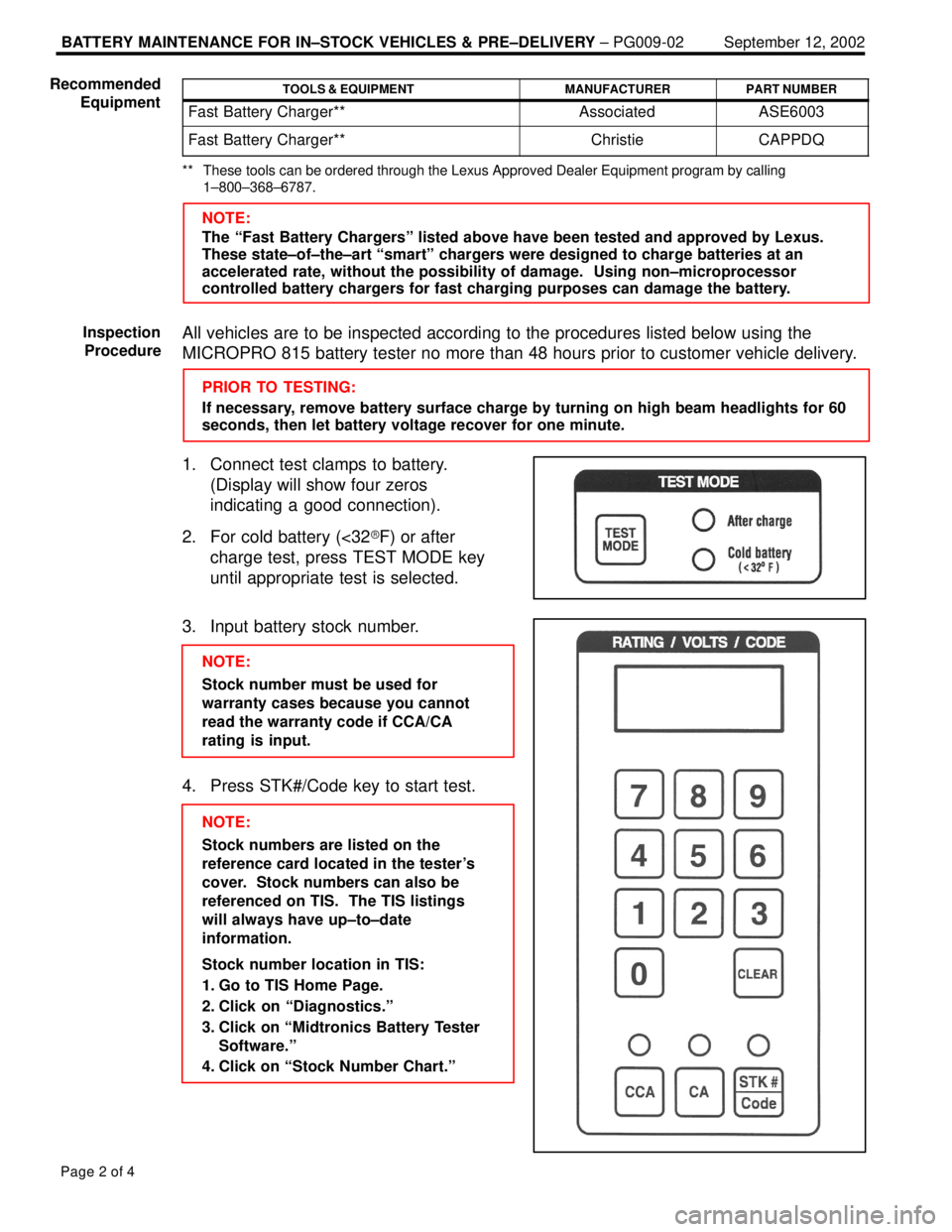
1. Connect test clamps to battery.
(Display will show four zeros
indicating a good connection).
2. For cold battery (<32�F) or after
charge test, press TEST MODE key
until appropriate test is selected.
3. Input battery stock number.
NOTE:
Stock number must be used for
warranty cases because you cannot
read the warranty code if CCA/CA
rating is input.
4. Press STK#/Code key to start test.
NOTE:
Stock numbers are listed on the
reference card located in the tester's
cover. Stock numbers can also be
referenced on TIS. The TIS listings
will always have up±to±date
information.
Stock number location in TIS:
1. Go to TIS Home Page.
2. Click on ªDiagnostics.º
3. Click on ªMidtronics Battery Tester
Software.º
4. Click on ªStock Number Chart.º Recommended
Equipment
Inspection
Procedure
Page 916 of 969
BATTERY MAINTENANCE FOR IN±STOCK VEHICLES & PRE±DELIVERY ± PG009-02 September 12, 2002
Page 3 of 4
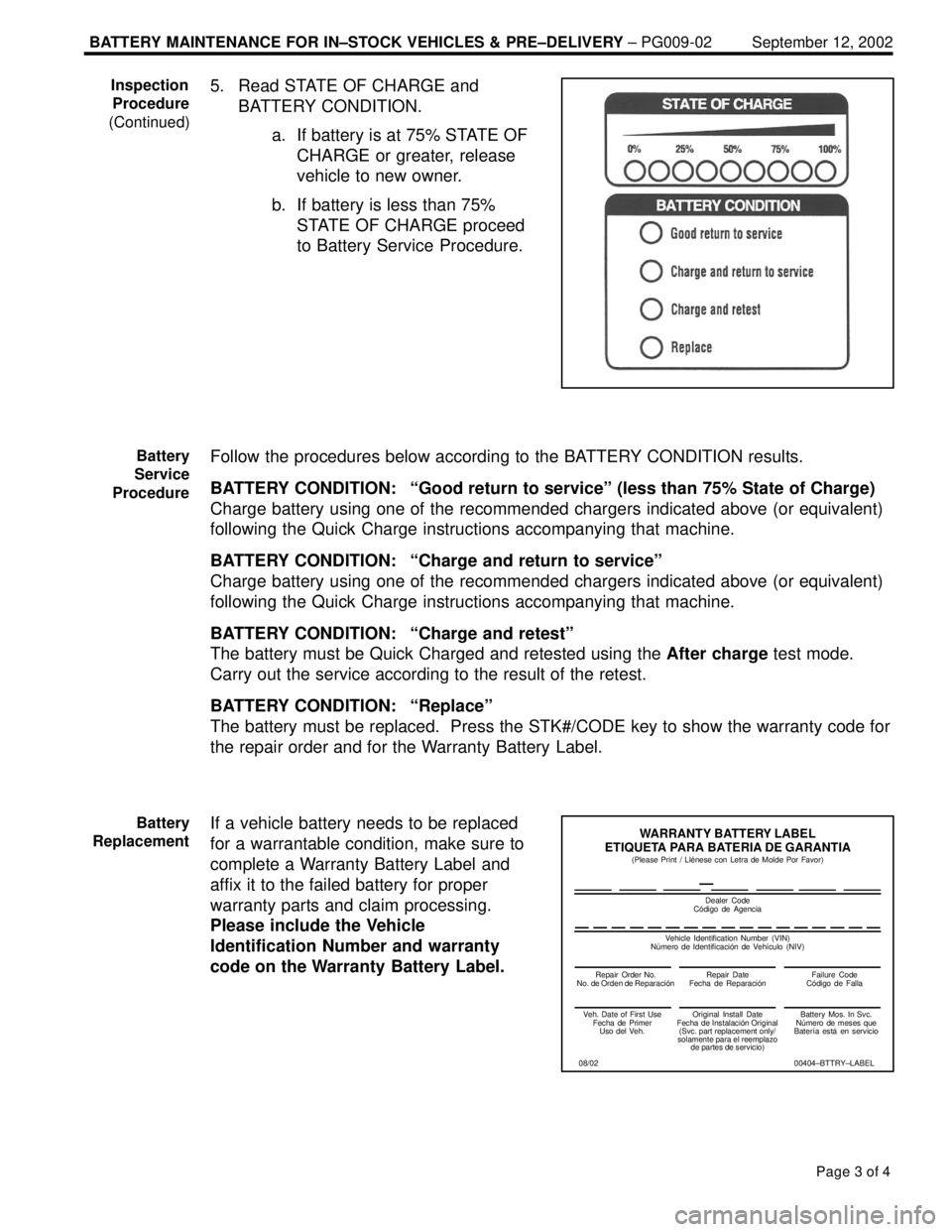
5. Read STATE OF CHARGE and
BATTERY CONDITION.
a. If battery is at 75% STATE OF
CHARGE or greater, release
vehicle to new owner.
b. If battery is less than 75%
STATE OF CHARGE proceed
to Battery Service Procedure.
Follow the procedures below according to the BATTERY CONDITION results.
BATTERY CONDITION: ªGood return to serviceº (less than 75% State of Charge)
Charge battery using one of the recommended chargers indicated above (or equivalent)
following the Quick Charge instructions accompanying that machine.
BATTERY CONDITION: ªCharge and return to serviceº
Charge battery using one of the recommended chargers indicated above (or equivalent)
following the Quick Charge instructions accompanying that machine.
BATTERY CONDITION: ªCharge and retestº
The battery must be Quick Charged and retested using the After charge test mode.
Carry out the service according to the result of the retest.
BATTERY CONDITION: ªReplaceº
The battery must be replaced. Press the STK#/CODE key to show the warranty code for
the repair order and for the Warranty Battery Label.
If a vehicle battery needs to be replaced
for a warrantable condition, make sure to
complete a Warranty Battery Label and
affix it to the failed battery for proper
warranty parts and claim processing.
Please include the Vehicle
Identification Number and warranty
code on the Warranty Battery Label.Inspection
Procedure
(Continued)
Battery
Service
Procedure
Battery
Replacement
Repair Order No.
Repair Date
Failure Code
WARRANTY BATTERY LABEL
ETIQUETA PARA BATERIA DE GARANTIA
Dealer Code
Veh. Date of First Use
Fecha de Primer
Uso del Veh.Original Install Date
Fecha
(Svc. part replacement only/
solamente para el reemplazo
de partes de servicio)Battery Mos. In Svc.
N–mero de meses que
Bater‹a est€ en servicio
00404±BTTRY±LABEL (Please Print / Ll‡nese con Letra de Molde Por Favor)
Vehicle Identification Number (VIN)
(NIV)
08/02
Page 921 of 969
FAILURE TO INITIALIZE CAN INTERFACE MODULE ± SS001-05 Revised March 11, 2005
Page 4 of 6
To determine the cause of communication error, perform the following steps:
1. Using the Diagnostic Tester, perform the CAN MODULE VERSION self test.
Select DIAGNOSIS/SETUP/SELF TEST and perform the following screen flow.
NOTE:
Before performing test, confirm that the Diagnostic Tester, 14/26 Pin DLC cable, and
CAN Interface Module are all securely connected.
SELF TEST MENU
1: DISPLAY/LEDs
2: KEYBOARD
3: SOUND
4: MEMORYINITIALIZING CAN
INTERFACE
0: CAN MODULE VER5: DATA LINK
6: AUTOPROBE
7: RS232
8: INST PORT
9: SYSTEM INFOPLEASE WAIT.
CAN VIM did not
respond
Press [ENTER] Toyota CAN VIM 1.0PRESS [EXIT]
Figure 2
OK NG
SELF TEST Result:
NG OKSELF TEST FAILED: CAN VIM did
not respond. Go to step 2.
SELF TEST PASSED: Go to step 3.
This response verifies the CAN module and the 14/26 Pin DLC cable are OK.
Diagnostic
Procedure
(Continued)
Page 922 of 969
FAILURE TO INITIALIZE CAN INTERFACE MODULE ± SS001-05 Revised March 11, 2005
Page 5 of 6
2. Perform the Data Link Self Test (Figure 3).
5: DATA LINK
6: AUTOPROBE
7: RS2325: DATA LINK
SELF TEST MENU
1: DISPLAY/LEDs
2: KEYBOARD
3: SOUND
4: MEMORYDATA LINK SELF±TEST
8: INST PORT
9: SYSTEM INFO
The Data Link Self Test
Adapter (P/N 02001607)
is included in the Lexus
Diagnostic Tool Set
(P/N LEX220036)
Install Data Link
Self±Test Adapter
to the end of the
Data Link Cable
DATA LINK SELF±TEST
Press [EXIT]**FAILED**PRESS [EXIT]
Press [ENTER]
DATA LINK SELF±TEST
Now testing the
data link.
Press [EXIT] to QUITTo test cable
integrity, please
flex cable
repeatedly.
(15±20 seconds)
DATA LINK SELF±TEST
PASSED
FAILED
SDL 1
Check Self±Test
Adapter Installation
Figure 3
NG OK
DATA LINK SELF TEST Result:
NG OK
DATA LINK TEST FAILED:
Replace 14/26 Pin DLC cable
(P/N 02001637).
DATA LINK TEST PASSED: Replace CAN Interface Module (P/N 01002744).
Diagnostic
Procedure
(Continued)
Page 924 of 969

Page 1 of 6Lexus Supports ASE Certification
Title:
IMMOBILIZER KEY CODE RESET
Models:
Applicable ES 300, GS 430, GS 300,
IS 300, & LX 470
Technical Service
Information Bulletin
August 26, 2002
SS002-01
TSIB REVISION NOTICE:
August 26, 2005: The model years for each model have been specifically defined in
the ªApplicable Vehiclesº section. The ªRequired SSTsº section has been updated.
February 11, 2003: Model years for LX 470 revised to apply to 2001 and 2002 only.
August 26, 2002: ES 300, GS 300, and IS 300 models added. Model years for GS 430
and LX 470 vehicles expanded to include 2002 and later. Diagnostic Tester software
in Required Tools & Material updated to version 9.01a (or later).
Previous versions of this TSIB should be discarded.
Immobilizer Reset is a new feature that allows the registration of a new Master Key even
if all original Master Keys are lost. Once the Immobilizer system is reset, all previously
registered keys will be erased.
MODEL YEARMODELENGINE MODEL
2001 ± 2005*GS 4303UZ±FE
2001 ± 2002*LX 4702UZ±FE
2002 ± 2003*ES 3001MZ±FE
2002 ± 2005*GS 3002JZ±GE
2002 & Later*IS 3002JZ±GE
* Immobilizer Key Code Reset procedure is not available for prior model years.
NOTE:
Refer to TIS (Technical Information System) for the most current applicable
vehicle information.
PREVIOUS PART NUMBERCURRENT PART NUMBERPART NAME
N/AModel SpecificReplacement Key (Master or Sub)
OP CODEDESCRIPTIONTIMEOFPT1T2
N/ANot Applicable to Warranty ±±±±
SPECIAL SERVICE TOOLS
Introduction
Applicable
Vehicles
Parts
Information
Warranty
Information
Page 925 of 969

August 26, 2002IMMOBILIZER KEY CODE RESET ± SS002-01 Revised
Page 2 of 6
ITEM
NO.SPECIAL SERVICE TOOLS (SSTs)PART NUMBERQTYDRW**
1
Lexus Diagnostic Tester Kit*
NOTE:
All components from this kit/set are required
12 Megabyte Diagnostic Tester Program Card
(P/N 01002593±005) with version 13.0a Software
(or later) is requiredLEX22003618
2
CAN Interface Module Kit*
NOTE:
All components from this kit/set are required0100274418
* Essential SSTs.
** Refers to drawer number in SST Storage System.
NOTE:
Additional Diagnostic Tester Kits, CAN Interface Modules, Program Cards, or other
SSTs may be ordered by calling SPX/OTC at 1-800-933-8335.
The Immobilizer Reset function is a 5-step process:
1. Using the Diagnostic Tester, retrieve a ªSeed Numberº through the OBD/MOBD
Immobilizer function.
A ªSeed Numberº is a unique number provided by the Diagnostic Tester and
validated by TIS (Technical Information System) in order to return a Passcode.
2. Using TIS, select Immobilizer Reset, and complete the request form to retrieve a
ªPasscode Number.º
A ªPasscode Numberº is a unique number required by the Diagnostic Tester to
reset the ECU allowing it to accept a new Master Key.
3. Enter the ªPasscode Numberº received from TIS into the Diagnostic Tester.
4. Confirm successful Immobilizer reset and new Master Key registration.
5. Register any additional customer keys.
Required
SSTs
Function
Description
Page 926 of 969

August 26, 2002IMMOBILIZER KEY CODE RESET ± SS002-01 Revised
Page 3 of 6
NOTE:
Ensure that the Diagnostic Tester is equipped with the latest version of software (13.0a
or later).
Connect the Diagnostic Tester to DLC3 and turn ignition ON.
1. Using the Diagnostic Tester, follow the screen flows below to retrieve the ªSeed
Number.º (DO NOT DISCONNECT the Diagnostic Tester from the vehicle during
this process.)
1: CODES (ALL)
2: ENGINE AND ECT
3: ABS / VSC
4: CCS
6: SRS AIRBAG
PRESS OR [NO]1: KEY REGISTRATION
2: KEY CODE ERASURE
3: AUTO REG CLOSURE
*APPLICATION SELECT*
1: DIAGNOSIS
2: CUSTOMIZE
3: ECU REPROGRAM
A
FUNCTION SELECT
FOR NORTH AMERICA
BC
1: OBD/MOBD
2: ENHANCED OBD II
3: CARB OBD II
4: BREAK-OUT BOX
5: NVH
6: AUTOPROBE
7: O2 RPM CHECK
8: SNAPSHOT REVIEW
9: SETUP
0: GAS ANALYSIS
OBD/MOBD MENU
5: IMMOBILIZER
DIAGNOSTIC MENU
IMMOBILIZER
4: KEY CODE UTILITY1: CURRENT DATA
2: TROUBLE DATA
D
KEY CODE UTILITY
EF
9: KEY CODE RESET
KEY CODE RESET
CONFIRM
± Master Key is in
ignition.
± ignition is ON.
NOTE: If ignition is OFF,
then EXIT to OBD/MOBD
Menu.
PRESS [ENTER]
GH
KEY CODE RESET
This Function will
RESET
the registered
Key Code.
DO YOU WISH TO
CONTINUE RESETTING?
[YES]PRESS [ENTER] KEY CODE RESET
SEED NUMBER
999999
FIGURE 2. DIAGNOSTIC TESTER SCREEN FLOW
Please input
SEED NUMBER
into TIS
NOTICE:
Do NOT turn the
ignition OFF.
Do NOT disconnect the
Diagnostic Tester.
*
* Option ª9: KEY CODE RESETº will not appear if your present vehicle does not support the key code
reset functions.
Key Code
Reset
Procedure
Page 927 of 969
August 26, 2002IMMOBILIZER KEY CODE RESET ± SS002-01 Revised
Page 4 of 6
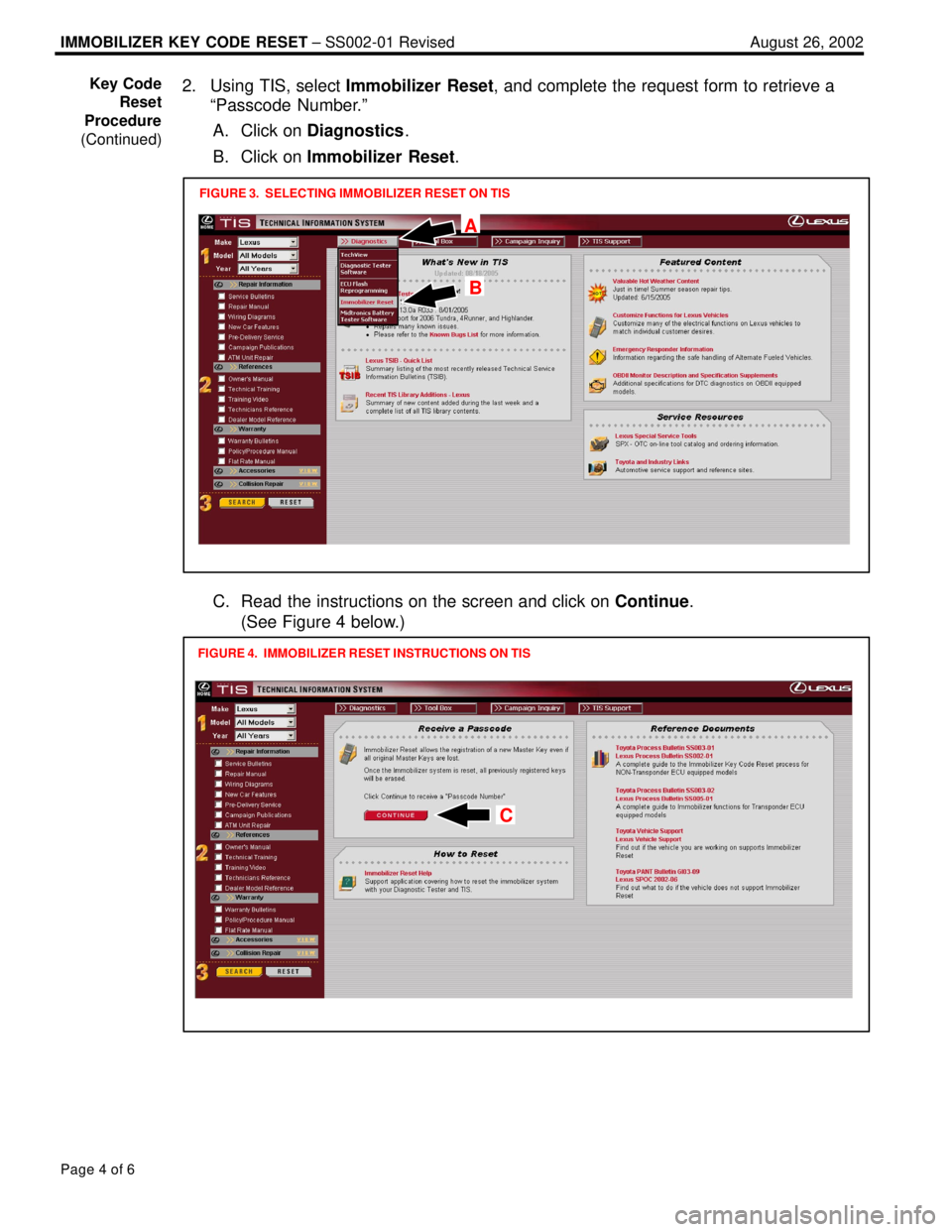
2. Using TIS, select Immobilizer Reset, and complete the request form to retrieve a
ªPasscode Number.º
A. Click on Diagnostics.
B. Click on Immobilizer Reset.
FIGURE 3. SELECTING IMMOBILIZER RESET ON TIS
A
B
C. Read the instructions on the screen and click on Continue.
(See Figure 4 below.)
FIGURE 4. IMMOBILIZER RESET INSTRUCTIONS ON TIS
C
Key Code
Reset
Procedure
(Continued)