2005 LEXUS ES300 engine
[x] Cancel search: enginePage 902 of 969

INITIAL CALIBRATION OF COMPASS DURING PDS ± PD034-05 August 22, 2005
Page 3 of 3
3. Check that the direction appears
several seconds after adjustment.
4. Start the engine and push the switch
for about 6 seconds until ªCº appears
on the display.
5. Drive the vehicle slowly at 5 mph
(8 km/h), or less, in a circle until the
direction is displayed. If there is not
enough space to drive in a circle,
drive around the block until the
direction is displayed.
After driving in 1 to 3 circles,
calibration is complete with the
direction shown on the display.
NOTE:
Do NOT perform calibration of the compass in a place where the Earth's magnetic
field is subject to interference by artificial magnetic fields (underground parking,
under a steel tower, between buildings, roof parking, near a railroad crossing, near
a large vehicle, etc.)
During calibration, do NOT operate electric systems (moon roof, power windows,
etc.) as they may interfere with the calibration. Compass
Calibration
Procedure
(Continued)
Page 914 of 969
Lexus Supports ASE CertificationPage 1 of 4
Title:
BATTERY MAINTENANCE FOR
IN-STOCK VEHICLES & PRE-DELIVERY
Models:
All Models & Model Years Through Current
Technical Service
Information Bulletin
September 12, 2002
PG009-02
A battery in a stored vehicle is subject to conditions that can reduce its performance and
life. These conditions include storage period, temperature, parasitic drain, and battery
load. Because of these factors, battery inspection and maintenance are required in
order to ensure proper operation and optimal battery life.
As a matter of policy, Lexus does not provide battery warranty coverage for discharged
and/or failed batteries due to lack of maintenance; it is the dealer's responsibility to
maintain the specified state of charge of the vehicle's battery while in stock and assure
proper state of charge at delivery.
To eliminate customer service concerns due to an undercharged battery during the first
few weeks of ownership, all dealers should check battery state of charge and
recharge, if necessary, just prior to delivery (i.e., within 48 hours of delivery).
This new procedure will improve the new vehicle ownership experience by greatly
reducing the risk of having a low performance battery concern due to extended storage
periods and/or short engine run times prior to the vehicle sale.
All models and model years through current.
SPECIAL SERVICE TOOLS (SSTs)MANUFACTURERPART NUMBER
MICROPRO 815 Digital
Battery Analyzer
(Essential SST)*Midtronics00002±MP815±T
* This SST can be ordered through SPX/OTC by calling 1±800±933±8335.
NOTE:
MICROPRO 815 Digital Battery Analyzer should be periodically updated through the
Technical Information System (TIS) for new vehicle models. For detailed information,
please see TSIB SS002±02, ªMidtronics Battery Tester Software Update.º
OP CODEDESCRIPTIONTIMEOFPT1T2
N/ANot Applicable to Warranty±±±±
PRODUCT GENERAL INFORMATION
Introduction
Applicable
Vehicles
Required
Tools &
Material
Warranty
Information
Page 924 of 969

Page 1 of 6Lexus Supports ASE Certification
Title:
IMMOBILIZER KEY CODE RESET
Models:
Applicable ES 300, GS 430, GS 300,
IS 300, & LX 470
Technical Service
Information Bulletin
August 26, 2002
SS002-01
TSIB REVISION NOTICE:
August 26, 2005: The model years for each model have been specifically defined in
the ªApplicable Vehiclesº section. The ªRequired SSTsº section has been updated.
February 11, 2003: Model years for LX 470 revised to apply to 2001 and 2002 only.
August 26, 2002: ES 300, GS 300, and IS 300 models added. Model years for GS 430
and LX 470 vehicles expanded to include 2002 and later. Diagnostic Tester software
in Required Tools & Material updated to version 9.01a (or later).
Previous versions of this TSIB should be discarded.
Immobilizer Reset is a new feature that allows the registration of a new Master Key even
if all original Master Keys are lost. Once the Immobilizer system is reset, all previously
registered keys will be erased.
MODEL YEARMODELENGINE MODEL
2001 ± 2005*GS 4303UZ±FE
2001 ± 2002*LX 4702UZ±FE
2002 ± 2003*ES 3001MZ±FE
2002 ± 2005*GS 3002JZ±GE
2002 & Later*IS 3002JZ±GE
* Immobilizer Key Code Reset procedure is not available for prior model years.
NOTE:
Refer to TIS (Technical Information System) for the most current applicable
vehicle information.
PREVIOUS PART NUMBERCURRENT PART NUMBERPART NAME
N/AModel SpecificReplacement Key (Master or Sub)
OP CODEDESCRIPTIONTIMEOFPT1T2
N/ANot Applicable to Warranty ±±±±
SPECIAL SERVICE TOOLS
Introduction
Applicable
Vehicles
Parts
Information
Warranty
Information
Page 926 of 969
August 26, 2002IMMOBILIZER KEY CODE RESET ± SS002-01 Revised
Page 3 of 6
NOTE:
Ensure that the Diagnostic Tester is equipped with the latest version of software (13.0a
or later).
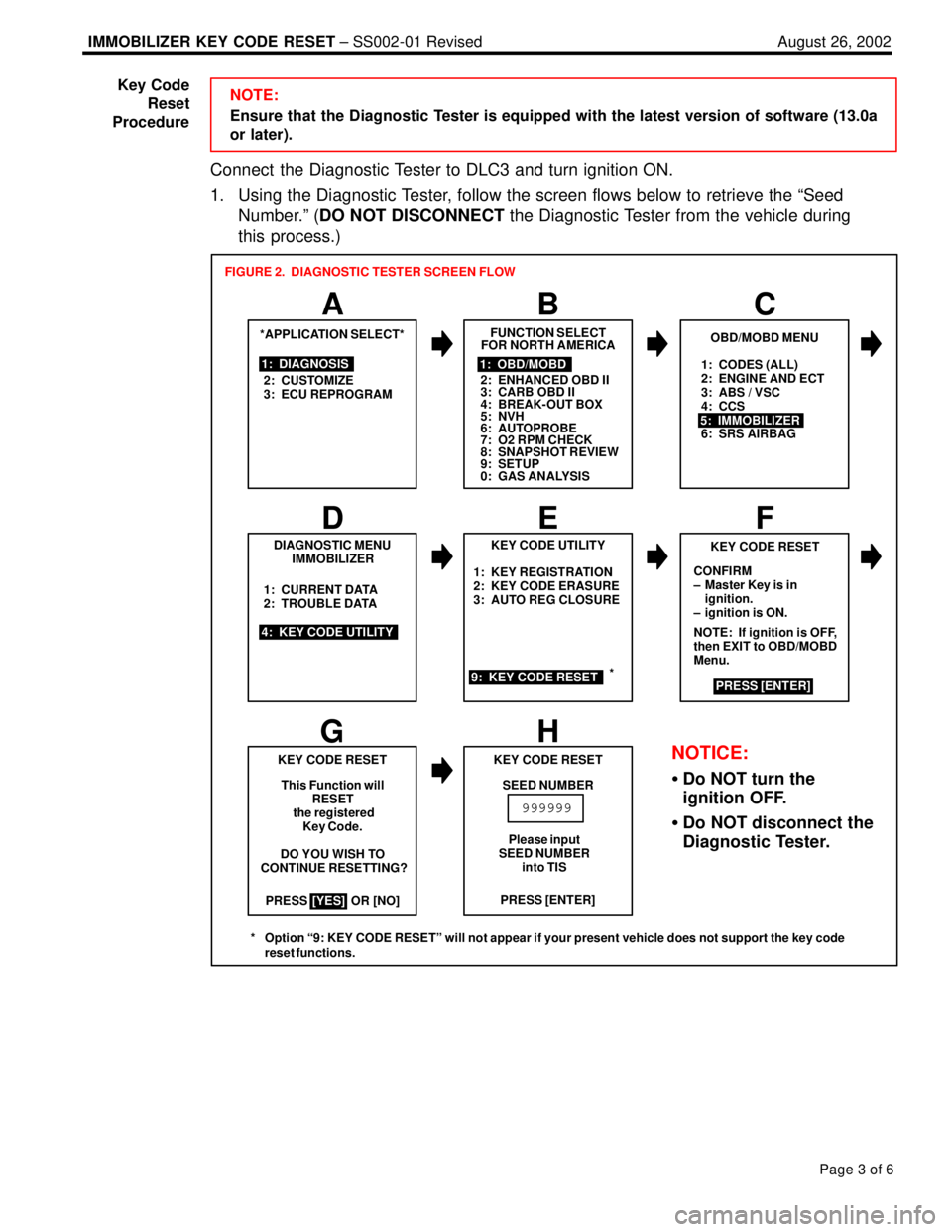
Connect the Diagnostic Tester to DLC3 and turn ignition ON.
1. Using the Diagnostic Tester, follow the screen flows below to retrieve the ªSeed
Number.º (DO NOT DISCONNECT the Diagnostic Tester from the vehicle during
this process.)
1: CODES (ALL)
2: ENGINE AND ECT
3: ABS / VSC
4: CCS
6: SRS AIRBAG
PRESS OR [NO]1: KEY REGISTRATION
2: KEY CODE ERASURE
3: AUTO REG CLOSURE
*APPLICATION SELECT*
1: DIAGNOSIS
2: CUSTOMIZE
3: ECU REPROGRAM
A
FUNCTION SELECT
FOR NORTH AMERICA
BC
1: OBD/MOBD
2: ENHANCED OBD II
3: CARB OBD II
4: BREAK-OUT BOX
5: NVH
6: AUTOPROBE
7: O2 RPM CHECK
8: SNAPSHOT REVIEW
9: SETUP
0: GAS ANALYSIS
OBD/MOBD MENU
5: IMMOBILIZER
DIAGNOSTIC MENU
IMMOBILIZER
4: KEY CODE UTILITY1: CURRENT DATA
2: TROUBLE DATA
D
KEY CODE UTILITY
EF
9: KEY CODE RESET
KEY CODE RESET
CONFIRM
± Master Key is in
ignition.
± ignition is ON.
NOTE: If ignition is OFF,
then EXIT to OBD/MOBD
Menu.
PRESS [ENTER]
GH
KEY CODE RESET
This Function will
RESET
the registered
Key Code.
DO YOU WISH TO
CONTINUE RESETTING?
[YES]PRESS [ENTER] KEY CODE RESET
SEED NUMBER
999999
FIGURE 2. DIAGNOSTIC TESTER SCREEN FLOW
Please input
SEED NUMBER
into TIS
NOTICE:
Do NOT turn the
ignition OFF.
Do NOT disconnect the
Diagnostic Tester.
*
* Option ª9: KEY CODE RESETº will not appear if your present vehicle does not support the key code
reset functions.
Key Code
Reset
Procedure
Page 929 of 969
August 26, 2002IMMOBILIZER KEY CODE RESET ± SS002-01 Revised
Page 6 of 6
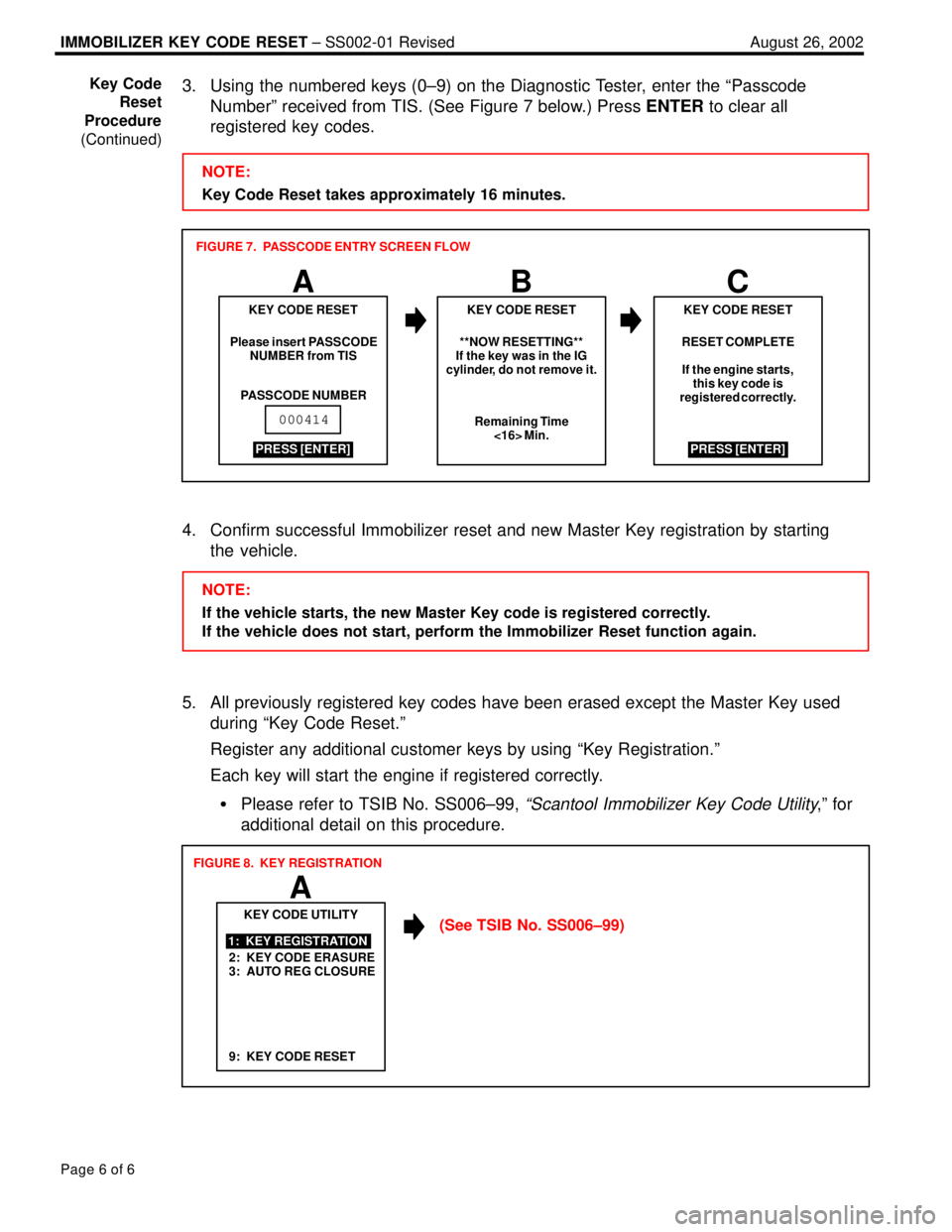
3. Using the numbered keys (0±9) on the Diagnostic Tester, enter the ªPasscode
Numberº received from TIS. (See Figure 7 below.) Press ENTER to clear all
registered key codes.
NOTE:
Key Code Reset takes approximately 16 minutes.
ABC
RESET COMPLETE
If the engine starts,
this key code is
registered correctly.
KEY CODE RESET
Please insert PASSCODE
NUMBER from TIS
PASSCODE NUMBERKEY CODE RESET KEY CODE RESET
**NOW RESETTING**
If the key was in the IG
cylinder, do not remove it.
Remaining Time
<16> Min.
PRESS [ENTER]
000414
PRESS [ENTER] FIGURE 7. PASSCODE ENTRY SCREEN FLOW
4. Confirm successful Immobilizer reset and new Master Key registration by starting
the vehicle.
NOTE:
If the vehicle starts, the new Master Key code is registered correctly.
If the vehicle does not start, perform the Immobilizer Reset function again.
5. All previously registered key codes have been erased except the Master Key used
during ªKey Code Reset.º
Register any additional customer keys by using ªKey Registration.º
Each key will start the engine if registered correctly.
Please refer to TSIB No. SS006±99,
ªScantool Immobilizer Key Code Utility,º for
additional detail on this procedure.
2: KEY CODE ERASURE
3: AUTO REG CLOSUREKEY CODE UTILITY
1: KEY REGISTRATION
A
FIGURE 8. KEY REGISTRATION
9: KEY CODE RESET
(See TSIB No. SS006±99) Key Code
Reset
Procedure
(Continued)
Page 931 of 969

CD SKIP VERIFICATION USING LEXUS MASTER CD ± SS003-05 November 28, 2005
Page 2 of 2
ITEM
NO.SPECIAL SERVICE TOOLS (SSTs)PART NUMBERQTYDRW**
1
Lexus Master CD*
NOTE:
All components from this kit/set are required
00002±07130±SCD122
* Essential SSTs.
** Refers to drawer number in SST Storage System.
NOTE:
Additional SSTs may be ordered by calling SPX/OTC at 1-800-933-8335.
1. Make sure the vehicle is stationary during the test.
2. Insert a compact disc (NOT the Lexus Master CD) to make sure the radio can accept
and eject the disc without damaging it.
3. Check the Lexus Master CD for any unintended scratches or dirt. Wipe away dirt
using a glass cleaning cloth. If the disc is damaged, order a replacement master CD.
4. Insert the Lexus Master CD and change to track number 9.
5. Play the track for one minute.
A. If skips are heard, replace the CD player.
B. If NO skips are heard, the CD player is working normally. Check the customer's
CDs for scratches or other damage to the discs. Confirm that the customer is
using a pre-recorded CD, NOT CD-Rs or CD-RWs as they may NOT have been
burned properly.
NOTE:
Tracks 1 ± 8 and 11 ± 14 are reference tracks. They can be used, but the conditions
are less severe than track 9. Do NOT use tracks 10 and 15.
Track 9 (0.8 mm scratch) is much more severe than the Lexus engineering
specification in order to ensure customer satisfaction. If the customer's radio
passes this test, a replacement radio will NOT improve the performance.
This disc has been specially manufactured with a physical defect for the purposes
of testing the CD player's performance. It is NOT possible to make copies of this
disc that can be used to test the CD player's performance. Required
SSTs
Repair
Procedure
Page 932 of 969
Lexus Supports ASE CertificationPage 1 of 14
Title:
DIAGNOSTIC TESTER
IMMOBILIZER FUNCTIONS
Models:
Applicable ES 330, GS 300, GS 430, GX 470,
LS 430, LX 470, RX 330, & SC 430
Technical Service
Information Bulletin
July 6, 2001
SS005-01
TSIB REVISION NOTICE:
August 26, 2005: The model years for each model have been specifically defined
in the ªApplicable Vehiclesº section. The following vehicles have been added to
the ªApplicable Vehiclesº section: ES 330, GS 300, GS 430, and RX 330.
The ªRequired SSTsº section has been updated.
January 9, 2003: GX 470 and LX 470 have been added to Applicable Vehicles.
The ªRequired SSTsº section has been updated to the current version software.
Screen flows revised (screen C and D) in Figures 1 (screen C and D), 2 (screen C),
3 (screen C), 4 (screen C and G), and 9 (screen A).
The information contained in this TSIB supercedes the original SS005±01.
Previous versions of this TSIB should be discarded.
The Diagnostic Tester incorporates support for Immobilizer system service. This bulletin
covers the following Immobilizer functions available using the Diagnostic Tester:
Transponder Key Type
Transponder Code Registration
Transponder Code Erasure
Transponder ECU Reset
Transponder ECU Replacement
Engine ECU Replacement
NOTE:
The available functions and procedures for the models listed in this TSIB differ
slightly from previous models and other Immobilizer systems currently in use on
Lexus vehicles.
OP CODEDESCRIPTIONTIMEOFPT1T2
N/ANot Applicable to Warranty ±±±±
SPECIAL SERVICE TOOLS
Introduction
Warranty
Information
Page 933 of 969

DIAGNOSTIC TESTER IMMOBILIZER FUNCTIONS ± SS005-01 Revised July 6, 2001
Page 2 of 14
MODEL YEARMODELENGINE MODEL
2001 & LaterLS 4303UZ±FE
2002 & LaterSC 4303UZ±FE
2003 & LaterGX 4702UZ±FE2003 & LaterLX 4702UZ±FE
2004 & LaterES 3303MZ±FE2004 & LaterRX 3303MZ±FE
2006GS 300 (w/o Smart Key)3GR±FSE2006GS 430 (w/o Smart Key)3UZ±FE
NOTE:
Refer to TIS (Technical Information System) for the most current applicable
vehicle information.
PREVIOUS PART NUMBERCURRENT PART NUMBERPART NAME
N/AModel SpecificReplacement Transponder Key (Master or Sub)
ITEM
NO.SPECIAL SERVICE TOOLS (SSTs)PART NUMBERQTYDRW**
1
Lexus Diagnostic Tester Kit*
NOTE:
All components from this kit/set are required
12 Megabyte Diagnostic Tester Program Card
(P/N 01002593±005) with version 13.0a Software
(or later) is requiredLEX22003618
2
CAN Interface Module Kit*
NOTE:
All components from this kit/set are required0100274418
* Essential SSTs.
** Refers to drawer number in SST Storage System.
NOTE:
Additional Diagnostic Tester Kits, CAN Interface Modules, Program Cards, or other
SSTs may be ordered by calling SPX/OTC at 1-800-933-8335. Applicable
Vehicles
Parts
Information
Required
SSTs