Page 238 of 969
C93323
Lock Key
C92370
C93015
C93325
- AUTOMATIC TRANSMISSION / TRANSFLOOR SHIFT ASSY
40-39
2554 Author�: Date�:
2005 LEXUS ES330 REPAIR MANUAL (RM1124U)
40. INSTALL FLOOR SHIFT PARKING LOCK CABLE
ASSY
(a) Using a screwdriver, unlock the claw of the lock key of au-
tomatic adjustment part.
(b) Insert the slide cap into the through hole and install.
(c) Shift the shift lever to P position and turn the ignition
switch to Lock.
(d) Insert the lever pin into the hole of the parking lock cable.
(e) Lock the lock key.
41. INSTALL BATTERY
42. ADJUST SHIFT LEVER POSITION(SEE PAGE 40-40)
43. INSPECT SHIFT LEVER POSITION(SEE PAGE 40-40)
44. INSPECT CHECK KEY INTERLOCK OPERATION(SEE PAGE 40-31)
45. INSPECT CHECK SHIFT LOCK OPERATION(SEE PAGE 40-31)
46. INSPECT CHECK SHIFT LOCK RELEASE BUTTON OPERATION(SEE PAGE 40-31)
47. INSTALL CONSOLE BOX DUCT NO.1(SEE PAGE 55-17)
48. INSTALL AIR DUCT REAR NO.2(SEE PAGE 55-17)
49. INSTALL AIR DUCT REAR NO.1(SEE PAGE 55-17)
Page 649 of 969
A86216
Keyway
KeyPlastic-faced
Hammer
- EXHAUSTEXHAUST PIPE ASSY (3MZ-FE)
15-5
2278 Author�: Date�:
2005 LEXUS ES330 REPAIR MANUAL (RM1124U)
14. INSTALL TAIL PIPE BAFFLE
(a) Align the keyway of the tail pipe baffle with the key on the
exhaust pipe tail.
(b) Using a plastic-faced hammer, tap the tail pipe baffle to
install.
15. INSTALL EXHAUST PIPE ASSY TAIL
(a) Install a new gasket and the exhaust pipe tail to the 3 exhaust pipe supports.
(b) Tighten the 2 new nuts.
Torque: 56 NVm (574 kgfVcm, 41 ftVlbf)
16. INSTALL HEATED OXYGEN SENSOR (See page 12-24)
SST 09224-00010
17. CONNECT ENGINE WIRE NO. 3 (BATTERY NEGATIVE TERMINAL)
Torque: 5.4 NVm (55 kgfVcm, 48 in.Vlbf)
18. CHECK FOR EXHAUST GAS LEAKS
19. INSTALL FLOOR PANEL BRACE REAR
Torque: 20 NVm (199 kgfVcm, 14 ftVlbf)
20. SYSTEM INITIALIZATION (See page 19-15)
Page 915 of 969
BATTERY MAINTENANCE FOR IN±STOCK VEHICLES & PRE±DELIVERY ± PG009-02 September 12, 2002
Page 2 of 4
TOOLS & EQUIPMENTMANUFACTURERPART NUMBER
Fast Battery Charger**AssociatedASE6003
Fast Battery Charger**ChristieCAPPDQ
** These tools can be ordered through the Lexus Approved Dealer Equipment program by calling
1±800±368±6787.
NOTE:
The ªFast Battery Chargersº listed above have been tested and approved by Lexus.
These state±of±the±art ªsmartº chargers were designed to charge batteries at an
accelerated rate, without the possibility of damage. Using non±microprocessor
controlled battery chargers for fast charging purposes can damage the battery.
All vehicles are to be inspected according to the procedures listed below using the
MICROPRO 815 battery tester no more than 48 hours prior to customer vehicle delivery.
PRIOR TO TESTING:
If necessary, remove battery surface charge by turning on high beam headlights for 60
seconds, then let battery voltage recover for one minute.
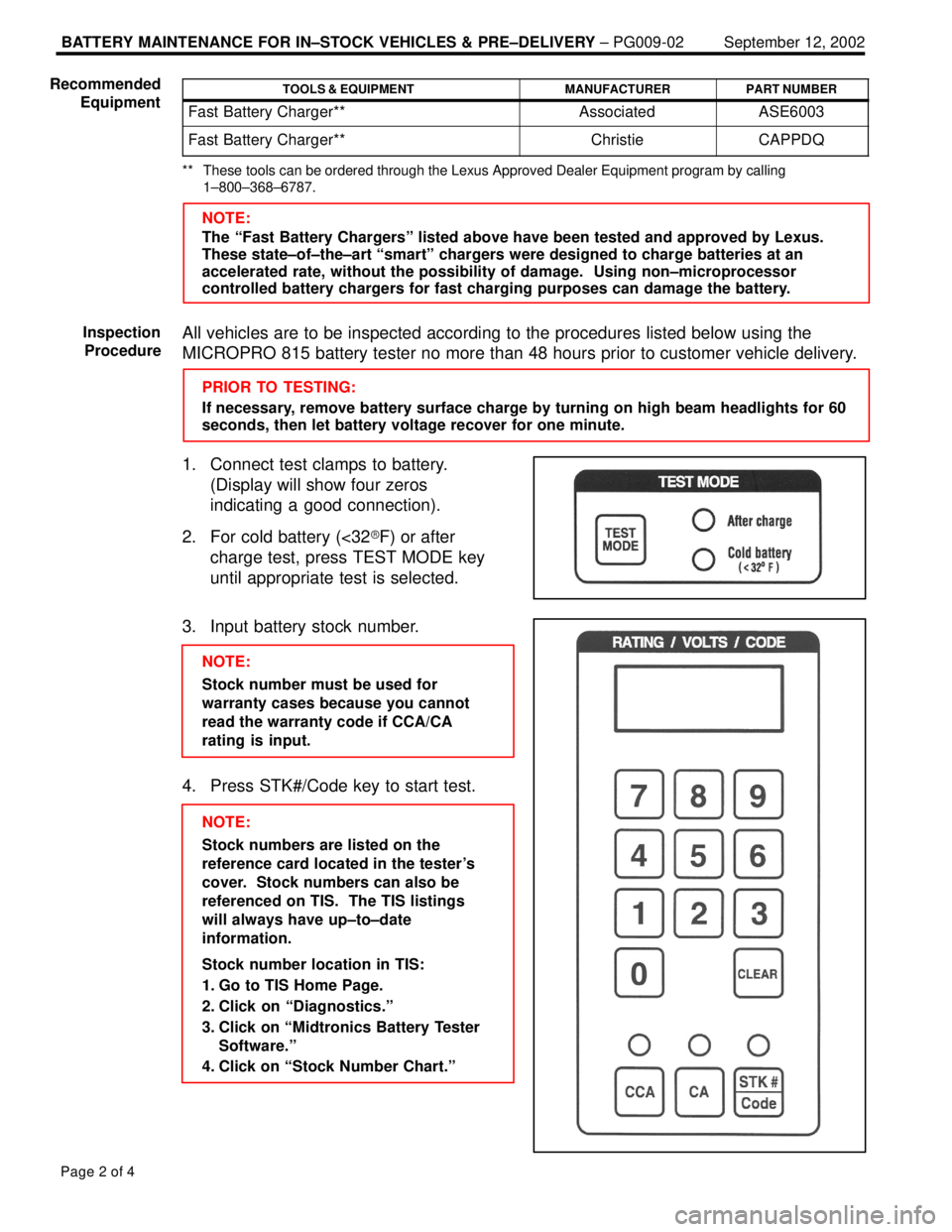
1. Connect test clamps to battery.
(Display will show four zeros
indicating a good connection).
2. For cold battery (<32�F) or after
charge test, press TEST MODE key
until appropriate test is selected.
3. Input battery stock number.
NOTE:
Stock number must be used for
warranty cases because you cannot
read the warranty code if CCA/CA
rating is input.
4. Press STK#/Code key to start test.
NOTE:
Stock numbers are listed on the
reference card located in the tester's
cover. Stock numbers can also be
referenced on TIS. The TIS listings
will always have up±to±date
information.
Stock number location in TIS:
1. Go to TIS Home Page.
2. Click on ªDiagnostics.º
3. Click on ªMidtronics Battery Tester
Software.º
4. Click on ªStock Number Chart.º Recommended
Equipment
Inspection
Procedure
Page 916 of 969
BATTERY MAINTENANCE FOR IN±STOCK VEHICLES & PRE±DELIVERY ± PG009-02 September 12, 2002
Page 3 of 4
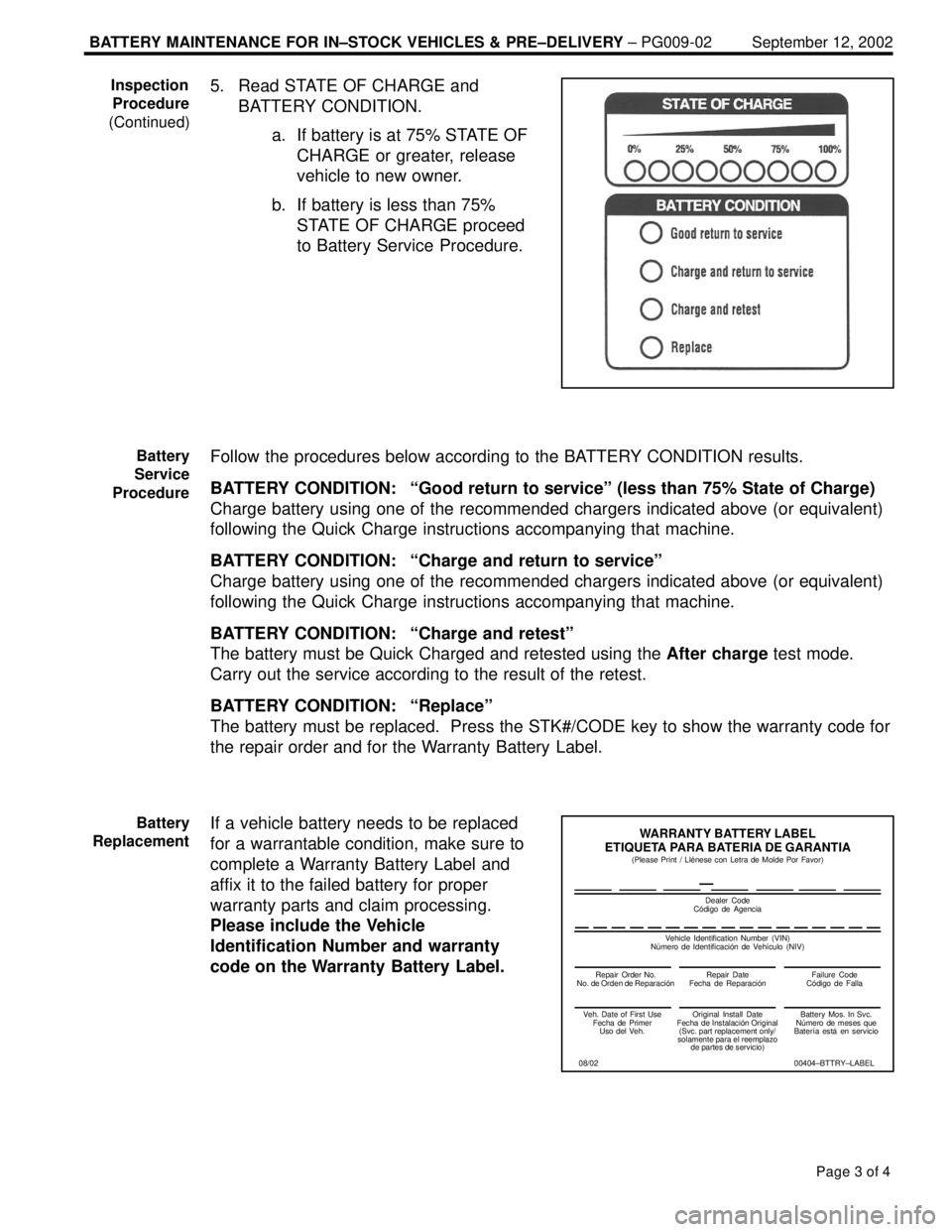
5. Read STATE OF CHARGE and
BATTERY CONDITION.
a. If battery is at 75% STATE OF
CHARGE or greater, release
vehicle to new owner.
b. If battery is less than 75%
STATE OF CHARGE proceed
to Battery Service Procedure.
Follow the procedures below according to the BATTERY CONDITION results.
BATTERY CONDITION: ªGood return to serviceº (less than 75% State of Charge)
Charge battery using one of the recommended chargers indicated above (or equivalent)
following the Quick Charge instructions accompanying that machine.
BATTERY CONDITION: ªCharge and return to serviceº
Charge battery using one of the recommended chargers indicated above (or equivalent)
following the Quick Charge instructions accompanying that machine.
BATTERY CONDITION: ªCharge and retestº
The battery must be Quick Charged and retested using the After charge test mode.
Carry out the service according to the result of the retest.
BATTERY CONDITION: ªReplaceº
The battery must be replaced. Press the STK#/CODE key to show the warranty code for
the repair order and for the Warranty Battery Label.
If a vehicle battery needs to be replaced
for a warrantable condition, make sure to
complete a Warranty Battery Label and
affix it to the failed battery for proper
warranty parts and claim processing.
Please include the Vehicle
Identification Number and warranty
code on the Warranty Battery Label.Inspection
Procedure
(Continued)
Battery
Service
Procedure
Battery
Replacement
Repair Order No.
Repair Date
Failure Code
WARRANTY BATTERY LABEL
ETIQUETA PARA BATERIA DE GARANTIA
Dealer Code
Veh. Date of First Use
Fecha de Primer
Uso del Veh.Original Install Date
Fecha
(Svc. part replacement only/
solamente para el reemplazo
de partes de servicio)Battery Mos. In Svc.
N–mero de meses que
Bater‹a est€ en servicio
00404±BTTRY±LABEL (Please Print / Ll‡nese con Letra de Molde Por Favor)
Vehicle Identification Number (VIN)
(NIV)
08/02