Page 2280 of 2870

EN(H4DOTC 2.5)-256
ENGINE (DIAGNOSTIC)
Diagnostic Procedure with Diagnostic Trouble Code (DTC)
14 CHECK HARNESS BETWEEN ECM AND AC-
CELERATOR PEDAL POSITION SENSOR.
1) Turn the ignition switch to OFF.
2) Disconnect the connector from ECM.
3) Disconnect the connector from the acceler-
ator pedal position sensor.
4) Measure the resistance between ECM con-
nector and accelerator pedal position sensor con-
nector.
Connector & terminal
(B136) No. 34 — (B315) No. 4:
(B136) No. 35 — (B315) No. 6:Is the resistance less than 1
Ω?Go to step 15.Repair the open
circuit of harness
connector.
15 CHECK HARNESS BETWEEN ECM AND AC-
CELERATOR PEDAL POSITION SENSOR.
1) Connect the ECM connector.
2) Measure the resistance between accelera-
tor pedal position sensor connector and engine
ground.
Connector & terminal
(B315) No. 4 — Engine ground:
(B315) No. 6 — Engine ground:Is the resistance less than 5
Ω?Go to step 16.Repair the poor
contact in ECM con-
nector. Replace the
ECM if defective.
16 CHECK HARNESS BETWEEN ECM AND AC-
CELERATOR PEDAL POSITION SENSOR.
1) Connect the ECM connector.
2) Turn the ignition switch to ON.
3) Measure the voltage between accelerator
pedal position sensor connector and engine
ground.
Connector & terminal
(B315) No. 1 (+) — Engine ground (
−):
(B315) No. 3 (+) — Engine ground (
−):
4) Check the voltage change by shaking the
harness and connector of ECM while monitor-
ing the value with voltage meter.Is the voltage less than 6 V? Go to step 17.Repair battery short
circuit in harness
between ECM con-
nector and acceler-
ator pedal position
sensor connector.
17 CHECK POWER SUPPLY OF ACCELERA-
TOR PEDAL POSITION SENSOR.
1) Measure the voltage between accelerator
pedal position sensor connector and engine
ground.
Connector & terminal
(B315) No. 2 (+) — Engine ground (
−):
(B315) No. 5 (+) — Engine ground (
−):
2) Check the voltage change by shaking the
harness and connector of ECM while monitor-
ing the value with voltage meter.Is the voltage less than 4.8 V? Go to step 18.Repair short circuit
in harness between
ECM connector and
accelerator pedal
position sensor con-
nector.
18 CHECK HARNESS BETWEEN ECM AND AC-
CELERATOR PEDAL POSITION SENSOR.
1) Turn the ignition switch to OFF.
2) Connect the accelerator pedal position sen-
sor connector.
3) Turn the ignition switch to ON.
4) Measure the voltage between ECM connector
and chassis ground.
Connector & terminal
(B136) No. 17 (+) — Chassis ground (
−):
(B136) No. 28 (+) — Chassis ground (
−):Is the voltage less than 4.8 V? Go to step 19.Repair poor contact
in accelerator pedal
position sensor con-
nector. Replace the
accelerator pedal
position sensor if
defective. Step Check Yes No
Page 2281 of 2870
EN(H4DOTC 2.5)-257
ENGINE (DIAGNOSTIC)
Diagnostic Procedure with Diagnostic Trouble Code (DTC)
19 CHECK HARNESS BETWEEN ECM AND AC-
CELERATOR PEDAL POSITION SENSOR.
1) Turn the ignition switch to OFF.
2) Disconnect the connector from ECM.
3) Disconnect the connector from the acceler-
ator pedal position sensor.
4) Measure the resistance between connector
terminals of accelerator pedal position sensor.
Connector & terminal
(B315) No. 5 — (B315) No. 2:Is the resistance more than 1
MΩ?Repair the poor
contact in ECM con-
nector. Replace the
ECM if defective.Repair short circuit
in harness between
ECM connector and
accelerator pedal
position sensor con-
nector. Step Check Yes No
Page 2292 of 2870

CS-7
CONTROL SYSTEM
General Description
C: CAUTION
Wear working clothing, including a cap, protec-
tive goggles, and protective shoes during opera-
tion.
Remove contamination including dirt and corro-
sion before removal, installation or disassembly.
Keep the disassembled parts in order and pro-
tect them from dust or dirt.
Before removal, installation or disassembly, be
sure to clarify the failure. Avoid unnecessary re-
moval, installation, disassembly and replacement.
Use SUBARU genuine fluid, grease etc. or the
equivalent. Do not mix grease etc. with that of an-
other grade or from other manufacturers.
Be sure to tighten fasteners including bolts and
nuts to the specified torque.
Place shop jacks or rigid racks at the specified
points.
Apply grease onto sliding or revolution surfaces
before installation.
Before installing O-rings or snap rings, apply suf-
ficient amount of grease to avoid damage and de-
formation.
Before securing a part on a vise, place cushion-
ing material such as wood blocks, aluminum plate,
or cloth between the part and vise.
Before disconnecting electrical connectors, be
sure to disconnect the ground cable from battery.
Page 2301 of 2870
CS-16
CONTROL SYSTEM
N-R Lock Solenoid
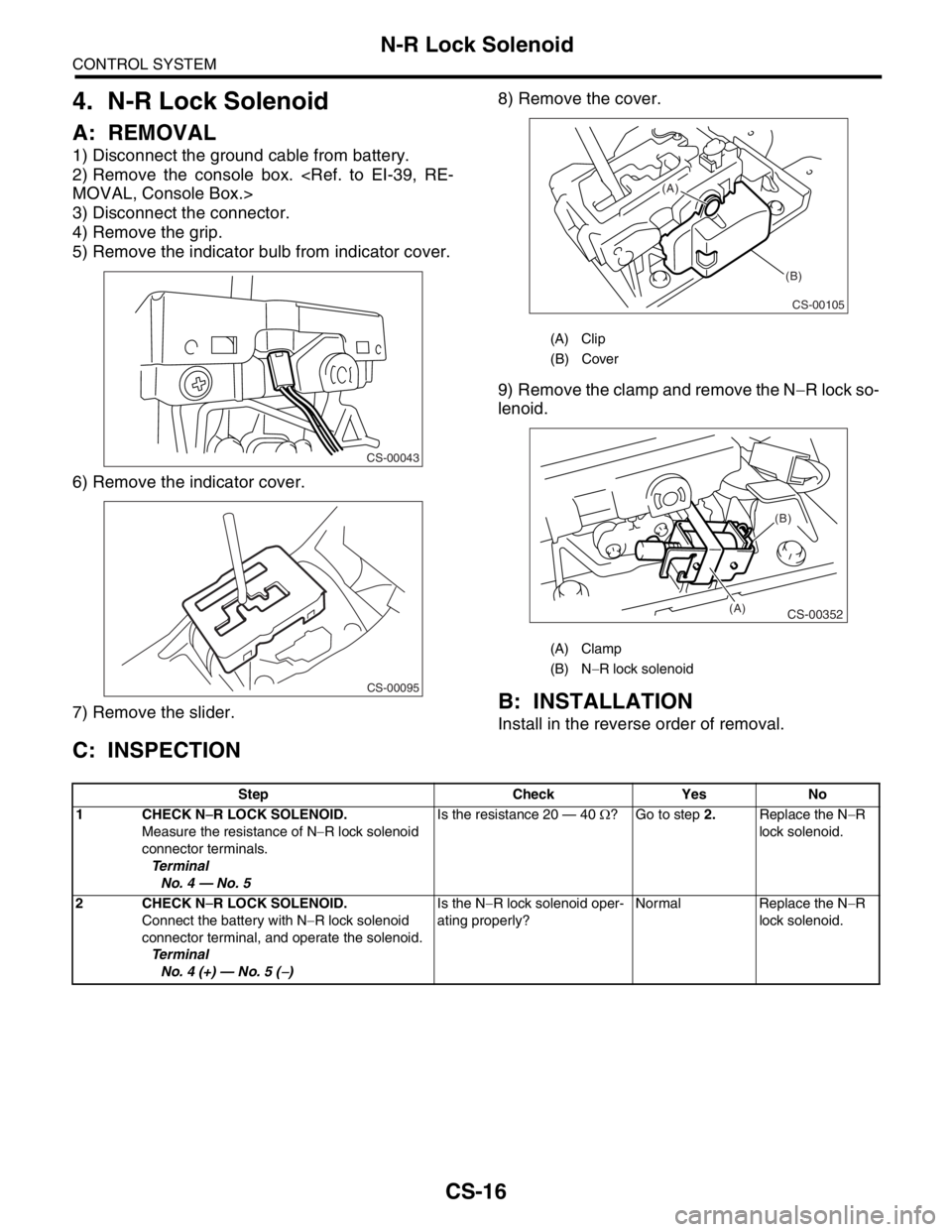
4. N-R Lock Solenoid
A: REMOVAL
1) Disconnect the ground cable from battery.
2) Remove the console box.
MOVAL, Console Box.>
3) Disconnect the connector.
4) Remove the grip.
5) Remove the indicator bulb from indicator cover.
6) Remove the indicator cover.
7) Remove the slider.8) Remove the cover.
9) Remove the clamp and remove the N−R lock so-
lenoid.
B: INSTALLATION
Install in the reverse order of removal.
C: INSPECTION
CS-00043
CS-00095
(A) Clip
(B) Cover
(A) Clamp
(B) N−R lock solenoid
CS-00105
(A)
(B)
CS-00352
(B)
(A)
Step Check Yes No
1 CHECK N−R LOCK SOLENOID.
Measure the resistance of N−R lock solenoid
connector terminals.
Te r m i n a l
No. 4 — No. 5Is the resistance 20 — 40 Ω? Go to step 2.Replace the N−R
lock solenoid.
2 CHECK N−R LOCK SOLENOID.
Connect the battery with N−R lock solenoid
connector terminal, and operate the solenoid.
Te r m i n a l
No. 4 (+) — No. 5 (
−)Is the N−R lock solenoid oper-
ating properly?Normal Replace the N−R
lock solenoid.
Page 2310 of 2870
CS-25
CONTROL SYSTEM
Drive Select Cable
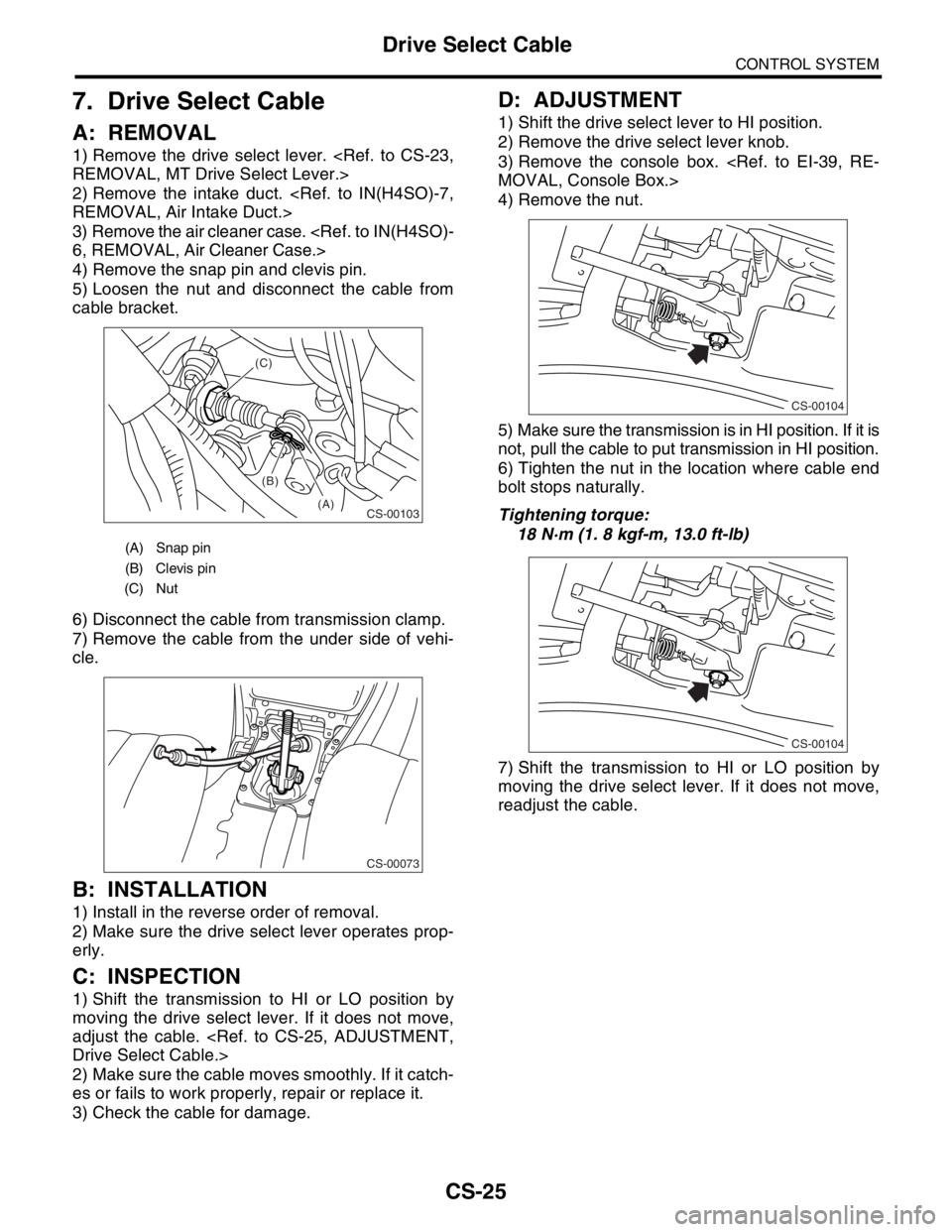
7. Drive Select Cable
A: REMOVAL
1) Remove the drive select lever.
REMOVAL, MT Drive Select Lever.>
2) Remove the intake duct.
REMOVAL, Air Intake Duct.>
3) Remove the air cleaner case.
6, REMOVAL, Air Cleaner Case.>
4) Remove the snap pin and clevis pin.
5) Loosen the nut and disconnect the cable from
cable bracket.
6) Disconnect the cable from transmission clamp.
7) Remove the cable from the under side of vehi-
cle.
B: INSTALLATION
1) Install in the reverse order of removal.
2) Make sure the drive select lever operates prop-
erly.
C: INSPECTION
1) Shift the transmission to HI or LO position by
moving the drive select lever. If it does not move,
adjust the cable.
Drive Select Cable.>
2) Make sure the cable moves smoothly. If it catch-
es or fails to work properly, repair or replace it.
3) Check the cable for damage.
D: ADJUSTMENT
1) Shift the drive select lever to HI position.
2) Remove the drive select lever knob.
3) Remove the console box.
MOVAL, Console Box.>
4) Remove the nut.
5) Make sure the transmission is in HI position. If it is
not, pull the cable to put transmission in HI position.
6) Tighten the nut in the location where cable end
bolt stops naturally.
Tightening torque:
18 N·m (1. 8 kgf-m, 13.0 ft-lb)
7) Shift the transmission to HI or LO position by
moving the drive select lever. If it does not move,
readjust the cable.
(A) Snap pin
(B) Clevis pin
(C) Nut
CS-00103(A) (B) (C)
CS-00073
CS-00104
CS-00104
Page 2365 of 2870
4AT-52
AUTOMATIC TRANSMISSION
Inhibitor Switch
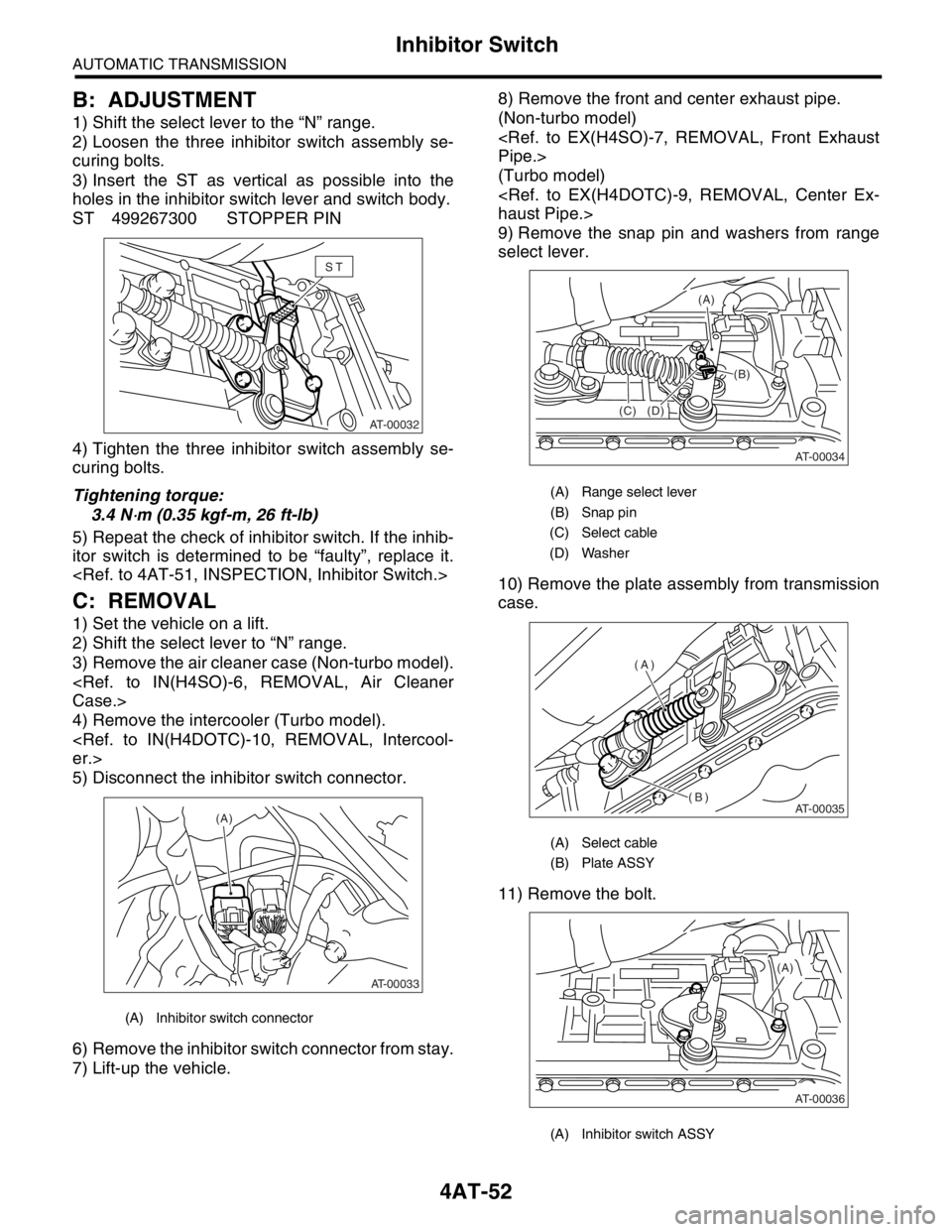
B: ADJUSTMENT
1) Shift the select lever to the “N” range.
2) Loosen the three inhibitor switch assembly se-
curing bolts.
3) Insert the ST as vertical as possible into the
holes in the inhibitor switch lever and switch body.
ST 499267300 STOPPER PIN
4) Tighten the three inhibitor switch assembly se-
curing bolts.
Tightening torque:
3.4 N
⋅m (0.35 kgf-m, 26 ft-lb)
5) Repeat the check of inhibitor switch. If the inhib-
itor switch is determined to be “faulty”, replace it.
C: REMOVAL
1) Set the vehicle on a lift.
2) Shift the select lever to “N” range.
3) Remove the air cleaner case (Non-turbo model).
Case.>
4) Remove the intercooler (Turbo model).
er.>
5) Disconnect the inhibitor switch connector.
6) Remove the inhibitor switch connector from stay.
7) Lift-up the vehicle.8) Remove the front and center exhaust pipe.
(Non-turbo model)
Pipe.>
(Turbo model)
haust Pipe.>
9) Remove the snap pin and washers from range
select lever.
10) Remove the plate assembly from transmission
case.
11) Remove the bolt.
(A) Inhibitor switch connector
ST
AT-00032
AT-00033
(A)
(A) Range select lever
(B) Snap pin
(C) Select cable
(D) Washer
(A) Select cable
(B) Plate ASSY
(A) Inhibitor switch ASSY
AT-00034
(C)(B) (A)
(D)
AT-00035
(A)
(B)
(A)
AT-00036
Page 2372 of 2870
4AT-59
AUTOMATIC TRANSMISSION
Rear Vehicle Speed Sensor
15.Rear Vehicle Speed Sensor
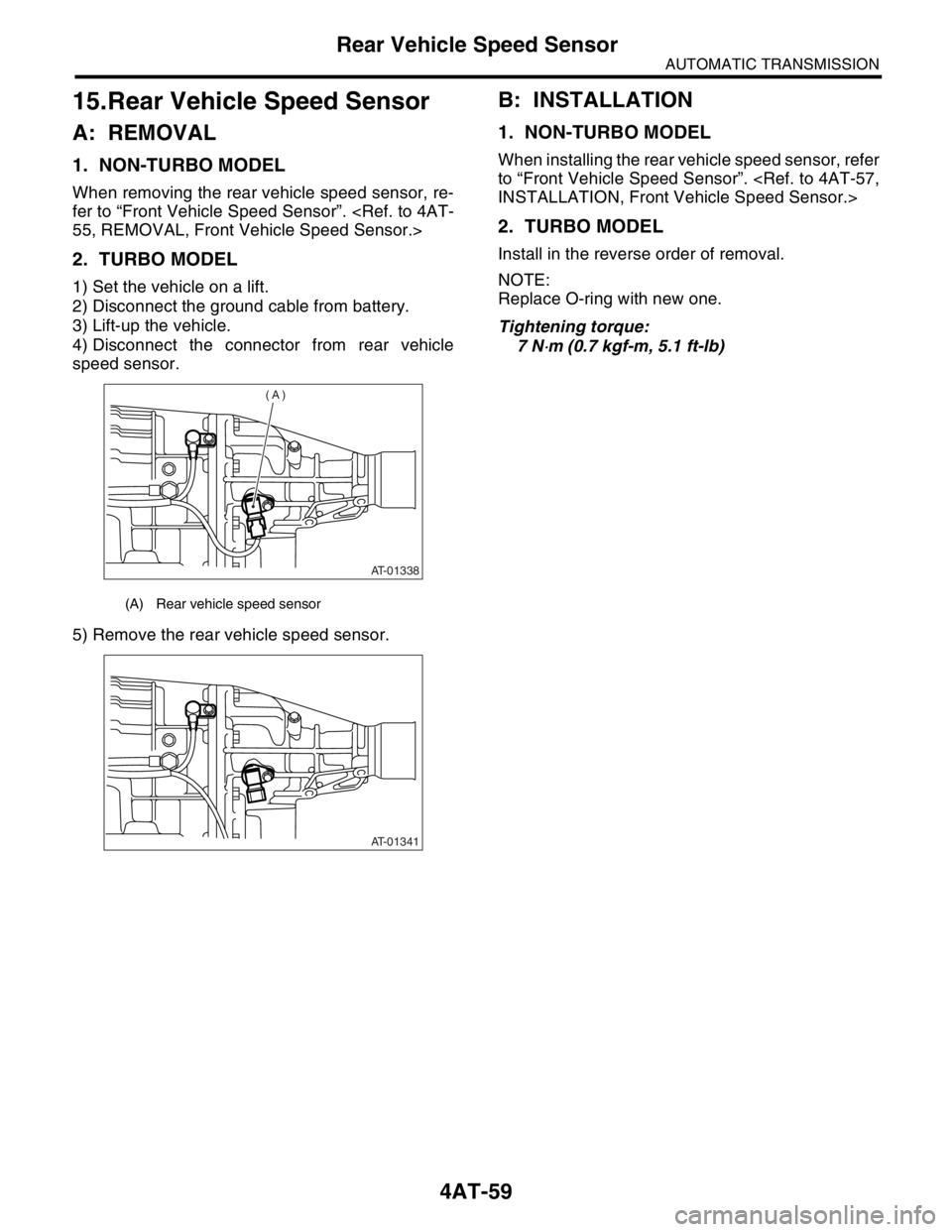
A: REMOVAL
1. NON-TURBO MODEL
When removing the rear vehicle speed sensor, re-
fer to “Front Vehicle Speed Sensor”.
55, REMOVAL, Front Vehicle Speed Sensor.>
2. TURBO MODEL
1) Set the vehicle on a lift.
2) Disconnect the ground cable from battery.
3) Lift-up the vehicle.
4) Disconnect the connector from rear vehicle
speed sensor.
5) Remove the rear vehicle speed sensor.
B: INSTALLATION
1. NON-TURBO MODEL
When installing the rear vehicle speed sensor, refer
to “Front Vehicle Speed Sensor”.
INSTALLATION, Front Vehicle Speed Sensor.>
2. TURBO MODEL
Install in the reverse order of removal.
NOTE:
Replace O-ring with new one.
Tightening torque:
7 N
⋅m (0.7 kgf-m, 5.1 ft-lb)
(A) Rear vehicle speed sensor
AT-01338
(A)
AT-01341
Page 2384 of 2870
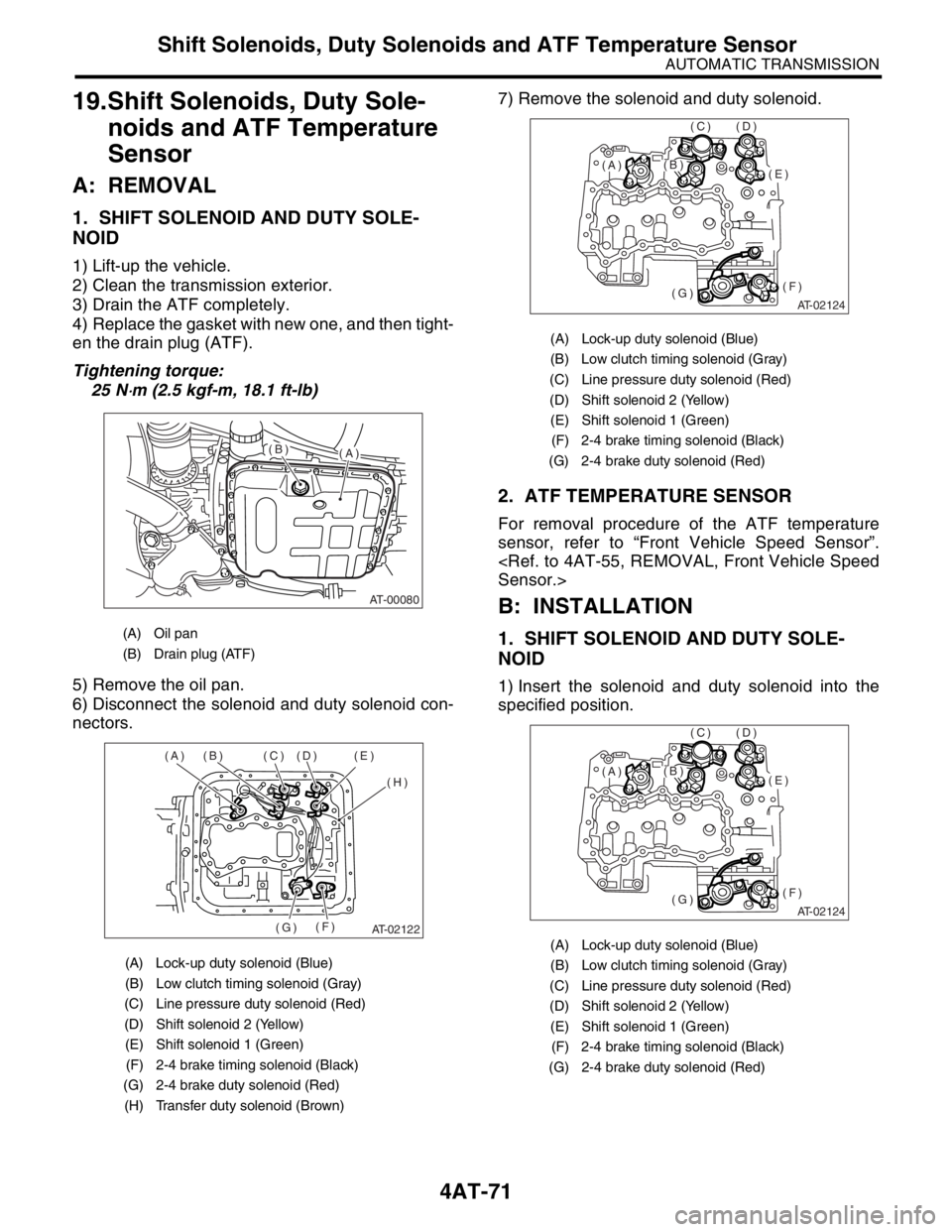
4AT-71
AUTOMATIC TRANSMISSION
Shift Solenoids, Duty Solenoids and ATF Temperature Sensor
19.Shift Solenoids, Duty Sole-
noids and ATF Temperature
Sensor
A: REMOVAL
1. SHIFT SOLENOID AND DUTY SOLE-
NOID
1) Lift-up the vehicle.
2) Clean the transmission exterior.
3) Drain the ATF completely.
4) Replace the gasket with new one, and then tight-
en the drain plug (ATF).
Tightening torque:
25 N
⋅m (2.5 kgf-m, 18.1 ft-lb)
5) Remove the oil pan.
6) Disconnect the solenoid and duty solenoid con-
nectors.7) Remove the solenoid and duty solenoid.
2. ATF TEMPERATURE SENSOR
For removal procedure of the ATF temperature
sensor, refer to “Front Vehicle Speed Sensor”.
Sensor.>
B: INSTALLATION
1. SHIFT SOLENOID AND DUTY SOLE-
NOID
1) Insert the solenoid and duty solenoid into the
specified position.
(A) Oil pan
(B) Drain plug (ATF)
(A) Lock-up duty solenoid (Blue)
(B) Low clutch timing solenoid (Gray)
(C) Line pressure duty solenoid (Red)
(D) Shift solenoid 2 (Yellow)
(E) Shift solenoid 1 (Green)
(F) 2-4 brake timing solenoid (Black)
(G) 2-4 brake duty solenoid (Red)
(H) Transfer duty solenoid (Brown)
AT-00080
(A)(B)
AT-02122
(A) (B) (C) (D) (E)
(H)
(F)
(G)
(A) Lock-up duty solenoid (Blue)
(B) Low clutch timing solenoid (Gray)
(C) Line pressure duty solenoid (Red)
(D) Shift solenoid 2 (Yellow)
(E) Shift solenoid 1 (Green)
(F) 2-4 brake timing solenoid (Black)
(G) 2-4 brake duty solenoid (Red)
(A) Lock-up duty solenoid (Blue)
(B) Low clutch timing solenoid (Gray)
(C) Line pressure duty solenoid (Red)
(D) Shift solenoid 2 (Yellow)
(E) Shift solenoid 1 (Green)
(F) 2-4 brake timing solenoid (Black)
(G) 2-4 brake duty solenoid (Red)
AT-02124
(E)
(F)(G)
(D)(C)
(B)(A)
AT-02124
(E)
(F)(G)
(D)(C)
(B)(A)