2004 SUBARU FORESTER brake light
[x] Cancel search: brake lightPage 1304 of 2870
EN(H4SO)-206
ENGINE (DIAGNOSTIC)
Diagnostic Procedure with Diagnostic Trouble Code (DTC)
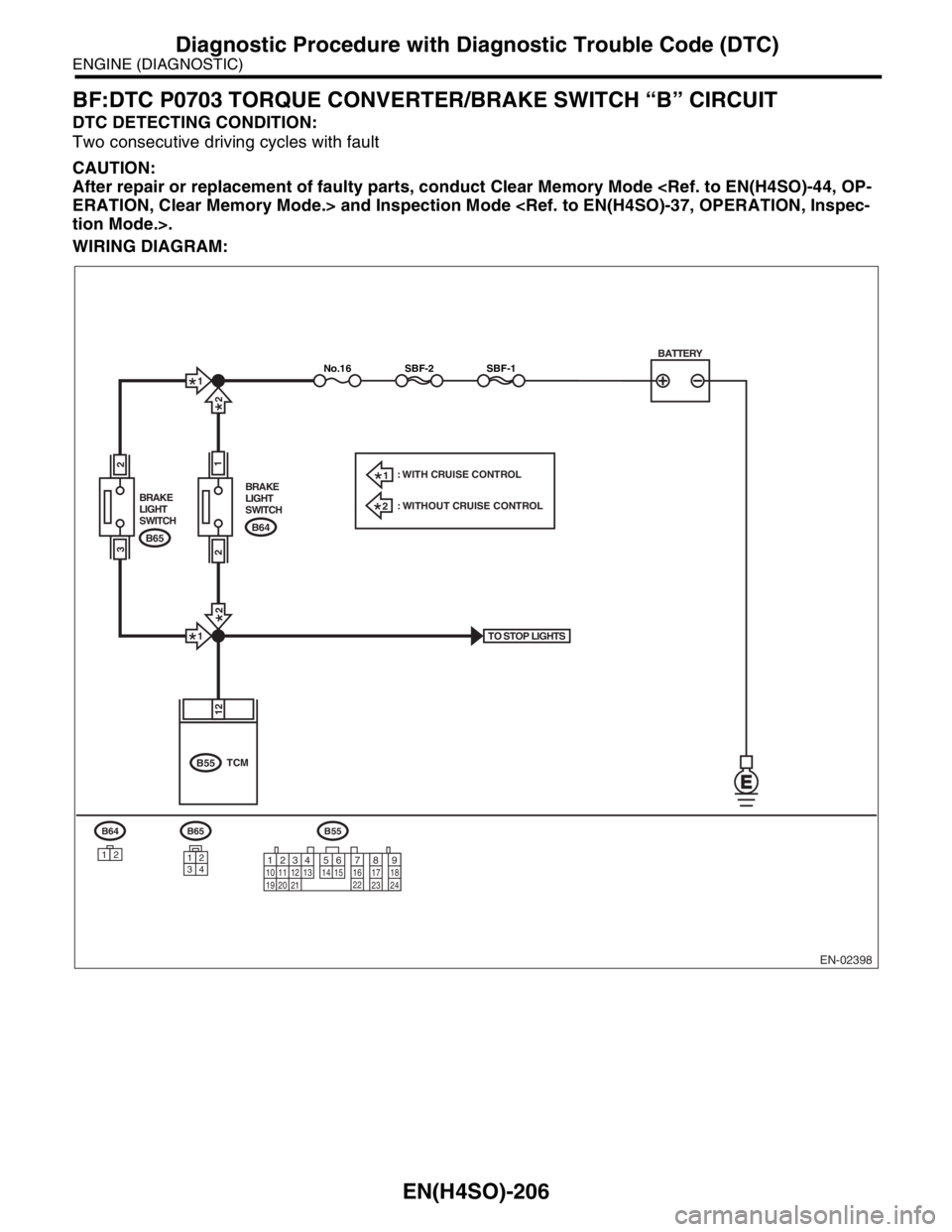
BF:DTC P0703 TORQUE CONVERTER/BRAKE SWITCH “B” CIRCUIT
DTC DETECTING CONDITION:
Two consecutive driving cycles with fault
CAUTION:
After repair or replacement of faulty parts, conduct Clear Memory Mode
WIRING DIAGRAM:
EN-02398
BATTERY
B65
34
12
TO STOP LIGHTS
SBF-1SBF-2No.16
B65 BRAKE
LIGHT
SWITCH
2
3
B64 BRAKE
LIGHT
SWITCH
1
B64
12
B55
B55
12
TCM
2
1
2
2
1
2
1: WITH CRUISE CONTROL
: WITHOUT CRUISE CONTROL
12
789 56 3410 11 12
19 20 2113 14 15 16 17 18
22
23
24
Page 1305 of 2870

EN(H4SO)-207
ENGINE (DIAGNOSTIC)
Diagnostic Procedure with Diagnostic Trouble Code (DTC)
Step Check Yes No
1 CHECK OPERATION OF BRAKE LIGHT.Does the brake light come on
when depressing the brake
pedal?Go to step 2.Repair or replace
the brake light cir-
cuit.
2 CHECK HARNESS BETWEEN TCM AND
BRAKE LIGHT SWITCH CONNECTOR.
1) Disconnect the connectors from TCM and
brake light switch.
2) Measure the resistance of harness
between TCM and brake light switch connec-
tor.
Connector & terminal
WITHOUT CRUISE CONTROL
(B55) No. 12 — (B64) No. 2:
WITH CRUISE CONTROL
(B55) No. 12 — (B65) No. 3:Is the resistance less than 1
Ω?Go to step 3.Repair or replace
the harness and
connector.
N
OTE:
In this case repair
the following:
Open circuit in
harness between
TCM and brake
light switch con-
nector
Poor contact in
TCM connector
Poor contact in
brake light switch
connector
3 CHECK HARNESS BETWEEN TCM AND
BRAKE LIGHT SWITCH CONNECTOR.
Measure the resistance of harness between
TCM and chassis ground.
Connector & terminal
(B55) No. 12 — Chassis ground:Is the resistance more than 1
MΩ?Go to step 4.Repair ground
short circuit in har-
ness between
TCM and brake
light switch con-
nector.
4 CHECK INPUT SIGNAL FOR TCM.
1) Connect the connectors to TCM and brake
light switch.
2) Measure the voltage between TCM and
chassis ground.
Connector & terminal
(B55) No. 12 (+) — Chassis ground (
−):Is the voltage less than 1 V
when releasing the brake
pedal?Go to step 5.Adjust or replace
the brake light
switch.
SWITCH,
INSPECTION,
Stop Light Sys-
tem.>
5 CHECK INPUT SIGNAL FOR TCM.
Measure the voltage between TCM and chas-
sis ground.
Connector & terminal
(B55) No. 12 (+) — Chassis ground (
−):Is the voltage more than 10 V
when depressing the brake
pedal?Go to step 6.Adjust or replace
the brake light
switch.
SWITCH,
INSPECTION,
Stop Light Sys-
tem.>
6 CHECK POOR CONTACT.
Check poor contact in TCM connector.Is there poor contact in TCM
connector?Repair poor con-
tact in TCM con-
nector.Replace the TCM.
trol Module
(TCM).>
Page 1308 of 2870

EN(H4SO)-210
ENGINE (DIAGNOSTIC)
Diagnostic Procedure with Diagnostic Trouble Code (DTC)
BK:DTC P0741 TORQUE CONVERTER CLUTCH CIRCUIT PERFORMANCE OR
STUCK OFF
DTC DETECTING CONDITION:
Two consecutive driving cycles with fault
TROUBLE SYMPTOM:
No lock-up (after engine warm-up)
No shift or excessive tight corner “braking”
CAUTION:
After repair or replacement of faulty parts, conduct Clear Memory Mode
Step Check Yes No
1 CHECK ANY OTHER DTC ON DISPLAY.Is any other DTC displayed? Inspect the rele-
vant DTC using
“List of Diagnostic
Trouble Code
(DTC)”.
of Diagnostic Trou-
ble Code (DTC).>Go to step 2.
2 CHECK LOCK-UP DUTY SOLENOID CIR-
CUIT.
Check lock-up duty solenoid circuit.
SOLENOID, Diagnostic Procedure with Diag-
nostic Trouble Code (DTC).>Is there any trouble in lock-up
duty solenoid circuit?Repair or replace
the lock-up duty
solenoid circuit.Go to step 3.
3 CHECK THROTTLE POSITION SENSOR
CIRCUIT.
Check the throttle position sensor circuit.
TION SENSOR, Diagnostic Procedure with
Diagnostic Trouble Code (DTC).>Is there any trouble in throttle
position sensor circuit?Repair or replace
the throttle posi-
tion sensor circuit.Go to step 4.
4 CHECK TORQUE CONVERTER TURBINE
SPEED SENSOR CIRCUIT.
Check torque converter turbine speed sensor
circuit.
SENSOR, Diagnostic Procedure with Diagnos-
tic Trouble Code (DTC).>Is there any trouble in torque
converter turbine speed sensor
circuit?Repair or replace
the torque con-
ver ter turbine
speed sensor cir-
cuit.Go to step 5.
5 CHECK ENGINE SPEED INPUT CIRCUIT.
Check engine speed input circuit.
NAL, Diagnostic Procedure with Diagnostic
Trouble Code (DTC).>Is there any trouble in engine
speed input circuit?Repair or replace
the engine speed
input circuit.Go to step 6.
6 CHECK INHIBITOR SWITCH CIRCUIT.
Check inhibitor switch circuit.
Diagnostic Procedure without Diagnostic Trou-
ble Code (DTC).>Is there any trouble in inhibitor
switch circuit?Repair or replace
the inhibitor switch
circuit.Go to step 7.
7 CHECK BRAKE LIGHT SWITCH CIRCUIT.
Check brake light switch circuit.
Diagnostic Procedure without Diagnostic Trou-
ble Code (DTC).>Is there any trouble in brake
light switch circuit?Repair or replace
the brake light
switch circuit.Go to step 8.
Page 1651 of 2870
EN(H4DOTC)-21
ENGINE (DIAGNOSTIC)
Electrical Component Location
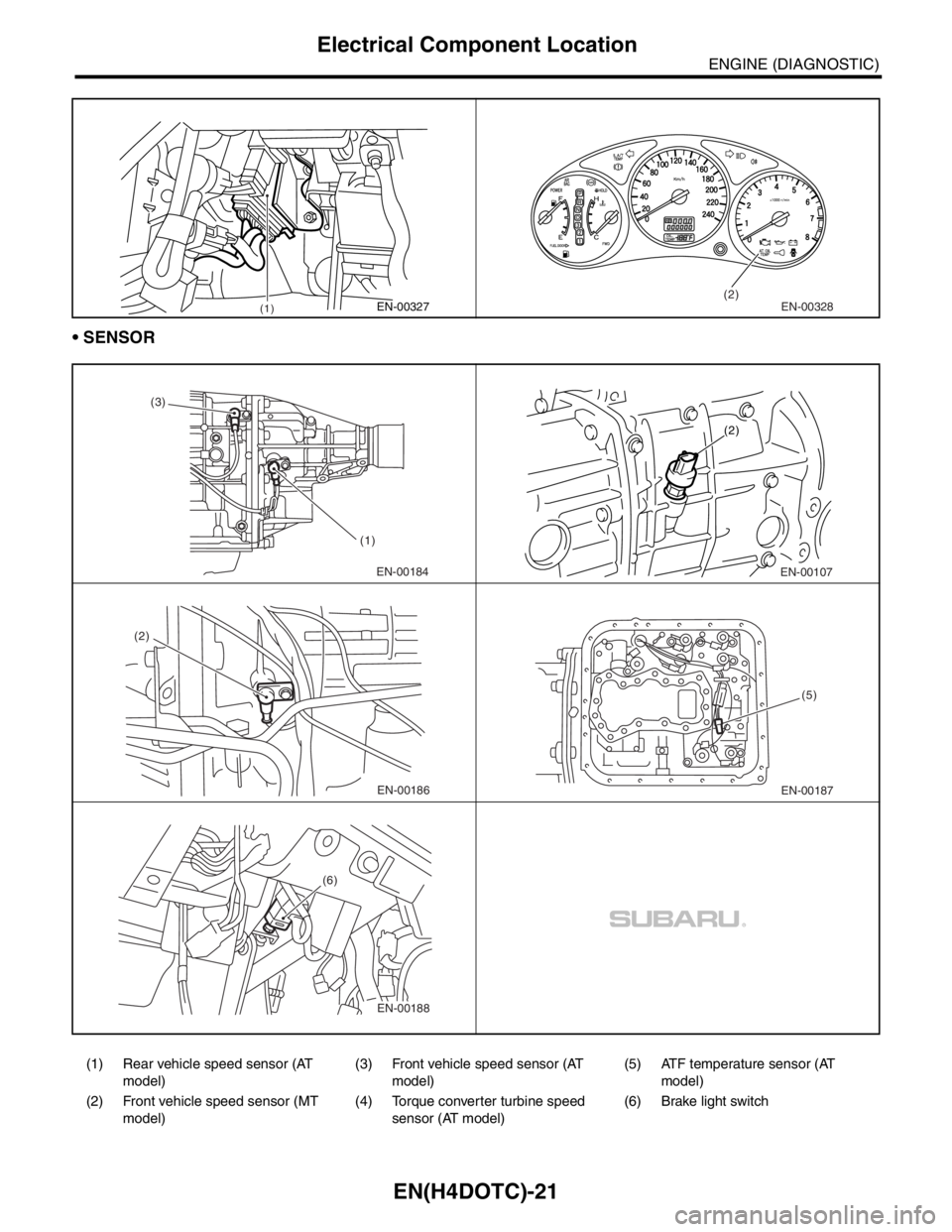
SENSOR
(1) Rear vehicle speed sensor (AT
model)(3) Front vehicle speed sensor (AT
model)(5) ATF temperature sensor (AT
model)
(2) Front vehicle speed sensor (MT
model)(4) Torque converter turbine speed
sensor (AT model)(6) Brake light switch
(1)EN-00327(2)EN-00328
EN-00184 (3)
(1)EN-00107 (2)
EN-00186 (2)EN-00187(5)
EN-00188 (6)
Page 1668 of 2870
![SUBARU FORESTER 2004 Service Repair Manual EN(H4DOTC)-38
ENGINE (DIAGNOSTIC)
Subaru Select Monitor
8. READ CURRENT DATA FOR AT
1) On the «Main Menu» display screen, select the {Each System Check} and press the [YES] key.
2) On the «System S](/manual-img/17/57426/w960_57426-1667.png "SUBARU FORESTER 2004 Service Repair Manual EN(H4DOTC)-38
ENGINE (DIAGNOSTIC)
Subaru Select Monitor
8. READ CURRENT DATA FOR AT
1) On the «Main Menu» display screen, select the {Each System Check} and press the [YES] key.
2) On the «System S")
EN(H4DOTC)-38
ENGINE (DIAGNOSTIC)
Subaru Select Monitor
8. READ CURRENT DATA FOR AT
1) On the «Main Menu» display screen, select the {Each System Check} and press the [YES] key.
2) On the «System Selection Menu» display screen, select the {Transmission} and press the [YES] key.
3) Press the [YES] key after displayed the information of transmission type.
4) On the «Transmission Diagnosis» screen, select the {Current Data Display/Save}, and then press the
[YES] key.
5) On the «Data Display Menu» screen, select the {Data Display} and press the [YES] key.
6) Using the scroll key, move the display screen up or down until the desired data is shown.
A list of the support data is shown in the following table.
NOTE:
For detailed operation procedure, refer to the “SUBARU SELECT MONITOR OPERATION MANUAL”.
Description Display Unit of measure
Battery voltage Battery Voltage V
Rear vehicle speed sensor signal Rear Wheel Speed km/h or MPH
Front vehicle speed sensor signal Front Wheel Speed km/h or MPH
Engine speed signal Engine Speed rpm
ATF temperature signal ATF Temp.°C or °F
Mass air flow sensor signal Air Flow Sensor Voltage V
Throttle position signal Throttle Sensor Voltage V
Gear Position Gear position —
Line pressure control duty ratio Line Pressure Duty Ratio %
Lock up clutch control duty ratio Lock Up Duty Ratio %
Transfer clutch control duty ratio Transfer Duty Ratio %
Throttle position sensor power supply Throttle Sensor Power V
Turbine revolution signal Turbine Revolution Speed rpm
2-4 Brake timing pressure control duty ratio Brake Clutch Duty Ratio %
Stop light switch signal Stop Light Switch ON or OFF
Anti lock brake system signal ABS Signal ON or OFF
Cruise control system signal Cruise Control Signal ON or OFF
Neutral/Parking range signal N/P Range Signal ON or OFF
Reverse range signal R Range Signal ON or OFF
Drive range signal D Range Signal ON or OFF
3rd range signal 3rd Range Signal ON or OFF
2nd range signal 2nd Range Signal ON or OFF
1st range signal 1st Range Signal ON or OFF
Shift control solenoid A Shift Solenoid #1 ON or OFF
Shift control solenoid B Shift Solenoid #2 ON or OFF
Torque control output signal #1 Torque Control Signal #1 ON or OFF
Torque control output signal #2 Torque Control Signal #2 ON or OFF
Torque control cut signal Torque Control Cut Sig. ON or OFF
2-4 brake timing control solenoid valve 2-4 Brake Timing Sol. ON or OFF
Low clutch timing control solenoid valve Low Clutch Timing Sol. ON or OFF
Automatic transmission diagnosis indicator lamp Diagnosis Lamp ON or OFF
Page 1673 of 2870
EN(H4DOTC)-43
ENGINE (DIAGNOSTIC)
Inspection Mode
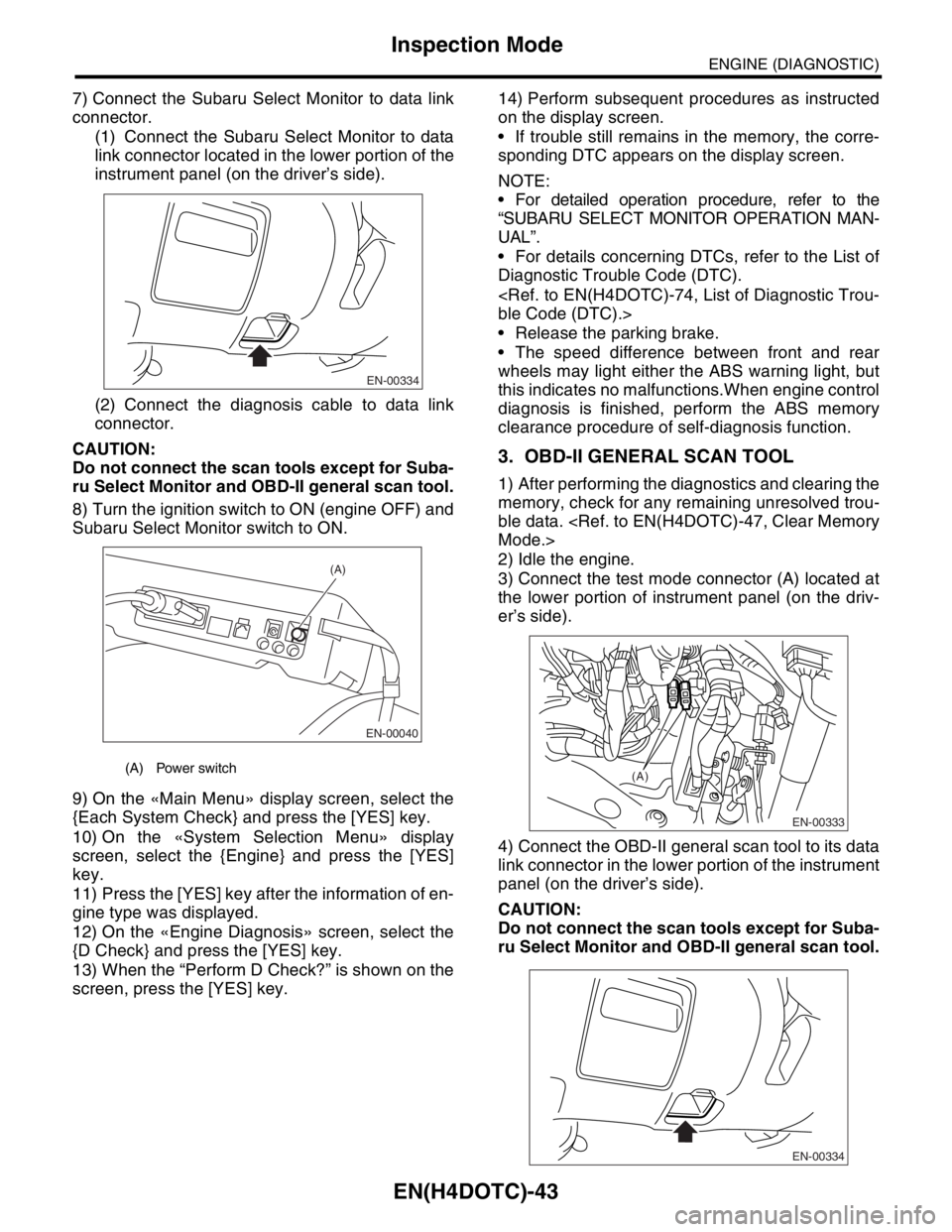
7) Connect the Subaru Select Monitor to data link
connector.
(1) Connect the Subaru Select Monitor to data
link connector located in the lower portion of the
instrument panel (on the driver’s side).
(2) Connect the diagnosis cable to data link
connector.
CAUTION:
Do not connect the scan tools except for Suba-
ru Select Monitor and OBD-II general scan tool.
8) Turn the ignition switch to ON (engine OFF) and
Subaru Select Monitor switch to ON.
9) On the «Main Menu» display screen, select the
{Each System Check} and press the [YES] key.
10) On the «System Selection Menu» display
screen, select the {Engine} and press the [YES]
key.
11) Press the [YES] key after the information of en-
gine type was displayed.
12) On the «Engine Diagnosis» screen, select the
{D Check} and press the [YES] key.
13) When the “Perform D Check?” is shown on the
screen, press the [YES] key.14) Perform subsequent procedures as instructed
on the display screen.
If trouble still remains in the memory, the corre-
sponding DTC appears on the display screen.
NOTE:
For detailed operation procedure, refer to the
“SUBARU SELECT MONITOR OPERATION MAN-
UAL”.
For details concerning DTCs, refer to the List of
Diagnostic Trouble Code (DTC).
Release the parking brake.
The speed difference between front and rear
wheels may light either the ABS warning light, but
this indicates no malfunctions.When engine control
diagnosis is finished, perform the ABS memory
clearance procedure of self-diagnosis function.
3. OBD-II GENERAL SCAN TOOL
1) After performing the diagnostics and clearing the
memory, check for any remaining unresolved trou-
ble data.
2) Idle the engine.
3) Connect the test mode connector (A) located at
the lower portion of instrument panel (on the driv-
er’s side).
4) Connect the OBD-II general scan tool to its data
link connector in the lower portion of the instrument
panel (on the driver’s side).
CAUTION:
Do not connect the scan tools except for Suba-
ru Select Monitor and OBD-II general scan tool.
(A) Power switch
EN-00334
EN-00040
(A)
EN-00333
(A)
EN-00334
Page 1674 of 2870

EN(H4DOTC)-44
ENGINE (DIAGNOSTIC)
Inspection Mode
5) Start the engine.
NOTE:
Ensure the select lever is placed in the “P” range
before starting.(AT model)
Depress the clutch pedal when starting the en-
gine.(MT model)
6) Using the selector lever or shift lever, turn the “P”
range switch and the “N” range switch to ON.
7) Depress the brake pedal to turn the brake switch
ON.(AT model)
8) Keep the engine speed in the 2,500 — 3,000
rpm range for 40 seconds.
9) Place the select lever or shift lever in the “D”
range (AT model) or “1st” gear (MT model) and
drive the vehicle at 5 to 10 km/h (3 to 6 MPH).
NOTE:
On AWD vehicles, release the parking brake.
The speed difference between front and rear
wheels may light either the ABS warning light, but
this indicates no malfunctions.When engine control
diagnosis is finished, perform the ABS memory
clearance procedure of self-diagnosis function.
10) Using the OBD-II general scan tool, check
DTC(s) and record the result(s).
NOTE:
For detailed operation procedures, refer to the
OBD-II General Scan Tool Operation Manual.
For details concerning DTCs, refer to the List of
Diagnostic Trouble Code (DTC).
Page 2044 of 2870

EN(H4DOTC 2.5)-20
ENGINE (DIAGNOSTIC)
Engine Control Module (ECM) I/O Signal
Electronic throttle con-
trol motor (+)B137 5 Duty waveform Duty waveform Drive frequency: 500 Hz
Electronic throttle con-
trol motor (−)B137 4 Duty waveform Duty waveform Drive frequency: 500 Hz
Electronic throttle con-
trol motor power supplyB137 6 10 — 13 13 — 14 —
Electronic throttle con-
trol motor relayB135 35ON: 0
OFF: 10 — 13ON: 0
OFF: 13 — 14When ignition switch is turned to
ON: ON
Oil flow
control
solenoid
(LH)Signal (+) B134 19ON: 10 — 13
OFF: 0ON: 13 — 14
OFF: 0—
Signal (−) B134 29 0 0 —
Oil flow
control
solenoid
(RH)Signal (+) B134 18ON: 10 — 13
OFF: 0ON: 13 — 14
OFF: 0—
Signal (−) B134 28 0 0 —
Accelera-
tor Pedal
Po si ti o n
SensorMain B136 17Fully closed: 1
Fully opens: 3.5Fully closed: 1
Fully opens: 3.5—
Pow er
supplyB136 15 5 5 —
GND
(sensor)B136 34 0 0 —
Sub B136 28Fully closed: 1
Fully opens: 3.5Fully closed: 1
Fully opens: 3.5—
Main light B134 15ON: 0
OFF: 10 — 13ON: 0
OFF: 13 — 14—
Clutch switch B134 1When clutch
pedal is
depressed: 0
When clutch
pedal is
released: 10 —
13When clutch
pedal is
depressed: 0
When clutch
pedal is
released: 13 —
14—
SET/COAST switch B136 11ON: 10 — 13
OFF: 0ON: 13 — 14
OFF: 0—
Brake switch 1 B136 9When brake
pedal is
depressed: 0
When brake
pedal is
released: 10 —
13When brake
pedal is
depressed: 0
When brake
pedal is
released: 13 —
14—
Brake switch 2 B136 8When brake
pedal is
depressed: 10
— 13
When brake
pedal is
released: 0When brake
pedal is
depressed: 13
— 14
When brake
pedal is
released: 0—
RESUME/ACCEL
switchB136 10ON: 10 — 13
OFF: 0ON: 13 — 14
OFF: 0—
Main switch B136 7ON: 10 — 13
OFF: 0ON: 13 — 14
OFF: 0—
CAN Com-
municationSignal (+) B137 18 Pulse signal —
Signal (−) B137 26 Pulse signal — DESCRIPTION Connector No. Terminal No.Signal (V)
NOTE
Ignition SW ON
(engine OFF)Engine ON
(Idling)