2004 CHEVROLET CORVETTE ECO mode
[x] Cancel search: ECO modePage 163 of 384

DIC Controls and Displays
Turn on the system by turning the ignition to ON. When
you turn on the ignition, the DIC will be in the mode
last displayed when the engine was turned off. Each DIC
button allows you to scroll through a menu. A blank
page ends each menu.
If a problem is detected, a diagnostic message will
appear on the display. Press RESET to acknowledge
any current warning or service messages. The following
pages will show the messages you can see on the
Driver Information Center (DIC) display by pressing the
DIC buttons.
1 FUEL
The FUEL button displays average fuel economy and
instantaneous fuel economy calculated for your specific
driving conditions and range.
Press the FUEL button to display average fuel economy,
such as:
•AVERAGE 20.1 MPG or
•AVERAGE 5.3 L/100 km
3-49
Page 164 of 384
The average fuel economy is viewed as a long-term
approximation of your overall driving conditions. If you
press RESET in this mode while you’re driving, the
system will begin figuring fuel economy from that point
in time.
Press FUEL again to display instantaneous fuel
economy, such as:
•INST. 20.1 MPG or
•INST. 5.3 L/100 km
Press FUEL again to display the range, such as:
•RANGE 20 MI or
•RANGE 32 km
The range calculates the remaining distance you can
drive without refueling. It’s based on fuel economy and
the fuel remaining in the tank.
If the range is lower than 30 miles (48 km), the display
will read RANGE LOW.
The fuel economy data used to determine fuel range is
an average of recent driving conditions. As your
driving conditions change, this data is gradually updated.
Resetting the fuel range causes the fuel economy
data to be updated immediately. Press RESET to reset
the fuel range.
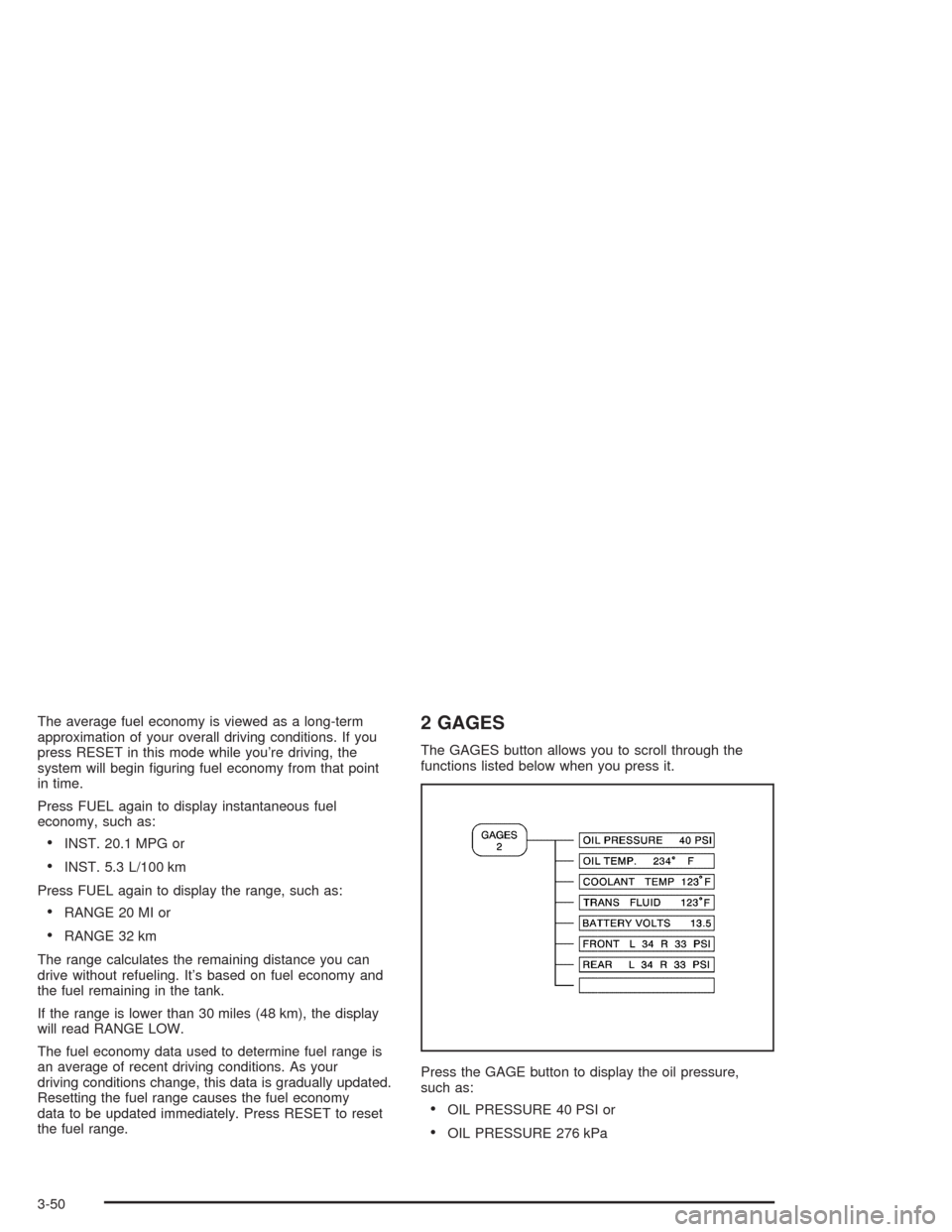
2 GAGES
The GAGES button allows you to scroll through the
functions listed below when you press it.
Press the GAGE button to display the oil pressure,
such as:
•OIL PRESSURE 40 PSI or
•OIL PRESSURE 276 kPa
3-50
Page 167 of 384
Elapsed Time
Press the TRIP button until ELAP. TIME is displayed,
such as ELAP. TIME 00:00:00.00.
When the ignition is in ON, the Driver Information
Center (DIC) can be used as a stopwatch. The display
can show hours, minutes, seconds and hundredths
of a second. The elapsed time indicator will record up to
99 hours, 59 minutes and 59 seconds, then it will
reset to zero and continue counting. (Hundredths are
shown up to 59 minutes, 59 seconds and
99 hundredths). The display appears as ELAP. TIME
00:00:00.00 in the elapsed time function.
You can start or stop the elapsed time by pressing
RESET. To reset the elapsed time to zero, stop the timer
by pressing RESET. Then press and hold RESET
until ELAP. TIME 00:00:00.00 appears in the DIC.
Average Speed
Press the TRIP button until the average speed is
displayed, such as:
•AVERAGE SPEED 62 MPH or
•AVERAGE SPEED 100 km/h
Press reset in this mode to start calculating the average
speed. Press and hold RESET to clear.
Engine Oil Life
Press the TRIP button until the engine oil life is
displayed, such as OIL LIFE REMAIN 89%.
This is an estimate of the engine oil’s remaining useful
life. It will show 100% when the system is reset after
an oil change. It will alert you to change your oil
on a schedule consistent with your driving conditions.
When the remaining oil life is low, the system will
alert you with the message CHANGE OIL SOON.
When the oil life is down to zero, you will receive the
message CHANGE OIL NOW.
Remember, you must reset the OIL LIFE yourself after
each oil change. It will not reset itself. Also, be
careful not to reset the OIL LIFE accidentally at any
time other than when the oil has just been changed. It
can’t be reset accurately until the next oil change.
To reset the system, see “How to Reset the Change Oil
Soon Message” underEngine Oil on page 5-13.
Also, seeEngine Oil on page 5-13andScheduled
Maintenance on page 6-4.
3-53
Page 177 of 384
{CAUTION:
When the LOW TIRE PRESSURE or FLAT TIRE
message is displayed on the Driver Information
Center, your vehicle’s handling capabilities will
be reduced during severe maneuvers. If you
drive too fast, you could lose control of your
vehicle. You or others could be injured. Don’t
drive over 55 mph (90 km/h) when the LOW
TIRE PRESSURE or FLAT TIRE message is
displayed. Drive cautiously and check your tire
pressures as soon as you can.MAXIMUM SPEED 80 MPH (129 km/h):You will hear
four chimes when this message is displayed. To
acknowledge the warning, press RESET. After you
press RESET, a message will reappear every
10 minutes until this condition changes.
This message indicates that a malfunction is present in
the selective real time damping system. The vehicle
speed will be limited to 80 mph (129 km/h) when
the shock absorber system has failed and the shocks
are in their full soft mode. Have your vehicle serviced as
soon as possible.
PULL KEY – WAIT 10 SEC (Manual Transmission
Only):If this message comes on, the steering column
lock system has detected a problem while disengaging
the steering column lock. This message may occur when
the ignition key is removed and reinserted before the
steering column lock system fully locks or unlocks
the steering column. To acknowledge that you have read
this message, and to clear it from the display, remove
the ignition key and wait 10 seconds before reinserting
the key into the ignition. If you attempt to operate
your vehicle without removing the key for 10 seconds,
the vehicle’s fuel system will shut off when you
reach 1.5 mph (2.4 km/h). If the message stays on after
removing the key and waiting 10 seconds, have your
vehicle taken to an authorized dealer as soon as
possible for diagnosis and repair.
3-63
Page 216 of 384
Competitive Driving Mode
The driver can select this optional handling mode by
pressing the ACTIVE HANDLING button on the console
for more than five seconds. A chime will sound and
COMPETITIVE DRIVING will be displayed in the DIC.
Competitive Driving mode allows the driver to have
full control of the rear wheels while the Active Handling
System helps steer the vehicle by selective brake
application. The instrument cluster light will not be on.
The Traction Control System will not be operating.
Adjust your driving accordingly.
When you press the ACTIVE HANDLING button again,
or turn the ignition to ACC, the Active Handling and
Traction Control Systems will be on. The TRAC/ACT
HNDLG-ON message will be displayed temporarily in the
DIC and a chime will be heard.
Limited-Slip Rear Axle
Your limited-slip rear axle can give you additional
traction on snow, mud, ice, sand or gravel. It works like a
standard axle most of the time, but when one of the rear
wheels has no traction and the other does, this feature
will allow the wheel with traction to move the vehicle.
Selective Ride Control
You may have a ride control system on your vehicle
called Selective Ride Control. The system provides the
following performance benefits:
•Reduced Impact Harshness
•Improved Road Isolation
•Improved High-Speed Stability
•Improved Handling Response
•Better Control of Body Ride Motions
4-12
Page 367 of 384
Additional Program Information
Courtesy Transportation is available during the
Bumper-to-Bumper warranty coverage period, but itis
notpart of the New Vehicle Limited Warranty. A
separate booklet entitled “Warranty and Owner
Assistance Information” furnished with each new vehicle
provides detailed warranty coverage information.
Courtesy Transportation is available only at participating
dealers and all program options, such as shuttle
service, may not be available at every dealer. Please
contact you dealer for specific information about
availability. All Courtesy Transportation arrangements
will be administered by appropriate dealer personnel.
Canadian Vehicles:For warranty repairs during
the Complete Vehicle Coverage period of the General
Motors of Canada New Vehicle Limited Warranty,
alternative transportation may be available under the
Courtesy Transportation Program. Please consult
your dealer for details.
General Motors reserves the right to unilaterally modify,
change or discontinue Courtesy Transportation at
any time and to resolve all questions of claim eligibility
pursuant to the terms and conditions described
herein at its sole discretion.
Vehicle Data Collection and Event
Data Recorders
Your vehicle, like other modern motor vehicles, has a
number of sophisticated computer systems that monitor
and control several aspects of the vehicle’s
performance. Your vehicle uses on-board vehicle
computers to monitor emission control components to
optimize fuel economy, to monitor conditions for air bag
deployment and, if so equipped, to provide anti-lock
braking and to help the driver control the vehicle
in difficult driving situations. Some information may be
stored during regular operations to facilitate repair
of detected malfunctions; other information is stored only
in a crash or near crash event by computer systems
commonly called event data recorders (EDR).
In a crash or near crash event, computer systems, such
as the Air Bag Sensing and Diagnostic Module (SDM)
in your vehicle may record information about the
condition of the vehicle and how it was operated, such
as engine speed, brake applications, throttle position,
vehicle speed, safety belt usage, air bag readiness, air
bag performance data, and the severity of a collision.
This information has been used to improve vehicle crash
performance and may be used to improve crash
performance of future vehicles and driving safety. Unlike
the data recorders on many airplanes, these on-board
systems do not record sounds, such as conversation of
vehicle occupants.
7-9
Page 379 of 384
Mirrors (cont.)
Outside Power Heated Mirrors.......................2-38
Model Reference................................................ vi
MyGMLink.com................................................ 7-3
N
New Vehicle Break-In......................................2-19
Normal Maintenance Replacement Parts............6-13
O
Odometer......................................................3-34
Off-Road Recovery..........................................4-16
Oil
Engine.......................................................5-13
Engine Oil Pressure Gage............................3-44
Older Children, Restraints................................1-19
One to Four Shift Light (Manual Transmission)....2-30
Online Owner Center........................................ 7-3
Operating the Trunk-Mounted CD Changer
with the Radio with Cassette.........................3-83
Operating the Trunk-Mounted CD Changer
with the Radio with CD................................3-84
Other Warning Devices...................................... 3-5
Outlet Adjustment............................................3-31
Outside
Automatic Dimming Mirror.............................2-39
Convex Mirror.............................................2-39Outside (cont.)
Power Heated Mirrors..................................2-38
Overheated Engine Protection Operating Mode . . . 5-26
Overseas – Customer Assistance........................ 7-5
Owner Checks and Services.............................. 6-8
Owners, Canadian............................................... ii
Owner’s Information........................................7-12
P
Park (P)
Shifting Into................................................2-32
Shifting Out of............................................2-34
Parking
Brake........................................................2-31
Over Things That Burn.................................2-35
Parking Your Vehicle.......................................2-35
Passenger Position, Safety Belts.......................1-19
Passing.........................................................4-16
PASS-Key
®....................................................2-18
Plan Ahead When Possible................................ 7-7
Playing a Cassette Tape..................................3-73
Playing a CD.................................................3-79
Playing the Radio...................................3-70, 3-76
Power
Accessory Outlets........................................3-22
Antenna Mast Care......................................3-90
Door Locks.................................................2-10
Electrical System.........................................5-92
9