Page 429 of 3502
TROUBLE DIAGNOSIS
ATC-51
C
D
E
F
G
H
I
K
L
MA
B
AT C
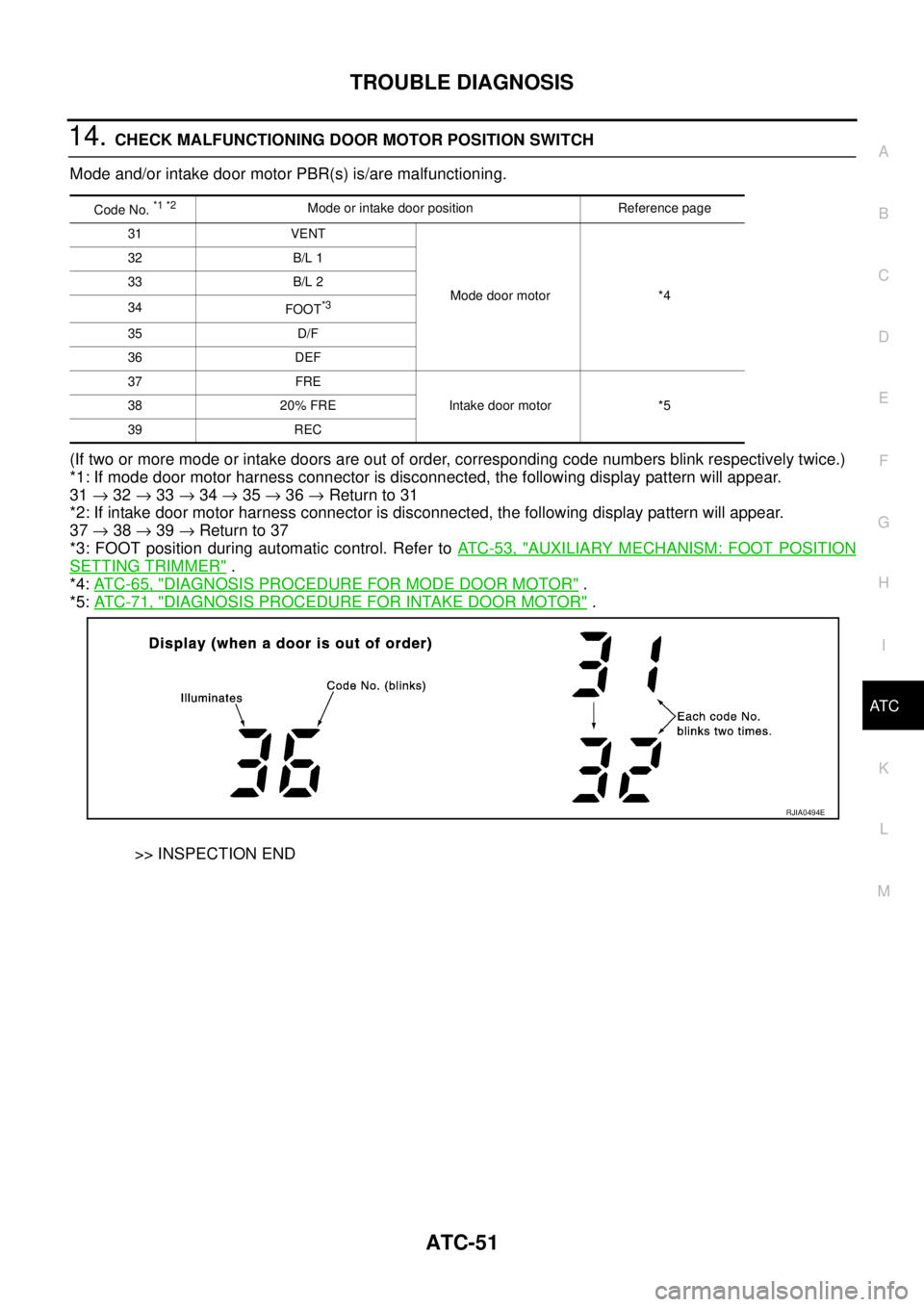
14. CHECK MALFUNCTIONING DOOR MOTOR POSITION SWITCH
Mode and/or intake door motor PBR(s) is/are malfunctioning.
(If two or more mode or intake doors are out of order, corresponding code numbers blink respectively twice.)
*1: If mode door motor harness connector is disconnected, the following display pattern will appear.
31 → 32 → 33 → 34 → 35 → 36 → Return to 31
*2: If intake door motor harness connector is disconnected, the following display pattern will appear.
37 → 38 → 39 → Return to 37
*3: FOOT position during automatic control. Refer to AT C - 5 3 , "
AUXILIARY MECHANISM: FOOT POSITION
SETTING TRIMMER" .
*4: AT C - 6 5 , "
DIAGNOSIS PROCEDURE FOR MODE DOOR MOTOR" .
*5: AT C - 7 1 , "
DIAGNOSIS PROCEDURE FOR INTAKE DOOR MOTOR" .
>> INSPECTION END
Code No. *1 *2Mode or intake door position Reference page
31 VENT
Mode door motor *4 32 B/L 1
33 B/L 2
34
FOOT
*3
35 D/F
36 DEF
37 FRE
Intake door motor *5 38 20% FRE
39 REC
RJIA0494E
Page 430 of 3502
ATC-52
TROUBLE DIAGNOSIS
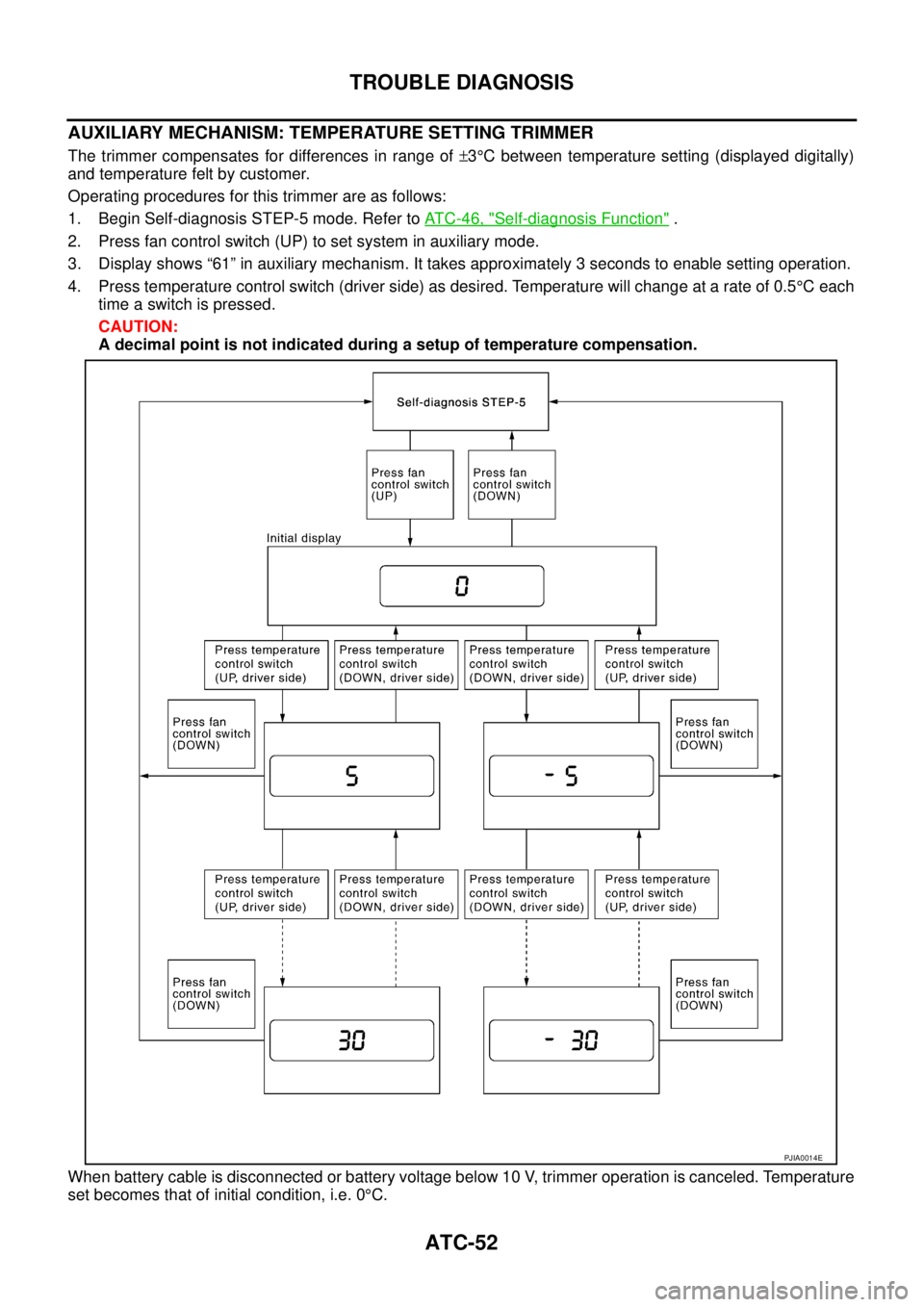
AUXILIARY MECHANISM: TEMPERATURE SETTING TRIMMER
The trimmer compensates for differences in range of ±3°C between temperature setting (displayed digitally)
and temperature felt by customer.
Operating procedures for this trimmer are as follows:
1. Begin Self-diagnosis STEP-5 mode. Refer to AT C - 4 6 , "
Self-diagnosis Function" .
2. Press fan control switch (UP) to set system in auxiliary mode.
3. Display shows “61” in auxiliary mechanism. It takes approximately 3 seconds to enable setting operation.
4. Press temperature control switch (driver side) as desired. Temperature will change at a rate of 0.5°C each
time a switch is pressed.
CAUTION:
A decimal point is not indicated during a setup of temperature compensation.
When battery cable is disconnected or battery voltage below 10 V, trimmer operation is canceled. Temperature
set becomes that of initial condition, i.e. 0°C.
PJIA0014E
Page 431 of 3502
TROUBLE DIAGNOSIS
ATC-53
C
D
E
F
G
H
I
K
L
MA
B
AT C
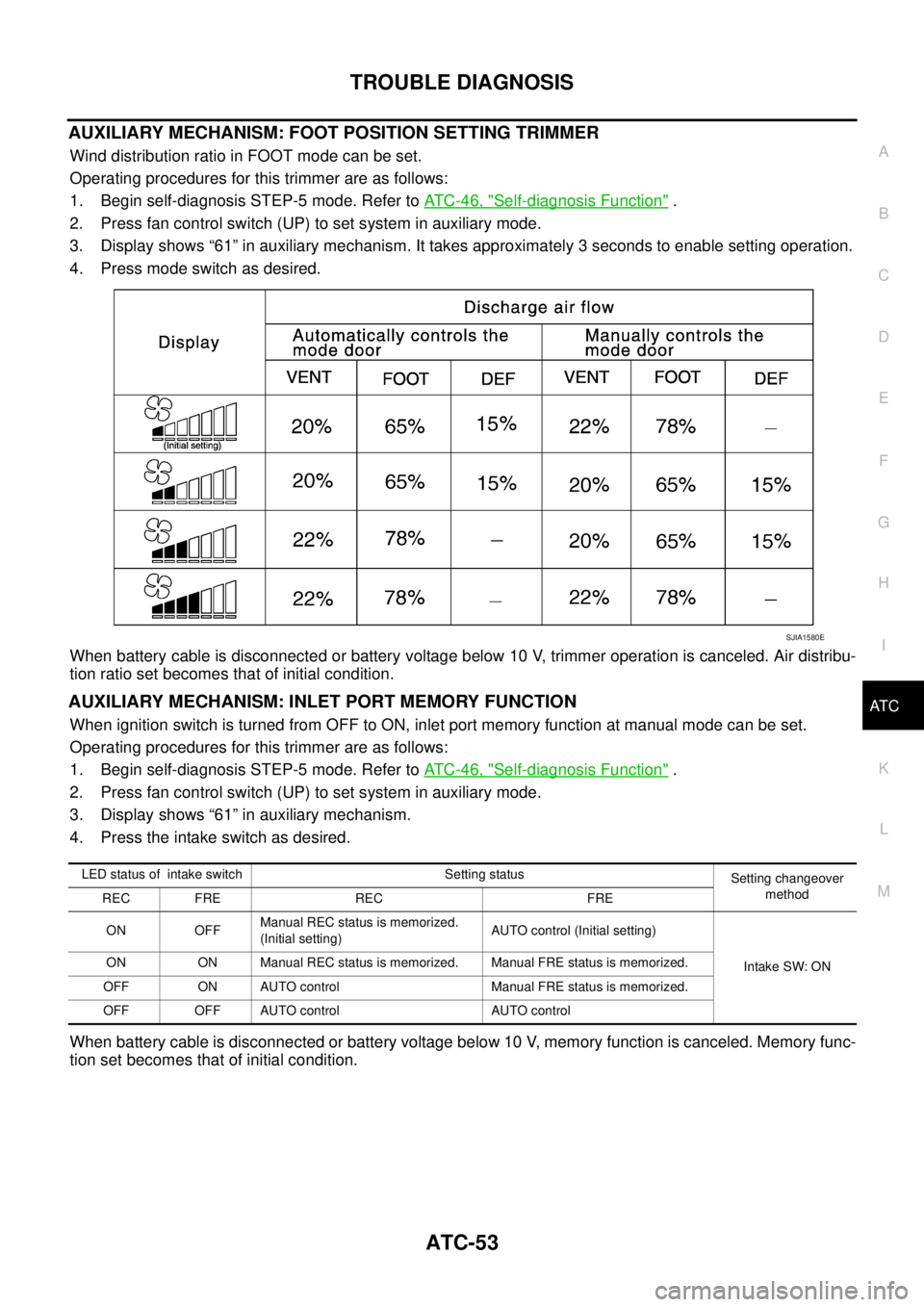
AUXILIARY MECHANISM: FOOT POSITION SETTING TRIMMER
Wind distribution ratio in FOOT mode can be set.
Operating procedures for this trimmer are as follows:
1. Begin self-diagnosis STEP-5 mode. Refer to AT C - 4 6 , "
Self-diagnosis Function" .
2. Press fan control switch (UP) to set system in auxiliary mode.
3. Display shows “61” in auxiliary mechanism. It takes approximately 3 seconds to enable setting operation.
4. Press mode switch as desired.
When battery cable is disconnected or battery voltage below 10 V, trimmer operation is canceled. Air distribu-
tion ratio set becomes that of initial condition.
AUXILIARY MECHANISM: INLET PORT MEMORY FUNCTION
When ignition switch is turned from OFF to ON, inlet port memory function at manual mode can be set.
Operating procedures for this trimmer are as follows:
1. Begin self-diagnosis STEP-5 mode. Refer to AT C - 4 6 , "
Self-diagnosis Function" .
2. Press fan control switch (UP) to set system in auxiliary mode.
3. Display shows “61” in auxiliary mechanism.
4. Press the intake switch as desired.
When battery cable is disconnected or battery voltage below 10 V, memory function is canceled. Memory func-
tion set becomes that of initial condition.
SJIA1580E
LED status of intake switch Setting status
Setting changeover
method
REC FRE REC FRE
ON OFFManual REC status is memorized.
(Initial setting)AUTO control (Initial setting)
Intake SW: ON ON ON Manual REC status is memorized. Manual FRE status is memorized.
OFF ON AUTO control Manual FRE status is memorized.
OFF OFF AUTO control AUTO control
Page 432 of 3502

ATC-54
TROUBLE DIAGNOSIS
Operational CheckBJS000FY
The purpose of the operational check is to confirm that the system operates properly.
CHECKING MEMORY FUNCTION
1. Press temperature control switch (UP, driver side) until 32°C is displayed.
2. Press fan control switch (DOWN) at least 2 seconds.
3. Turn ignition switch OFF.
4. Turn ignition switch ON.
5. Press AUTO switch.
6. Confirm that the set temperature remains at previous temperature.
7. Press fan control switch (DOWN) at least 2 seconds.
If NG, go to trouble diagnosis procedure for AT C - 9 5 , "
Memory Function" .
If OK, continue the check.
CHECKING BLOWER
1. Press fan control switch (UP). Blower should operate on low speed. The fan symbol should have one
blade lit.
2. Press fan control switch (UP) again, and continue checking blower speed and fan symbol until all speeds
are checked.
3. Leave blower on max. speed.
If NG, go to trouble diagnosis procedure for AT C - 7 2 , "
Blower Motor Circuit" .
If OK, continue the check.
CHECKING DISCHARGE AIR
1. Press MODE switch and DEF switch.
2. Each position indicator should change shape.
3. Confirm that discharge air comes out according to the air distri-
bution table. Refer to AT C - 3 1 , "
Discharge Air Flow" .
If NG, go to trouble diagnosis procedure for AT C - 6 3 , "
Mode Door
Motor Circuit" .
If OK, continue the check.
NOTE:
Confirm that the compressor clutch is engaged (sound or visual
inspection) and intake door position is at FRESH when the DEF is
selected.
CHECKING INTAKE AIR
1. Press intake switch. Recirculation indicator should illuminate.
2. Press intake switch again. Fresh indicator should illuminate.
3. Listen for intake door position change (Slight change of blower sound can be heard.).
If NG, go to trouble diagnosis procedure for AT C - 6 9 , "
Intake Door Motor Circuit" .
If OK, continue the check.
NOTE:
Confirm that the compressor clutch is engaged (sound or visual inspection) and intake door position is at
FRESH when the DEF is selected.
CHECKING TEMPERATURE DECREASE
1. Press temperature control switch (DOWN, driver side) until 18°C is displayed.
2. Check for cold air at discharge air outlets.
If NG, go to trouble diagnosis procedure for AT C - 8 4 , "
Insufficient Cooling" .
If OK, continue the check.Conditions : Engine running at normal operating temperature
SJIA1002E
Page 433 of 3502
TROUBLE DIAGNOSIS
ATC-55
C
D
E
F
G
H
I
K
L
MA
B
AT C
CHECKING TEMPERATURE INCREASE
1. Press temperature control switch (UP, driver side) until 32°C is displayed.
2. Check for hot air at discharge air outlets.
If NG, go to trouble diagnosis procedure for AT C - 9 1 , "
Insufficient Heating" .
If OK, continue the check.
CHECKING A/C SWITCH
1. Press AUTO switch and A/C switch.
2. A/C switch indicator will turn ON.
�Confirm that the compressor clutch engages (sound or visual inspection).
If NG, go to trouble diagnosis procedure for AT C - 7 8 , "
Magnet Clutch Circuit" .
If OK, continue the check.
CHECKING AUTO MODE
1. Press AUTO switch and A/C switch.
2. Display should indicate AUTO.
�Confirm that the compressor clutch engages (sound or visual inspection). (Discharge air and blower
speed will depend on ambient, in-vehicle, and set temperatures.)
If NG, go to trouble diagnosis procedure for AT C - 5 6 , "
Power Supply and Ground Circuit for Auto Amp." , then
if necessary, trouble diagnosis procedure for AT C - 7 8 , "
Magnet Clutch Circuit" .
If all operational checks are OK (symptom cannot be duplicated), go to Incident Simulation Tests in GI-24,
"How to Perform Efficient Diagnosis for an Electrical Incident" and perform tests as outlined to simulate driv-
ing conditions environment. If symptom appears, refer to AT C - 3 5 , "
SYMPTOM TABLE" and perform applica-
ble trouble diagnosis procedures.
Page 434 of 3502
ATC-56
TROUBLE DIAGNOSIS
Power Supply and Ground Circuit for Auto Amp.BJS000FZ
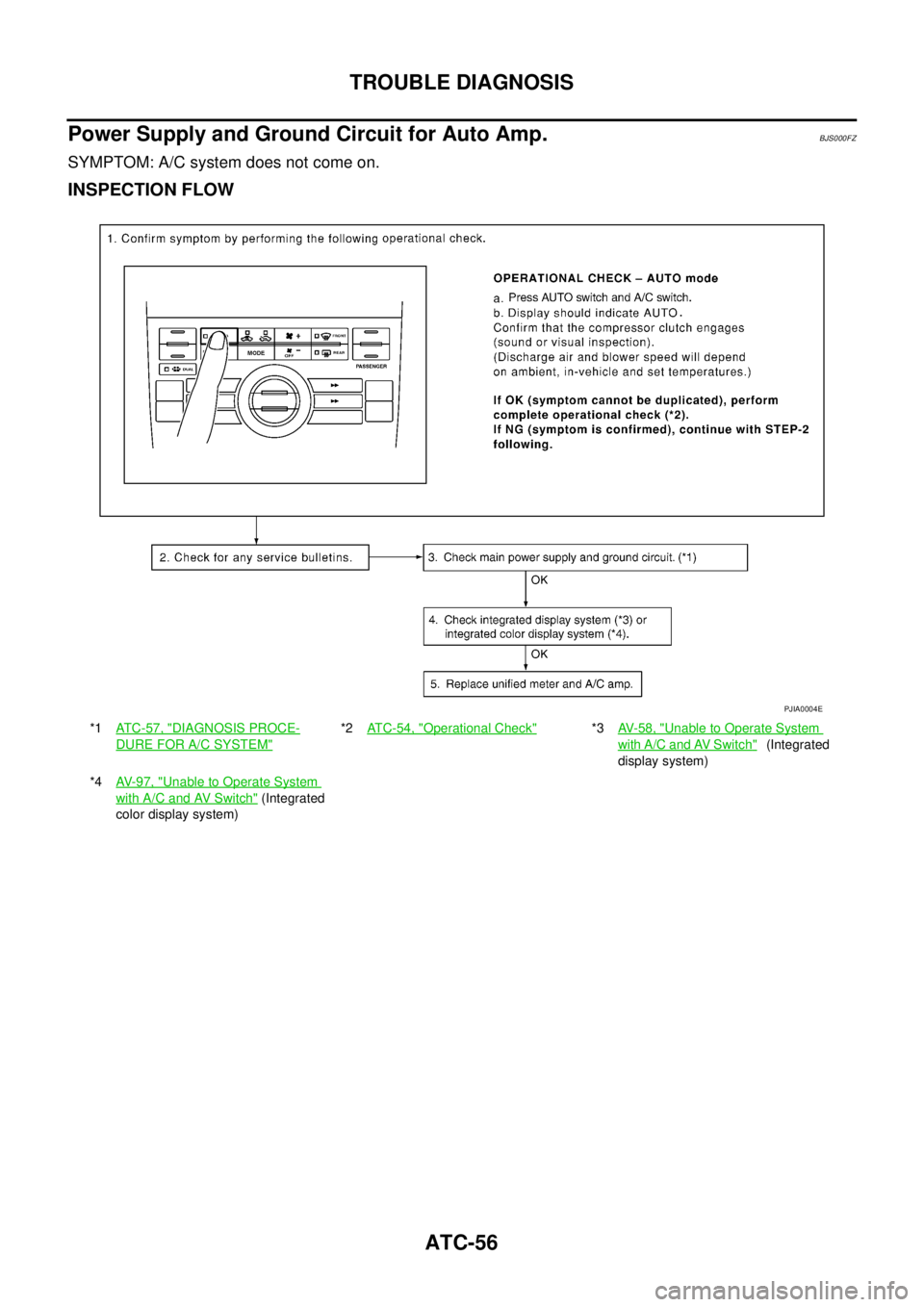
SYMPTOM: A/C system does not come on.
INSPECTION FLOW
*1ATC-57, "DIAGNOSIS PROCE-
DURE FOR A/C SYSTEM"
*2ATC-54, "Operational Check"*3AV-58, "Unable to Operate System
with A/C and AV Switch" (Integrated
display system)
*4AV-97, "
Unable to Operate System
with A/C and AV Switch" (Integrated
color display system)
PJIA0004E
Page 435 of 3502

TROUBLE DIAGNOSIS
ATC-57
C
D
E
F
G
H
I
K
L
MA
B
AT C
COMPONENT DESCRIPTION
Unified Meter and A/C amp. (Automatic Amplifier)
The unified meter and A/C amp. has a built-in microcomputer which
processes information sent from various sensors needed for air con-
ditioner operation. The air mix door motor, mode door motor, intake
door motor, blower motor and compressor are then controlled.
When the various switches and temperature contorol switch are
operated, data is input to the unified meter and A/C amp. from the
display unit / display control unit using CAN communication.
Self-diagnosis functions are also built into unified meter and A/C
amp. to provide quick check of malfunctions in the auto air condi-
tioner system.
Potentio Temperature Control (PTC)
The PTC is built into the A/C and AV switch. It can be set at an inter-
val of 0.5°C in the 18°C to 32°C temperature range by turning tem-
perature control switch. The set temperature is displayed.
DIAGNOSIS PROCEDURE FOR A/C SYSTEM
SYMPTOM: A/C system does not come on.
RJIA2732E
RJIA3253E
SJIA0301E
Page 475 of 3502

TROUBLE DIAGNOSIS
ATC-97
C
D
E
F
G
H
I
K
L
MA
B
AT C
2. CHECK CIRCUIT CONTINUITY BETWEEN AMBIENT SENSOR AND UNIFIED METER AND A/C AMP.
1. Turn ignition switch OFF.
2. Disconnect unified meter and A/C amp. connector.
3. Check continuity between ambient sensor harness connector
E257 terminal 2 and unified meter and A/C amp. harness con-
nector M45 terminal 49.
OK or NG
OK >> GO TO 3.
NG >> Repair harness or connector.
3. CHECK AMBIENT SENSOR
Refer to AT C - 9 8 , "
Ambient Sensor" .
OK or NG
OK >> 1. Replace unified meter and A/C amp.
2. Go to self-diagnosis AT C - 4 7 , "
FUNCTION CONFIRMATION PROCEDURE" and perform self-
diagnosis STEP-2. Confirm that code No. 20 is displayed.
NG >> 1. Replace ambient sensor.
2. Go to self-diagnosis AT C - 4 7 , "
FUNCTION CONFIRMATION PROCEDURE" and perform self-
diagnosis STEP-2. Confirm that code No. 20 is displayed.
4. CHECK CIRCUIT CONTINUITY BETWEEN AMBIENT SENSOR AND UNIFIED METER AND A/C AMP.
1. Turn ignition switch OFF.
2. Disconnect unified meter and A/C amp. connector.
3. Check continuity between ambient sensor harness connector
E257 terminal 1 and unified meter and A/C amp. harness con-
nector M45 terminal 39.
4. Check continuity between ambient sensor harness connector
E257 terminal 1 and ground.
OK or NG
OK >> 1. Replace unified meter and A/C amp.
2. Go to self-diagnosis AT C - 4 7 , "
FUNCTION CONFIRMATION PROCEDURE" and perform self-
diagnosis STEP-2. Confirm that code No. 20 is displayed.
NG >> Repair harness or connector.2 – 49 : Continuity should exist.
RJIA2018E
1 – 39 : Continuity should exist.
1 – Ground : Continuity should not exist.
RJIA2019E