2003 NISSAN 350Z ignition
[x] Cancel search: ignitionPage 55 of 227

mation, see ªTraction control system (TCS)º in
the ª5. Starting and drivingº section of this
manual.
Vehicle dynamic control off
indicator light (if so equipped)
After turning the ignition key to the ON position,
the light will illuminate. The light will turn off in
about 1 second if the vehicle dynamic control
(VDC) system is operational.
The light comes on when the vehicle dynamic
control (VDC) off switch is pushed to OFF. This
indicates the vehicle dynamic control system
and traction control system are not operating.
When the vehicle dynamic control off indicator
light and slip indicator light come on with the
vehicle dynamic control system turned on, this
light alerts the driver to the fact that the vehicle
dynamic control system's fail-safe mode is op-
erating, that is the system may not be functioning
properly. Have the system checked by your
NISSAN dealer. If an abnormality occurs in the
system, the vehicle dynamic control system
function will be canceled but the vehicle is still
driveable. For additional information, see ªVe-
hicle dynamic control (VDC) systemº in the ª5.
Starting and drivingº section of this manual.
Turn signal/hazard indicator
lights
The light flashes when the turn signal switch
lever or hazard switch is turned on.AUDIBLE REMINDERS
Key reminder chimeThe chime will sound if the driver's side door is
opened while the key is left in the ignition switch
(ignition switch is turned off). Remove the key
and take it with you when leaving the vehicle.Light reminder chimeThe chime will sound when the driver's door is
opened with the headlight switch on unless the
key is in the ignition switch. Make sure to turn the
light switch off when you leave the vehicle.Brake pad wear warningThe disc brake pads have audible wear warn-
ings. When a brake pad requires replacement, it
will make a high pitched scraping sound when
the vehicle is in motion whether or not the brake
pedal is depressed. Have the brakes checked as
soon as possible if the warning sound is heard.Your vehicle has two types of security systems,
as follows:
IVehicle Security System
INissan Vehicle Immobilizer System (NVIS)
SECURITY SYSTEMS
2-16
Instruments and controls
Z
02.9.13/Z33-D/V5.0
X
Page 56 of 227

The security condition will be shown by the
security indicator light.VEHICLE SECURITY SYSTEMThe vehicle security system provides visual and
audio alarm signals if parts of the vehicle are
disturbed.How to activate the vehicle security
system1. Close all windows.
The system can be activated even if the
windows are open.2. Remove the key from the ignition switch.
3. Close and lock all doors, hood and rear
hatch.
Lock all doors by pressing the LOCK button
on the keyfob. When using the keyfob, the
hazard indicators flash twice to indicate all
doors are locked.
4. Confirm that the security indicator light
comes on. The security indicator light glows
for about 30 seconds and then blinks. The
system is now activated. If, during this 30
second time period, the door is unlocked by
the key or the keyfob, or the ignition key is
turned to ACC or ON, the system will not
activate.
IIf the key is turned slowly toward the
rear of the vehicle when locking the
door, the system may not activate. If the
key is returned beyond the vertical po-
sition toward the front of the vehicle to
remove the key, the system may be
deactivated. If the indicator light fails to
glow for 30 seconds, unlock the door
once and lock it again.
IEven when the driver and/or passengers
are in the vehicle, the system will acti-
vate with all doors, hood and rear hatch
locked and ignition key off. Turn theignition key to ACC to turn the system
off.
Vehicle security system operationThe security system will give the following alarm:
IThe headlights blink and the horn sounds
intermittently.
IThe alarm automatically turns off after ap-
proximately 1 minute. However, the alarm
reactivates if the vehicle is tampered with
again. The alarm can be shut off by unlocking
a door with the key, or by pressing the
UNLOCK button on the keyfob.
The alarm is activated by:
IOpening the door without using the key or
keyfob.
IOpening the rear hatch without using the rear
hatch release switch or keyfob.
IOpening the hood.How to stop alarmThe alarm will stop only by unlocking a door with
the key, or by pressing the UNLOCK button on
keyfob. The alarm will not stop if the ignition
switch is turned to ACC or ON.
If the system does not operate as de-
SIC1699
Instruments and controls
2-17
Z
02.9.13/Z33-D/V5.0
X
Page 57 of 227

scribed above, have it checked by your
NISSAN dealer.NISSAN VEHICLE IMMOBILIZER
SYSTEM (NVIS)The Nissan Vehicle Immobilizer System will not
allow the engine to start without the use of the
registered Nissan Vehicle Immobilizer System
key.
If the engine fails to start using the registered
Nissan Vehicle Immobilizer System key, it may be
due to interference caused by another Nissan
Vehicle Immobilizer System key, an automated
toll road device or automated payment device on
the key ring. Restart the engine using the follow-
ing procedures:
1. Leave the ignition switch in the ON position
for approximately 5 seconds.
2. Turn the ignition switch to the OFF or LOCK
position and wait approximately 10 seconds.
3. Repeat step 1 and 2 again.
4. Restart the engine while holding the device
(which may have caused the interference)
separate from the registered Nissan Vehicle
Immobilizer System key.
If this procedure allows the engine to start,
NISSAN recommends placing the registeredNissan Vehicle Immobilizer System key on a
separate key ring to avoid interference from
other devices.
Statement related to section 15 of FCC
rules for Nissan Vehicle Immobilizer Sys-
tem (CONT ASSY-BCM, ANT ASSY-
IMMOBILIZER)
This device complies with part 15 of the
FCC Rules and RSS-210 of Industry
Canada. Operation is subject to the follow-
ing two conditions;
(1) This device may not cause harmful in-
terference, and (2) this device must accept
any interference received, including inter-
ference that may cause undesired opera-
tion of the device.
CHANGES OR MODIFICATIONS NOT EX-
PRESSLY APPROVED BY THE MANUFAC-
TURE RESPONSIBLE FOR COMPLIANCE
COULD VOID THE USER'S AUTHORITY TO
OPERATE THE EQUIPMENT.
Security indicator lightThis light blinks whenever the ignition switch is in
the LOCK, OFF or ACC position. This function
indicates the security system equipped on the
vehicle is operational.
If the Nissan Vehicle Immobilizer System is
malfunctioning, this light will remain on while the
ignition key is in the ON position.
If the light still remains on and/or the
engine will not start, see your NISSAN
dealer for Nissan Vehicle Immobilizer Sys-
tem service as soon as possible. Please
bring all Nissan Vehicle Immobilizer Sys-
SIC1699
2-18
Instruments and controls
Z
02.9.13/Z33-D/V5.0
X
Page 58 of 227
tem keys that you have when visiting your
NISSAN dealer for service.
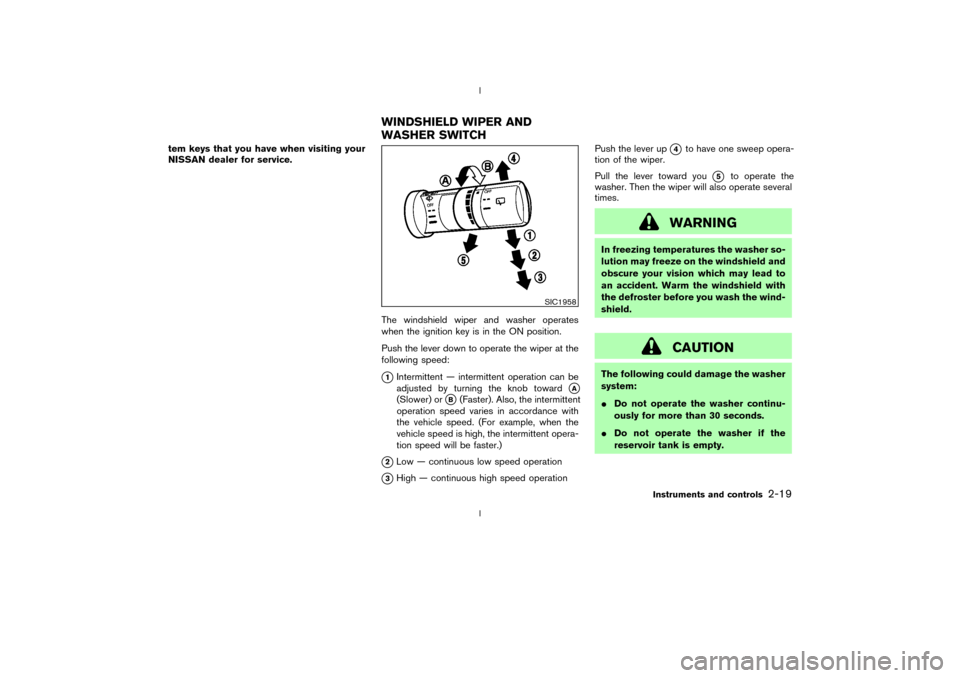
The windshield wiper and washer operates
when the ignition key is in the ON position.
Push the lever down to operate the wiper at the
following speed:
q1Intermittent Ð intermittent operation can be
adjusted by turning the knob toward
qA
(Slower) or
qB(Faster). Also, the intermittent
operation speed varies in accordance with
the vehicle speed. (For example, when the
vehicle speed is high, the intermittent opera-
tion speed will be faster.)
q2Low Ð continuous low speed operation
q3High Ð continuous high speed operationPush the lever up
q4
to have one sweep opera-
tion of the wiper.
Pull the lever toward you
q5
to operate the
washer. Then the wiper will also operate several
times.
WARNING
In freezing temperatures the washer so-
lution may freeze on the windshield and
obscure your vision which may lead to
an accident. Warm the windshield with
the defroster before you wash the wind-
shield.
CAUTION
The following could damage the washer
system:
IDo not operate the washer continu-
ously for more than 30 seconds.
IDo not operate the washer if the
reservoir tank is empty.
SIC1958
WINDSHIELD WIPER AND
WASHER SWITCH
Instruments and controls
2-19
Z
02.9.13/Z33-D/V5.0
X
Page 59 of 227
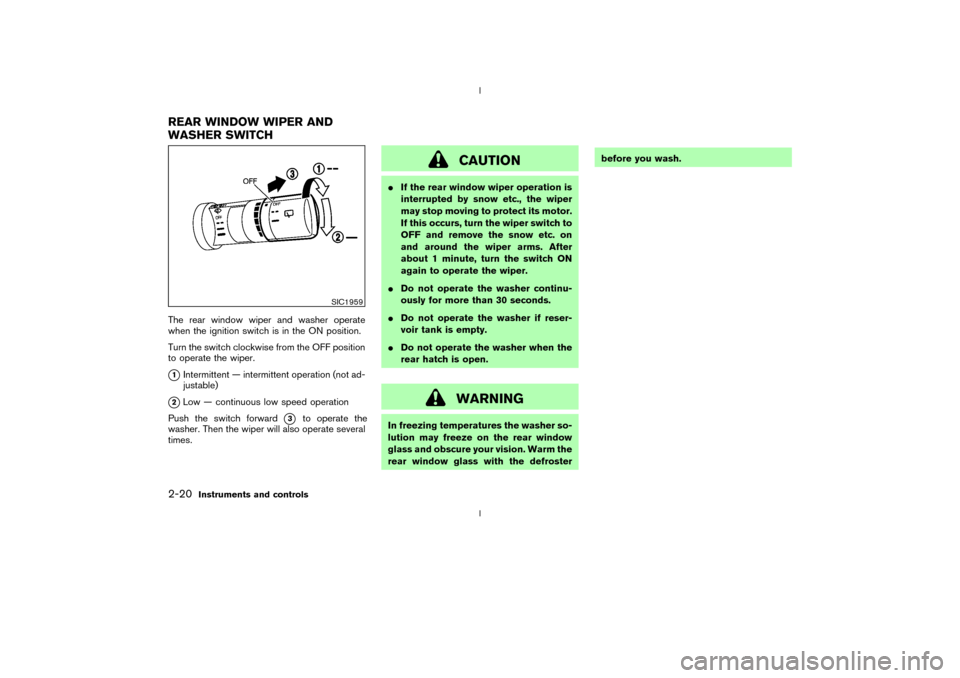
The rear window wiper and washer operate
when the ignition switch is in the ON position.
Turn the switch clockwise from the OFF position
to operate the wiper.q1Intermittent Ð intermittent operation (not ad-
justable)
q2Low Ð continuous low speed operation
Push the switch forward
q3
to operate the
washer. Then the wiper will also operate several
times.
CAUTION
IIf the rear window wiper operation is
interrupted by snow etc., the wiper
may stop moving to protect its motor.
If this occurs, turn the wiper switch to
OFF and remove the snow etc. on
and around the wiper arms. After
about 1 minute, turn the switch ON
again to operate the wiper.
IDo not operate the washer continu-
ously for more than 30 seconds.
IDo not operate the washer if reser-
voir tank is empty.
IDo not operate the washer when the
rear hatch is open.
WARNING
In freezing temperatures the washer so-
lution may freeze on the rear window
glass and obscure your vision. Warm the
rear window glass with the defrosterbefore you wash.
SIC1959
REAR WINDOW WIPER AND
WASHER SWITCH2-20
Instruments and controls
Z
02.9.13/Z33-D/V5.0
X
Page 61 of 227
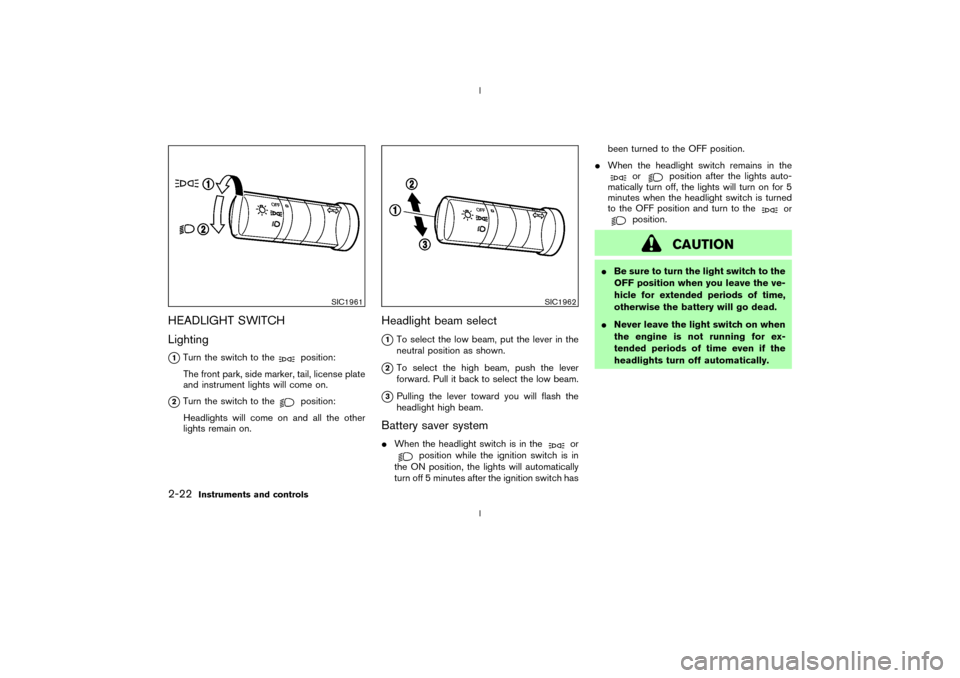
HEADLIGHT SWITCH
Lighting
q1Turn the switch to the
position:
The front park, side marker, tail, license plate
and instrument lights will come on.
q2Turn the switch to the
position:
Headlights will come on and all the other
lights remain on.
Headlight beam select
q1To select the low beam, put the lever in the
neutral position as shown.
q2To select the high beam, push the lever
forward. Pull it back to select the low beam.
q3Pulling the lever toward you will flash the
headlight high beam.
Battery saver systemIWhen the headlight switch is in the
or
position while the ignition switch is in
the ON position, the lights will automatically
turn off 5 minutes after the ignition switch hasbeen turned to the OFF position.
IWhen the headlight switch remains in the
or
position after the lights auto-
matically turn off, the lights will turn on for 5
minutes when the headlight switch is turned
to the OFF position and turn to the
or
position.
CAUTION
IBe sure to turn the light switch to the
OFF position when you leave the ve-
hicle for extended periods of time,
otherwise the battery will go dead.
INever leave the light switch on when
the engine is not running for ex-
tended periods of time even if the
headlights turn off automatically.
SIC1961
SIC1962
2-22
Instruments and controls
Z
02.9.13/Z33-D/V5.0
X
Page 62 of 227
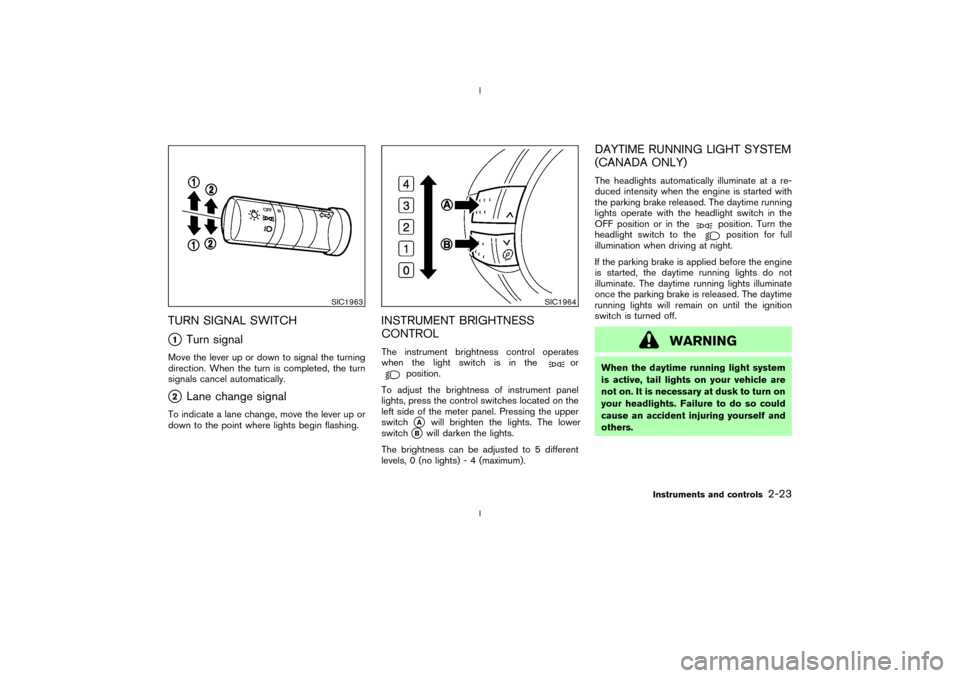
TURN SIGNAL SWITCHq1
Turn signal
Move the lever up or down to signal the turning
direction. When the turn is completed, the turn
signals cancel automatically.q2
Lane change signal
To indicate a lane change, move the lever up or
down to the point where lights begin flashing.
INSTRUMENT BRIGHTNESS
CONTROLThe instrument brightness control operates
when the light switch is in the
or
position.
To adjust the brightness of instrument panel
lights, press the control switches located on the
left side of the meter panel. Pressing the upper
switchqA
will brighten the lights. The lower
switch
qB
will darken the lights.
The brightness can be adjusted to 5 different
levels, 0 (no lights) - 4 (maximum).
DAYTIME RUNNING LIGHT SYSTEM
(CANADA ONLY)The headlights automatically illuminate at a re-
duced intensity when the engine is started with
the parking brake released. The daytime running
lights operate with the headlight switch in the
OFF position or in the
position. Turn the
headlight switch to theposition for full
illumination when driving at night.
If the parking brake is applied before the engine
is started, the daytime running lights do not
illuminate. The daytime running lights illuminate
once the parking brake is released. The daytime
running lights will remain on until the ignition
switch is turned off.
WARNING
When the daytime running light system
is active, tail lights on your vehicle are
not on. It is necessary at dusk to turn on
your headlights. Failure to do so could
cause an accident injuring yourself and
others.
SIC1963
SIC1964
Instruments and controls
2-23
Z
02.9.13/Z33-D/V5.0
X
Page 63 of 227
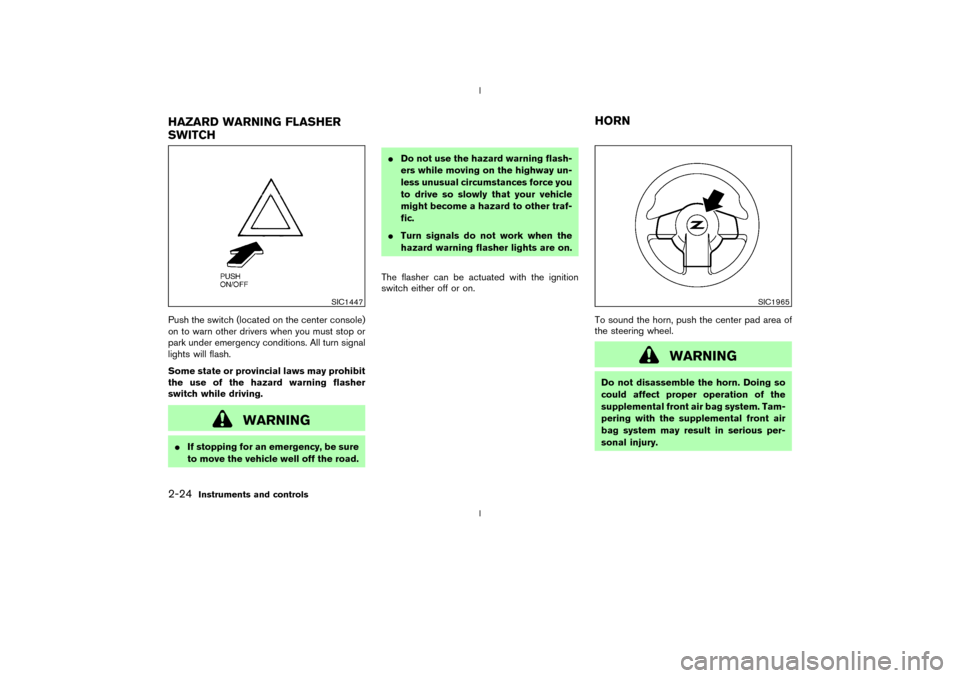
Push the switch (located on the center console)
on to warn other drivers when you must stop or
park under emergency conditions. All turn signal
lights will flash.
Some state or provincial laws may prohibit
the use of the hazard warning flasher
switch while driving.
WARNING
IIf stopping for an emergency, be sure
to move the vehicle well off the road.IDo not use the hazard warning flash-
ers while moving on the highway un-
less unusual circumstances force you
to drive so slowly that your vehicle
might become a hazard to other traf-
fic.
ITurn signals do not work when the
hazard warning flasher lights are on.
The flasher can be actuated with the ignition
switch either off or on.
To sound the horn, push the center pad area of
the steering wheel.
WARNING
Do not disassemble the horn. Doing so
could affect proper operation of the
supplemental front air bag system. Tam-
pering with the supplemental front air
bag system may result in serious per-
sonal injury.
SIC1447
SIC1965
HAZARD WARNING FLASHER
SWITCHHORN2-24
Instruments and controls
Z
02.9.13/Z33-D/V5.0
X