2003 NISSAN 350Z instrument panel
[x] Cancel search: instrument panelPage 11 of 227
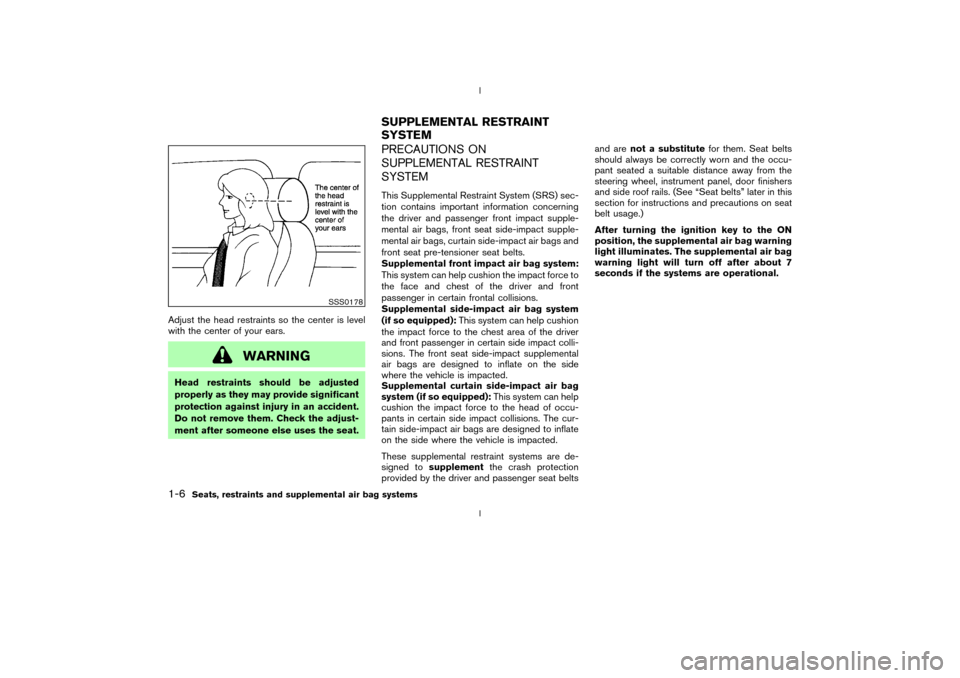
Adjust the head restraints so the center is level
with the center of your ears.
WARNING
Head restraints should be adjusted
properly as they may provide significant
protection against injury in an accident.
Do not remove them. Check the adjust-
ment after someone else uses the seat.
PRECAUTIONS ON
SUPPLEMENTAL RESTRAINT
SYSTEMThis Supplemental Restraint System (SRS) sec-
tion contains important information concerning
the driver and passenger front impact supple-
mental air bags, front seat side-impact supple-
mental air bags, curtain side-impact air bags and
front seat pre-tensioner seat belts.
Supplemental front impact air bag system:
This system can help cushion the impact force to
the face and chest of the driver and front
passenger in certain frontal collisions.
Supplemental side-impact air bag system
(if so equipped):This system can help cushion
the impact force to the chest area of the driver
and front passenger in certain side impact colli-
sions. The front seat side-impact supplemental
air bags are designed to inflate on the side
where the vehicle is impacted.
Supplemental curtain side-impact air bag
system (if so equipped):This system can help
cushion the impact force to the head of occu-
pants in certain side impact collisions. The cur-
tain side-impact air bags are designed to inflate
on the side where the vehicle is impacted.
These supplemental restraint systems are de-
signed tosupplementthe crash protection
provided by the driver and passenger seat beltsand arenot a substitutefor them. Seat belts
should always be correctly worn and the occu-
pant seated a suitable distance away from the
steering wheel, instrument panel, door finishers
and side roof rails. (See ªSeat beltsº later in this
section for instructions and precautions on seat
belt usage.)
After turning the ignition key to the ON
position, the supplemental air bag warning
light illuminates. The supplemental air bag
warning light will turn off after about 7
seconds if the systems are operational.
SSS0178
SUPPLEMENTAL RESTRAINT
SYSTEM
1-6
Seats, restraints and supplemental air bag systems
Z
02.9.13/Z33-D/V5.0
X
Page 12 of 227
WARNING
IThe supplemental front air bags ordi-
narily will not inflate in the event of a
side impact, rear impact, roll over, or
lower severity frontal collision. Al-
ways wear your seat belts to help
reduce the risk or severity of injury in
various kinds of accidents.
IThe seat belts and the supplemental
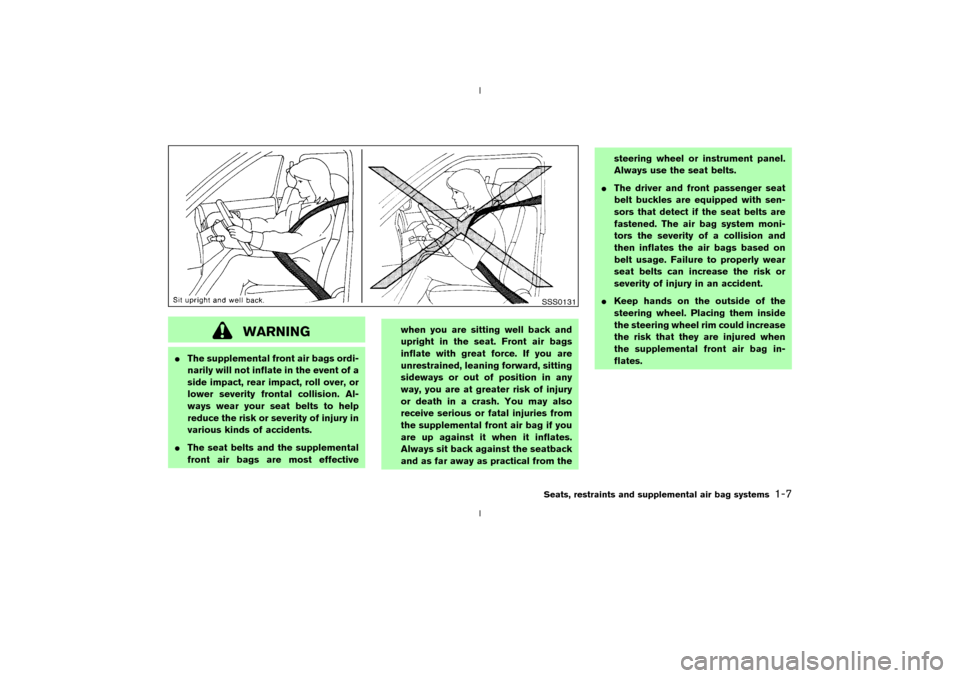
front air bags are most effectivewhen you are sitting well back and
upright in the seat. Front air bags
inflate with great force. If you are
unrestrained, leaning forward, sitting
sideways or out of position in any
way, you are at greater risk of injury
or death in a crash. You may also
receive serious or fatal injuries from
the supplemental front air bag if you
are up against it when it inflates.
Always sit back against the seatback
and as far away as practical from thesteering wheel or instrument panel.
Always use the seat belts.
IThe driver and front passenger seat
belt buckles are equipped with sen-
sors that detect if the seat belts are
fastened. The air bag system moni-
tors the severity of a collision and
then inflates the air bags based on
belt usage. Failure to properly wear
seat belts can increase the risk or
severity of injury in an accident.
IKeep hands on the outside of the
steering wheel. Placing them inside
the steering wheel rim could increase
the risk that they are injured when
the supplemental front air bag in-
flates.
SSS0131Seats, restraints and supplemental air bag systems
1-7
Z
02.9.13/Z33-D/V5.0
X
Page 17 of 227
may inflate if the forces in another type of
collision are similar to those of a higher severity
frontal impact. They may not inflate in certain
frontal collisions. Vehicle damage (or lack of it) is
not always an indication of proper supplemental
air bag operation.
The supplemental air bag system has dual stage
inflators for both the driver and passenger air
bags. The system monitors information from the
crash zone sensor, the diagnosis sensor unit and
seat belt buckle sensors that detect if the seat
belts are fastened, inflator operation is based on
the severity of a collision and whether the seat
belts are being used. Only one front air bag may
inflate in a crash, depending on the crash sever-
ity and whether the front occupants are belted or
unbelted. This does not indicate improper per-
formance of the system. If you have any ques-
tions about the performance of your air bag
system, please contact your NISSAN dealer.
When the supplemental front air bag inflates, a
fairly loud noise may be heard, followed by
release of smoke. This smoke is not harmful and
does not indicate a fire. Care should be taken
not to inhale it, as it may cause irritation and
choking. Those with a history of a breathing
condition should get fresh air promptly.
Supplemental front air bags, along with the use
of seat belts, help to cushion the impact force onthe face and chest of the front occupants. They
can help save lives and reduce serious injuries.
However, an inflating front air bag may cause
facial abrasions or other injuries. Front air bags
do not provide restraint to the lower body.
The seat belts should be correctly worn and the
driver and passenger seated upright as far as
practical away from the steering wheel or instru-
ment panel. The supplemental front air bags
inflates quickly in order to help protect the front
occupants. Because of this, the force of the front
air bag inflating can increase the risk of injury if
the occupant is too close to, or is against, the air
bag module during inflation. The air bag will
deflate quickly after the collision is over.
After turning the ignition key to the ON
position, the supplemental air bag warning
light illuminates. The supplemental air bag
warning light will turn off after about 7
seconds if the system is operational.
WARNING
IDo not place any objects on the
steering wheel pad or on the instru-
ment panel. Also, do not place any
objects between any occupant andthe steering wheel or instrument
panel. Such objects may become
dangerous projectiles and cause in-
jury if the supplemental front air bag
inflates.
IRight after inflation, several air bag
system components will be hot. Do
not touch them; you may severely
burn yourself.
INo unauthorized changes should be
made to any components or wiring of
the supplemental front air bag sys-
tem. This is to prevent accidental in-
flation of the air bag or damage to
the air bag system.
IDo not make unauthorized changes
to your vehicle's electrical system,
suspension system or front end
structure. This could affect proper
operation of the supplemental air
bag system.
ITampering with the supplemental
front air bag system may result in
serious personal injury. Tampering
1-12
Seats, restraints and supplemental air bag systems
Z
02.9.13/Z33-D/V5.0
X
Page 18 of 227
includes changes to the steering
wheel and the instrument panel as-
sembly by placing material over the
steering wheel pad, above the dash-
board, or by installing additional trim
material around the air bag system.
IWork around and on the supplemen-
tal front air bag system should be
done by a NISSAN dealer. Installa-
tion of electrical equipment should
also be done by a NISSAN dealer.
The yellow and orange Supplemental
Restrain System (SRS) wiring and
connectors should not be modified or
disconnected. Unauthorized electri-
cal test equipment and probing de-
vices should not be used on the air
bag system.
IA cracked windshield should be re-
placed immediately by a qualified re-
pair facility. A cracked windshield
could affect inflation of the supple-
mental air bag system.
IThe SRS wiring harness connectors
are yellow and orange for easyidentification.
When selling your vehicle, we request that you
inform the buyer about the supplemental front air
bag system and guide the buyer to the appro-
priate sections in this Owner's Manual.
Supplemental side air bag and curtain
side-impact air bag systems (if so
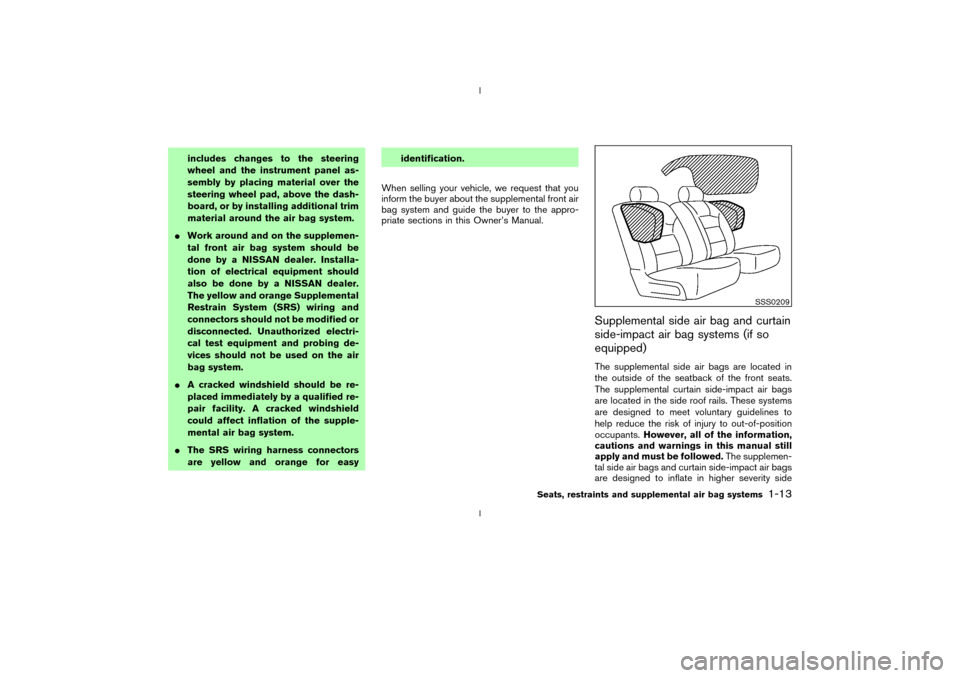
equipped)The supplemental side air bags are located in
the outside of the seatback of the front seats.
The supplemental curtain side-impact air bags
are located in the side roof rails. These systems
are designed to meet voluntary guidelines to
help reduce the risk of injury to out-of-position
occupants.However, all of the information,
cautions and warnings in this manual still
apply and must be followed.The supplemen-
tal side air bags and curtain side-impact air bags
are designed to inflate in higher severity side
SSS0209
Seats, restraints and supplemental air bag systems
1-13
Z
02.9.13/Z33-D/V5.0
X
Page 22 of 227
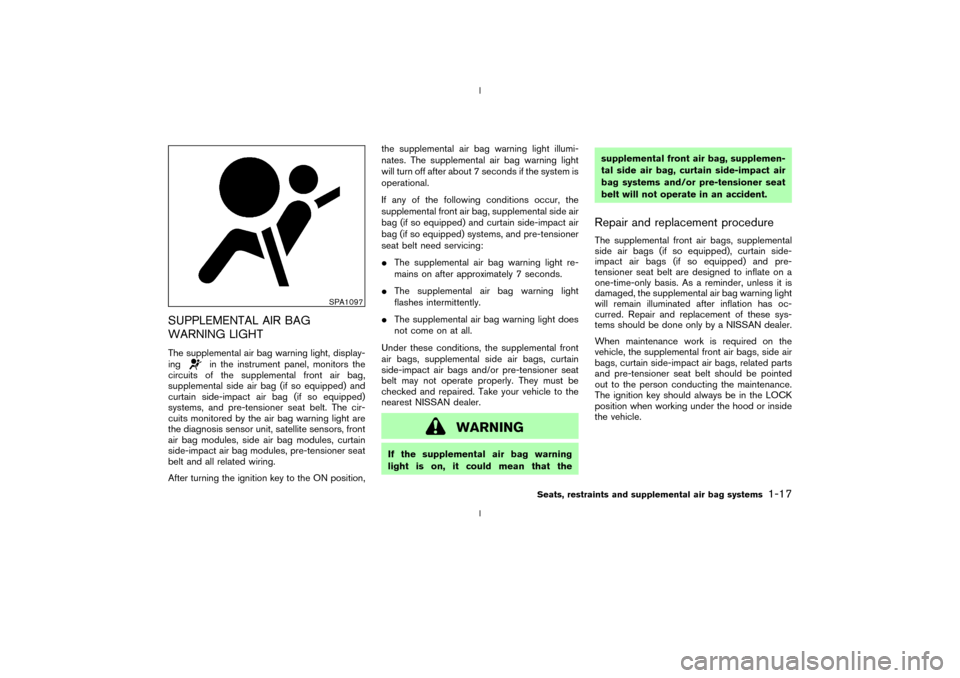
SUPPLEMENTAL AIR BAG
WARNING LIGHTThe supplemental air bag warning light, display-
ing
in the instrument panel, monitors the
circuits of the supplemental front air bag,
supplemental side air bag (if so equipped) and
curtain side-impact air bag (if so equipped)
systems, and pre-tensioner seat belt. The cir-
cuits monitored by the air bag warning light are
the diagnosis sensor unit, satellite sensors, front
air bag modules, side air bag modules, curtain
side-impact air bag modules, pre-tensioner seat
belt and all related wiring.
After turning the ignition key to the ON position,the supplemental air bag warning light illumi-
nates. The supplemental air bag warning light
will turn off after about 7 seconds if the system is
operational.
If any of the following conditions occur, the
supplemental front air bag, supplemental side air
bag (if so equipped) and curtain side-impact air
bag (if so equipped) systems, and pre-tensioner
seat belt need servicing:
IThe supplemental air bag warning light re-
mains on after approximately 7 seconds.
IThe supplemental air bag warning light
flashes intermittently.
IThe supplemental air bag warning light does
not come on at all.
Under these conditions, the supplemental front
air bags, supplemental side air bags, curtain
side-impact air bags and/or pre-tensioner seat
belt may not operate properly. They must be
checked and repaired. Take your vehicle to the
nearest NISSAN dealer.
WARNING
If the supplemental air bag warning
light is on, it could mean that thesupplemental front air bag, supplemen-
tal side air bag, curtain side-impact air
bag systems and/or pre-tensioner seat
belt will not operate in an accident.
Repair and replacement procedureThe supplemental front air bags, supplemental
side air bags (if so equipped), curtain side-
impact air bags (if so equipped) and pre-
tensioner seat belt are designed to inflate on a
one-time-only basis. As a reminder, unless it is
damaged, the supplemental air bag warning light
will remain illuminated after inflation has oc-
curred. Repair and replacement of these sys-
tems should be done only by a NISSAN dealer.
When maintenance work is required on the
vehicle, the supplemental front air bags, side air
bags, curtain side-impact air bags, related parts
and pre-tensioner seat belt should be pointed
out to the person conducting the maintenance.
The ignition key should always be in the LOCK
position when working under the hood or inside
the vehicle.
SPA1097
Seats, restraints and supplemental air bag systems
1-17
Z
02.9.13/Z33-D/V5.0
X
Page 39 of 227

2 Instruments and controlsInstrument panel ..................................................................... 2-2
Meters and gauges ............................................................... 2-3
Speedometer and odometer ......................................... 2-4
Tachometer ........................................................................ 2-5
Engine coolant temperature gauge ............................. 2-5
Fuel gauge ......................................................................... 2-6
Engine oil pressure gauge ............................................. 2-6
Volt meter ......................................................................... 2-7
Trip computer .................................................................. 2-8
Warning/indicator lights and audible reminders ......... 2-11
Checking bulbs .............................................................. 2-11
Warning lights ................................................................ 2-11
Indicator lights ................................................................ 2-14
Audible reminders.......................................................... 2-16
Security systems.................................................................. 2-16
Vehicle security system................................................ 2-17
Nissan Vehicle Immobilizer System (NVIS) ............ 2-18
Windshield wiper and washer switch ............................ 2-19
Rear window wiper and washer switch ........................ 2-20
Rear window and outside mirror (if so equipped)
defroster switch ................................................................... 2-21
Headlight and turn signal switch..................................... 2-21
Xenon headlights (if so equipped) ............................ 2-21
Headlight switch ............................................................ 2-22Turn signal switch ......................................................... 2-23
Instrument brightness control ..................................... 2-23
Daytime running light system (Canada only) .......... 2-23
Hazard warning flasher switch ......................................... 2-24
Horn ........................................................................................ 2-24
Heated seats (if so equipped) ......................................... 2-25
Vehicle dynamic control (VDC) off switch
(if so equipped).................................................................... 2-26
Traction control system (TCS) off switch
(if so equipped).................................................................... 2-26
Clock ...................................................................................... 2-27
Adjusting the time ......................................................... 2-27
Power outlet.......................................................................... 2-27
Cigarette lighter and ashtray (accessory) .................... 2-28
Storage ................................................................................. 2-29
Instrument pocket (Except for Navigation system
equipped models) ........................................................ 2-29
Sunglasses holder ......................................................... 2-29
Tray.................................................................................... 2-30
Cup holders .................................................................... 2-30
Console box .................................................................... 2-31
Rear floor box ................................................................. 2-32
Rear parcel box .............................................................. 2-32
Windows................................................................................ 2-33
Z
02.9.13/Z33-D/V5.0
X
Page 41 of 227

1. Headlight and turn signal switch (P.2-21)
2. Instrument brightness control switch
(P.2-23)
3. Driver supplemental air bag (P.1-6)/Horn
(P.2-24)
4. Meters/gauges (P.2-3)5. Cruise control main/set switch (P.5-15)
6. Trip computer mode/setting switch (P.2-8)
7. Windshield wiper/washer switch (P.2-19)
8. Center ventilator (P.4-2)
9. Cup holder (P.2-30)
10. Passenger supplemental air bag (P.1-6)11. Side ventilator (P.4-2)
12. VDC (Vehicle dynamic control) OFF switch
(P.2-26) or TCS (Traction control system)
OFF switch (P.2-26)
13. Fuel filler lid opener switch (P.3-10)
14. Hood lock release handle (P.3-8)
15. Fuse box (P.8-23)
16. Tilting steering wheel lock lever (P.3-12)
17. Ignition switch/steering lock (P.5-5)
18. Navigation system* or Instrument pocket
(P.2-29)
19. Rear window and outside mirror (if so
equipped) defroster switch (P.2-21)
20. Heater/air conditioner control (P.4-3)
21. Audio system (P.4-6)/Clock (P.2-27)
22. Heated seat switch (P.2-25)
23. Hazard warning flasher switch (P.2-24)
24. Ashtray (P.2-28) or Tray (P.2-30)
See the page indicated in parentheses for
operating details.
*: Refer to the separate Navigation System
Owner's Manual.
SIC1943
INSTRUMENT PANEL2-2
Instruments and controls
Z
02.9.13/Z33-D/V5.0
X
Page 47 of 227

TRIP COMPUTERThe display of the trip computer is situated in the
triple meter. When the ignition switch is turned
to ON, the display scrolls all the modes of the
trip computer and then shows the mode chosen
before the ignition switch is turned OFF.Switches for the trip computer are located on
the side of the combination meter panel. To
operate the trip computer, press the side of the
switches as shown above.
qA: Trip computer mode switch
qB: Trip computer setting switch
When the ignition switch is turned to ON, modes
of the trip computer can be selected by pressing
the trip computer mode switch
qA.
Each time the mode switch
qA
is pressed, the
display will change as follows:
Speed indicator®Outside air temperature
(ICY)®Distance to empty (dte)®Average fuelconsumption and speed®Elapsed time and
trip odometer®Stopwatch®Tire pressure
indicator (PSI) (if so equipped)®Up-shift indi-
cator setting (for M/T models)®Speed indica-
tor
Speed indicator (MPH or km/h)The vehicle speed is displayed in MPH or km/h
while driving.Outside air temperature (ICY Ð ÉF or
ÉC)The outside air temperature is displayed in ÉF or
ÉC in the range of þ22 to 131ÉF (þ30 to 55ÉC).
The outside air temperature mode includes a low
temperature warning feature: below 37ÉF (3ÉC),
the outside air temperature mode is automati-
cally selected and ICY indicator will illuminate in
order to draw the driver's attention. Press the
mode switch
qAif you wish to return to the mode
that was selected before the warning occurred.
The ICY indicator will continue blinking as long
as the temperature remains below 39ÉF (4ÉC).
The ambient temperature sensor is located in
front of the radiator. The sensor may be affected
by road or engine heat, wind directions and
other driving conditions. The display may differ
from the actual ambient temperature or the
SIC1956
SIC1957
2-8
Instruments and controls
Z
02.9.13/Z33-D/V5.0
X