2003 CHEVROLET SILVERADO tow
[x] Cancel search: towPage 148 of 556
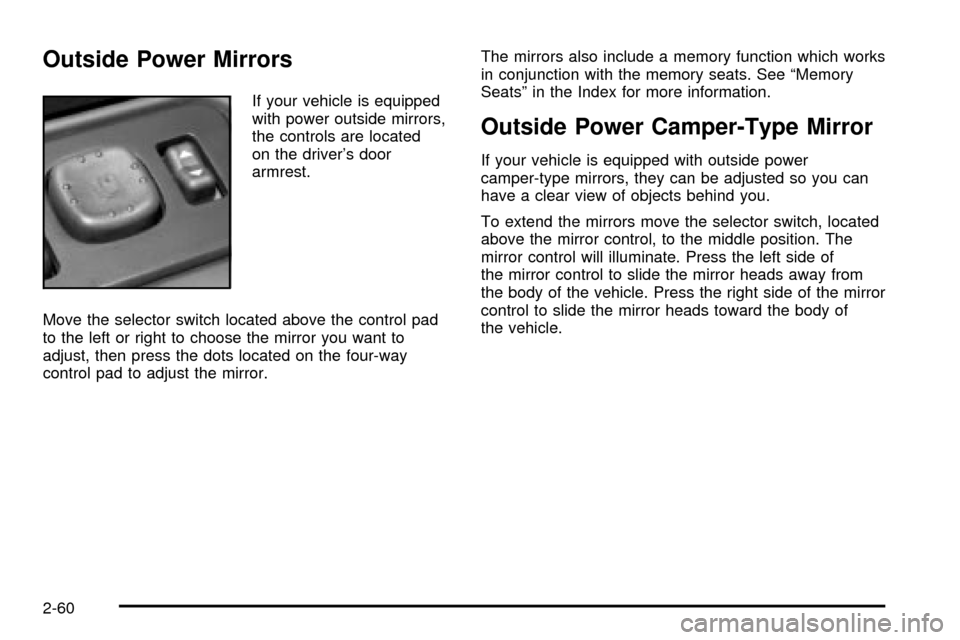
Outside Power Mirrors
If your vehicle is equipped
with power outside mirrors,
the controls are located
on the driver's door
armrest.
Move the selector switch located above the control pad
to the left or right to choose the mirror you want to
adjust, then press the dots located on the four-way
control pad to adjust the mirror.The mirrors also include a memory function which works
in conjunction with the memory seats. See ªMemory
Seatsº in the Index for more information.
Outside Power Camper-Type Mirror
If your vehicle is equipped with outside power
camper-type mirrors, they can be adjusted so you can
have a clear view of objects behind you.
To extend the mirrors move the selector switch, located
above the mirror control, to the middle position. The
mirror control will illuminate. Press the left side of
the mirror control to slide the mirror heads away from
the body of the vehicle. Press the right side of the mirror
control to slide the mirror heads toward the body of
the vehicle.
2-60
Page 149 of 556

Outside Power Foldaway Mirrors
If your vehicle is equipped with outside power foldaway
mirrors the mirrors can be folded in toward the body
of the vehicle.
To fold in the mirrors, move the upper selector switch,
located above the mirror control, to the middle position.
Press the right side of the mirror control to fold the
mirrors toward the body of the vehicle. The mirror glass
on one or both sides of the vehicle may automatically
adjust before the mirror folds inward. When the
mirror glass or mirror starts moving, you can release the
mirror control.
To return the mirrors and the mirror glass to their
normal position press the left side of the mirror control.
If the mirrors are manually folded, unfold and fold
them atleast twice using the mirror controls. Do not
unfold them manually. They may not stay in place
otherwise.
Outside Automatic Dimming Mirror
If your vehicle is equipped with this feature, the
driver's side outside mirror will adjust for the glare of
headlamps behind you. This feature is controlled by the
on and off settings found on the electrochromic
mirror. See
Automatic Dimming Rearview Mirror with
Compass and Temperature Display on page 2-56.
Outside Curb View Assist Mirrors
If your vehicle has the optional memory package
you may have this feature.
The vehicle's mirrors are capable of performing the curb
view assist mirror function. This feature will cause the
passenger's and/or driver's mirror to tilt to a preselected
position when the vehicle is in REVERSE (R). This
feature may be useful in allowing you to view the curb
when you are parallel parking. When the vehicle is
shifted out of REVERSE (R) and a short delay
has occurred, the passenger's and/or driver's mirror will
return to its original position.
To change the preselected tilt position, adjust the
mirrors to the desired position while the vehicle is in
REVERSE (R). When the vehicle is shifted out of
REVERSE (R), this new position is saved in memory as
the tilt position.
You may be able to enabled/disable this feature through
the Driver Information Center. See
Driver Information
Center (DIC) on page 3-54.
2-61
Page 157 of 556

Instrument Panel Overview...............................3-4
Hazard Warning Flashers................................3-6
Other Warning Devices...................................3-6
Horn.............................................................3-7
Tilt Wheel.....................................................3-7
Turn Signal/Multifunction Lever.........................3-7
Exterior Lamps.............................................3-14
Interior Lamps..............................................3-18
Accessory Power Outlets...............................3-19
Ashtrays and Cigarette Lighter........................3-20
Climate Controls............................................3-20
Climate Control System.................................3-20
Dual Climate Control System..........................3-22
Dual Automatic Climate Control System...........3-25
Warning Lights, Gages and Indicators.............3-33
Instrument Panel Cluster................................3-34
Speedometer and Odometer...........................3-35
Tachometer.................................................3-35
Safety Belt Reminder Light.............................3-36
Air Bag Readiness Light................................3-36
Air Bag Off Light..........................................3-37Passenger Air Bag Status Indicator.................3-40
Battery Warning Light....................................3-42
Voltmeter Gage............................................3-42
Up-Shift Light...............................................3-43
Brake System Warning Light..........................3-44
Anti-Lock Brake System Warning Light.............3-45
Traction Off Light..........................................3-46
Engine Coolant Temperature Gage..................3-47
Transmission Temperature Gage.....................3-47
Malfunction Indicator Lamp.............................3-49
Oil Pressure Gage........................................3-51
Cruise Control Light......................................3-52
Four-Wheel-Drive Light..................................3-52
Tow/Haul Mode Light....................................3-53
Overdrive Disable.........................................3-53
Fuel Gage...................................................3-53
Low Fuel Warning Light.................................3-54
Driver Information Center (DIC).......................3-54
DIC Operation and Displays...........................3-55
DIC Warnings and Messages.........................3-65
Section 3 Instrument Panel
3-1
Page 161 of 556

The main components of your instrument panel are the
following:
A. Dome Lamp Button. See ªDome Lampsº under
Interior Lamps on page 3-18.
B. Exterior Lamp Controls. See
Exterior Lamps on
page 3-14.
C. Air Outlets. See ªClimate Controlsº in Section 3.
D. Automatic Transfer Case/Electronic Transfer
Case/Traction Assist System (TAS). See
Four-Wheel
Drive on page 2-33.
E. Multifunction Lever. See
Turn Signal/Multifunction
Lever on page 3-7.
F. Instrument Panel Cluster. See
Instrument Panel
Cluster on page 3-34.
G. Gearshift Lever (Automatic Transmission). See
Automatic Transmission Operation on page 2-25.
H. Tow/Haul Selector and Overdrive Disable (Allison
Transmission
žOnly) Button (If Equipped). SeeAutomatic Transmission Operation on page 2-25.
I. Audio System. See
Audio System(s) on page 3-71.
J. Comfort Control System. See
Climate Control
System on page 3-20.
K. Instrument Panel Fuse Block.
Fuses and Circuit
Breakers on page 5-110.L. Hood Release. See
Hood Release on page 5-9.
M. Steering Wheel Control Buttons (If Equipped). See
Driver Information Center (DIC) on page 3-54.
N. Center Instrument Panel Utility Block. See
Fuses
and Circuit Breakers on page 5-110.
O. Parking Brake Release. See
Parking Brake on
page 2-44.
P. Tilt Wheel Lever. See
Tilt Wheel on page 3-7.
Q. Lighter and Accessory Power Outlet. See
Accessory
Power Outlets on page 3-19, andAshtrays and
Cigarette Lighter on page 3-20.
R. Storage Area. See ªStorage Areasº in Section 2.
S. Ashtray. See
Ashtrays and Cigarette Lighter
on page 3-20.
T. Manual Selectable Ride Control (If Equipped). See
Manual Selectable Ride on page 4-12.
U. 4WS Switch (If Equipped). See
QUADRASTEERŸ
on page 4-15.
V. Passenger Air Bag Off Switch. See
Air Bag Off
Switch on page 1-71.
W. Glove Box. See
Glove Box on page 2-64.
3-5
Page 165 of 556

Headlamp High/Low Beam Changer
To change the headlamps from low to high beam, push
the lever toward the instrument panel. To return the
low-beam headlamps, pull the multifunction lever toward
you. Then release it.
When the high beams are
on, this light on the
instrument panel cluster
also will be on.
Flash-To-Pass Feature
This feature allows you to use your high-beam
headlamps to signal a driver in front of you that you
want to pass. It works even if your headlamps are off.
To use it, pull the turn signal lever toward you.
If your headlamps are off or on low-beam, your
high-beam headlamps will turn on. They'll stay on as long
as you hold the lever toward you and the high-beam
indicator on the instrument panel will come on. Release
the lever to turn the high-beam headlamps off.
3-9
Page 170 of 556

Exterior Lamps
The switch on the driver's side of your instrument panel
operates the exterior lamps.
Turn the control clockwise to operate the lamps.
The exterior lamp switch has four positions:
9(OFF):Turning the switch to this position turns off
the Daytime Running Lamps (DRL) and the automatic
headlamps. An indicator light will illuminate when
the position is selected.AUTO (Automatic):Turning the control to this position
puts the system into automatic headlamp mode. An
indicator light will illuminate when this position is
selected.
;(Parking Lamps):Turning the control to this
position turns on the parking lamps, together with the
following:
·Sidemarker Lamps
·Taillamps
·License Plate Lamps
·Instrument Panel Lights
·Roof Marker Lamps (If Equipped)
2(Headlamps):Turning the switch to this position
turns on the headlamps, together with the previously
listed lamps and lights.
You can switch your headlamps from high to low-beam
by pushing the turn signal/high-beam lever towards
the instrument panel.
A circuit breaker protects your headlamps. If you have
an electrical overload, your headlamps will ¯icker on and
off. Have your headlamp wiring checked right away if
this happens.
3-14
Page 176 of 556
Ashtrays and Cigarette Lighter
Your vehicle may be equipped with a front ashtray
located near the center of the instrument panel. Pull on
the door to open it.
Notice:Don't put papers or other ¯ammable items
into your ashtrays. Hot cigarettes or other smoking
materials could ignite them, causing a damaging
®re.
To remove the front ashtray, pull the ashtray toward
you. To replace the ashtray, place the ashtray on
the slides at the side of its location in the instrument
panel. To use the cigarette lighter, push it in all the way,
and let go. When it's ready, it will pop back out by
itself.
Notice:Holding a cigarette lighter in while it is
heating will not allow the lighter to back away from
the heating element when it is hot. Damage from
overheating may occur to the lighter or heating
element, or a fuse could be blown. Do not hold a
cigarette lighter in while it is heating.
Climate Controls
Climate Control System
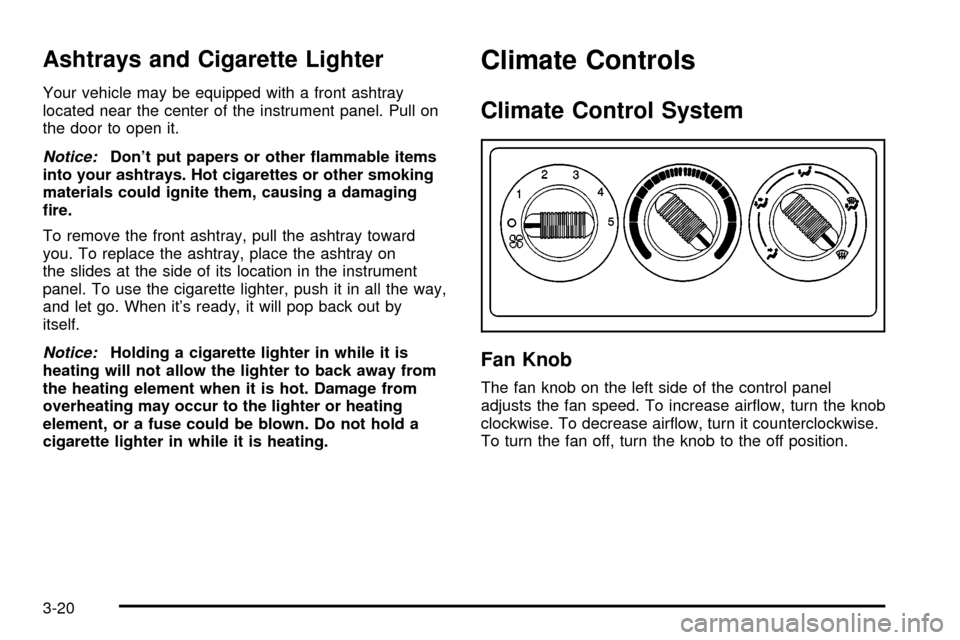
Fan Knob
The fan knob on the left side of the control panel
adjusts the fan speed. To increase air¯ow, turn the knob
clockwise. To decrease air¯ow, turn it counterclockwise.
To turn the fan off, turn the knob to the off position.
3-20
Page 177 of 556

9(Off):If the fan is off, outside air will still enter the
vehicle, and will be directed based on the position of
the mode knob. The temperature can also be adjusted
using the temperature knob.
Temperature Knob
The middle knob on the control panel lets you select the
temperature of the air ¯owing into the passenger
area. Turn the knob clockwise toward the red area for
warmer air. Turn the knob counterclockwise toward
the blue area for cooler air.
Mode Knob
The right knob on the control panel allows you to
choose the direction of air delivery.
H(Vent):This setting directs the air through the
instrument panel outlets.
)(Bi-Level):Air is delivered through the ¯oor outlets
as well as the instrument panel outlets. The ¯ow can
be divided between vent and ¯oor outlets depending
upon where the knob is placed between the settings.
6(Floor):This setting directs most of the air through
the ¯oor outlets, and the rest of the air is divided
between the windshield defroster outlets and the side
window defroster outlets.
W(Defog):Air¯ow is delivered through the ¯oor
outlets, the windshield defroster outlets and the side
window defroster outlets. The air ¯ow can be divided
between ¯oor and defrost depending upon where
the knob is placed between the settings.
1(Defrost):This setting directs most air through the
windshield defroster outlets, side window defroster
outlets and some through the ¯oor outlets.
3-21