2003 CHEVROLET SILVERADO tow
[x] Cancel search: towPage 226 of 556

TIGHTEN FUEL CAP
If the vehicle's fuel cap is not tightened properly thsi
message may appear along with the check engine light
on the instrument panel. See
Malfunction Indicator
Lamp on page 3-49. Fully reinstall the fuel cap.
SeeFilling Your Tank on page 5-6. The diagnostic
system can determine if the fuel cap has been left off or
improperly installed. A loose or missing fuel cap will
allow fuel to evaporate into the atmosphere. A few
driving trips with the cap properly installed should turn
the light and message off.
TRACTION ACTIVE
When the traction control system had detected that any
of the vehicle's wheels are slipping, the traction
control system will activate and this message will appear
on the DIC. For more information see ªTraction Assistº
in the Index.
TRANSMISSION HOT
If the transmission ¯uid temperature becomes high, the
message center will display this message.
When the transmission enters the protection mode, you
may notice a change in the transmission shifting
patterns. When the transmission ¯uid temperature
returns to normal, the display will turn off and the
transmission shifting patterns will return to normal.
Notice:If you keep driving your vehicle with the
transmission TRANS FLUID HOT message
displayed, you can damage the transmission. This
could lead to costly repairs that may not be covered
under your warranty.
The following situations can cause the transmission to
operate at higher temperatures:
·Towing a trailer
·Hot outside air temperatures
·Hauling a large or heavy load
·Low transmission ¯uid level
·High transmission ¯uid level
·Restricted air ¯ow to the radiator and the auxiliary
transmission oil cooler.
A temporary solution to hotter transmission operating
temperatures may be to let the transmission cool down.
If the transmission is operated at higher temperatures
on a frequent basis, see
Scheduled Maintenance
on page 6-5for the proper transmission maintenance
intervals.
3-70
Page 230 of 556

To adjust both tone controls and both speaker controls
to the middle position, end out of audio by waiting
for the display to change to the time display. Then press
and hold AUDIO for more than two seconds until you
hear a beep. CEN will appear on the display.
Adjusting the Speakers (Balance/Fade)
AUDIO:To adjust the balance between the right
and the left speakers, press and release AUDIO until
BAL appears on the display. Then press and hold the up
or the down arrow to move the sound toward the right
or the left speakers.
To adjust the fade between the front and the rear
speakers, press and release AUDIO until FAD appears
on the display. Then press and hold the up or the
down arrow to move the sound toward the front or the
rear speakers.
To adjust balance or fade to the middle position, select
BAL or FAD. Then press and hold AUDIO for more
than two seconds until you hear a beep. L and a zero
or F and a zero will appear on the display.To adjust both tone controls and both speaker controls
to the middle position, end out of audio by waiting
for the display to change to the time display. Then press
and hold AUDIO for more than two seconds until you
hear a beep. CEN will appear on the display.
Fade may not be available if you have a regular cab
model.Radio Messages
CAL (Calibrated):Your audio system has been
calibrated for your vehicle from the factory. If CAL
appears on the display it means that your radio has not
been con®gured properly for your vehicle and must
be returned to the dealership for service.
LOC (Locked):This message is displayed when the
Theftlock
žsystem has locked up. Your vehicle must be
returned to the dealership for service.
3-74
Page 234 of 556

AUTO EQ (Automatic Equalization):Press this button
to choose bass and treble equalization settings
designed for country/western, jazz, talk, pop, rock and
classical stations. Selecting CUSTOM or changing
bass or treble, returns the EQ to the manual bass and
treble settings.
The radio will save separate AUTO EQ settings for each
preset and source.
If you radio is equipped with the Bose audio system,
your equalization settings are either CUSTOM or TALK.
Adjusting the Speakers (Balance/Fade)
AUDIO:To adjust the balance to the right and the
left speakers, push and release the AUDIO knob until
BAL appears on the display. Turn the knob to move the
sound toward the right or the left speakers.
To adjust the fade to the front and the rear speakers,
push and release the AUDIO knob until FADE appears
on the display. Turn the knob to move the sound
toward the front or the rear speakers.
To adjust the balance and fade to the middle position,
push the AUDIO knob then push it again and hold it until
the radio produces one beep. The balance and fade
will be adjusted to the middle position and the display
will show the speaker balance.To adjust all tone and speaker controls to the middle
position, push and hold the AUDIO knob when no tone
or speaker control is displayed. The radio will produce
one beep and display ALL with the level display in
the middle position.
Finding a PTY Station (RDS and XMŸ)
To select and ®nd a desired PTY perform the following:
1. Turn the P-TYPE LIST knob. TYPE and a PTY
will appear on the display.
2. Select a category by turning the P-TYPE
LIST knob.
3. Once the desired category is displayed, press the
SEEK TYPE button or one of the SEEK arrows to
take you to the category's ®rst station.
4. If you want to go to another station within that
category and the category is displayed, press
the SEEK TYPE button once. If the category is not
displayed, press the SEEK TYPE button twice
to display the category and then to go to another
station.
If the radio cannot ®nd the desired program type, NONE
will appear on the display and the radio will return to
the last station you were listening to.
3-78
Page 244 of 556

AUTO EQ (Automatic Equalization):Press this button
to choose bass and treble equalization settings
designed for country/western, jazz, talk, pop, rock and
classical stations. Selecting CUSTOM or changing
bass or treble, returns the EQ to the manual bass and
treble settings.
The radio will save separate AUTO EQ settings for each
preset and source.
If you radio is equipped with the Bose audio system,
your equalization settings are either CUSTOM or TALK.
Adjusting the Speakers (Balance/Fade)
AUDIO:To adjust the balance between the right
and the left speakers, push and release the AUDIO
knob until BAL appears on the display. Turn the knob to
move the sound toward the right or the left speakers.
To adjust the fade between the front and the rear
speakers, push and release the AUDIO knob until FADE
appears on the display. Turn the knob to move the
sound toward the front or the rear speakers.
To adjust the balance and fade to the middle position,
push the AUDIO knob then push it again and hold it until
the radio produces one beep. The balance and fade
will be adjusted to the middle position and the display
will show the speaker balance.To adjust all tone and speaker controls to the middle
position, push and hold the AUDIO knob when no tone
or speaker control is displayed. The radio will produce
one beep and display ALL with the level display in
the middle position.
Finding a PTY Station (RDS and XMŸ)
To select and ®nd a desired PTY perform the following:
1. Turn the P-TYPE LIST knob. TYPE and a PTY
will appear on the display.
2. Select a category by turning the P-TYPE LIST
knob.
3. Once the desired category is displayed, press the
SEEK TYPE button or one of the SEEK arrows to
take you to the category's ®rst station.
4. If you want to go to another station within that
category and the category is displayed, press
the SEEK TYPE button once. If the category is not
displayed, press the SEEK TYPE button twice
to display the category and then to go to another
station.
If the radio cannot ®nd the desired program type, NONE
will appear on the display and the radio will return to
the last station you were listening to.
3-88
Page 257 of 556

Adjusting the Speakers (Balance/Fade)
AUDIO:To adjust the balance between the right and the
left speakers, push the AUDIO knob until BAL appears on
the display. Turn the knob to move the sound toward the
left or the right speakers.
To adjust the fade between the front and rear speakers,
push and hold the AUDIO knob until FAD appears on the
display. Turn the knob to move the sound toward the front
or the rear speakers.
To adjust the balance and the fade to the middle position,
select balance or fade and push and hold the AUDIO
knob. The radio will beep once and will adjust the display
level to the middle position.
To adjust all tone and speaker controls to the middle
position, push and hold the AUDIO knob when no tone or
speaker controls are displayed. The radio will produce
one beep and CENTERED will appear on the display.
Finding a PTY Station (RDS and XMŸ)
To select and ®nd a desired PTY perform the following:
1. Press the P-TYPE button. P-TYPE and the last
selected PTY will be displayed on the screen.
2. Select a category by turning the P-TYPE knob.
3. Once the desired category is displayed, press either
SEEK arrow to select the category and take you to
the category's ®rst station.4. If you want to go to another station within that
category and the category is displayed, press either
SEEK arrow once. If the category is not displayed,
press either SEEK arrow twice to display the
category and then to go to another station.
5. If PTY times out and is no longer on the display, go
back to Step 1.
If both P-TYPE and TRAF are on, the radio will search
for stations with the selected PTY and traffic
announcements.
To use the PTY interrupt feature, press and hold the
P-TYPE button until you hear a beep on the PTY you
want to interrupt with. When selected, an asterick will
appear beside that PTY on the display. You may select
multiple interrupts if desired. When you are listening to a
compact disc, the last selected RDS station will interrupt
play if that selected program type format is broadcast.
SCAN:You can also scan through the stations within a
category by performing the following:
1. Press the P-TYPE button. P-TYPE and the last
selected PTY will be displayed on the screen.
2. Select a category by turning the P-TYPE knob.
3. Once the desired category is displayed, press and
hold either SCAN arrow, and the radio will begin
scanning within your chosen category.
4. Press either SCAN arrow again to stop at a
particular station.
3-101
Page 276 of 556
Problem Recommended Action
Sometimes the wireless
headphone audio cuts out
or buzzes.This could be caused by
interference from cellular
telephone towers or by
using your cellular
telephone in the vehicle.
I lost the remote and/or
the headphones.See your dealer for
assistance.
What is the best way to
clean the video screen?Wipe the video screen
with a soft cloth that is
damp with water.
Rear Seat Audio (RSA)
This feature allows rear seat passengers to listen to any
of the audio sources: radio, cassette tapes, CDs, or
DVDs, depending on your vehicles options. However,
the rear seat passengers can only control the music
sources that the front seat passengers are not listening
to. For example, rear seat passengers may listen to
a cassette tape through headphones while the driver
listens to the radio through the front speakers. The rear
seat passengers have control of the volume for each
set of headphones. The front seat audio controls always
override the RSA controls.
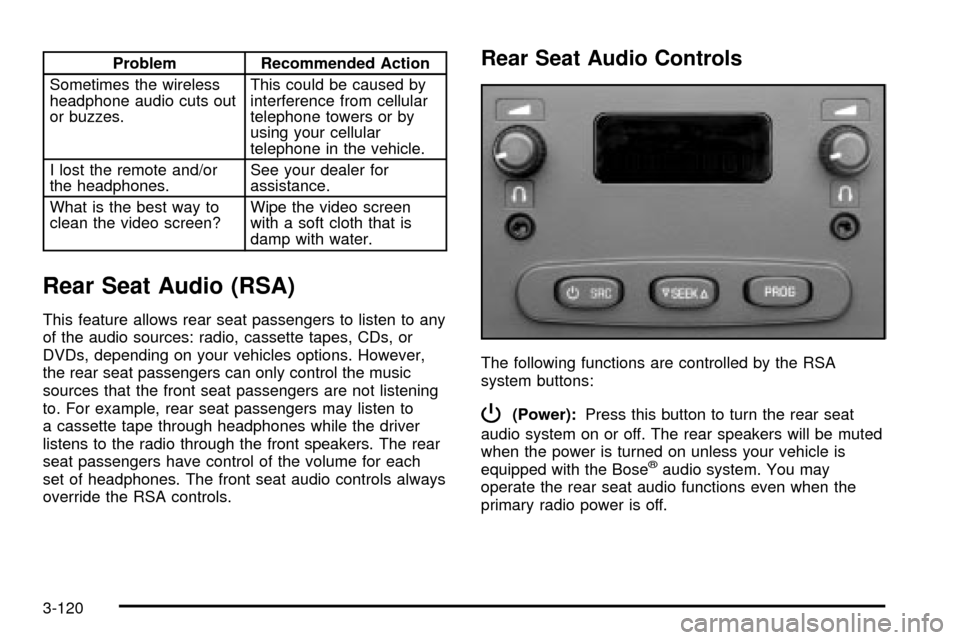
Rear Seat Audio Controls
The following functions are controlled by the RSA
system buttons:
P(Power):Press this button to turn the rear seat
audio system on or off. The rear speakers will be muted
when the power is turned on unless your vehicle is
equipped with the Bose
žaudio system. You may
operate the rear seat audio functions even when the
primary radio power is off.
3-120
Page 283 of 556

Your Driving, the Road, and Your Vehicle..........4-2
Defensive Driving...........................................4-2
Drunken Driving.............................................4-2
Control of a Vehicle........................................4-5
Braking.........................................................4-6
Traction Assist System (TAS).........................4-10
Manual Selectable Ride.................................4-12
Locking Rear Axle........................................4-13
Steering......................................................4-13
QUADRASTEERŸ........................................4-15
Off-Road Recovery.......................................4-19
Passing.......................................................4-19
Loss of Control.............................................4-21
Off-Road Driving with Your Four-Wheel-Drive
Vehicle....................................................4-22
Driving at Night............................................4-38
Driving in Rain and on Wet Roads..................4-39
City Driving..................................................4-42Freeway Driving...........................................4-43
Before Leaving on a Long Trip.......................4-44
Highway Hypnosis........................................4-45
Hill and Mountain Roads................................4-46
Winter Driving..............................................4-48
If You Are Stuck: In Sand, Mud, Ice or Snow . . .4-52
Towing..........................................................4-55
Towing Your Vehicle.....................................4-55
Recreational Vehicle Towing...........................4-55
Loading Your Vehicle....................................4-58
Adding a Snow Plow or Similar Equipment.......4-61
Truck-Camper Loading Information..................4-65
Trailer Recommendations...............................4-67
Pickup Conversion to Chassis Cab..................4-67
Towing a Trailer...........................................4-68
Power Take-Off (PTO)...................................4-95
Section 4 Driving Your Vehicle
4-1
Page 299 of 556
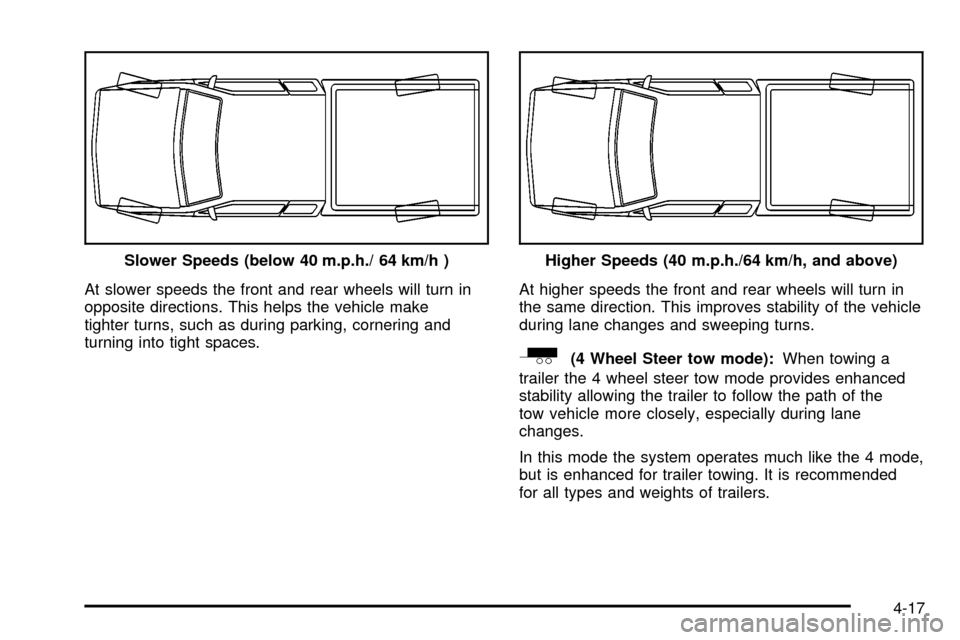
At slower speeds the front and rear wheels will turn in
opposite directions. This helps the vehicle make
tighter turns, such as during parking, cornering and
turning into tight spaces.At higher speeds the front and rear wheels will turn in
the same direction. This improves stability of the vehicle
during lane changes and sweeping turns.
_(4 Wheel Steer tow mode):When towing a
trailer the 4 wheel steer tow mode provides enhanced
stability allowing the trailer to follow the path of the
tow vehicle more closely, especially during lane
changes.
In this mode the system operates much like the 4 mode,
but is enhanced for trailer towing. It is recommended
for all types and weights of trailers. Slower Speeds (below 40 m.p.h./ 64 km/h )
Higher Speeds (40 m.p.h./64 km/h, and above)
4-17