2002 BMW 745LI SEDAN warning
[x] Cancel search: warningPage 181 of 208
Rules and regulations
180
Rules and regulationsCalifornia Proposition 65
Warning California laws require us to state the
following warning:
Engine exhausts, some of its constit-
uents, and certain vehicle compo-
nents contain or emit chemicals known to
the State of California to cause cancer and
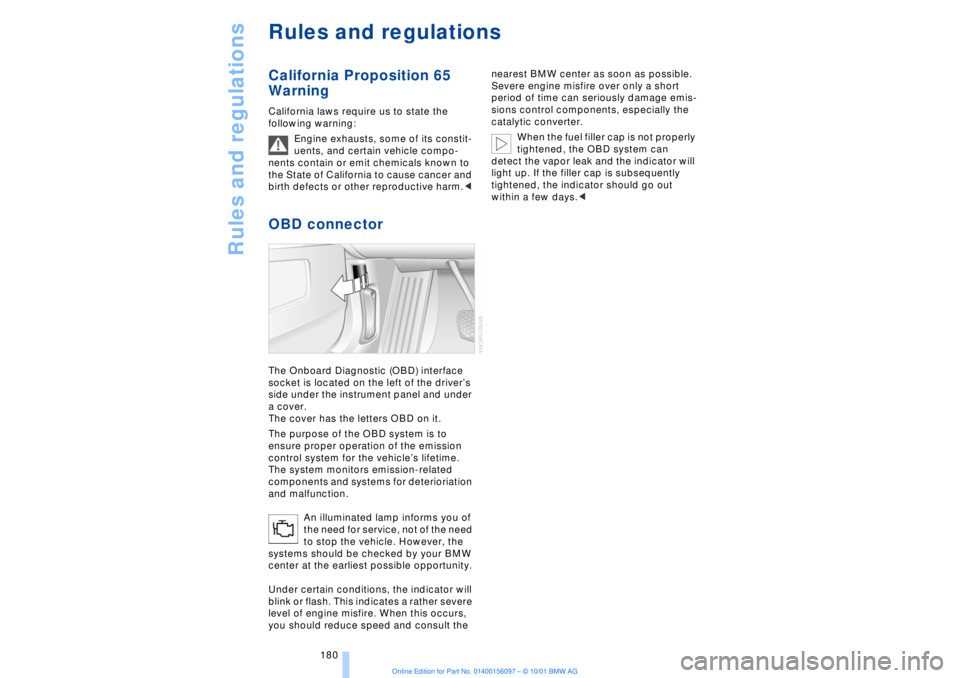
birth defects or other reproductive harm.< OBD connector The Onboard Diagnostic (OBD) interface
socket is located on the left of the driverÕs
side under the instrument panel and under
a cover.
The cover has the letters OBD on it.
The purpose of the OBD system is to
ensure proper operation of the emission
control system for the vehicleÕs lifetime.
The system monitors emission-related
components and systems for deterioriation
and malfunction.
An illuminated lamp informs you of
the need for service, not of the need
to stop the vehicle. However, the
systems should be checked by your BMW
center at the earliest possible opportunity.
Under certain conditions, the indicator will
blink or flash. This indicates a rather severe
level of engine misfire. When this occurs,
you should reduce speed and consult the nearest BMW center as soon as possible.
Severe engine misfire over only a short
period of time can seriously damage emis-
sions control components, especially the
catalytic converter.
When the fuel filler cap is not properly
tightened, the OBD system can
detect the vapor leak and the indicator will
light up. If the filler cap is subsequently
tightened, the indicator should go out
within a few days.<
Page 184 of 208
OverviewControlsDriving tipsCommunicationsNavigationEntertainmentMobilityReference
183
Side marker lamps, front and rear Please contact your BMW center for
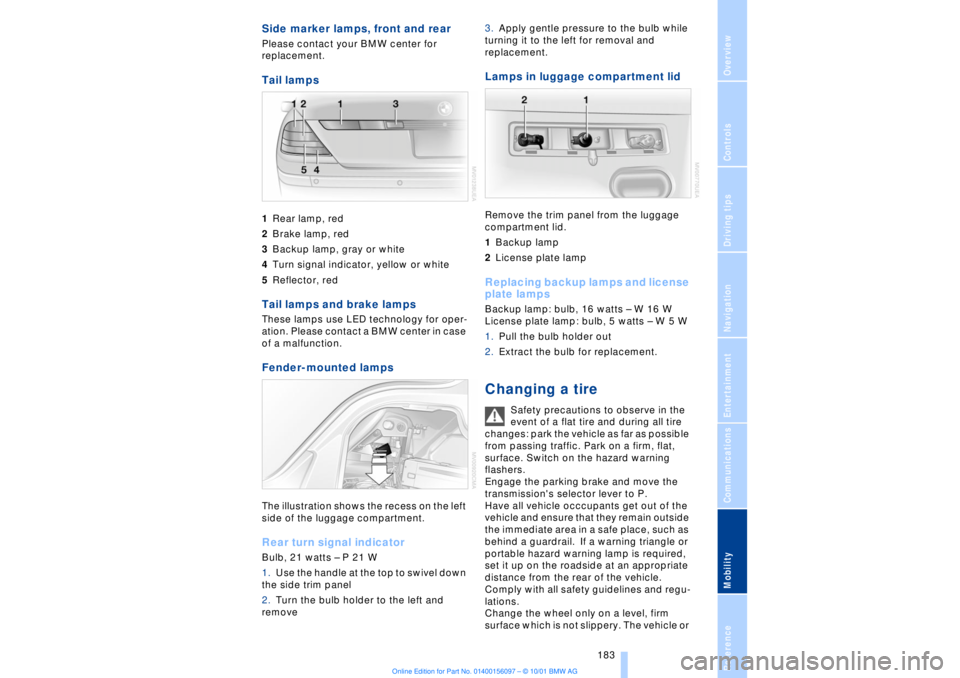
replacement. Tail lamps 1Rear lamp, red
2Brake lamp, red
3Backup lamp, gray or white
4Turn signal indicator, yellow or white
5Reflector, redTail lamps and brake lamps These lamps use LED technology for oper-
ation. Please contact a BMW center in case
of a malfunction. Fender-mounted lamps The illustration shows the recess on the left
side of the luggage compartment.Rear turn signal indicatorBulb, 21 watts Ð P 21 W
1.Use the handle at the top to swivel down
the side trim panel
2.Turn the bulb holder to the left and
remove 3.Apply gentle pressure to the bulb while
turning it to the left for removal and
replacement.
Lamps in luggage compartment lid Remove the trim panel from the luggage
compartment lid.
1Backup lamp
2License plate lamp Replacing backup lamps and license
plate lamps Backup lamp: bulb, 16 watts Ð W 16 W
License plate lamp: bulb, 5 watts Ð W 5 W
1.Pull the bulb holder out
2.Extract the bulb for replacement. Changing a tire
Safety precautions to observe in the
event of a flat tire and during all tire
changes: park the vehicle as far as possible
from passing traffic. Park on a firm, flat,
surface. Switch on the hazard warning
flashers.
Engage the parking brake and move the
transmission's selector lever to P.
Have all vehicle occcupants get out of the
vehicle and ensure that they remain outside
the immediate area in a safe place, such as
behind a guardrail. If a warning triangle or
portable hazard warning lamp is required,
set it up on the roadside at an appropriate
distance from the rear of the vehicle.
Comply with all safety guidelines and regu-
lations.
Change the wheel only on a level, firm
surface which is not slippery. The vehicle or
Page 188 of 208
At a glanceControlsDriving tipsCommunicationsNavigationEntertainmentMobilityReference
187
Help Ð Giving and receiving Warning triangle*
The warning triangle is conveniently stored
in the onboard tool kit mounted on the
inside of the luggage compartment lid.
Comply with legal requirements
requiring you to carry a hazard
warning triangle in the vehicle.< First-aid kit*
You will also find the first-aid kit in the
onboard tool kit's container.
Some of the articles contained in the
first-aid kit have a limited service life.
For this reason, check the expiration dates
of each of the items regularly, and replace
any whose expiration dates have passed.
You can find replacements in any phar-
macy.
Always comply with laws requiring a first-
aid kit to be carried in the vehicle.< Jump-starting Never use spray fluids to start the engine.
When your battery is discharged you can
use two jumper cables to start your vehicle
with power from the battery in a second
vehicle. You can also use the same method
to help start another vehicle. Use only
jumper cables with fully-insulated clamp
handles. To avoid the risk of potentially fatal
injury, always avoid all contact with
electrical components while the engine is
running. Carefully adhere to the following
sequence, both to prevent damage to one
or both vehicles, and to guard against
possible personal injury.<
1.The battery in the support vehicle must
also be rated at 12 volts. This information
can be found on the sticker affixed to the
battery
2.Switch off the support vehicle's engine
and switch off all electrical equipment and
accessories in both vehicles (except the
hazard warning flashers on the support
vehicle)
3.Ensure that no contact exists between
the bodywork on the two vehicles as there
is a danger of short circuits
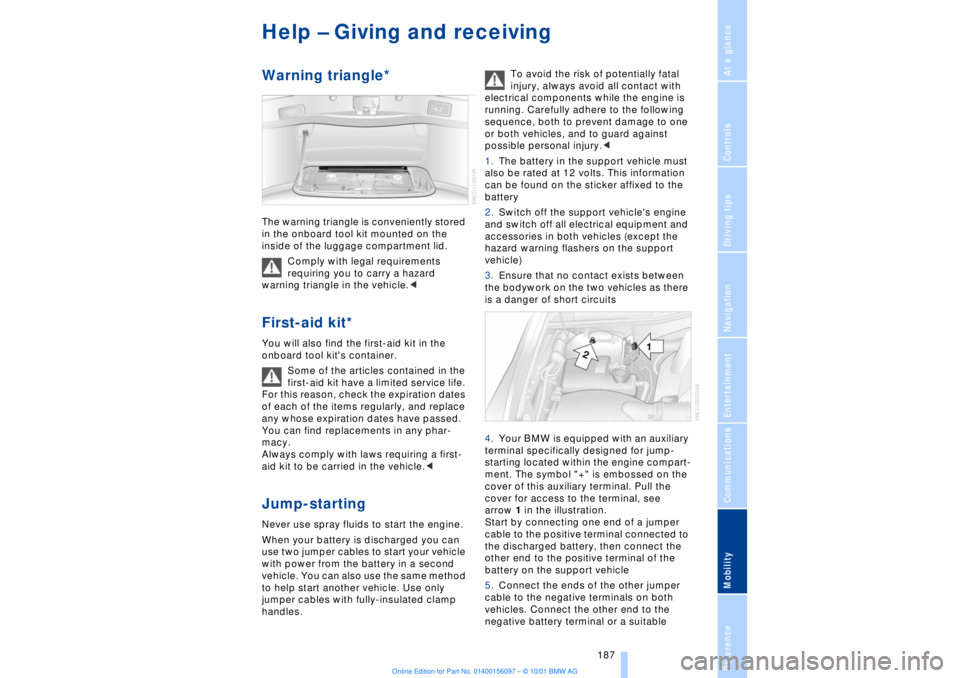
4.Your BMW is equipped with an auxiliary
terminal specifically designed for jump-
starting located within the engine compart-
ment. The symbol "+" is embossed on the
cover of this auxiliary terminal. Pull the
cover for access to the terminal, see
arrow 1 in the illustration.
Start by connecting one end of a jumper
cable to the positive terminal connected to
the discharged battery, then connect the
other end to the positive terminal of the
battery on the support vehicle
5.Connect the ends of the other jumper
cable to the negative terminals on both
vehicles. Connect the other end to the
negative battery terminal or a suitable
Page 190 of 208
At a glanceControlsDriving tipsCommunicationsNavigationEntertainmentMobilityReference
189
>Clearance and maneuvering capability
will be strictly limited in corners
>When mounted at an angle, the towbar
will exert lateral forces, tending to push the
vehicle sideways.
Never use a vehicle to tow another
vehicle that is heavier than itself, as
this could lead to a loss of control.< Towing
Do not tow the vehicle by the rear
axle; because the steering detent is
not operational, the wheels could turn to an
extreme angle during towing.<
1.Switch on the ignition to allow operation
of the brake lamps, turn signal indicators,
horn, parking brake and windshield wipers
2.Turn on the hazard warning flashers
where allowed by law
3.Manual release of the transmission
lockout, refer to page 70
4.Maximum towing speed:
maximum 43 mph (70 km/h)
5.Maximum towing distance:
maximum 93 miles (150 km).
If the electrical system in the towed vehicle
has failed, use an alternate means to iden-
tify the vehicle as being towed such as a
sign or warning triangle placed in the rear
window.
The steering and brakes are without
power assistance when the engine is
off. This means that higher levels of effort
will be required to operate the steering and
brakes.<
Tow-starting It is not possible to start the engine by tow-
starting the vehicle.
Jump starting, refer to page 187.
Have the source of the starting difficulties
diagnosed and repaired at your BMW
center.
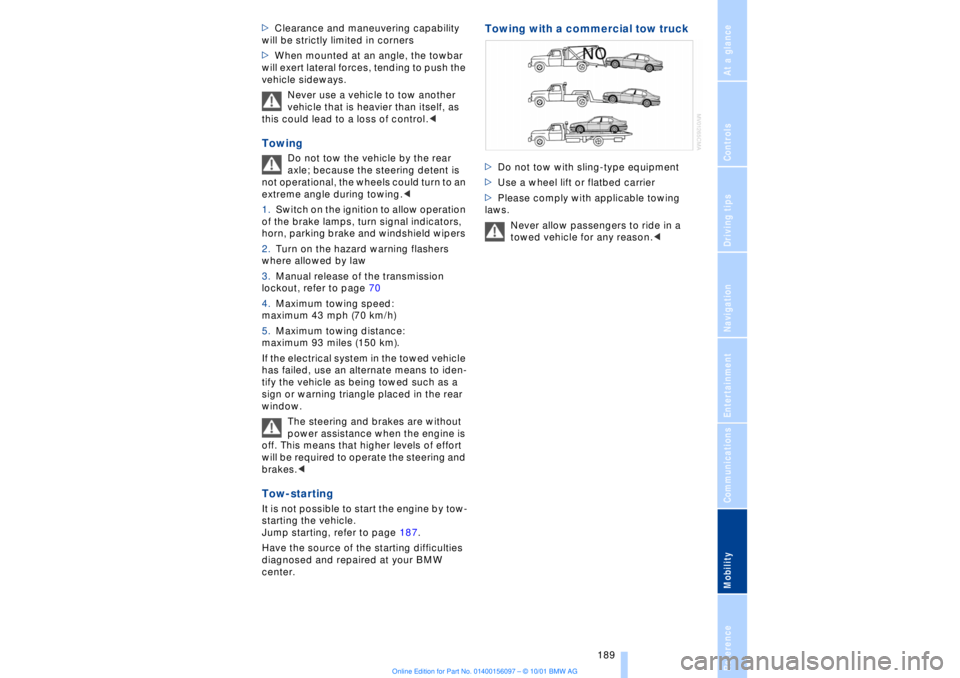
Towing with a commercial tow truck >Do not tow with sling-type equipment
>Use a wheel lift or flatbed carrier
>Please comply with applicable towing
laws.
Never allow passengers to ride in a
towed vehicle for any reason.<
Page 197 of 208

Everything from A to Z
196 Backup lamp, bulb
replacement 183
Bass 141
Battery 185
Ð discharged 187
Battery switch 185, 186
"BC," refer to Computer 83
Belts 50
Beverage holders 112
Blinds 109
Blower 101
BMW active seat 52
"BMW ASSIST" 19, 22
BMW comfort seat 46
"Booktape" 153
Brake, malfunctions 178
Brake lamp, adaptive 94
Brake lamps, bulb
replacement 183
"Brake pads" 179
Brake pads 119
Brakes 119
Brake system
Ð brake fluid 178
Break-in procedures 118
Brief commands for voice
command system 29
"Brief info" 23
Bulb changes 181
Buttons in steering
wheel 18
CCalifornia Proposition
65 Warning 180
Call
Ð terminating 162
Calling 162
Ð from telephone
directory 163
Ð from the redial list 164
Ð from the Top 8 list 163
Ð redialing 164
Can holders, refer to Bever-
age holders 112
Capacities 194
Car care, refer to Car care
manual
Cargo, securing 120Cargo area
Ð capacity 194
Ð opening from the
inside 39
Car Memory 59
"Car parked" 103, 106
Car radio, see Radio 140
Car wash, refer to separate
Car care manual
Cassette 153
Cassette deck 153
Ð booktape 153
Ð fast-forward mode 154
Ð music search 154
Ð reverse 154
Ð selecting tape side 153
Ð skipping pauses 154
Ð switching on 153
CBC (Cornering Brake
Control) 91
CBS (Condition Based
Service) 179
"CD" 140, 146
CD changer 148
Ð fast forward 150
Ð humidity 148
Ð operating
temperatures 148
Ð random play 150
Ð reverse 150
Ð safety 148
Ð scan function 149
Ð skipping tracks 150
Ð switching on 149
Ð temperature range 148
CD player 146
Ð activation 146
Ð fast forward 146
Ð random selection 147
Ð reverse 146
Ð sampling 147
Ð scan 147
Ð skip track 146
Cell phone, refer to sepa-
rate Mobile phone
manual 158
Center (high-mount) brake
lamp 183
Center armrest 113
Center console, refer to
Comfort features 16Central locking
system 35, 38
"CHANGE" for
navigation 130
Changing bulbs 181
Changing bulbs, refer to
Lamps and bulbs 181
Changing language 86
Changing settings in Con-
trol Display 86
Changing units of measure
in Control Display 86
Check Control 80
Ð "Check" 81
Checking engine oil
level 176, 176
Checking tire
pressures 170
Child-restraint systems 57
Ð refer also to LATCH child-
restraint system 58
Child-safety locks 59
Child seats 57
Cigarette lighter 113
Cleaning, refer to Car care
manual
"Climate" 19, 22
"Clock" 86
Clock 77
Ð setting time and date 86
Closing
Ð from the inside 37
Closing assist
Ð doors 38
Ð luggage compartment
lid 39
Cockpit 12, 16
Coin box, see
Compartments 111
Cold start 62
Combination switch 71
"Comfort"
Ð "EDC" 92
Comfort features 16
Comfort seat 46
Ð in rear 47
"Communication" 19, 22
Compact Disc, see CD 146
Compartments 111
Page 198 of 208
197
At a glanceControlsDriving tipsCommunicationsNavigationEntertainmentMobilityReference
Computer 81
Ð automatic climate
control 103
Ð "BC" 84
Ð changing settings 86
Ð changing time and
date 86
Ð Control Display screen
contents 83
Ð displays, menus 22
Ð language selection 86
Ð status lines 24
Ð symbols 20
Computer, refer to Control
Center 19
Condition Based Service
(CBS) 179
Connecting car vacuum
cleaner 113
Consumption display 82
Control Center 19
Ð assistance window 23
Ð automatic climate
control 103
Ð changing menu page 20
Ð changing settings 86
Ð confirm selection or
entry 20
Ð display help texts 23
Ð displays, menus 22
Ð language selection 86
Ð lists 20
Ð menu entry selection 19
Ð selecting units of measure
and display format 86
Ð setting time and date 86
Ð status lines 24
Ð symbols 20
Ð symbols and lists 20
Control Display 19
Controller, refer to Control
Center 19
Convenience operation of
windows and sliding/tilt
sunroof 36, 37
Convenience starting
feature 62
"Coolant" 179
Coolant 176, 177
Cooler, refer to Rear
cooler 110Cooling adjustment
Ð rear air conditioner 105
Copyright 2
Cornering Brake Control
(CBC) 91
Courtesy lamps 98
Cruise control 73
Cruise control, see Pro-
grammable cruise
control 73
Cruising range 82
Cup holder, refer to Bever-
age holder 112
Curb lamp
Ð bulb replacement 182
Curb weight 194
Current fuel
consumption 83
D"Date" 86
Daytime driving lamp
mode 96
DBC (Dynamic Brake
Control) 91
Deactivating
Ð tilt alarm sensor 36, 41
Defrosting, windows 101
Defrost setting 101
"DELETE" for
navigation 130
Destination entry 126
Destination for navigation
system
Ð selecting in
"Information" 129
Destination memory 129
"Destinations" 126
"Dest. input" 126
Dialed numbers 164
Dimensions 193
Dimming mirrors 52
Dipstick, engine oil 176
Direction
Ð arrow 132
Ð to destination 131
Ð voice instructions 133
Directional indicators, see
Turn signal indicators 71Directory creation
Ð with navigation
system 134
"Dir. of travel" with naviga-
tion system 132
"Dir. to north" with naviga-
tion system 132
Disc brakes 119
Displacement 192
Display, refer to Control
Display 19
Display format and units of
measure in Control
Display, changing 86
Display illumination, refer to
Instrument lighting 97
Displays 14
Ð computer 22
Ð Control Center 22
Distance 83
Distance to destination 83
Distance warning 88
Door keys 34
Doors
Ð locking and unlocking 35
Ð manual operation 37
Ð remote control 35
DOT Quality Grades 172
Draft-free ventilation 102
Drink holders, refer to
Beverage holders 112
Driving stability control 89
Driving tips 118
"DSC" 90
DSC (Dynamic Stability
Control) 89
"DTC" 90
DTC (Dynamic Traction
Control) 15, 90
Dynamic Brake Control
(DBC) 91
Dynamic Drive 91
Dynamic Stability Control
(DSC) 89
Dynamic Traction Control
(DTC) 15, 90
EEBV (Electronic Brake-
force Distribution) 91
Page 200 of 208
199
At a glanceControlsDriving tipsCommunicationsNavigationEntertainmentMobilityReference
HHandbrake, refer to Parking
brake 62
Hand lamp 111
Hands-free
microphone 161
Hands-free system 161
Hazard warning flashers 16
Headlamp control 96
Headlamp flasher 71
Headlamps, low beam 96
Headlamp washers 72, 73
Head restraints 48
Ð front head restraints,
active 48
Heated steering wheel 53
Heating and ventilation 99
Heating while stopped 101
Height 193
Height adjustment
Ð seats 46
Ð steering column 53
"Help" 19, 22
Help texts in Control
Display 23
High beams 97
Ð bulb replacement 182
High-mount brake
lamp 183
Home address 135
Hood release 175
Horn 13
Hydraulic Brake Assistant,
refer to DBC 91IIce warning 77
Ignition key 34
Ignition lock 61
"Indep. ventil." 106
Indicator lamps 15
"Individual" 104
Individual button assign-
ments on steering
wheel 53
Inflation pressure 170
Inflation pressure control,
tires 92
Info Display 14"Information" for
navigation 129
Instrument cluster, refer to
Info Display 14
Instrument lighting 97
Instrument panel 12, 16
Instrument panel switch 71
Interior lamps 97
Ð remote control 36
Interior motion sensor 41
Interior protection
Ð deactivating 36, 41
Interior rearview mirror 52
Ð automatic dimming 52
Intermittent wipe 71
JJack 184
Jump-starting 187KKey Memory 59
Key Pad control
buttons 160
Key Pad digit buttons 160
Key Pad with mobile
phone 160
Keys 34
Ð adapter for spare key 34
Kickdown 68L"Last" 164
"Last destin." 130
LATCH, refer to LATCH
child-restraint system 58
"Left"
Ð for heated seats 51
Ð with automatic climate
control 103
Length 193
Level control system 94
License plate lamp, bulb
replacement 183
Lighter 113
Lights on warning 96
Light switch 96
"Limit" 84Limit selection,
adjustment 84
Litter container 111
L mode on automatic
transmission 66
Loading 120
Loading the vehicle 120
"LOCATION" 135
"Location" 129, 135
Lock Code 162
Locking
Ð from the outside 35
Louvers 99
Low beams
Ð automatic 96
Lower back support, refer
to lumbar support 46
Lug bolts 185
Luggage compartment
capacity 194
Luggage compartment lid
Ð emergency release 40
Ð locking separately 39
Ð opening from the
inside 39
Ð opening from the
outside 38
Ð operating via remote
control 36
Luggage compartment lid
operation,
automatic 36, 39
Luggage compartment
net 40
Luggage rack, refer to
Roof-mounted luggage
rack 120
Lug wrench 184
Lumbar support 46
MM+S tires 173
Maintenance 179
Make-up mirror 53
Malfunction displays 80
"M AM" 144, 145
Manually controlled recir-
culated air 101
Page 202 of 208
201
At a glanceControlsDriving tipsCommunicationsNavigationEntertainmentMobilityReference
Parking brake 62
Ð Automatic Hold 63
Ð manual operation 65
Parking brake lockout, refer
to Transmission
lockout 67, 70
Parking lamps 96
Ð bulb replacement 182
Parking with
Automatic Hold 64
Passenger-side mirror tilt
function 54
PDC (Park Distance
Control) 88
"PDC pic." 88
Phone directory 162
Ð deleting all entries 163
Ð dialing numbers using
voice command
system 163
Ð entering numbers in voice
command directory 163
Ð entry deletion 163
Ð viewing entries 163
Phone number, see Mobile
phone 162
Please fasten safety belts
warning lamp 50
Pollen 104
Power electric seat 47
Power rating 192
Power socket 113
Pressure, tires 170
Pressure control, tires 92
Programmable cruise
control 73
Programming settings,
refer to Car Memory, Key
Memory 59
Publishers 2
RRadio
Ð autostore 144
Ð memory locations 144
Ð search 144
Ð station search 144
Ð station selection 145
Ð switching on and off 140
Ð waveband selection 143
Ð Weather Band 145
Radio "Autostore"
feature 144
Radio mode 61
Radio "SCAN"
feature 143, 144
Rain sensor 72
"RDC" 93
RDC (Tire Pressure
Monitor) 92
Reading lamps 98
Rear air conditioner 105
Ð activation and deactiva-
tion in Control
Display 105
Ð air supply 105
Ð cooling adjustment 105
Ð deactivating 105
Rear armrest, see Center
armrest 113
Rear cooler 110
Rear seat heaters 51
Rear seats
Ð adjusting passenger seat
from the rear 47
Ð comfort seat
adjustments 47
Ð head restraint
adjustment 48
Rearview mirror 52
Rear window blind, see Sun
blind 109
Rear window defroster 16
Rear window safety
switch 13
"Recirc. air" 53
Reclining seat 45
Redialing with mobile
phone 164
Redial list 164Refrigerator box, refer to
Rear cooler 110
Refueling 168
Releasing the hood 175
Remaining distance 83
Remote control 34, 35
Remote-control unit 34
Removing condensation
from windows 101
Replacement fuses 186
Replacement keys 35
Replacing tires 172
Reserve warning 82
Reservoir, washer
system 73
Reset 141
Residual heat 101
"Right"
Ð for heated seats 51
Ð with automatic climate
control 103
"RND" with CD
changer 150
"RND" with CD player 147
"RND" with MD player 152
Roadside assistance calls
Ð manual activation 161
Roof-mounted luggage
rack 120
Route
Ð display 132
Ð list 132
Ð map cancelation 132
Ð map display 132
Ð selection 130
"Route guide" 131, 134
"Route select" 131
SSafety belts 50
Safety belt tensioners, see
Safety belts 50
Safety lock buttons 38
Safety precautions to
observe when using your
phone 158
Safety switch for rear
windows 42