2001 DODGE RAM ECU
[x] Cancel search: ECUPage 2529 of 2889
REMOVAL
(1) Raise and support vehicle.
(2) Remove skid plate, if equipped. (Refer to 13 -
FRAMES & BUMPERS/FRAME/TRANSFER CASE
SKID PLATE - REMOVAL)
(3) Position drain oil container under transfer
case.
(4) Remove transfer case drain plug and drain
lubricant into container.
(5) Disconnect vent hose and vacuum harness at
transfer case switch.
(6) Disconnect shift rod from grommet in transfer
case shift lever, or from floor shift arm whichever
provides easy access. Use channel lock style pliers to
press rod out of lever grommet.
(7) Support transmission with jack stand.
(8) Remove rear crossmember.
(9) Mark front and rear propeller shafts for assem-
bly reference.
(10) Remove front and rear propeller shafts. (Refer
to 3 - DIFFERENTIAL & DRIVELINE/PROPELLER
SHAFT/PROPELLER SHAFT - REMOVAL)
(11) Support transfer case with suitable jack.
Secure transfer case to jack with safety chains.
(12) Remove nuts attaching transfer case to trans-
mission.
(13) Move transfer case assembly rearward until
free of transmission output shaft.
(14) Lower jack and move transfer case from
under vehicle.
DISASSEMBLY
Position transfer case in a shallow drain pan.
Remove drain plug and drain any remaining lubri-
cant remaining in case.
EXTENSION HOUSING
(1) Remove extension housing snap-ring access
cover.
(2) Remove bolts holding extension housing to rear
case half.
(3) Tap extension housing with plastic or rawhide
hammer to loosen sealant.
(4) Disengage extension housing snap-ring from
rear output shaft bearing.
(5) Separate extension housing from transfer case.
COMPANION FLANGE AND SHIFT LEVER
(1) Shift transfer case into NEUTRAL.
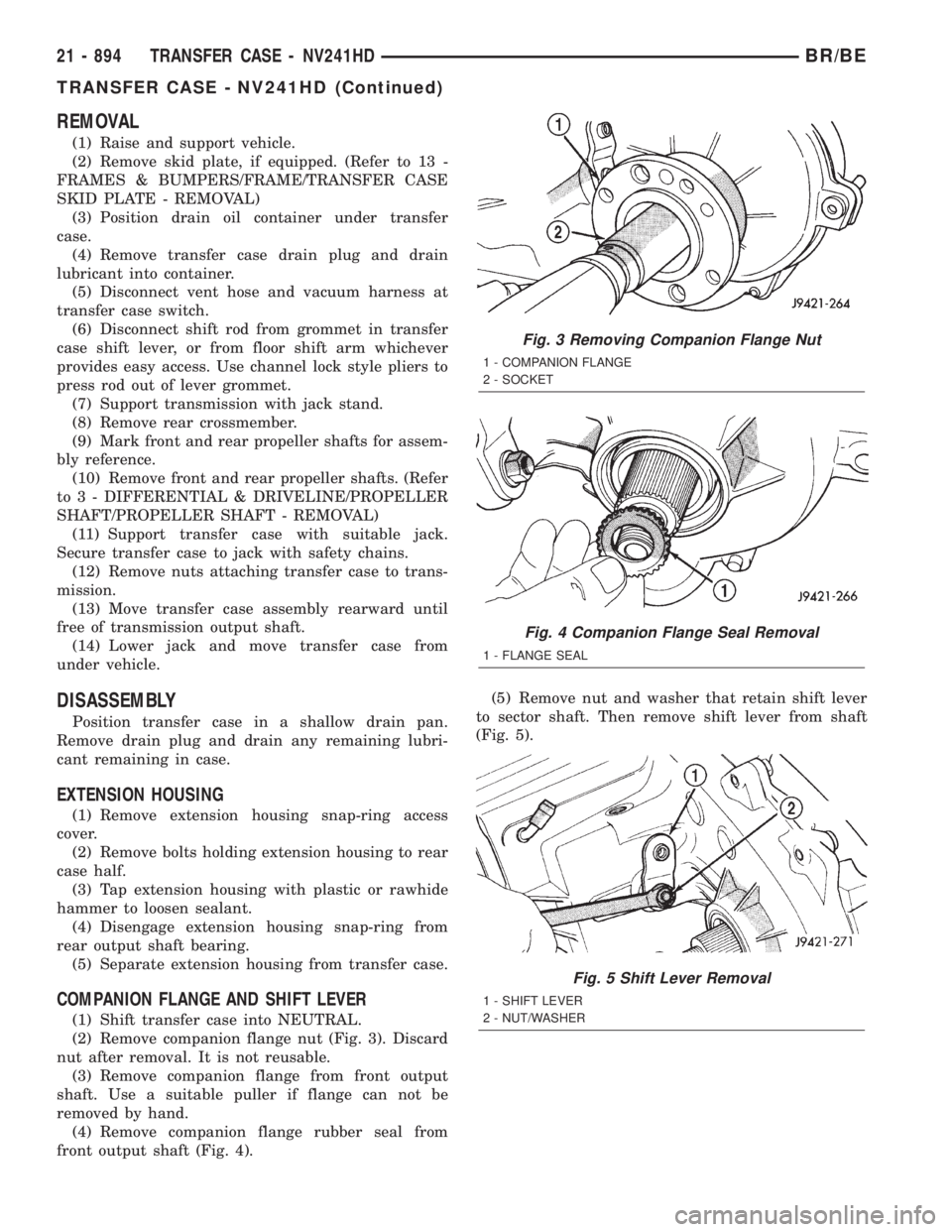
(2) Remove companion flange nut (Fig. 3). Discard
nut after removal. It is not reusable.
(3) Remove companion flange from front output
shaft. Use a suitable puller if flange can not be
removed by hand.
(4) Remove companion flange rubber seal from
front output shaft (Fig. 4).(5) Remove nut and washer that retain shift lever
to sector shaft. Then remove shift lever from shaft
(Fig. 5).
Fig. 3 Removing Companion Flange Nut
1 - COMPANION FLANGE
2 - SOCKET
Fig. 4 Companion Flange Seal Removal
1 - FLANGE SEAL
Fig. 5 Shift Lever Removal
1 - SHIFT LEVER
2 - NUT/WASHER
21 - 894 TRANSFER CASE - NV241HDBR/BE
TRANSFER CASE - NV241HD (Continued)
Page 2534 of 2889
MAINSHAFT
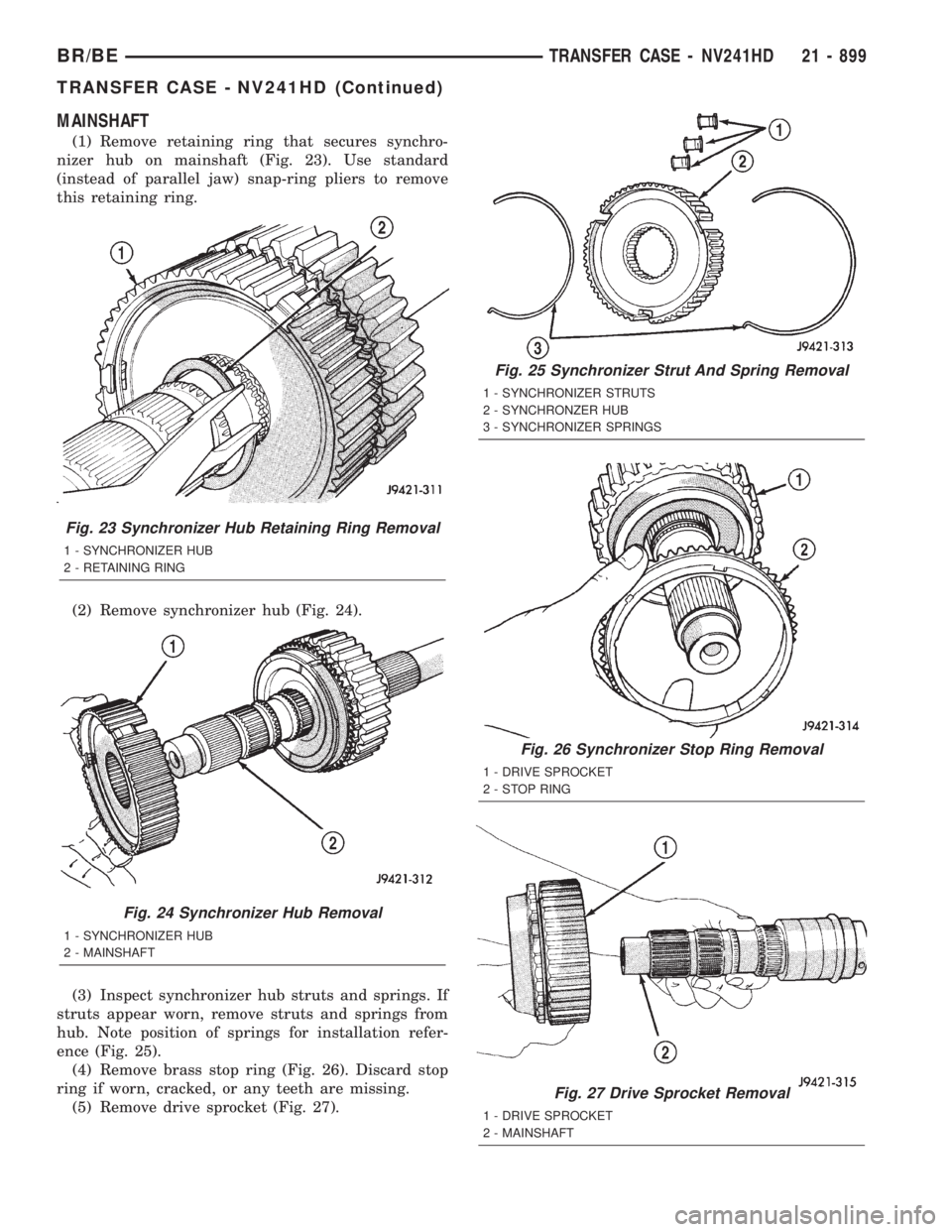
(1) Remove retaining ring that secures synchro-
nizer hub on mainshaft (Fig. 23). Use standard
(instead of parallel jaw) snap-ring pliers to remove
this retaining ring.
(2) Remove synchronizer hub (Fig. 24).
(3) Inspect synchronizer hub struts and springs. If
struts appear worn, remove struts and springs from
hub. Note position of springs for installation refer-
ence (Fig. 25).
(4) Remove brass stop ring (Fig. 26). Discard stop
ring if worn, cracked, or any teeth are missing.
(5) Remove drive sprocket (Fig. 27).
Fig. 23 Synchronizer Hub Retaining Ring Removal
1 - SYNCHRONIZER HUB
2 - RETAINING RING
Fig. 24 Synchronizer Hub Removal
1 - SYNCHRONIZER HUB
2 - MAINSHAFT
Fig. 25 Synchronizer Strut And Spring Removal
1 - SYNCHRONIZER STRUTS
2 - SYNCHRONZER HUB
3 - SYNCHRONIZER SPRINGS
Fig. 26 Synchronizer Stop Ring Removal
1 - DRIVE SPROCKET
2 - STOP RING
Fig. 27 Drive Sprocket Removal
1 - DRIVE SPROCKET
2 - MAINSHAFT
BR/BETRANSFER CASE - NV241HD 21 - 899
TRANSFER CASE - NV241HD (Continued)
Page 2535 of 2889
INPUT AND PLANETARY GEAR
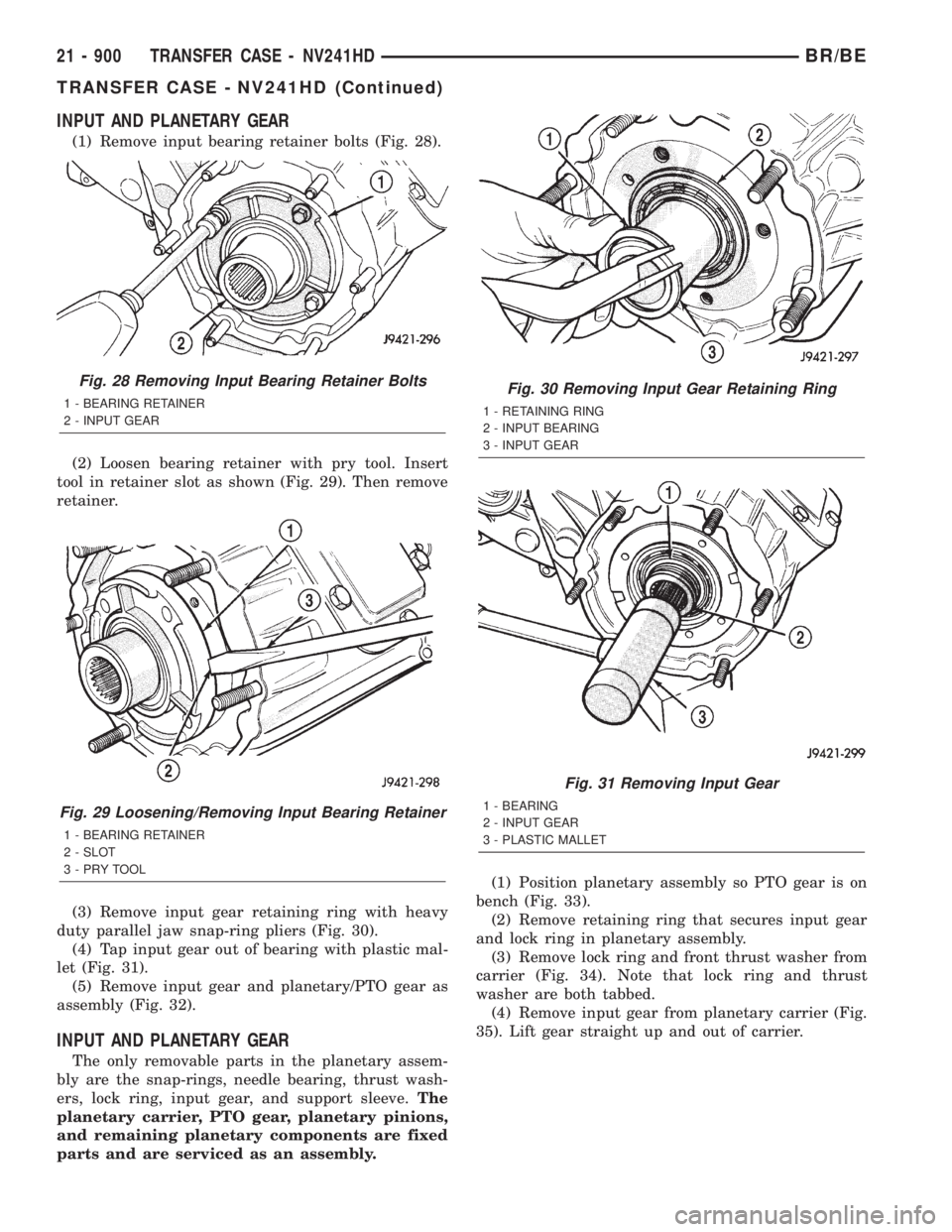
(1) Remove input bearing retainer bolts (Fig. 28).
(2) Loosen bearing retainer with pry tool. Insert
tool in retainer slot as shown (Fig. 29). Then remove
retainer.
(3) Remove input gear retaining ring with heavy
duty parallel jaw snap-ring pliers (Fig. 30).
(4) Tap input gear out of bearing with plastic mal-
let (Fig. 31).
(5) Remove input gear and planetary/PTO gear as
assembly (Fig. 32).
INPUT AND PLANETARY GEAR
The only removable parts in the planetary assem-
bly are the snap-rings, needle bearing, thrust wash-
ers, lock ring, input gear, and support sleeve.The
planetary carrier, PTO gear, planetary pinions,
and remaining planetary components are fixed
parts and are serviced as an assembly.(1) Position planetary assembly so PTO gear is on
bench (Fig. 33).
(2) Remove retaining ring that secures input gear
and lock ring in planetary assembly.
(3) Remove lock ring and front thrust washer from
carrier (Fig. 34). Note that lock ring and thrust
washer are both tabbed.
(4) Remove input gear from planetary carrier (Fig.
35). Lift gear straight up and out of carrier.
Fig. 28 Removing Input Bearing Retainer Bolts
1 - BEARING RETAINER
2 - INPUT GEAR
Fig. 29 Loosening/Removing Input Bearing Retainer
1 - BEARING RETAINER
2 - SLOT
3-PRYTOOL
Fig. 30 Removing Input Gear Retaining Ring
1 - RETAINING RING
2 - INPUT BEARING
3 - INPUT GEAR
Fig. 31 Removing Input Gear
1 - BEARING
2 - INPUT GEAR
3 - PLASTIC MALLET
21 - 900 TRANSFER CASE - NV241HDBR/BE
TRANSFER CASE - NV241HD (Continued)
Page 2538 of 2889
Check a replacement synchronizer ring for proper fit
on the cone with a minimum of wobble. Also check
the synchronizer struts for wear or damage.
Inspect all gear teeth and splines for wear or dam-
age. Also check splines for burrs, or nicks. Remove
minor nicks and scratches with an oil stone. Replace
any part with damaged splines.
It is recommended that all retaining rings be replaced
during overhaul. Most of the retaining rings can be dis-
torted during removal and should not be reused.
Inspect the two case halves, for cracks, porosity,
damaged mating surfaces, stripped bolt threads, or
distortion. Replace either case half if necessary. How-
ever, stripped threads can be repaired with Heli-
CoilŸ stainless steel thread inserts. The case vent
tube can be resecured with LoctiteŸ 680 if necessary.
Inspect the annulus gear. Be sure the gear teeth
are in good condition. Replace the front case and
annulus as an assembly if the gear is damaged.
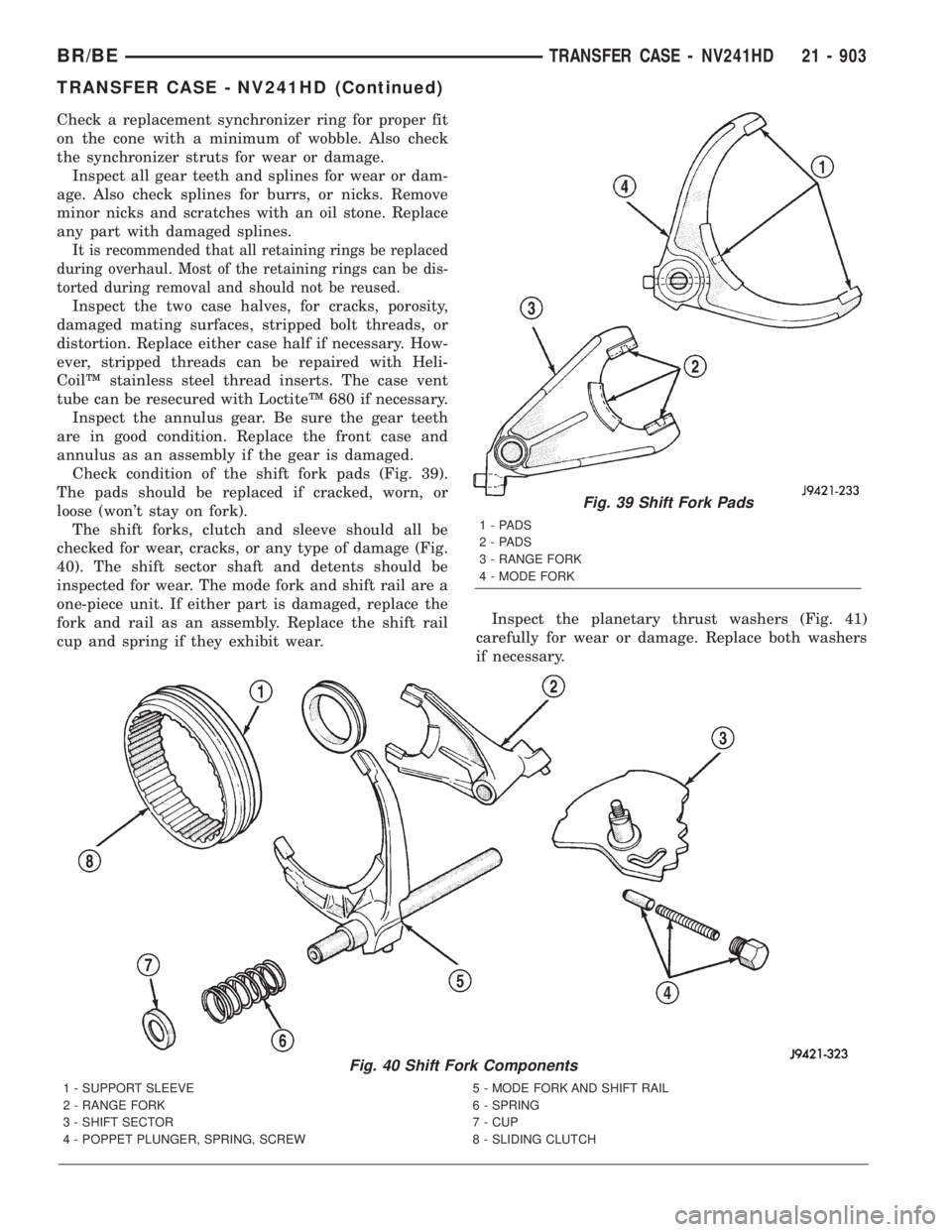
Check condition of the shift fork pads (Fig. 39).
The pads should be replaced if cracked, worn, or
loose (won't stay on fork).
The shift forks, clutch and sleeve should all be
checked for wear, cracks, or any type of damage (Fig.
40). The shift sector shaft and detents should be
inspected for wear. The mode fork and shift rail are a
one-piece unit. If either part is damaged, replace the
fork and rail as an assembly. Replace the shift rail
cup and spring if they exhibit wear.Inspect the planetary thrust washers (Fig. 41)
carefully for wear or damage. Replace both washers
if necessary.
Fig. 39 Shift Fork Pads
1-PADS
2-PADS
3 - RANGE FORK
4 - MODE FORK
Fig. 40 Shift Fork Components
1 - SUPPORT SLEEVE 5 - MODE FORK AND SHIFT RAIL
2 - RANGE FORK 6 - SPRING
3 - SHIFT SECTOR 7 - CUP
4 - POPPET PLUNGER, SPRING, SCREW 8 - SLIDING CLUTCH
BR/BETRANSFER CASE - NV241HD 21 - 903
TRANSFER CASE - NV241HD (Continued)
Page 2546 of 2889
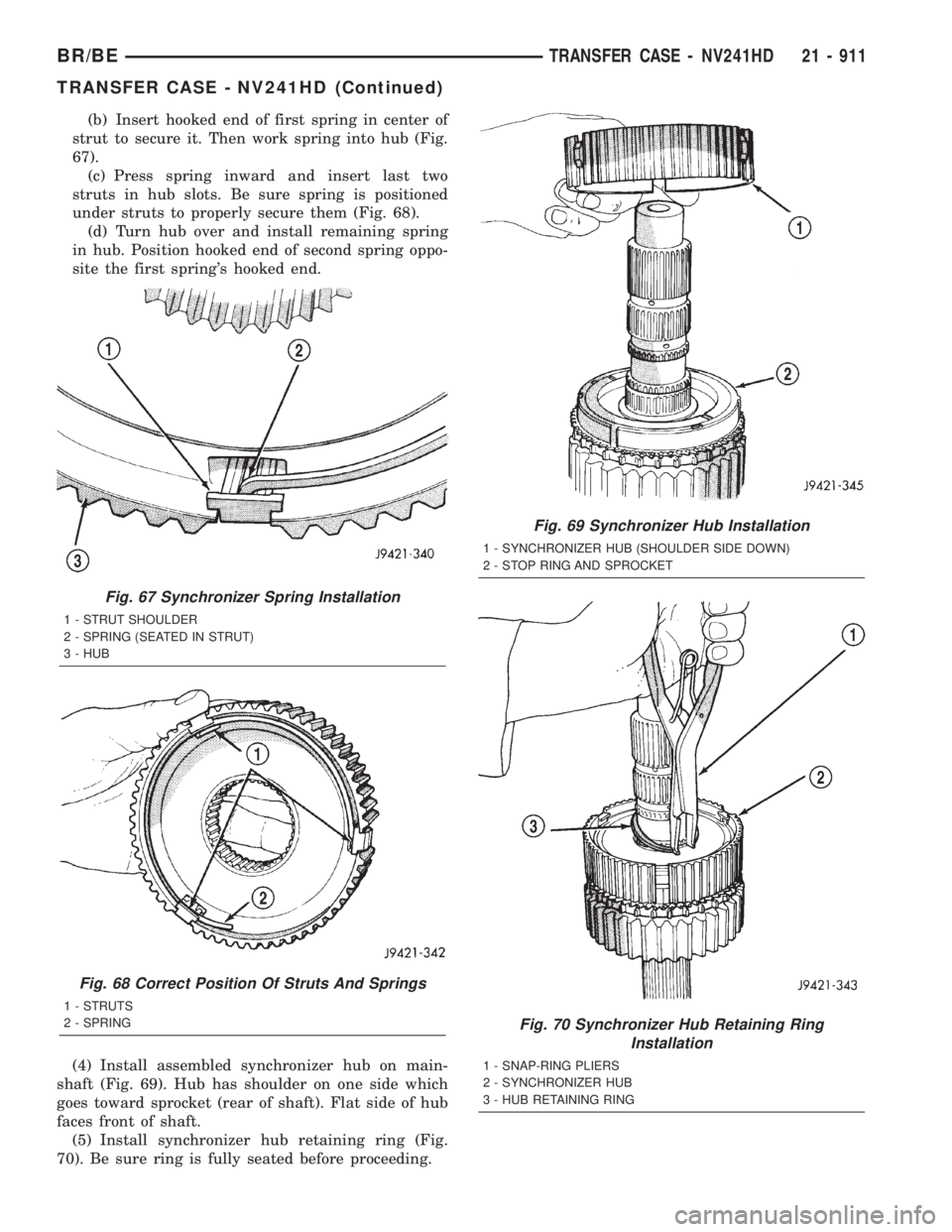
(b) Insert hooked end of first spring in center of
strut to secure it. Then work spring into hub (Fig.
67).
(c) Press spring inward and insert last two
struts in hub slots. Be sure spring is positioned
under struts to properly secure them (Fig. 68).
(d) Turn hub over and install remaining spring
in hub. Position hooked end of second spring oppo-
site the first spring's hooked end.
(4) Install assembled synchronizer hub on main-
shaft (Fig. 69). Hub has shoulder on one side which
goes toward sprocket (rear of shaft). Flat side of hub
faces front of shaft.
(5) Install synchronizer hub retaining ring (Fig.
70). Be sure ring is fully seated before proceeding.
Fig. 67 Synchronizer Spring Installation
1 - STRUT SHOULDER
2 - SPRING (SEATED IN STRUT)
3 - HUB
Fig. 68 Correct Position Of Struts And Springs
1 - STRUTS
2 - SPRING
Fig. 69 Synchronizer Hub Installation
1 - SYNCHRONIZER HUB (SHOULDER SIDE DOWN)
2 - STOP RING AND SPROCKET
Fig. 70 Synchronizer Hub Retaining Ring
Installation
1 - SNAP-RING PLIERS
2 - SYNCHRONIZER HUB
3 - HUB RETAINING RING
BR/BETRANSFER CASE - NV241HD 21 - 911
TRANSFER CASE - NV241HD (Continued)
Page 2549 of 2889
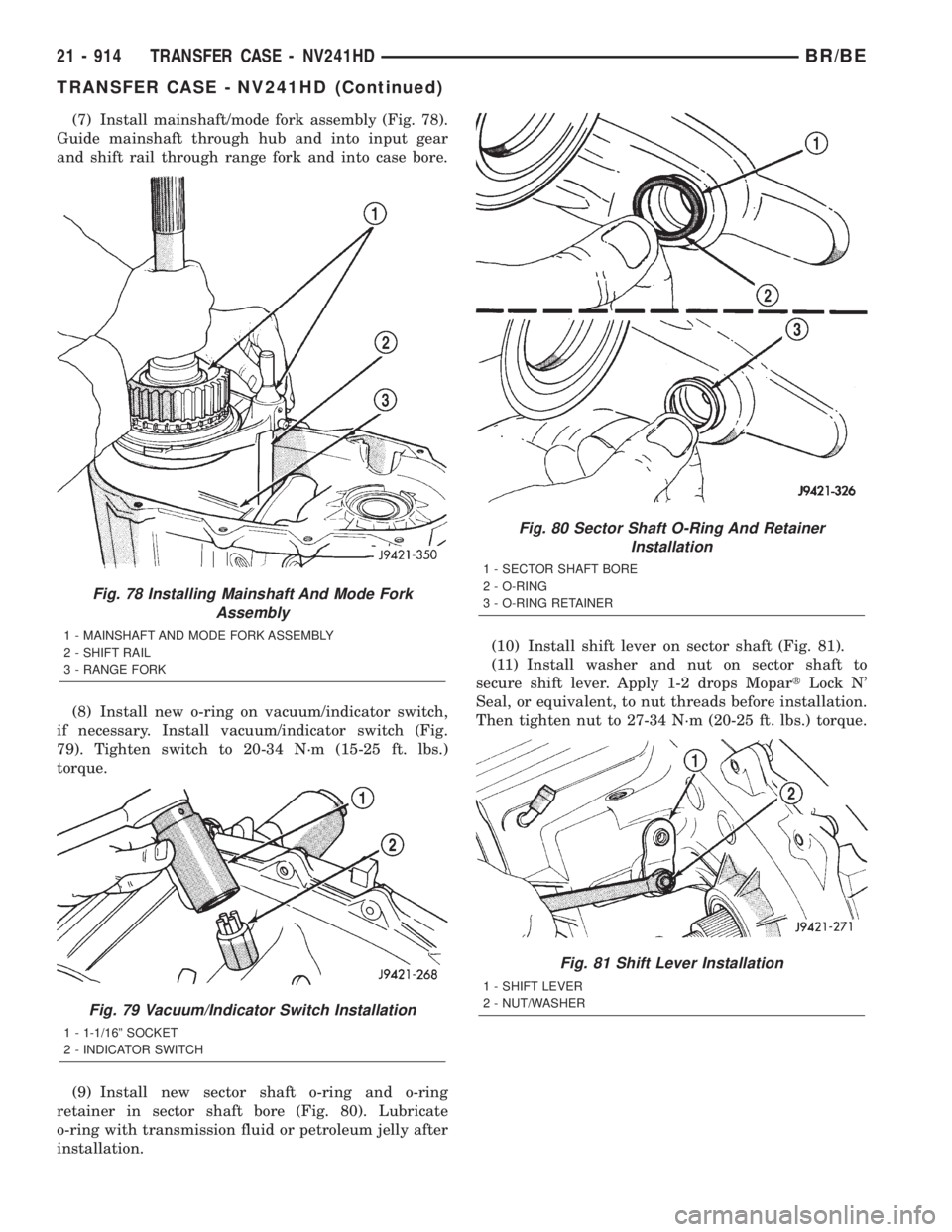
(7) Install mainshaft/mode fork assembly (Fig. 78).
Guide mainshaft through hub and into input gear
and shift rail through range fork and into case bore.
(8) Install new o-ring on vacuum/indicator switch,
if necessary. Install vacuum/indicator switch (Fig.
79). Tighten switch to 20-34 N´m (15-25 ft. lbs.)
torque.
(9) Install new sector shaft o-ring and o-ring
retainer in sector shaft bore (Fig. 80). Lubricate
o-ring with transmission fluid or petroleum jelly after
installation.(10) Install shift lever on sector shaft (Fig. 81).
(11) Install washer and nut on sector shaft to
secure shift lever. Apply 1-2 drops MopartLock N'
Seal, or equivalent, to nut threads before installation.
Then tighten nut to 27-34 N´m (20-25 ft. lbs.) torque.
Fig. 78 Installing Mainshaft And Mode Fork
Assembly
1 - MAINSHAFT AND MODE FORK ASSEMBLY
2 - SHIFT RAIL
3 - RANGE FORK
Fig. 79 Vacuum/Indicator Switch Installation
1 - 1-1/16º SOCKET
2 - INDICATOR SWITCH
Fig. 80 Sector Shaft O-Ring And Retainer
Installation
1 - SECTOR SHAFT BORE
2 - O-RING
3 - O-RING RETAINER
Fig. 81 Shift Lever Installation
1 - SHIFT LEVER
2 - NUT/WASHER
21 - 914 TRANSFER CASE - NV241HDBR/BE
TRANSFER CASE - NV241HD (Continued)
Page 2551 of 2889
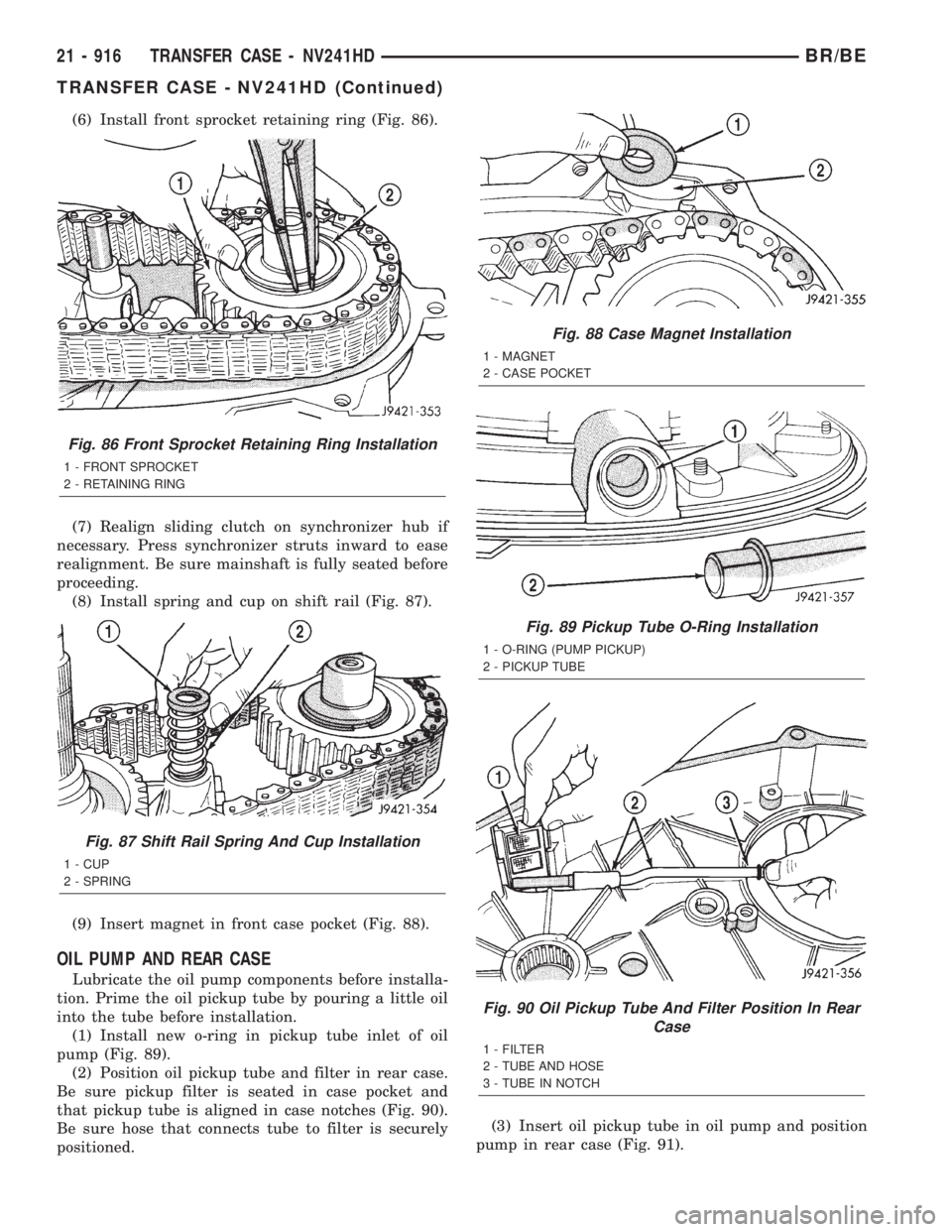
(6) Install front sprocket retaining ring (Fig. 86).
(7) Realign sliding clutch on synchronizer hub if
necessary. Press synchronizer struts inward to ease
realignment. Be sure mainshaft is fully seated before
proceeding.
(8) Install spring and cup on shift rail (Fig. 87).
(9) Insert magnet in front case pocket (Fig. 88).
OIL PUMP AND REAR CASE
Lubricate the oil pump components before installa-
tion. Prime the oil pickup tube by pouring a little oil
into the tube before installation.
(1) Install new o-ring in pickup tube inlet of oil
pump (Fig. 89).
(2) Position oil pickup tube and filter in rear case.
Be sure pickup filter is seated in case pocket and
that pickup tube is aligned in case notches (Fig. 90).
Be sure hose that connects tube to filter is securely
positioned.(3) Insert oil pickup tube in oil pump and position
pump in rear case (Fig. 91).
Fig. 86 Front Sprocket Retaining Ring Installation
1 - FRONT SPROCKET
2 - RETAINING RING
Fig. 87 Shift Rail Spring And Cup Installation
1 - CUP
2 - SPRING
Fig. 88 Case Magnet Installation
1 - MAGNET
2 - CASE POCKET
Fig. 89 Pickup Tube O-Ring Installation
1 - O-RING (PUMP PICKUP)
2 - PICKUP TUBE
Fig. 90 Oil Pickup Tube And Filter Position In Rear
Case
1 - FILTER
2 - TUBE AND HOSE
3 - TUBE IN NOTCH
21 - 916 TRANSFER CASE - NV241HDBR/BE
TRANSFER CASE - NV241HD (Continued)
Page 2559 of 2889
SHIFT LEVER
REMOVAL
(1) Shift transfer case into 2H.
(2) Remove transfer case shifter knob cap.
(3) Remove nut holding shifter knob to shift lever.
(4) Remove shifter knob.
(5) Remove the shift boot from the shifter bezel.
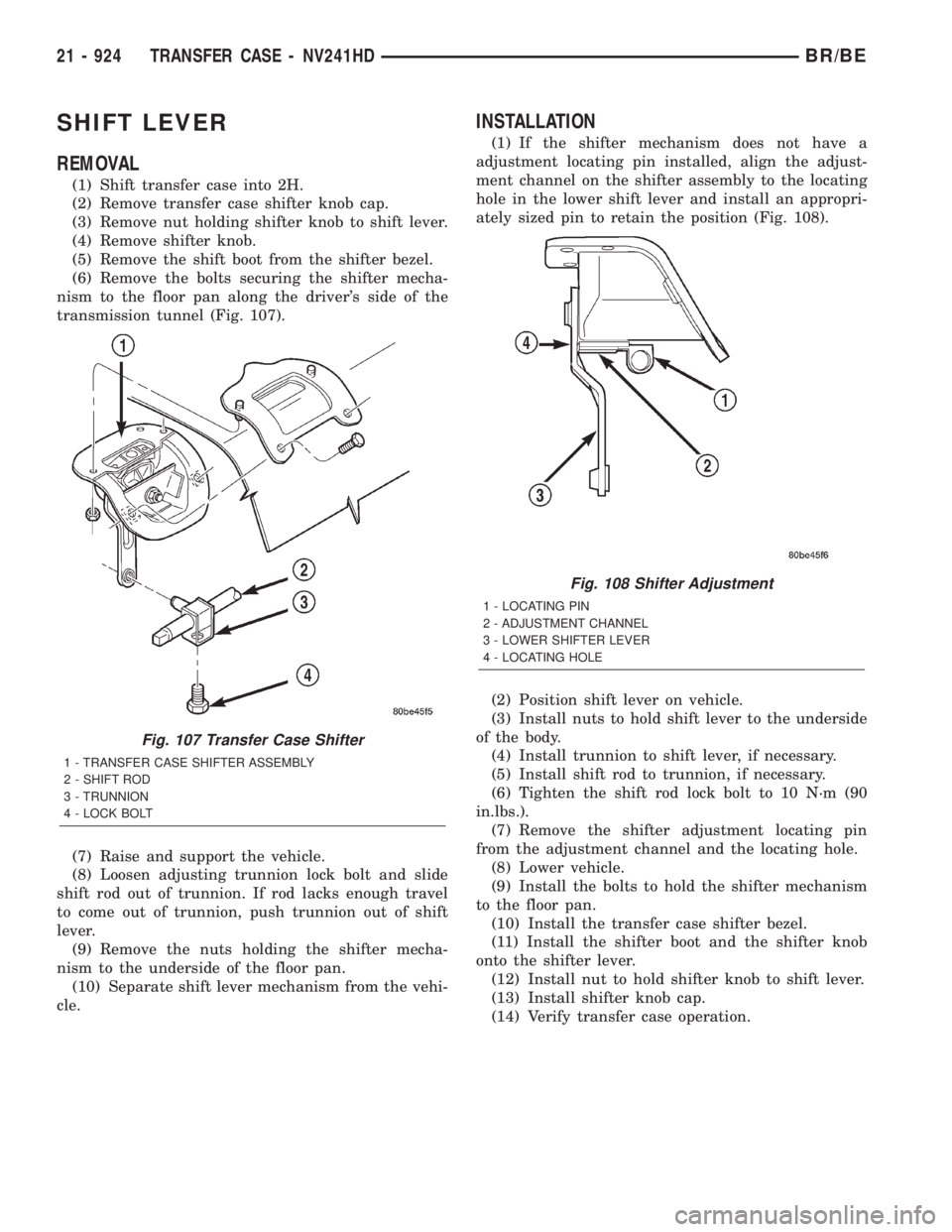
(6) Remove the bolts securing the shifter mecha-
nism to the floor pan along the driver's side of the
transmission tunnel (Fig. 107).
(7) Raise and support the vehicle.
(8) Loosen adjusting trunnion lock bolt and slide
shift rod out of trunnion. If rod lacks enough travel
to come out of trunnion, push trunnion out of shift
lever.
(9) Remove the nuts holding the shifter mecha-
nism to the underside of the floor pan.
(10) Separate shift lever mechanism from the vehi-
cle.
INSTALLATION
(1) If the shifter mechanism does not have a
adjustment locating pin installed, align the adjust-
ment channel on the shifter assembly to the locating
hole in the lower shift lever and install an appropri-
ately sized pin to retain the position (Fig. 108).
(2) Position shift lever on vehicle.
(3) Install nuts to hold shift lever to the underside
of the body.
(4) Install trunnion to shift lever, if necessary.
(5) Install shift rod to trunnion, if necessary.
(6) Tighten the shift rod lock bolt to 10 N´m (90
in.lbs.).
(7) Remove the shifter adjustment locating pin
from the adjustment channel and the locating hole.
(8) Lower vehicle.
(9) Install the bolts to hold the shifter mechanism
to the floor pan.
(10) Install the transfer case shifter bezel.
(11) Install the shifter boot and the shifter knob
onto the shifter lever.
(12) Install nut to hold shifter knob to shift lever.
(13) Install shifter knob cap.
(14) Verify transfer case operation.
Fig. 107 Transfer Case Shifter
1 - TRANSFER CASE SHIFTER ASSEMBLY
2 - SHIFT ROD
3 - TRUNNION
4 - LOCK BOLT
Fig. 108 Shifter Adjustment
1 - LOCATING PIN
2 - ADJUSTMENT CHANNEL
3 - LOWER SHIFTER LEVER
4 - LOCATING HOLE
21 - 924 TRANSFER CASE - NV241HDBR/BE