2001 DODGE RAM roof
[x] Cancel search: roofPage 639 of 2889
while maintaining a speed of 48 kilometers-per-hour
(30 miles-per-hour) or higher.
The thermometer function is supported by an
ambient temperature sensor. The sensor is mounted
outside the passenger compartment near the front
and center of the vehicle, and is hard wired to the
module. The ambient temperature sensor is available
as a separate service item.
STANDARD PROCEDURE - COMPASS
CALIBRATION
CAUTION: Do not place any external magnets, such
as magnetic roof mount antennas, in the vicinity of
the compass. Do not use magnetic tools when ser-
vicing the overhead console.
The electronic compass unit features a self-cali-
brating design, which simplifies the calibration pro-
cedure. This feature automatically updates the
compass calibration while the vehicle is being driven.
This allows the compass unit to compensate for small
changes in the residual magnetism that the vehicle
may acquire during normal use. If the compass read-
ings appear to be erratic or out of calibration, per-
form the following calibration procedure. Also, new
service replacement compass mini-trip computer
modules must have their compass calibrated using
this procedure. Do not attempt to calibrate the com-
pass near large metal objects such as other vehicles,
large buildings, or bridges; or, near overhead or
underground power lines.
(1) Start the engine. If the compass/temperature
data is not currently being displayed, momentarily
depress and release the Step push button to step
through the display options until you have reached
the compass/temperature display.
(2) Depress both the U.S./Metric and the Step
push buttons at the same time for more than six sec-
onds, until ªCALº appears in the display, then release
both push buttons. The ªCALº in the display indi-
cates that the compass is in the calibration mode.
(3) Drive the vehicle on a level surface, at least
fifty feet away from large metal objects and power
lines, in all four compass directions, such as driving
around a city block several times or driving in two to
three complete circles at a slow to medium speed.
(4) When the calibration is successfully completed,
ªCALº will disappear from the display and normal
compass mini-trip computer operation will resume.
NOTE: If the ªCALº message remains in the display,
either there is excessive magnetism near the com-
pass, or the unit is faulty. Repeat the calibration
procedure at least one more time.NOTE: If the wrong direction is still indicated in the
compass display, the area selected for calibration
may be too close to a strong magnetic field. Repeat
the calibration procedure in another location.
STANDARD PROCEDURE - COMPASS
VARIATION ADJUSTMENT
Compass variance, also known as magnetic decli-
nation, is the difference in angle between magnetic
north and true geographic north. In some geographic
locations, the difference between magnetic and geo-
graphic north is great enough to cause the compass
to give false readings. If this problem occurs, the
compass variance must be set. There are two meth-
ods that can be used to enter this information into
the compass mini-trip computer module. They are
the zone method and the direct method.
ZONE METHOD
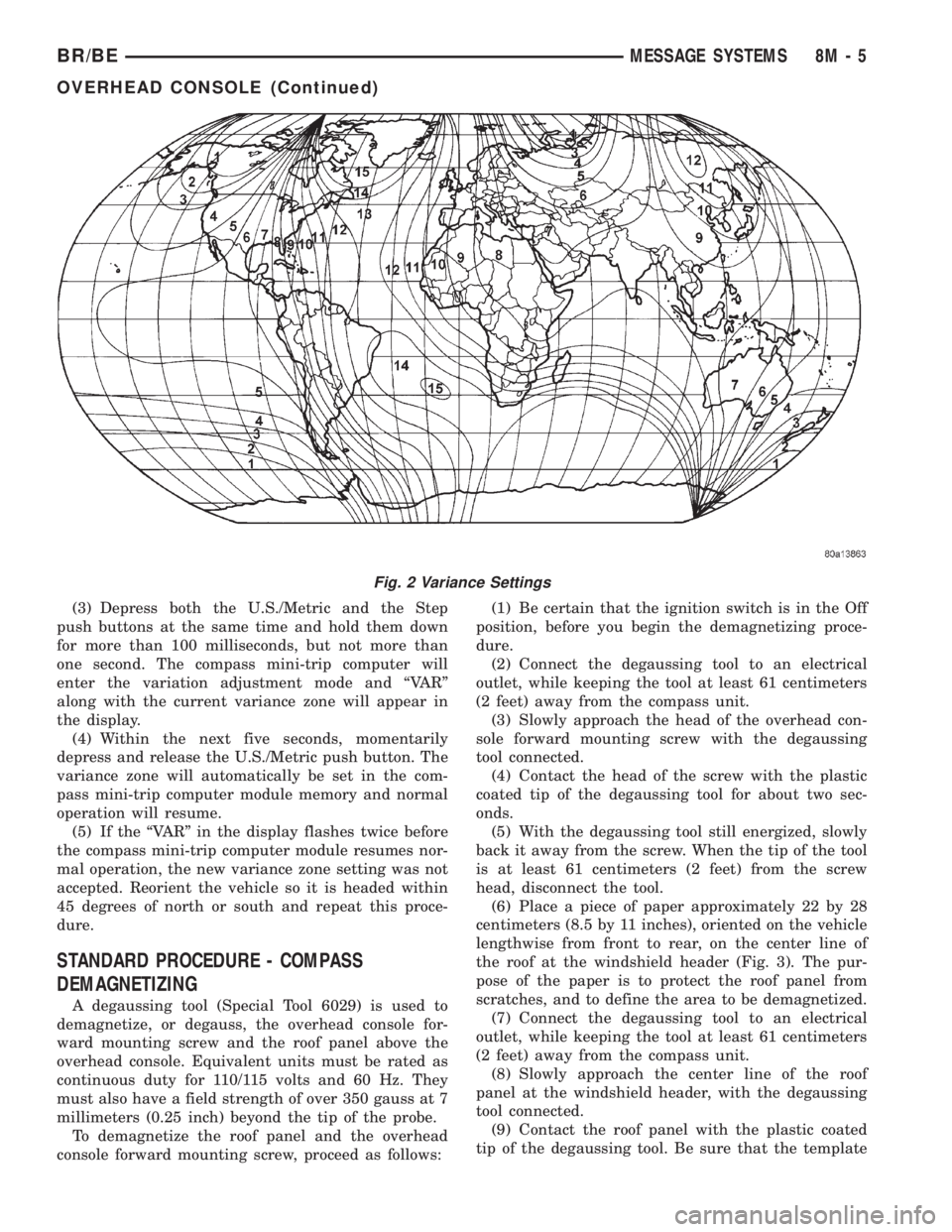
(1) Using the Variance Settings map, find your
geographic location and note the zone number (Fig.
2).
(2) Turn the ignition switch to the On position. If
the compass/temperature data is not currently being
displayed, momentarily depress and release the Step
push button to step through the display options until
you have reached the compass/temperature display.
(3) Depress both the U.S./Metric and the Step
push buttons at the same time and hold them down
for more than 100 milliseconds, but not more than
one second. The compass mini-trip computer will
enter the variation adjustment mode and ªVARº
along with the current variance zone will appear in
the display.
(4) Momentarily depress and release the Step push
button to step through the zone numbers, until the
zone number for your geographic location appears in
the display.
(5) After five seconds, the displayed zone will auto-
matically be set in the compass mini-trip computer
module memory and normal operation will resume.
(6) Confirm that the correct directions are now
indicated by the compass.
DIRECT METHOD
(1) Turn the vehicle so it is headed in either the
north or south direction. The vehicle must be headed
within 45 degrees of north or south for this procedure
to work. The vehicle may be moving or stationary.
(2) Turn the ignition switch to the On position. If
the compass/temperature data is not currently being
displayed, momentarily depress and release the Step
push button to step through the display options until
you have reached the compass/temperature display.
8M - 4 MESSAGE SYSTEMSBR/BE
OVERHEAD CONSOLE (Continued)
Page 640 of 2889
(3) Depress both the U.S./Metric and the Step
push buttons at the same time and hold them down
for more than 100 milliseconds, but not more than
one second. The compass mini-trip computer will
enter the variation adjustment mode and ªVARº
along with the current variance zone will appear in
the display.
(4) Within the next five seconds, momentarily
depress and release the U.S./Metric push button. The
variance zone will automatically be set in the com-
pass mini-trip computer module memory and normal
operation will resume.
(5) If the ªVARº in the display flashes twice before
the compass mini-trip computer module resumes nor-
mal operation, the new variance zone setting was not
accepted. Reorient the vehicle so it is headed within
45 degrees of north or south and repeat this proce-
dure.
STANDARD PROCEDURE - COMPASS
DEMAGNETIZING
A degaussing tool (Special Tool 6029) is used to
demagnetize, or degauss, the overhead console for-
ward mounting screw and the roof panel above the
overhead console. Equivalent units must be rated as
continuous duty for 110/115 volts and 60 Hz. They
must also have a field strength of over 350 gauss at 7
millimeters (0.25 inch) beyond the tip of the probe.
To demagnetize the roof panel and the overhead
console forward mounting screw, proceed as follows:(1) Be certain that the ignition switch is in the Off
position, before you begin the demagnetizing proce-
dure.
(2) Connect the degaussing tool to an electrical
outlet, while keeping the tool at least 61 centimeters
(2 feet) away from the compass unit.
(3) Slowly approach the head of the overhead con-
sole forward mounting screw with the degaussing
tool connected.
(4) Contact the head of the screw with the plastic
coated tip of the degaussing tool for about two sec-
onds.
(5) With the degaussing tool still energized, slowly
back it away from the screw. When the tip of the tool
is at least 61 centimeters (2 feet) from the screw
head, disconnect the tool.
(6) Place a piece of paper approximately 22 by 28
centimeters (8.5 by 11 inches), oriented on the vehicle
lengthwise from front to rear, on the center line of
the roof at the windshield header (Fig. 3). The pur-
pose of the paper is to protect the roof panel from
scratches, and to define the area to be demagnetized.
(7) Connect the degaussing tool to an electrical
outlet, while keeping the tool at least 61 centimeters
(2 feet) away from the compass unit.
(8) Slowly approach the center line of the roof
panel at the windshield header, with the degaussing
tool connected.
(9) Contact the roof panel with the plastic coated
tip of the degaussing tool. Be sure that the template
Fig. 2 Variance Settings
BR/BEMESSAGE SYSTEMS 8M - 5
OVERHEAD CONSOLE (Continued)
Page 641 of 2889
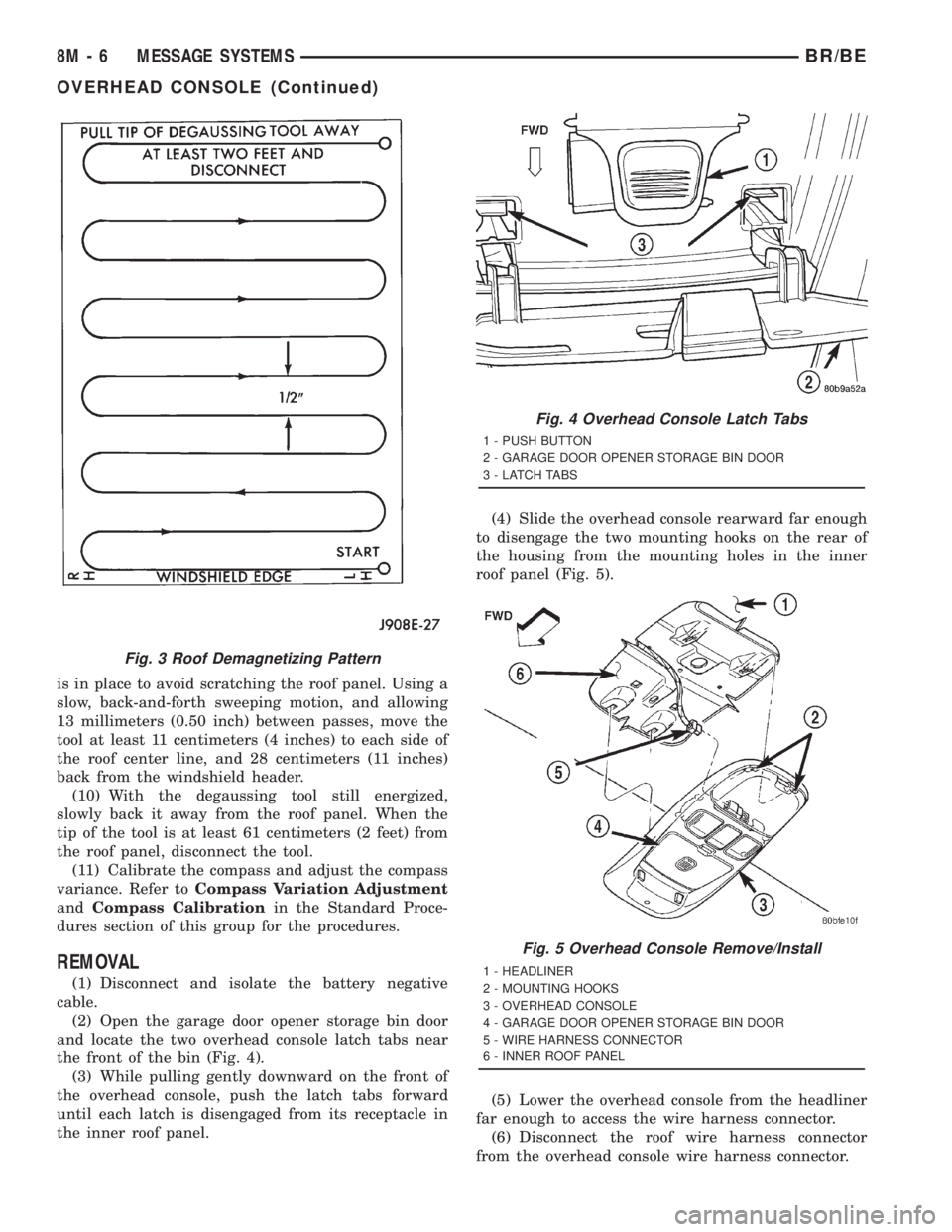
is in place to avoid scratching the roof panel. Using a
slow, back-and-forth sweeping motion, and allowing
13 millimeters (0.50 inch) between passes, move the
tool at least 11 centimeters (4 inches) to each side of
the roof center line, and 28 centimeters (11 inches)
back from the windshield header.
(10) With the degaussing tool still energized,
slowly back it away from the roof panel. When the
tip of the tool is at least 61 centimeters (2 feet) from
the roof panel, disconnect the tool.
(11) Calibrate the compass and adjust the compass
variance. Refer toCompass Variation Adjustment
andCompass Calibrationin the Standard Proce-
dures section of this group for the procedures.
REMOVAL
(1) Disconnect and isolate the battery negative
cable.
(2) Open the garage door opener storage bin door
and locate the two overhead console latch tabs near
the front of the bin (Fig. 4).
(3) While pulling gently downward on the front of
the overhead console, push the latch tabs forward
until each latch is disengaged from its receptacle in
the inner roof panel.(4) Slide the overhead console rearward far enough
to disengage the two mounting hooks on the rear of
the housing from the mounting holes in the inner
roof panel (Fig. 5).
(5) Lower the overhead console from the headliner
far enough to access the wire harness connector.
(6) Disconnect the roof wire harness connector
from the overhead console wire harness connector.
Fig. 3 Roof Demagnetizing Pattern
Fig. 4 Overhead Console Latch Tabs
1 - PUSH BUTTON
2 - GARAGE DOOR OPENER STORAGE BIN DOOR
3 - LATCH TABS
Fig. 5 Overhead Console Remove/Install
1 - HEADLINER
2 - MOUNTING HOOKS
3 - OVERHEAD CONSOLE
4 - GARAGE DOOR OPENER STORAGE BIN DOOR
5 - WIRE HARNESS CONNECTOR
6 - INNER ROOF PANEL
8M - 6 MESSAGE SYSTEMSBR/BE
OVERHEAD CONSOLE (Continued)
Page 643 of 2889
the latch. Repeat this step to engage the second pivot
pin with its pivot latch.
(3) Close the garage door opener storage bin door.
(4) If the vehicle is so equipped, position the com-
pass mini-trip computer module to the back side of
the overhead console housing. Install and tighten the
three screws that secure the module to the housing.
Tighten the screws to 2.2 N´m (20 in. lbs.).
(5) Install the overhead console onto the headliner.
Refer toOverhead Consolein the Removal and
Installation section of this group for the procedures.
SUNGLASS STORAGE BIN
(1) From the face side of the overhead console
housing, position the sunglasses storage bin pivot
arms through the openings in the front of the storage
bin housing in the overhead console.
(2) From the back side of the of the overhead con-
sole housing, align one of the pivot pins of the sun-
glasses storage bin with the pivot latch integral to
the overhead console housing. Press the pivot arm
forward until the pivot pin is engaged in the latch.
Repeat this step to engage the second pivot pin with
its pivot latch.
(3) Close the sunglasses storage bin.
(4) Position the reading and courtesy lamp housing
to the back side of the overhead console housing.
Install and tighten the four screws that secure the
lamp housing to the back of the overhead console
housing. Tighten the screws to 2.2 N´m (20 in. lbs.).
(5) Install the overhead console onto the headliner.
Refer toOverhead Consolein the Removal and
Installation section of this group for the procedures.
MINI-TRIP COMPUTER LENS
Overhead consoles equipped with the optional com-
pass mini-trip computer have a lens installed in the
front of the overhead console housing through which
the Vacuum-Fluorescent Display can be viewed. If
the overhead console is not equipped with the com-
pass mini-trip computer option, a plastic cover plug
is installed in the front of the overhead console hous-
ing in place of the lens.
(1) Remove the trip computer lens or the cover
plug onto the overhead console housing.
(2) From the face of the overhead console, push the
trip computer lens or the cover plug forward far
enough to engage the four forward mounting tabs in
the overhead console unit.
(3) From the face of the overhead console, align
the rear mounting boss of the trip computer lens or
the alignment pin of the cover plug with the recepta-
cle in the overhead console housing.
(4) Press firmly and evenly on the rear edge of the
trip computer lens or the cover plug until the rear
mounting boss is fully seated in the receptacle, or thesnap features of the cover plug are fully engaged in
the overhead console housing.
(5) If the vehicle is so equipped, install the com-
pass mini-trip computer module onto the overhead
console. Refer toCompass Mini-Trip Computerin
the Removal and Installation section of this group for
the procedures.
(6) Install the overhead console onto the headliner.
Refer toOverhead Consolein the Removal and
Installation section of this group for the procedures.
INSTALLATION
(1) Position the overhead console near the mount-
ing location on the headliner in the vehicle.
(2) Reconnect the roof wire harness connector to
the overhead console wire harness connector.
(3) Engage the two mounting hooks on the rear of
the overhead console housing in the mounting holes
in the inner roof panel.
(4) Slide the overhead console forward far enough
to align the two latches on the front of the housing
with their receptacles in the inner roof panel.
(5) Push upward firmly and evenly on the front of
the overhead console until each of the two latches is
fully engaged in its receptacle in the inner roof panel.
(6) Close the garage door opener storage bin door.
(7) Reconnect the battery negative cable.
SPECIAL TOOLS
OVERHEAD CONSOLE SYSTEMS
COMPASS/MINI-TRIP
COMPUTER
DESCRIPTION
The compass mini-trip computer is located in the
premium overhead console on models equipped with
this option. Two compass mini-trip computer units
are available. One unit is used on vehicles not
equipped with the Vehicle Theft Security System
(VTSS) option, and the other is used on vehicles with
the VTSS option. Both compass mini-trip computer
units include the electronic control module, a Vacu-
um-Fluorescent Display (VFD), a compass flux-gate
unit and two push button function switches.
Degaussing Tool 6029
8M - 8 MESSAGE SYSTEMSBR/BE
OVERHEAD CONSOLE (Continued)
Page 645 of 2889

DIAGNOSIS & TESTING - COMPASS MINI-TRIP
COMPUTER
If the problem with the compass mini-trip com-
puter module is an inoperative security indicator
lamp, refer toSecurity Indicator Lampin Vehicle
Theft/Security Systems. If the problem with the com-
pass mini-trip computer module is an ªOCº or ªSCº in
the compass/thermometer display, refer toAmbient
Temperature Sensorin the Diagnosis and Testing
section of this group. If the problem with the com-
pass mini-trip computer module is an inaccurate or
scrambled display, refer toSelf-Diagnostic Testin
the Diagnosis and Testing section of this group. If the
problem with the compass mini-trip computer module
is incorrect Vacuum Fluorescent Display (VFD) dim-
ming levels, use a DRBtscan tool and the proper
Diagnostic Procedures manual to test for the correct
dimming message inputs being received from the
instrument cluster over the Chrysler Collision Detec-
tion (CCD) data bus. If the problem is a no-display
condition, use the following procedures. For complete
circuit diagrams, refer toOverhead Consolein the
Contents of Wiring Diagrams.
(1) Check the fused B(+) fuse in the junction block.
If OK, go to Step 2. If not OK, repair the shorted cir-
cuit or component as required and replace the faulty
fuse.
(2) Check for battery voltage at the fused B(+) fuse
in the junction block. If OK, go to Step 3. If not OK,
repair the open fused B(+) circuit to the battery as
required.
(3) Check the fused ignition switch output (run/
start) fuse in the junction block. If OK, go to Step 4.
If not OK, repair the shorted circuit or component as
required and replace the faulty fuse.
(4) Turn the ignition switch to the On position.
Check for battery voltage at the fused ignition switch
output (run/start) fuse in the junction block. If OK,
go to Step 5. If not OK, repair the open fused ignition
switch output (run/start) circuit to the ignition switch
as required.
(5) Turn the ignition switch to the Off position.
Disconnect and isolate the battery negative cable.
Remove the overhead console. Check for continuity
between the ground circuit cavities of the roof wire
harness connector for the overhead console and a
good ground. There should be continuity. If OK, go to
Step 6. If not OK, repair the open ground circuit to
ground as required.
(6) Connect the battery negative cable. Check for
battery voltage at the fused B(+) circuit cavity of the
roof wire harness connector for the overhead console.
If OK, go to Step 7. If not OK, repair the open fused
B(+) circuit to the junction block fuse as required.(7) Turn the ignition switch to the On position.
Check for battery voltage at the fused ignition switch
output (run/start) circuit cavity of the roof wire har-
ness connector for the overhead console. If OK, refer
toSelf-Diagnostic Testin the Diagnosis and Test-
ing section of this group for further diagnosis of the
compass mini-trip computer module and the CCD
data bus. If not OK, repair the open fused ignition
switch output (run/start) circuit to the junction block
fuse as required.
SELF-DIAGNOSTIC TEST
A self-diagnostic test is used to determine that the
compass mini-trip computer module is operating
properly electrically. Initiate the self-diagnostic test
as follows:
(1) With the ignition switch in the Off position,
simultaneously depress and hold the Step button and
the U.S./Metric button.
(2) Turn the ignition switch to the On position.
(3) Continue to hold both buttons depressed until
the compass mini-trip computer module enters the
display segment test. In this test, all of the Vacuum
Fluorescent Display (VFD) segments are lighted
while the compass mini-trip computer module per-
forms the following checks:
²Microprocessor RAM read/write test
²Non-volatile memory read/write test
²Microprocessor ROM verification test
²CCD communications test.
(4) Following completion of these tests, the com-
pass mini-trip computer will display one of three
messages: ªPASS,º ªFAIL,º or ªCCd.º Respond to the
respective test results as follows:
²If the ªPASSº message is displayed, but compass
mini-trip computer operation is still improper, the
use of a DRB scan tool and the proper Diagnostic
Procedures manual are required for further diagno-
sis.
²If the ªFAILº message is displayed, the compass
mini-trip computer module is faulty and must be
replaced.
²If the ªCCdº message is displayed, the use of a
DRBtscan tool and the proper Diagnostic Proce-
dures manual are required for further diagnosis.
²If any VFD segment should fail to light during
the display segment test, the compass mini-trip com-
puter module is faulty and must be replaced.
(5) If all tests are passed, or if the ignition switch
is turned to the Off position, the compass mini-trip
computer module will automatically return to normal
operation.
8M - 10 MESSAGE SYSTEMSBR/BE
COMPASS/MINI-TRIP COMPUTER (Continued)
Page 647 of 2889

DIAGNOSIS & TESTING - AMBIENT
TEMPERATURE SENSOR
The thermometer function is supported by the
ambient temperature sensor, a wiring circuit, and a
portion of the compass mini-trip computer module. If
any portion of the ambient temperature sensor cir-
cuit fails, the compass/thermometer display function
will self-diagnose the circuit. If 55É C (131É F)
appears in the display, the sensor is being exposed to
temperatures above 55É C (131É F), or the sensor cir-
cuit is shorted. If ±40É C (±40É F) appears in the dis-
play, the sensor is being exposed to temperatures
below ±40É C (±40É F), or the sensor circuit is open.
The ambient temperature sensor circuit can also be
diagnosed using the following Sensor Test, and Sen-
sor Circuit Test. If the temperature sensor and cir-
cuit are confirmed to be OK, but the temperature
display is inoperative or incorrect, refer toCompass
Mini-Trip Computerin the Diagnosis and Testing
section of this group. For complete circuit diagrams,
refer toOverhead Consolein the Contents of Wir-
ing Diagrams.
SENSOR TEST
(1) Turn the ignition switch to the Off position.
Disconnect and isolate the battery negative cable.
Disconnect the ambient temperature sensor wire har-
ness connector.
(2) Measure the resistance of the ambient temper-
ature sensor. At ±40É C (±40É F), the sensor resis-
tance is 336 kilohms. At 55É C (131É F), the sensor
resistance is 2.488 kilohms. The sensor resistance
should read between these two values. If OK, refer to
Sensor Circuit Testin the Diagnosis and Testing
section of this group. If not OK, replace the faulty
ambient temperature sensor.
SENSOR CIRCUIT TEST
(1) Turn the ignition switch to the Off position.
Disconnect and isolate the battery negative cable.
Disconnect the ambient temperature sensor wire har-
ness connector and the overhead console wire har-
ness connector.
(2) Connect a jumper wire between the two termi-
nals in the body half of the ambient temperature sen-
sor wire harness connector.
(3) Check for continuity between the sensor return
circuit and the ambient temperature sensor signal
circuit cavities of the roof wire harness overhead con-
sole connector. There should be continuity. If OK, go
to Step 4. If not OK, repair the open sensor return
circuit or ambient temperature sensor signal circuit
to the ambient temperature sensor as required.(4) Remove the jumper wire from the body half of
the ambient temperature sensor wire harness con-
nector. Check for continuity between the sensor
return circuit cavity of the roof wire harness over-
head console connector and a good ground. There
should be no continuity. If OK, go to Step 5. If not
OK, repair the shorted sensor return circuit as
required.
(5) Check for continuity between the ambient tem-
perature sensor signal circuit cavity of the roof wire
harness overhead console connector and a good
ground. There should be no continuity. If OK, refer to
Compass Mini-Trip Computerin the Diagnosis
and Testing section of this group. If not OK, repair
the shorted ambient temperature sensor signal cir-
cuit as required.
REMOVAL
(1) Disconnect and isolate the battery negative
cable.
(2) Locate the ambient temperature sensor, on the
underside of the hood near the hood latch striker
(Fig. 8).
(3) Disconnect the wire harness connector from the
ambient temperature sensor connector receptacle.
(4) Remove the one screw that secures the ambient
temperature sensor bracket to the inner hood rein-
forcement.
(5) Remove the ambient temperature sensor from
the inner hood reinforcement.
Fig. 8 Ambient Temperature Sensor Remove/Install
1 - HOOD
2 - SCREW
3 - SENSOR AND BRACKET
4 - WIRE HARNESS CONNECTOR
5 - HOOD LATCH STRIKER
8M - 12 MESSAGE SYSTEMSBR/BE
AMBIENT TEMP SENSOR (Continued)
Page 1126 of 2889
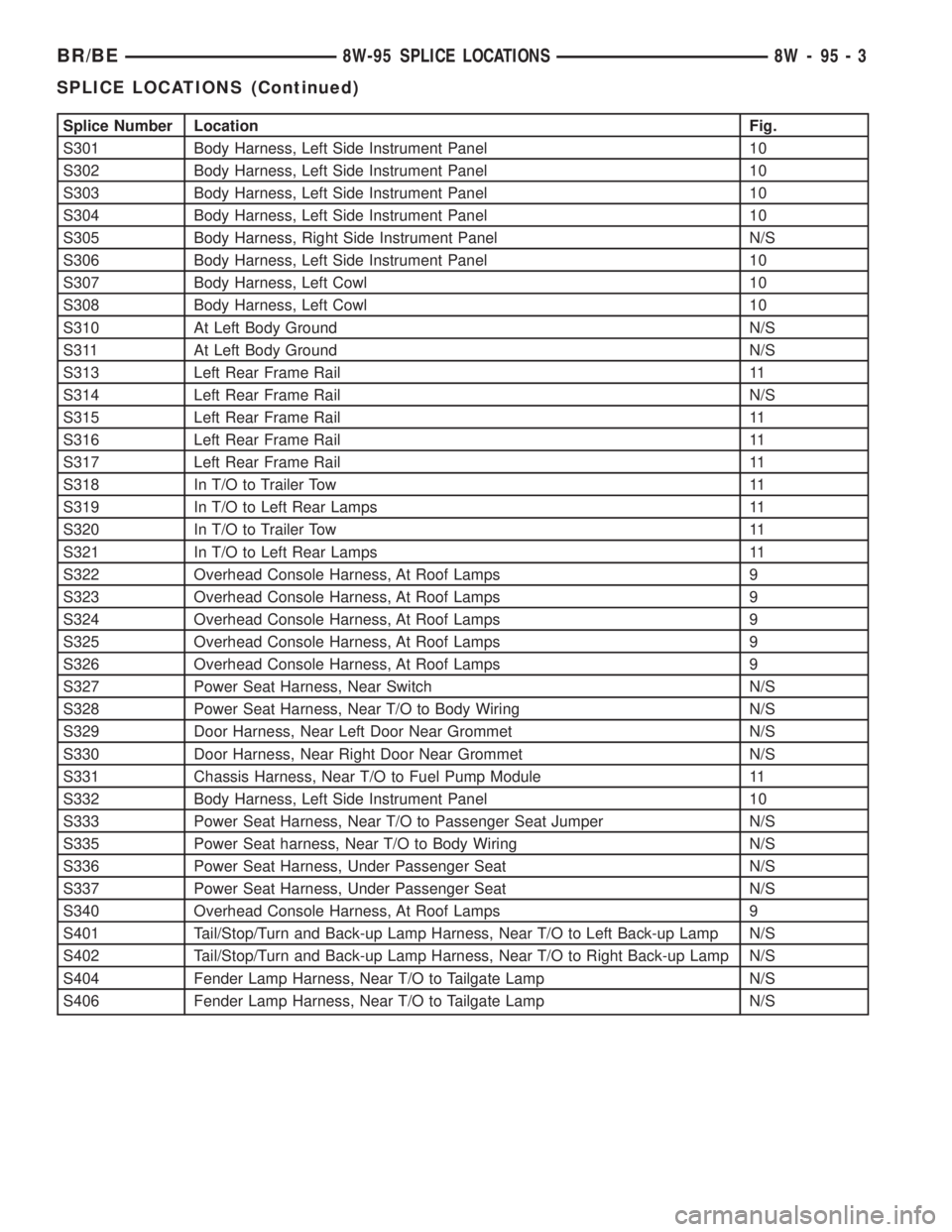
Splice Number Location Fig.
S301 Body Harness, Left Side Instrument Panel 10
S302 Body Harness, Left Side Instrument Panel 10
S303 Body Harness, Left Side Instrument Panel 10
S304 Body Harness, Left Side Instrument Panel 10
S305 Body Harness, Right Side Instrument Panel N/S
S306 Body Harness, Left Side Instrument Panel 10
S307 Body Harness, Left Cowl 10
S308 Body Harness, Left Cowl 10
S310 At Left Body Ground N/S
S311 At Left Body Ground N/S
S313 Left Rear Frame Rail 11
S314 Left Rear Frame Rail N/S
S315 Left Rear Frame Rail 11
S316 Left Rear Frame Rail 11
S317 Left Rear Frame Rail 11
S318 In T/O to Trailer Tow 11
S319 In T/O to Left Rear Lamps 11
S320 In T/O to Trailer Tow 11
S321 In T/O to Left Rear Lamps 11
S322 Overhead Console Harness, At Roof Lamps 9
S323 Overhead Console Harness, At Roof Lamps 9
S324 Overhead Console Harness, At Roof Lamps 9
S325 Overhead Console Harness, At Roof Lamps 9
S326 Overhead Console Harness, At Roof Lamps 9
S327 Power Seat Harness, Near Switch N/S
S328 Power Seat Harness, Near T/O to Body Wiring N/S
S329 Door Harness, Near Left Door Near Grommet N/S
S330 Door Harness, Near Right Door Near Grommet N/S
S331 Chassis Harness, Near T/O to Fuel Pump Module 11
S332 Body Harness, Left Side Instrument Panel 10
S333 Power Seat Harness, Near T/O to Passenger Seat Jumper N/S
S335 Power Seat harness, Near T/O to Body Wiring N/S
S336 Power Seat Harness, Under Passenger Seat N/S
S337 Power Seat Harness, Under Passenger Seat N/S
S340 Overhead Console Harness, At Roof Lamps 9
S401 Tail/Stop/Turn and Back-up Lamp Harness, Near T/O to Left Back-up Lamp N/S
S402 Tail/Stop/Turn and Back-up Lamp Harness, Near T/O to Right Back-up Lamp N/S
S404 Fender Lamp Harness, Near T/O to Tailgate Lamp N/S
S406 Fender Lamp Harness, Near T/O to Tailgate Lamp N/S
BR/BE8W-95 SPLICE LOCATIONS 8W - 95 - 3
SPLICE LOCATIONS (Continued)
Page 1201 of 2889
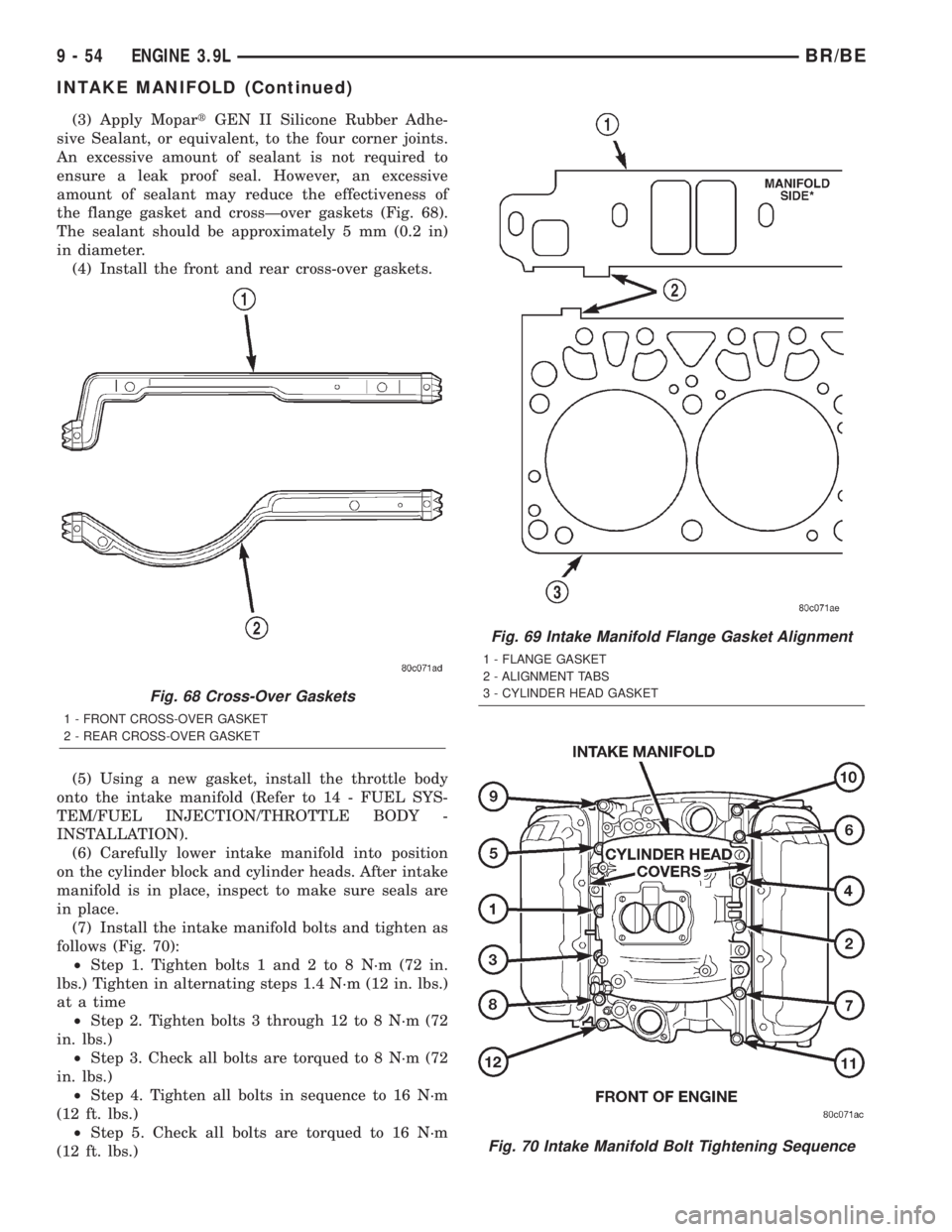
(3) Apply MopartGEN II Silicone Rubber Adhe-
sive Sealant, or equivalent, to the four corner joints.
An excessive amount of sealant is not required to
ensure a leak proof seal. However, an excessive
amount of sealant may reduce the effectiveness of
the flange gasket and crossÐover gaskets (Fig. 68).
The sealant should be approximately 5 mm (0.2 in)
in diameter.
(4) Install the front and rear cross-over gaskets.
(5) Using a new gasket, install the throttle body
onto the intake manifold (Refer to 14 - FUEL SYS-
TEM/FUEL INJECTION/THROTTLE BODY -
INSTALLATION).
(6) Carefully lower intake manifold into position
on the cylinder block and cylinder heads. After intake
manifold is in place, inspect to make sure seals are
in place.
(7) Install the intake manifold bolts and tighten as
follows (Fig. 70):
²Step 1. Tighten bolts 1 and 2 to 8 N´m (72 in.
lbs.) Tighten in alternating steps 1.4 N´m (12 in. lbs.)
at a time
²Step 2. Tighten bolts 3 through 12 to 8 N´m (72
in. lbs.)
²Step 3. Check all bolts are torqued to 8 N´m (72
in. lbs.)
²Step 4. Tighten all bolts in sequence to 16 N´m
(12 ft. lbs.)
²Step 5. Check all bolts are torqued to 16 N´m
(12 ft. lbs.)
Fig. 68 Cross-Over Gaskets
1 - FRONT CROSS-OVER GASKET
2 - REAR CROSS-OVER GASKET
Fig. 69 Intake Manifold Flange Gasket Alignment
1 - FLANGE GASKET
2 - ALIGNMENT TABS
3 - CYLINDER HEAD GASKET
Fig. 70 Intake Manifold Bolt Tightening Sequence
9 - 54 ENGINE 3.9LBR/BE
INTAKE MANIFOLD (Continued)