Page 2522 of 2889
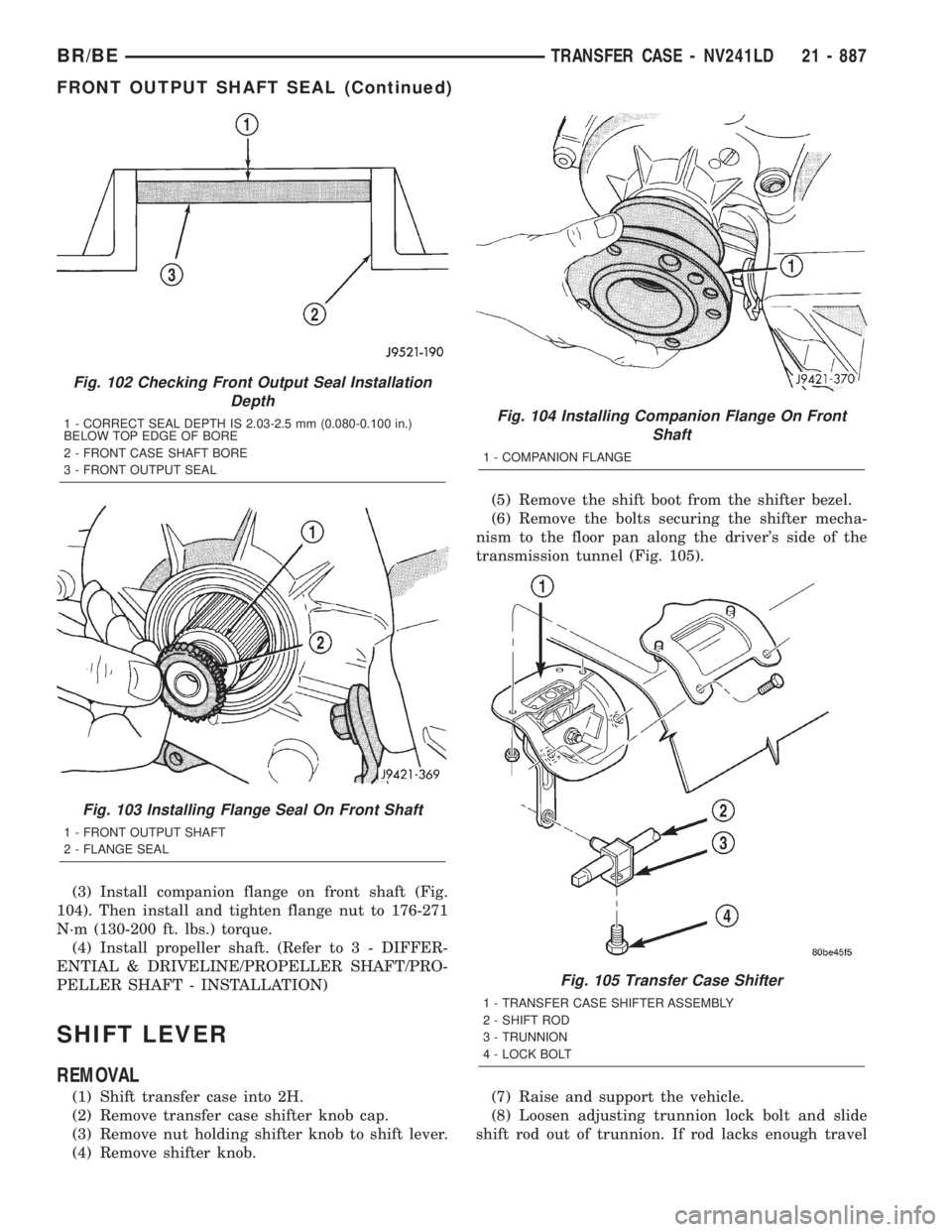
(3) Install companion flange on front shaft (Fig.
104). Then install and tighten flange nut to 176-271
N´m (130-200 ft. lbs.) torque.
(4) Install propeller shaft. (Refer to 3 - DIFFER-
ENTIAL & DRIVELINE/PROPELLER SHAFT/PRO-
PELLER SHAFT - INSTALLATION)
SHIFT LEVER
REMOVAL
(1) Shift transfer case into 2H.
(2) Remove transfer case shifter knob cap.
(3) Remove nut holding shifter knob to shift lever.
(4) Remove shifter knob.(5) Remove the shift boot from the shifter bezel.
(6) Remove the bolts securing the shifter mecha-
nism to the floor pan along the driver's side of the
transmission tunnel (Fig. 105).
(7) Raise and support the vehicle.
(8) Loosen adjusting trunnion lock bolt and slide
shift rod out of trunnion. If rod lacks enough travel
Fig. 102 Checking Front Output Seal Installation
Depth
1 - CORRECT SEAL DEPTH IS 2.03-2.5 mm (0.080-0.100 in.)
BELOW TOP EDGE OF BORE
2 - FRONT CASE SHAFT BORE
3 - FRONT OUTPUT SEAL
Fig. 103 Installing Flange Seal On Front Shaft
1 - FRONT OUTPUT SHAFT
2 - FLANGE SEAL
Fig. 104 Installing Companion Flange On Front
Shaft
1 - COMPANION FLANGE
Fig. 105 Transfer Case Shifter
1 - TRANSFER CASE SHIFTER ASSEMBLY
2 - SHIFT ROD
3 - TRUNNION
4 - LOCK BOLT
BR/BETRANSFER CASE - NV241LD 21 - 887
FRONT OUTPUT SHAFT SEAL (Continued)
Page 2523 of 2889
to come out of trunnion, push trunnion out of shift
lever.
(9) Remove the nuts holding the shifter mecha-
nism to the underside of the floor pan.
(10) Separate shift lever mechanism from the vehi-
cle.
INSTALLATION
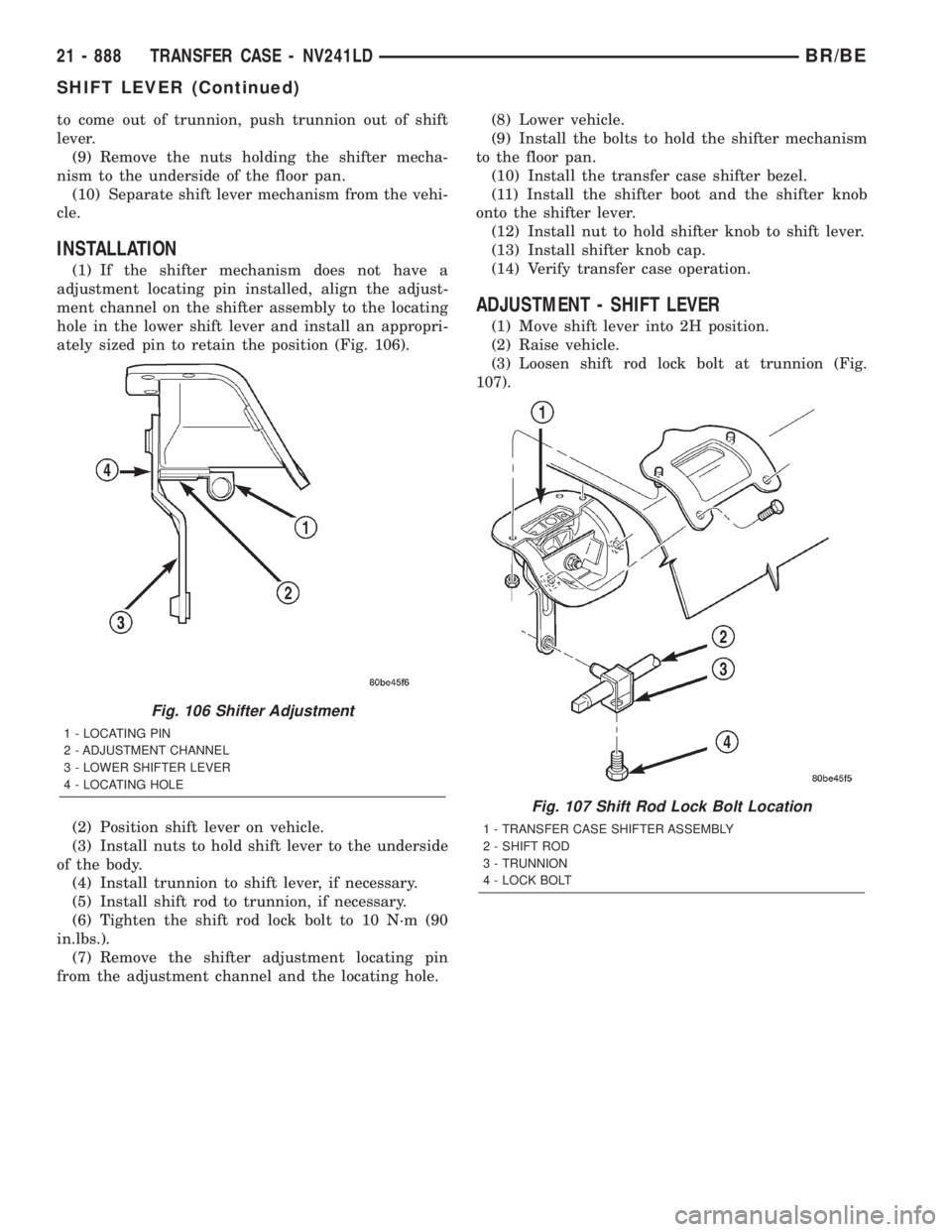
(1) If the shifter mechanism does not have a
adjustment locating pin installed, align the adjust-
ment channel on the shifter assembly to the locating
hole in the lower shift lever and install an appropri-
ately sized pin to retain the position (Fig. 106).
(2) Position shift lever on vehicle.
(3) Install nuts to hold shift lever to the underside
of the body.
(4) Install trunnion to shift lever, if necessary.
(5) Install shift rod to trunnion, if necessary.
(6) Tighten the shift rod lock bolt to 10 N´m (90
in.lbs.).
(7) Remove the shifter adjustment locating pin
from the adjustment channel and the locating hole.(8) Lower vehicle.
(9) Install the bolts to hold the shifter mechanism
to the floor pan.
(10) Install the transfer case shifter bezel.
(11) Install the shifter boot and the shifter knob
onto the shifter lever.
(12) Install nut to hold shifter knob to shift lever.
(13) Install shifter knob cap.
(14) Verify transfer case operation.
ADJUSTMENT - SHIFT LEVER
(1) Move shift lever into 2H position.
(2) Raise vehicle.
(3) Loosen shift rod lock bolt at trunnion (Fig.
107).
Fig. 106 Shifter Adjustment
1 - LOCATING PIN
2 - ADJUSTMENT CHANNEL
3 - LOWER SHIFTER LEVER
4 - LOCATING HOLE
Fig. 107 Shift Rod Lock Bolt Location
1 - TRANSFER CASE SHIFTER ASSEMBLY
2 - SHIFT ROD
3 - TRUNNION
4 - LOCK BOLT
21 - 888 TRANSFER CASE - NV241LDBR/BE
SHIFT LEVER (Continued)
Page 2524 of 2889
(4) Check shift rod fit in trunnion. Be sure rod
does not bind in trunnion. Lubricate the shift rod
and trunnion if necessary.
(5) Verify that transfer case shift lever is in 2H
detent position. The 2H detent position on the trans-
fer case shift arm is the second position from full for-
ward.
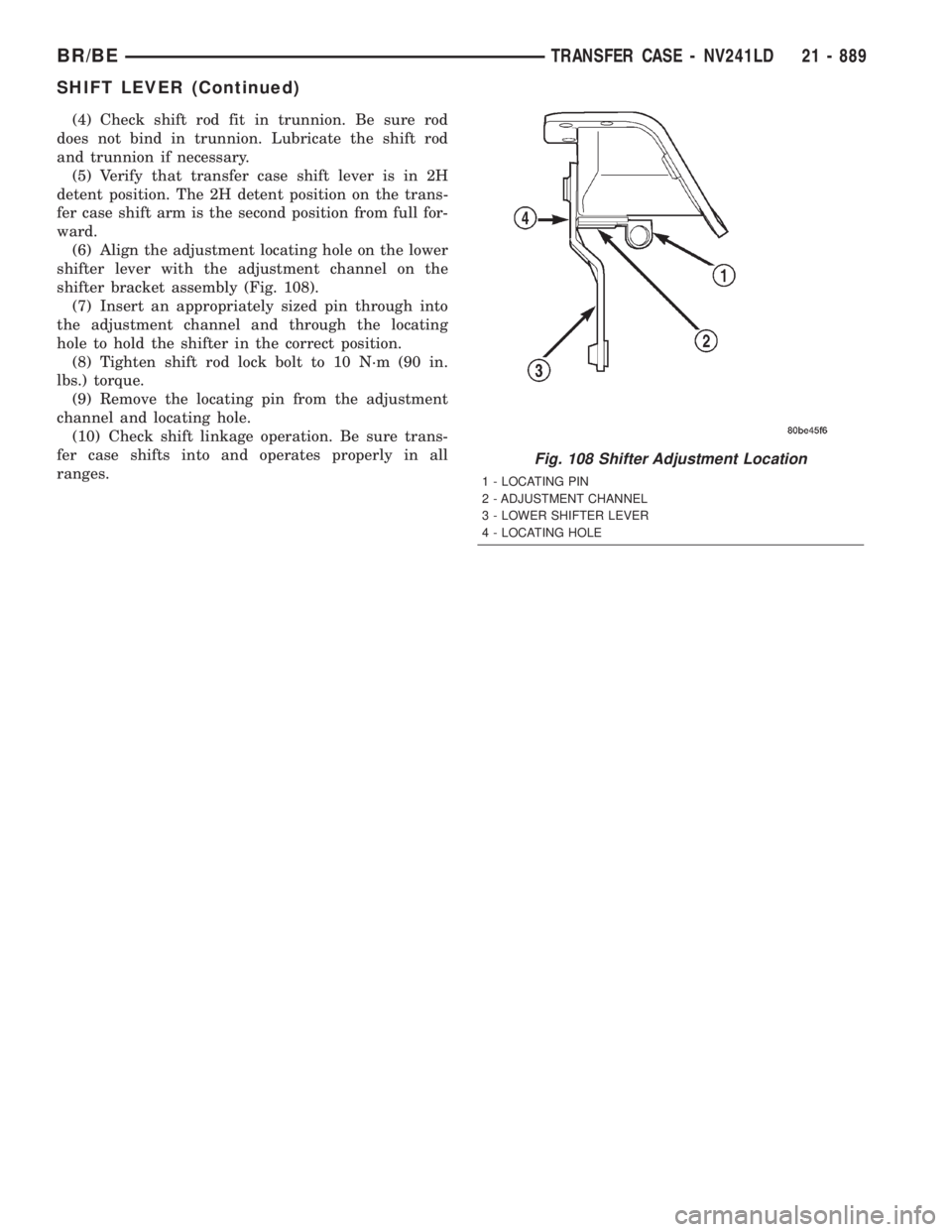
(6) Align the adjustment locating hole on the lower
shifter lever with the adjustment channel on the
shifter bracket assembly (Fig. 108).
(7) Insert an appropriately sized pin through into
the adjustment channel and through the locating
hole to hold the shifter in the correct position.
(8) Tighten shift rod lock bolt to 10 N´m (90 in.
lbs.) torque.
(9) Remove the locating pin from the adjustment
channel and locating hole.
(10) Check shift linkage operation. Be sure trans-
fer case shifts into and operates properly in all
ranges.
Fig. 108 Shifter Adjustment Location
1 - LOCATING PIN
2 - ADJUSTMENT CHANNEL
3 - LOWER SHIFTER LEVER
4 - LOCATING HOLE
BR/BETRANSFER CASE - NV241LD 21 - 889
SHIFT LEVER (Continued)
Page 2529 of 2889
REMOVAL
(1) Raise and support vehicle.
(2) Remove skid plate, if equipped. (Refer to 13 -
FRAMES & BUMPERS/FRAME/TRANSFER CASE
SKID PLATE - REMOVAL)
(3) Position drain oil container under transfer
case.
(4) Remove transfer case drain plug and drain
lubricant into container.
(5) Disconnect vent hose and vacuum harness at
transfer case switch.
(6) Disconnect shift rod from grommet in transfer
case shift lever, or from floor shift arm whichever
provides easy access. Use channel lock style pliers to
press rod out of lever grommet.
(7) Support transmission with jack stand.
(8) Remove rear crossmember.
(9) Mark front and rear propeller shafts for assem-
bly reference.
(10) Remove front and rear propeller shafts. (Refer
to 3 - DIFFERENTIAL & DRIVELINE/PROPELLER
SHAFT/PROPELLER SHAFT - REMOVAL)
(11) Support transfer case with suitable jack.
Secure transfer case to jack with safety chains.
(12) Remove nuts attaching transfer case to trans-
mission.
(13) Move transfer case assembly rearward until
free of transmission output shaft.
(14) Lower jack and move transfer case from
under vehicle.
DISASSEMBLY
Position transfer case in a shallow drain pan.
Remove drain plug and drain any remaining lubri-
cant remaining in case.
EXTENSION HOUSING
(1) Remove extension housing snap-ring access
cover.
(2) Remove bolts holding extension housing to rear
case half.
(3) Tap extension housing with plastic or rawhide
hammer to loosen sealant.
(4) Disengage extension housing snap-ring from
rear output shaft bearing.
(5) Separate extension housing from transfer case.
COMPANION FLANGE AND SHIFT LEVER
(1) Shift transfer case into NEUTRAL.
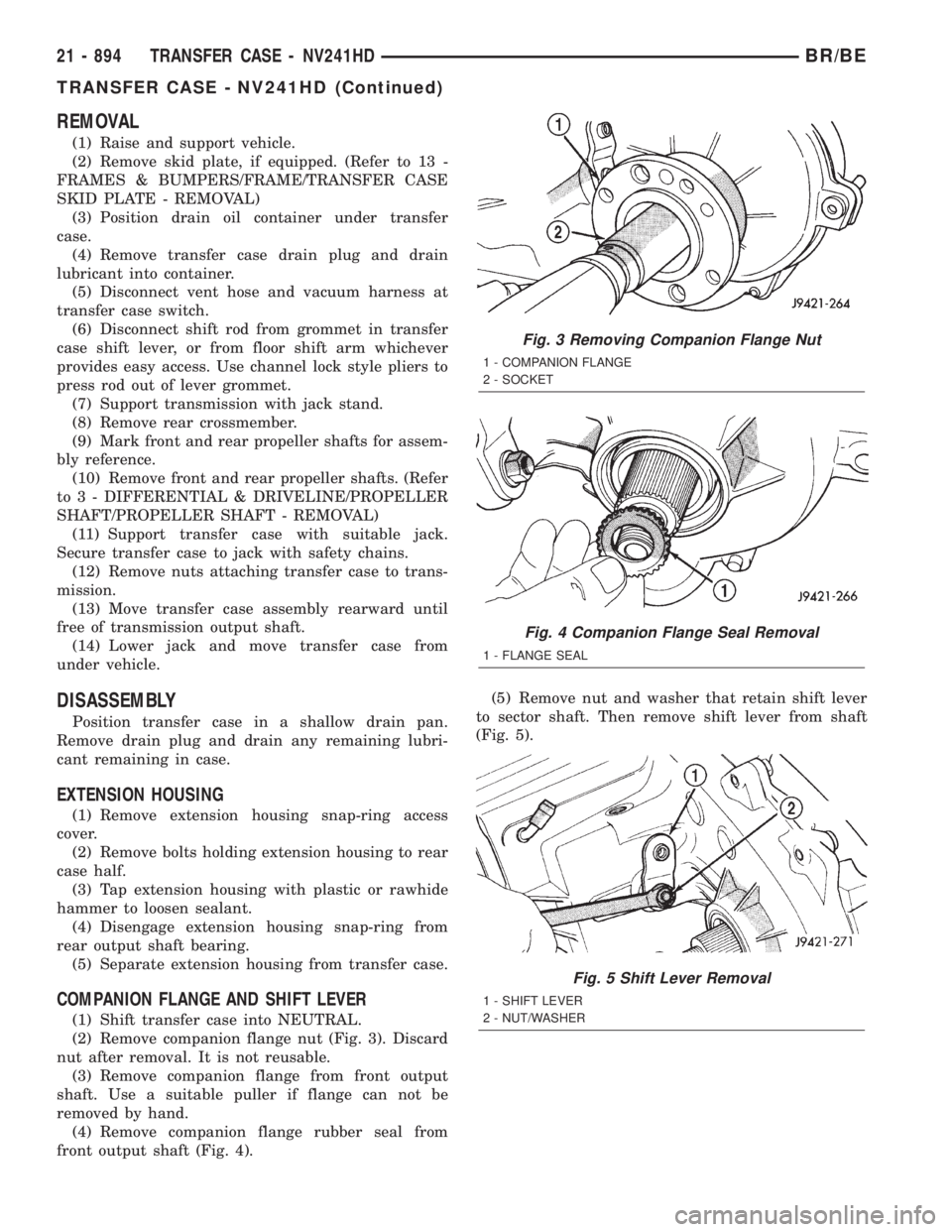
(2) Remove companion flange nut (Fig. 3). Discard
nut after removal. It is not reusable.
(3) Remove companion flange from front output
shaft. Use a suitable puller if flange can not be
removed by hand.
(4) Remove companion flange rubber seal from
front output shaft (Fig. 4).(5) Remove nut and washer that retain shift lever
to sector shaft. Then remove shift lever from shaft
(Fig. 5).
Fig. 3 Removing Companion Flange Nut
1 - COMPANION FLANGE
2 - SOCKET
Fig. 4 Companion Flange Seal Removal
1 - FLANGE SEAL
Fig. 5 Shift Lever Removal
1 - SHIFT LEVER
2 - NUT/WASHER
21 - 894 TRANSFER CASE - NV241HDBR/BE
TRANSFER CASE - NV241HD (Continued)
Page 2535 of 2889
INPUT AND PLANETARY GEAR
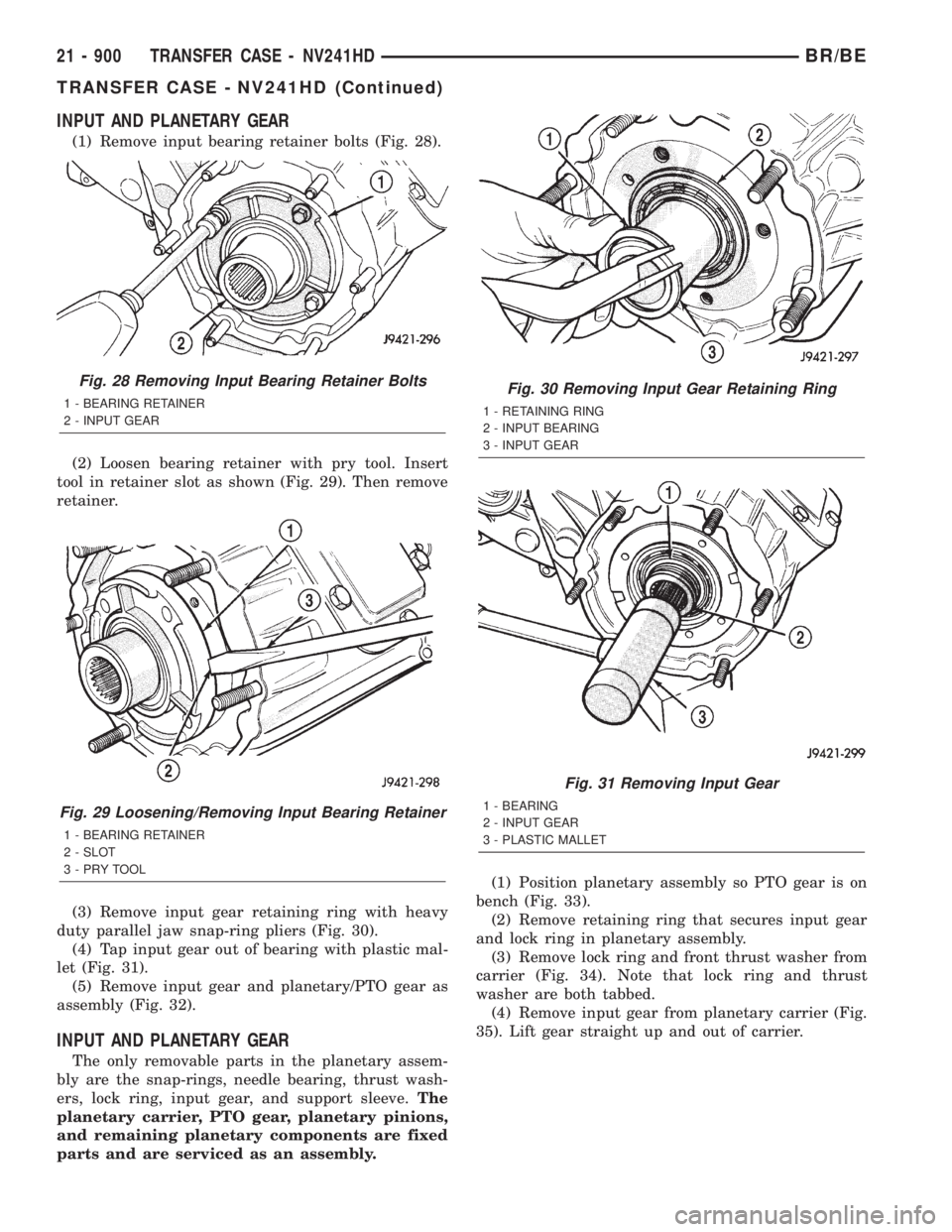
(1) Remove input bearing retainer bolts (Fig. 28).
(2) Loosen bearing retainer with pry tool. Insert
tool in retainer slot as shown (Fig. 29). Then remove
retainer.
(3) Remove input gear retaining ring with heavy
duty parallel jaw snap-ring pliers (Fig. 30).
(4) Tap input gear out of bearing with plastic mal-
let (Fig. 31).
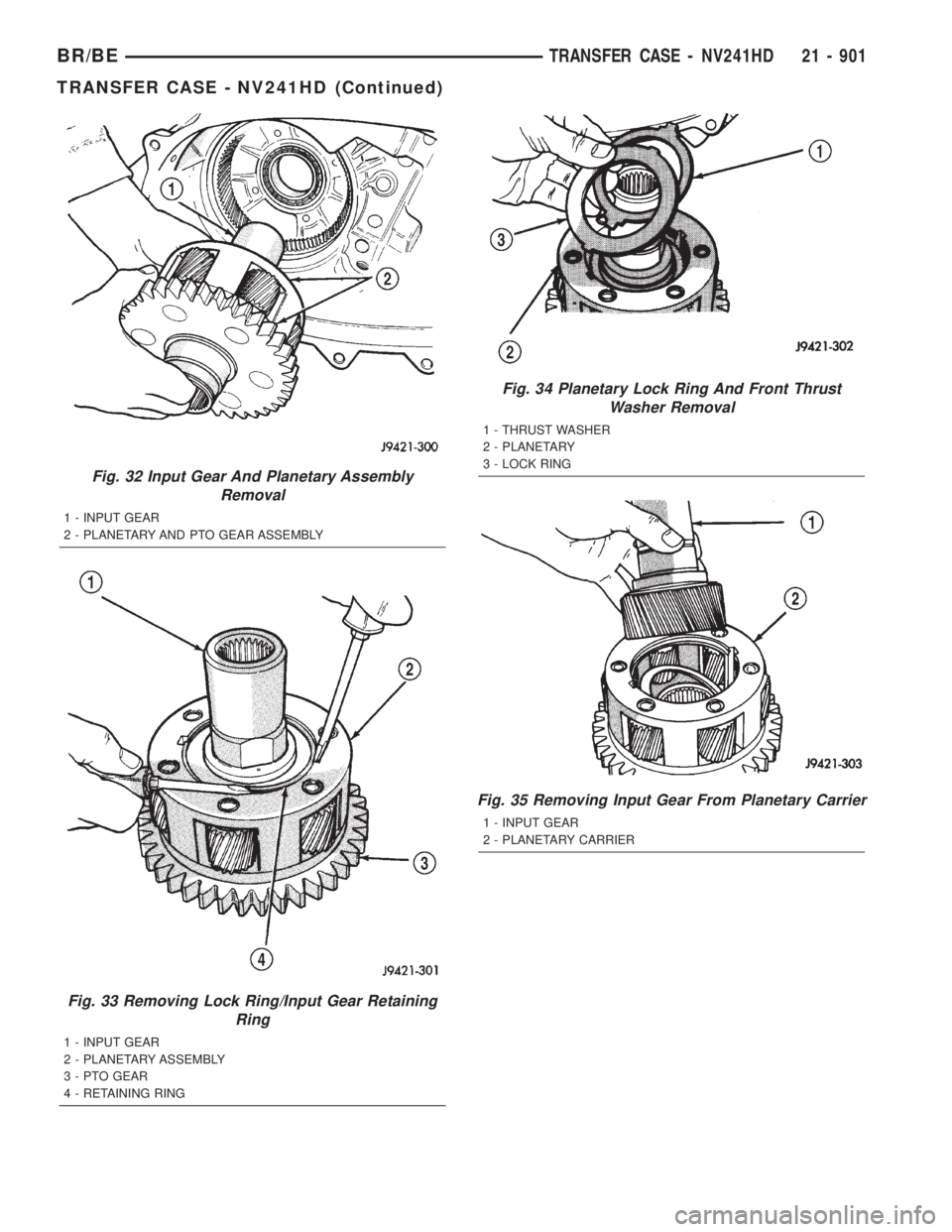
(5) Remove input gear and planetary/PTO gear as
assembly (Fig. 32).
INPUT AND PLANETARY GEAR
The only removable parts in the planetary assem-
bly are the snap-rings, needle bearing, thrust wash-
ers, lock ring, input gear, and support sleeve.The
planetary carrier, PTO gear, planetary pinions,
and remaining planetary components are fixed
parts and are serviced as an assembly.(1) Position planetary assembly so PTO gear is on
bench (Fig. 33).
(2) Remove retaining ring that secures input gear
and lock ring in planetary assembly.
(3) Remove lock ring and front thrust washer from
carrier (Fig. 34). Note that lock ring and thrust
washer are both tabbed.
(4) Remove input gear from planetary carrier (Fig.
35). Lift gear straight up and out of carrier.
Fig. 28 Removing Input Bearing Retainer Bolts
1 - BEARING RETAINER
2 - INPUT GEAR
Fig. 29 Loosening/Removing Input Bearing Retainer
1 - BEARING RETAINER
2 - SLOT
3-PRYTOOL
Fig. 30 Removing Input Gear Retaining Ring
1 - RETAINING RING
2 - INPUT BEARING
3 - INPUT GEAR
Fig. 31 Removing Input Gear
1 - BEARING
2 - INPUT GEAR
3 - PLASTIC MALLET
21 - 900 TRANSFER CASE - NV241HDBR/BE
TRANSFER CASE - NV241HD (Continued)
Page 2536 of 2889
Fig. 32 Input Gear And Planetary Assembly
Removal
1 - INPUT GEAR
2 - PLANETARY AND PTO GEAR ASSEMBLY
Fig. 33 Removing Lock Ring/Input Gear Retaining
Ring
1 - INPUT GEAR
2 - PLANETARY ASSEMBLY
3 - PTO GEAR
4 - RETAINING RING
Fig. 34 Planetary Lock Ring And Front Thrust
Washer Removal
1 - THRUST WASHER
2 - PLANETARY
3 - LOCK RING
Fig. 35 Removing Input Gear From Planetary Carrier
1 - INPUT GEAR
2 - PLANETARY CARRIER
BR/BETRANSFER CASE - NV241HD 21 - 901
TRANSFER CASE - NV241HD (Continued)
Page 2539 of 2889
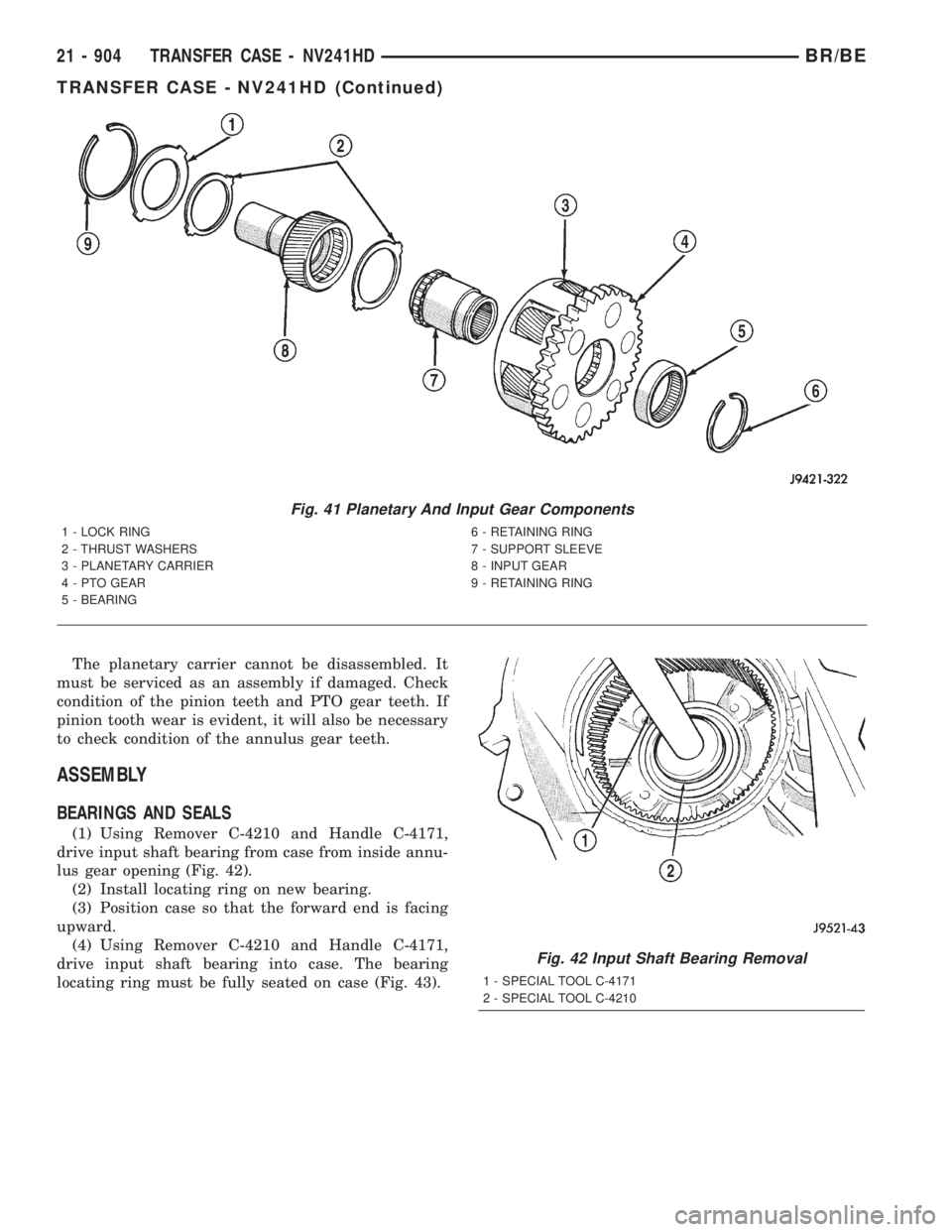
The planetary carrier cannot be disassembled. It
must be serviced as an assembly if damaged. Check
condition of the pinion teeth and PTO gear teeth. If
pinion tooth wear is evident, it will also be necessary
to check condition of the annulus gear teeth.
ASSEMBLY
BEARINGS AND SEALS
(1) Using Remover C-4210 and Handle C-4171,
drive input shaft bearing from case from inside annu-
lus gear opening (Fig. 42).
(2) Install locating ring on new bearing.
(3) Position case so that the forward end is facing
upward.
(4) Using Remover C-4210 and Handle C-4171,
drive input shaft bearing into case. The bearing
locating ring must be fully seated on case (Fig. 43).
Fig. 41 Planetary And Input Gear Components
1 - LOCK RING 6 - RETAINING RING
2 - THRUST WASHERS 7 - SUPPORT SLEEVE
3 - PLANETARY CARRIER 8 - INPUT GEAR
4 - PTO GEAR 9 - RETAINING RING
5 - BEARING
Fig. 42 Input Shaft Bearing Removal
1 - SPECIAL TOOL C-4171
2 - SPECIAL TOOL C-4210
21 - 904 TRANSFER CASE - NV241HDBR/BE
TRANSFER CASE - NV241HD (Continued)
Page 2543 of 2889
INPUT AND PLANETARY GEAR
(1) Lubricate planetary components with transmis-
sion fluid.
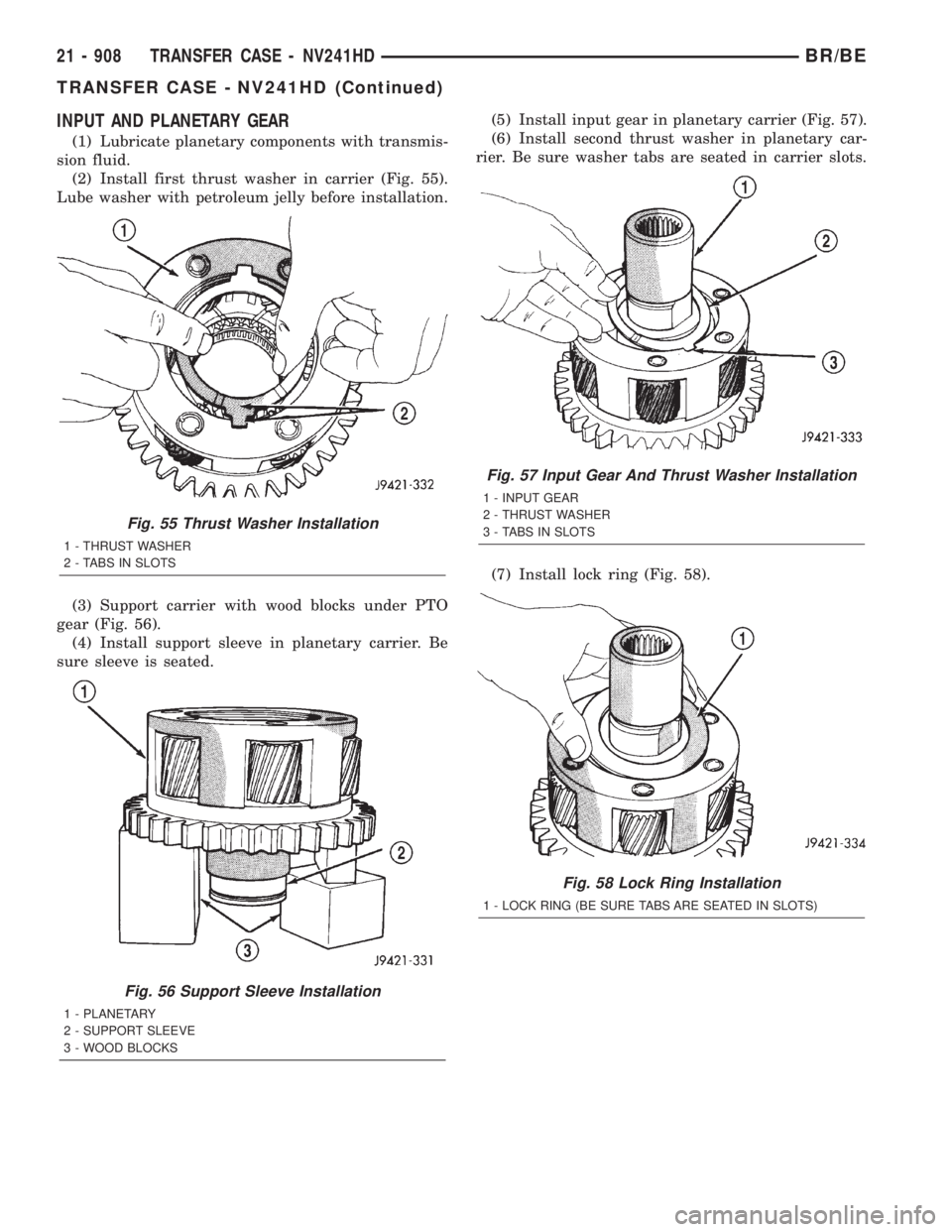
(2) Install first thrust washer in carrier (Fig. 55).
Lube washer with petroleum jelly before installation.
(3) Support carrier with wood blocks under PTO
gear (Fig. 56).
(4) Install support sleeve in planetary carrier. Be
sure sleeve is seated.(5) Install input gear in planetary carrier (Fig. 57).
(6) Install second thrust washer in planetary car-
rier. Be sure washer tabs are seated in carrier slots.
(7) Install lock ring (Fig. 58).
Fig. 55 Thrust Washer Installation
1 - THRUST WASHER
2 - TABS IN SLOTS
Fig. 56 Support Sleeve Installation
1 - PLANETARY
2 - SUPPORT SLEEVE
3 - WOOD BLOCKS
Fig. 57 Input Gear And Thrust Washer Installation
1 - INPUT GEAR
2 - THRUST WASHER
3 - TABS IN SLOTS
Fig. 58 Lock Ring Installation
1 - LOCK RING (BE SURE TABS ARE SEATED IN SLOTS)
21 - 908 TRANSFER CASE - NV241HDBR/BE
TRANSFER CASE - NV241HD (Continued)