2000 NISSAN PATROL Engine harness
[x] Cancel search: Engine harnessPage 82 of 1033
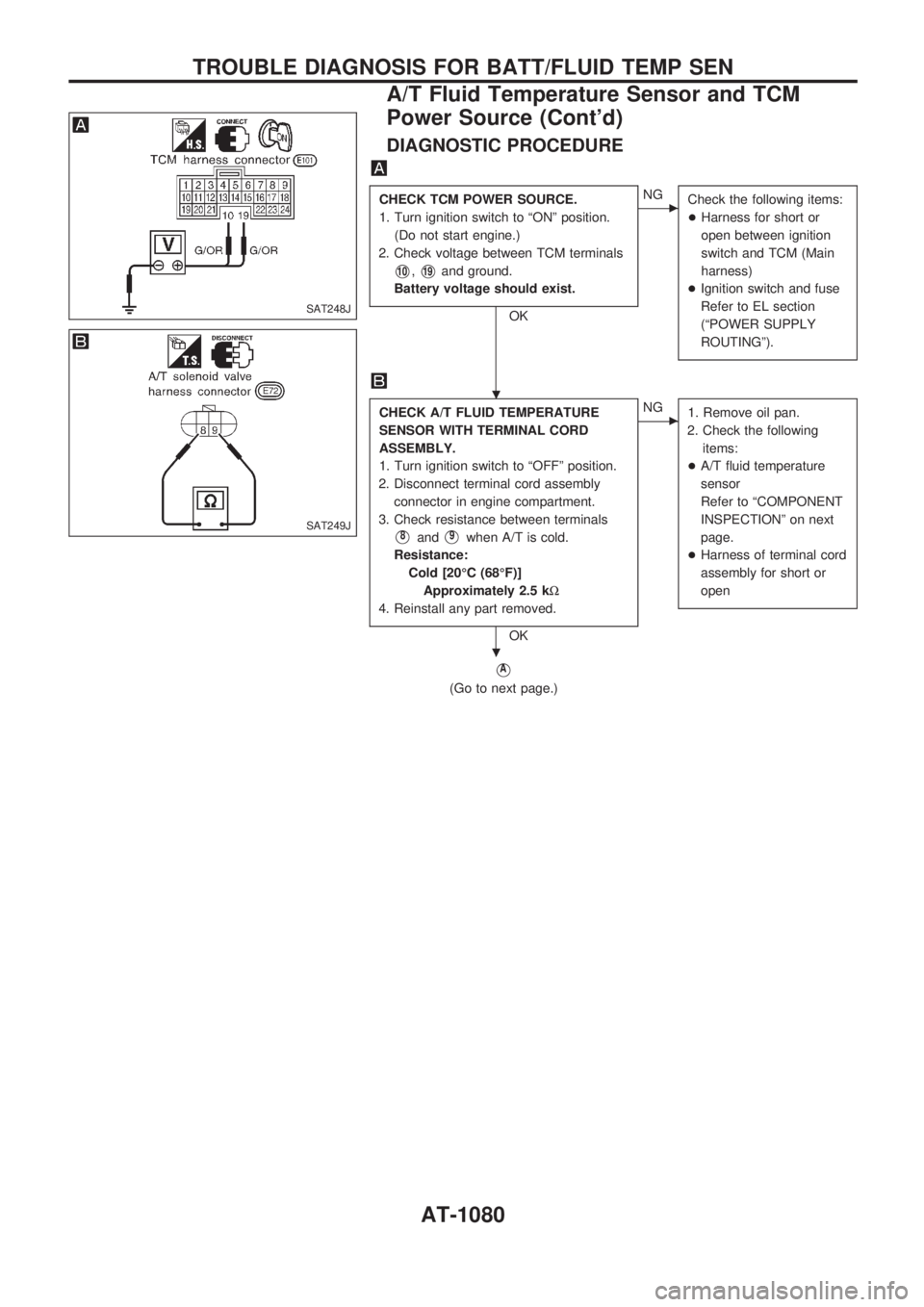
DIAGNOSTIC PROCEDURE
CHECK TCM POWER SOURCE.
1. Turn ignition switch to ªONº position.
(Do not start engine.)
2. Check voltage between TCM terminals
V10,V19and ground.
Battery voltage should exist.
OK
cNG
Check the following items:
+Harness for short or
open between ignition
switch and TCM (Main
harness)
+Ignition switch and fuse
Refer to EL section
(ªPOWER SUPPLY
ROUTINGº).
CHECK A/T FLUID TEMPERATURE
SENSOR WITH TERMINAL CORD
ASSEMBLY.
1. Turn ignition switch to ªOFFº position.
2. Disconnect terminal cord assembly
connector in engine compartment.
3. Check resistance between terminals
V8andV9when A/T is cold.
Resistance:
Cold [20ÉC (68ÉF)]
Approximately 2.5 kW
4. Reinstall any part removed.
OK
cNG
1. Remove oil pan.
2. Check the following
items:
+A/T fluid temperature
sensor
Refer to ªCOMPONENT
INSPECTIONº on next
page.
+Harness of terminal cord
assembly for short or
open
VA
(Go to next page.)
SAT248J
SAT249J
.
.
TROUBLE DIAGNOSIS FOR BATT/FLUID TEMP SEN
A/T Fluid Temperature Sensor and TCM
Power Source (Cont'd)
AT-1080
Page 83 of 1033
![NISSAN PATROL 2000 Electronic Repair Manual VA
CHECK INPUT SIGNAL OF A/T FLUID
TEMPERATURE SENSOR.
1. Start engine.
2. Select ªTCM INPUT SIGNALSº
in Data Monitor.
3. Read out the value of ªFLUID
TEMP SEº.
Voltage:
Cold [20ÉC (68ÉF)]®
Hot](/manual-img/5/57367/w960_57367-82.png "NISSAN PATROL 2000 Electronic Repair Manual VA
CHECK INPUT SIGNAL OF A/T FLUID
TEMPERATURE SENSOR.
1. Start engine.
2. Select ªTCM INPUT SIGNALSº
in Data Monitor.
3. Read out the value of ªFLUID
TEMP SEº.
Voltage:
Cold [20ÉC (68ÉF)]®
Hot")
VA
CHECK INPUT SIGNAL OF A/T FLUID
TEMPERATURE SENSOR.
1. Start engine.
2. Select ªTCM INPUT SIGNALSº
in Data Monitor.
3. Read out the value of ªFLUID
TEMP SEº.
Voltage:
Cold [20ÉC (68ÉF)]®
Hot [80ÉC (176ÉF)]:
Approximately
1.5V®0.5V
------------------------------------------------------------------------------------------------------------------------------------OR------------------------------------------------------------------------------------------------------------------------------------
1. Start engine.
2. Check voltage between TCM
terminal
V47and ground while
warming up A/T.
Voltage:
Cold [20ÉC (68ÉF)]®
Hot [80ÉC (176ÉF)]:
Approximately
1.5V®0.5V
OK
cNG
Check the following item:
+Harness for short or
open between TCM and
terminal cord assembly
(Main harness)
Perform ªSELF-DIAGNOSIS CODE CON-
FIRMATION PROCEDUREº, AT-1079.
OK
cNG
1. Perform TCM input/
output signal inspection.
2. If NG, recheck TCM pin
terminals for damage or
loose connection with
harness connector.
INSPECTION END
COMPONENT INSPECTION
A/T fluid temperature sensor
+For removal, refer to AT-1124.
+Check resistance between terminals
V8andV9while chang-
ing temperature as shown at left.
Temperature ÉC (ÉF) Resistance
20 (68) Approximately 2.5 kW
80 (176) Approximately 0.3 kW
SAT738J
SAT250J
SAT252J
.
.
.
TROUBLE DIAGNOSIS FOR BATT/FLUID TEMP SEN
A/T Fluid Temperature Sensor and TCM
Power Source (Cont'd)
AT-1081
Page 84 of 1033
Engine Speed Signal
DESCRIPTION
The engine speed signal is sent from the ECM to the TCM.
ON BOARD DIAGNOSIS LOGIC
Diagnostic trouble code Malfunction is detected when ...Check items
(Possible cause)
:
ENGINE SPEED SIG
TCM does not receive the proper volt-
age signal from ECM.+Harness or connectors
(The sensor circuit is open or
shorted.)
:
9th judgement flicker
SELF-DIAGNOSIS CODE CONFIRMATION
PROCEDURE
After the repair, perform the following procedure to confirm the
malfunction is eliminated.
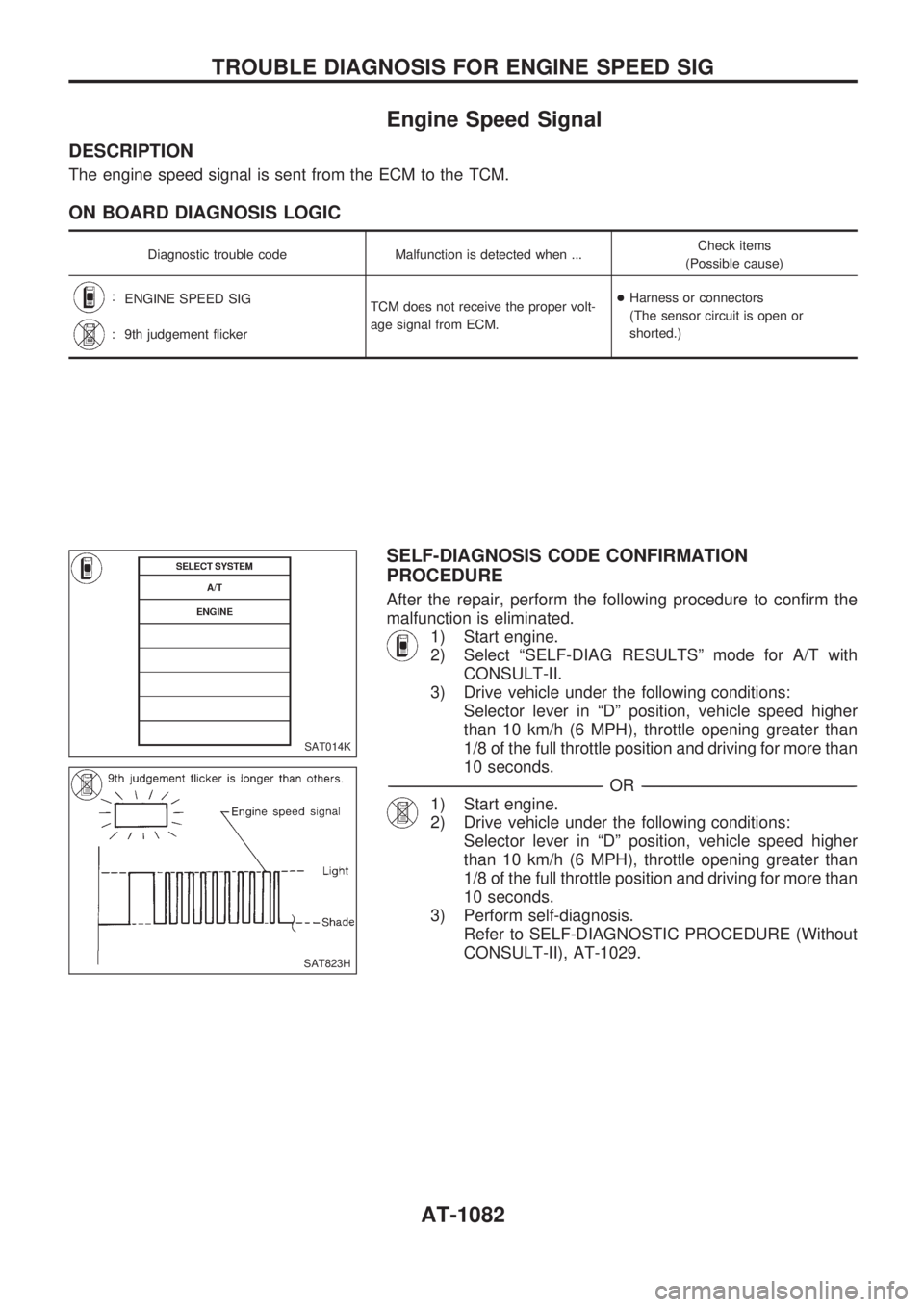
1) Start engine.
2) Select ªSELF-DIAG RESULTSº mode for A/T with
CONSULT-II.
3) Drive vehicle under the following conditions:
Selector lever in ªDº position, vehicle speed higher
than 10 km/h (6 MPH), throttle opening greater than
1/8 of the full throttle position and driving for more than
10 seconds.
-------------------------------------------------------------------------------------------------------------------------------------------------------------------------------------------------------------------------------------------------OR-------------------------------------------------------------------------------------------------------------------------------------------------------------------------------------------------------------------------------------------------
1) Start engine.
2) Drive vehicle under the following conditions:
Selector lever in ªDº position, vehicle speed higher
than 10 km/h (6 MPH), throttle opening greater than
1/8 of the full throttle position and driving for more than
10 seconds.
3) Perform self-diagnosis.
Refer to SELF-DIAGNOSTIC PROCEDURE (Without
CONSULT-II), AT-1029.
SAT014K
SAT823H
TROUBLE DIAGNOSIS FOR ENGINE SPEED SIG
AT-1082
Page 85 of 1033
DIAGNOSTIC PROCEDURE
Perform diagnostic test mode II (self-
diagnostic results) for engine control.
Check ignition signal circuit condition.
OK
cNG
Check ignition signal cir-
cuit for engine control.
Refer to EC section
[TROUBLE DIAGNOSIS
FOR ªIGN SIGNAL-PRI-
MARYº (DTC 21)].
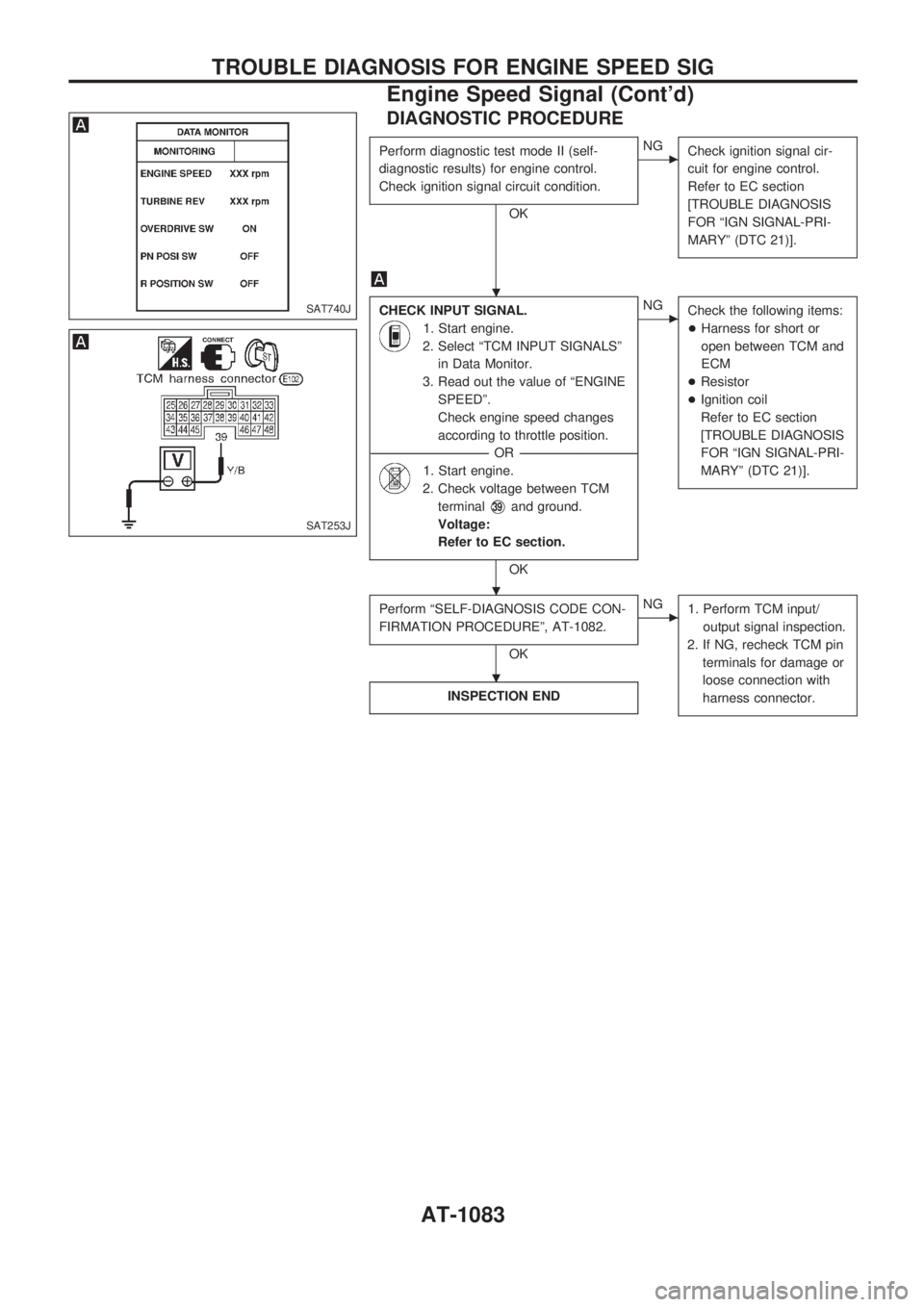
CHECK INPUT SIGNAL.
1. Start engine.
2. Select ªTCM INPUT SIGNALSº
in Data Monitor.
3. Read out the value of ªENGINE
SPEEDº.
Check engine speed changes
according to throttle position.
------------------------------------------------------------------------------------------------------------------------------------OR------------------------------------------------------------------------------------------------------------------------------------
1. Start engine.
2. Check voltage between TCM
terminal
V39and ground.
Voltage:
Refer to EC section.
OK
cNG
Check the following items:
+Harness for short or
open between TCM and
ECM
+Resistor
+Ignition coil
Refer to EC section
[TROUBLE DIAGNOSIS
FOR ªIGN SIGNAL-PRI-
MARYº (DTC 21)].
Perform ªSELF-DIAGNOSIS CODE CON-
FIRMATION PROCEDUREº, AT-1082.
OK
cNG
1. Perform TCM input/
output signal inspection.
2. If NG, recheck TCM pin
terminals for damage or
loose connection with
harness connector.
INSPECTION END
SAT740J
SAT253J
.
.
.
TROUBLE DIAGNOSIS FOR ENGINE SPEED SIG
Engine Speed Signal (Cont'd)
AT-1083
Page 86 of 1033
Line Pressure Solenoid Valve
DESCRIPTION
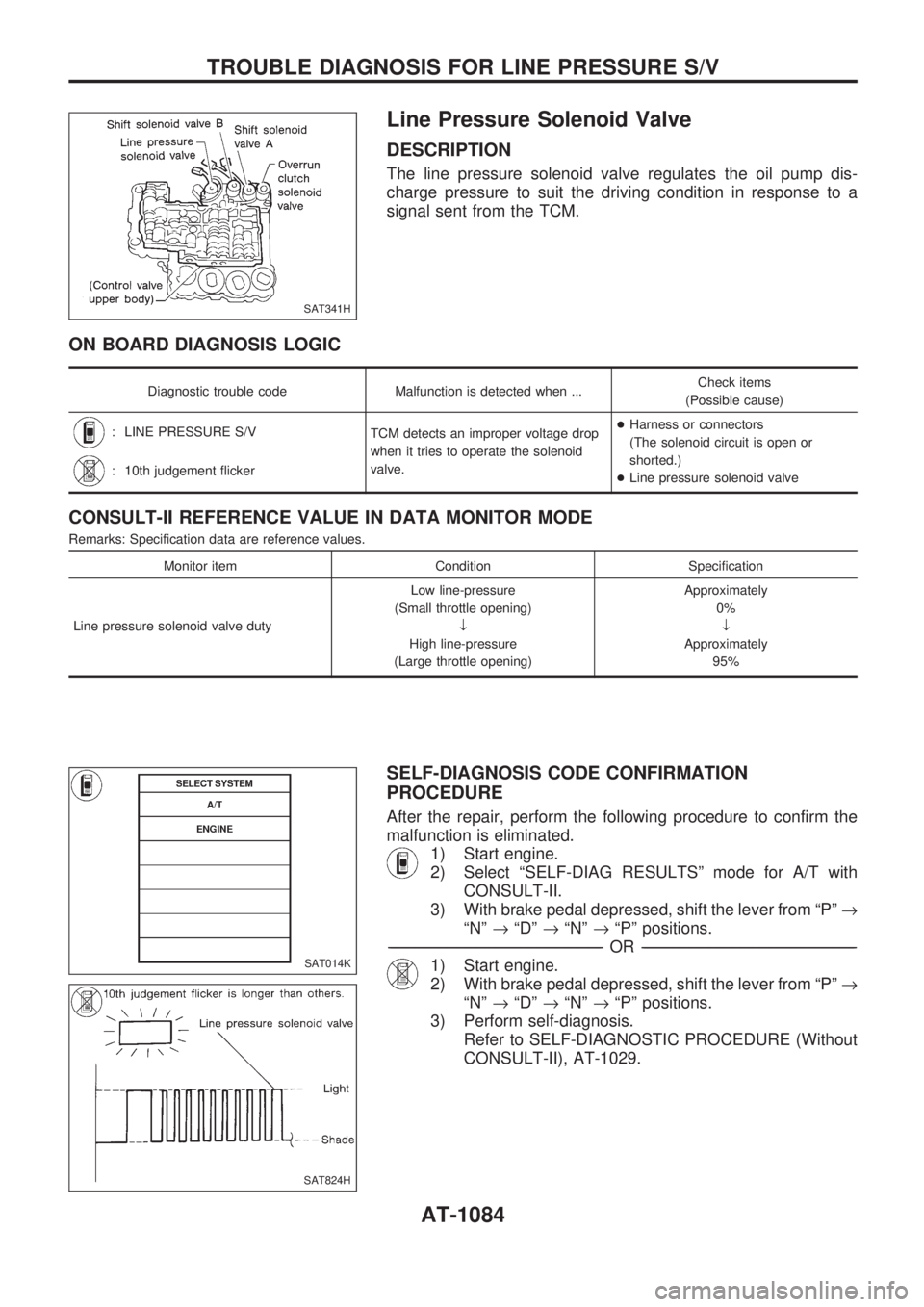
The line pressure solenoid valve regulates the oil pump dis-
charge pressure to suit the driving condition in response to a
signal sent from the TCM.
ON BOARD DIAGNOSIS LOGIC
Diagnostic trouble code Malfunction is detected when ...Check items
(Possible cause)
: LINE PRESSURE S/V
TCM detects an improper voltage drop
when it tries to operate the solenoid
valve.+Harness or connectors
(The solenoid circuit is open or
shorted.)
+Line pressure solenoid valve
: 10th judgement flicker
CONSULT-II REFERENCE VALUE IN DATA MONITOR MODE
Remarks: Specification data are reference values.
Monitor item Condition Specification
Line pressure solenoid valve dutyLow line-pressure
(Small throttle opening)
¯
High line-pressure
(Large throttle opening)Approximately
0%
¯
Approximately
95%
SELF-DIAGNOSIS CODE CONFIRMATION
PROCEDURE
After the repair, perform the following procedure to confirm the
malfunction is eliminated.
1) Start engine.
2) Select ªSELF-DIAG RESULTSº mode for A/T with
CONSULT-II.
3) With brake pedal depressed, shift the lever from ªPº®
ªNº®ªDº®ªNº®ªPº positions.
-------------------------------------------------------------------------------------------------------------------------------------------------------------------------------------------------------------------------------------------------OR-------------------------------------------------------------------------------------------------------------------------------------------------------------------------------------------------------------------------------------------------
1) Start engine.
2) With brake pedal depressed, shift the lever from ªPº®
ªNº®ªDº®ªNº®ªPº positions.
3) Perform self-diagnosis.
Refer to SELF-DIAGNOSTIC PROCEDURE (Without
CONSULT-II), AT-1029.
SAT341H
SAT014K
SAT824H
TROUBLE DIAGNOSIS FOR LINE PRESSURE S/V
AT-1084
Page 87 of 1033
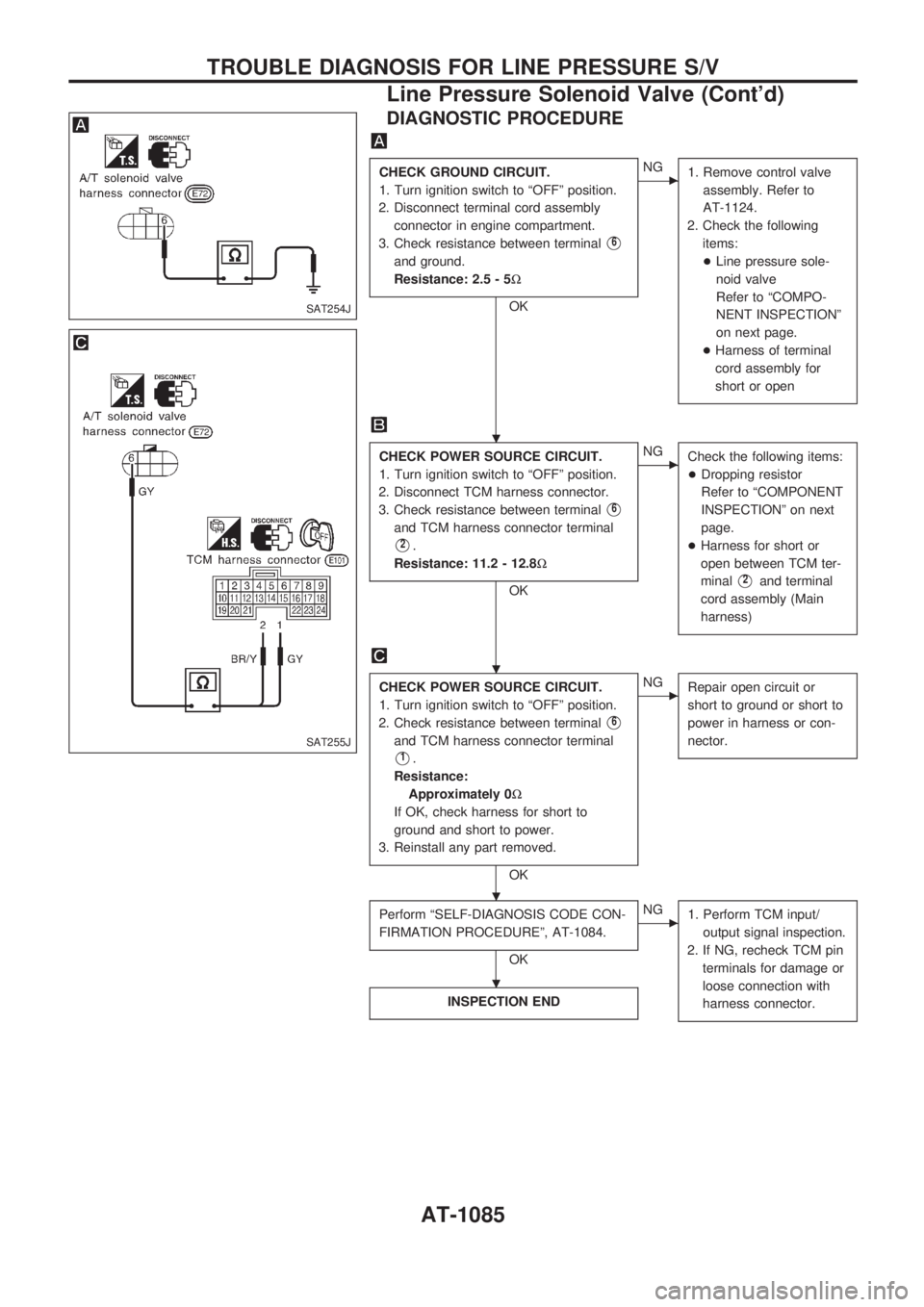
DIAGNOSTIC PROCEDURE
CHECK GROUND CIRCUIT.
1. Turn ignition switch to ªOFFº position.
2. Disconnect terminal cord assembly
connector in engine compartment.
3. Check resistance between terminal
V6
and ground.
Resistance: 2.5 - 5W
OK
cNG
1. Remove control valve
assembly. Refer to
AT-1124.
2. Check the following
items:
+Line pressure sole-
noid valve
Refer to ªCOMPO-
NENT INSPECTIONº
on next page.
+Harness of terminal
cord assembly for
short or open
CHECK POWER SOURCE CIRCUIT.
1. Turn ignition switch to ªOFFº position.
2. Disconnect TCM harness connector.
3. Check resistance between terminal
V6
and TCM harness connector terminal
V2.
Resistance: 11.2 - 12.8W
OK
cNG
Check the following items:
+Dropping resistor
Refer to ªCOMPONENT
INSPECTIONº on next
page.
+Harness for short or
open between TCM ter-
minal
V2and terminal
cord assembly (Main
harness)
CHECK POWER SOURCE CIRCUIT.
1. Turn ignition switch to ªOFFº position.
2. Check resistance between terminal
V6
and TCM harness connector terminal
V1.
Resistance:
Approximately 0W
If OK, check harness for short to
ground and short to power.
3. Reinstall any part removed.
OK
cNG
Repair open circuit or
short to ground or short to
power in harness or con-
nector.
Perform ªSELF-DIAGNOSIS CODE CON-
FIRMATION PROCEDUREº, AT-1084.
OK
cNG
1. Perform TCM input/
output signal inspection.
2. If NG, recheck TCM pin
terminals for damage or
loose connection with
harness connector.
INSPECTION END
SAT254J
SAT255J
.
.
.
.
TROUBLE DIAGNOSIS FOR LINE PRESSURE S/V
Line Pressure Solenoid Valve (Cont'd)
AT-1085
Page 94 of 1033
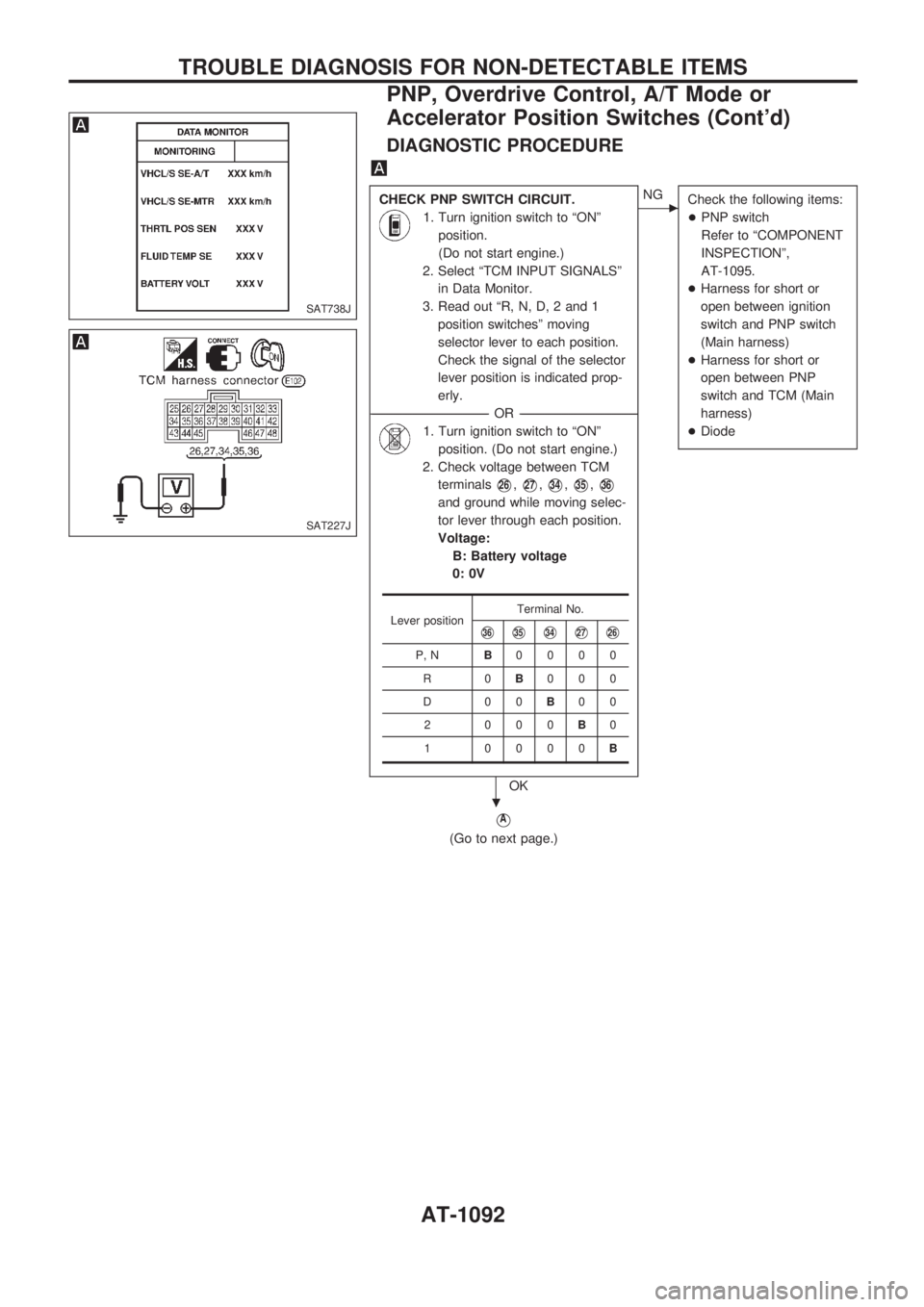
DIAGNOSTIC PROCEDURE
CHECK PNP SWITCH CIRCUIT.
1. Turn ignition switch to ªONº
position.
(Do not start engine.)
2. Select ªTCM INPUT SIGNALSº
in Data Monitor.
3. Read out ªR, N, D, 2 and 1
position switchesº moving
selector lever to each position.
Check the signal of the selector
lever position is indicated prop-
erly.
------------------------------------------------------------------------------------------------------------------------------------OR------------------------------------------------------------------------------------------------------------------------------------
1. Turn ignition switch to ªONº
position. (Do not start engine.)
2. Check voltage between TCM
terminals
V26,V27,V34,V35,V36
and ground while moving selec-
tor lever through each position.
Voltage:
B: Battery voltage
0: 0V
OK
cNG
Check the following items:
+PNP switch
Refer to ªCOMPONENT
INSPECTIONº,
AT-1095.
+Harness for short or
open between ignition
switch and PNP switch
(Main harness)
+Harness for short or
open between PNP
switch and TCM (Main
harness)
+Diode
VA
(Go to next page.)
Lever positionTerminal No.V36V35V34V27V26
P, NB0000
R0B000
D00B00
2 000B0
1 0000B
SAT738J
SAT227J
.
TROUBLE DIAGNOSIS FOR NON-DETECTABLE ITEMS
PNP, Overdrive Control, A/T Mode or
Accelerator Position Switches (Cont'd)
AT-1092
Page 95 of 1033
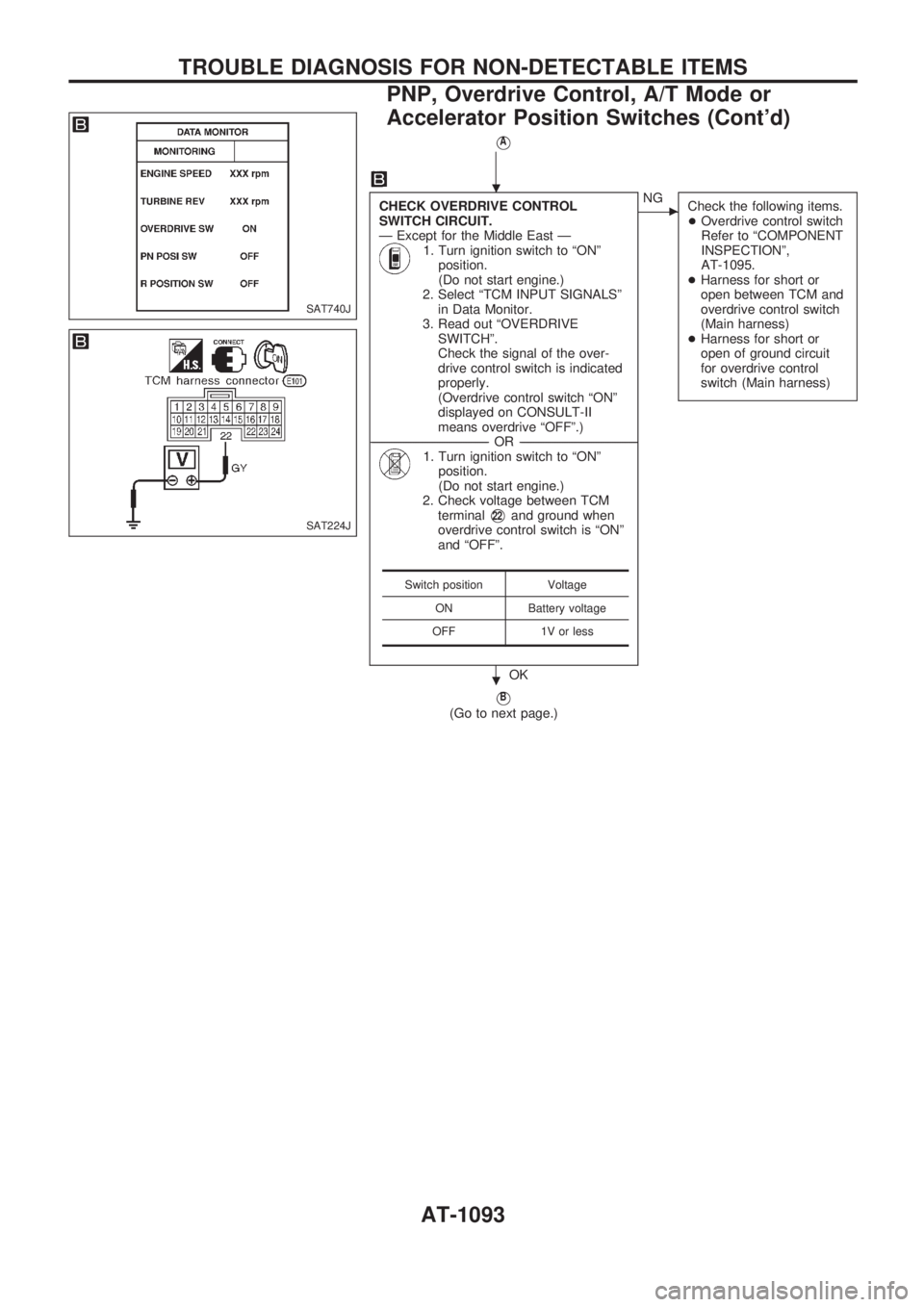
VA
CHECK OVERDRIVE CONTROL
SWITCH CIRCUIT.
Ð Except for the Middle East Ð
1. Turn ignition switch to ªONº
position.
(Do not start engine.)
2. Select ªTCM INPUT SIGNALSº
in Data Monitor.
3. Read out ªOVERDRIVE
SWITCHº.
Check the signal of the over-
drive control switch is indicated
properly.
(Overdrive control switch ªONº
displayed on CONSULT-II
means overdrive ªOFFº.)
------------------------------------------------------------------------------------------------------------------------------------OR------------------------------------------------------------------------------------------------------------------------------------
1. Turn ignition switch to ªONº
position.
(Do not start engine.)
2. Check voltage between TCM
terminal
V22and ground when
overdrive control switch is ªONº
and ªOFFº.
OK
cNG
Check the following items.
+Overdrive control switch
Refer to ªCOMPONENT
INSPECTIONº,
AT-1095.
+Harness for short or
open between TCM and
overdrive control switch
(Main harness)
+Harness for short or
open of ground circuit
for overdrive control
switch (Main harness)
VB
(Go to next page.)
Switch position Voltage
ON Battery voltage
OFF 1V or less
SAT740J
SAT224J
.
.
TROUBLE DIAGNOSIS FOR NON-DETECTABLE ITEMS
PNP, Overdrive Control, A/T Mode or
Accelerator Position Switches (Cont'd)
AT-1093