2000 NISSAN PATROL sensor
[x] Cancel search: sensorPage 651 of 1033
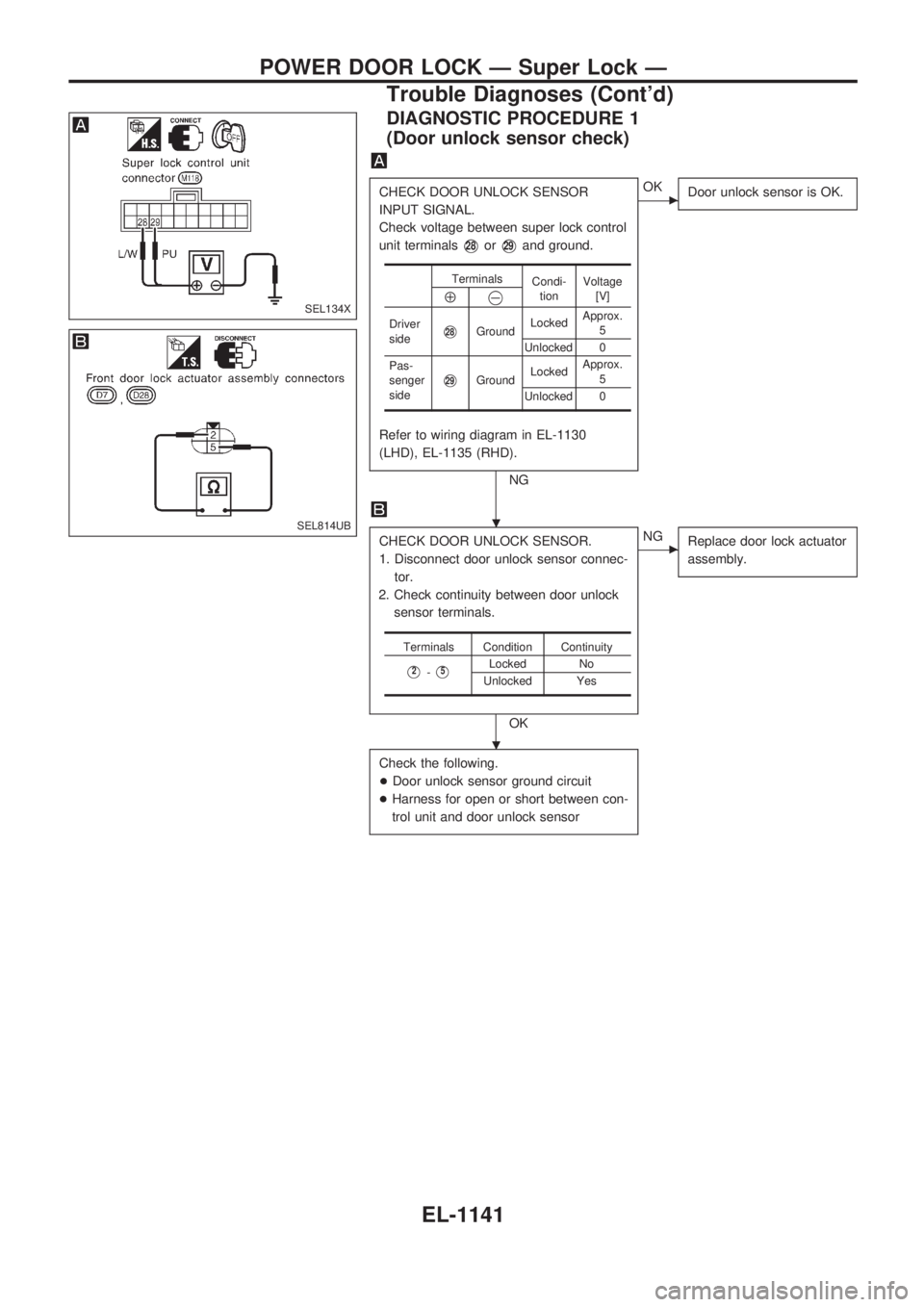
DIAGNOSTIC PROCEDURE 1
(Door unlock sensor check)
CHECK DOOR UNLOCK SENSOR
INPUT SIGNAL.
Check voltage between super lock control
unit terminals
V28orV29and ground.
Refer to wiring diagram in EL-1130
(LHD), EL-1135 (RHD).
NG
cOK
Door unlock sensor is OK.
CHECK DOOR UNLOCK SENSOR.
1. Disconnect door unlock sensor connec-
tor.
2. Check continuity between door unlock
sensor terminals.
OK
cNG
Replace door lock actuator
assembly.
Check the following.
+Door unlock sensor ground circuit
+Harness for open or short between con-
trol unit and door unlock sensor
Terminals
Condi-
tionVoltage
[V]
Å@
Driver
sideV28GroundLockedApprox.
5
Unlocked 0
Pas-
senger
side
V29GroundLockedApprox.
5
Unlocked 0
Terminals Condition Continuity
V2-V5Locked No
Unlocked Yes
SEL134X
SEL814UB.
.
POWER DOOR LOCK Ð Super Lock Ð
Trouble Diagnoses (Cont'd)
EL-1141
Page 659 of 1033
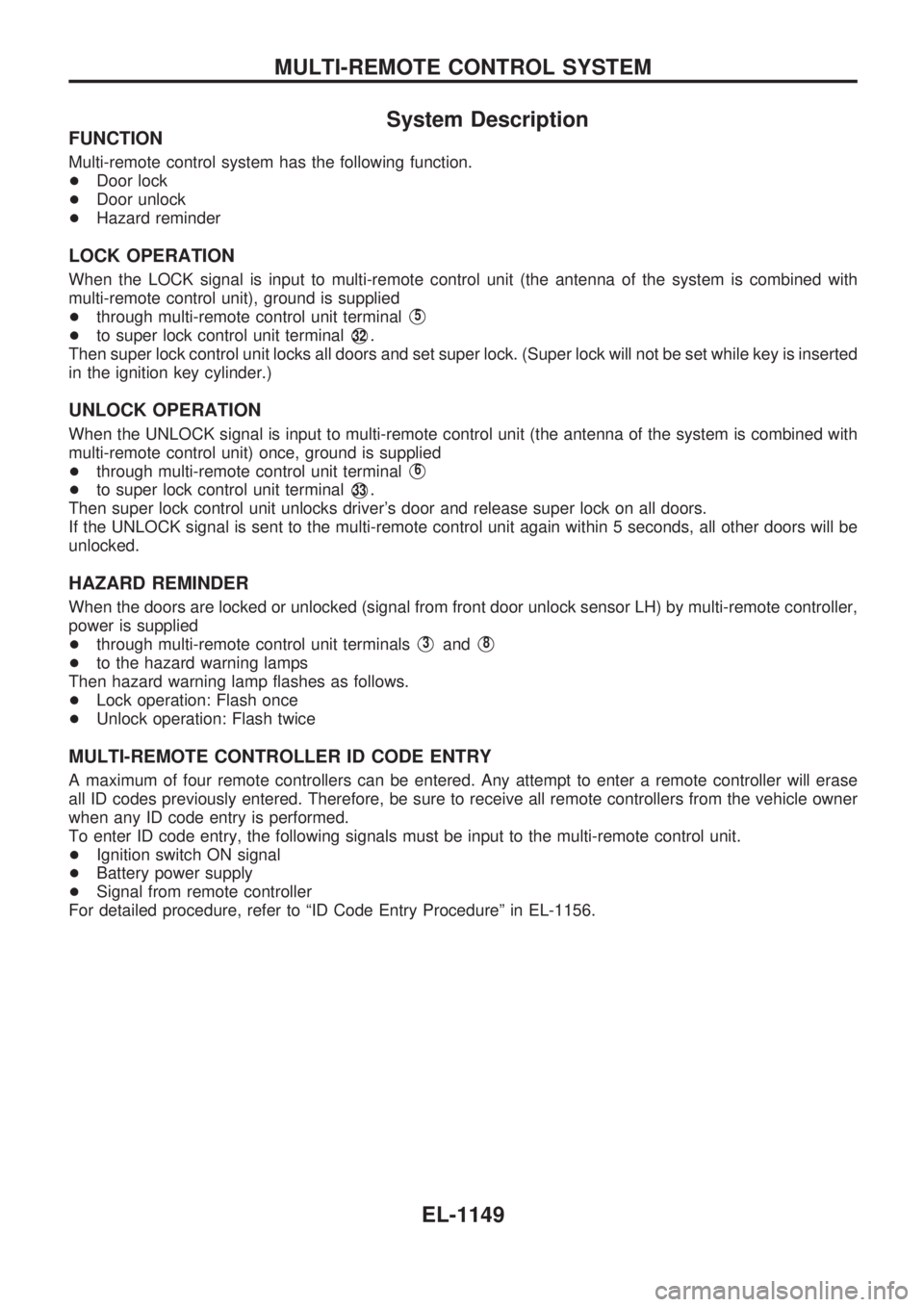
System Description
FUNCTION
Multi-remote control system has the following function.
+Door lock
+Door unlock
+Hazard reminder
LOCK OPERATION
When the LOCK signal is input to multi-remote control unit (the antenna of the system is combined with
multi-remote control unit), ground is supplied
+through multi-remote control unit terminal
V5
+to super lock control unit terminalV32.
Then super lock control unit locks all doors and set super lock. (Super lock will not be set while key is inserted
in the ignition key cylinder.)
UNLOCK OPERATION
When the UNLOCK signal is input to multi-remote control unit (the antenna of the system is combined with
multi-remote control unit) once, ground is supplied
+through multi-remote control unit terminal
V6
+to super lock control unit terminalV33.
Then super lock control unit unlocks driver's door and release super lock on all doors.
If the UNLOCK signal is sent to the multi-remote control unit again within 5 seconds, all other doors will be
unlocked.
HAZARD REMINDER
When the doors are locked or unlocked (signal from front door unlock sensor LH) by multi-remote controller,
power is supplied
+through multi-remote control unit terminals
V3andV8
+to the hazard warning lamps
Then hazard warning lamp flashes as follows.
+Lock operation: Flash once
+Unlock operation: Flash twice
MULTI-REMOTE CONTROLLER ID CODE ENTRY
A maximum of four remote controllers can be entered. Any attempt to enter a remote controller will erase
all ID codes previously entered. Therefore, be sure to receive all remote controllers from the vehicle owner
when any ID code entry is performed.
To enter ID code entry, the following signals must be input to the multi-remote control unit.
+Ignition switch ON signal
+Battery power supply
+Signal from remote controller
For detailed procedure, refer to ªID Code Entry Procedureº in EL-1156.
MULTI-REMOTE CONTROL SYSTEM
EL-1149
Page 664 of 1033
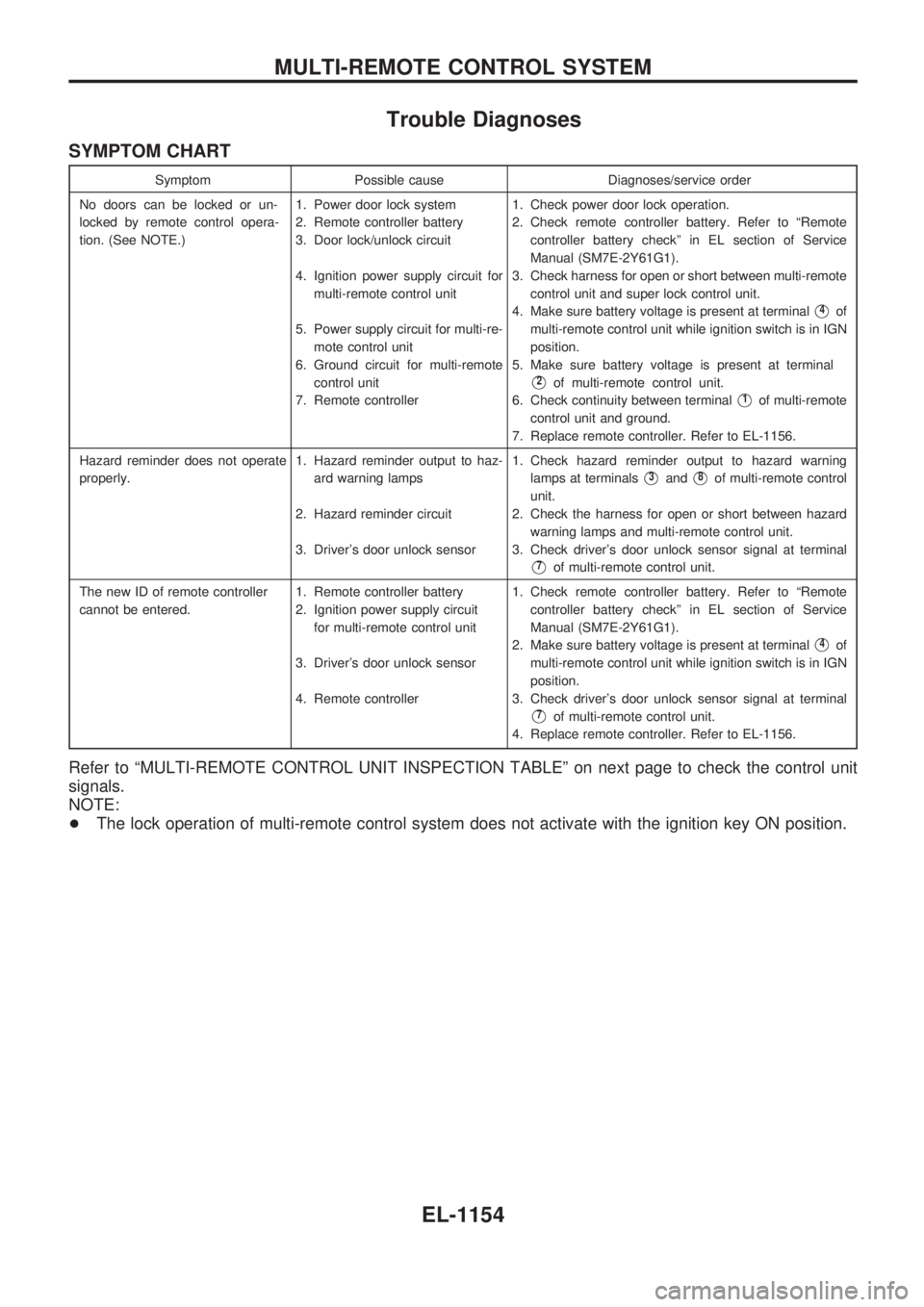
Trouble Diagnoses
SYMPTOM CHART
Symptom Possible cause Diagnoses/service order
No doors can be locked or un-
locked by remote control opera-
tion. (See NOTE.)1. Power door lock system
2. Remote controller battery
3. Door lock/unlock circuit
4. Ignition power supply circuit for
multi-remote control unit
5. Power supply circuit for multi-re-
mote control unit
6. Ground circuit for multi-remote
control unit
7. Remote controller1. Check power door lock operation.
2. Check remote controller battery. Refer to ªRemote
controller battery checkº in EL section of Service
Manual (SM7E-2Y61G1).
3. Check harness for open or short between multi-remote
control unit and super lock control unit.
4. Make sure battery voltage is present at terminal
V4of
multi-remote control unit while ignition switch is in IGN
position.
5. Make sure battery voltage is present at terminal
V2of multi-remote control unit.
6. Check continuity between terminal
V1of multi-remote
control unit and ground.
7. Replace remote controller. Refer to EL-1156.
Hazard reminder does not operate
properly.1. Hazard reminder output to haz-
ard warning lamps
2. Hazard reminder circuit
3. Driver's door unlock sensor1. Check hazard reminder output to hazard warning
lamps at terminals
V3andV8of multi-remote control
unit.
2. Check the harness for open or short between hazard
warning lamps and multi-remote control unit.
3. Check driver's door unlock sensor signal at terminal
V7of multi-remote control unit.
The new ID of remote controller
cannot be entered.1. Remote controller battery
2. Ignition power supply circuit
for multi-remote control unit
3. Driver's door unlock sensor
4. Remote controller1. Check remote controller battery. Refer to ªRemote
controller battery checkº in EL section of Service
Manual (SM7E-2Y61G1).
2. Make sure battery voltage is present at terminal
V4of
multi-remote control unit while ignition switch is in IGN
position.
3. Check driver's door unlock sensor signal at terminal
V7of multi-remote control unit.
4. Replace remote controller. Refer to EL-1156.
Refer to ªMULTI-REMOTE CONTROL UNIT INSPECTION TABLEº on next page to check the control unit
signals.
NOTE:
+The lock operation of multi-remote control system does not activate with the ignition key ON position.
MULTI-REMOTE CONTROL SYSTEM
EL-1154
Page 665 of 1033
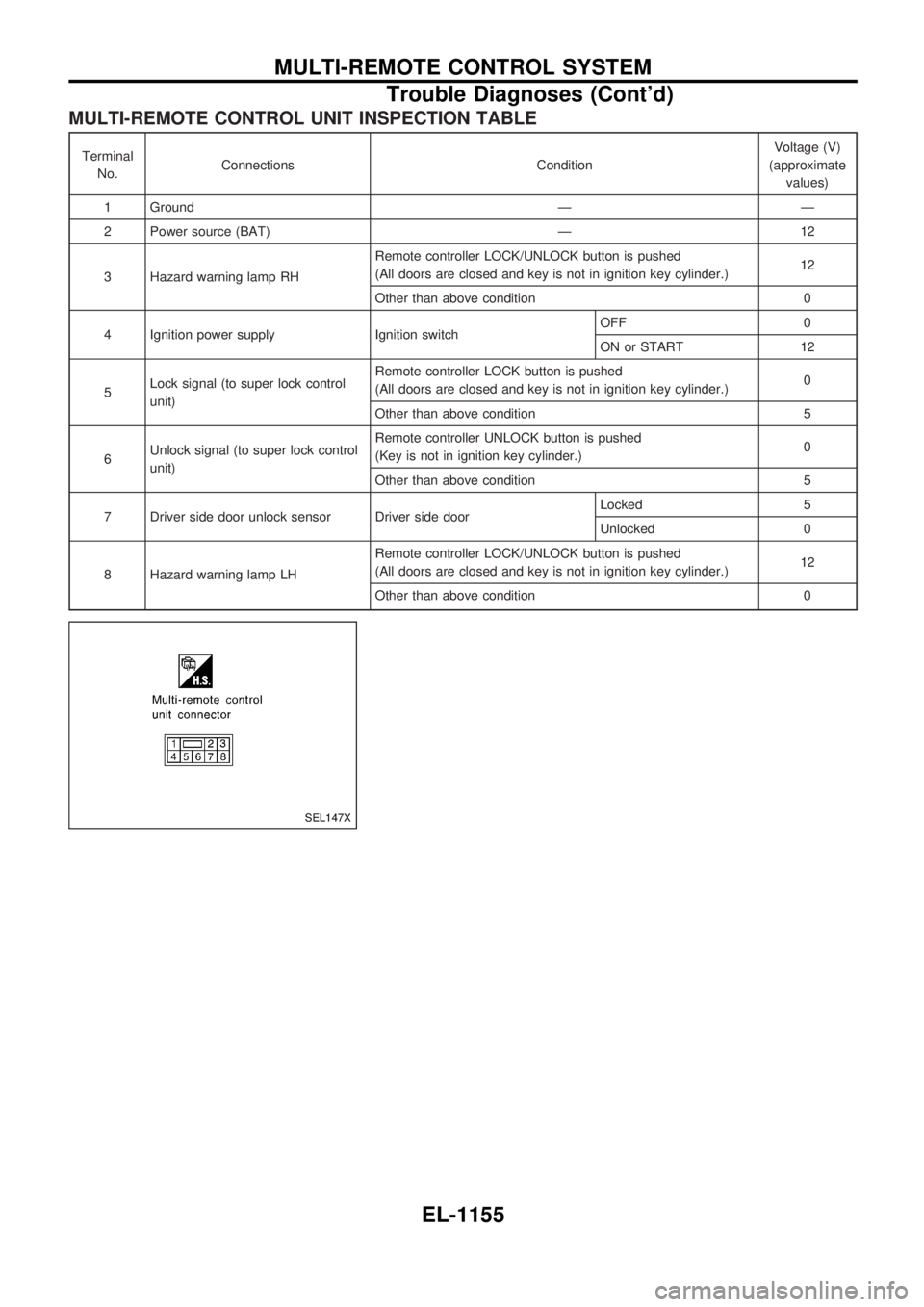
MULTI-REMOTE CONTROL UNIT INSPECTION TABLE
Terminal
No.Connections ConditionVoltage (V)
(approximate
values)
1 Ground Ð Ð
2 Power source (BAT) Ð 12
3 Hazard warning lamp RHRemote controller LOCK/UNLOCK button is pushed
(All doors are closed and key is not in ignition key cylinder.)12
Other than above condition 0
4 Ignition power supply Ignition switchOFF 0
ON or START 12
5Lock signal (to super lock control
unit)Remote controller LOCK button is pushed
(All doors are closed and key is not in ignition key cylinder.)0
Other than above condition 5
6Unlock signal (to super lock control
unit)Remote controller UNLOCK button is pushed
(Key is not in ignition key cylinder.)0
Other than above condition 5
7 Driver side door unlock sensor Driver side doorLocked 5
Unlocked 0
8 Hazard warning lamp LHRemote controller LOCK/UNLOCK button is pushed
(All doors are closed and key is not in ignition key cylinder.)12
Other than above condition 0
SEL147X
MULTI-REMOTE CONTROL SYSTEM
Trouble Diagnoses (Cont'd)
EL-1155
Page 669 of 1033
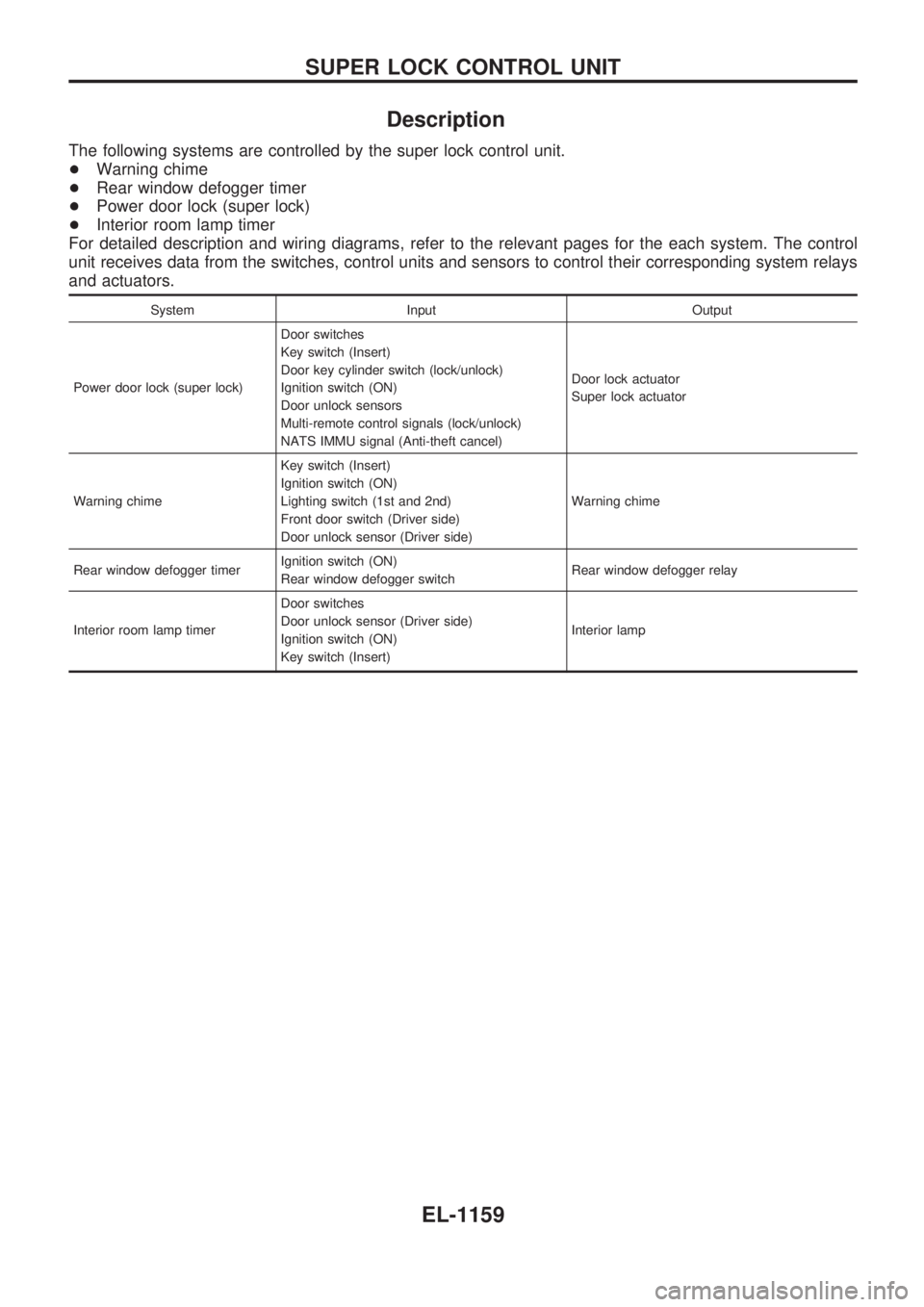
Description
The following systems are controlled by the super lock control unit.
+Warning chime
+Rear window defogger timer
+Power door lock (super lock)
+Interior room lamp timer
For detailed description and wiring diagrams, refer to the relevant pages for the each system. The control
unit receives data from the switches, control units and sensors to control their corresponding system relays
and actuators.
System Input Output
Power door lock (super lock)Door switches
Key switch (Insert)
Door key cylinder switch (lock/unlock)
Ignition switch (ON)
Door unlock sensors
Multi-remote control signals (lock/unlock)
NATS IMMU signal (Anti-theft cancel)Door lock actuator
Super lock actuator
Warning chimeKey switch (Insert)
Ignition switch (ON)
Lighting switch (1st and 2nd)
Front door switch (Driver side)
Door unlock sensor (Driver side)Warning chime
Rear window defogger timerIgnition switch (ON)
Rear window defogger switchRear window defogger relay
Interior room lamp timerDoor switches
Door unlock sensor (Driver side)
Ignition switch (ON)
Key switch (Insert)Interior lamp
SUPER LOCK CONTROL UNIT
EL-1159
Page 672 of 1033
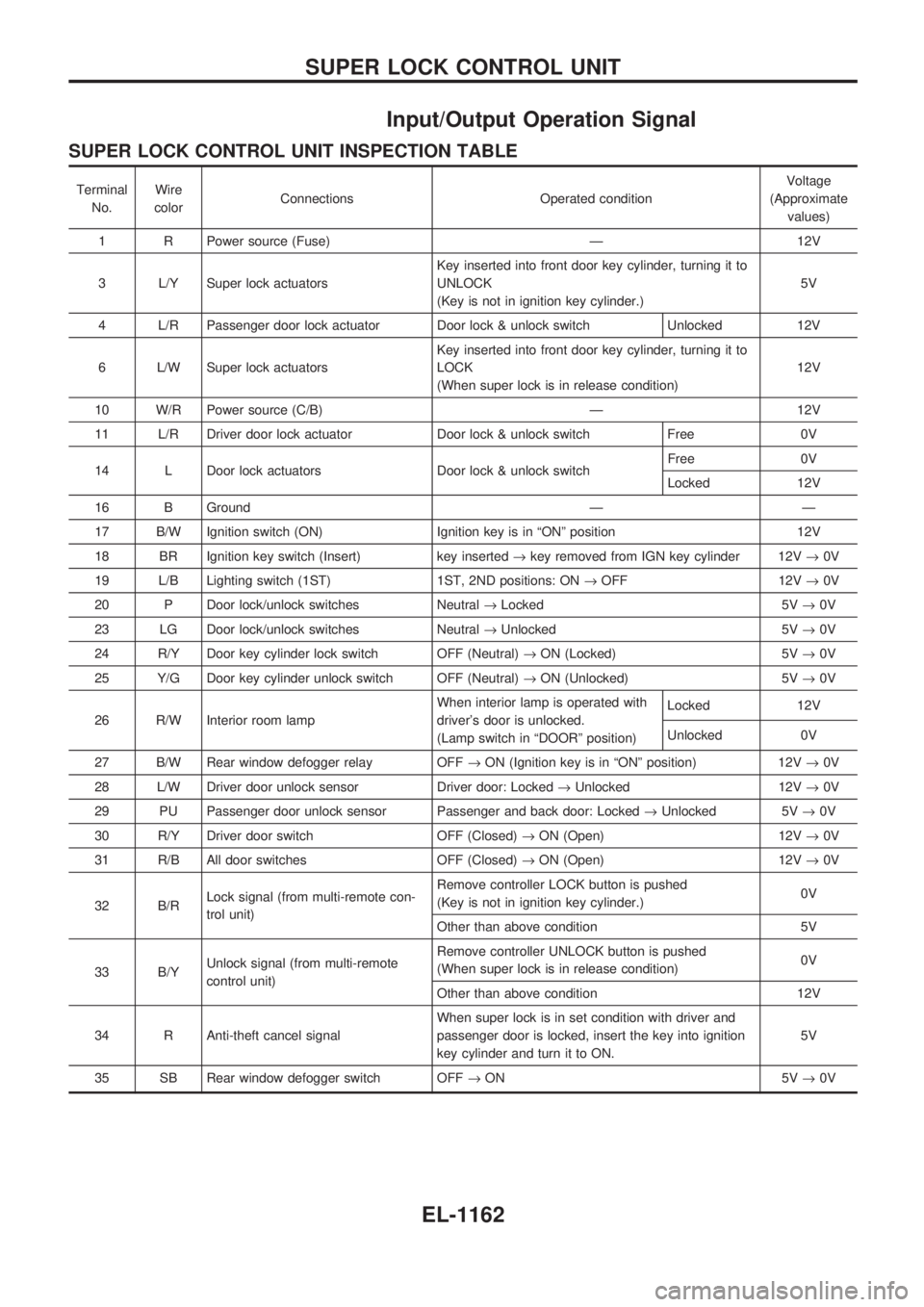
Input/Output Operation Signal
SUPER LOCK CONTROL UNIT INSPECTION TABLE
Terminal
No.Wire
colorConnections Operated conditionVoltage
(Approximate
values)
1 R Power source (Fuse) Ð 12V
3 L/Y Super lock actuatorsKey inserted into front door key cylinder, turning it to
UNLOCK
(Key is not in ignition key cylinder.)5V
4 L/R Passenger door lock actuator Door lock & unlock switch Unlocked 12V
6 L/W Super lock actuatorsKey inserted into front door key cylinder, turning it to
LOCK
(When super lock is in release condition)12V
10 W/R Power source (C/B) Ð 12V
11 L/R Driver door lock actuator Door lock & unlock switch Free 0V
14 L Door lock actuators Door lock & unlock switchFree 0V
Locked 12V
16 B Ground Ð Ð
17 B/W Ignition switch (ON) Ignition key is in ªONº position 12V
18 BR Ignition key switch (Insert) key inserted®key removed from IGN key cylinder 12V®0V
19 L/B Lighting switch (1ST) 1ST, 2ND positions: ON®OFF 12V®0V
20 P Door lock/unlock switches Neutral®Locked 5V®0V
23 LG Door lock/unlock switches Neutral®Unlocked 5V®0V
24 R/Y Door key cylinder lock switch OFF (Neutral)®ON (Locked) 5V®0V
25 Y/G Door key cylinder unlock switch OFF (Neutral)®ON (Unlocked) 5V®0V
26 R/W Interior room lampWhen interior lamp is operated with
driver's door is unlocked.
(Lamp switch in ªDOORº position)Locked 12V
Unlocked 0V
27 B/W Rear window defogger relay OFF®ON (Ignition key is in ªONº position) 12V®0V
28 L/W Driver door unlock sensor Driver door: Locked®Unlocked 12V®0V
29 PU Passenger door unlock sensor Passenger and back door: Locked®Unlocked 5V®0V
30 R/Y Driver door switch OFF (Closed)®ON (Open) 12V®0V
31 R/B All door switches OFF (Closed)®ON (Open) 12V®0V
32 B/RLock signal (from multi-remote con-
trol unit)Remove controller LOCK button is pushed
(Key is not in ignition key cylinder.)0V
Other than above condition 5V
33 B/YUnlock signal (from multi-remote
control unit)Remove controller UNLOCK button is pushed
(When super lock is in release condition)0V
Other than above condition 12V
34 R Anti-theft cancel signalWhen super lock is in set condition with driver and
passenger door is locked, insert the key into ignition
key cylinder and turn it to ON.5V
35 SB Rear window defogger switch OFF®ON 5V®0V
SUPER LOCK CONTROL UNIT
EL-1162
Page 737 of 1033
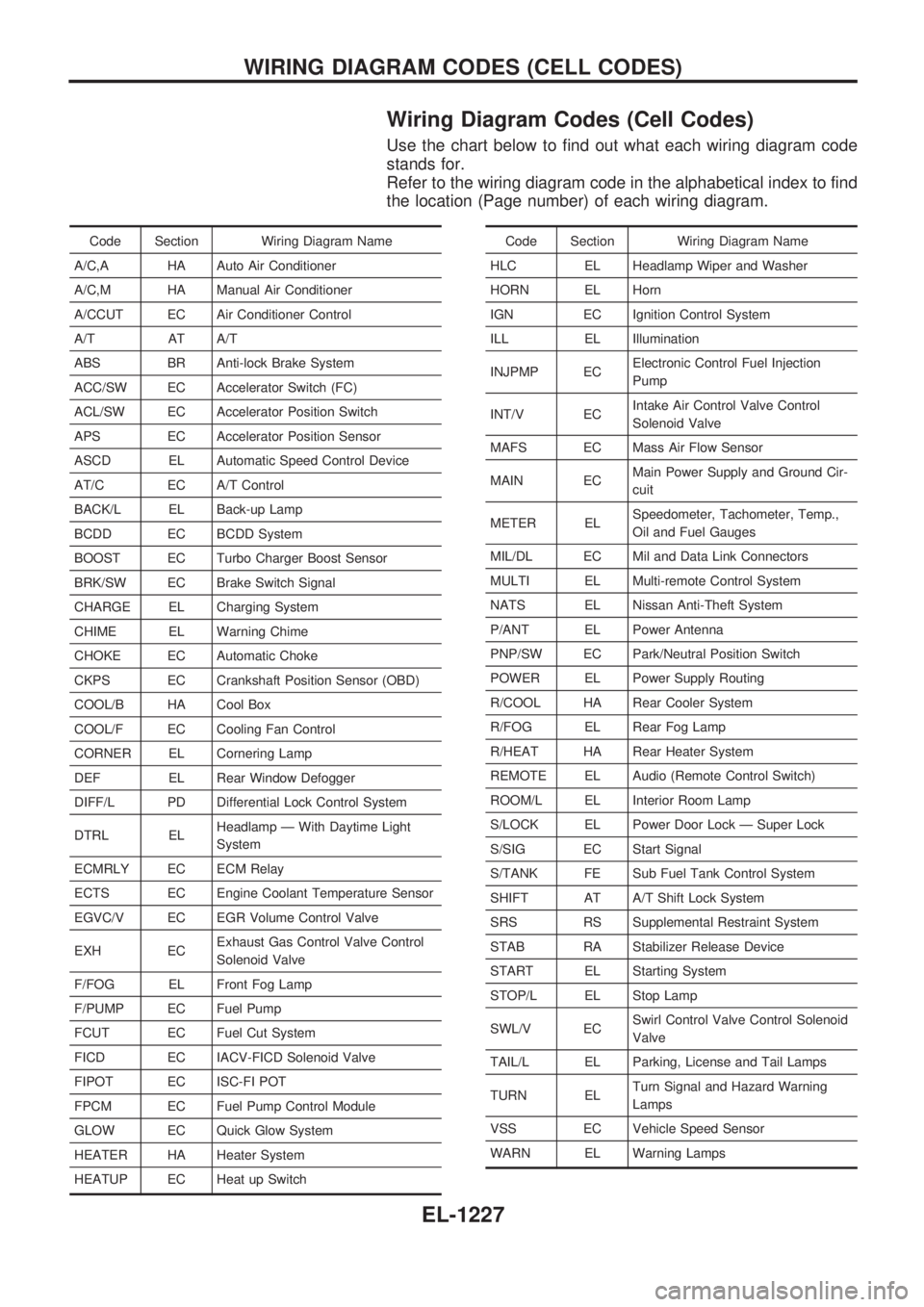
Wiring Diagram Codes (Cell Codes)
Use the chart below to find out what each wiring diagram code
stands for.
Refer to the wiring diagram code in the alphabetical index to find
the location (Page number) of each wiring diagram.
Code Section Wiring Diagram Name
A/C,A HA Auto Air Conditioner
A/C,M HA Manual Air Conditioner
A/CCUT EC Air Conditioner Control
A/T AT A/T
ABS BR Anti-lock Brake System
ACC/SW EC Accelerator Switch (FC)
ACL/SW EC Accelerator Position Switch
APS EC Accelerator Position Sensor
ASCD EL Automatic Speed Control Device
AT/C EC A/T Control
BACK/L EL Back-up Lamp
BCDD EC BCDD System
BOOST EC Turbo Charger Boost Sensor
BRK/SW EC Brake Switch Signal
CHARGE EL Charging System
CHIME EL Warning Chime
CHOKE EC Automatic Choke
CKPS EC Crankshaft Position Sensor (OBD)
COOL/B HA Cool Box
COOL/F EC Cooling Fan Control
CORNER EL Cornering Lamp
DEF EL Rear Window Defogger
DIFF/L PD Differential Lock Control System
DTRL ELHeadlamp Ð With Daytime Light
System
ECMRLY EC ECM Relay
ECTS EC Engine Coolant Temperature Sensor
EGVC/V EC EGR Volume Control Valve
EXH ECExhaust Gas Control Valve Control
Solenoid Valve
F/FOG EL Front Fog Lamp
F/PUMP EC Fuel Pump
FCUT EC Fuel Cut System
FICD EC IACV-FICD Solenoid Valve
FIPOT EC ISC-FI POT
FPCM EC Fuel Pump Control Module
GLOW EC Quick Glow System
HEATER HA Heater System
HEATUP EC Heat up SwitchCode Section Wiring Diagram Name
HLC EL Headlamp Wiper and Washer
HORN EL Horn
IGN EC Ignition Control System
ILL EL Illumination
INJPMP ECElectronic Control Fuel Injection
Pump
INT/V ECIntake Air Control Valve Control
Solenoid Valve
MAFS EC Mass Air Flow Sensor
MAIN ECMain Power Supply and Ground Cir-
cuit
METER ELSpeedometer, Tachometer, Temp.,
Oil and Fuel Gauges
MIL/DL EC Mil and Data Link Connectors
MULTI EL Multi-remote Control System
NATS EL Nissan Anti-Theft System
P/ANT EL Power Antenna
PNP/SW EC Park/Neutral Position Switch
POWER EL Power Supply Routing
R/COOL HA Rear Cooler System
R/FOG EL Rear Fog Lamp
R/HEAT HA Rear Heater System
REMOTE EL Audio (Remote Control Switch)
ROOM/L EL Interior Room Lamp
S/LOCK EL Power Door Lock Ð Super Lock
S/SIG EC Start Signal
S/TANK FE Sub Fuel Tank Control System
SHIFT AT A/T Shift Lock System
SRS RS Supplemental Restraint System
STAB RA Stabilizer Release Device
START EL Starting System
STOP/L EL Stop Lamp
SWL/V ECSwirl Control Valve Control Solenoid
Valve
TAIL/L EL Parking, License and Tail Lamps
TURN ELTurn Signal and Hazard Warning
Lamps
VSS EC Vehicle Speed Sensor
WARN EL Warning Lamps
WIRING DIAGRAM CODES (CELL CODES)
EL-1227
Page 766 of 1033
+Vacuum pipe
+Vacuum pump
2. Move the following parts.
+TDC sensor harness
+Power steering oil pump
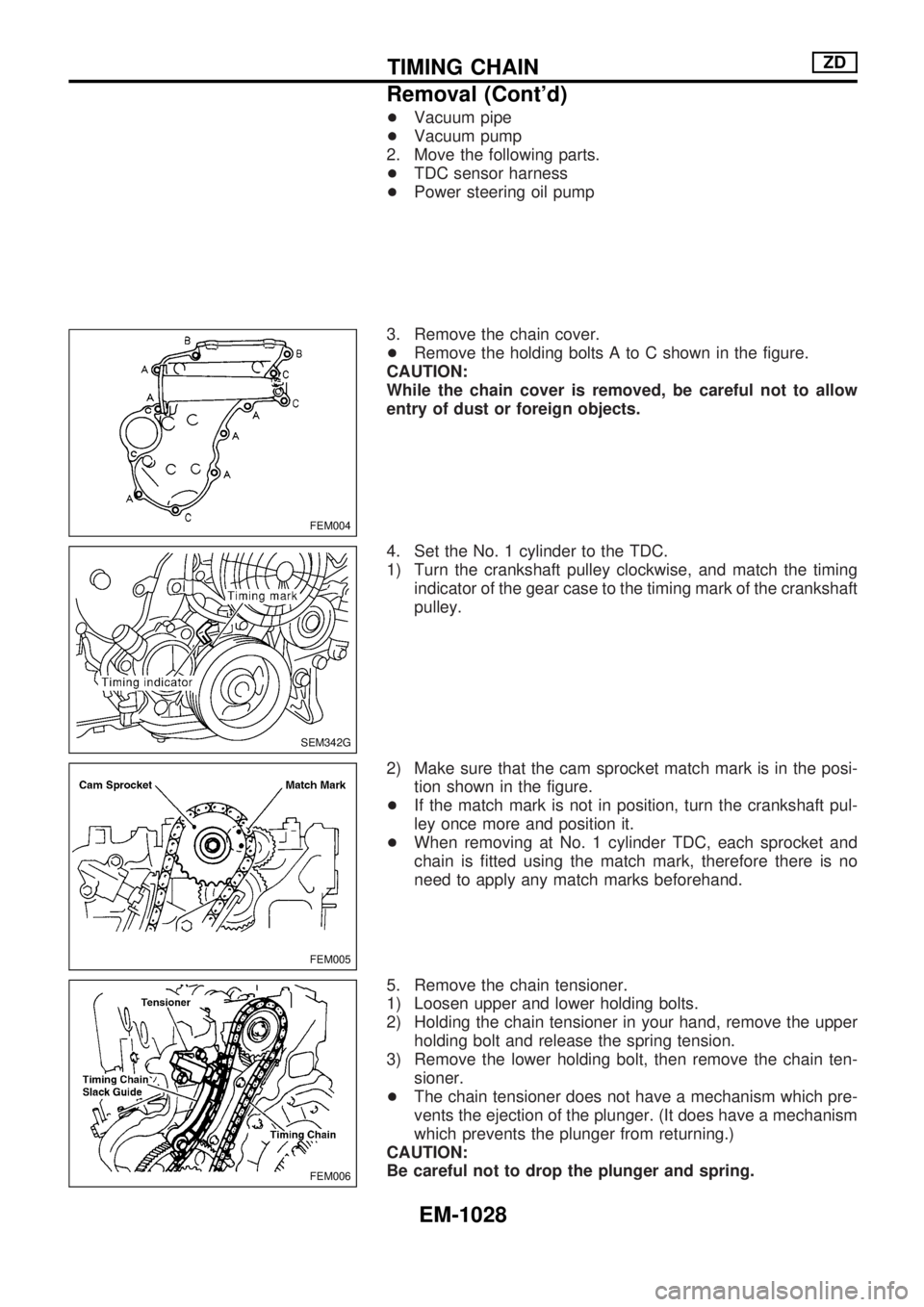
3. Remove the chain cover.
+Remove the holding bolts A to C shown in the figure.
CAUTION:
While the chain cover is removed, be careful not to allow
entry of dust or foreign objects.
4. Set the No. 1 cylinder to the TDC.
1) Turn the crankshaft pulley clockwise, and match the timing
indicator of the gear case to the timing mark of the crankshaft
pulley.
2) Make sure that the cam sprocket match mark is in the posi-
tion shown in the figure.
+If the match mark is not in position, turn the crankshaft pul-
ley once more and position it.
+When removing at No. 1 cylinder TDC, each sprocket and
chain is fitted using the match mark, therefore there is no
need to apply any match marks beforehand.
5. Remove the chain tensioner.
1) Loosen upper and lower holding bolts.
2) Holding the chain tensioner in your hand, remove the upper
holding bolt and release the spring tension.
3) Remove the lower holding bolt, then remove the chain ten-
sioner.
+The chain tensioner does not have a mechanism which pre-
vents the ejection of the plunger. (It does have a mechanism
which prevents the plunger from returning.)
CAUTION:
Be careful not to drop the plunger and spring.
FEM004
SEM342G
FEM005
FEM006
TIMING CHAINZD
Removal (Cont'd)
EM-1028