Page 68 of 267

as indicated by the "U/S" (upshift)
light on the instrument panel.
If vehicle speed drops below
20 mph (30 km/h), or if the
engine is not running smoothly,
you should downshift to the next lower gear. You may need to
downshift two or more gears to
keep the engine running smoothly or for satisfactory performance.
This indicator comes on for a fewseconds when you turn the
ignition switch to the "ON"
position. 4-Whee
l Driv e
(4WD ) Indicato r
4WD models only
This indicator lights when the 4-Wheel Drive system is engaged.
With the 4WD-2WD switch in the "OFF" or 2WD position, this light
will come on to provide a "bulb
check" when the key is turned to the "ON" position, but should go
out after the engine is started.
If the 4WD-2WD switch is in the "ON" or 4WD position, this light
will come on when the key is
turned to the "ON" position and
remain on after the engine is
started.
Anti-Loc
k Indicato r
This light will come on and go out when the ignition switch is turned
to the "ON" position. (If the light
does not come on, see your Honda
dealer to have the system
repaired.)
If the light remains on after
engine start-up or comes on
during operation of the vehicle, stop as soon as possible and turn
the key off. Then start the engine
to reset the system. If the light stays on, or it comes on again
while you're driving, the anti-lock
brake system should be checked at your Honda dealer.
Until you get it fixed, you'll have
normal brakes, but you won't
have anti-lock.
Instrument s an d Control s
AB
S
Page 69 of 267

Chec
k Automati c
Transmissio n Indicato r
The indicator light comes on for a
few seconds when the ignition
switch is turned to the "ON"
position.
If the light flashes, it means the
computer controlling the
transmission has found a problem.
Have the automatic transmission checked by your Honda dealer as
soon as possible. You can safely
drive the vehicle while the light is
flashing, but the computer may
put the transmission into its "backup mode."
In the backup mode, the
transmission may not shiftautomatically. If the transmission
does not shift automatically, you must move the shift lever to
change gears. This chart shows the shift lever position and the
gear range that will result. "L" position First gear
"2" position Third gear
"3" position Fourth gear
"D" position Fourth gear
When the transmission is in
backup mode and does not shift
automatically, you should move
the selector lever to the
appropriate position for your
driving needs, as follows:
Select "3" or "D" for high speed
driving (over 50 mph, 80 km/h).
Select "2" for moderate speed
driving (between 15 mph [25
km/h] and 50 mph [80 km/h]).
Select "L" when starting from a
stop, driving up or down a steep
hill, or for engine braking when
towing a trailer downhill.
Do not exceed 65 mph (45 mph if
towing a trailer).
Instrument s an d Control s
Page 70 of 267

Depending on the type of problem,
the "CHECK TRANS" light will
flash but the transmission may continue to shift automatically. If
the transmission is shifting
normally, you do not have tochoose gears with the shift lever.
However, continued operation of the vehicle with this light flashingcan cause serious mechanical
damage. You should have the vehicle serviced by your Honda
dealer as soon as possible.
Winte r Driv e Indicato r
Automatic Transmission only
The "Winter Drive" light will
come on when you push the
Winter Drive button with the
engine running and the
transmission lever in the "D"
range.
It also comes on for a few seconds
when you turn the ignition switch
to the "ON" position.
Refer to "Driving PatternSelector" later in this section.
Powe r Driv e Indicato r
Automatic Transmission only
The "Power Drive" light will
come on when you push the
Power Drive button with the
engine running.
It also comes on for a few seconds
when you turn the ignition switch
to the "ON" position.
Refer to "Driving PatternSelector" later in this section.
Instrument s an d Control s
NOTIC
E
Page 71 of 267

Automati
c Transmissio n
Flui d Temperatur e Indicato r
The "A/T OIL TEMP" indicator
light warns that the automatic
transmission fluid temperature is
high.
The indicator light should turn onwhen the ignition switch is turned
to the "ON" position, but should
go out after a few seconds. If this light comes on while you are
driving, slow down and pull off the
road. Stop the vehicle at a safe
place and put the shift lever in "P"
position. With the engine idling,
wait until the light goes off. If thelight goes off, you can drive the
vehicle again. If the light does not
go off, have the automatic
transmission lubricating system
checked as soon as possible by
your Honda dealer.
Driving with the "AIT OIL TEMP" light constantly on will cause
serious mechanical damage to the
automatic transmission. Windshiel
d Wiper/Washe r
The lever on the right side of the steering column controls the
windshield wipers. Move the lever
down to select the various windshield wiper speeds.
In INT, the wipers operate every
few seconds. In LO and HIGH, the
wipers run continuously.
In INT, you can vary how often the
Instrument s an d Control s
Switche
s
NOTIC E
Page 73 of 267
Do not use engine antifreeze or
a vinegar/water solution in the
windshield washer reservoir.
Antifreeze can damage your vehicle's paint, while a
vinegar/water solution can
damage the windshield washer
pump. Use only commercially available windshield washer fluid.
In cold weather, warm the
windshield with the defrosters
before using the washers. This
will help prevent icing of the
windshield that may block your
vision.
Headlight
s
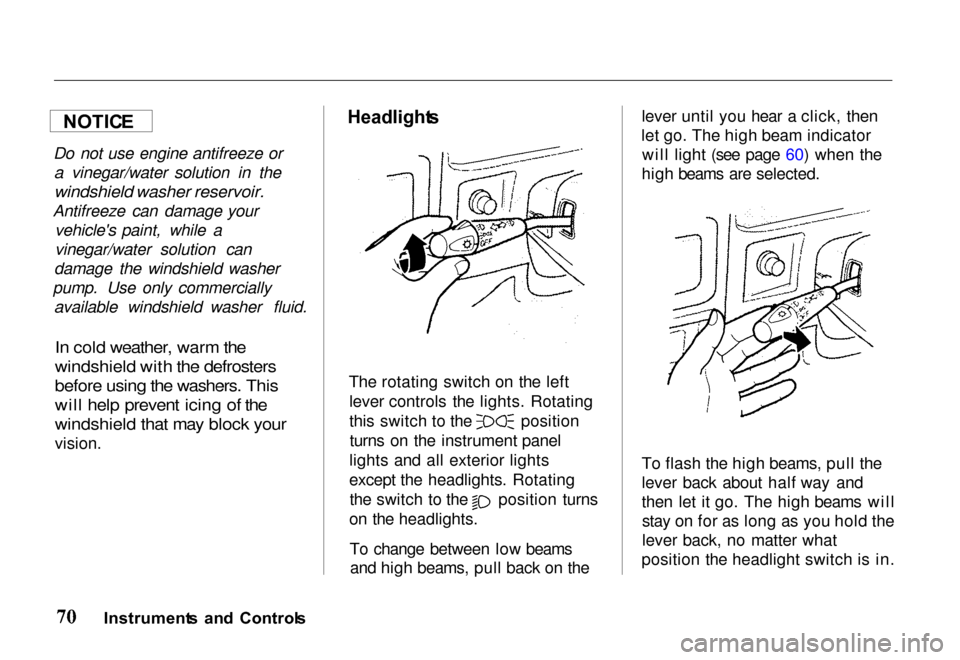
The rotating switch on the left lever controls the lights. Rotating this switch to the position
turns on the instrument panel
lights and all exterior lights
except the headlights. Rotating the switch to the position turns
on the headlights.
To change between low beamsand high beams, pull back on the lever until you hear a click, then
let go. The high beam indicator will light (see page 60) when the
high beams are selected.
To flash the high beams, pull the
lever back about half way and
then let it go. The high beams will stay on for as long as you hold the
lever back, no matter what
position the headlight switch is in.
Instrument s an d Control s
NOTIC
E
Page 74 of 267
Headlights-On Reminder
You will hear a continuous tone
when the key is out of the ignitionswitch and the driver's door is
opened with the headlight switch in the "ON" position. This will
remind you to turn the headlights off. Never leave the headlights onwhen the engine is not running.
They can rapidly discharge the
battery.
Fo
g Light s
EX model only
When fog or heavy mist reducesyour forward vision, push thisswitch to turn the fog lights on.
The indicator light in the switch
turns on. Push the switch again to turn off the fog lights.
The fog lights operate only when the headlight low beams are in
use.
Illuminatio
n Contro l
The instrument panel lights turn on when the light switch is on.
Brightness of the instrument panel
lights is controlled by turning the illumination control knob
clockwise for brighter or counterclockwise for dimmer.
Instrument s an d Control s
DIMMER BRIGHTE
R
Page 75 of 267
Rea
r Windo w an d Mirro r
Defogger s
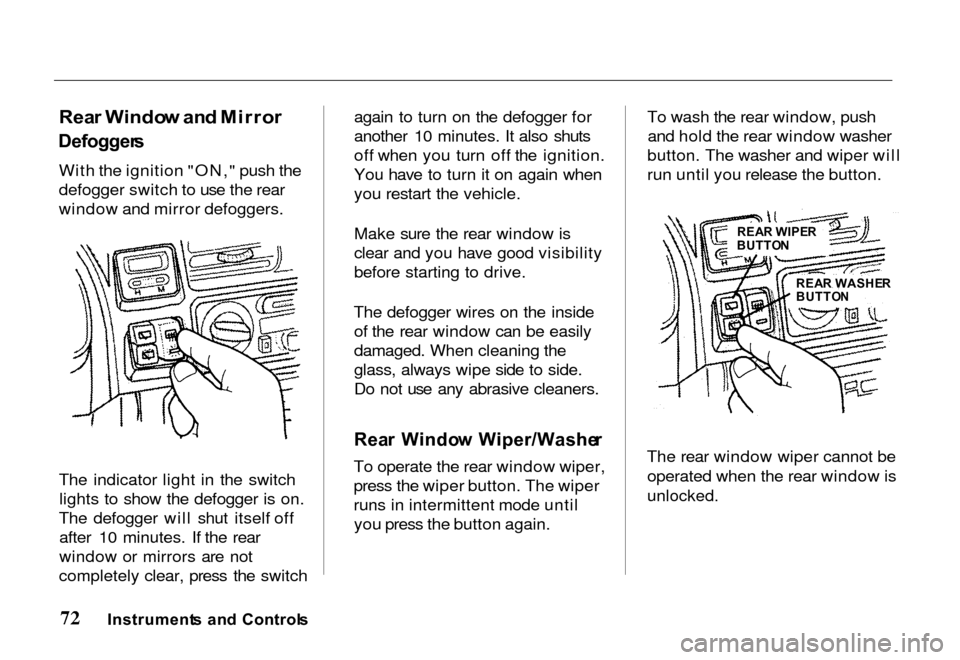
With the ignition "ON," push the
defogger switch to use the rear
window and mirror defoggers.
The indicator light in the switch lights to show the defogger is on.
The defogger will shut itself off after 10 minutes. If the rear
window or mirrors are not
completely clear, press the switch again to turn on the defogger for
another 10 minutes. It also shuts
off when you turn off the ignition.
You have to turn it on again when
you restart the vehicle.
Make sure the rear window is
clear and you have good visibility
before starting to drive.
The defogger wires on the inside of the rear window can be easily
damaged. When cleaning the
glass, always wipe side to side.
Do not use any abrasive cleaners.
Rea r Windo w Wiper/Washe r
To operate the rear window wiper,
press the wiper button. The wiper
runs in intermittent mode until you press the button again. To wash the rear window, push
and hold the rear window washer
button. The washer and wiper will
run until you release the button.
The rear window wiper cannot be operated when the rear window is
unlocked.
Instrument s an d Control s
REAR WIPE R
BUTTO N
REA R WASHE R
BUTTO N
Page 76 of 267
Tur
n Signa l Leve r
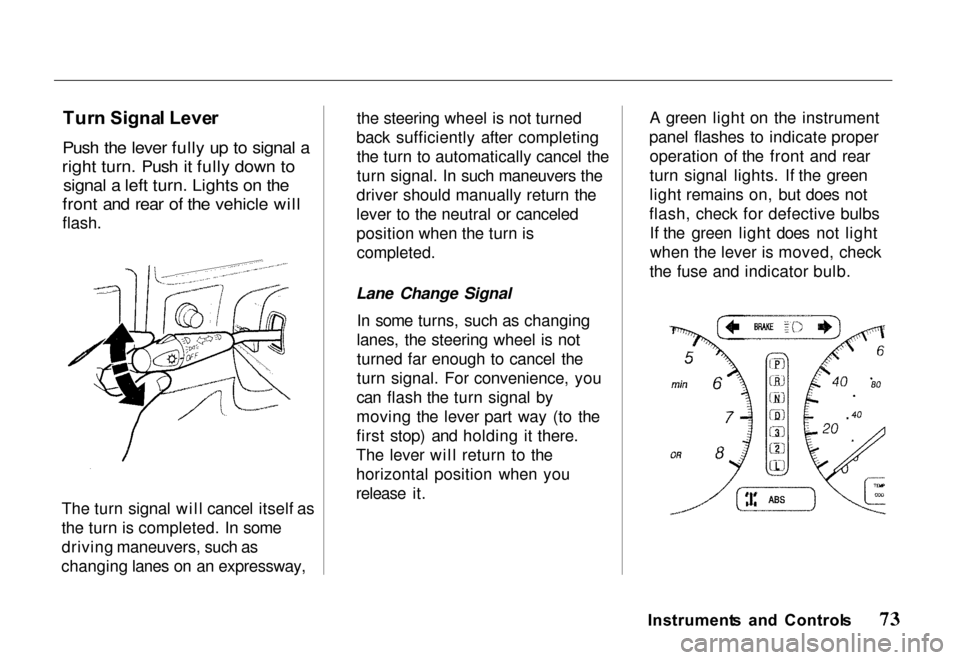
Push the lever fully up to signal a
right turn. Push it fully down to signal a left turn. Lights on the
front and rear of the vehicle will
flash.
The turn signal will cancel itself as
the turn is completed. In some
driving maneuvers, such as
changing lanes on an expressway, the steering wheel is not turned
back sufficiently after completing the turn to automatically cancel the
turn signal. In such maneuvers the
driver should manually return the
lever to the neutral or canceled
position when the turn is
completed.
Lane Change Signal In some turns, such as changing
lanes, the steering wheel is not
turned far enough to cancel the
turn signal. For convenience, you
can flash the turn signal by
moving the lever part way (to the
first stop) and holding it there.
The lever will return to the
horizontal position when you
release it. A green light on the instrument
panel flashes to indicate proper operation of the front and rear
turn signal lights. If the green
light remains on, but does not
flash, check for defective bulbs If the green light does not lightwhen the lever is moved, check
the fuse and indicator bulb.
Instrument s an d Control s
