2000 AUDI ALLROAD ECO mode
[x] Cancel search: ECO modePage 3 of 306
VEHICLE LIT
ERATURE-----------------------
In addition to this Owner's Manual,
your Audi comes with a Maintenance
booklet, Warranty booklet and for
some models, special supple
ments.
Moreover, depending on the model and
the equipment, there may be additional
instruction booklets delivered with
y our vehicle (for example, Sound
System Operating Instructions).
If you are missing one of these publica
tions, or if you believe that the informa
tion is not complete, contact your au
thorized Audi Dealer for assistance.
2 The
Owner's Manual
and the supplements should be read
carefully and as soon as possible to ac
quaint yourself with your vehicle.
Pay special attention to the chapter en
titled "Vehicle operation". There you
will see how to drive safely and eco
nomicall y, and how to minimize pollu
tion. For
safety reasons please note
also the information regarding
additional accessories, modifi
cations and parts replacement
on page 262.
The other chapters are also important
because correct operation of the ve
hicle -in addition to proper care and
maintenance -serves to maintain the
value of the vehicle. In many cases, it
may also be one of the condi tions for
upholding warranty claims.
Page 53 of 306
SA
FETYRRST---------------------------------------------------
Activ ating the convertible
locking retractor
• Slowly pull the belt all the way out.
• Hold on to the safety belt while securing
the safety belt around the child restraint per
the instructions found in the child restraint's
owner's manual.
• Insert the belt tongue into the buckle for
that seating position. Pull on the belt to
make sure the safety belt is properly
fas tened.
• Guide the remaining portion of the belt
back in place, allowing the retractor to take
up the slack. Press the child restraint
against the seat cushion as you guide the
belt into the retractor so that the belt ten
sion holds the child restraint firmly in place.
• While the safety belt is retra cting, you
will hear a continuous clicking noise from
the retractor; that means that the convert
ible locking retractor has been activated.
52 •
To covert the safety belt into standard
use after the child restraint is removed, re
lease the tongue from the buckle and allow
the safety belt to fully retract again. The re
tractor will then operate in the normal emer
gency locking mode for the occupant re
straint.
�W ARNING
Always buckle the child seat firm
ly in place even if your child is not
sitting in it. A loose child seat can
fly around during a sudden stop or
in an accident.
Deactivating the convertible
locking retractor
The convertible locking retractor is deacti
vated by unfaste ning the safety belt (see
page 24). Allow the safety belt to retract
completely to its stowed position. The
safety belt can now be used as an ordinary
three-point safety belt without the addi
tional locking feature. If
the convertible locking feature has been
inadvertently activated, the safety belt
must be unfastened to deactivate this fea
ture. If the convertible locking feature is not
deactivated, the safety belt will gradually
become tighter and uncomfortable to wear.
The convertible locking feature must be de
activated to restore normal belt operation
and greater occupant comfort.
�W ARNING
Never unfasten the safety belt to
deactivate the convertible locking
retractor while the vehicle is in
motion. You would not be pro
tected at all and could suffer seri
ous injury in an accident.
Page 108 of 306
In selector
lever positions "P" (Park) a no
"N" (Neutral), the instruction "WHEN
STA TIONARY APPLY FOOTBRAKE WHILE
SELECTING GEAR" appears in the instru
ment cluster as a reminder for the driver.
Also, the symbol in the shift console will
light up.
A time delay element prevents the selector
lever from locking when it is moved through
the "N"' (Neutral) position (for example,
going from "R" to "D"). The locking ele
ment only locks the selector lever if it is left
in the "N" (Neutral) position for more than
about one second without the brake pedal
being depressed.
In the N (Neutral) position, the selector le
ver will not lock when the vehicle is driving
faster than 3 mph (5 km/h). Display
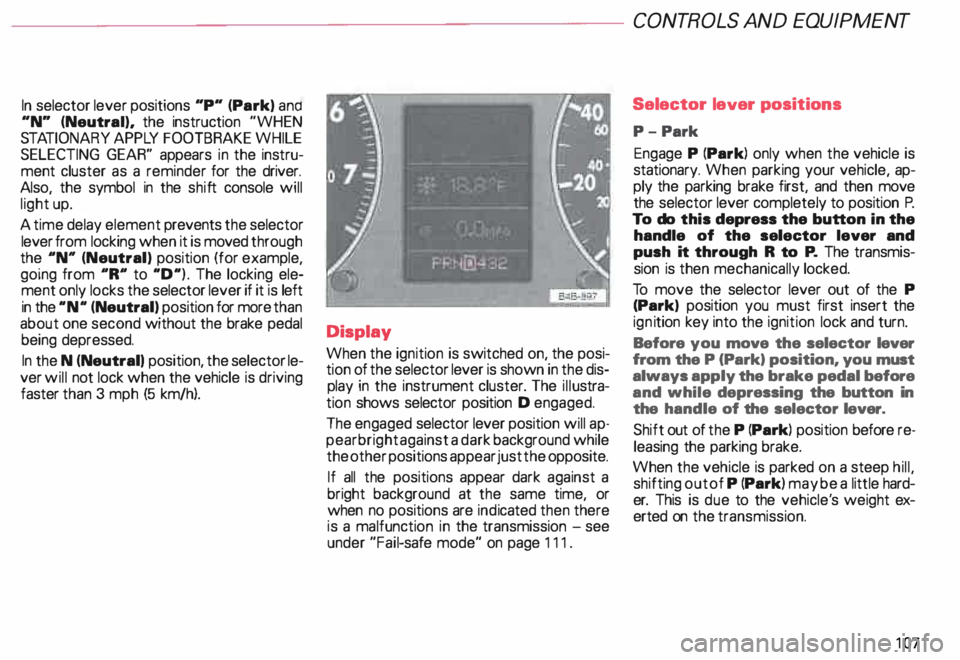
When the ignition is switched on, the posi
tion of the selector lever is shown in the dis
play in the instrument cluster. The illustra
tion shows selector position D engaged.
The engaged selector lever position will ap
pear bright against a dark background while
the other positions appear just the opposite.
If all the positions appear dark against a
bright background at the same time, or
when no positions are indicated then there
is a malfunction in the transmission -see
under "Fail-safe mode" on page 111. CONT
ROLS AND EQUIPMENT
Selector lever positions
P- Park
Engage P (Park) only when the vehicle is
stationary. When parking your vehicle, ap
ply the parking brake first, and then move
the selector lever completely to position P.
To do this depress the button in the
handle of the selector lever and
push it through R to P. The transmis
sion is then mechanically locked.
To move the selector lever out of the P
(Park) position you must first insert the
ign ition key into the ignition lock and turn.
Before you move the selector lever
from the P (Park) position, you must
always apply the brake pedal before
and while depressing the button in
the handle of the selector lever.
Shift out of the P (Park) position before re
leasing the parking brake.
When the vehicle is parked on a steep hill,
shifting out of P (Park) may be a little hard
er. This is due to the vehicle' s weight ex
erted on the transmission.
107
Page 112 of 306

---------------------CONTROLS AND EQUIPMENT
Parking On flat terrain, it is enough to simply set the
selector lever to position P (Park). On an
incline, however, first depress the brake
pedal. engage the parking brake and then
move the selector lever completely to posi
tion P. If you do this. the locking mechanism
will not be overloaded and it will be easier to
release the parking brake.
Always heed all WA RNINGS
on page 103. Emergency
starting
Yo ur Audi with automatic transmission
cannot be started by pushing or tow
ing. If the engine does not start because of
a discharged battery, the vehicle can be
start edwithjumper cables. Referto "Emer
genc y starting with jumper cables." Should
the engine fail to start, consult your nearest
Audi Dealer.
To wing
To tow the vehicle. see instructions "Emer
gency towing" on page 281. Auxiliar
y modes
Yo u can recognize a failure in the electronic
system if the selector lever position display
letters appear bright ·aga in st a dark back
ground. You can still drive because the
transmission will continue to work in an aux
iliary mode. Take your vehicle to your near
est Audi Dealer as soon as possible.
Note
• The electronic lock that protects
the reverse gear while driving is in
operative when the transmission is
in an auxiliary mode. Shifting into R
(Reverse) while driving will cause
serious damage to the vehicle.
• The liptronic® is inoperative when the
transmission is in the fail-safe mode.
111
Page 115 of 306

CONTROLS
AND EQUIPMENT---------------------
Starting procedures
� WARN ING
• Always fasten safety belts be
fore driving.
• Never start or let the engine run
in a confined or enclosed area. Ex
haust fumes from the engine con
tain carbon monoxide, a colorless
and odorless gas. Carbon monox
ide can be fatal if inhaled.
• Never leave the engine idling
unattended. An unattended ve
hicle with a running engine poses
a danger of personal injury or
theft.
114
dib To avoid unnecessary engine
W wear and to reduce exhaust
emissions, do not let your vehicle
stand end warm up. Be ready to
drive off immediately after starting
your vehicle. Maintain moderate
speed until the engine is completely
warm. Remember, the engine per
forms bast at operating tempera
ture.
Manual transmission
Yo ur Audi with manual transmission is
equipped with an "interlock-fea ture".
Start the engine with the gearshift
lever in Neutral and the clutch pedal
fully depressed. Remember, you
must depress and hold the clutch
pedal all the way down, otherwise
the engine will not start.
Automatic transmission
Engine will start with selector lever in N
(Neutral) or P (Park) only. Starting
engine
• Do not depress the gas pedal while
starting. This applies at any outside temper
ature.
• As soon as the engine starts, release the
ignition key.
• If the engine does not start the first time
or stalls, turn the ignition off and restart.
• Operate the starter for no more than
10 seconds.
• Allow about 30 seconds between each
starting attempt.
• When starting a very hot engine, it may
be necessary to slightly depress the gas
pedal after starting the engine.
Page 121 of 306

CONTROLS AND
EQUIPMEN T--------------------
Odometer
The odometer indicates the distance driven.
USA models:
Miles
Canada models: Kilometres
On the trip odometer, the last digit indicates
1 /,0 of a mile or 1 00 meters.
Reset knob for trip odometer
To record a distance, reset the trip odome
ter by pressing the knob until the display re
turns to zero -see illustrat ion.
12 0 When
the ignition is off, the display can be
ill umin ated by pressing the test knob for the
Auto-Check System. See page 116, posi
tion 8. The display switches off automati
cally after about 15 seconds.
Also the display will remain illuminated for
abo �t 30 seconds after you open the driv
er's door.
Defect message
If there is a defect in the instrument cluster,
"dEF" will be displayed continuously in the
trip odometer display area. Have this prob
lem corrected as soon as possible by an au
thorized Audi Dealer.
7 - Vo ltmeter
The voltmeter indicates the voltage for the
vehicle's total electrical system, which
should normally be between 12 and
14 volts. If the display drops below 12 volts
when the engine is running, have the power
supply (battery and alternator) checked by
an authorized Audi Dealer. See also
pages 127 and 143.
The voltage may fall below 8 volts while the
engine is being started. 8
- Set I Check knob
Setting the clock ...• ... .
Auto-ch eck system
Odometer lighting .
Service indicator .. 118
14 0
12 0
121
9 - Driver information system
Auto-C heck System display . . . . . ... 138
Outside air temperature display .... 137
Tr ip computer display . . . . . . . . 146
Selector lever position display ....... 1 07
Radio frequency display . . . . . . 138
Service interval display . . . . . . . . . . .
121
10 -Reset knob
Reset knob for trip odometer . .... .. 12 0
Service indicator . . . . . .. . . . . . . 121
Page 124 of 306
---------------------CONTROLS AND
EQUIPMENT
Electronic
power control• EPC
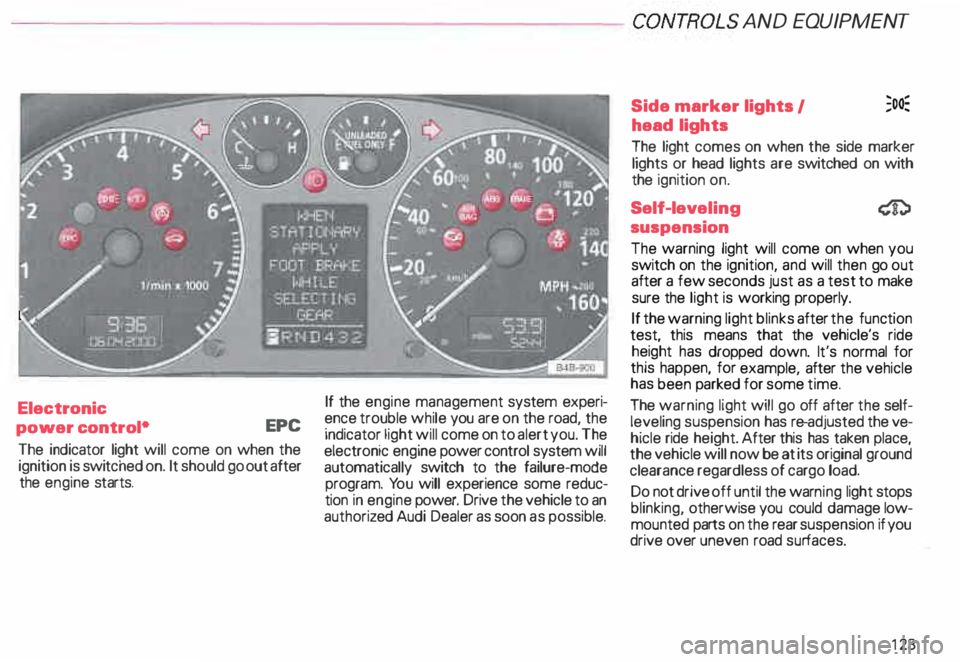
The indicator light will come on when the
ignition is switc hed on. It should go out after
the engine starts. If
the engine management system experi
ence trouble while you are on the road, the
indicator light will come on to alert you. The
electronic engine power control system will
automatically switch to the failure-mode
program. You will experience some reduc
tion in engine power. Drive the vehicle to an
authoriz ed Audi Dealer as soon as possible. Side
marker lights I ;o�
head lights
The light comes on when the side marker
lights or head lights are switched on with
the ignition on.
Self-lev eling
suspension
The warning light will come on when you
switch on the ignition, and will then go out
after a few seconds just as a test to make
sure the light is working properly.
If the warning light blinks after the function
test, this means that the vehicle's ride
height has dropped down. It's normal for
this happen, for example, after the vehicle
has been parked for some time.
The warning light will go off after the self
leveling suspension has re-adjusted the ve
hicle ride height. After this has taken place,
the vehicle will now be at its original ground
clearance regardless of cargo load.
Do not drive off until the warn ing light stops
blinking, otherwise you could damage low
mounted parts on the rear suspension if you
drive over uneven road surfaces.
123
Page 125 of 306

CONTROLS AND
EQUIPMEN T--------------------
If the warning light is flashing, it can also
mean that the vehicle is riding ''too high"
(above the highest level). Once again, do
not drive off until the warning light stops
flashing.
If the .warning light stays on continuous ly,
there 1s a problem with the ride height ad
JUStment system. The light will also come
on continuously if the vehicle is on an ex
treme incline.
Tro uble in the ESP may also cause the warn
ing light to remain on continuously.
A system failure can cause the vehicle to
have too little or too much ground clear
ance. Drive very carefully and slowly to your
nearest authorized Audi dealer and have the
fault corrected.
See page 153 for additional information.
12 4 Electronic Stability
Program {ESP)
The indicator light lights up when the igni
tion is turned on, and it must go out after
about 2 seconds.
When the ESP system is in control mode,
this indicator light will flash while the ve
hicle is being operated.
When you start the engine, the ESP
may shut off for safety reasons. The indica
tor light also turns on to indicate this statu s.
If this should happen, you can reactivate the
ESP by turning the ignition off and then on
� gain. This indicator light will go out, indicat
Ing that the system is once again operating
properly.
If the system is off or is malfunctioning, the
indi cator light will remain on.
Since the ESP system works together with
the ABS system, the ESP indicator light will
also come on if the ABS stops operating. Electronic
immobilizer
�
When you turn on the ignition, the vehicle
key data are automatically scanned. The in
dicator light will come on briefly, indicating
that the data verification procedure has
been acknowledged.
If a non-coded vehicle key was used (for ex
ample a duplic ate key), the control light
goes to a continuous flashing mode. If this
happens, the vehicle cannot be started. See
also page 57