2000 AUDI ALLROAD ECO mode
[x] Cancel search: ECO modePage 165 of 306

CONTROLS AND
EQUIPMENT---------------------
C... -Air recirculation
In the air recirculation mode, the supply of
outside air is blocked and the air in the pas
senger compartment is recirculated. This
helps to prevent pollutant-conta ining out
side air from entering the passenger
compartment. It is best not to use this set
ting for exte nded periods of time.
If the windows begin to fog or ice
up, select the ® program setting as
soon as possible.
�W ARNING
• You will not receive any fresh
outside air when air recirculation
is on. Do not use this setting over
long periods of time because stale
air contributes to fatigue and re
duced driver alertness.
• If the windows fog up, press the
air recirculation button again im
mediately to switch off the air re
circulation function or select de
frost.
16 4 ECON -
Economy
The air conditioner compressor can be
turned off to save fuel. However, the com
fort level that the system can achieve in this
mode limited.
If the interior of the vehicle gets too hot, or
if the windows begin to fog or ice up, press
the ECON button again to tum the compres
sor on again and switch back to AUTO .
OFF -Switching air conditioner oft
The air conditioner can be switched off by
pressing the button briefly. This cuts off the
supply of air from the outside.
To reactivate the air conditioner,
press the AUTO button or one of the blower,
temperature or air distribution selector but
tons, or press OFF again.
It is not normally necessary to switch off the
air condition er.
- + Fan speed
The automatically selected fan speed (vol
ume of air delivery) can be reduced or in
creased manually by operati ng these but
tons. The selected fan speed is shown by a
segment display above the buttons. 4iiJ
-Rear window defogger
See page 151.
Air distribution selector
buttons
The automatically programmed air distribu
tion can be altered manually with the but
tons {},� . and {).. The buttons can be op
erated singly or in combination.
To return to the automatically programmed
air distribution, switch off the selected
manual functions separately or by pressing
the "AUTO" or ® butto ns.
iJ -Air directed to windows
Unlike setting ®, this setting directs all
the air to outlets 1 and 2.
1 :s::
1 -
Air
from dashboard outlets
-
and rear of center console
All the air comes from outlets 3 and 4.
0 -Air to footwall&
All the air comes from outlets 5 and from
the outlets under the front seats.
Page 168 of 306

---------------------CONTROLS AND
EQUIPMENT
General notes
• Vehicle heating is depend upon tne tem
perature of the engine coolant -therefore,
your vehicle interior will warm uponly when
the engine has reached its operating tem
perature.
When the ambient temperature is too low,
the fan only switches to high speed modes
when the coolant has reached a sufficiently
high temperature, or when the ® button
has been depressed.
• Keeping the air intake slots in front of the
windshield free from ice, snow and debris
helps to make sure that the climate control
system will work properly.
• When the air conditioner compressor is
on it reduces both the temperature and the
humid ity of the air inside the vehicle. This
prevents the windows from fogging up.
• The air conditioner works best with the
windows and power roof* closed. •
If the inside temperature is very high af
ter the vehicle has been parked in the sun,
open windows and allow the hot air to es
cape before switching on the air condi
tioner.
• The dust and pollen filter will prevent
dust and pollen etc. in the outside air from
entering the car. Switch to air recirculation
to prevent unpleasant fumes from entering
the vehicle.
If water drips under the
vehicle ...
At high outside temperatures and humidity,
condensation may drip from the evaporator.
This is normal and does not indicate a leak.
If the airflow is not cool ...
• At low ambient temperatures the air con
ditioner compressor switches off automati
cally. The compressor cannot be switc hed
on again in this case, even by pressing the
AUTO button. •
The air conditioner may switch itself off
temporarily to ensure sufficient engine
cooling when the engine is running at full
load.
The air conditioner will also be switched off
temporarily in the kick-down function. See
page 109.
• Check the air conditioning fuse on the
fuse p imel -see page 27 4. Have it replaced,
if necessary.
• If you suspect that the air conditioner is
damaged, for instance after an accident,
switch to the ECON and have the system
examined immediately for leaks or other
damage.
167
Page 176 of 306
Training a Garage Door
Equip ped with Rolling Code
To train your rolling code garage door
opener to operate from your Homelink®
Universal Transmi tter, follow these steps
after completing the "Program
ming" portion of this text (the aid of a sec
ond person may make the training quicker
and easier):
1 - Locate and press and relaaaa the
training (or "learning") button on the
garage door opener motor head unit.
(Exact location and color of the button
may vary by garage door opener brand.)
If there is difficulty locating the training
button, reference the garage door
opener owner's manual or call toll free:
1- 800-355- 3515.
2 - Return to the vehicle and press and re
lease the progr ammed Homelink ®
channel. Press and release the
Homelink ® channel a second time to
complete the progra mming process.
(Some garage door openers may re
qu i· re you to do this procedure a thir d
ti me.) The
garage door opener should now recog
nize the Audi Homelink ® Un iversal Trans
mitter. You may use either the hand-held
transmitter or the Audi Home link® Univer
sal Transmi tter to activate the garage door.
Oper ating the Audi HomeLink ®
Uni versal Transmitter
1 - Tum the ignition switch on.
2 - Select and firmly press and release the
appropriate channel (1, 2, or 3) to acti
vate the trained device (e.g. garage
door, estate gate, home security sy
stem, entry door lock, or home or office
lighting). CONTROLS
AND EQUIPMENT
Erasing the Audi HomeLink ®
Universal Transm itter's Pro
gramming
1 - Turn the ignition switch on.
2 - Simult aneously press and hold chan
nels 1 and 3 until the indicator light be
gins to flash after 20 seconds.
3 - Release both buttons.
This process will erase the trained codes of
the three channels or erase the factory set
default codes.
The Audi Homelink ® Un iversal Transmitter
is now in the train (or progra mming) mode
and can be progra mmed at any time follow
ing steps 3 through 5 in the "Progr amming"
portion of this text.
175
Page 177 of 306
CONT
ROLS AND EQ
UIPMEN T---------------------
Reprogramming a Single Audi
HomeLink ® Universal Transmit
ter Channel
If a Homelink ® channel has been pro
grammed to activate a device, and it has
been decided to program another device us
ing the same Homelink® channel, follow
these steps:
Press and hold the desired Homelink ®
button for approximately 20 seconds.
Do not release until step 3 has been
completed.
2 - When the indicator light begins to flash
slowly, position the hand-held transmit
ter approximately 2 inches away from
the Homelink ® surface. Press and
hold the hand-held transmitter button.
3- The indicator light will flash, first slowly,
and then rapidly. When the indicator
light begins to flash rapidly, release
both the button and channel.
The previous device has now been erased
and the new device has been progra mmed
into Homelink ®. This procedure will not af
fect any other programmed Homelink®
channels.
17 6 Accessories
Accessories for the Audi Homelink ® Uni
versal Transmitter are available through vari
ous sources.
If you would like additional information on
Homelink ®. where to purchase the
Homelink ® compatible products, or would
like to purchase the Homelink ® Home
Lighting Package, please call toll-free:
1- 800-355- 3515. Notes
This device complies with FCC rules
part 15. Operation is subject to following
conditi ons:
1 - This device may not cause any harmful
interference and
2 - This device must accept any interfer
ence that may be received including in
terference that may cause undesired
operation.
� WARNING
The transmitter has been tested
and complies with FCC and DOC/
MDC rules. Changes or modifica
tions not expressly approved by
the party responsible for com
pliance could void the user's au
thority to operate the device.
DOC: ISTC 1763 102 264
Prince MODEUFCC ID: CB2 V94800
Page 188 of 306
D
-Increase volume
- Radio
- Cassette
- CD
- Hands-free operation (telephone)
depending on which unit is currently operat
ing.
E -Reduce volume
Radio
- Cassette
- CD
- Hands-free operation (telephone)
depending on which unit is currently operat
ing.
F - Te lephone
Press this button to:
- answer telephone calls using the spea
ker phone system,
- "send" a call, or
- finish a call that is already in progress. How
the telephone works
Operation of the Audi telephone is de
scribed in the operating manual, however
please note the following information:
Defaults must be set once on the tele
phone. The "Name Preference" must
be to ON -refer to the Audi Cellular Phone
Operating manual.
If the telephone is replaced, the telephone
book entries must be copied once from the
telephone into the system.
This operation can be performed in the "Ra
dio" operating mode. It takes a few min
utes. If the "T elephone" mode is active,
press the C button.
Once you have done this, any change in the
telephone book made as a result of data en
tered at the telephone will automatically be
updated in the syste m.
To begin copying telephone book data into
the system, press buttons B and E simul ta
neously for at least 5 seconds.
During the transfer of data, the data set that
is currently being transferred will appear in
the DIS disp lay. CONT
ROLS AND EQUIPMENT
The following status messages may appear
in the DIS display:
- INCOMING CALL-
an outside call is being received.
- PHONE IN USE -
the telephone is currently connected to
the cellular phone sytem.
- MEMORY EMPTY-
memory is empty.
- SYSTEM BUSY-
the cellular phone system is busy.
- PHONE OFF-
the telephone is turned off.
NO SERV ICE-
no connection to the cellular phone net
work.
187
Page 189 of 306

CONT
ROLS AND
EQUIPMENT-------------------------------------------
Changing the language setting
The default setting for displaying messages
is ENGLISH. If you want to use a different
language, proceed as follows:
• Langugage changes can only be made in
the "Radio" mode. If you are in the "Tele
phone" mode, press the C button.
18 8 •
Now, simult aneously press the C and F
buttons for at least 5 seconds. The current
language setting will appear in the DIS dis
play (for example: ENGLISH).
• Use the A and B butt ons to select the lan
guage you wish to use.
• Confirm the selection by pressing the F
button.
Page 206 of 306
Electronic
Stability Program (ESP)
The Electronic Stability Program helps to
control the vehicle in critical maneuvers like
curves.
When the vehicle starts up and accelerates,
the wheels are prevented from spinning by
adjusting the engine power to conform to all
road conditions. This improves vehicle sta
bil ity.
The system operates across the entire
speed range in combination with the ABS
syst em. If the Anti-Lock Brake System
(ABS) malfunctions, the ESP will also shut
down.
When you turn on the engine, the ESP will
automatically be activated and will perform
a self-test. The
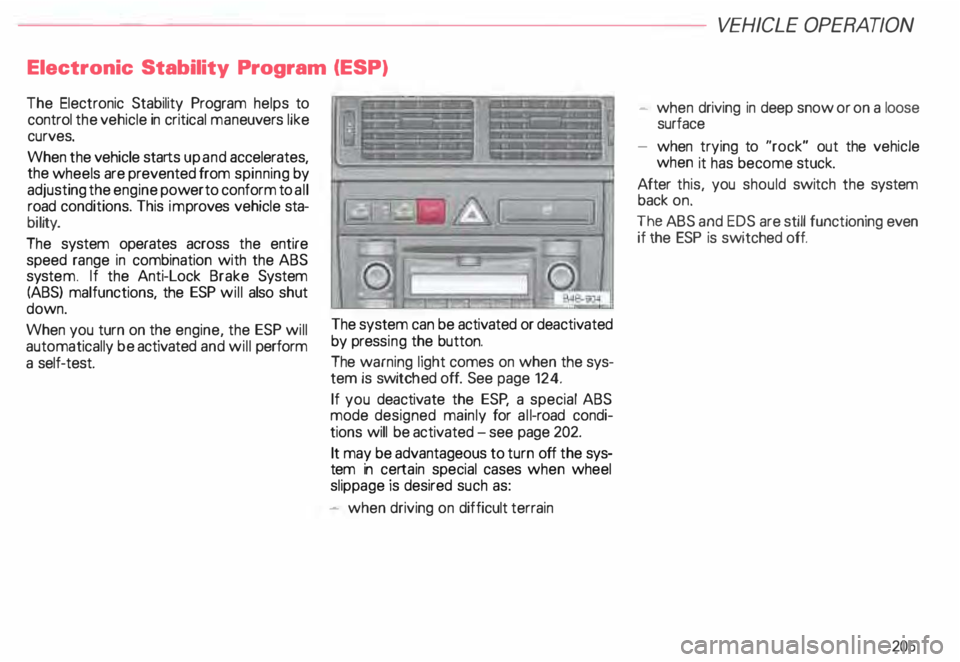
system can be activated or deactivated
by press ing the button.
The warning light comes on when the sys
tem is switch ed off. See page 124.
If you deactivate the ESP, a special ABS
mode designed mainly for all-road condi
tions will be activated - see page 202.
It may be advantageous to turn off the sys
tem in certain special cases when wheel
slippage is desired such as:
- when driving on difficult terrain VE
HICL E OPER ATION
- when driving in deep snow or on a loose
surface
- when trying to "rock" out the vehicle
when it has become stuck.
After this, you should switch the system
back on.
The ABS and EDS are still functioning even
if the ESP is switched off.
205
Page 239 of 306
VEHICLE CA
RE----------------------------------------------------
Engine cooling system
The cooling system is sealed and generally
requires little attention.
The cooling system has been filled at the
factory with a permanent coolant which
does not need to be changed. The coolant
consists of a mixture of water and the
man ufacturer's coolant additive G 12 ABD
-ant ifreeze on a glycol base with anti-corro
sion additives (50% for USA models; 60o/o
for Canadian models). This mixture assures
the necessary frost protection and protects
alloy components in the engine's cooling
system from corrosion and scaling. It also
raises the boiling point of the coolant.
Do not reduce the concentration of the cool
ant in the summer by adding plain water.
The proportion of coolant additive
must be at least 500fa but not more
than 600fa to maintain antifreeze protec
tion and cooling efficiency.
238 For
year-r ound driving, antifreeze is added at
the factory for temperatures down to:
-31 °F (-35 °C) USA
-40 °F (-40 °C) Canada.
g Always heed all WA RNINGS
E!!1 on page 232.
Never use eny coolant additive
other than our G12 ABD additive
(check label) for your vehicle. This
coolant additive is available at au
thorized Audi Dealers.
Other types of antifreeze can. above
all. significantly reduce corrosion
protection. The resulting corrosion
can cause a loss of coolant and
therefore serious engine damage. When
adding coolant additive to
your cooling system. please remem
ber:
Under no circumstances may G12
ABD be mixed with other coolant ad
ditives (for example G 11 ).
You can recognize G12 ABD in the
expansion tank by its red color. If
the liquid in the expansion tank is
brown, G 12 ABD has been mixed
with another coolant additive. In
this case. your vehicle's coolant
must be changed as soon as pos
sible.
Note
Mixing coolant additives can result
in serious malfunction or engine
damage!