2000 AUDI ALLROAD power
[x] Cancel search: powerPage 63 of 306
CONT
ROLS AND EQUIPMENT---------------------
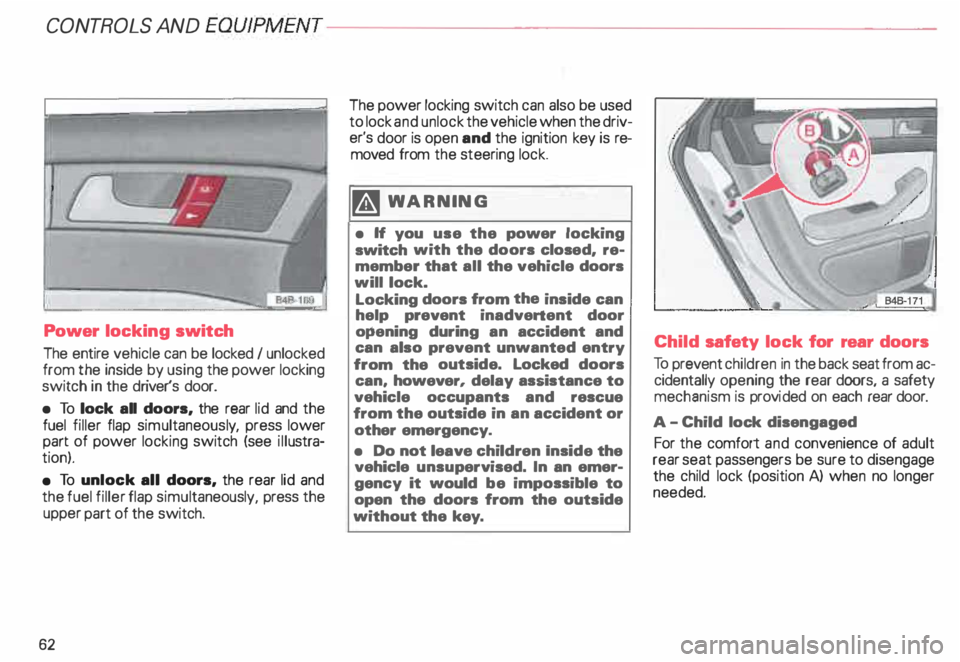
Power locking switch
The entire vehicle can be locked I unlocked
from the inside by using the power locking
switch in the driver's door.
• To lock all doors, the rear lid and the
fuel filler flap simultaneous ly, press lower
part of power locking switch (see illustra
tion).
• To unlock all doors, the rear lid and
the fuel filler flap simul taneously, press the
upper part of the switch.
62 The
power locking switch can also be used
to lock and unlock the vehicle when the driv
er's door is open and the ignition key is re
moved from the steering lock.
�W ARNING
• H you use the power locking
switch with the doors closed, re
member that all the vehicle doors
will lock.
Locking doors from the inside can
help prevent inadvertent door
opening during an accident and
can also prevent unwanted entry
from the outside. Locked doors
can, however, delay assistance to
vehicle occupants and rescue
from the outside in an accident or
other emergency.
• Do not leave children Inside the
vehicle unsupervised. In an emer
gency it would be impossible to
open the doors from the outside
without the key. Child
safety lock for rear doors
To prevent children in the back seat from ac
cidentally opening the rear doors, a safety
mechanism is provi ded on each rear door.
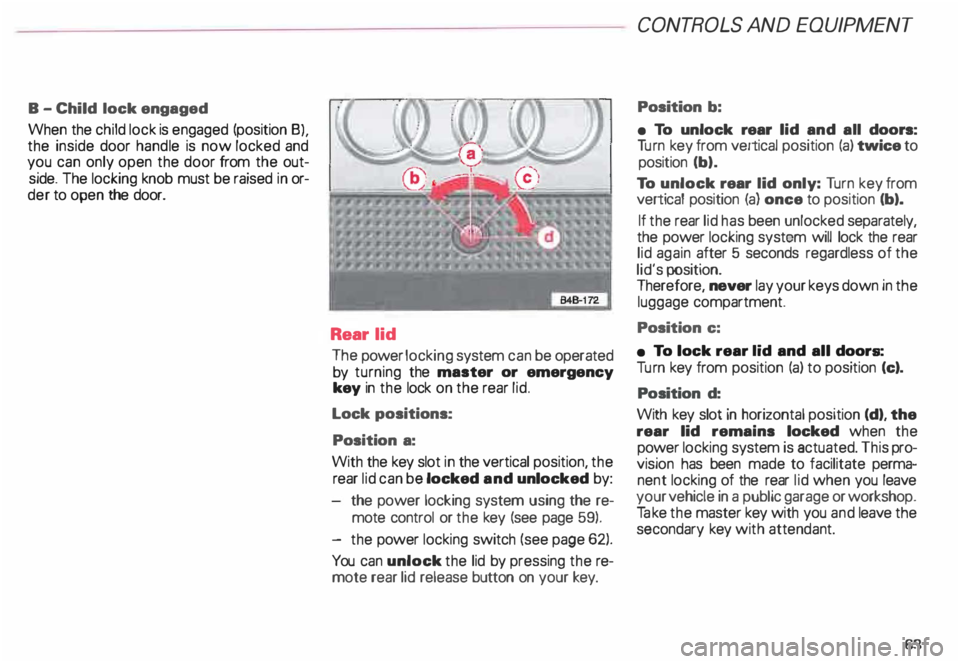
A -C hild lock disengaged
For the comfort and convenience of adult
rear seat passengers be sure to disengage
the child lock (position A) when no longer
needed.
Page 64 of 306
B
-Child lock engaged
When the child lock is engaged (position 8),
the inside door handle is now locked and
you can only open the door from the out
side. The locking knob must be raised in or
der to open the door.
Rear lid
The power locking system can be operated
by turning the master or emergency
key in the lock on the rear lid.
Lock positions:
Position a:
With the key slot in the vertical position, the
rear lid can be locked and unlocked by:
the power locking system using the re
mote control or the key (see page 59).
- the power locking switch (see page 62).
You can unlock the lid by pressing the re
mote rear lid release button on your key. CONT
ROLS AND EQUIPMEN T
Position b:
• To unlock rear lid and all doors:
Tu rn key from vertical position (a) twice to
position (b).
To unlock rear lid only: Turn key from
vertical position (a) once to position (b).
If the rear lid has been unlocked separately,
the power locking system will lock the rear
lid again after 5 seconds regardless of the
lid's position.
Therefore, never lay your keys down in the
luggage compartment.
Position c:
• To lock rear lid and all doors:
Tu rn key from position (a) to position (c).
Position d:
With key slot in horizontal position (d), the
rear lid remains locked when the
power locking system is actuated. This pro
vision has been made to facilitate perma
nent locking of the rear lid when you leave
your vehicle in a public garage or workshop.
Ta ke the master key with you and leave the
secondary key with attendant.
63
Page 67 of 306

CONT
ROLS AND EQUIPMENT---------------------
With the vehicle locked and child safe
ty lock activated, you can also open the rear
lid in an emergency without having to use a
key.
To do this, a passenger in the car must lift
the lever on the inside of the rear lid (arrow) .
Then the rear lid can be opened from the
outside.
66 General
notes
Power locking system
• In the event of an accident with airbag
deployment all locked doors will be auto
matically unlocked to give access to the ve
hicle occupants from the outside.
• If the power locking system should fail,
you can still open the fuel tank flap in an
emergency, see page 224. Remote
control function
• The remote control system can be af
fected by other systems operating in the
same frequency range close to the vehicle,
such as mobile telephones, television
broadcas ting stations, etc.
• Do no use the remote control if you are
inside the car, otherwise you may uninten
tionally lock the vehicle, and then you would
set off the anti-theft alarm when you try to
start the engine or open a door.
If the ignition is switched on, the remote
control system is deactiv ated.
• Reactiv ating remote control.
If you replace a lost key, or if any repair and
I or exchange work is performed on the re
ceiver, an authorized Audi Dealer must reac
tivate the syste m. Only then can the key
less remote system be used again.
Page 70 of 306

·--------------------CONT
ROLS AND EQUIPMENT
Power windows
The switches are located in the driver's
door. Also, the front passenger's door and
each rear door has its own power window
switch.
If the respective switch is pushed or pulled
the window will open or close.
• Switches A and B operate the front door
win dows.
• Switches C and D operate the rear win
dows.
• Safety switch S The
safety switch {S) in the armrest on the
driver's door can turn off the rear power win
dows. This feature has been provided for
the safety of small children riding in the rear
of the vehicle.
A symbol lights up in the safety switch
when the switches in the rear doors are de
activated.
Normally , the power windows can be
opened and closed only with the ignition on.
However, when the ignition is off the win
dows can still be operated by means of the
control switches as long as the driver's and
front passenger's doors are closed. yvhen
either door is opened, the power w1ndow
operation will be deactivated.
�W ARNING
• Do not leave children unat
tended In the vehicle, especially
with access to vehicle keys. Unsu
pervised use of the keys can result
in sta rting of the engine and use of
vehicle systems such as power
windows, etc. which could result
in serious injury. m
WARNING continued
• Remember also that the power
windows will continue to operate
until the ignition key has been re
moved and one of the front doors
has been opened.
• Be careful when closing the win
dows. Check to see that no one is
in the way, or serious injury could
result I
• Switch off the power to the rear
windows -if necessary -using the
safety switch S.
• Always remove the ignition key
whenever you leave your vehicle.
• If you lock your vehicle from the
outside, no one especially children
should remain in the vehicle. The
windows will not open in case of
an emergency.
• Do not stick anything on the
windows or the windshield that
may Interfere with the driver's vi
sion.
69
Page 72 of 306
---------------------CONTROLS AND EQUIPMEN T
Convenience close I open
feature
For the convenience of the driver all win
dows can be closed I opened centrally with
the ignition key while locking I unlocking the
vehicle:
Closing windows
In sert key into the lock of driver's door,
turn and hold in the locking position until all
windows are closed. The automatic close
func tion will stop imme diately if the key is
released.
�W ARNING
• Be careful when closing the win
dows.
• Check to see that no one is in
the way, or serious injury could re
sult. Opening
windows
Inse rt key into the lock of driver's door,
turn the key and hold in the unlocking posi
tion until all windows are opened.
This feature enables the driver, to let the
heat escape from the interior of the car, af
ter having parked in direct sunlight.
The convenience close I open feature is not
available when locking the vehicle using the
remote control. Note
If you disconnect and then reconnect the
battery, the convenience open and close
feature will not work.
The follow ing steps describe how to reacti
vate the convenience open I close feature
after reconnecting the battery:
• Close the window completely by lifting
the power window switch and holding.
• Release the switch and then lift it again
for a second.
• The convenience feature is now acti
vated.
71
Page 111 of 306

CONTROLS AND
EQUIPMEN T--------------------
Selecting a driving position
�W ARNING
• Power is transmitted to the
wheels as soon as a driving posi
tion Is engaged. Therefore, when
the selector lever is in a driving
position, the vehicle may creep
even at idle speed. Do not release
the parking brake or foot brake un
til you are ready to move.
• If you must check under the
hood with the engine running,
never have any driving position en
gaged. Make sure the selector le
ver is securely locked into the P
(Park) position with the parking
brake firmly set. Otherwise, any
increase in engine speed may set
the vehicle in motion, even with
the parking brake applied.
• Do not accelerate while select
ing a driving position. At this time
the engine must run at idle speed
so that no undue stress will be
placed on the automatic clutches
in the transmission.
110 rA'J
WARNING continued
o If the selector lever is uninten
tionally moved into N (Neutral}
while you are driving, take your
foot off the accelerator pedal and
wait to idle speed before selecting
a driving position.
• Never shift into R (Reverse) or P
(Park) when the vehicle is in mov
ing. You will damage the transmis
sion.
Sta rting off
Select a gear. Wait for the transmis·
sion to engage the gaar (the vehicle
may move slightly). Then press the gas
pedal.
Maneuvering
When alternating between forward (D) and
reverse (R)-for instance, while maneuver
ing the vehicle into a tight parking space -
shift only when the vehicle has come to a
full stop and the engine is running at idle
speed. Stopping
• When stopping briefly, at a traffic light for
example, it is not necessary to move these
lector lever to N (Neutra l). Simply apply
the foot brake.
• The driving positions must never be used
for holding the vehicle on a hill. Always use
the foot brake when stopped on inclines.
mi WARNING
It is best never to get out of the
driver's seat when the engine is
running. However, if you must get
out of the vehicle, do this: Move
the selector lever securely into the
P (Park) position and apply the
parking brake firmly. If you are not
securely in P (Park), your vehicle
could move, possibly causing a se
rious accident.
Page 114 of 306
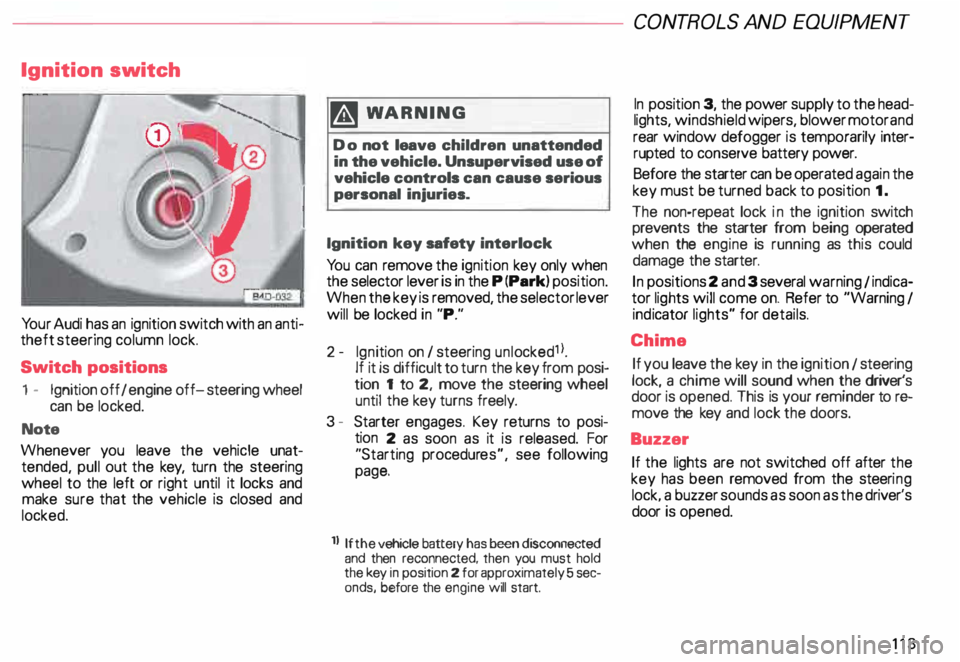
Ignition
switch
Yo ur Audi has an ignition switch with an anti
theft steering column lock.
Switch positions
1 - Ignition off I engine off-steering wheel
can be locked.
Note
Whenever you leave the vehicle unat
tended, pull out the key, turn the steering
wheel to the left or right until it locks and
make sure that the vehicle is closed and
locked. m
WARNING
Do not leave children unattended
in the vehicle. Unsupervised use of
vehicle controls can cause serious
personal injuries.
Ignition key safety interlock
Yo u can remove the ignition key only when
the selector lever is in the P (Park) position.
When the key is removed, the selector lever
will be locked in "P."
2- Ignition on I steering unlocked1 l.
If it is difficult to turn the key from posi
tion 1 to 2, move the steering wheel
until the key turns freely.
3 - Starter engages. Key returns to posi
tion 2 as soon as it is released. For
"Starting procedures", see following
page.
ll If the
vehicle battery has been disconnected
and then reconnected, then you must hold
the key in position 2 for approximately 5 sec
onds, before the engine will start. CONT
ROLS AND EQUIPMEN T
In position 3, the power supply to the head
lights, windshield wipers, blower motor and
rear window defogger is temporarily inter·
rupted to conserve battery power.
Before the starter can be operated again the
key must be turned back to position 1.
The non-repeat lock in the ignition switch
prevents the starter from being operated
when the engine is running as this could
damage the starter.
In positions 2 and 3 several warning 1 indica
tor lights will come on. Refer to "Warning I
ind icator lights" for details.
Chime If you leave the key in the ignition 1 steering
lock, a chime will sound when the driver's
door is opened. This is your reminder tor&
move the key and lock the doors.
Buzzer If the lights are not switched off after the
key has been removed from the steeri ng
lock. a buzzer sounds as soon as the driver's
door is opened.
113
Page 121 of 306

CONTROLS AND
EQUIPMEN T--------------------
Odometer
The odometer indicates the distance driven.
USA models:
Miles
Canada models: Kilometres
On the trip odometer, the last digit indicates
1 /,0 of a mile or 1 00 meters.
Reset knob for trip odometer
To record a distance, reset the trip odome
ter by pressing the knob until the display re
turns to zero -see illustrat ion.
12 0 When
the ignition is off, the display can be
ill umin ated by pressing the test knob for the
Auto-Check System. See page 116, posi
tion 8. The display switches off automati
cally after about 15 seconds.
Also the display will remain illuminated for
abo �t 30 seconds after you open the driv
er's door.
Defect message
If there is a defect in the instrument cluster,
"dEF" will be displayed continuously in the
trip odometer display area. Have this prob
lem corrected as soon as possible by an au
thorized Audi Dealer.
7 - Vo ltmeter
The voltmeter indicates the voltage for the
vehicle's total electrical system, which
should normally be between 12 and
14 volts. If the display drops below 12 volts
when the engine is running, have the power
supply (battery and alternator) checked by
an authorized Audi Dealer. See also
pages 127 and 143.
The voltage may fall below 8 volts while the
engine is being started. 8
- Set I Check knob
Setting the clock ...• ... .
Auto-ch eck system
Odometer lighting .
Service indicator .. 118
14 0
12 0
121
9 - Driver information system
Auto-C heck System display . . . . . ... 138
Outside air temperature display .... 137
Tr ip computer display . . . . . . . . 146
Selector lever position display ....... 1 07
Radio frequency display . . . . . . 138
Service interval display . . . . . . . . . . .
121
10 -Reset knob
Reset knob for trip odometer . .... .. 12 0
Service indicator . . . . . .. . . . . . . 121