1999 NISSAN PRIMERA length
[x] Cancel search: lengthPage 119 of 2267
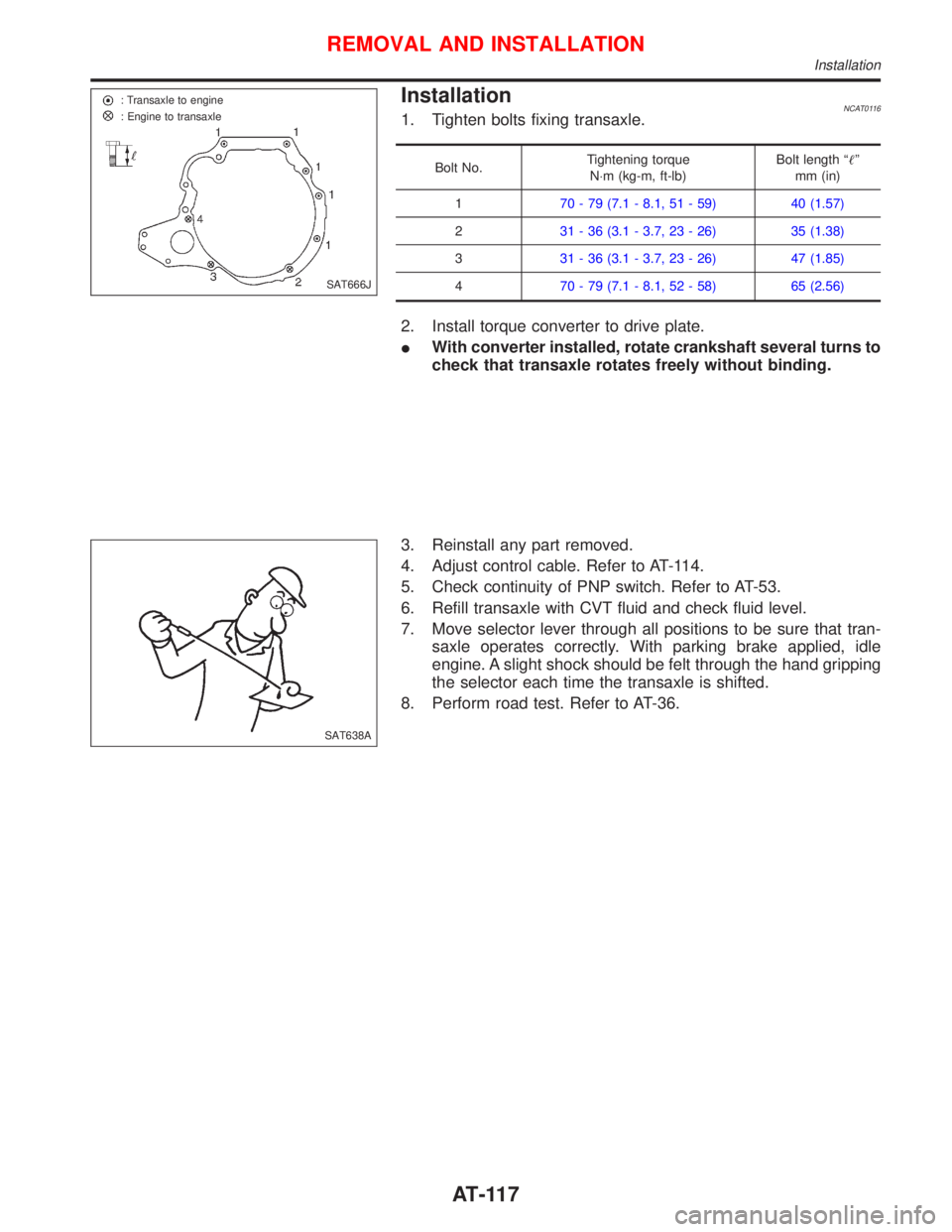
InstallationNCAT01161. Tighten bolts fixing transaxle.
Bolt No.Tightening torque
N×m (kg-m, ft-lb)Bolt length ªº
mm (in)
170 - 79 (7.1 - 8.1, 51 - 59) 40 (1.57)
231 - 36 (3.1 - 3.7, 23 - 26) 35 (1.38)
331 - 36 (3.1 - 3.7, 23 - 26) 47 (1.85)
470 - 79 (7.1 - 8.1, 52 - 58) 65 (2.56)
2. Install torque converter to drive plate.
IWith converter installed, rotate crankshaft several turns to
check that transaxle rotates freely without binding.
3. Reinstall any part removed.
4. Adjust control cable. Refer to AT-114.
5. Check continuity of PNP switch. Refer to AT-53.
6. Refill transaxle with CVT fluid and check fluid level.
7. Move selector lever through all positions to be sure that tran-
saxle operates correctly. With parking brake applied, idle
engine. A slight shock should be felt through the hand gripping
the selector each time the transaxle is shifted.
8. Perform road test. Refer to AT-36.
SAT666J : Transaxle to engine
: Engine to transaxle
SAT638A
REMOVAL AND INSTALLATION
Installation
AT-117
Page 141 of 2267
Inspection
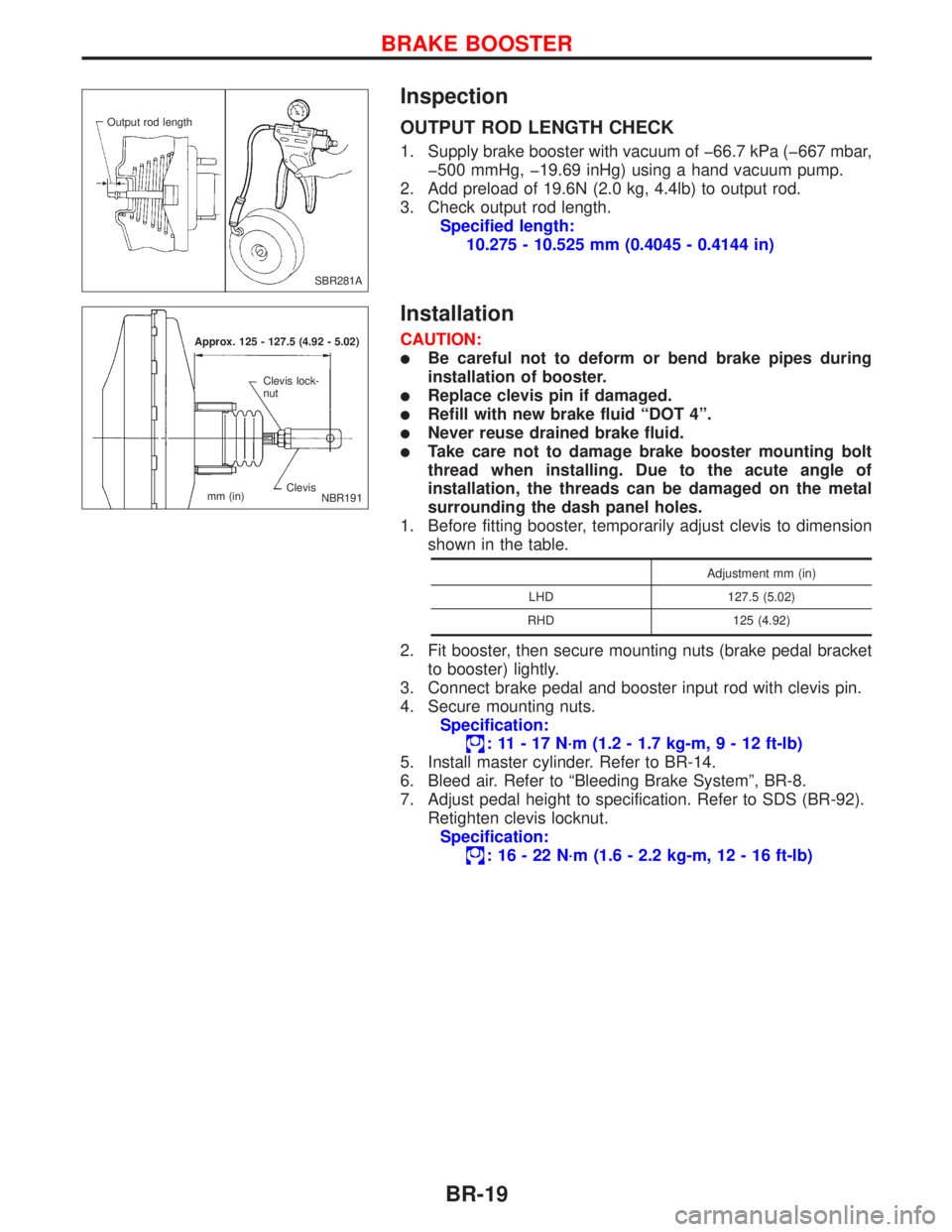
OUTPUT ROD LENGTH CHECK
1. Supply brake booster with vacuum of þ66.7 kPa (þ667 mbar,
þ500 mmHg, þ19.69 inHg) using a hand vacuum pump.
2. Add preload of 19.6N (2.0 kg, 4.4lb) to output rod.
3. Check output rod length.
Specified length:
10.275 - 10.525 mm (0.4045 - 0.4144 in)
Installation
CAUTION:
lBe careful not to deform or bend brake pipes during
installation of booster.
lReplace clevis pin if damaged.
lRefill with new brake fluid ªDOT 4º.
lNever reuse drained brake fluid.
lTake care not to damage brake booster mounting bolt
thread when installing. Due to the acute angle of
installation, the threads can be damaged on the metal
surrounding the dash panel holes.
1. Before fitting booster, temporarily adjust clevis to dimension
shown in the table.
Adjustment mm (in)
LHD 127.5 (5.02)
RHD 125 (4.92)
2. Fit booster, then secure mounting nuts (brake pedal bracket
to booster) lightly.
3. Connect brake pedal and booster input rod with clevis pin.
4. Secure mounting nuts.
Specification:
: 11 - 17 N´m (1.2 - 1.7 kg-m,9-12ft-lb)
5. Install master cylinder. Refer to BR-14.
6. Bleed air. Refer to ªBleeding Brake Systemº, BR-8.
7. Adjust pedal height to specification. Refer to SDS (BR-92).
Retighten clevis locknut.
Specification:
: 16 - 22 N´m (1.6 - 2.2 kg-m, 12 - 16 ft-lb)
SBR281A Output rod length
Approx. 125 - 127.5 (4.92 - 5.02)
Clevis Clevis lock-
nut
mm (in)
NBR191
BRAKE BOOSTER
BR-19
Page 213 of 2267
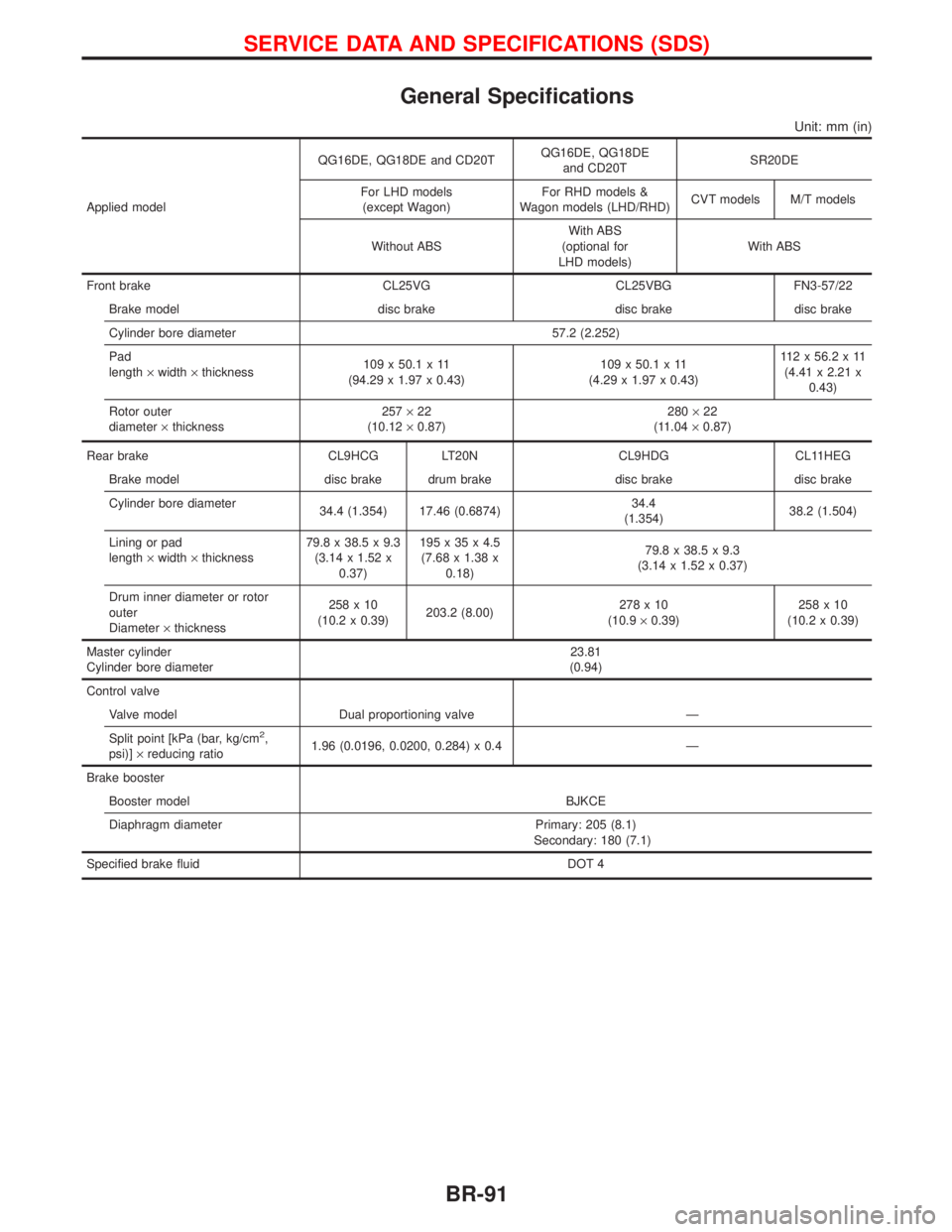
General Specifications
Unit: mm (in)
Applied modelQG16DE, QG18DE and CD20TQG16DE, QG18DE
and CD20TSR20DE
For LHD models
(except Wagon)For RHD models &
Wagon models (LHD/RHD)CVT models M/T models
Without ABSWith ABS
(optional for
LHD models)With ABS
Front brake CL25VG CL25VBG FN3-57/22
Brake model disc brake disc brake disc brake
Cylinder bore diameter 57.2 (2.252)
Pad
length´width´thickness109 x 50.1 x 11
(94.29 x 1.97 x 0.43)109 x 50.1 x 11
(4.29 x 1.97 x 0.43)112x56.2x11
(4.41 x 2.21 x
0.43)
Rotor outer
diameter´thickness257´22
(10.12´0.87)280´22
(11.04´0.87)
Rear brake CL9HCG LT20N CL9HDG CL11HEG
Brake model disc brake drum brake disc brake disc brake
Cylinder bore diameter
34.4 (1.354) 17.46 (0.6874)34.4
(1.354)38.2 (1.504)
Lining or pad
length´width´thickness79.8 x 38.5 x 9.3
(3.14 x 1.52 x
0.37)195x35x4.5
(7.68 x 1.38 x
0.18)79.8 x 38.5 x 9.3
(3.14 x 1.52 x 0.37)
Drum inner diameter or rotor
outer
Diameter´thickness258x10
(10.2 x 0.39)203.2 (8.00)278x10
(10.9´0.39)258x10
(10.2 x 0.39)
Master cylinder
Cylinder bore diameter23.81
(0.94)
Control valve
Valve model Dual proportioning valve Ð
Split point [kPa (bar, kg/cm
2,
psi)]´reducing ratio1.96 (0.0196, 0.0200, 0.284) x 0.4 Ð
Brake booster
Booster model BJKCE
Diaphragm diameter Primary: 205 (8.1)
Secondary: 180 (7.1)
Specified brake fluid DOT 4
SERVICE DATA AND SPECIFICATIONS (SDS)
BR-91
Page 220 of 2267
NBT033
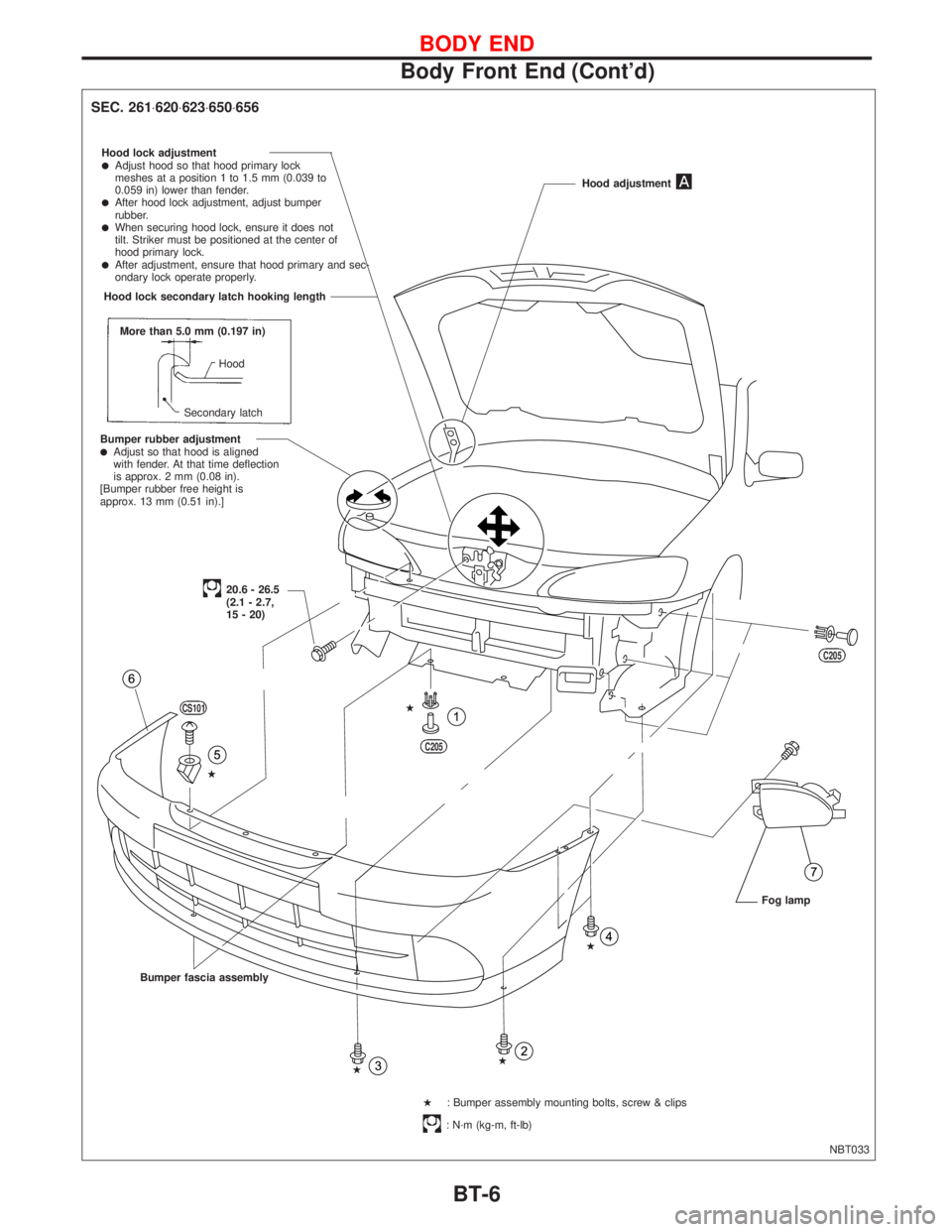
SEC. 261×620×623×650×656
Hood lock adjustmentlAdjust hood so that hood primary lock
meshes at a position 1 to 1.5 mm (0.039 to
0.059 in) lower than fender.
lAfter hood lock adjustment, adjust bumper
rubber.
lWhen securing hood lock, ensure it does not
tilt. Striker must be positioned at the center of
hood primary lock.
lAfter adjustment, ensure that hood primary and sec-
ondary lock operate properly.
More than 5.0 mm (0.197 in)
Hood
Secondary latch
Bumper rubber adjustment
lAdjust so that hood is aligned
with fender. At that time deflection
is approx. 2 mm (0.08 in).
[Bumper rubber free height is
approx. 13 mm (0.51 in).]Hood adjustment
20.6 - 26.5
(2.1 - 2.7,
15 - 20)
Bumper fascia assembly
H: Bumper assembly mounting bolts, screw & clips
: N´m (kg-m, ft-lb)Fog lamp
CS101
HH
C205
C205
H
H
H
.Hood lock secondary latch hooking length
BODY END
Body Front End (Cont'd)
BT-6
Page 260 of 2267
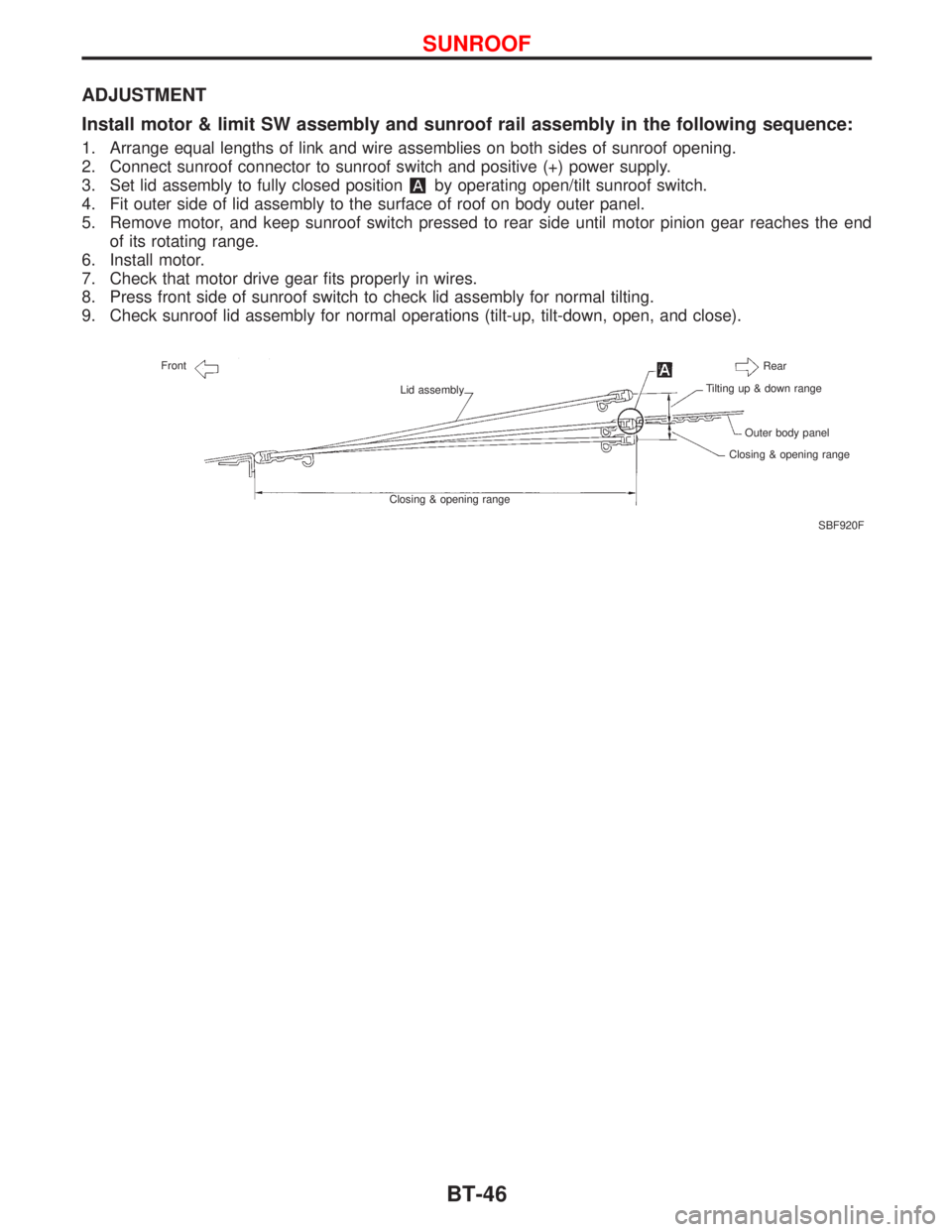
ADJUSTMENT
Install motor & limit SW assembly and sunroof rail assembly in the following sequence:
1. Arrange equal lengths of link and wire assemblies on both sides of sunroof opening.
2. Connect sunroof connector to sunroof switch and positive (+) power supply.
3. Set lid assembly to fully closed position
by operating open/tilt sunroof switch.
4. Fit outer side of lid assembly to the surface of roof on body outer panel.
5. Remove motor, and keep sunroof switch pressed to rear side until motor pinion gear reaches the end
of its rotating range.
6. Install motor.
7. Check that motor drive gear fits properly in wires.
8. Press front side of sunroof switch to check lid assembly for normal tilting.
9. Check sunroof lid assembly for normal operations (tilt-up, tilt-down, open, and close).
SBF920F Front
Lid assembly
Closing & opening rangeRear
Tilting up & down range
Outer body panel
Closing & opening range
SUNROOF
BT-46
Page 274 of 2267
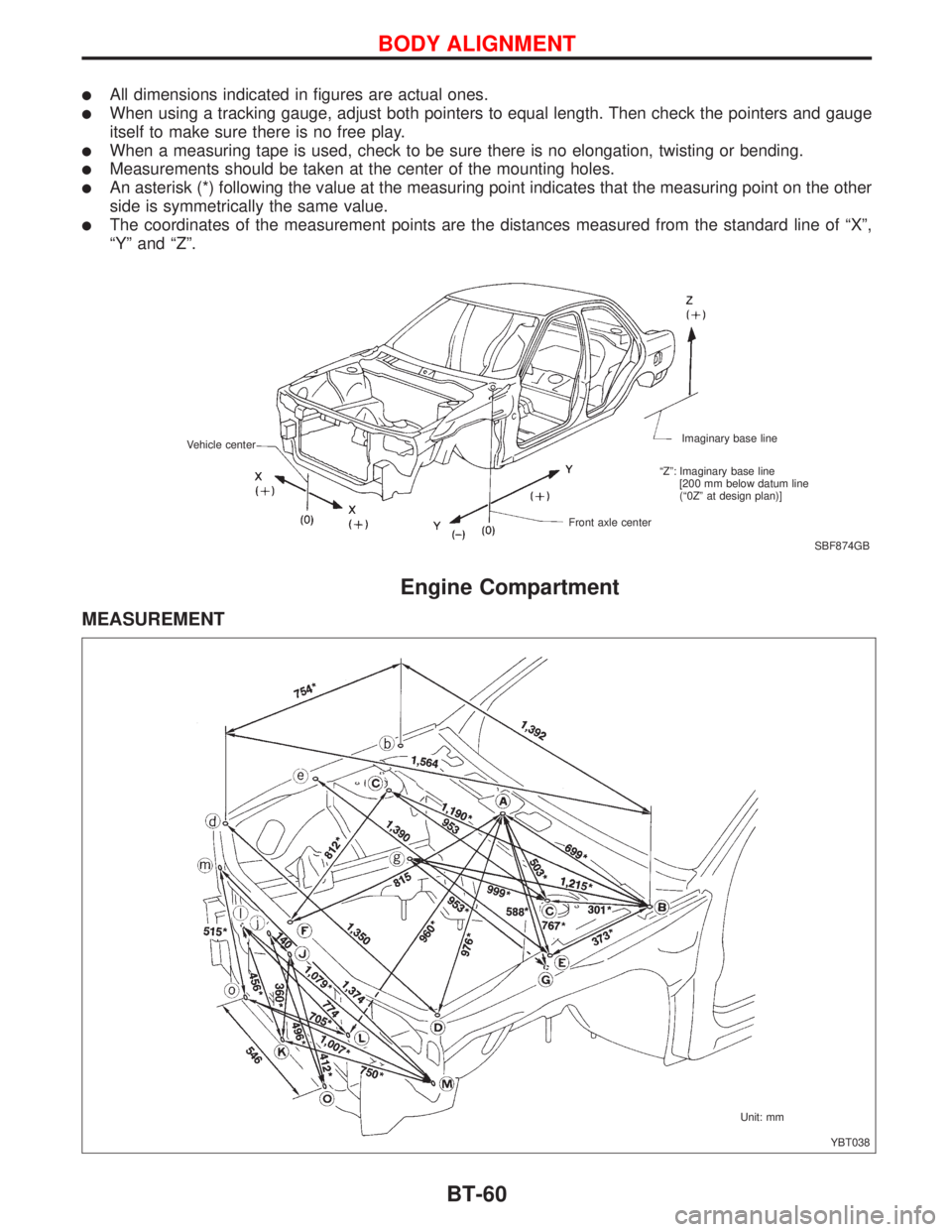
lAll dimensions indicated in figures are actual ones.
lWhen using a tracking gauge, adjust both pointers to equal length. Then check the pointers and gauge
itself to make sure there is no free play.
lWhen a measuring tape is used, check to be sure there is no elongation, twisting or bending.
lMeasurements should be taken at the center of the mounting holes.
lAn asterisk (*) following the value at the measuring point indicates that the measuring point on the other
side is symmetrically the same value.
lThe coordinates of the measurement points are the distances measured from the standard line of ªXº,
ªYº and ªZº.
Engine Compartment
MEASUREMENT
SBF874GB Imaginary base line
Front axle center Vehicle center
ªZº: Imaginary base line
[200 mm below datum line
(ª0Zº at design plan)]
YBT038 Unit: mm
BODY ALIGNMENT
BT-60
Page 463 of 2267
Multiport Fuel Injection (MFI) System
DESCRIPTIONNCEC0014Input/Output Signal ChartNCEC0014S01
Sensor Input Signal to ECMECM func-
tionActuator
Crankshaft position sensor (POS) Engine speed and piston position
Fuel injec-
tion & mix-
ture ratio
controlInjector Camshaft position sensor (PHASE) Cylinder number
Mass air flow sensor Amount of intake air
Engine coolant temperature sensor Engine coolant temperature
Heated oxygen sensor 1 (front) Density of oxygen in exhaust gas
Throttle position sensorThrottle position
Throttle valve idle position
PNP switch Gear position
Vehicle speed sensor or ABS actuator and
electric unit (control unit)Vehicle speed
Ignition switch Start signal
Air conditioner switch Air conditioner operation
Knock sensor Engine knocking condition
Electrical load Electrical load signal
Battery Battery voltage
Power steering oil pressure switch Power steering operation
Heated oxygen sensor 2 (rear)* Density of oxygen in exhaust gas
* Under normal conditions, this sensor is not for engine control operation.
Basic Multiport Fuel Injection SystemNCEC0014S02The amount of fuel injected from the fuel injector is determined by the ECM. The ECM controls the length of
time the valve remains open (injection pulse duration). The amount of fuel injected is a program value in the
ECM memory. The program value is preset by engine operating conditions. These conditions are determined
by input signals (for engine speed and intake air) from both the camshaft position sensor and the mass air
flow sensor.
Various Fuel Injection Increase/Decrease CompensationNCEC0014S03In addition, the amount of fuel injected is compensated to improve engine performance under various oper-
ating conditions as listed below.
IDuring warm-up
IWhen starting the engine
IDuring acceleration
IHot-engine operation
IHigh-load, high-speed operation
IDuring deceleration
IDuring high engine speed operation
IDuring high vehicle speed operation (M/T models)
IExtremely high engine coolant temperature
ENGINE AND EMISSION BASIC CONTROL
SYSTEM DESCRIPTIONQG16I18DE
Multiport Fuel Injection (MFI) System
EC-21
Page 491 of 2267
Diagnostic Test Mode I Ð Bulb CheckNCEC0032S03In this mode, the MI on the instrument panel should stay ON. If it remains OFF, check the MI bulb. Refer to
EL section (ªWARNING LAMPSº) or see EC-QG-354.
Diagnostic Test Mode I Ð Malfunction WarningNCEC0032S04
MI Condition
ON When the malfunction is detected or the ECM's CPU is malfunctioning.
OFF No malfunction.
IThese DTC numbers are clarified in Diagnostic Test Mode II (SELF-DIAGNOSTIC RESULTS).
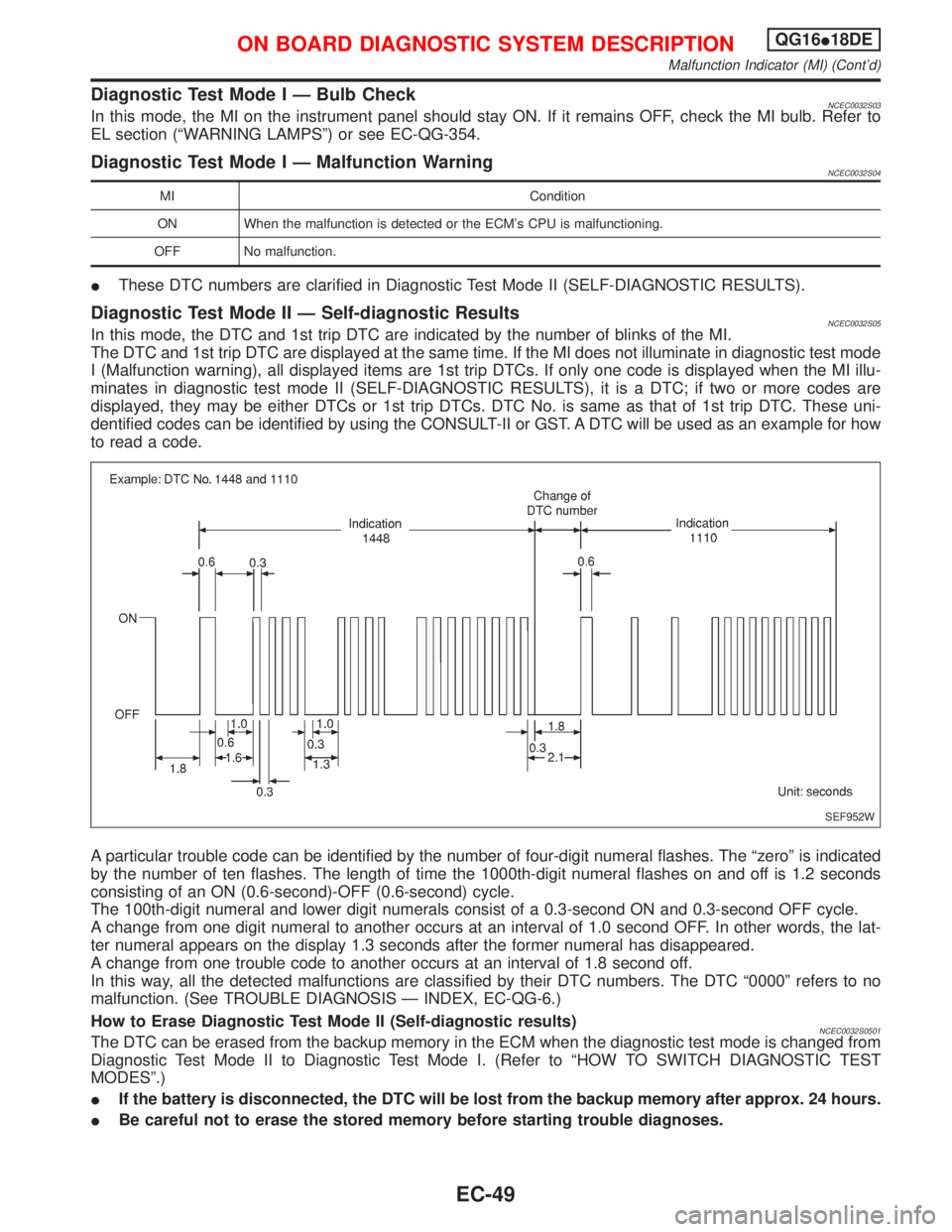
Diagnostic Test Mode II Ð Self-diagnostic ResultsNCEC0032S05In this mode, the DTC and 1st trip DTC are indicated by the number of blinks of the MI.
The DTC and 1st trip DTC are displayed at the same time. If the MI does not illuminate in diagnostic test mode
I (Malfunction warning), all displayed items are 1st trip DTCs. If only one code is displayed when the MI illu-
minates in diagnostic test mode II (SELF-DIAGNOSTIC RESULTS), it is a DTC; if two or more codes are
displayed, they may be either DTCs or 1st trip DTCs. DTC No. is same as that of 1st trip DTC. These uni-
dentified codes can be identified by using the CONSULT-II or GST. A DTC will be used as an example for how
to read a code.
A particular trouble code can be identified by the number of four-digit numeral flashes. The ªzeroº is indicated
by the number of ten flashes. The length of time the 1000th-digit numeral flashes on and off is 1.2 seconds
consisting of an ON (0.6-second)-OFF (0.6-second) cycle.
The 100th-digit numeral and lower digit numerals consist of a 0.3-second ON and 0.3-second OFF cycle.
A change from one digit numeral to another occurs at an interval of 1.0 second OFF. In other words, the lat-
ter numeral appears on the display 1.3 seconds after the former numeral has disappeared.
A change from one trouble code to another occurs at an interval of 1.8 second off.
In this way, all the detected malfunctions are classified by their DTC numbers. The DTC ª0000º refers to no
malfunction. (See TROUBLE DIAGNOSIS Ð INDEX, EC-QG-6.)
How to Erase Diagnostic Test Mode II (Self-diagnostic results)
NCEC0032S0501The DTC can be erased from the backup memory in the ECM when the diagnostic test mode is changed from
Diagnostic Test Mode II to Diagnostic Test Mode I. (Refer to ªHOW TO SWITCH DIAGNOSTIC TEST
MODESº.)
IIf the battery is disconnected, the DTC will be lost from the backup memory after approx. 24 hours.
IBe careful not to erase the stored memory before starting trouble diagnoses.
SEF952W
ON BOARD DIAGNOSTIC SYSTEM DESCRIPTIONQG16I18DE
Malfunction Indicator (MI) (Cont'd)
EC-49