1999 NISSAN PICK-UP EC IGN
[x] Cancel search: EC IGNPage 205 of 666
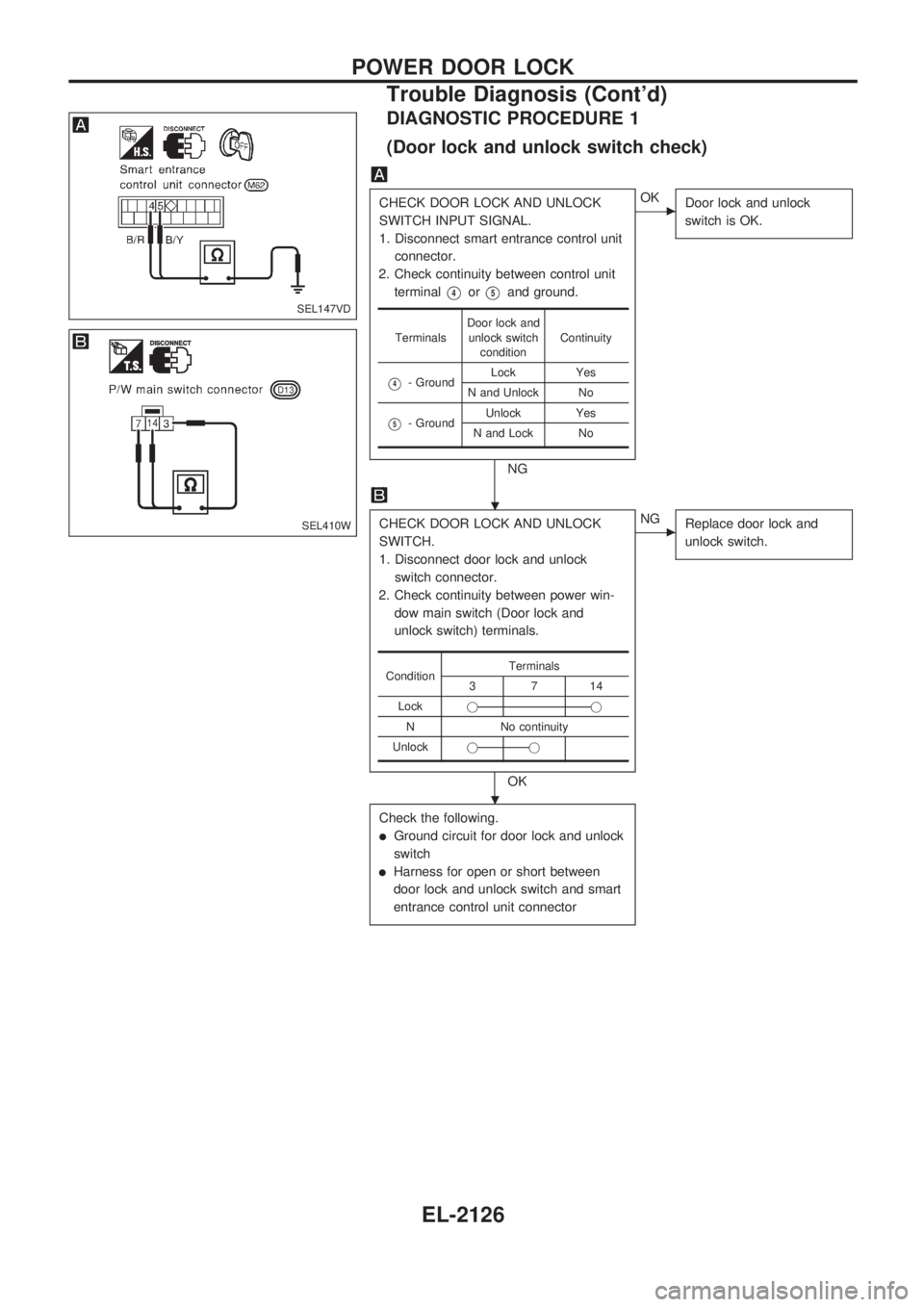
DIAGNOSTIC PROCEDURE 1
(Door lock and unlock switch check)
CHECK DOOR LOCK AND UNLOCK
SWITCH INPUT SIGNAL.
1. Disconnect smart entrance control unit
connector.
2. Check continuity between control unit
terminal
V4orV5and ground.
NG
cOK
Door lock and unlock
switch is OK.
CHECK DOOR LOCK AND UNLOCK
SWITCH.
1. Disconnect door lock and unlock
switch connector.
2. Check continuity between power win-
dow main switch (Door lock and
unlock switch) terminals.
OK
cNG
Replace door lock and
unlock switch.
Check the following.
lGround circuit for door lock and unlock
switch
lHarness for open or short between
door lock and unlock switch and smart
entrance control unit connector
TerminalsDoor lock and
unlock switch
conditionContinuity
V4- GroundLock Yes
N and Unlock No
V5- GroundUnlock Yes
N and Lock No
ConditionTerminals3714
Lockjj
N No continuity
Unlockjj
SEL147VD
SEL410W
.
.
POWER DOOR LOCK
Trouble Diagnosis (Cont'd)
EL-2126
Page 207 of 666
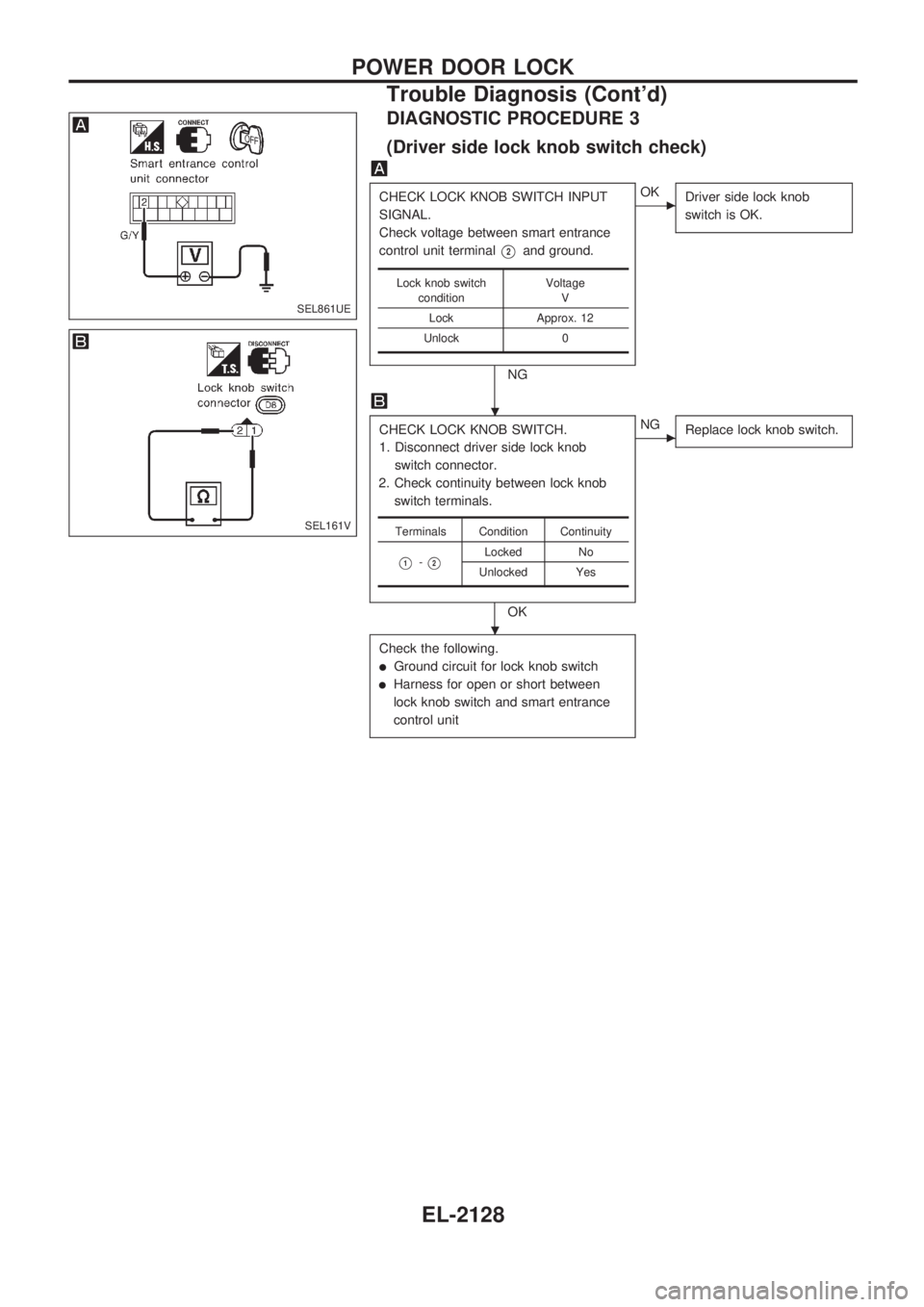
DIAGNOSTIC PROCEDURE 3
(Driver side lock knob switch check)
CHECK LOCK KNOB SWITCH INPUT
SIGNAL.
Check voltage between smart entrance
control unit terminal
V2and ground.
NG
cOK
Driver side lock knob
switch is OK.
CHECK LOCK KNOB SWITCH.
1. Disconnect driver side lock knob
switch connector.
2. Check continuity between lock knob
switch terminals.
OK
cNG
Replace lock knob switch.
Check the following.
lGround circuit for lock knob switch
lHarness for open or short between
lock knob switch and smart entrance
control unit
Lock knob switch
conditionVoltage
V
Lock Approx. 12
Unlock 0
Terminals Condition Continuity
V1-V2Locked No
Unlocked Yes
SEL861UE
SEL161V
.
.
POWER DOOR LOCK
Trouble Diagnosis (Cont'd)
EL-2128
Page 208 of 666
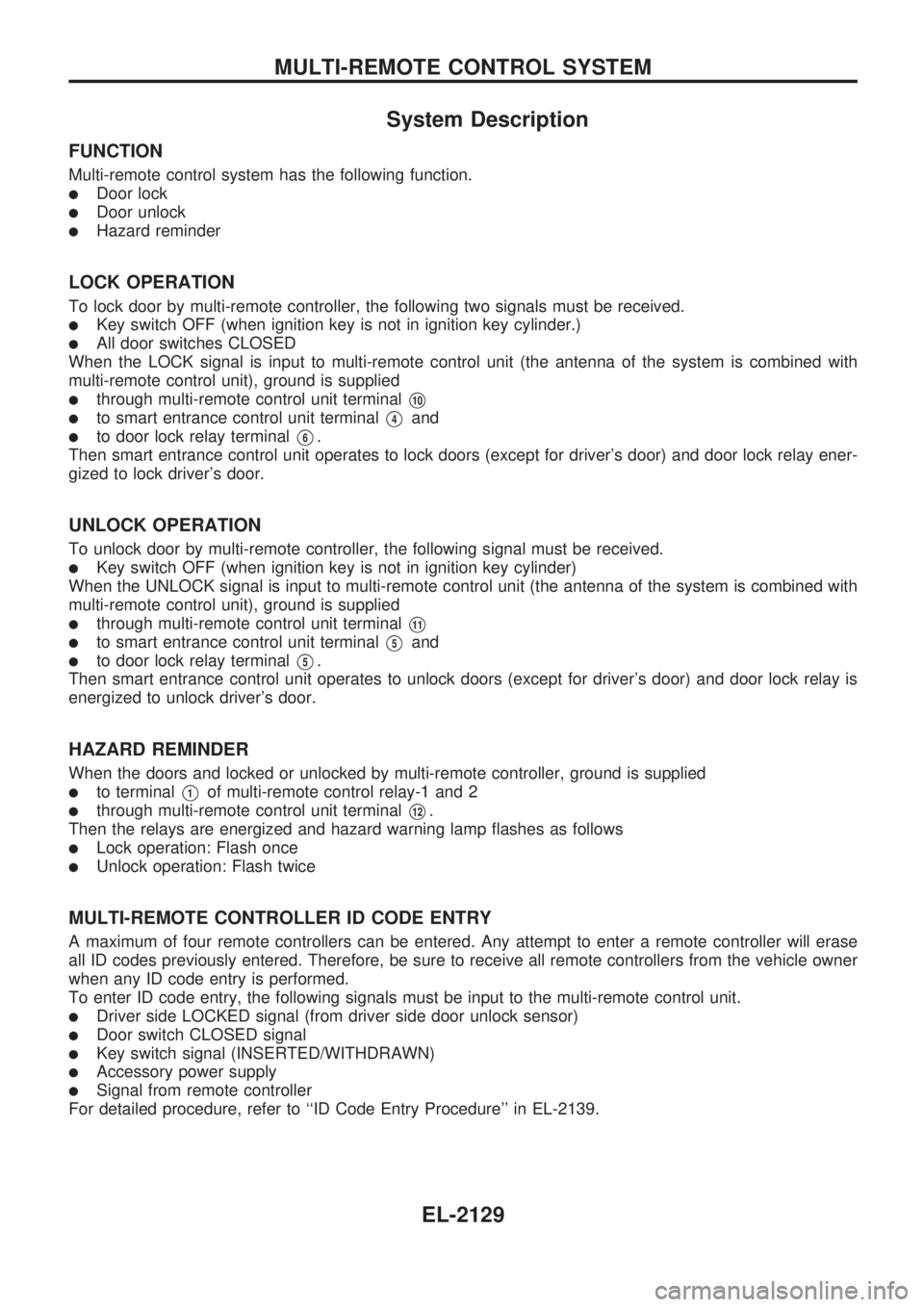
System Description
FUNCTION
Multi-remote control system has the following function.
lDoor lock
lDoor unlock
lHazard reminder
LOCK OPERATION
To lock door by multi-remote controller, the following two signals must be received.
lKey switch OFF (when ignition key is not in ignition key cylinder.)
lAll door switches CLOSED
When the LOCK signal is input to multi-remote control unit (the antenna of the system is combined with
multi-remote control unit), ground is supplied
lthrough multi-remote control unit terminalV10
lto smart entrance control unit terminalV4and
lto door lock relay terminalV6.
Then smart entrance control unit operates to lock doors (except for driver's door) and door lock relay ener-
gized to lock driver's door.
UNLOCK OPERATION
To unlock door by multi-remote controller, the following signal must be received.
lKey switch OFF (when ignition key is not in ignition key cylinder)
When the UNLOCK signal is input to multi-remote control unit (the antenna of the system is combined with
multi-remote control unit), ground is supplied
lthrough multi-remote control unit terminalV11
lto smart entrance control unit terminalV5and
lto door lock relay terminalV5.
Then smart entrance control unit operates to unlock doors (except for driver's door) and door lock relay is
energized to unlock driver's door.
HAZARD REMINDER
When the doors and locked or unlocked by multi-remote controller, ground is supplied
lto terminalV1of multi-remote control relay-1 and 2
lthrough multi-remote control unit terminalV12.
Then the relays are energized and hazard warning lamp flashes as follows
lLock operation: Flash once
lUnlock operation: Flash twice
MULTI-REMOTE CONTROLLER ID CODE ENTRY
A maximum of four remote controllers can be entered. Any attempt to enter a remote controller will erase
all ID codes previously entered. Therefore, be sure to receive all remote controllers from the vehicle owner
when any ID code entry is performed.
To enter ID code entry, the following signals must be input to the multi-remote control unit.
lDriver side LOCKED signal (from driver side door unlock sensor)
lDoor switch CLOSED signal
lKey switch signal (INSERTED/WITHDRAWN)
lAccessory power supply
lSignal from remote controller
For detailed procedure, refer to ``ID Code Entry Procedure'' in EL-2139.
MULTI-REMOTE CONTROL SYSTEM
EL-2129
Page 214 of 666
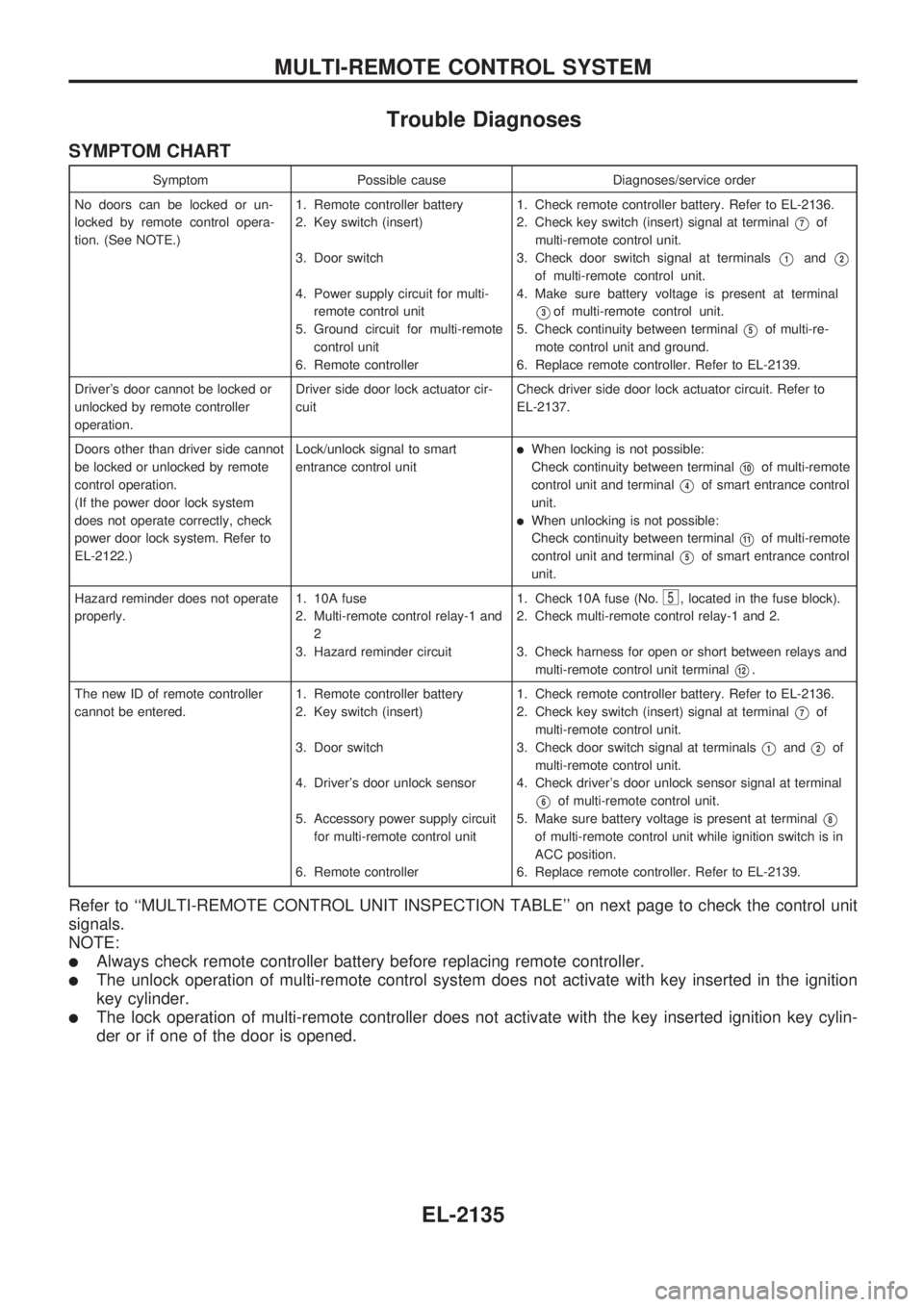
Trouble Diagnoses
SYMPTOM CHART
Symptom Possible cause Diagnoses/service order
No doors can be locked or un-
locked by remote control opera-
tion. (See NOTE.)1. Remote controller battery
2. Key switch (insert)
3. Door switch
4. Power supply circuit for multi-
remote control unit
5. Ground circuit for multi-remote
control unit
6. Remote controller1. Check remote controller battery. Refer to EL-2136.
2. Check key switch (insert) signal at terminal
V7of
multi-remote control unit.
3. Check door switch signal at terminals
V1andV2
of multi-remote control unit.
4. Make sure battery voltage is present at terminal
V3of multi-remote control unit.
5. Check continuity between terminal
V5of multi-re-
mote control unit and ground.
6. Replace remote controller. Refer to EL-2139.
Driver's door cannot be locked or
unlocked by remote controller
operation.Driver side door lock actuator cir-
cuitCheck driver side door lock actuator circuit. Refer to
EL-2137.
Doors other than driver side cannot
be locked or unlocked by remote
control operation.
(If the power door lock system
does not operate correctly, check
power door lock system. Refer to
EL-2122.)Lock/unlock signal to smart
entrance control unit
lWhen locking is not possible:
Check continuity between terminal
V10of multi-remote
control unit and terminal
V4of smart entrance control
unit.
lWhen unlocking is not possible:
Check continuity between terminal
V11of multi-remote
control unit and terminal
V5of smart entrance control
unit.
Hazard reminder does not operate
properly.1. 10A fuse
2. Multi-remote control relay-1 and
2
3. Hazard reminder circuit1. Check 10A fuse (No.
5, located in the fuse block).
2. Check multi-remote control relay-1 and 2.
3. Check harness for open or short between relays and
multi-remote control unit terminal
V12.
The new ID of remote controller
cannot be entered.1. Remote controller battery
2. Key switch (insert)
3. Door switch
4. Driver's door unlock sensor
5. Accessory power supply circuit
for multi-remote control unit
6. Remote controller1. Check remote controller battery. Refer to EL-2136.
2. Check key switch (insert) signal at terminal
V7of
multi-remote control unit.
3. Check door switch signal at terminals
V1andV2of
multi-remote control unit.
4. Check driver's door unlock sensor signal at terminal
V6of multi-remote control unit.
5. Make sure battery voltage is present at terminal
V8
of multi-remote control unit while ignition switch is in
ACC position.
6. Replace remote controller. Refer to EL-2139.
Refer to ``MULTI-REMOTE CONTROL UNIT INSPECTION TABLE'' on next page to check the control unit
signals.
NOTE:
lAlways check remote controller battery before replacing remote controller.
lThe unlock operation of multi-remote control system does not activate with key inserted in the ignition
key cylinder.
lThe lock operation of multi-remote controller does not activate with the key inserted ignition key cylin-
der or if one of the door is opened.
MULTI-REMOTE CONTROL SYSTEM
EL-2135
Page 215 of 666
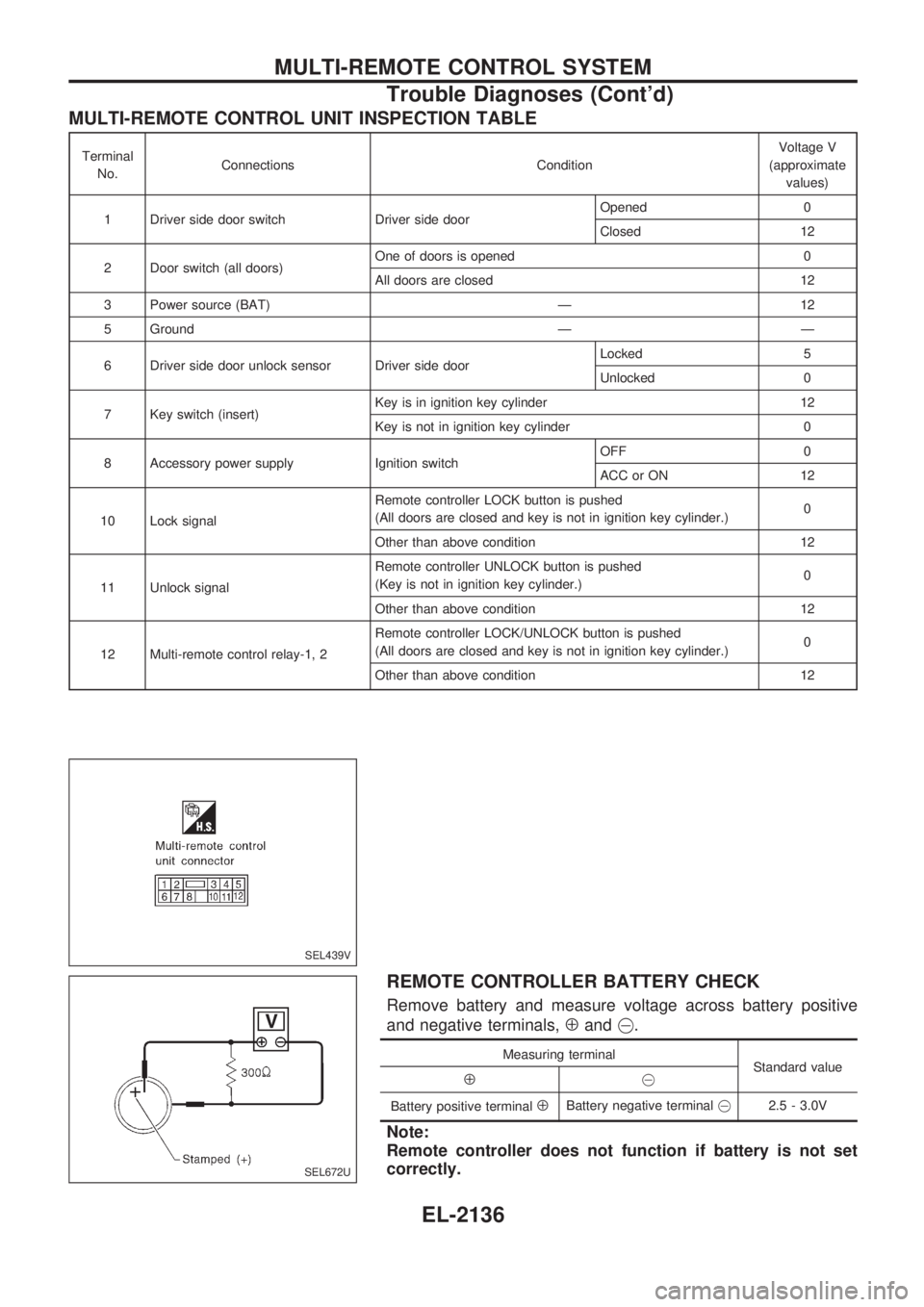
MULTI-REMOTE CONTROL UNIT INSPECTION TABLE
Terminal
No.Connections ConditionVoltage V
(approximate
values)
1 Driver side door switch Driver side doorOpened 0
Closed 12
2 Door switch (all doors)One of doors is opened 0
All doors are closed 12
3 Power source (BAT) Ð 12
5 Ground Ð Ð
6 Driver side door unlock sensor Driver side doorLocked 5
Unlocked 0
7 Key switch (insert)Key is in ignition key cylinder 12
Key is not in ignition key cylinder 0
8 Accessory power supply Ignition switchOFF 0
ACC or ON 12
10 Lock signalRemote controller LOCK button is pushed
(All doors are closed and key is not in ignition key cylinder.)0
Other than above condition 12
11 Unlock signalRemote controller UNLOCK button is pushed
(Key is not in ignition key cylinder.)0
Other than above condition 12
12 Multi-remote control relay-1, 2Remote controller LOCK/UNLOCK button is pushed
(All doors are closed and key is not in ignition key cylinder.)0
Other than above condition 12
REMOTE CONTROLLER BATTERY CHECK
Remove battery and measure voltage across battery positive
and negative terminals,
Åand@.
Measuring terminal
Standard value
Å@
Battery positive terminal
ÅBattery negative [email protected] - 3.0V
Note:
Remote controller does not function if battery is not set
correctly.
SEL439V
SEL672U
MULTI-REMOTE CONTROL SYSTEM
Trouble Diagnoses (Cont'd)
EL-2136
Page 216 of 666
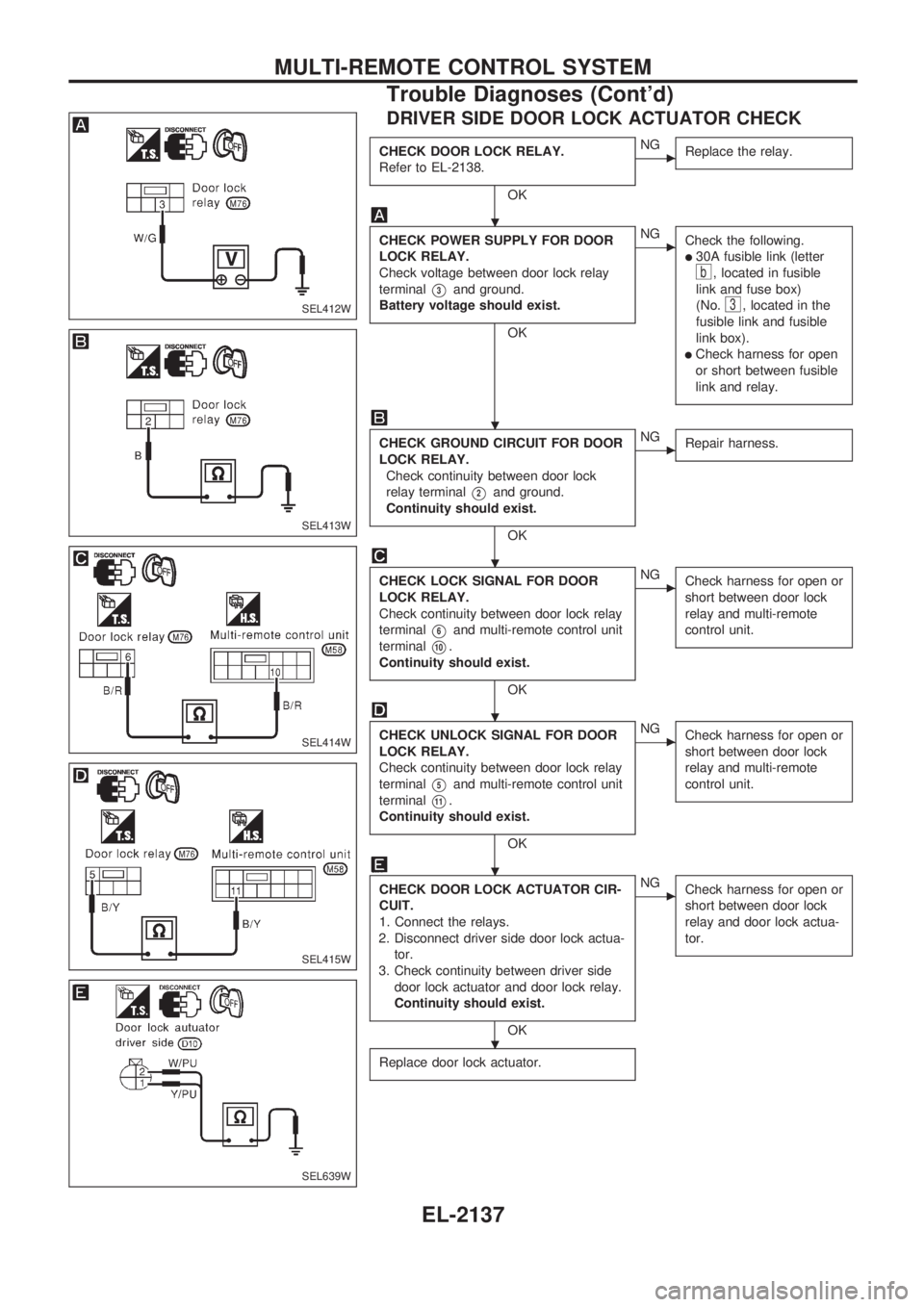
DRIVER SIDE DOOR LOCK ACTUATOR CHECK
CHECK DOOR LOCK RELAY.
Refer to EL-2138.
OK
cNG
Replace the relay.
CHECK POWER SUPPLY FOR DOOR
LOCK RELAY.
Check voltage between door lock relay
terminal
V3and ground.
Battery voltage should exist.
OK
cNG
Check the following.
l30A fusible link (letter
b, located in fusible
link and fuse box)
(No.
3, located in the
fusible link and fusible
link box).
lCheck harness for open
or short between fusible
link and relay.
CHECK GROUND CIRCUIT FOR DOOR
LOCK RELAY.
Check continuity between door lock
relay terminal
V2and ground.
Continuity should exist.
OK
cNG
Repair harness.
CHECK LOCK SIGNAL FOR DOOR
LOCK RELAY.
Check continuity between door lock relay
terminal
V6and multi-remote control unit
terminal
V10.
Continuity should exist.
OK
cNG
Check harness for open or
short between door lock
relay and multi-remote
control unit.
CHECK UNLOCK SIGNAL FOR DOOR
LOCK RELAY.
Check continuity between door lock relay
terminal
V5and multi-remote control unit
terminal
V11.
Continuity should exist.
OK
cNG
Check harness for open or
short between door lock
relay and multi-remote
control unit.
CHECK DOOR LOCK ACTUATOR CIR-
CUIT.
1. Connect the relays.
2. Disconnect driver side door lock actua-
tor.
3. Check continuity between driver side
door lock actuator and door lock relay.
Continuity should exist.
OK
cNG
Check harness for open or
short between door lock
relay and door lock actua-
tor.
Replace door lock actuator.
SEL412W
SEL413W
SEL414W
SEL415W
SEL639W
.
.
.
.
.
.
MULTI-REMOTE CONTROL SYSTEM
Trouble Diagnoses (Cont'd)
EL-2137
Page 218 of 666
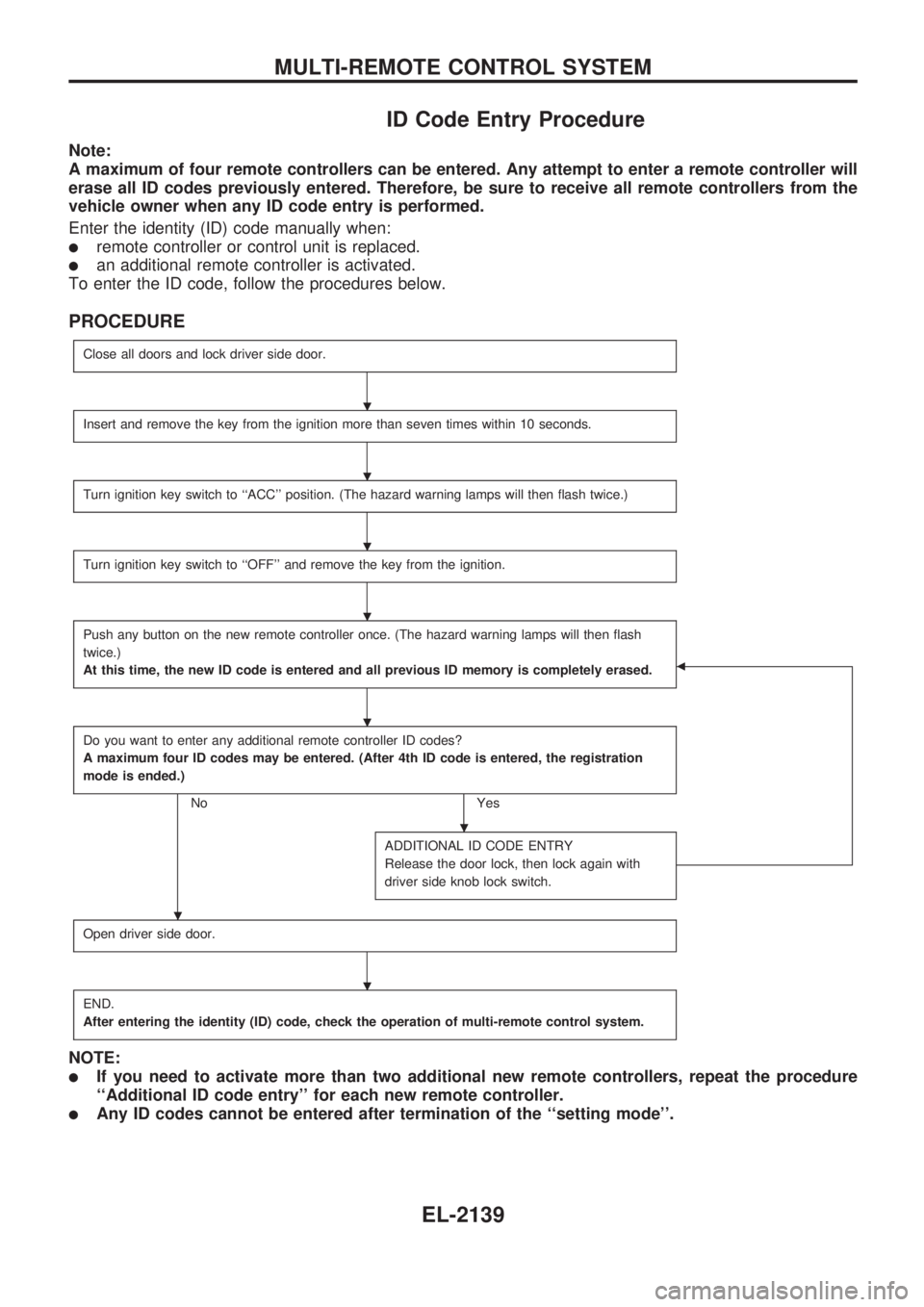
ID Code Entry Procedure
Note:
A maximum of four remote controllers can be entered. Any attempt to enter a remote controller will
erase all ID codes previously entered. Therefore, be sure to receive all remote controllers from the
vehicle owner when any ID code entry is performed.
Enter the identity (ID) code manually when:
lremote controller or control unit is replaced.
lan additional remote controller is activated.
To enter the ID code, follow the procedures below.
PROCEDURE
Close all doors and lock driver side door.
Insert and remove the key from the ignition more than seven times within 10 seconds.
Turn ignition key switch to ``ACC'' position. (The hazard warning lamps will then flash twice.)
Turn ignition key switch to ``OFF'' and remove the key from the ignition.
Push any button on the new remote controller once. (The hazard warning lamps will then flash
twice.)
At this time, the new ID code is entered and all previous ID memory is completely erased.
b
Do you want to enter any additional remote controller ID codes?
A maximum four ID codes may be entered. (After 4th ID code is entered, the registration
mode is ended.)
No Yes
ADDITIONAL ID CODE ENTRY
Release the door lock, then lock again with
driver side knob lock switch.
Open driver side door.
END.
After entering the identity (ID) code, check the operation of multi-remote control system.
NOTE:
lIf you need to activate more than two additional new remote controllers, repeat the procedure
``Additional ID code entry'' for each new remote controller.
lAny ID codes cannot be entered after termination of the ``setting mode''.
.
.
.
.
.
.
.
.
MULTI-REMOTE CONTROL SYSTEM
EL-2139
Page 250 of 666
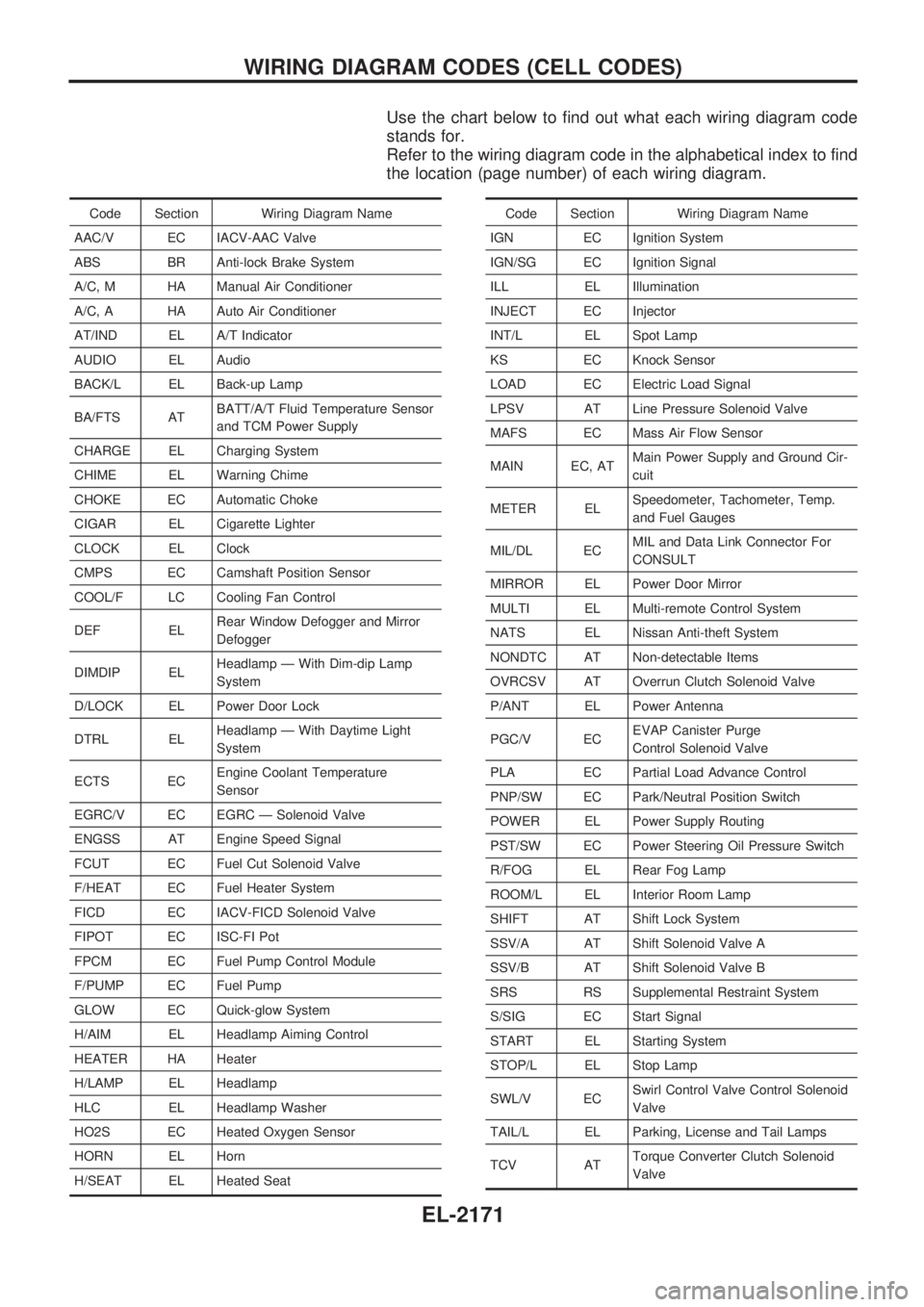
Use the chart below to find out what each wiring diagram code
stands for.
Refer to the wiring diagram code in the alphabetical index to find
the location (page number) of each wiring diagram.
Code Section Wiring Diagram Name
AAC/V EC IACV-AAC Valve
ABS BR Anti-lock Brake System
A/C, M HA Manual Air Conditioner
A/C, A HA Auto Air Conditioner
AT/IND EL A/T Indicator
AUDIO EL Audio
BACK/L EL Back-up Lamp
BA/FTS ATBATT/A/T Fluid Temperature Sensor
and TCM Power Supply
CHARGE EL Charging System
CHIME EL Warning Chime
CHOKE EC Automatic Choke
CIGAR EL Cigarette Lighter
CLOCK EL Clock
CMPS EC Camshaft Position Sensor
COOL/F LC Cooling Fan Control
DEF ELRear Window Defogger and Mirror
Defogger
DIMDIP ELHeadlamp Ð With Dim-dip Lamp
System
D/LOCK EL Power Door Lock
DTRL ELHeadlamp Ð With Daytime Light
System
ECTS ECEngine Coolant Temperature
Sensor
EGRC/V EC EGRC Ð Solenoid Valve
ENGSS AT Engine Speed Signal
FCUT EC Fuel Cut Solenoid Valve
F/HEAT EC Fuel Heater System
FICD EC IACV-FICD Solenoid Valve
FIPOT EC ISC-FI Pot
FPCM EC Fuel Pump Control Module
F/PUMP EC Fuel Pump
GLOW EC Quick-glow System
H/AIM EL Headlamp Aiming Control
HEATER HA Heater
H/LAMP EL Headlamp
HLC EL Headlamp Washer
HO2S EC Heated Oxygen Sensor
HORN EL Horn
H/SEAT EL Heated SeatCode Section Wiring Diagram Name
IGN EC Ignition System
IGN/SG EC Ignition Signal
ILL EL Illumination
INJECT EC Injector
INT/L EL Spot Lamp
KS EC Knock Sensor
LOAD EC Electric Load Signal
LPSV AT Line Pressure Solenoid Valve
MAFS EC Mass Air Flow Sensor
MAIN EC, ATMain Power Supply and Ground Cir-
cuit
METER ELSpeedometer, Tachometer, Temp.
and Fuel Gauges
MIL/DL ECMIL and Data Link Connector For
CONSULT
MIRROR EL Power Door Mirror
MULTI EL Multi-remote Control System
NATS EL Nissan Anti-theft System
NONDTC AT Non-detectable Items
OVRCSV AT Overrun Clutch Solenoid Valve
P/ANT EL Power Antenna
PGC/V ECEVAP Canister Purge
Control Solenoid Valve
PLA EC Partial Load Advance Control
PNP/SW EC Park/Neutral Position Switch
POWER EL Power Supply Routing
PST/SW EC Power Steering Oil Pressure Switch
R/FOG EL Rear Fog Lamp
ROOM/L EL Interior Room Lamp
SHIFT AT Shift Lock System
SSV/A AT Shift Solenoid Valve A
SSV/B AT Shift Solenoid Valve B
SRS RS Supplemental Restraint System
S/SIG EC Start Signal
START EL Starting System
STOP/L EL Stop Lamp
SWL/V ECSwirl Control Valve Control Solenoid
Valve
TAIL/L EL Parking, License and Tail Lamps
TCV ATTorque Converter Clutch Solenoid
Valve
WIRING DIAGRAM CODES (CELL CODES)
EL-2171