Page 145 of 343
Climate Control System
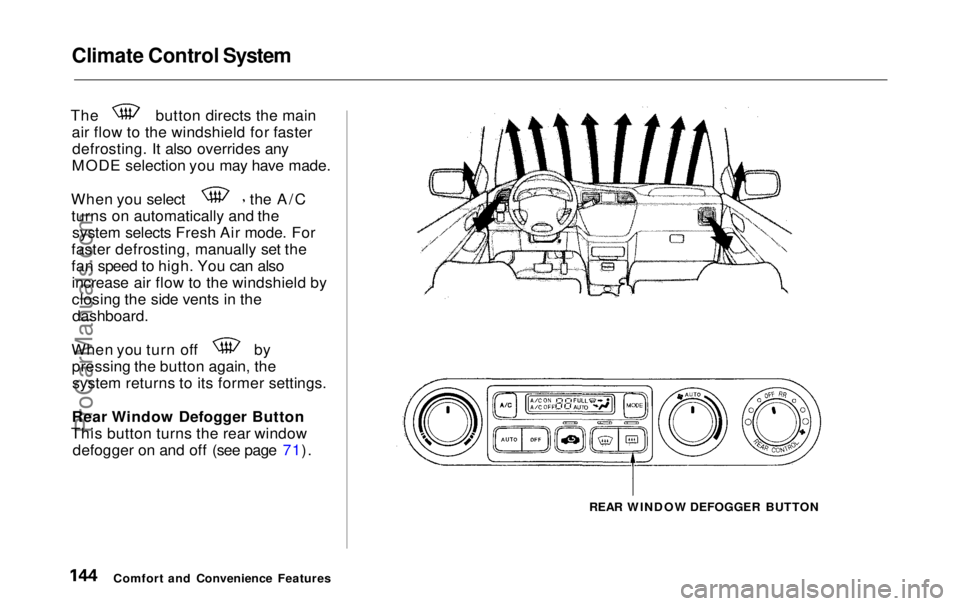
The button directs the main
air flow to the windshield for fasterdefrosting. It also overrides any
MODE selection you may have made. When you select the A/C
turns on automatically and the system selects Fresh Air mode. For
faster defrosting, manually set the
fan speed to high. You can also increase air flow to the windshield by
closing the side vents in the
dashboard.
When you turn off by
pressing the button again, thesystem returns to its former settings.
Rear Window Defogger Button
This button turns the rear window defogger on and off (see page 71).
REAR WINDOW DEFOGGER BUTTON
Comfort and Convenience FeaturesProCarManuals.comMain Menu Table of Contents s t
Page 147 of 343
Climate Control System
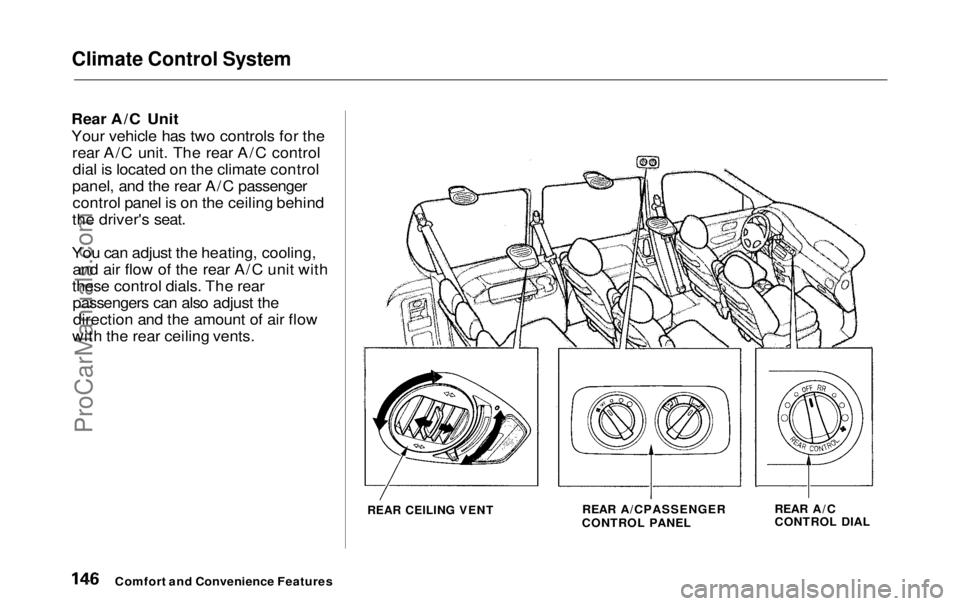
Rear A/C Unit
Your vehicle has two controls for the rear A/C unit. The rear A/C controldial is located on the climate control
panel, and the rear A/C passenger control panel is on the ceiling behind
the driver's seat.
You can adjust the heating, cooling, and air flow of the rear A/C unit with
these control dials. The rear passengers can also adjust thedirection and the amount of air flow
with the rear ceiling vents.
REAR CEILING VENT
REAR A/CPASSENGER
CONTROL PANEL REAR A/C
CONTROL DIAL
Comfort and Convenience FeaturesProCarManuals.comMain Menu Table of Contents s t
Page 149 of 343
Climate Control System
The heating/cooling/air flow control dial selects the temperature and
level of the air flow.
When the dial is in the position, heated air flows
from the rear floor vents.
When the dial is in the position, cooled air flows
from the rear ceiling vents. Cooled air can be selected when the A/C
switch on the front control panel is
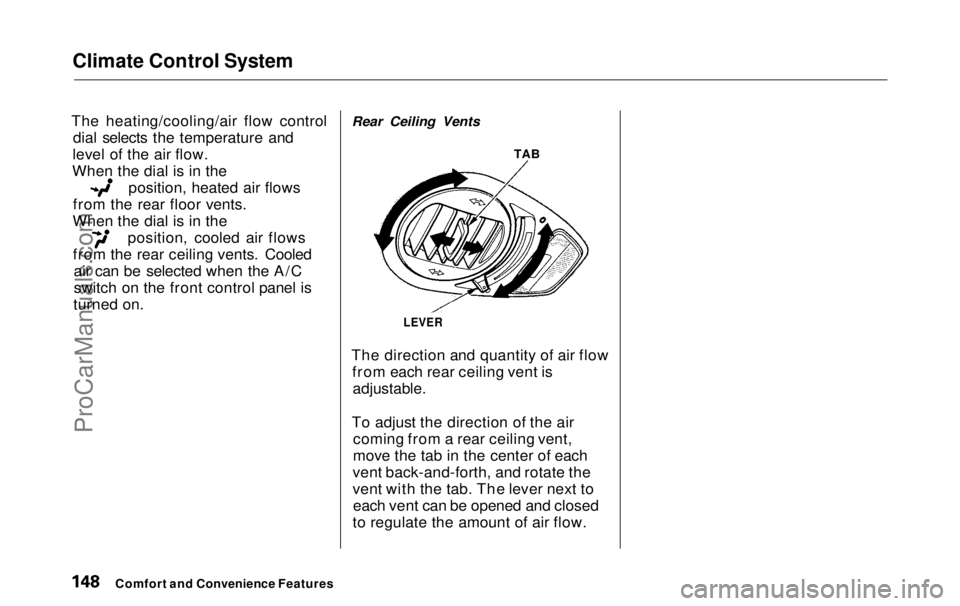
turned on. Rear Ceiling Vents
TAB
LEVER
The direction and quantity of air flow from each rear ceiling vent is
adjustable.
To adjust the direction of the air coming from a rear ceiling vent,
move the tab in the center of each
vent back-and-forth, and rotate the
vent with the tab. The lever next to each vent can be opened and closed
to regulate the amount of air flow.
Comfort and Convenience FeaturesProCarManuals.comMain Menu Table of Contents s t
Page 150 of 343
Audio System
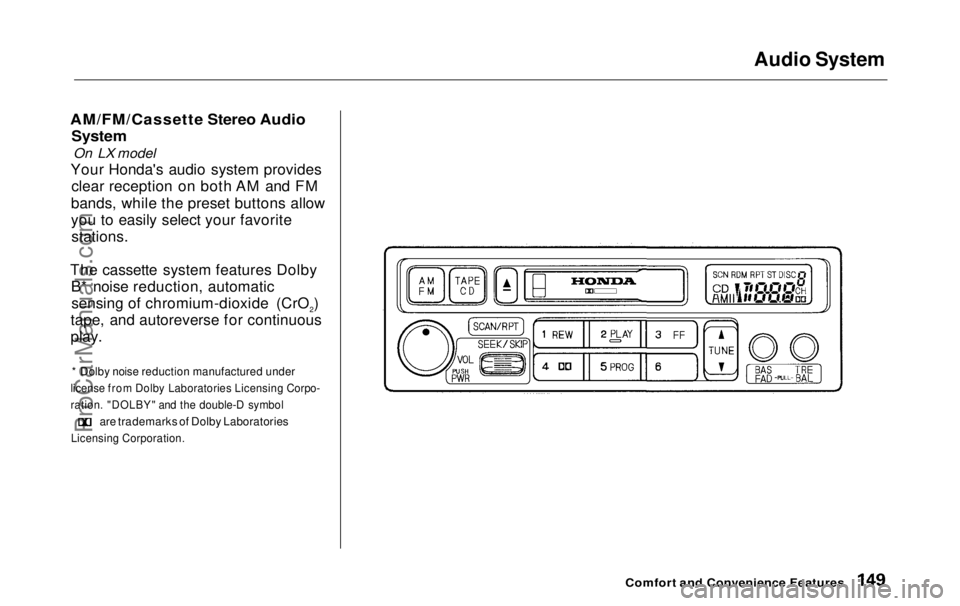
AM/FM/Cassette Stereo Audio
System
On LX model
Your Honda's audio system provides clear reception on both AM and FM
bands, while the preset buttons allow
you to easily select your favorite stations.
The cassette system features Dolby B* noise reduction, automaticsensing of chromium-dioxide (CrO2)
tape, and autoreverse for continuous
play.
* Dolby noise reduction manufactured under
license from Dolby Laboratories Licensing Corpo-
ration. "DOLBY" and the double-D symbol
are trademarks of Dolby Laboratories
Licensing Corporation.
Comfort and Convenience FeaturesProCarManuals.comMain Menu Table of Contents s t
Page 151 of 343
Audio System
Operating the Radio
The ignition switch must be in ACCESSORY (I) or ON (II) to operate the audio system. Turn thesystem on by pushing the PWR/
VOL knob.
Adjust the volume by turning the PWR/VOLknob.
The band and frequency that the radio was last tuned to is displayed.
To change bands, press the AM/FM button. On the FM band, ST will be
displayed if the station is broadcast-
ing in stereo. Stereo reproduction on
AM is not available.
You can use any of four methods to
find radio stations on the selectedband: TUNE, SEEK, SCAN or the
Preset buttons.
TUNE — Use the TUNE bar to tune the radio to a desired frequency. Press the upper part ( ) to tune
to a higher frequency, or the lower part ( ) to tune to a lower
frequency. The frequency numbers
will start to change rapidly. Release the bar when the display reaches the
desired frequency. To change the
frequency in small increments, press
and release the TUNE bar quickly. SEEK — The SEEK function
searches the band for a station with
a strong signal. To activate it, push
the SEEK switch up or down, then
release it. Depending on which way
you push the switch, the system scans upward or downward from the
current frequency. It stops when it
finds a station with a strong signal.
Comfort and Convenience FeaturesProCarManuals.comMain Menu Table of Contents s t
Page 153 of 343
Audio System
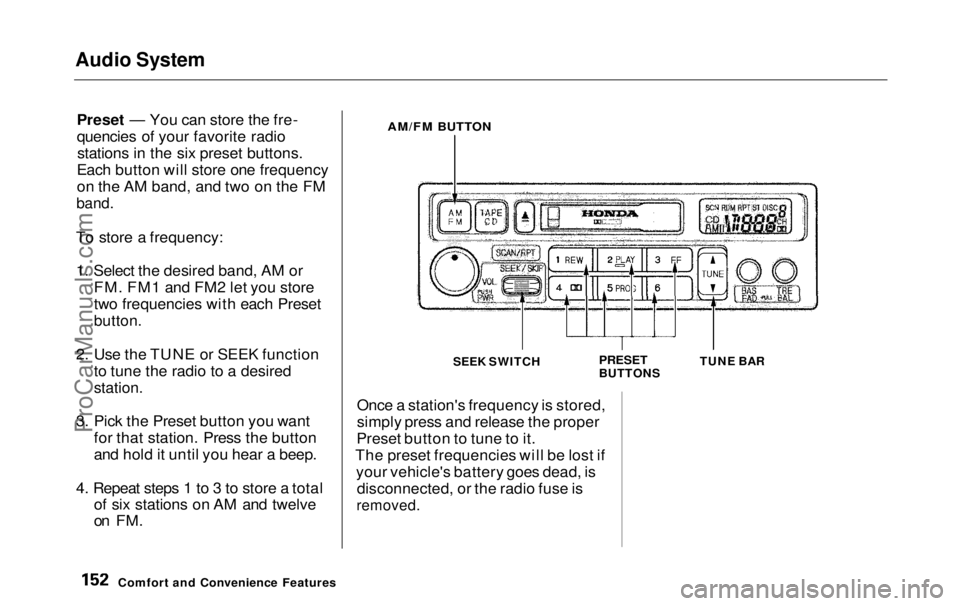
Preset — You can store the fre-
quencies of your favorite radiostations in the six preset buttons.
Each button will store one frequency
on the AM band, and two on the FM
band.
To store a frequency: 1. Select the desired band, AM or FM. FM1 and FM2 let you store
two frequencies with each Preset
button.
2. Use the TUNE or SEEK function to tune the radio to a desired
station.
3. Pick the Preset button you want for that station. Press the button
and hold it until you hear a beep.
4. Repeat steps 1 to 3 to store a total of six stations on AM and twelve
on FM.
AM/FM BUTTON
SEEK SWITCH
PRESET
BUTTONSTUNE BAR
Once a station's frequency is stored,
simply press and release the proper
Preset button to tune to it.
The preset frequencies will be lost if your vehicle's battery goes dead, isdisconnected, or the radio fuse is
removed.
Comfort and Convenience FeaturesProCarManuals.comMain Menu Table of Contents s t
Page 154 of 343
Audio System
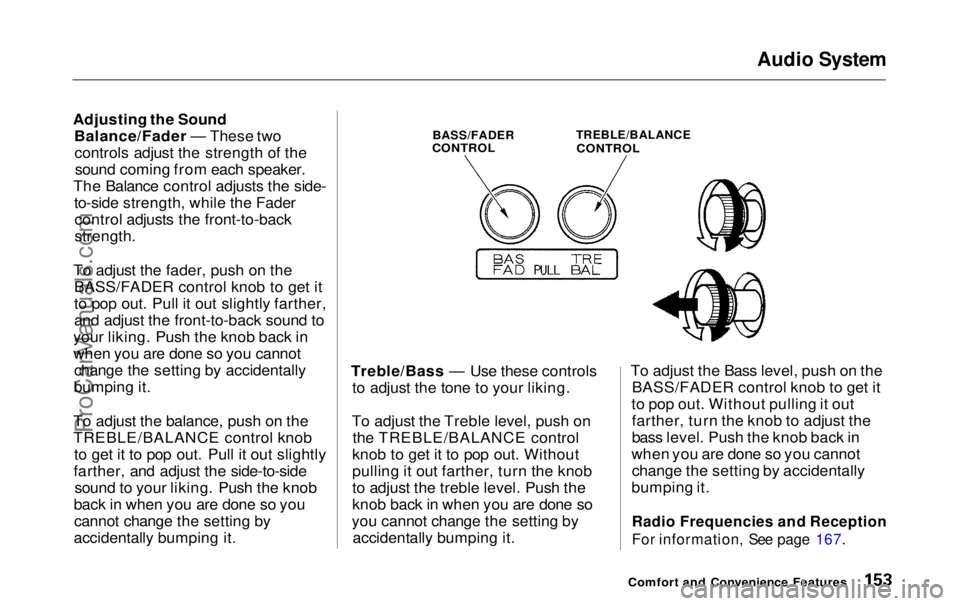
Adjusting the Sound Balance/Fader — These twocontrols adjust the strength of thesound coming from each speaker.
The Balance control adjusts the side- to-side strength, while the Fadercontrol adjusts the front-to-back
strength.
To adjust the fader, push on the BASS/FADER control knob to get it
to pop out. Pull it out slightly farther,
and adjust the front-to-back sound to
your liking. Push the knob back in
when you are done so you cannot change the setting by accidentally
bumping it.
To adjust the balance, push on the
TREBLE/BALANCE control knob to get it to pop out. Pull it out slightly
farther, and adjust the side-to-side sound to your liking. Push the knob
back in when you are done so you cannot change the setting by
accidentally bumping it.
BASS/FADER
CONTROL
TREBLE/BALANCE
CONTROL
Treble/Bass — Use these controls to adjust the tone to your liking.
To adjust the Treble level, push on the TREBLE/BALANCE control
knob to get it to pop out. Without
pulling it out farther, turn the knob
to adjust the treble level. Push the
knob back in when you are done so
you cannot change the setting by accidentally bumping it. To adjust the Bass level, push on the
BASS/FADER control knob to get it
to pop out. Without pulling it out farther, turn the knob to adjust the
bass level. Push the knob back in
when you are done so you cannot change the setting by accidentally
bumping it.
Radio Frequencies and Reception
For information, See page 167.
Comfort and Convenience FeaturesProCarManuals.comMain Menu Table of Contents s t
Page 155 of 343
Audio System
Audio System LightingYou can use the instrument panelbrightness control knob to adjust theillumination of the audio system (see
page 67 ). The audio system
illuminates when the parking lightsare on, even if the radio is turned off.
Operating the Cassette Player
Turn the audio system ON. Make sure the tape opening on the cassette
is facing to the right, then insert the
cassette most of the way into the slot.
The system will pull it in the rest of the way, and begin to play.
The tape direction indicator will light to show you which side of the cassette is playing. The indicates
the side you inserted facing upward
is now playing. If you want to play
the other side, press the PROG
button. Dolby B noise reduction turns on
when you insert a cassette. If the
tape was not recorded with Dolby B noise reduction, turn it off by pressing the button.
When the system reaches the end of the tape, it will automatically reversedirection and play the other side. If
you want to remove the cassette from the drive, press the EJECT
button.
Tape Search Functions With a cassette playing, you can usethe FF, REW, SKIP, or REPEAT
function to find a desired program.
FF/REW — Fast Forward and Re-
wind move the tape rapidly. To re-
wind the tape, push the REW button.
You will see REW in the display. To fast forward the tape, push the FF
button. You will see FF displayed.Press the PLAY button to take thesystem out of rewind or fast forward. If the system reaches the end of the
tape while in fast forward or rewind,
it automatically stops that function,
reverses direction, and begins to play.
SKIP — The Skip Function allows
you to find the beginning of a song or passage. To find the beginning of
the song or passage currently
playing, push the SKIP switch down.
You will see REW flashing in the display as the tape rewinds. To find
the beginning of the next song, push
the SKIP switch up. You will see FF
flashing in the display as the tape
fast forwards. When the system
finds the beginning of a song or passage, it goes back to PLAY mode.
Comfort and Convenience FeaturesProCarManuals.comMain Menu Table of Contents s t