1999 DODGE RAM instrument panel
[x] Cancel search: instrument panelPage 1486 of 1691

PCM.
MISCELLANEOUS CONTROLS
NOTE: Although not strictly considered part of engine performance
system, some controlled devices can adversely affect
driveability if they malfunction.
A/C CLUTCH RELAY
A/C clutch relay is controlled by PCM. When A/C or Defrost
mode is selected and PCM receives A/C request signal from evaporator
switch, PCM will cycle clutch on and off through A/C clutch relay.
When this relay is energized during engine operation, PCM will
determine correct engine idle speed through IAC motor.
When PCM senses low idle speed or wide open throttle through
TP sensor, PCM will de-energize A/C clutch relay, preventing A/C
operation.
AUTO SHUTDOWN (ASD) RELAY & FUEL PUMP RELAY
ASD relay and electric fuel pump relay are energized when
ignition is on. These relays are controlled through PCM by switching a
common ground circuit on and off. Following components are controlled
by ASD and fuel pump relays:
* Electric Fuel Pump
* Fuel Injectors
* Generator Field Winding
* Ignition Coil(s)
* HO2S Heating Element
When ignition switch is turned to RUN position, PCM energizes
ASD relay and electric fuel pump relay which powers these components.
If PCM does not receive a CMP and CKP sensor signal within one second
of engine cranking (start-up), PCM will turn ground circuit off and
de-energize ASD relay.
GENERATOR
Powertrain Control Module (PCM) regulates charging system
voltage.
LIMP-IN MODE
Limp-in mode is the attempt by PCM to compensate for failure
of certain components by substituting information from other sources
so that vehicle can still be operated. If PCM senses incorrect data or
no data at all from MAP sensor, TP sensor, ECT sensor or battery
voltage, system is placed into limp-in mode and Malfunction Indicator
Light (MIL) on instrument panel comes on.
If faulty sensor comes back on line, PCM will resume closed
loop operation. On some vehicles, MIL will remain on until ignition is
shut off and vehicle is restarted. To prevent damage to catalytic
converter, vehicle should NOT be driven for extended periods in limp-
in mode.
RADIATOR FAN RELAY
Electric cooling fan is used only on Dakota. Using
information supplied by A/C signal (if equipped), ECT sensor, and VSS,\
Page 1510 of 1691
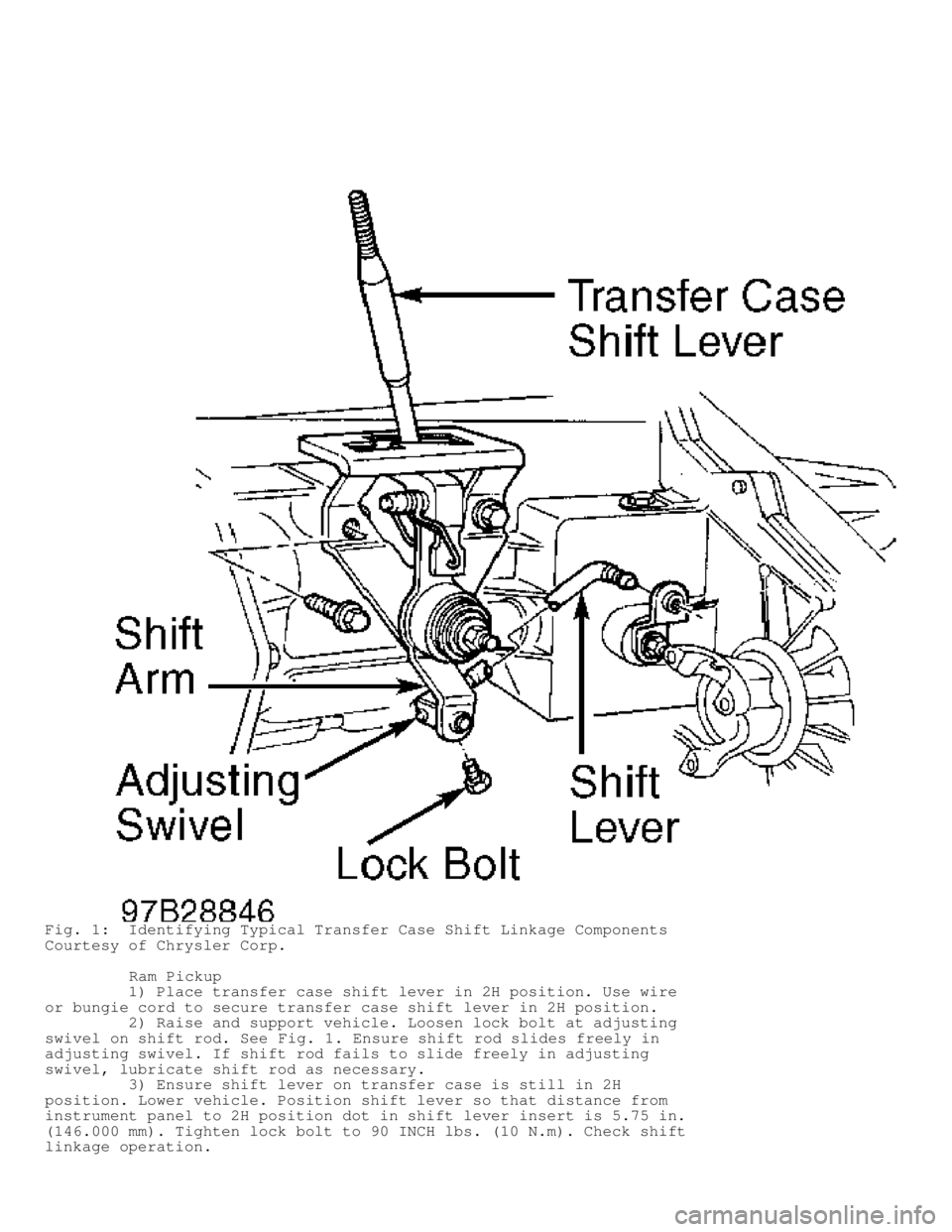
Fig. 1: Identifying Typical Transfer Case Shift Linkage Components
Courtesy of Chrysler Corp.
Ram Pickup
1) Place transfer case shift lever in 2H position. Use wire
or bungie cord to secure transfer case shift lever in 2H position.
2) Raise and support vehicle. Loosen lock bolt at adjusting
swivel on shift rod. See Fig. 1. Ensure shift rod slides freely in
adjusting swivel. If shift rod fails to slide freely in adjusting
swivel, lubricate shift rod as necessary.
3) Ensure shift lever on transfer case is still in 2H
position. Lower vehicle. Position shift lever so that distance from
instrument panel to 2H position dot in shift lever insert is 5.75 in.
(146.000 mm). Tighten lock bolt to 90 INCH lbs. (10 N.m). Check shif\
t
linkage operation.
Page 1527 of 1691
. If resistance is less than 5 ohms, replace\
instrument cluster. If resistance is 5 ohms or more, rep")
resistance between ground and instrument cluster connector C1 terminal
No. 10 (Violet/Brown wire). If resistance is less than 5 ohms, replace\
instrument cluster. If resistance is 5 ohms or more, repair open
Violet/Brown wire.
BUS (+) & BUS (-) SHORTED TOGETHER
NOTE: For connector terminal identification and wiring diagrams,
see BODY CONTROL COMPUTER - INTRODUCTION article. Perform
VERIFICATION TEST VER-1 after each repair.
CAUTION: Always turn ignition off prior to disconnecting any module
connector.
1) Turn ignition off. Disconnect Powertrain Control Module
(PCM). PCM is mounted in right side of firewall. Turn ignition on. If
scan tool does not display BUS (+) & BUS (-) SHORTED TOGETHER, repla\
ce
PCM. If scan tool displays BUS (+) & BUS (-) SHORTED TOGETHER, go to\
next step.
2) Turn ignition off. Disconnect anti-lock brake controller
module. Controller is mounted to top of ABS hydraulic unit. Turn
ignition on. If scan tool does not display BUS (+) & BUS (-) SHORTED\
TOGETHER, replace anti-lock brake controller module. If scan tool
displays BUS (+) & BUS (-) SHORTED TOGETHER, go to next step.
3) Turn ignition off. Disconnect instrument cluster. Turn
ignition on. If scan tool does not display BUS (+) & BUS (-) SHORTED\
TOGETHER, replace instrument cluster circuit board. If scan tool
displays BUS (+) & BUS (-) SHORTED TOGETHER, go to next step.
4) Turn ignition off. Disconnect compass mini-trip computer.
Turn ignition on. If scan tool does not display BUS (+) & BUS (-)
SHORTED TOGETHER, replace compass mini-trip computer. If scan tool
displays BUS (+) & BUS (-) SHORTED TOGETHER, go to next step.
5) Turn ignition off. Disconnect radio connector. Turn
ignition on. If scan tool does not display BUS (+) & BUS (-) SHORTED\
TOGETHER, replace radio. If scan tool displays BUS (+) & BUS (-)
SHORTED TOGETHER, go to next step.
6) Turn ignition off and wait 2 minutes. Disconnect Air Bag
Control Module (ACM). ACM is located under center of instrument panel.\
Turn ignition on. If scan tool does not display BUS (+) & BUS (-)
SHORTED TOGETHER, replace ACM. If scan tool displays BUS (+) & BUS (-\
)
SHORTED TOGETHER, go to next step.
7) Turn ignition off. Disconnect Central Timer Module (CTM).\
CTM is located under left side of instrument panel. Turn ignition on.
If scan tool does not display BUS (+) & BUS (-) SHORTED TOGETHER,
replace CTM. If scan tool displays BUS (+) & BUS (-) SHORTED TOGETHE\
R,
go to next step.
8) Disconnect scan tool from DLC. Using external ohmmeter,
measure resistance between terminals No. 3 (Violet/Brown wire) and No.\
11 (White/Black wire) on DLC connector. If resistance is less than 5
ohms, repair short between Violet/Brown wire and White/Dark Green
wire. If resistance is 5 ohms or more, replace scan tool cable or scan
tool as necessary.
BUS BIAS LEVEL TOO LOW (BUS BIAS LEVEL TOO HIGH)
NOTE: For connector terminal identification and wiring diagrams,
see BODY CONTROL COMPUTER - INTRODUCTION article. Perform
VERIFICATION TEST VER-1 after each repair.
CAUTION: Always turn ignition off prior to disconnecting any module
connector.
1) Disconnect scan tool. Using an external voltmeter, measure
Page 1530 of 1691

Junction block is on left side of instrument panel. If fuse is open,
go to next step. If fuse is okay, go to step 6).
2) Using external voltmeter, measure voltage between ground
and voltage input side of fuse No. 19 socket. If voltage is 10 volts
or less, repair open ignition switch output circuit (Dark Blue wire
between ignition switch and junction block). If voltage is more than
10 volts, go to next step.
3) Turn ignition off and wait 2 minutes. Using external
ohmmeter, measure resistance between ground and fused ignition switch
output run/start terminal (Light Green/Yellow wire) on fuse No. 19
socket. If resistance is less than 5 ohms, go to next step. If
resistance is 5 ohms or more, go to step 5).
4) Disconnect Air Bag Control Module (ACM) connector. ACM is\
located under center of instrument panel. Turn ignition on. Measure
resistance between ground and fused ignition switch output run/start
terminal (Light Green/Yellow wire) on fuse No. 19 socket. If
resistance is less than 5 ohms, repair Light Green/Yellow wire for
short to ground. Replace fuse No. 19. If resistance is 5 ohms or more,
replace air bag control module and fuse No. 19.
5) Turn ignition off and wait 2 minutes. Disconnect Air Bag
Control Module (ACM) connector. ACM is located under center of
instrument panel. Using external ohmmeter, measure resistance of Light
Green/Yellow wire between ACM connector terminal No. 14 and fused
ignition switch output run/start terminal on fuse No. 19 socket. If
resistance is less than 5 ohms, connect ACM connector. Turn ignition
on. Replace fuse No. 19 in junction block. Go to appropriate AIR BAG
SERVICE & REPAIR, DOMESTIC CARS, LIGHT TRUCKS & VANS for further
testing. If resistance is 5 ohms or more, repair open Light
Green/Yellow wire. Replace fuse No. 19.
6) Using external voltmeter, measure voltage between ground
and voltage input side of fuse No. 19 socket. If voltage is 10 volts
or less, repair open ignition switch output circuit (Dark Blue wire
between ignition switch and junction block). If voltage is more than
10 volts, go to next step.
7) Turn ignition off and wait 2 minutes. Install fuse No. 19.
Disconnect Air Bag Control Module (ACM) connector. ACM is located
under center of instrument panel. Turn ignition on. Using external
voltmeter, measure voltage between ground and ACM connector terminal
No. 14 (Light Green/Yellow wire). If voltage is 10 volts or less,
repair open Light Green/Yellow wire. If voltage is more than 10 volts,
go to next step.
8) Turn ignition off. Using external ohmmeter, measure
resistance between ground and ACM connector terminal No. 4
(Black/Pink). If resistance is 5 ohms or more, repair open Black/Pink
wire. If resistance is less than 5 ohms, go to next step.
9) Turn ignition on. Using external voltmeter, measure
voltage between ground and ACM connector terminal No. 21 (Violet/Brown
wire). If voltage is not 1.8-2.6 volts, repair open Violet/Brown wire.
If voltage is 1.8-2.6 volts, go to next step.
10) Turn ignition off. Using external ohmmeter, measure
resistance between ground and ACM connector terminal No. 4 (Black/Pink
wire). If resistance is 5 ohms or more, repair open Black/Pink wire.
If resistance is less than 5 ohms, go to next step.
11) Using external voltmeter, measure voltage between ground
and ACM connector terminal No. 22 (White/Black wire). If voltage is
not 1.8- 2.6 volts, repair open White/Black wire. If voltage is 1.8-2.
6 volts, replace ACM.
NO RESPONSE CENTRAL TIMER MODULE
NOTE: For connector terminal identification and wiring diagrams,
see BODY CONTROL COMPUTER - INTRODUCTION article. Perform
VERIFICATION TEST VER-1 after each repair.
Page 1531 of 1691

CAUTION: Always turn ignition off prior to disconnecting any module
connector.
1) Remove and inspect fuse No. 11 from junction block.
Junction block is on left side of instrument panel. If fuse is open,
go to next step. If fuse is okay, go to step 3).
2) Using external ohmmeter, measure resistance between ground
and fused ignition switch output run/start terminal (Dark Blue/White
wire) on fuse No. 11 socket. If resistance is less than 5 ohms, repair
short to ground in Dark Blue/White wire. Replace fuse No. 11. If
resistance is 5 ohms or more, replace fuse No. 11.
3) Install fuse No. 11. Remove and inspect fuse No. 6 from
junction block. If fuse is open, next step. If fuse is okay, go to
step 5).
4) Using external ohmmeter, measure resistance between ground
and fused ignition switch output run/accy terminal (Dark Blue wire) on\
fuse No. 6 socket. If resistance is less than 5 ohms, repair short to
ground in Dark Blue wire. Replace fuse No. 6. If resistance is 5 ohms
or more, replace fuse No. 6.
5) Install fuse No. 6. Disconnect Central Timer Module (CTM)\
.
CTM is located under left side of instrument panel. Using external
ohmmeter, measure resistance between ground and CTM 18-pin connector
terminal No. 3 (Black/Orange wire). If resistance is more than 5 ohms,\
repair open Black/Orange wire. If resistance is 5 ohms or less, go to
next step.
6) Measure resistance between ground and CTM 14-pin connector
terminal No. 6 (Black/Light Green wire). If resistance is more than 5
ohms, repair open Black/Light Green wire. If resistance is 5 ohms or
less, go to next step.
7) Turn ignition on. Using scan tool, perform CCD Bus test.
Connect jumper wire between ground and CTM 18-pin connector terminal
No. 16 (Violet/Brown wire). If scan tool does not display BUS SHORT TO\
GROUND, repair open Violet/Brown wire. If scan tool displays BUS SHORT
TO GROUND, go to next step.
8) Disconnect jumper wire. Connect jumper wire between ground
and CTM 18-pin connector terminal No. 17 (White/Black wire). If scan
tool does not display BUS SHORT TO GROUND, repair open White/Black
wire. If scan tool displays BUS SHORT TO GROUND, replace CTM.
NO RESPONSE INSTRUMENT CLUSTER
NOTE: For connector terminal identification and wiring diagrams,
see BODY CONTROL COMPUTER - INTRODUCTION article. Perform
VERIFICATION TEST VER-1A after each repair.
CAUTION: Always turn ignition off prior to disconnecting any module
connector.
1) Turn ignition on. Using scan tool, select BODY CONTROL
MODULE. If scan tool displays NO RESPONSE, go to NO RESPONSE CENTRAL
TIMER MODULE. If scan tool does not display NO RESPONSE, go to next
step.
2) Using scan tool, select SYSTEM TEST. If scan tool displays
PCM ACTIVE ON THE BUS, go to next step. If scan tool does not display
PCM ACTIVE ON THE BUS, go to NO RESPONSE POWERTRAIN CONTROL MODULE.
3) Turn ignition off. Remove instrument cluster. Turn
ignition on. Using scan tool, turn on CCD bus bias under SYSTEM
MONITORS, then CCD BUS VOLTAGE. Connect jumper wire between ground and
instrument cluster connector C1 terminal No. 10 (Violet/Brown wire).
If scan tool voltage did not drop to about zero volts, repair open
Violet/Brown wire. If scan tool voltage dropped to about zero volts,
go to next step.
Page 1532 of 1691

4) Move jumper to instrument cluster connector C1 terminal
No. 9 (White/Black wire). Monitor CCD BUS VOLTAGE. If scan tool
voltage did not drop to about zero volts, repair open White/Black
wire. If scan tool voltage did not drop to about zero volts, replace
instrument cluster.
NO RESPONSE POWERTRAIN CONTROL MODULE
NOTE: For connector terminal identification and wiring diagrams,
see BODY CONTROL COMPUTER - INTRODUCTION article. Perform
VERIFICATION TEST VER-1 after each repair.
CAUTION: Always turn ignition off prior to disconnecting any module
connector.
1) If engine does not run, see appropriate BASIC DIAGNOSTIC
PROCEDURES article in ENGINE PERFORMANCE section. If engine runs, go
to next step.
2) Turn ignition off. Disconnect Powertrain Control Module
(PCM). PCM is mounted in right side of firewall. Turn ignition on.
Connect jumper wire between ground and PCM connector C3 terminal. No.
30 (Violet/Brown wire). Using scan tool, perform CCD BUS test. If scan\
tool does not display SHORT TO GROUND, repair open Violet/Brown wire.
If scan tool displays SHORT TO GROUND, go to next step.
3) Move jumper wire to PCM connector C3 terminal No. 28
(White/Black wire). Perform CCD BUS test. If scan tool does not
display SHORT TO GROUND, repair open White/Black wire. If scan tool
displays SHORT TO GROUND, replace PCM.
NO RESPONSE COMPASS/MINI-TRIP SYSTEM
NOTE: For connector terminal identification and wiring diagrams,
see BODY CONTROL COMPUTER - INTRODUCTION article. Perform
VERIFICATION TEST VER-1 after each repair.
CAUTION: Always turn ignition off prior to disconnecting any module
connector.
1) Remove and inspect fuse No. 11 from junction block.
Junction block is on left side of instrument panel. If fuse is open,
go to next step. If fuse is okay, go to step 3).
2) Using external ohmmeter, measure resistance between ground
and fused ignition switch output run/start terminal (Dark Blue/White
wire) on fuse No. 11 socket. If resistance is less than 5 ohms, repair
Dark Blue/White wire for short to ground. Replace fuse No. 11. If
resistance is 5 ohms or more, replace fuse No. 11.
3) Reinstall fuse. Disconnect CMTC 12-pin connector. Turn
ignition on. Using external voltmeter, measure voltage between ground
and CMTC connector terminal No. 1 (Dark Blue/White wire). If voltage
is less than 9.5 volts, repair open Dark Blue/White wire. If voltage
is 9.5 volts or more, go to next step.
4) Using external voltmeter, measure voltage between ground
and CMTC connector terminal No. 5 (Pink wire). If voltage is less than\
9.5 volts, repair open Pink wire. If voltage is 9.5 volts or more, go
to next step.
5) Turn ignition off. Using external ohmmeter, measure
resistance between ground and CMTC connector terminal No. 7
(Black/Light Green wire). If resistance is 5 ohms or less, go to next
step. If resistance is more than 5 ohms, repair open Black/Light Green
wire.
6) Using scan tool, perform CCD bus test. Connect jumper wire
between ground and CMTC connector terminal No. 2 (Violet/Brown wire).
If scan tool displays BUS (+) SHORTED TO GROUND, go to next step. If
Page 1534 of 1691

(White/Black wire). Perform CCD BUS test. If scan tool does not
display BUS SHORT TO GROUND, repair open White/Black wire. If scan
tool displays BUS SHORT TO GROUND, replace PCM.
NOT RECEIVING BUS MESSAGES CORRECTLY
NOTE: For connector terminal identification and wiring diagrams,
see BODY CONTROL COMPUTER - INTRODUCTION article. Perform
VERIFICATION TEST VER-1 after each repair.
CAUTION: Always turn ignition off prior to disconnecting any module
connector.
1) Disconnect anti-lock brake controller module. Controller
module is mounted to top of ABS hydraulic unit. Turn ignition on. If
scan tool displays BUS OPERATIONAL, replace anti-lock brake controller
module. If scan tool does not display BUS OPERATIONAL, go to next
step.
2) Turn ignition off and wait 2 minutes. Disconnect Air Bag
Control Module (ACM). ACM is located under center of instrument panel.\
Turn ignition on. If scan tool displays BUS OPERATIONAL, replace ACM.
If scan tool does not display BUS OPERATIONAL, go to next step.
3) Disconnect Central Timer Module (CTM). CTM is located
under left side of instrument panel. Turn ignition on. If scan tool
displays BUS OPERATIONAL, replace CTM. If scan tool does not display
BUS OPERATIONAL, replace scan tool cable or scan tool.
BUS SHORT TO 5 VOLTS
NOTE: For connector terminal identification and wiring diagrams,
see BODY CONTROL COMPUTER - INTRODUCTION article. Perform
VERIFICATION TEST VER-1 after each repair.
CAUTION: Always turn ignition off prior to disconnecting any module
connector.
1) Turn ignition off. Disconnect Powertrain Control Module
(PCM). PCM is mounted in right side of firewall. Turn ignition on. If
scan tool does not display BUS SHORT TO 5 VOLTS, go to step 10). If
scan tool displays BUS SHORT TO 5 VOLTS, go to next step.
2) Turn ignition off. Disconnect anti-lock brake controller
module. Controller module is mounted to top of ABS hydraulic unit.
Turn ignition on. If scan tool does not display BUS SHORT TO 5 VOLTS,
replace anti-lock brake controller module. If scan tool displays BUS
SHORT TO 5 VOLTS, go to next step.
3) Turn ignition off. Disconnect instrument cluster. Turn
ignition on. If scan tool does not display BUS SHORT TO 5 VOLTS,
replace instrument cluster circuit board. If scan tool displays BUS
SHORT TO 5 VOLTS, go to next step.
4) Turn ignition off. Disconnect compass mini-trip computer.
Turn ignition on. If scan tool does not display BUS SHORT TO 5 VOLTS,
replace compass mini-trip computer. If scan tool displays BUS SHORT TO
5 VOLTS, go to next step.
5) Turn ignition off. Disconnect CCD radio. Turn ignition on.
If scan tool does not display BUS SHORT TO 5 VOLTS, replace radio. If
scan tool displays BUS SHORT TO 5 VOLTS, go to next step.
6) Turn ignition off and wait 2 minutes. Disconnect Air Bag
Control Module (ACM). ACM is located under center of instrument panel.\
Turn ignition on. If scan tool does not display BUS SHORT TO 5 VOLTS,
replace ACM. If scan tool displays BUS SHORT TO 5 VOLTS, go to next
step.
7) Turn ignition off. Disconnect Central Timer Module (CTM).\
CTM is mounted behind right corner of dash, beside glove box. Turn
Page 1535 of 1691

ignition on. If scan tool does not display BUS SHORT TO 5 VOLTS,
replace CTM. If scan tool displays BUS SHORT TO 5 VOLTS, go to next
step.
8) Disconnect scan tool from DLC. Using external voltmeter,
measure voltage between ground and DLC connector terminal No. 3
(Violet/Brown wire). If voltage is more than 4 volts, repair
Violet/Brown wire for short to voltage. If voltage is 4 volts or less,
go to next step.
9) Measure voltage between ground and DLC connector terminal
No. 11 (White/Black wire). If voltage is more than 4 volts, repair
White/Black wire for short to voltage. If voltage is less than 4
volts, replace scan tool cable or scan tool as necessary.
10) Turn ignition off. Using external ohmmeter, measure
resistance between Powertrain Control Module (PCM) connector C3
terminal No. 30 (Violet/Brown wire) and connector C1 terminal No. 17
(Violet/Black wire). PCM is located at right inner fender. If
resistance is less than 800 ohms, repair short between Violet/Brown
wire and Violet/Black wire. If resistance is 800 ohms or more, go to
next step.
11) Measure resistance between PCM connector C3 terminal No.
28 (White/Black wire) and PCM connector C1 terminal No. 17
(Violet/Black wire). If resistance is less than 800 ohms, repair short\
between Violet/Black and White/Black wires of both connectors. See
wiring diagram for clarification. If resistance is 800 ohms or more,
replace PCM.
BUS SHORT TO BATTERY
NOTE: For connector terminal identification and wiring diagrams,
see BODY CONTROL COMPUTER - INTRODUCTION article. Perform
VERIFICATION TEST VER-1 after each repair.
CAUTION: Always turn ignition off prior to disconnecting any module
connector.
1) Turn ignition off. Disconnect Powertrain Control Module
(PCM). PCM is mounted in right side of firewall. Turn ignition on. If
scan tool does not display BUS SHORT TO BATTERY, go to step 10). If
scan tool displays BUS SHORT TO BATTERY, go to next step.
2) Turn ignition off. Disconnect instrument cluster. Turn
ignition on. If scan tool does not display BUS SHORT TO BATTERY,
replace instrument cluster. If scan tool displays BUS SHORT TO
BATTERY, go to next step.
3) Turn ignition off. Disconnect compass mini-trip computer.
Turn ignition on. If scan tool does not display BUS SHORT TO BATTERY,
replace compass mini-trip computer. If scan tool displays BUS SHORT TO
BATTERY, go to next step.
4) Turn ignition off. Disconnect CCD radio. Turn ignition on.
If scan tool does not display BUS SHORT TO BATTERY, replace radio. If
scan tool displays BUS SHORT TO BATTERY, go to next step.
5) Turn ignition off and wait 2 minutes. Disconnect Air Bag
Control Module (ACM). ACM is located under center of instrument panel.\
Turn ignition on. If scan tool does not display BUS SHORT TO BATTERY,
replace ACM. If scan tool displays BUS SHORT TO BATTERY, go to next
step.
6) Turn ignition off. Disconnect Central Timer Module (CTM).\
CTM is located under left side of instrument panel. Turn ignition on.
If scan tool does not display BUS SHORT TO BATTERY, replace CTM. If
scan tool displays BUS SHORT TO BATTERY, go to next step.
7) Turn ignition off. Disconnect anti-lock brake controller
module. Controller module is mounted to top of ABS hydraulic unit.
Turn ignition on. If scan tool does not display BUS SHORT TO BATTERY,
replace anti-lock brake controller module. If scan tool displays BUS