Page 863 of 1691
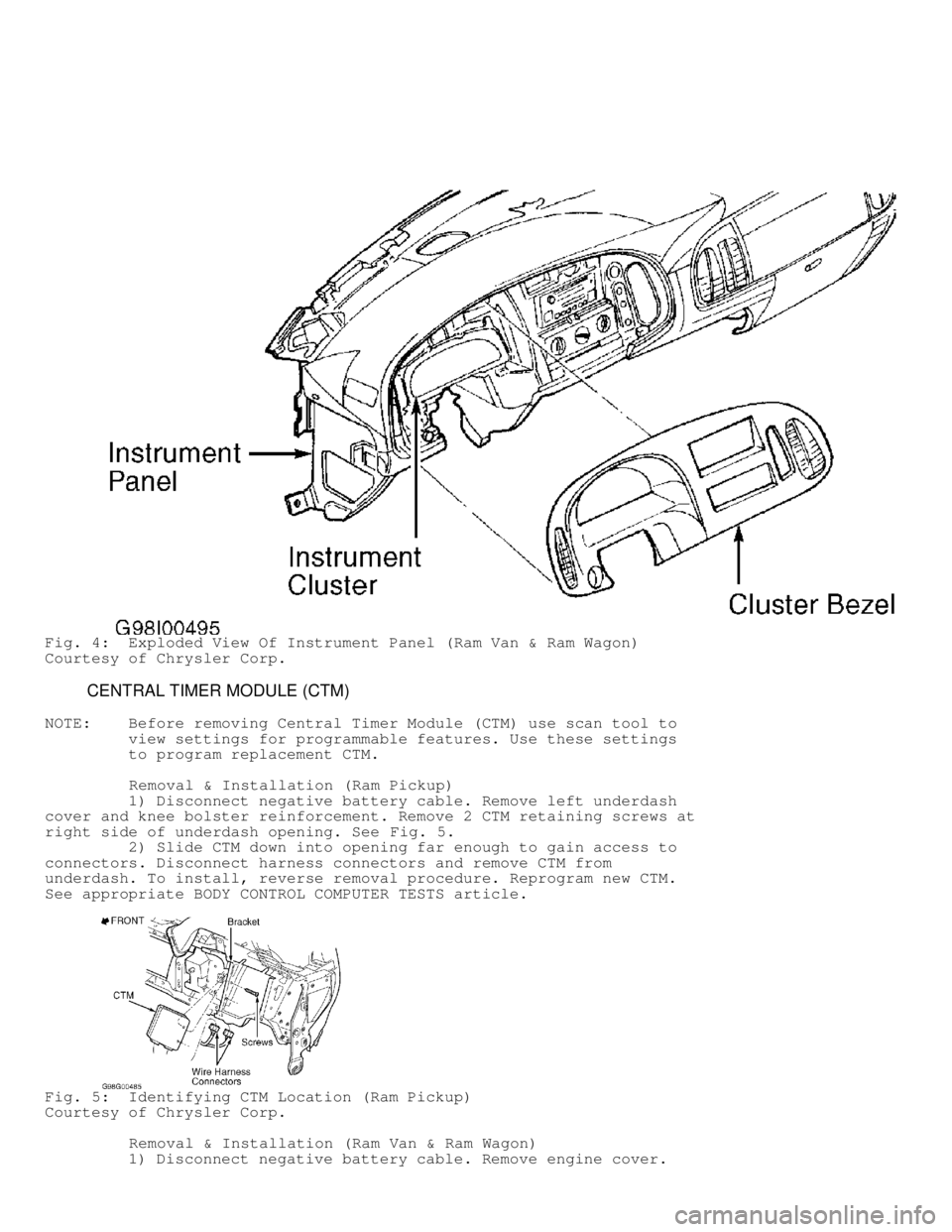
Fig. 4: Exploded View Of Instrument Panel (Ram Van & Ram Wagon)
Courtesy of Chrysler Corp.
CENTRAL TIMER MODULE (CTM)
NOTE: Before removing Central Timer Module (CTM) use scan tool to
view settings for programmable features. Use these settings
to program replacement CTM.
Removal & Installation (Ram Pickup)
1) Disconnect negative battery cable. Remove left underdash
cover and knee bolster reinforcement. Remove 2 CTM retaining screws at
right side of underdash opening. See Fig. 5.
2) Slide CTM down into opening far enough to gain access to
connectors. Disconnect harness connectors and remove CTM from
underdash. To install, reverse removal procedure. Reprogram new CTM.
See appropriate BODY CONTROL COMPUTER TESTS article.
Fig. 5: Identifying CTM Location (Ram Pickup)
Courtesy of Chrysler Corp.
Removal & Installation (Ram Van & Ram Wagon)
1) Disconnect negative battery cable. Remove engine cover.
Page 864 of 1691
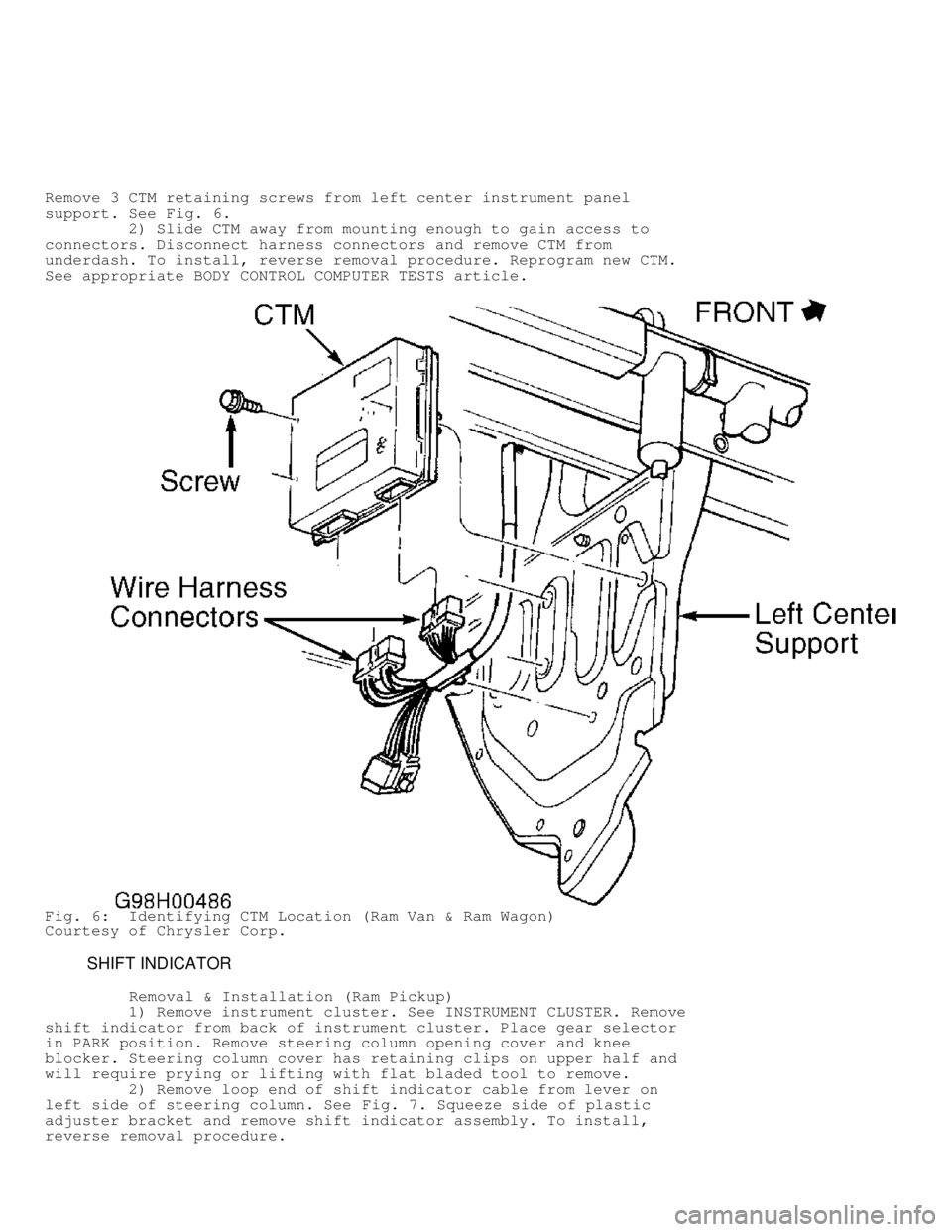
Remove 3 CTM retaining screws from left center instrument panel
support. See Fig. 6.
2) Slide CTM away from mounting enough to gain access to
connectors. Disconnect harness connectors and remove CTM from
underdash. To install, reverse removal procedure. Reprogram new CTM.
See appropriate BODY CONTROL COMPUTER TESTS article.
Fig. 6: Identifying CTM Location (Ram Van & Ram Wagon)
Courtesy of Chrysler Corp.
SHIFT INDICATOR
Removal & Installation (Ram Pickup)
1) Remove instrument cluster. See INSTRUMENT CLUSTER. Remove
shift indicator from back of instrument cluster. Place gear selector
in PARK position. Remove steering column opening cover and knee
blocker. Steering column cover has retaining clips on upper half and
will require prying or lifting with flat bladed tool to remove.
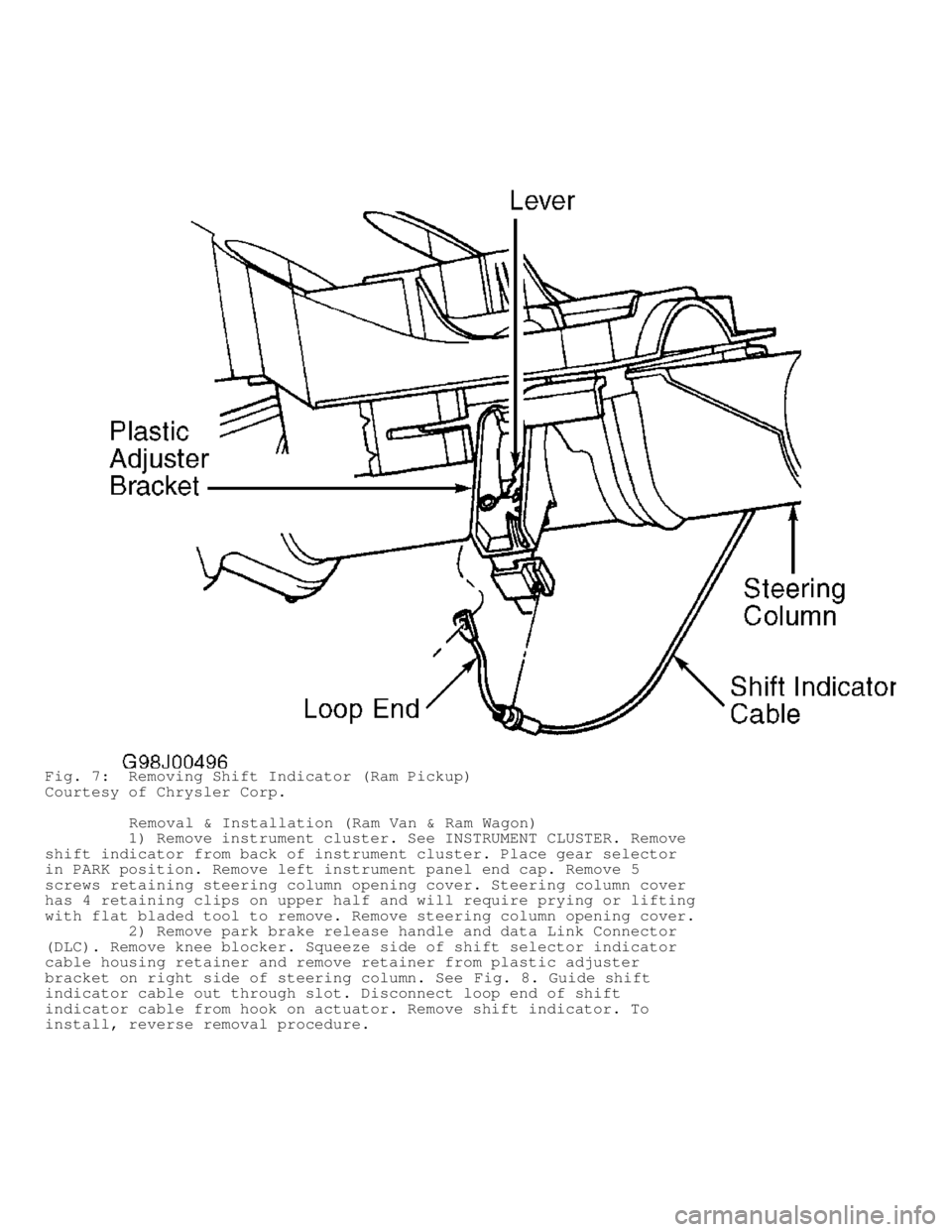
2) Remove loop end of shift indicator cable from lever on
left side of steering column. See Fig. 7. Squeeze side of plastic
adjuster bracket and remove shift indicator assembly. To install,
reverse removal procedure.
Page 865 of 1691
Fig. 7: Removing Shift Indicator (Ram Pickup)
Courtesy of Chrysler Corp.
Removal & Installation (Ram Van & Ram Wagon)
1) Remove instrument cluster. See INSTRUMENT CLUSTER. Remove
shift indicator from back of instrument cluster. Place gear selector
in PARK position. Remove left instrument panel end cap. Remove 5
screws retaining steering column opening cover. Steering column cover
has 4 retaining clips on upper half and will require prying or lifting
with flat bladed tool to remove. Remove steering column opening cover.
2) Remove park brake release handle and data Link Connector
(DLC). Remove knee blocker. Squeeze side of shift selector indicator
cable housing retainer and remove retainer from plastic adjuster
bracket on right side of steering column. See Fig. 8. Guide shift
indicator cable out through slot. Disconnect loop end of shift
indicator cable from hook on actuator. Remove shift indicator. To
install, reverse removal procedure.
Page 866 of 1691
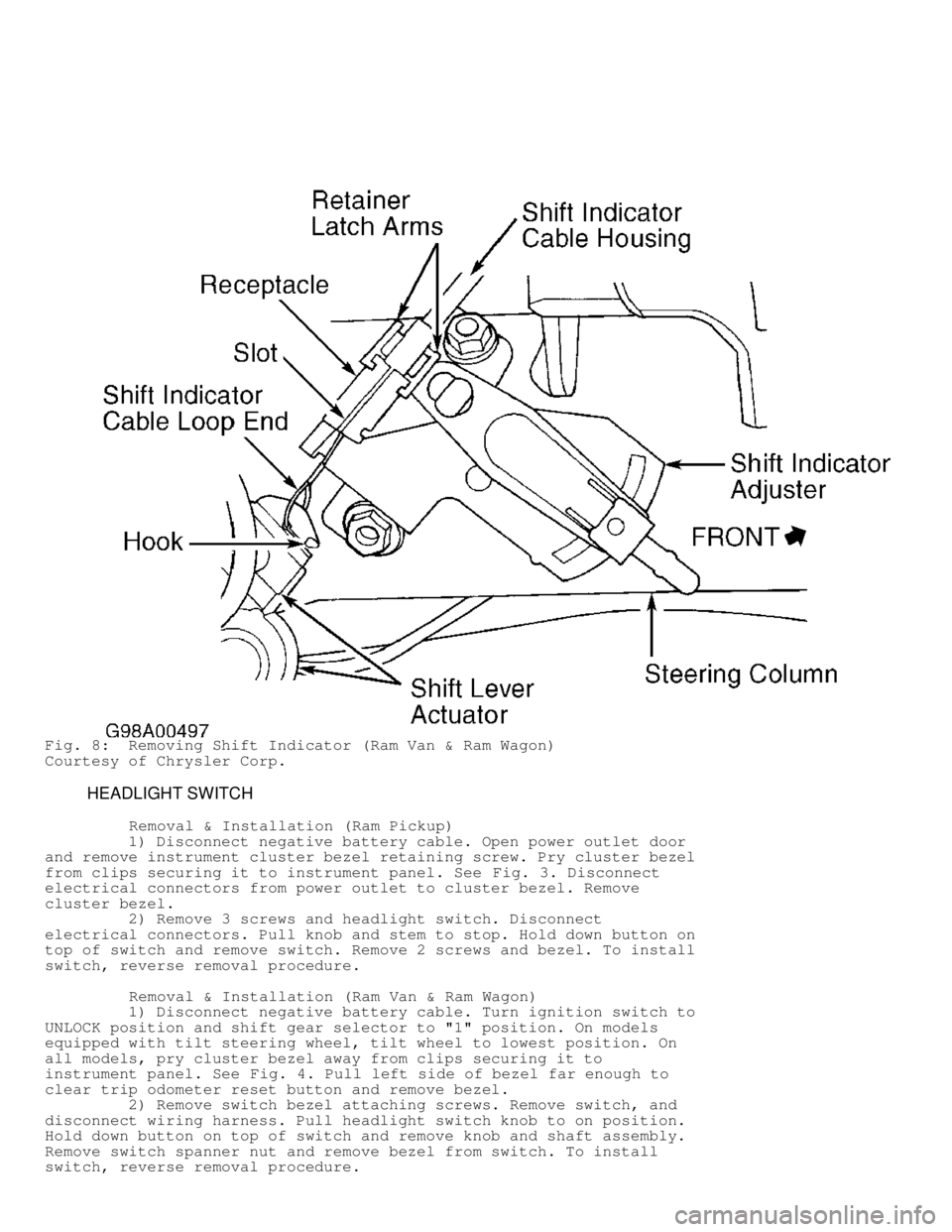
Fig. 8: Removing Shift Indicator (Ram Van & Ram Wagon)
Courtesy of Chrysler Corp.
HEADLIGHT SWITCH
Removal & Installation (Ram Pickup)
1) Disconnect negative battery cable. Open power outlet door
and remove instrument cluster bezel retaining screw. Pry cluster bezel
from clips securing it to instrument panel. See Fig. 3. Disconnect
electrical connectors from power outlet to cluster bezel. Remove
cluster bezel.
2) Remove 3 screws and headlight switch. Disconnect
electrical connectors. Pull knob and stem to stop. Hold down button on
top of switch and remove switch. Remove 2 screws and bezel. To install
switch, reverse removal procedure.
Removal & Installation (Ram Van & Ram Wagon)
1) Disconnect negative battery cable. Turn ignition switch to
UNLOCK position and shift gear selector to "1" position. On models
equipped with tilt steering wheel, tilt wheel to lowest position. On
all models, pry cluster bezel away from clips securing it to
instrument panel. See Fig. 4. Pull left side of bezel far enough to
clear trip odometer reset button and remove bezel.
2) Remove switch bezel attaching screws. Remove switch, and
disconnect wiring harness. Pull headlight switch knob to on position.
Hold down button on top of switch and remove knob and shaft assembly.
Remove switch spanner nut and remove bezel from switch. To install
switch, reverse removal procedure.
Page 867 of 1691
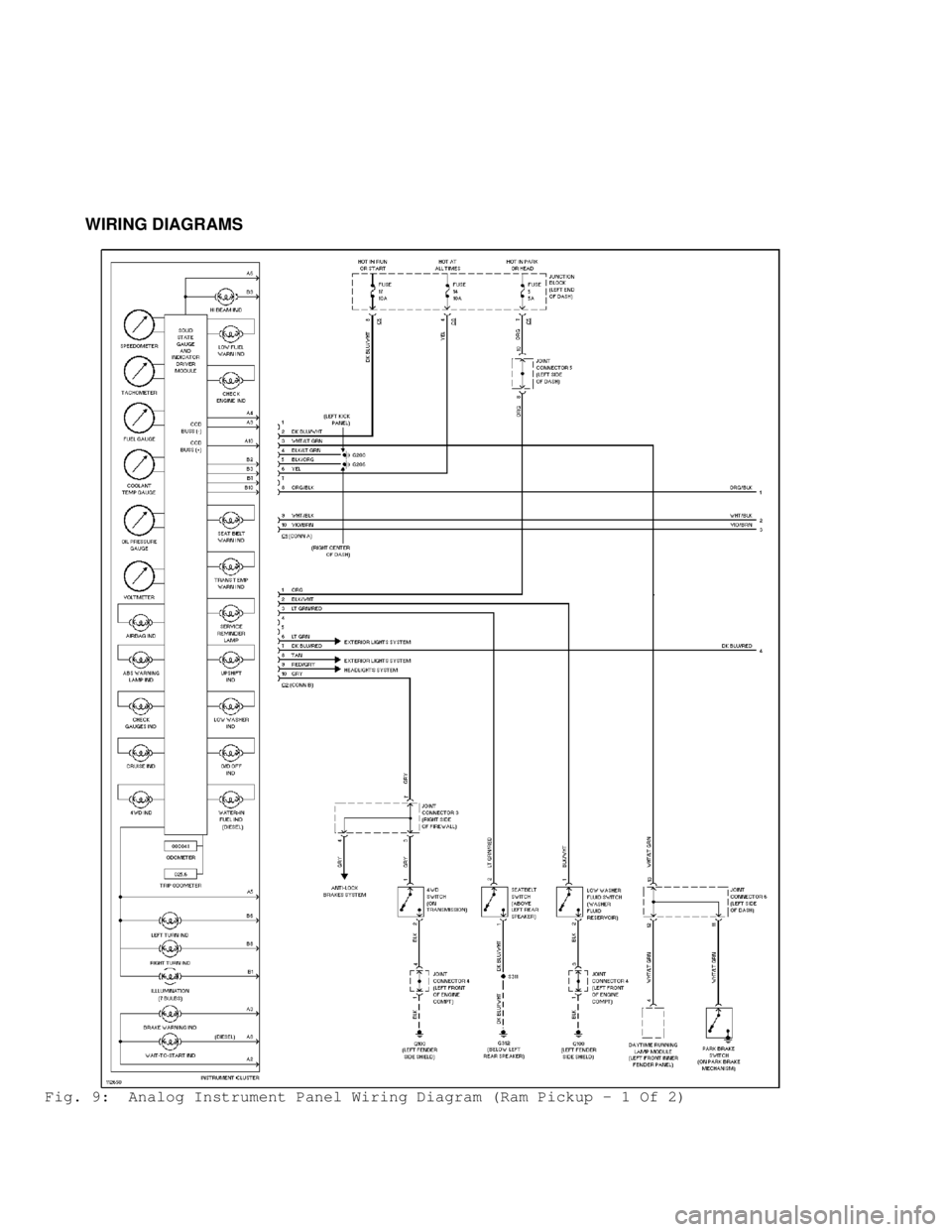
WIRING DIAGRAMS
Fig. 9: Analog Instrument Panel Wiring Diagram (Ram Pickup - 1 Of 2)
Page 868 of 1691
Fig. 10: Analog Instrument Panel Wiring Diagram (Ram Pickup - 2 Of 2)\
Page 869 of 1691
Fig. 11: Analog Instrument Panel Wiring Diagram (Ram Van & Ram Wagon)\
Page 881 of 1691
refer to the 5.9L V8 TURBO DIESEL - VIN [D] article.
in the ENGINE MECHANICAL section.
Drain fuel/water separator by pushing up on the valve
located on the bottom of the fuel filter until clear fuel
is visible. Drain fuel into a container and follow proper
disposal procedures.
CAUTION: DO NOT drain fuel/water separator when engine is running or
hot. Allow engine to cool before draining. Verify that the
WATER IN FUEL light on instrument panel is OFF.
ADDITIONAL SERVICE INFORMATION - CNG MODELS
Fig. 11: Locating CNG Components
Courtesy of Chrysler Corp.
\")
\")
![DODGE RAM 1999 Service Repair Manual refer to the 5.9L V8 TURBO DIESEL - VIN [D] article.
in the ENGINE MECHANICAL section.
Drain fuel/water separator by pushing up on the valve
located on the bottom](/manual-img/12/56915/w960_56915-880.png "DODGE RAM 1999 Service Repair Manual refer to the 5.9L V8 TURBO DIESEL - VIN [D] article.
in the ENGINE MECHANICAL section.
Drain fuel/water separator by pushing up on the valve
located on the bottom")