1999 DODGE NEON key
[x] Cancel search: keyPage 1116 of 1200
INSTALLATION
Reverse the preceding operation. Adjust inner belt
stabilizer against glass with enough tension to allow
free up and down movement.
WINDOW REGULATORÐ2 DOOR
NOTE: Power and manual door glass regulators are
serviced using the same procedures. For power
window motor service procedures, refer to Group
8S, Power Windows.
REMOVAL
(1) Remove door trim panel and water shield.
(2) Disconnect wire connector to power window
motor, if so equipped.
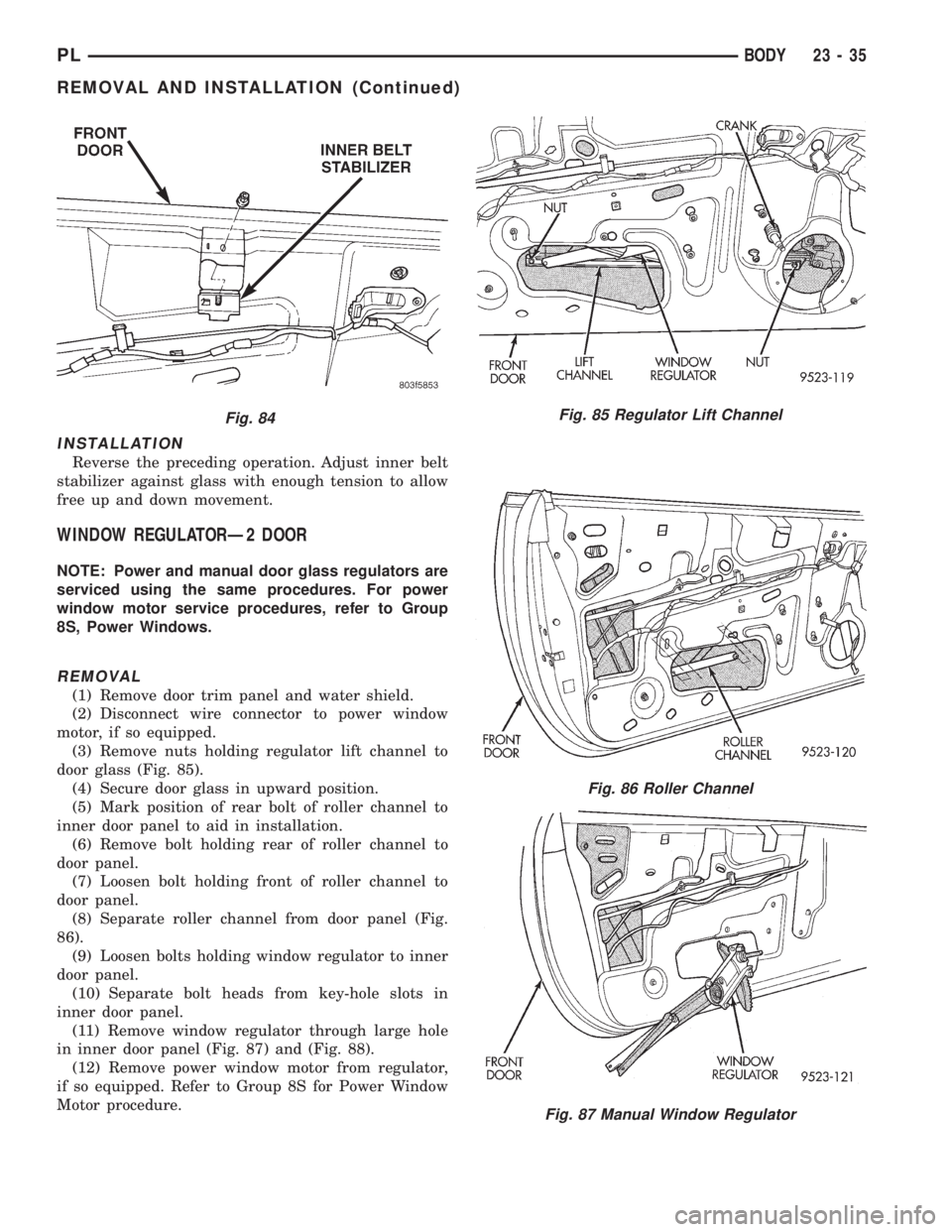
(3) Remove nuts holding regulator lift channel to
door glass (Fig. 85).
(4) Secure door glass in upward position.
(5) Mark position of rear bolt of roller channel to
inner door panel to aid in installation.
(6) Remove bolt holding rear of roller channel to
door panel.
(7) Loosen bolt holding front of roller channel to
door panel.
(8) Separate roller channel from door panel (Fig.
86).
(9) Loosen bolts holding window regulator to inner
door panel.
(10) Separate bolt heads from key-hole slots in
inner door panel.
(11) Remove window regulator through large hole
in inner door panel (Fig. 87) and (Fig. 88).
(12) Remove power window motor from regulator,
if so equipped. Refer to Group 8S for Power Window
Motor procedure.
Fig. 84Fig. 85 Regulator Lift Channel
Fig. 86 Roller Channel
Fig. 87 Manual Window Regulator
PLBODY 23 - 35
REMOVAL AND INSTALLATION (Continued)
Page 1117 of 1200
INSTALLATION
(1) Install power window motor on regulator, if so
equipped. Refer to group 8S for Power Window Motor
procedures.
(2) Move window regulator into position in door
and engage bolt heads into key-hole slots in inner
door panel and tighten bolts.
(3) Install roller channel to door panel.
(4) Install bolt at rear of roller channel. Make sure
that bolt is aligned to mark on inner door panel
made previously.
(5) Tighten front and rear bolts of roller channel.
(6) Install nuts holding regulator lift channel to
door glass.
(7) Adjust door glass as described in this section.
(8) Connect wire connector to power window motor,
if so equipped.
(9) Install door speaker, if so equipped.
(10) Install door trim panel and water shield.
WINDOW REGULATORÐ4 DOOR
NOTE: Power and manual door glass regulators are
serviced using the same procedures. For power
window motor service procedures, refer to Group
8S, Power Windows.
REMOVAL
(1) Remove door trim panel and water shield.
(2) Remove door glass.
(3) Disconnect wire connector to power window
motor, if so equipped.
(4) Remove nuts holding top of regulator to inner
door panel.
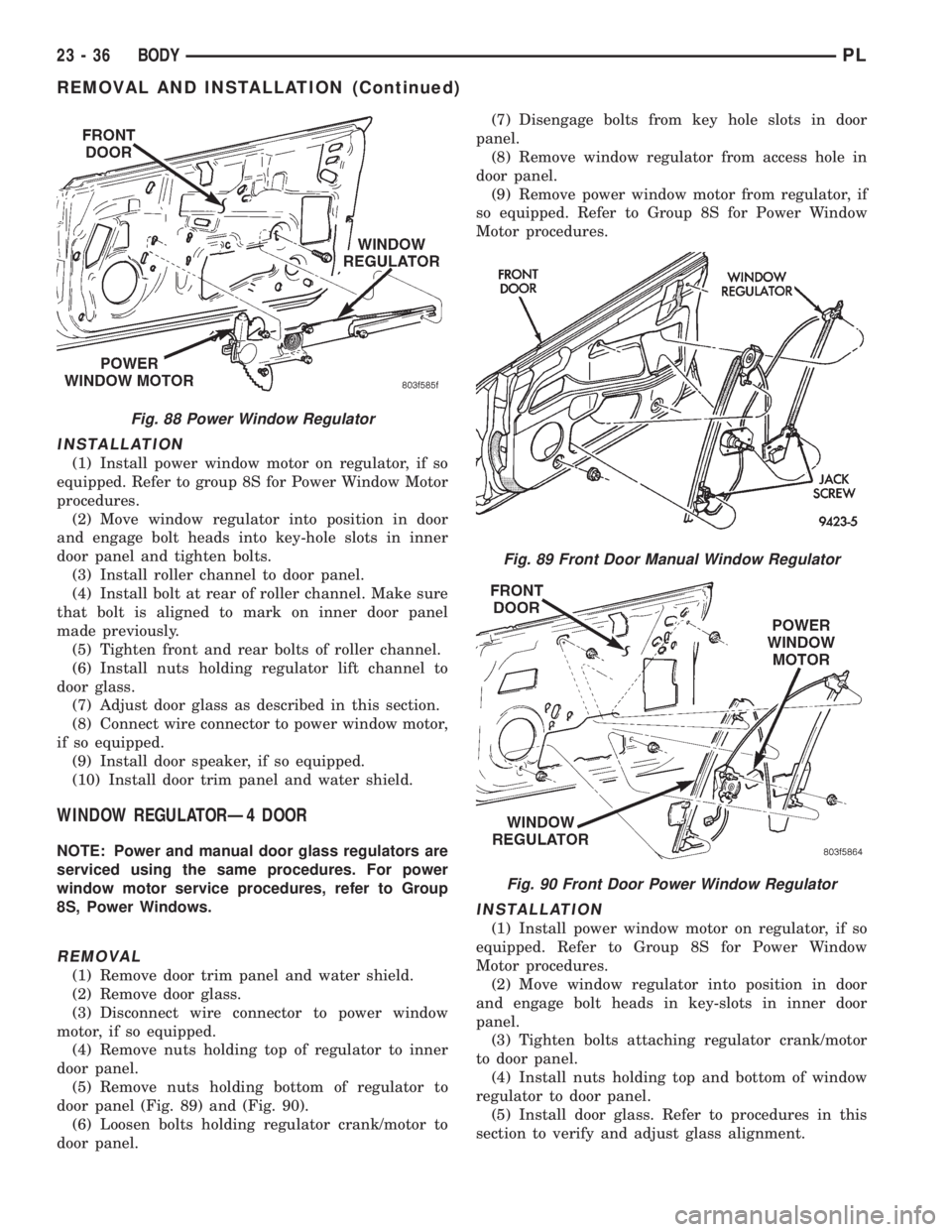
(5) Remove nuts holding bottom of regulator to
door panel (Fig. 89) and (Fig. 90).
(6) Loosen bolts holding regulator crank/motor to
door panel.(7) Disengage bolts from key hole slots in door
panel.
(8) Remove window regulator from access hole in
door panel.
(9) Remove power window motor from regulator, if
so equipped. Refer to Group 8S for Power Window
Motor procedures.
INSTALLATION
(1) Install power window motor on regulator, if so
equipped. Refer to Group 8S for Power Window
Motor procedures.
(2) Move window regulator into position in door
and engage bolt heads in key-slots in inner door
panel.
(3) Tighten bolts attaching regulator crank/motor
to door panel.
(4) Install nuts holding top and bottom of window
regulator to door panel.
(5) Install door glass. Refer to procedures in this
section to verify and adjust glass alignment.
Fig. 88 Power Window Regulator
Fig. 89 Front Door Manual Window Regulator
Fig. 90 Front Door Power Window Regulator
23 - 36 BODYPL
REMOVAL AND INSTALLATION (Continued)
Page 1120 of 1200
(5) Adjust glass so that a piece of paper can be
pulled between the glass and weatherstrip with some
tension.
REAR DOOR LATCH ADJUSTMENT
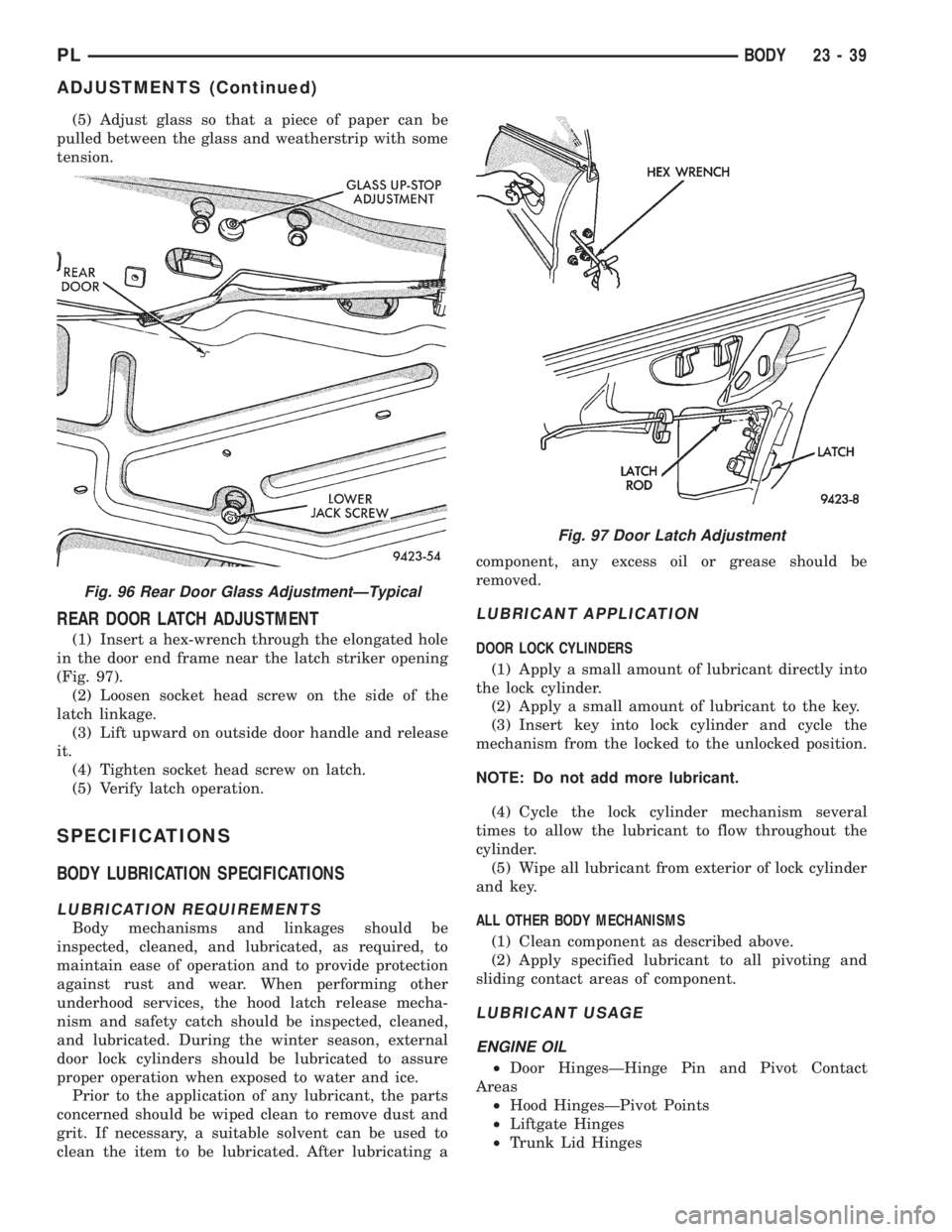
(1) Insert a hex-wrench through the elongated hole
in the door end frame near the latch striker opening
(Fig. 97).
(2) Loosen socket head screw on the side of the
latch linkage.
(3) Lift upward on outside door handle and release
it.
(4) Tighten socket head screw on latch.
(5) Verify latch operation.
SPECIFICATIONS
BODY LUBRICATION SPECIFICATIONS
LUBRICATION REQUIREMENTS
Body mechanisms and linkages should be
inspected, cleaned, and lubricated, as required, to
maintain ease of operation and to provide protection
against rust and wear. When performing other
underhood services, the hood latch release mecha-
nism and safety catch should be inspected, cleaned,
and lubricated. During the winter season, external
door lock cylinders should be lubricated to assure
proper operation when exposed to water and ice.
Prior to the application of any lubricant, the parts
concerned should be wiped clean to remove dust and
grit. If necessary, a suitable solvent can be used to
clean the item to be lubricated. After lubricating acomponent, any excess oil or grease should be
removed.
LUBRICANT APPLICATION
DOOR LOCK CYLINDERS
(1) Apply a small amount of lubricant directly into
the lock cylinder.
(2) Apply a small amount of lubricant to the key.
(3) Insert key into lock cylinder and cycle the
mechanism from the locked to the unlocked position.
NOTE: Do not add more lubricant.
(4) Cycle the lock cylinder mechanism several
times to allow the lubricant to flow throughout the
cylinder.
(5) Wipe all lubricant from exterior of lock cylinder
and key.
ALL OTHER BODY MECHANISMS
(1) Clean component as described above.
(2) Apply specified lubricant to all pivoting and
sliding contact areas of component.
LUBRICANT USAGE
ENGINE OIL
²Door HingesÐHinge Pin and Pivot Contact
Areas
²Hood HingesÐPivot Points
²Liftgate Hinges
²Trunk Lid Hinges
Fig. 96 Rear Door Glass AdjustmentÐTypical
Fig. 97 Door Latch Adjustment
PLBODY 23 - 39
ADJUSTMENTS (Continued)
Page 1164 of 1200
EMISSION CONTROL SYSTEMS
CONTENTS
page page
EVAPORATIVE EMISSION CONTROLS........ 11
EXHAUST GAS RECIRCULATION (EGR)
SYSTEM.............................. 18ON-BOARD DIAGNOSTICS.................. 1
ON-BOARD DIAGNOSTICS
INDEX
page page
GENERAL INFORMATION
SYSTEM DESCRIPTION................... 1
DESCRIPTION AND OPERATION
CIRCUIT ACTUATION TEST MODE........... 2
COMPONENT MONITORS.................. 9
DIAGNOSTIC TROUBLE CODES............. 2
HIGH AND LOW LIMITS................... 10LOAD VALUE........................... 10
MALFUNCTION INDICATOR LAMP (MIL)....... 1
MONITORED SYSTEMS.................... 6
NON-MONITORED CIRCUITS............... 9
STATE DISPLAY TEST MODE............... 2
TRIP DEFINITION........................ 9
GENERAL INFORMATION
SYSTEM DESCRIPTION
The Powertrain Control Module (PCM) monitors
many different circuits in the fuel injection, ignition,
emission and engine systems. If the PCM senses a
problem with a monitored circuit often enough to
indicate an actual problem, it stores a Diagnostic
Trouble Code (DTC) in the PCM's memory. If the
code applies to a non-emissions related component or
system, and the problem is repaired or ceases to
exist, the PCM cancels the code after 40 warmup
cycles. Diagnostic trouble codes that affect vehicle
emissions illuminate the Malfunction Indicator Lamp
(MIL). Refer to Malfunction Indicator Lamp in this
section.
Certain criteria must be met before the PCM
stores a DTC in memory. The criteria may be a spe-
cific range of engine RPM, engine temperature,
and/or input voltage to the PCM.
The PCM might not store a DTC for a monitored
circuit even though a malfunction has occurred. This
may happen because one of the DTC criteria for the
circuit has not been met.For example, assume the
diagnostic trouble code criteria requires the PCM to
monitor the circuit only when the engine operates
between 750 and 2000 RPM. Suppose the sensor'soutput circuit shorts to ground when engine operates
above 2400 RPM (resulting in 0 volt input to the
PCM). Because the condition happens at an engine
speed above the maximum threshold (2000 rpm), the
PCM will not store a DTC.
There are several operating conditions for which
the PCM monitors and sets DTC's. Refer to Moni-
tored Systems, Components, and Non-Monitored Cir-
cuits in this section.
NOTE: Various diagnostic procedures may actually
cause a diagnostic monitor to set a DTC. For
instance, pulling a spark plug wire to perform a
spark test may set the misfire code. When a repair
is completed and verified, use the DRB scan tool to
erase all DTC's and extinguish the MIL.
Technicians can display stored DTC's by using the
DRB scan tool. Refer to Diagnostic Trouble Codes in
this section. For DTC information, refer to charts in
this section.
DESCRIPTION AND OPERATION
MALFUNCTION INDICATOR LAMP (MIL)
As a functional test, the Malfunction Indicator
Lamp (MIL) illuminates at key-on before engine
PLEMISSION CONTROL SYSTEMS 25 - 1
Page 1165 of 1200
cranking. Whenever the Powertrain Control Module
(PCM) sets a Diagnostic Trouble Code (DTC) that
affects vehicle emissions, it illuminates the MIL. If a
problem is detected, the PCM sends a message over
the CCD Bus to the instrument cluster to illuminate
the lamp. The PCM illuminates the MIL only for
DTC's that affect vehicle emissions. The MIL stays
on continuously when the PCM has entered a
Limp-In mode or identified a failed emission compo-
nent or system. The MIL remains on until the DTC
is erased. Refer to the Diagnostic Trouble Code
charts in this group for emission related codes.
Also, the MIL either flashes or illuminates contin-
uously when the PCM detects active engine misfire.
Refer to Misfire Monitoring in this section.
Additionally, the PCM may reset (turn off) the MIL
when one of the following occur:
²PCM does not detect the malfunction for 3 con-
secutive trips (except misfire and fuel system moni-
tors).
²PCM does not detect a malfunction while per-
forming three successive engine misfire or fuel sys-
tem tests. The PCM performs these tests while the
engine is operating within6375 RPM of and within
10 % of the load of the operating condition at which
the malfunction was first detected.
STATE DISPLAY TEST MODE
The switch inputs to the Powertrain Control Mod-
ule (PCM) have two recognized states; HIGH and
LOW. For this reason, the PCM cannot recognize the
difference between a selected switch position versus
an open circuit, a short circuit, or a defective switch.
If the State Display screen shows the change from
HIGH to LOW or LOW to HIGH, assume the entire
switch circuit to the PCM functions properly. From
the state display screen, access either State Display
Inputs and Outputs or State Display Sensors.
CIRCUIT ACTUATION TEST MODE
The Circuit Actuation Test Mode checks for proper
operation of output circuits or devices the Powertrain
Control Module (PCM) may not internally recognize.
The PCM attempts to activate these outputs and
allow an observer to verify proper operation. Most of
the tests provide an audible or visual indication of
device operation (click of relay contacts, fuel spray,
etc.). Except for intermittent conditions, if a device
functions properly during testing, assume the device,
its associated wiring, and driver circuit work cor-
rectly.
DIAGNOSTIC TROUBLE CODES
A Diagnostic Trouble Code (DTC) indicates the
PCM has recognized an abnormal condition in the
system.
²The preferred and most accurate method of
retrieving a DTC is by using the DRB scan tool. The
scan tool supplies detailed diagnostic information
which can be used to more accurately diagnose
causes for a DTC.
Remember that DTC's are the results of a sys-
tem or circuit failure, but do not directly iden-
tify the failed component or components.
NOTE: For a list of DTC's, refer to the charts in this
section.
BULB CHECK
Each time the ignition key is turned to the ON
position, the malfunction indicator (check engine)
lamp on the instrument panel should illuminate for
approximately 2 seconds then go out. This is done for
a bulb check.
OBTAINING DTC'S USING DRB SCAN TOOL
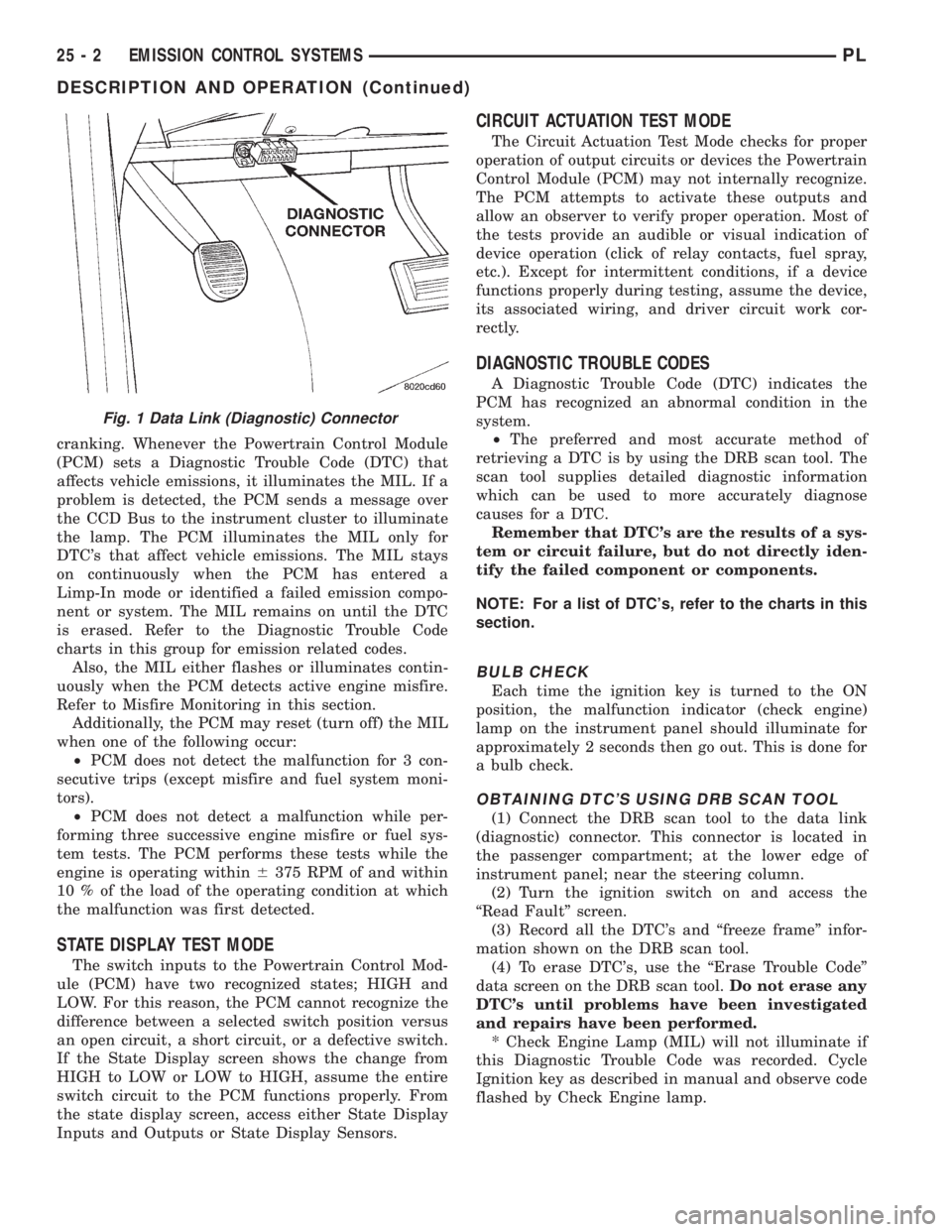
(1) Connect the DRB scan tool to the data link
(diagnostic) connector. This connector is located in
the passenger compartment; at the lower edge of
instrument panel; near the steering column.
(2) Turn the ignition switch on and access the
ªRead Faultº screen.
(3) Record all the DTC's and ªfreeze frameº infor-
mation shown on the DRB scan tool.
(4) To erase DTC's, use the ªErase Trouble Codeº
data screen on the DRB scan tool.Do not erase any
DTC's until problems have been investigated
and repairs have been performed.
* Check Engine Lamp (MIL) will not illuminate if
this Diagnostic Trouble Code was recorded. Cycle
Ignition key as described in manual and observe code
flashed by Check Engine lamp.
Fig. 1 Data Link (Diagnostic) Connector
25 - 2 EMISSION CONTROL SYSTEMSPL
DESCRIPTION AND OPERATION (Continued)