Page 2584 of 6000
ENTERTAINMENT8C–1
BODY AND ACCESSORIES
ENTERTAINMENT
CONTENTS
Service Precaution 8C–1. . . . . . . . . . . . . . . . . . . . . .
Cigarette Lighter 8C–2. . . . . . . . . . . . . . . . . . . . . . . .
General Description 8C–2. . . . . . . . . . . . . . . . . . . . .
Removal 8C–2. . . . . . . . . . . . . . . . . . . . . . . . . . . . .
Installation 8C–2. . . . . . . . . . . . . . . . . . . . . . . . . . . .
Digital Clock 8C–3. . . . . . . . . . . . . . . . . . . . . . . . . . . .
Removal 8C–3. . . . . . . . . . . . . . . . . . . . . . . . . . . . .
Installation 8C–3. . . . . . . . . . . . . . . . . . . . . . . . . . . .
Rod Type Antenna 8C–4. . . . . . . . . . . . . . . . . . . . . .
Removal 8C–4. . . . . . . . . . . . . . . . . . . . . . . . . . . . .
Installation 8C–4. . . . . . . . . . . . . . . . . . . . . . . . . . . .
Auto Antenna 8C–5. . . . . . . . . . . . . . . . . . . . . . . . . . .
General Description 8C–5. . . . . . . . . . . . . . . . . . . . .
Removal 8C–5. . . . . . . . . . . . . . . . . . . . . . . . . . . . . Installation 8C–5. . . . . . . . . . . . . . . . . . . . . . . . . . . .
Antenna Rod 8C–6. . . . . . . . . . . . . . . . . . . . . . . . . . .
Removal 8C–6. . . . . . . . . . . . . . . . . . . . . . . . . . . . .
Installation 8C–6. . . . . . . . . . . . . . . . . . . . . . . . . . . .
Radio 8C–7. . . . . . . . . . . . . . . . . . . . . . . . . . . . . . . . . .
Removal 8C–7. . . . . . . . . . . . . . . . . . . . . . . . . . . . .
Installation 8C–7. . . . . . . . . . . . . . . . . . . . . . . . . . . .
Front Speaker 8C–8. . . . . . . . . . . . . . . . . . . . . . . . . .
Removal 8C–8. . . . . . . . . . . . . . . . . . . . . . . . . . . . .
Installation 8C–8. . . . . . . . . . . . . . . . . . . . . . . . . . . .
Rear Speaker 8C–9. . . . . . . . . . . . . . . . . . . . . . . . . . .
Removal 8C–9. . . . . . . . . . . . . . . . . . . . . . . . . . . . .
Installation 8C–9. . . . . . . . . . . . . . . . . . . . . . . . . . . .
Service Precaution
WARNING: IF SO EQUIPPED WITH A
SUPPLEMENTAL RESTRAINT SYSTEM (SRS),
REFER TO THE SRS COMPONENT AND WIRING
LOCATION VIEW IN ORDER TO DETERMINE
WHETHER YOU ARE PERFORMING SERVICE ON OR
NEAR THE SRS COMPONENTS OR THE SRS
WIRING. WHEN YOU ARE PERFORMING SERVICE
ON OR NEAR THE SRS COMPONENTS OR THE SRS
WIRING, REFER TO THE SRS SERVICE
INFORMATION. FAILURE TO FOLLOW WARNINGS
COULD RESULT IN POSSIBLE AIR BAG
DEPLOYMENT, PERSONAL INJURY, OR
OTHERWISE UNNEEDED SRS SYSTEM REPAIRS.
CAUTION: Always use the correct fastener in the
proper location. When you replace a fastener, use
ONLY the exact part number for that application.
ISUZU will call out those fasteners that require a
replacement after removal. ISUZU will also call out
the fasteners that require thread lockers or thread
sealant. UNLESS OTHERWISE SPECIFIED, do not
use supplemental coatings (Paints, greases, or other
corrosion inhibitors) on threaded fasteners or
fastener joint interfaces. Generally, such coatings
adversely affect the fastener torque and the joint
clamping force, and may damage the fastener. When
you install fasteners, use the correct tightening
sequence and specifications. Following these
instructions can help you avoid damage to parts and
systems.
Page 2600 of 6000
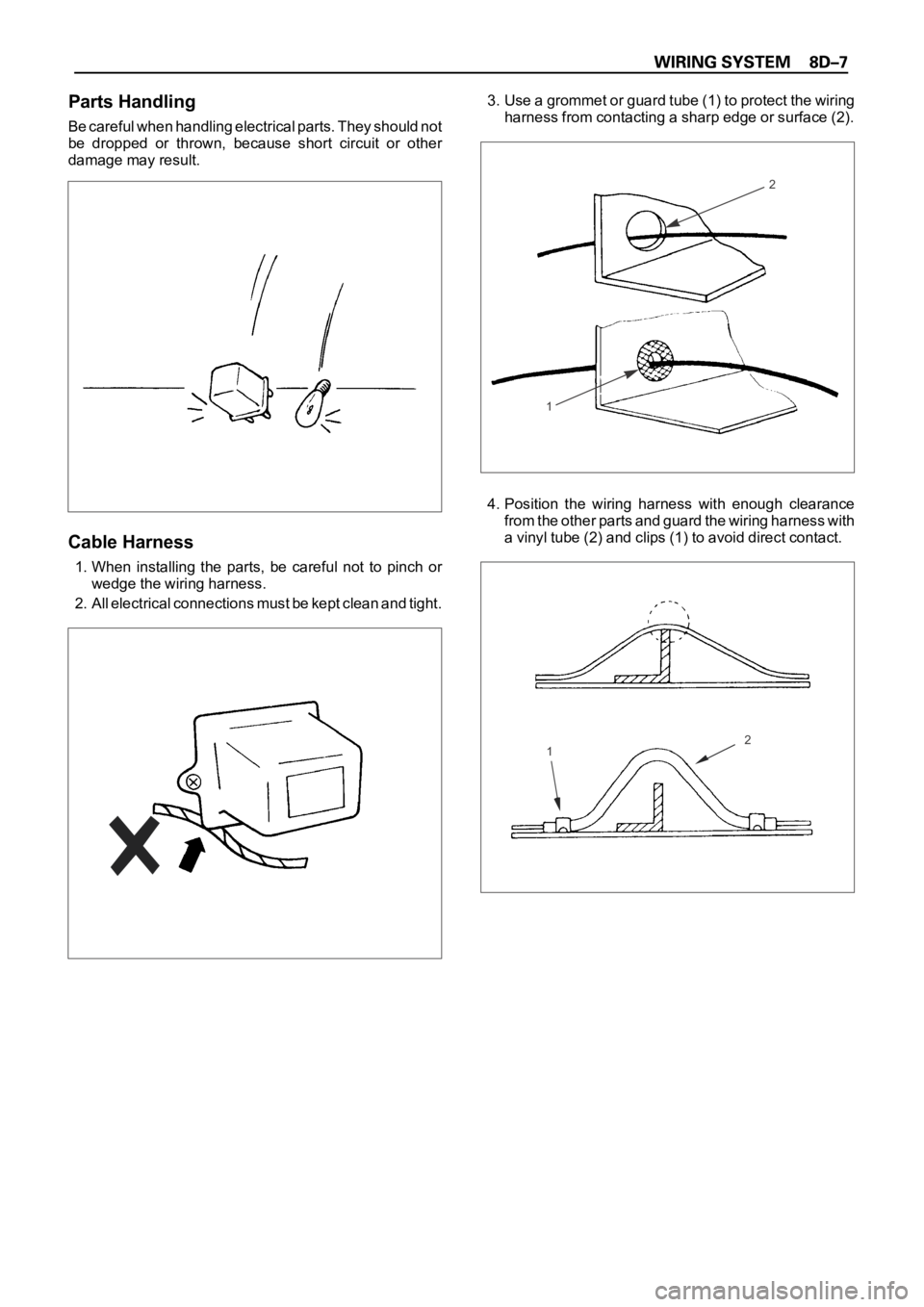
Parts Handling
Be careful when handling electrical parts. They should not
be dropped or thrown, because short circuit or other
damage may result.
Cable Harness
1. When installing the parts, be careful not to pinch or
wedge the wiring harness.
2. All electrical connections must be kept clean and tight.3. Use a grommet or guard tube (1) to protect the wiring
harness from contacting a sharp edge or surface (2).
4. Position the wiring harness with enough clearance
from the other parts and guard the wiring harness with
a vinyl tube (2) and clips (1) to avoid direct contact.
12
2
1
Page 2601 of 6000
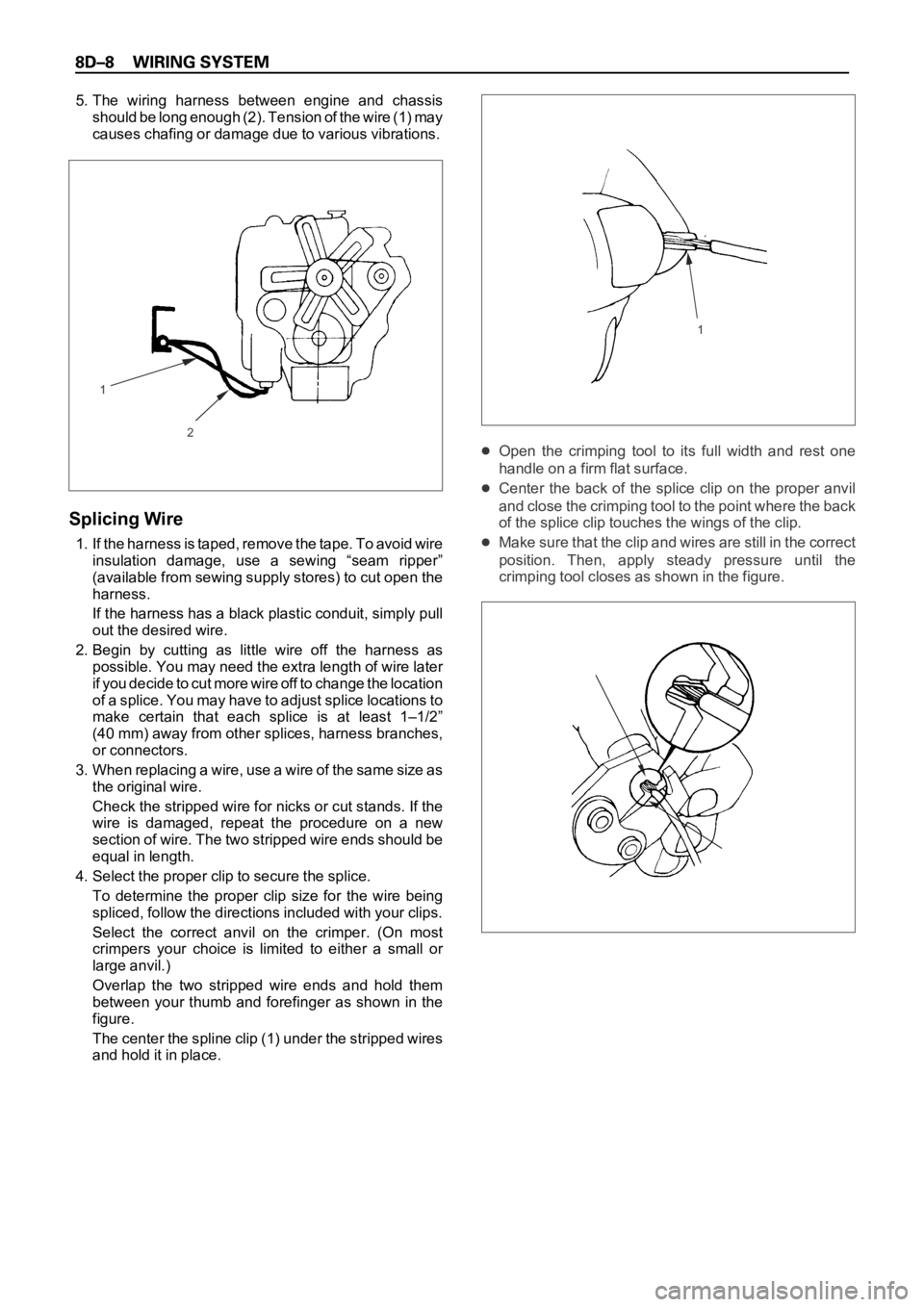
5. The wiring harness between engine and chassis
should be long enough (2). Tension of the wire (1) may
causes chafing or damage due to various vibrations.
Splicing Wire
1. If the harness is taped, remove the tape. To avoid wire
insulation damage, use a sewing “seam ripper”
(available from sewing supply stores) to cut open the
harness.
If the harness has a black plastic conduit, simply pull
out the desired wire.
2. Begin by cutting as little wire off the harness as
possible. You may need the extra length of wire later
if you decide to cut more wire off to change the location
of a splice. You may have to adjust splice locations to
make certain that each splice is at least 1–1/2”
(40 mm) away from other splices, harness branches,
or connectors.
3 . W h e n r e p l a c i n g a w i r e , u s e a w i r e o f t h e s a m e s i z e a s
the original wire.
Check the stripped wire for nicks or cut stands. If the
wire is damaged, repeat the procedure on a new
section of wire. The two stripped wire ends should be
equal in length.
4. Select the proper clip to secure the splice.
To determine the proper clip size for the wire being
spliced, follow the directions included with your clips.
Select the correct anvil on the crimper. (On most
crimpers your choice is limited to either a small or
large anvil.)
Overlap the two stripped wire ends and hold them
between your thumb and forefinger as shown in the
figure.
The center the spline clip (1) under the stripped wires
and hold it in place.
Open the crimping tool to its full width and rest one
handle on a firm flat surface.
Center the back of the splice clip on the proper anvil
and close the crimping tool to the point where the back
of the splice clip touches the wings of the clip.
Make sure that the clip and wires are still in the correct
position. Then, apply steady pressure until the
crimping tool closes as shown in the figure.
2
11
Page 2605 of 6000
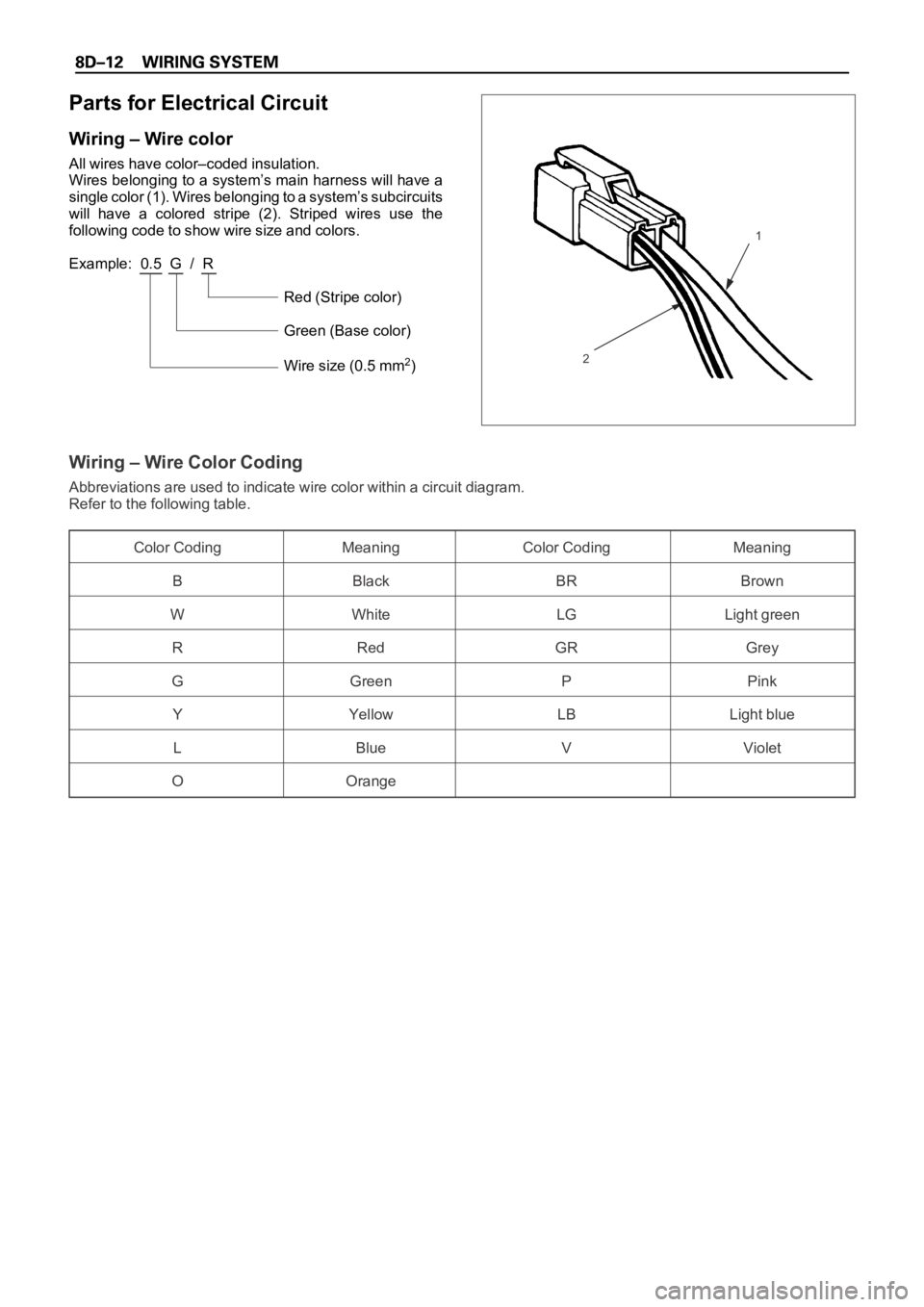
Parts for Electrical Circuit
Wiring – Wire color
All wires have color–coded insulation.
Wires belonging to a system’s main harness will have a
single color (1). Wires belonging to a system’s subcircuits
will have a colored stripe (2). Striped wires use the
following code to show wire size and colors.
Example: 0.5 G / R
Red (Stripe color)
Green (Base color)
Wire size (0.5 mm
2)
Wiring – Wire Color Coding
Abbreviations are used to indicate wire color within a circuit diagram.
Refer to the following table.
Color Coding Meaning Color Coding Meaning
B Black BR Brown
W White LG Light green
RRedGRGrey
G Green P Pink
Y Yellow LB Light blue
LBlue VViolet
OOrange
1
2
Page 2606 of 6000
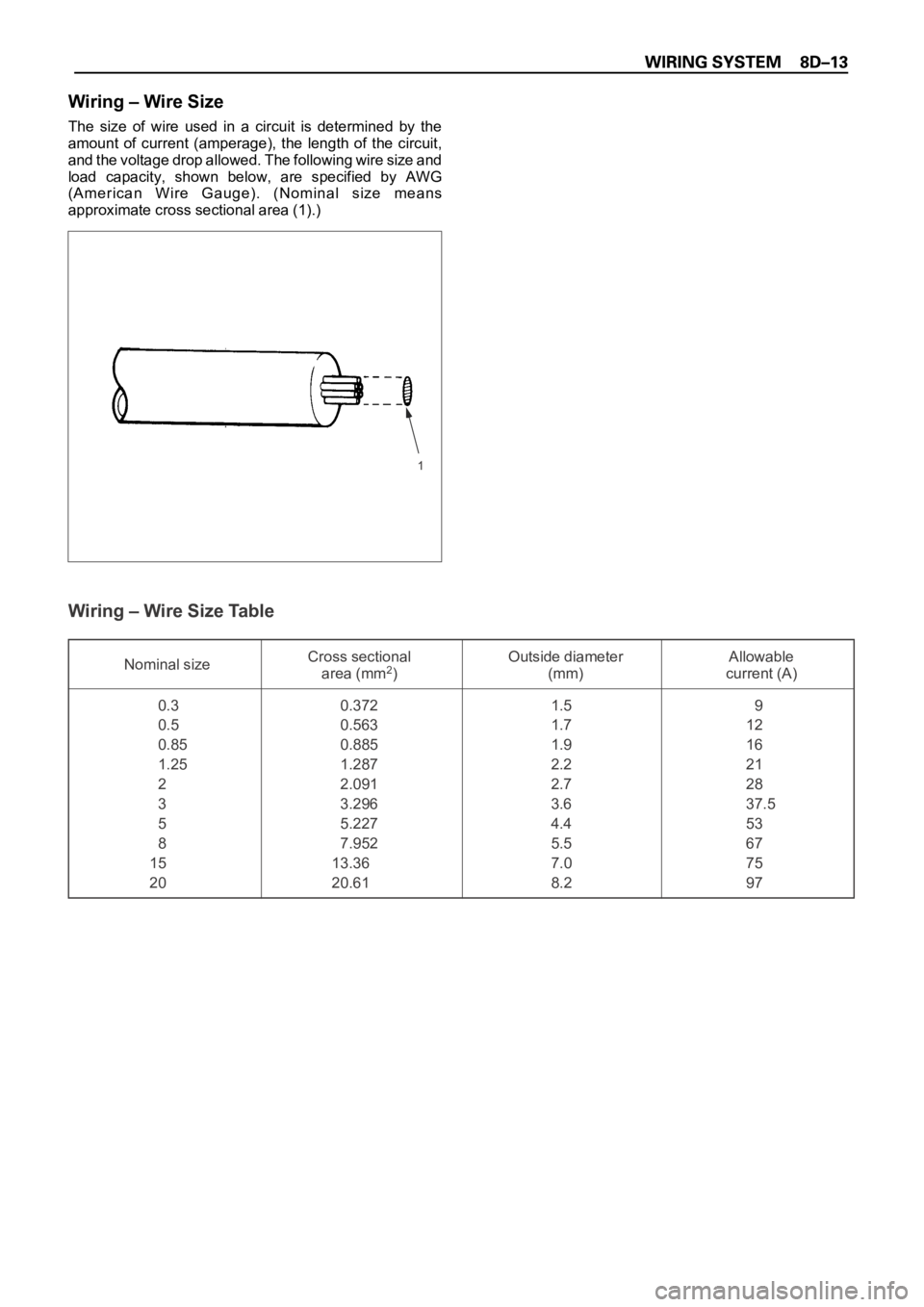
Wiring – Wire Size
The size of wire used in a circuit is determined by the
amount of current (amperage), the length of the circuit,
and the voltage drop allowed. The following wire size and
load capacity, shown below, are specified by AWG
(American Wire Gauge). (Nominal size means
approximate cross sectional area (1).)
Wiring – Wire Size Table
Nominal sizeCross sectional Outside diameter Allowable
area (mm2) (mm) current (A)
0.3 0.372 1.5 9
0.5 0.563 1.7 12
0.85 0.885 1.9 16
1.25 1.287 2.2 21
22.0912.728
3 3.296 3.6 37.5
55.2274.453
87.9525.567
15 13.36 7.0 75
20 20.61 8.2 97
1
Page 2607 of 6000
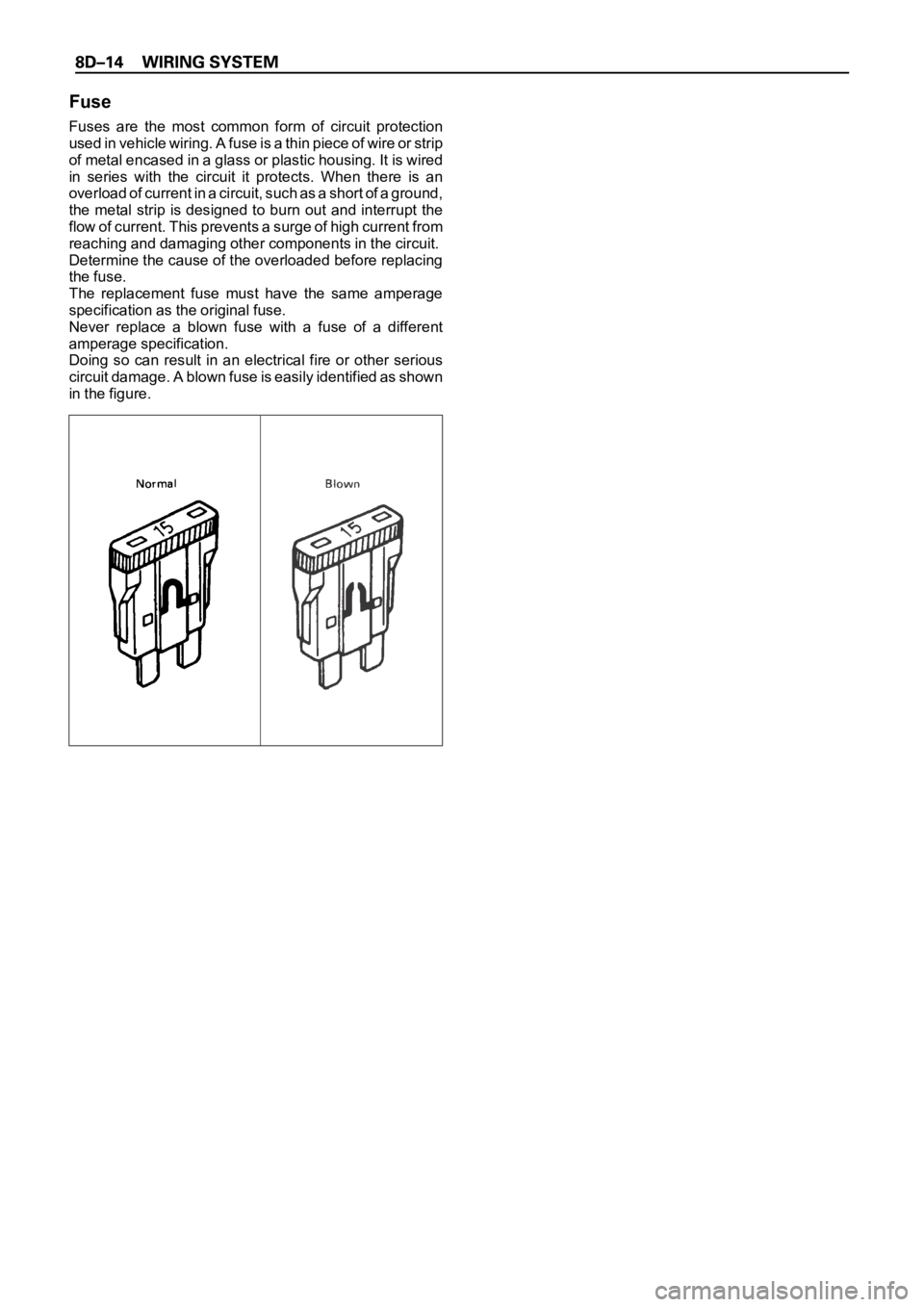
Fuse
Fuses are the most common form of circuit protection
used in vehicle wiring. A fuse is a thin piece of wire or strip
of metal encased in a glass or plastic housing. It is wired
in series with the circuit it protects. When there is an
overload of current in a circuit, such as a short of a ground,
the metal strip is designed to burn out and interrupt the
flow of current. This prevents a surge of high current from
reaching and damaging other components in the circuit.
Determine the cause of the overloaded before replacing
the fuse.
The replacement fuse must have the same amperage
specification as the original fuse.
Never replace a blown fuse with a fuse of a different
amperage specification.
Doing so can result in an electrical fire or other serious
circuit damage. A blown fuse is easily identified as shown
in the figure.
Page 2608 of 6000
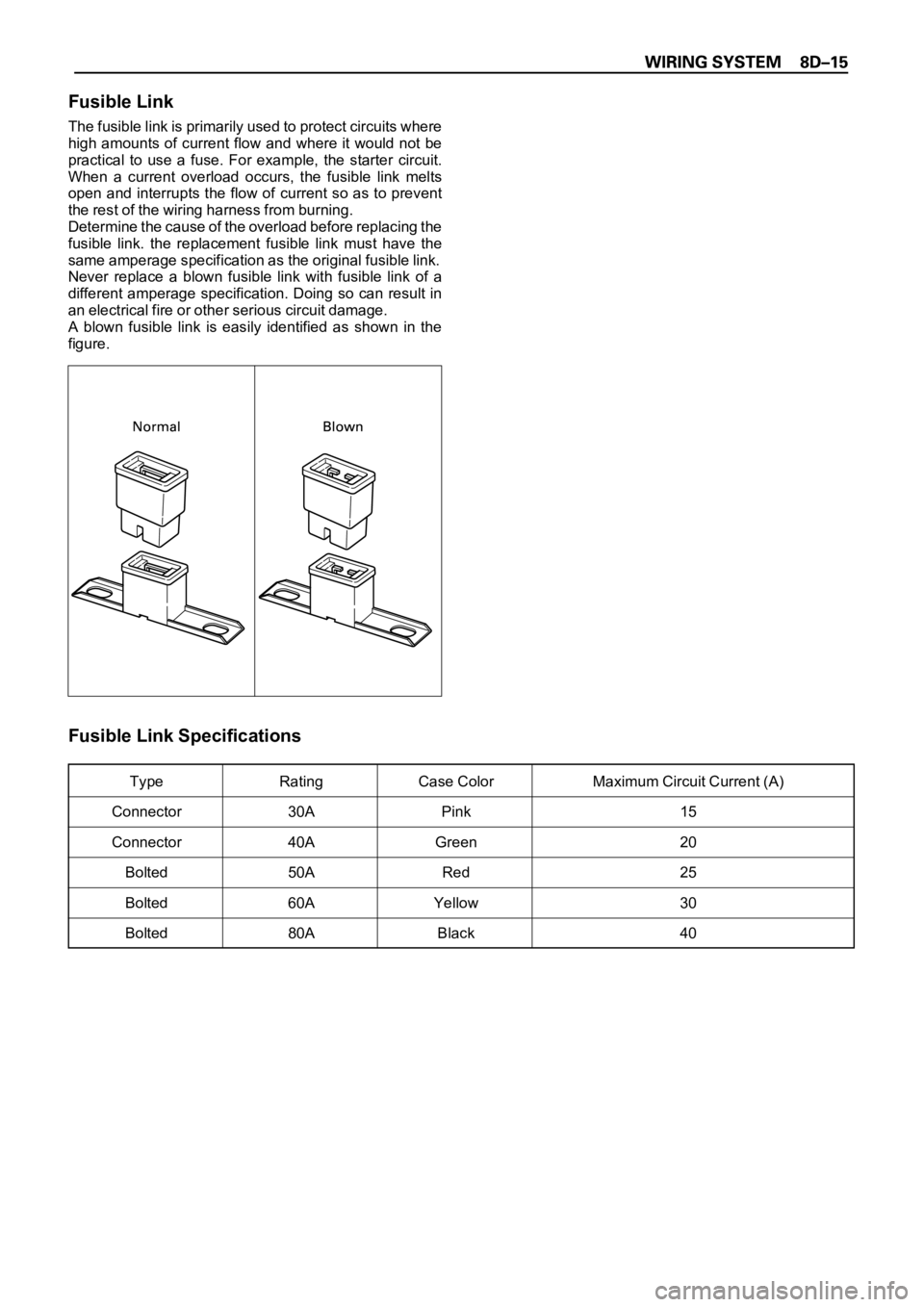
Fusible Link
The fusible link is primarily used to protect circuits where
high amounts of current flow and where it would not be
practical to use a fuse. For example, the starter circuit.
When a current overload occurs, the fusible link melts
open and interrupts the flow of current so as to prevent
the rest of the wiring harness from burning.
Determine the cause of the overload before replacing the
fusible link. the replacement fusible link must have the
same amperage specification as the original fusible link.
Never replace a blown fusible link with fusible link of a
different amperage specification. Doing so can result in
an electrical fire or other serious circuit damage.
A blown fusible link is easily identified as shown in the
figure.
Fusible Link Specifications
Type Rating Case Color Maximum Circuit Current (A)
Connector 30A Pink 15
Connector 40A Green 20
Bolted 50A Red 25
Bolted 60A Yellow 30
Bolted 80A Black 40
Page 2610 of 6000
Relay Specifications and Configurations
* Relay contact shown in the wiring diagram indicates condition before actuation.