1998 CHEVROLET CORVETTE lock
[x] Cancel search: lockPage 160 of 378
Downloaded from www.Manualslib.com manuals search engine Section 3 Comfort Controls and Audio Systems
In this section, you’ll find out how to operate the comfort control and audio systems offered with your vehicle. Be
sure to read about the particular systems supplied with your vehicle.
3-2
3-2
3-4
3-9
3- 10
3-11 3-11
3- 12 3-12
3-12
3-17 Comfort Controls
Manual
Comfort Controls
Automatic Electronic Dual Climate Control
System (If Equipped)
Sensors
Air Conditioning
Heating
Defogging and Defrosting
Audio Systems Setting the Clock for
All Systems
AM-FM Stereo with Cassette Tape Player and
Automatic Tone Control
CD Adapter Kits
3- 17
3-2 1
3-25
3 -27
3-27
3-28
3-29
3-29
3-29
3-30 AM-FM Stereo with Compact Disc Player and
Automatic Tone Control
(If Equipped)
Trunk Mounted CD Changer Theft-Deterrent Feature
Understanding Radio Reception
Tips About Your Audio System
Care of Your Cassette Tape Player
Care of Your Compact Discs
Care
of Your Compact Disc Player
Power Mast Antenna (Option)
Integrated Windshield and Rear Window
Antennas (Option)
3-1
Page 164 of 378
Downloaded from www.Manualslib.com manuals search engine When adjusting the temperature, start with a driver-set
temperature of
73°F (23 "C) until you determine your
comfort zone. If you choose
60°F (16"C), the system
will remain at maximum cooling and will not
automatically adjust fan speed or air delivery. If you
choose
90°F (32"C), the system will remain at
maximum heating and will not automatically adjust fan
speed or air delivery. Choosing either maximum setting
will not cause the system to heat or cool any faster.
Turning the knob past either maximum setting has no
effect on the operation of the system.
Passenger Temperature Offset
The PASSENGER knob changes the temperature on the
passenger's side of the vehicle. When the knob is in the
12 o'clock position, the passenger's temperature is the
same as the driver's. Turn the knob to the right for
warmer air
on the passenger's side, to the left for cooler
air. If the driver-set temperature is set at
60°F (1 6 " C) or
90 OF (32 " C), turning the passenger knob has no effect
because the system is locked at a maximum setting.
Automatic Operation
Press the AUTO button to place the entire system in the
automatic mode. After a five second display of the current settings, only the word
AUTO and the outside
temperature will be shown on the digital display. The
system will operate to achieve your comfort set
temperature as quickly as possible. If you have set the
driver temperature at
60°F (16°C) or 90°F (32"C), the
system will not operate automatically until a different
temperature is selected. The AUTO control system
works best with the windows up and the removable roof
installed or the convertible top up.
A Typical Cold Weather Example:
Your vehicle has been parked outside overnight in cold
weather (below
32 OF/ 0 " C) and you have set the driver
temperature at
73°F (23°C) and have selected the AUTO
mode. The system will automatically adjust the
temperature output to maximum heating. The fan will start
at a low speed. This is to avoid blowing cold
air into the
vehicle. The length of the delay depends on the amount of
time since the engine was last started, the outside
temperature and the engine coolant temperature. As the
coolant warms up, the fan speed will gradually increase.
Air will flow to the floor with some air to the windshield
to prevent fogging under most normal conditions.
3-5
Page 165 of 378
Downloaded from www.Manualslib.com manuals search engine As the interior of the vehicle warms up to your comfort
set temperature, the fan speed will decrease and the
temperature output may become cooler.
If the interior
temperature continues to warm up due to heating from
the sun or outside temperature increases, the system
may switch to other air delivery modes (typically
DEFOG or BI-LEVEL).
A ljpical Hot Weather Example:
Your vehicle has been parked outside all day in hot
weather (above
7OoF/ 21 O C) and you have set the driver
temperature at
73 OF (23 "C) and have selected the
AUTO mode. The system will automatically adjust the
temperature output to maximum cooling. The blower
will start at a low speed momentarily to push the hot air
to the floor of the vehicle and then go to a higher blower
speed with cold airflow out of the instrument panel
outlets.
A small amount of airflow will continue through
the lower ducts to cool the
floor area.
The air intake may start in the recirculated mode for
maximum cooling performance.
As the interior of the
vehicle cools down to your comfort set temperature, the
fan speed will decrease and the temperature output may
become warmer. The air intake may shift from
recirculation to fresh air mode.
If the interior continues to
cool due to a decrease,,,in the amount of heat the
vehicle is absorbing from the sun or a decrease
in the
outside temperature, the system could switch to other air
delivery modes (typically BI-LEVEL or DEFOG).
Manual Settings
With the Dual Zone Electronic Climate Control, there
are several manual settings you can use to control the
system and override the
AUTO operation. You can
program the fan speed,
air delivery mode, air intake
mode and control the air conditioning operation using
these settings. The system will still determine the
temperature output level based on the driver-set
temperature and the passenger temperature offset.
% FAN SPEED: Press the button with the fan switch
on it to manually lock
in the current fan speed and to
stop the automatic fan speed control. Pressing the
arrows will delete
AUTO from the digital display. The
fan graphics with the fan speed bars will be shown.
To
increase the fan speed so that more air flows into the
vehicle, press the
UP arrow on the fan switch. To
decrease the fan speed and airflow, press the DOWN
arrow. The
AUTO button must be pressed to return to
the automatic fan control.
Page 166 of 378
Downloaded from www.Manualslib.com manuals search engine MODE: Press the MODE button to manually lock in the
current air delivery setting and to stop the automatic
mode control. Pressing the MODE button will delete
AUTO from the digital display and the mode graphics
will be shown. To change the setting, press the MODE
button again. The AUTO button must be pressed to
return to the automatic mode selection.
-bo
UPPER: This setting directs most of the air
through the instrument panel outlets and a very small amount to the lower outlets.
+# BI-LEVEL: This setting directs air into your
vehicle in two ways. Cooler air is directed toward your upper body through the instrument panel outlets, while
warmer air is directed through the lower outlets.
+# LOWER: This setting directs most of the air to
the floor area and some of it toward the windshield and
side window vents.
+’, DEFOG: This setting divides the air between
the windshield and lower outlets and a small amount
toward the side window vents. This is useful when fog
appears
on the windshield or side glass due to rain or
snowy conditions.
+e
e
w.
Mode Buttons
These buttons control climate control OWOFF, air
intake, front defrost, rear defrost and the air
conditioning operation.
OFF: Press the OFF button to turn off the climate
control system.
This is the only setting that fully shuts
off the fan. The digital display will show only the
outside temperature. You can still adjust the driver set
temperature, the passenger temperature offset and the
air
intake mode while in OFF.
a A/C: This button turns the air conditioning
compressor on or
off, except in the FRONT defrost
mode. The light on the
A/C button will come on when
the compressor is operating in either the automatic or
manual mode. The air conditioning may also be forced
off at high engine speeds. The light on the A/C button
will flash
if pressed when air conditioning operation is
not allowed.
3-7
Page 167 of 378
Downloaded from www.Manualslib.com manuals search engine FRESH AIR: Press this button to provide fresh
air from the outside. The light on this air intake button
will come on to show when it is operating. When in the
AUTO mode, the system automatically selects FRESH
AIR instead of RECIRCULATE, as required, to control
the temperature in the vehicle. By pressing FRESH
AIR, the system
will lock into the fresh air mode. Any
adjustment to the air intake must then be made
manually.
FRESH AIR should be used when trying to
defrost or defog windows to help reduce moisture inside
the vehicle.
RECIRCULATE: Press this button to limit the
amount
of fresh air entering the vehicle. The light on
this air intake button will come on to show when it is
operating. RECIRCULATE is helpful when you are
trying to cool the air quickly or trying to limit odors and
dust from entering the vehicle. When in the AUTO
mode, the system automatically selects RECIRCULATE
to cool the vehicle’s temperature. By pressing this
button, the system will lock into the recirculated air
mode. Any adjustment to the air intake must then be
made manually. The recirculated air mode is not allowed
in the front defrost or defog modes as fresh air helps
reduce moisture inside the vehicle.
FRONT: Press the FRONT defrost button to
quickly remove fog or frost from the windshield. This
setting directs most of the airflow to the windshield and
a small amount toward the lower and side window
outlets. The light on the button will come
on and the
digital display will show the defrost mode symbol and
fan speed when the front defrost mode is being used.
Pressing FRONT defrost again will return the system to
the last operating mode.
If the system is
in FRONT defrost when you shut the
engine
off, it will restart in FRONT defrost unless the
engine is off for longer than
40 minutes. If the engine is
off longer than 40 minutes, the system will restart in the
operating mode you had set prior to FRONT defrost.
The air conditioning cools and dehumidifies air coming
into the vehicle. It also operates in defrost to help
remove moisture from the vehicle. The air conditioning
does not operate at temperatures below approximately 35°F to
40°F (2°C to 4°C). If the system is operating in
the AUTO mode, turning the air conditioning
off will
delete AUTO from the digital display and show current
mode and fan settings. The AUTO button must be
pressed to return to the automatic mode operation.
3-8
Page 168 of 378
Downloaded from www.Manualslib.com manuals search engine Sensors
The Dual Zone Electronic Climate Control System
uses several sensors to control operation and
display information.
Solar Load Sensor
This sensor is located on the top right side of the
defroster grille. The defroster grille is on the top of the
instrument panel.
The sensor monitors the sun’s solar radiation and uses
this information as
part of the automatic climate control
system when operating in the
AUTO mode.
Be careful not to put anything over the sensor. It cannot
compensate for changes in the amount of heat the
vehicle is absorbing from the sun when covered.
Outside Air Temperature Sensor
This sensor is located in the air intake under the front
bumper of the vehicle. Information from this sensor
is used for the outside air temperature readings
shown on the digital display for the automatic climate
control system. If
the outside temperature goes up, the displayed
temperature will not change until:
The vehicle’s speed is above 20 mph (32 km/h) for
one and a half minutes.
0 The vehicle’s speed is above 45 mph (72 km/h) for
one minute.
These delays help prevent false readings. If the
temperature goes down, the outside temperature display
is updated immediately.
If your vehicle has been turned off for more than
three hours, the current outside temperature will be
shown when you start the vehicle. If it has been turned
off for less than three hours, the temperature will be
recalled from the previous vehicle operation.
Inside Temperature Sensor
This sensor is located just left of the ignition switch.
The automatic climate control system uses this sensor
to receive information
so if you block or cover it, the
system will not function properly.
3-9
Page 171 of 378
Downloaded from www.Manualslib.com manuals search engine When you enter a vehicle in cold weather, turn the
blower fan to the highest speed for a few moments
before driving
off. This helps clear the intake outlets
of snow and moisture, and reduces the chance of
fogging the inside of the windows.
Keep the area around the base of the center
instrument panel console and air path under the seats
clear of objects. This helps air circulate throughout
your vehicle.
Audio Systems
Your Delco Electronics audio system has been designed
to operate easily and give years of listening pleasure.
You will get the most enjoyment out of it if you acquaint
yourself with it first. Find out what your Delco
Electronics system can do and how to operate all its
controls, to be sure you're getting the most out of the
advanced engineering that went into it.
Setting the Clock for All Systems
Press and hold HR until the correct hour appears. Press
and hold
MN until the correct minute appears.
AM-FM Stereo with Cassette Tape Player
and Automatic Tone Control
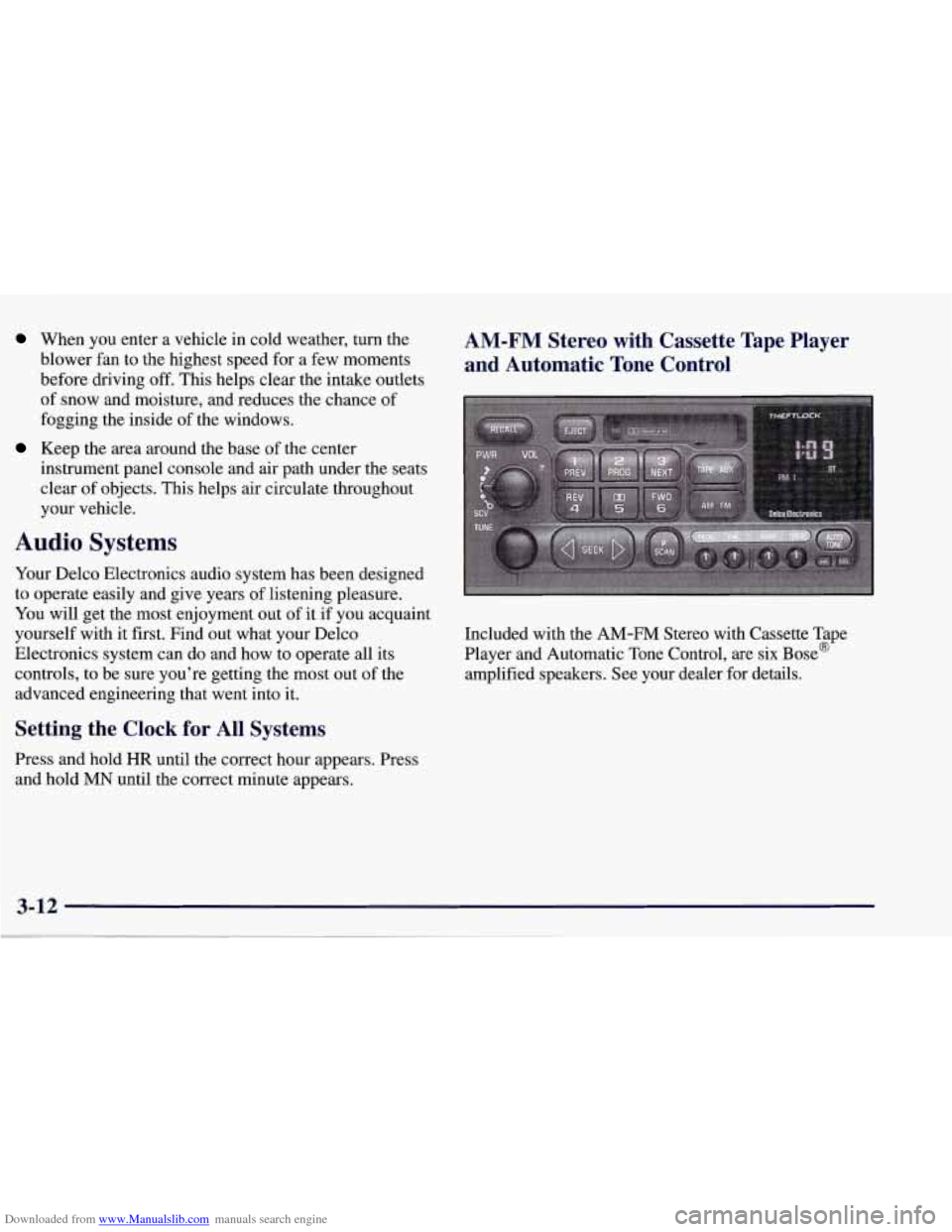
Included with the AM-FM Stereo with Cassette Tape
Player and Automatic Tone Control, are six Bose@
amplified speakers. See your dealer for details.
Page 172 of 378
Downloaded from www.Manualslib.com manuals search engine Playing the Radio
PWR-VOL: Press this knob to turn the system on and
off. To increase volume, turn the knob to the right. Turn
it to the left to decrease volume. The knob is capable of
rotating continuously.
RECALL: Press this button to recall the station being
played. If you press the button when the ignition is
off,
the clock will show for a few seconds.
SCV: Your system has a feature called
Speed-Compensated-Volume (SCV). With SCV, your
audio system adjusts automatically to make up for road
and wind noise as you drive. Set the volume at the
desired level. Move the control ring behind the upper
knob to the right to adjust the SCV. Then, as you drive,
SCV automatically increases the volume, as necessary,
to overcome noise at any particular speed. The volume
level should always sound the same to you as you drive.
If you don’t want to use SCV, turn the control all the
way down. Each notch on the control ring allows for
more volume compensation at faster vehicle speeds.
Finding a Station
AM-FM: Press this button to switch between AM, FM1
and FM2. The display shows your selection.
TUNE: Press this knob lightly so it extends. Turn it to
choose radio stations. Push the
knob back into its stored
position when you’re not using it.
SEEK: Press the right or left arrow to go to the
next higher
or lower station. The sound will mute
while seeking.
SCAN: Press one of the SEEK arrows for two seconds,
and SCAN will appear in the display. Use SCAN to
listen to stations for a few seconds. The radio will go to
a station, stop for a few seconds, then
go on to the next
station. Press SEEK again to stop scanning. The sound
will mute while scanning.
PUSHBUTTONS: The six numbered pushbuttons let
you return to your favorite stations. You can set up to
18 stations (six AM, six FM1 and six FM2). Just:
1. Turn the radio on.
2. Press AM-FM to select the band.
3. Tune in the desired station.
4. Press AUTO TONE to select the equalization that
best suits the type of station selected.
3-13