Page 1060 of 2543
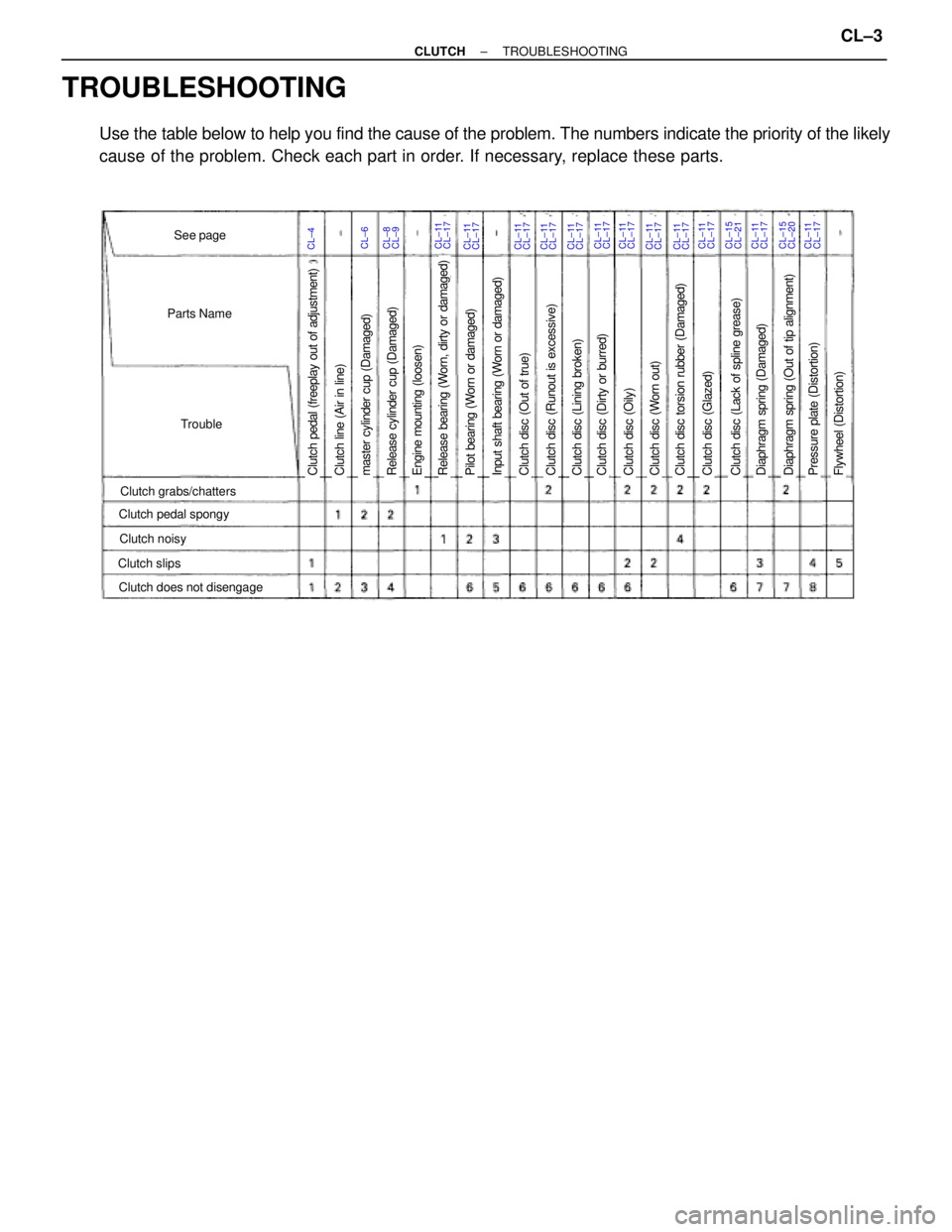
TROUBLESHOOTING
Use the table below to help you find the cause of the problem. The numbers indicate the priority of the likely
cause of the problem. Check each part in order. If necessary, replace these parts.
CL±4CL±6CL±11See page
Parts Name
Trouble
Clutch grabs/chatters
Clutch noisy
Clutch slips
Clutch pedal spongy
Clutch does not disengage
Clutch pedal (freeplay out of adjustment)Pilot bearing (Worn or damaged)Release bearing (Worn, dirty or damaged)Engine mounting (loosen)Release cylinder cup (Damaged)master cylinder cup (Damaged)Clutch line (Air in line)Clutch disc (Dirty or burred)Clutch disc (Oily)Clutch disc (Worn out)Clutch disc torsion rubber (Damaged)Clutch disc (Out of true)Input shaft bearing (Worn or damaged)Clutch disc (Lining broken)Clutch disc (Runout is excessive)Clutch disc (Lack of spline grease)Diaphragm spring (Damaged)Clutch disc (Glazed)Diaphragm spring (Out of tip alignment)Pressure plate (Distortion)Flywheel (Distortion)
CL±17CL±8CL±9CL±11CL±17CL±11CL±17CL±11CL±17CL±11CL±17CL±11CL±17CL±11CL±17CL±11CL±17CL±11CL±17CL±11CL±17CL±15CL±21CL±11CL±17CL±15CL±20CL±11CL±17
± CLUTCHTROUBLESHOOTINGCL±3
Page 1072 of 2543
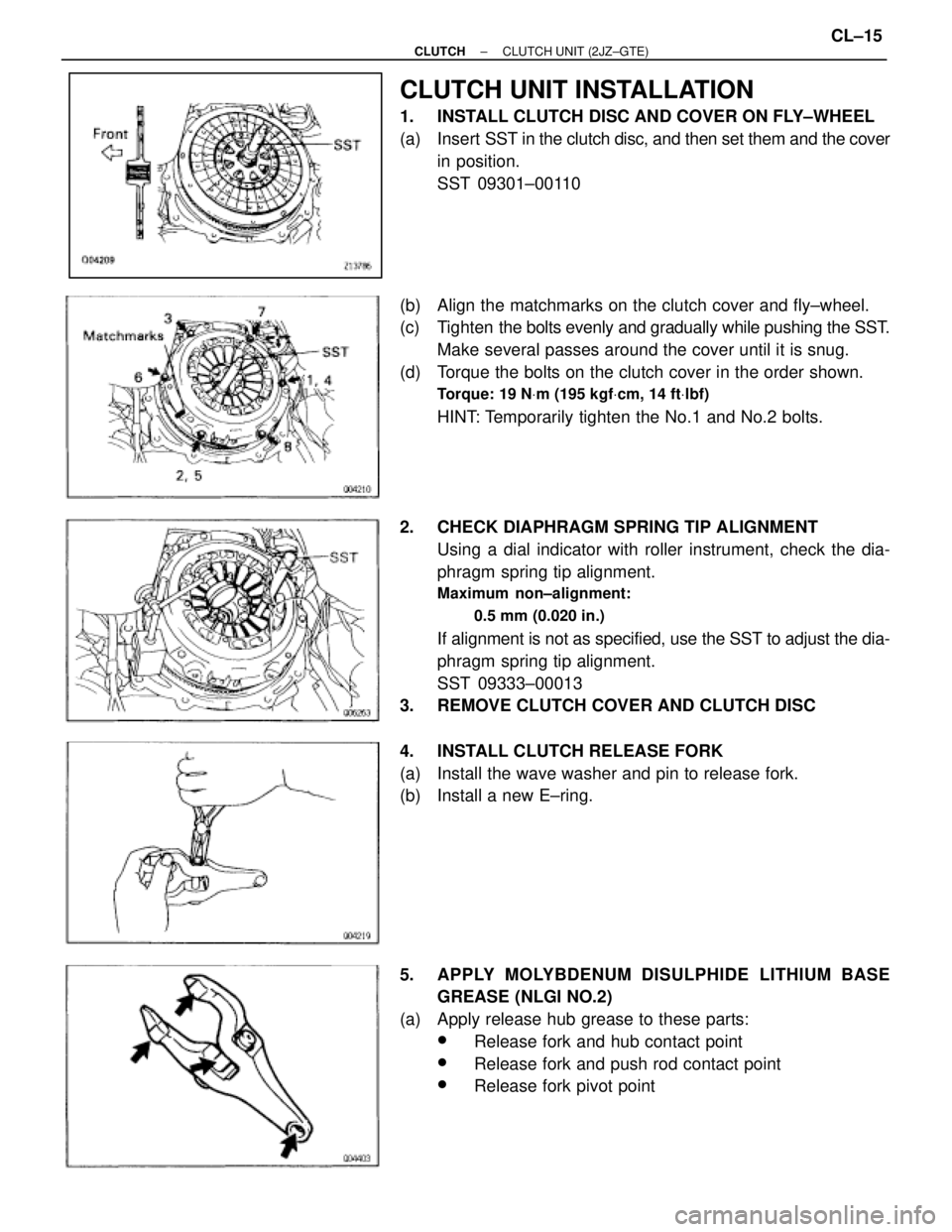
CLUTCH UNIT INSTALLATION
1. INSTALL CLUTCH DISC AND COVER ON FLY±WHEEL
(a) Insert SST in the clutch disc, and then set them and the cover
in position.
SST 09301±00110
(b) Align the matchmarks on the clutch cover and fly±wheel.
(c) Tighten the bolts evenly and gradually while pushing the SST.
Make several passes around the cover until it is snug.
(d) Torque the bolts on the clutch cover in the order shown.
Torque: 19 NVm (195 kgfVcm, 14 ftVlbf)
HINT: Temporarily tighten the No.1 and No.2 bolts.
2. CHECK DIAPHRAGM SPRING TIP ALIGNMENT
Using a dial indicator with roller instrument, check the dia-
phragm spring tip alignment.
Maximum non±alignment:
0.5 mm (0.020 in.)
If alignment is not as specified, use the SST to adjust the dia-
phragm spring tip alignment.
SST 09333±00013
3. REMOVE CLUTCH COVER AND CLUTCH DISC
4. INSTALL CLUTCH RELEASE FORK
(a) Install the wave washer and pin to release fork.
(b) Install a new E±ring.
5. APPLY MOLYBDENUM DISULPHIDE LITHIUM BASE
GREASE (NLGI NO.2)
(a) Apply release hub grease to these parts:
wRelease fork and hub contact point
wRelease fork and push rod contact point
wRelease fork pivot point
± CLUTCHCLUTCH UNIT (2JZ±GTE)CL±15
Page 1077 of 2543
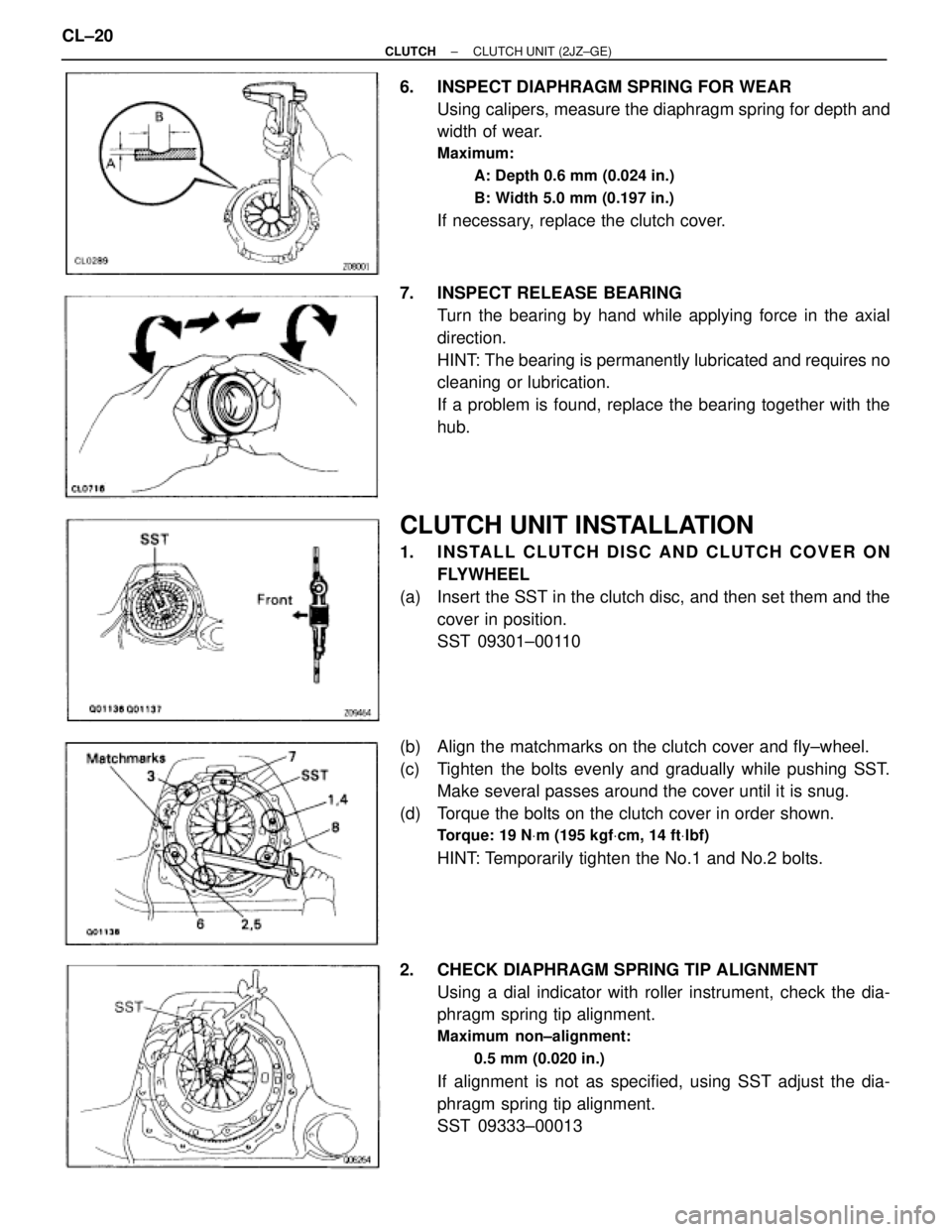
6. INSPECT DIAPHRAGM SPRING FOR WEAR
Using calipers, measure the diaphragm spring for depth and
width of wear.
Maximum:
A: Depth 0.6 mm (0.024 in.)
B: Width 5.0 mm (0.197 in.)
If necessary, replace the clutch cover.
7. INSPECT RELEASE BEARING
Turn the bearing by hand while applying force in the axial
direction.
HINT: The bearing is permanently lubricated and requires no
cleaning or lubrication.
If a problem is found, replace the bearing together with the
hub.
CLUTCH UNIT INSTALLATION
1. INSTALL CLUTCH DISC AND CLUTCH COVER ON
FLYWHEEL
(a) Insert the SST in the clutch disc, and then set them and the
cover in position.
SST 09301±00110
(b) Align the matchmarks on the clutch cover and fly±wheel.
(c) Tighten the bolts evenly and gradually while pushing SST.
Make several passes around the cover until it is snug.
(d) Torque the bolts on the clutch cover in order shown.
Torque: 19 NVm (195 kgfVcm, 14 ftVlbf)
HINT: Temporarily tighten the No.1 and No.2 bolts.
2. CHECK DIAPHRAGM SPRING TIP ALIGNMENT
Using a dial indicator with roller instrument, check the dia-
phragm spring tip alignment.
Maximum non±alignment:
0.5 mm (0.020 in.)
If alignment is not as specified, using SST adjust the dia-
phragm spring tip alignment.
SST 09333±00013 CL±20
± CLUTCHCLUTCH UNIT (2JZ±GE)
Page 1079 of 2543
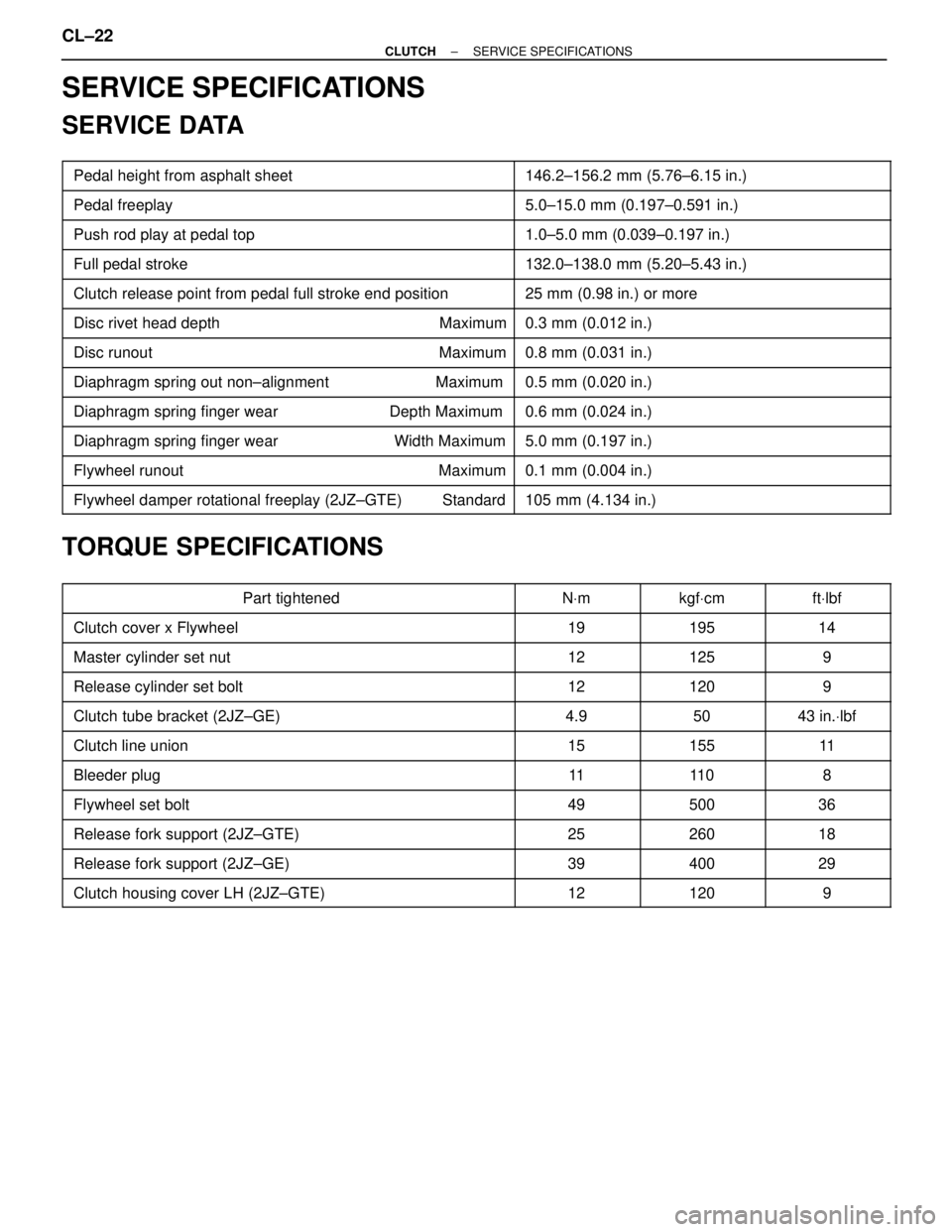
SERVICE SPECIFICATIONS
SERVICE DATA
�������������������� ��������������������Pedal height from asphalt sheet����������������� �����������������146.2±156.2 mm (5.76±6.15 in.)�������������������� �
������������������� ��������������������Pedal freeplay
����������������� �
���������������� �����������������5.0±15.0 mm (0.197±0.591 in.)
�������������������� ��������������������Push rod play at pedal top����������������� �����������������1.0±5.0 mm (0.039±0.197 in.)
�������������������� ��������������������Full pedal stroke����������������� �����������������132.0±138.0 mm (5.20±5.43 in.)
�������������������� ��������������������Clutch release point from pedal full stroke end position����������������� �����������������25 mm (0.98 in.) or more�������������������� �
������������������� ��������������������Disc rivet head depth Maximum
����������������� �
���������������� �����������������0.3 mm (0.012 in.)
�������������������� ��������������������Disc runout Maximum����������������� �����������������0.8 mm (0.031 in.)
�������������������� ��������������������Diaphragm spring out non±alignment Maximum����������������� �����������������0.5 mm (0.020 in.)
�������������������� ��������������������Diaphragm spring finger wear Depth Maximum����������������� �����������������0.6 mm (0.024 in.)�������������������� �
������������������� ��������������������Diaphragm spring finger wear Width Maximum
����������������� �
���������������� �����������������5.0 mm (0.197 in.)
�������������������� ��������������������Flywheel runout Maximum����������������� �����������������0.1 mm (0.004 in.)
�������������������� ��������������������Flywheel damper rotational freeplay (2JZ±GTE) Standard����������������� �����������������105 mm (4.134 in.)
TORQUE SPECIFICATIONS
�������������������� ��������������������Part tightened������ ������NVm������ ������kgfVcm������ ������ftVlbf
�������������������� ��������������������Clutch cover x Flywheel������ ������19������ ������195������ ������14�������������������� �
������������������� ��������������������Master cylinder set nut
������ �
����� ������12
������ �
�����
������
125
������ �
����� ������9
�������������������� ��������������������Release cylinder set bolt������ ������12������ ������120������ ������9
�������������������� ��������������������Clutch tube bracket (2JZ±GE)������ ������4.9������ ������50������ ������43 in.Vlbf
�������������������� ��������������������Clutch line union������ ������15������ ������155������ ������11�������������������� �
������������������� ��������������������Bleeder plug
������ �
����� ������11
������ �
�����
������
11 0
������ �
����� ������8
�������������������� ��������������������Flywheel set bolt������ ������49������ ������500������ ������36
�������������������� ��������������������Release fork support (2JZ±GTE)������ ������25������ ������260������ ������18
�������������������� ��������������������Release fork support (2JZ±GE)������ ������39������ ������400������ ������29�������������������� ��������������������Clutch housing cover LH (2JZ±GTE)������ ������12������ ������120������ ������9
CL±22± CLUTCHSERVICE SPECIFICATIONS
Page 1633 of 2543
PRECAUTION
wCare must be taken to replace parts properly because they could affect the
performance of the steering system and result in a driving hazard.
wThe steering wheel pad has an SRS (Supplemental Restraint System) airbag built in,
so take all due precautions when handling it. For more details, see the RS section.
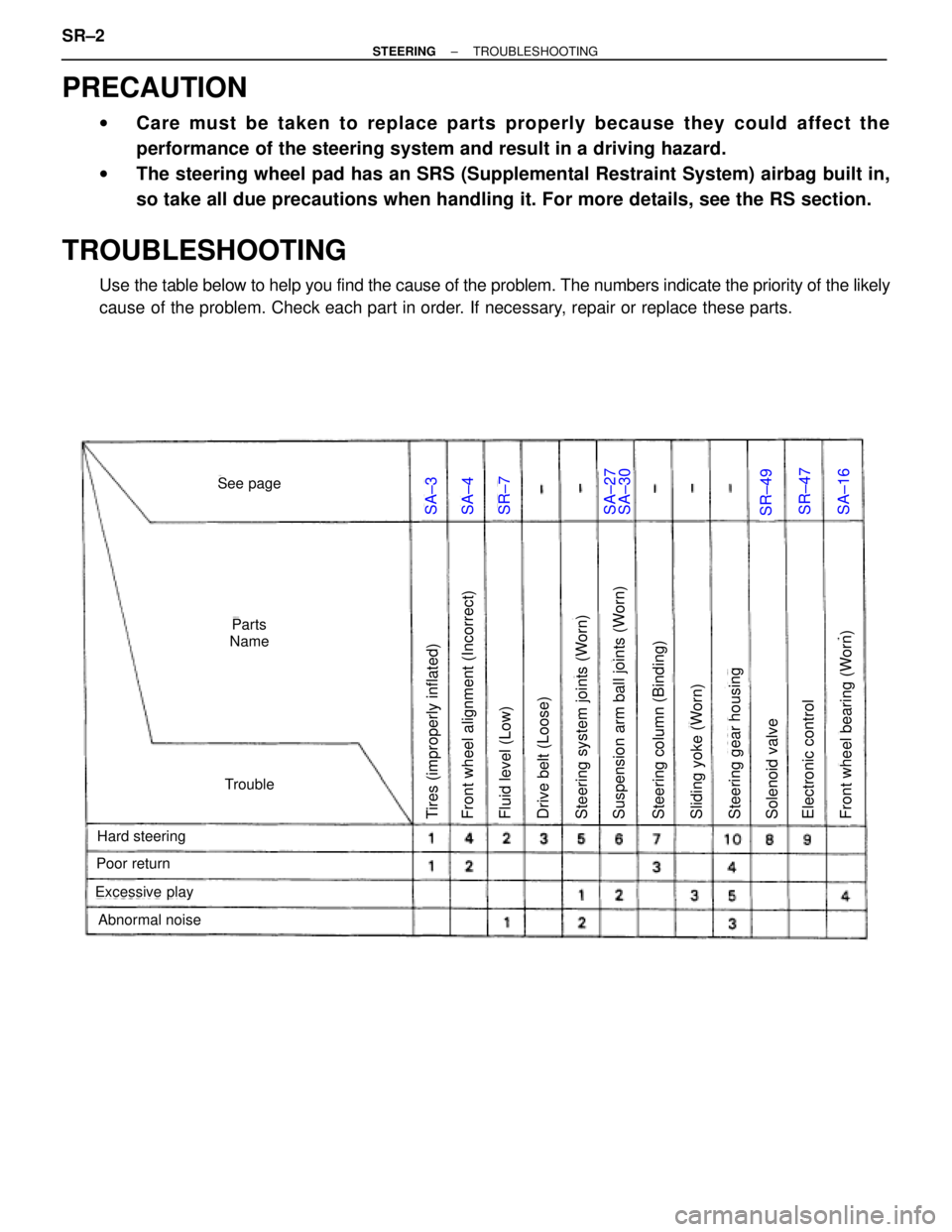
TROUBLESHOOTING
Use the table below to help you find the cause of the problem. The numbers indicate the priority of the likely
cause of the problem. Check each part in order. If necessary, repair or replace these parts.
SA±3SA±4SR±7SA±27SR±49SR±47SA±16
Tires (improperly inflated)Steering column (Binding)Suspension arm ball joints (Worn)Steering system joints (Worn)Drive belt (Loose)Fluid level (Low)Front wheel alignment (Incorrect)Electronic controlSolenoid valveSteering gear housingSliding yoke (Worn)Front wheel bearing (Worn)
Hard steering
Abnormal noise
Excessive play
Poor return
See page
Parts
Name
Trouble
SA±30
SR±2± STEERINGTROUBLESHOOTING
Page 1677 of 2543
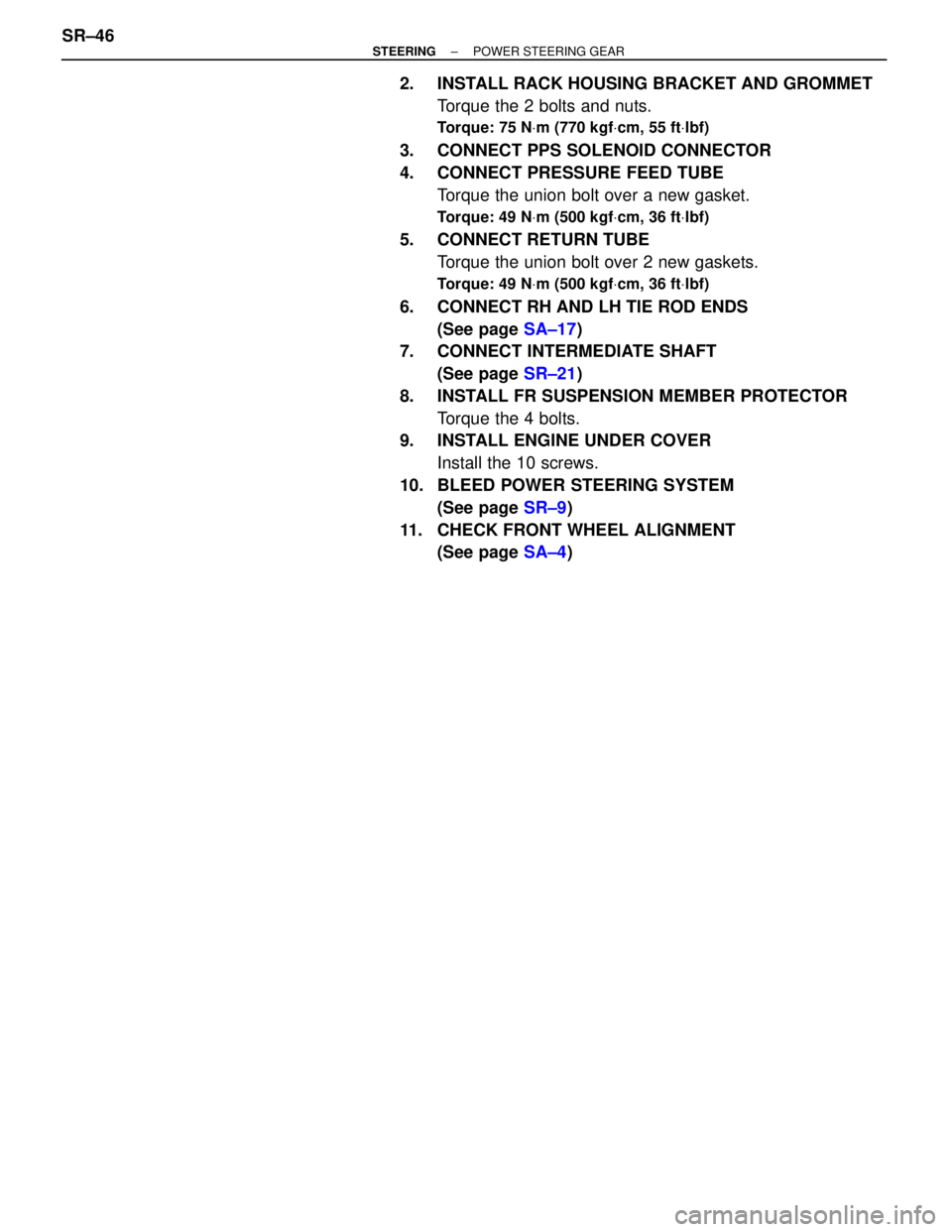
2. INSTALL RACK HOUSING BRACKET AND GROMMET
Torque the 2 bolts and nuts.
Torque: 75 NVm (770 kgfVcm, 55 ftVlbf)
3. CONNECT PPS SOLENOID CONNECTOR
4. CONNECT PRESSURE FEED TUBE
Torque the union bolt over a new gasket.
Torque: 49 NVm (500 kgfVcm, 36 ftVlbf)
5. CONNECT RETURN TUBE
Torque the union bolt over 2 new gaskets.
Torque: 49 NVm (500 kgfVcm, 36 ftVlbf)
6. CONNECT RH AND LH TIE ROD ENDS
(See page SA±17)
7. CONNECT INTERMEDIATE SHAFT
(See page SR±21)
8. INSTALL FR SUSPENSION MEMBER PROTECTOR
Torque the 4 bolts.
9. INSTALL ENGINE UNDER COVER
Install the 10 screws.
10. BLEED POWER STEERING SYSTEM
(See page SR±9)
11. CHECK FRONT WHEEL ALIGNMENT
(See page SA±4) SR±46
± STEERINGPOWER STEERING GEAR
Page 1678 of 2543
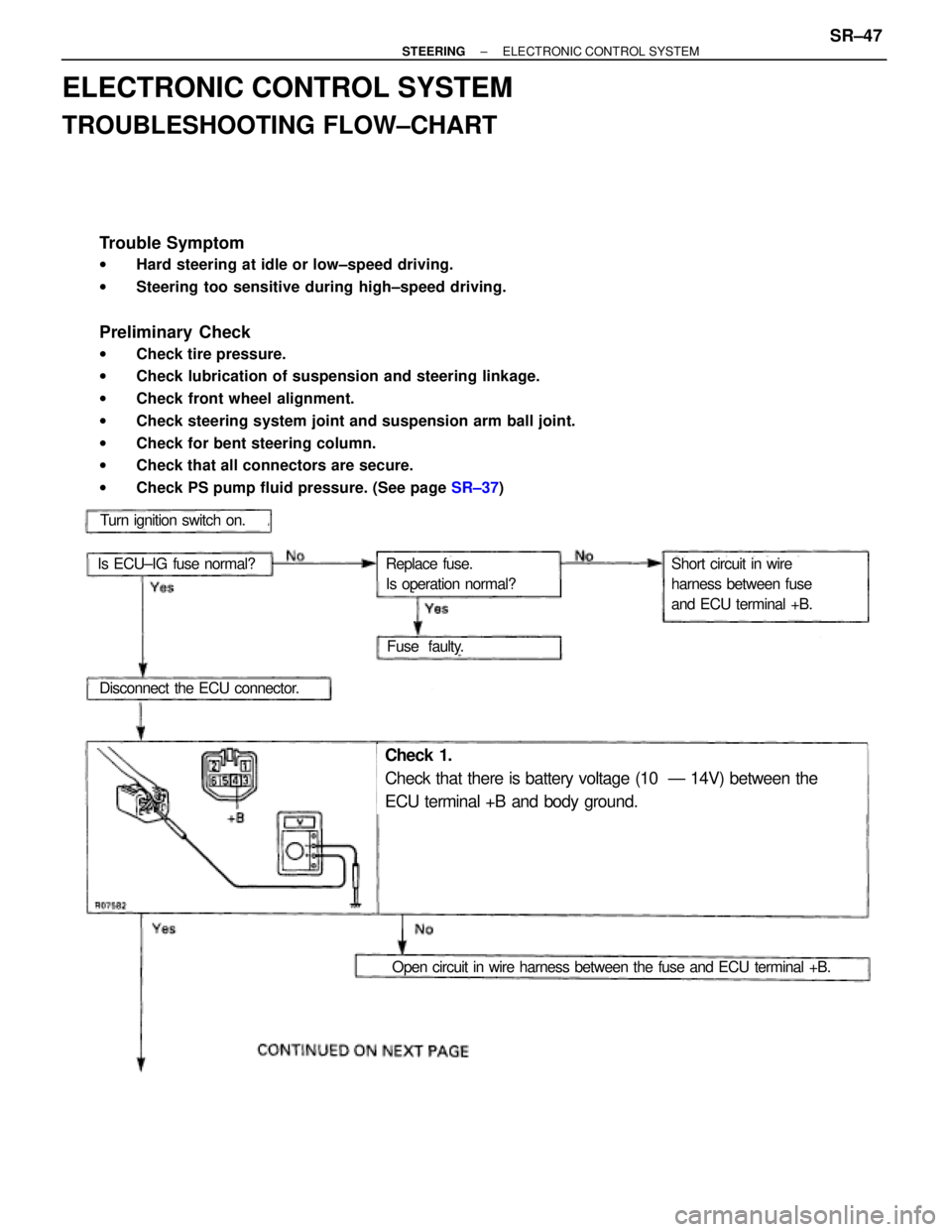
ELECTRONIC CONTROL SYSTEM
TROUBLESHOOTING FLOW±CHART
Trouble Symptom
wHard steering at idle or low±speed driving.
wSteering too sensitive during high±speed driving.
Preliminary Check
wCheck tire pressure.
wCheck lubrication of suspension and steering linkage.
wCheck front wheel alignment.
wCheck steering system joint and suspension arm ball joint.
wCheck for bent steering column.
wCheck that all connectors are secure.
wCheck PS pump fluid pressure. (See page SR±37)
Turn ignition switch on.
Is ECU±IG fuse normal?
Disconnect the ECU connector.
Fuse faulty.
Replace fuse.
Is operation normal?Short circuit in wire
harness between fuse
and ECU terminal +B.
Check 1.
Check that there is battery voltage (10 Ð 14V) between the
ECU terminal +B and body ground.
Open circuit in wire harness between the fuse and ECU terminal +B.
± STEERINGELECTRONIC CONTROL SYSTEMSR±47
Page 1787 of 2543
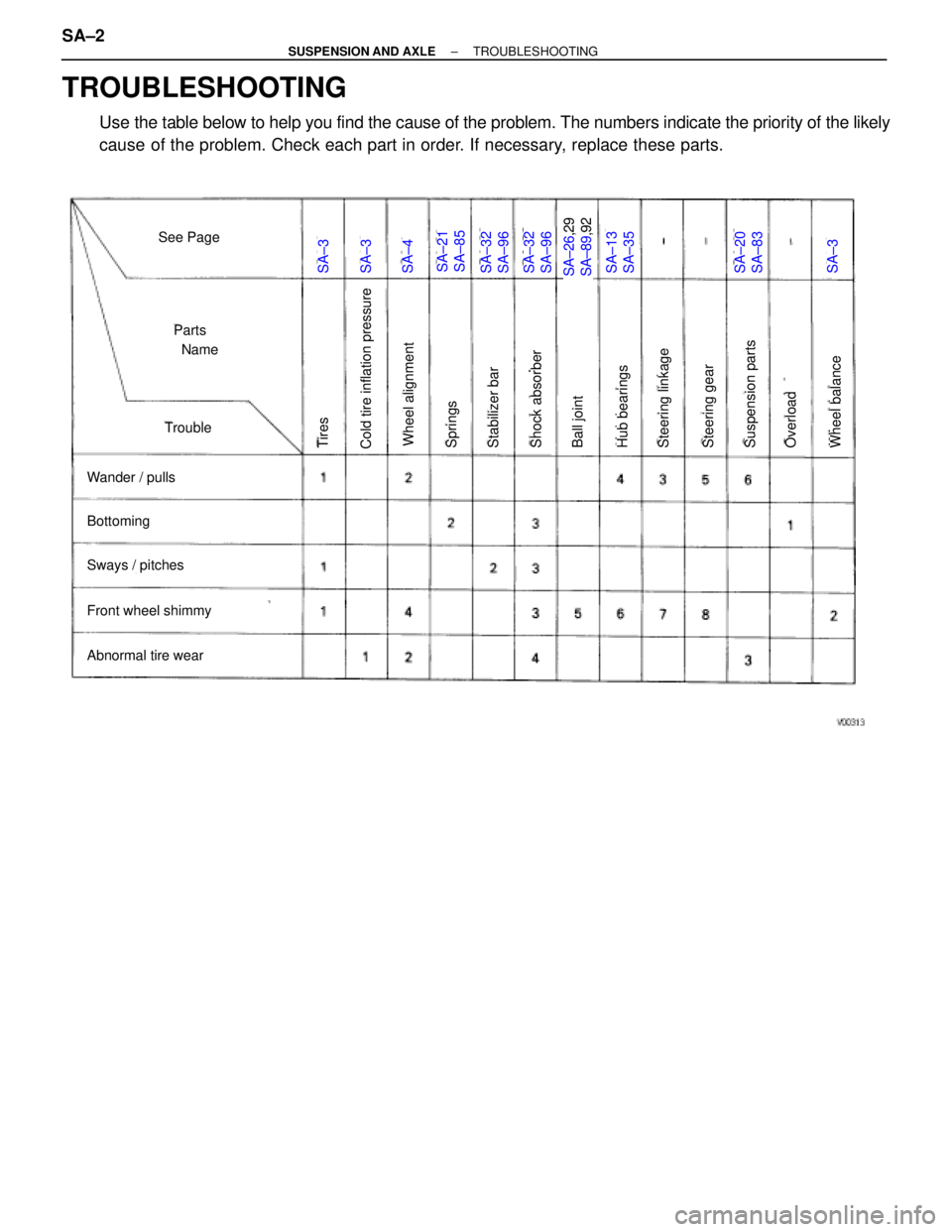
SA±3SA±3SA±4SA±21
SA±85SA±32
SA±96SA±32
SA±96SA±26,29
SA±89,92SA±13
SA±35SA±20
SA±83SA±3
See Page
Parts
Name
Trouble
Wander / pulls
Bottoming
Sways / pitches
Front wheel shimmy
Abnormal tire wear
Cold tire inflation pressureTiresWheel alignmentSpringsStabilizer barShock absorberBall jointHub bearingsSteering linkageSteering gearSuspension partsOverloadWheel balance
TROUBLESHOOTING
Use the table below to help you find the cause of the problem. The numbers indicate the priority of the likely
cause of the problem. Check each part in order. If necessary, replace these parts. SA±2
± SUSPENSION AND AXLETROUBLESHOOTING