1995 HONDA ODYSSEY check engine
[x] Cancel search: check enginePage 199 of 240
If Your Engine Won't Start, Jump Starting
The Starter Operates Normally In this case, the starter motorsounds normal when you turn the
ignition switch to START (III), but
the engine does not run.
Are you using the proper startingprocedure? Refer to Starting the
Engine on page 119 .
Do you have fuel? Turn the
ignition switch to ON (II) for a
minute and watch the fuel gauge.
The low fuel level warning light may not be working, so you were
not reminded to fill the tank.
There may be an electrical problem, such as no power to the
fuel pump. Check all the fuses (see page 208 ).
If you find nothing wrong, you will
need a qualified technician to find
the problem. See Towing on page 213. Jump Starting
If your car's battery has run clown,
you may be able to start the engine by using a booster battery. Although
this seems like a simple procedure,
there are several precautions youshould take. Follow the directions
closely.
You cannot start a Honda by pushing or pulling it. To jump start your car:
1. Open the hood and check the physical condition of the battery(see page 162 ). In very cold
weather, check the condition of
the electrolyte. If it seems slushy or like ice, do not try jump starting
until it thaws.
Taking Care of the Unexpected
If a battery sits in extreme cold, the
electrolyte inside can freeze.
Attempting to lump start with a frozen battery can cause it to rupture or
explode.
2. Turn off all the electrical acces- sories: heater, A/C, stereo system,
lights, etc.
Put the transmission in Neutral or
Park and set the parking brake.
A battery can explode if you do
not follow the correct procedure,
seriously injuring anyone nearby.
Keep all sparks, open flames,
and smoking materials away
from the battery.ProCarManuals.comMain Menu Table of Contents s t
Page 200 of 240
Jump Starting
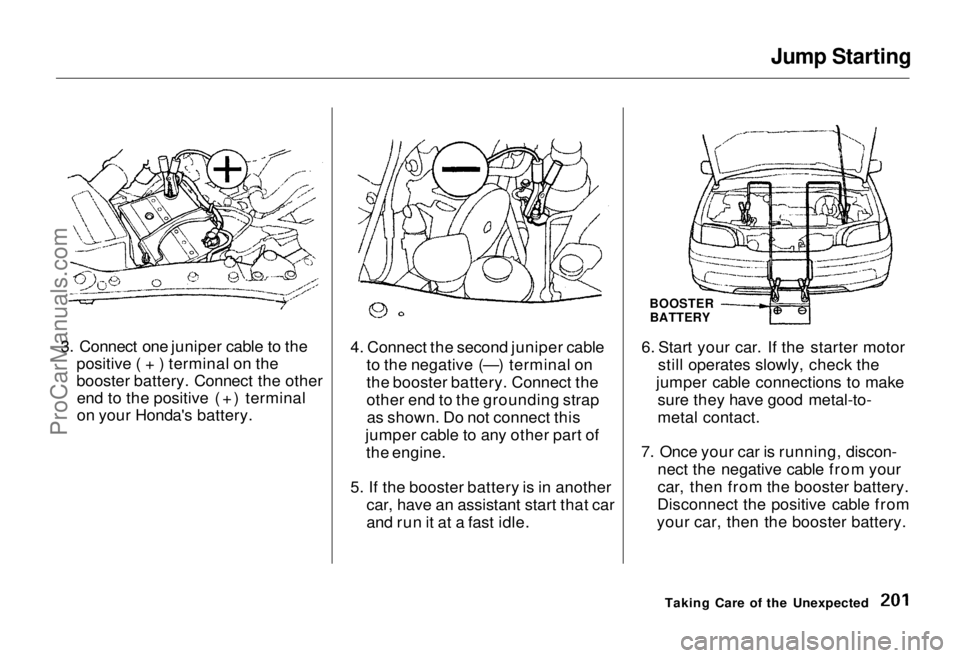
3. Connect one juniper cable to the positive ( + ) terminal on the
booster battery. Connect the otherend to the positive (+) terminal
on your Honda's battery. 4. Connect the second juniper cable
to the negative (—) terminal on
the booster battery. Connect the
other end to the grounding strapas shown. Do not connect this
jumper cable to any other part of the engine.
5. If the booster battery is in another car, have an assistant start that car
and run it at a fast idle. 6. Start your car. If the starter motor
still operates slowly, check the
jumper cable connections to make sure they have good metal-to-
metal contact.
7. Once your car is running, discon- nect the negative cable from your
car, then from the booster battery.
Disconnect the positive cable from
your car, then the booster battery.
Taking Care of the Unexpected
BOOSTER
BATTERYProCarManuals.comMain Menu Table of Contents s t
Page 202 of 240
If Your Engine Overheats
4. If the temperature gauge stays at the red mark, turn off the engine.
5. Wait until you see no more signs of steam or spray, then open the
hood.
6. Look for any obvious coolant leaks, such as a split radiator hose.
Everything is still extremely hot, so use caution. If you find a leak, it
must be repaired before you
continue driving (see Towing on
page 213).
7. If you don't find an obvious leak, check the coolant level in the
radiator reserve tank (see page 150). If the level is below the
MIN mark, add coolant to half-way
between the MIN and MAX marks.
8. If there was no coolant in the reserve tank, you may also have to
add coolant to the radiator. Let the
engine cool down until the pointer reaches the middle of the tempera-
ture gauge, or lower, before check-
ing the radiator.
9. Using gloves or a large heavy cloth, turn the radiator cap
counterclockwise, without pushing
down, to the first stop. This
releases any remaining pressure in
the cooling system. After the
pressure releases, push down on
the cap and turn it until it comes
off.
10.Start the engine and set the
temperature control lever to
maximum. Add coolant to the
radiator up to the base of the filler
neck. If you do not have the proper coolant mixture available,
you can add plain water. Remember to have the coolingsystem drained and refilled with
the proper mixture as soon as you
can.
11. Put the radiator cap back on tightly. Run the engine and watch
the temperature gauge. If it goes
back to the red mark, the engine needs repair. (See Towing on
page 213.)
12.If the temperature stays normal, check the coolant level in the
radiator reserve tank. If it has
gone down, add coolant to the MAX mark. Put the cap back on
tightly.
Taking Care of the Unexpected
Removing the radiator cap
while the engine is hot can cause the coolant to spray out,
seriously scalding you.
Always let the engine and radiator cool down before
removing the radiator cap.ProCarManuals.comMain Menu Table of Contents s t
Page 203 of 240
Low Oil Pressure
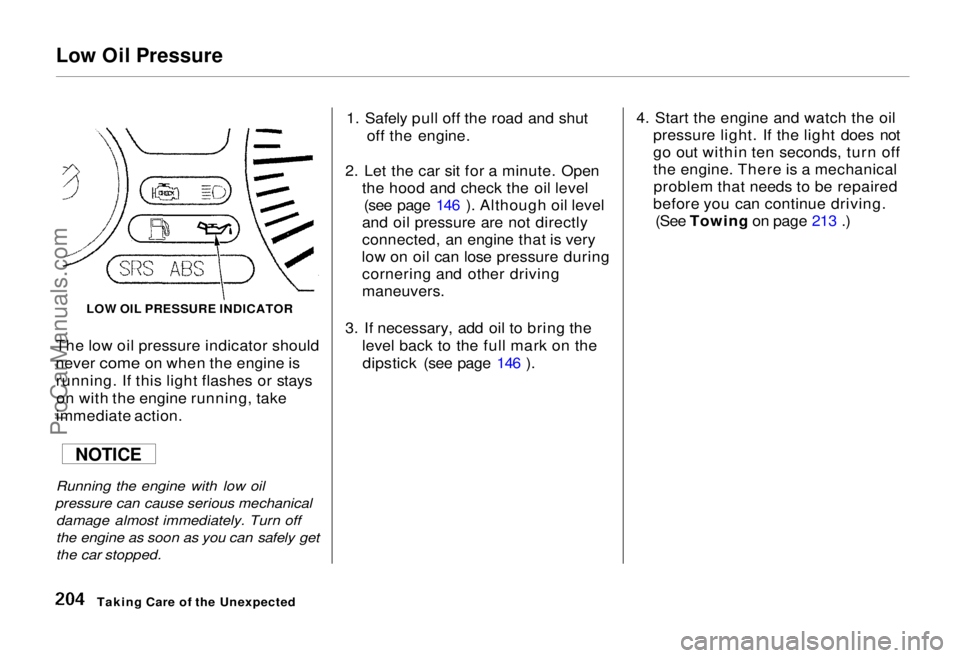
The low oil pressure indicator should
never come on when the engine is
running. If
this light flashes or stays
on with the engine running, take
immediate action.
Running the engine with low oil
pressure can cause serious mechanical
damage almost immediately. Turn off
the engine as soon as you can safely get
the car stopped.
1. Safely pull off the road and shut
off the engine.
2. Let the car sit for a minute. Open the hood and check the oil level(see page 146 ). Although oil level
and oil pressure are not directly
connected, an engine that is very
low on oil can lose pressure during cornering and other driving
maneuvers.
3. If necessary, add oil to bring the level back to the full mark on thedipstick (see page 146 ). 4. Start the engine and watch the oil
pressure light. If the light does not
go out within ten seconds, turn off
the engine. There is a mechanicalproblem that needs to be repaired
before you can continue driving. (See Towing on page 213 .)
Taking Care of the Unexpected
LOW OIL PRESSURE INDICATOR
NOTICEProCarManuals.comMain Menu Table of Contents s t
Page 205 of 240
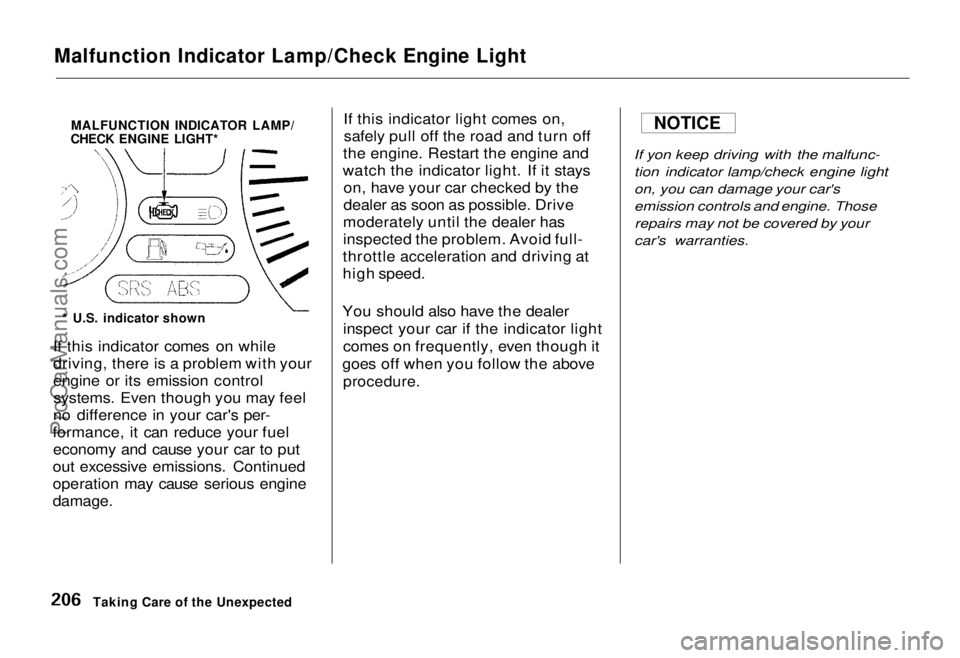
Malfunction Indicator Lamp/Check Engine Light
MALFUNCTION INDICATOR LAMP/
CHECK ENGINE LIGHT*
* U.S. indicator shown
If this indicator comes on while
driving, there is a problem with your
engine or its emission control systems. Even though you may feel
no difference in your car's per-
formance, it can reduce your fuel economy and cause your car to put
out excessive emissions. Continued
operation may cause serious engine
damage.
If this indicator light comes on,
safely pull off the road and turn off
the engine. Restart the engine and
watch the indicator light. If it stays on, have your car checked by the
dealer as soon as possible. Drive
moderately until the dealer has
inspected the problem. Avoid full-
throttle acceleration and driving at
high speed.
You should also have the dealer inspect your car if the indicator light
comes on frequently, even though it
goes off when you follow the above
procedure.
If yon keep driving with the malfunc-
tion indicator lamp/check engine light
on, you can damage your car's
emission controls and engine. Thoserepairs may not be covered by your
car's warranties.
Taking Care of the Unexpected NOTICEProCarManuals.comMain Menu Table of Contents s t
Page 208 of 240
Fuses
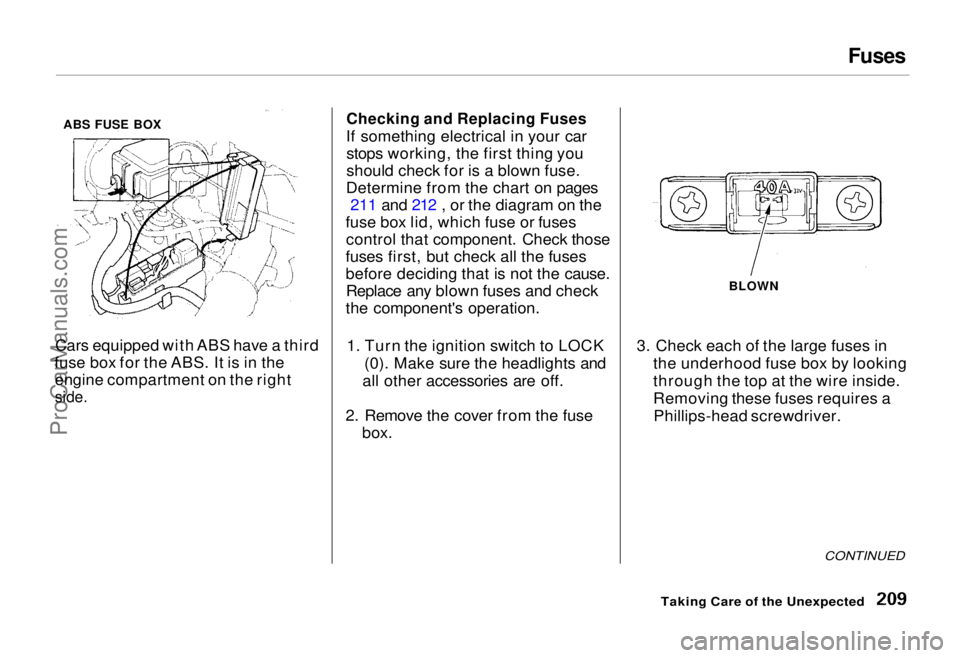
Cars equipped with ABS have a third
fuse box for the ABS. It is in the engine compartment on the right
side.
Checking and Replacing Fuses
If something electrical in your car stops working, the first thing you
should check for is a blown fuse.
Determine from the chart on pages 211 and 212 , or the diagram on the
fuse box lid, which fuse or fuses control that component. Check those
fuses first, but check all the fuses
before deciding that is not the cause. Replace any blown fuses and check
the component's operation.
1. Turn the ignition switch to LOCK (0). Make sure the headlights and
all other accessories are off.
2. Remove the cover from the fuse box. 3. Check each of the large fuses in
the underhood fuse box by looking
through the top at the wire inside.
Removing these fuses requires aPhillips-head screwdriver.
CONTINUED
Taking Care of the Unexpected
BLOWN
ABS FUSE BOXProCarManuals.comMain Menu Table of Contents s t
Page 232 of 240
Index
Accessories
Installation.................................. 115
ACCESSORY (Ignition Key
Position)....................................... 52
Adding Automatic Transmission
Fluid........................................ 155
Brake Fluid................................. 156
Engine Coolant........................... 150
Engine Oil................................... 146
Power Steering Fluid................. 157
Windshield Washer Fluid......... 154
Additional Safety Information........ 18 Door Locks................................... 19
Driving with Pets......................... 19
Head Restraint Position.............. 18
Seat-back Position........................ 18
Storing Cargo Safely................... 19
Additives, Engine Oil..................... 148
Adjustments
Mirrors.......................................... 67
Head Restraints........................... 58
Seats.............................................. 56
Steering Wheel............................ 46
Airbag (SRS) .................................... 12
Air Cleaner..................................... 157
Air Conditioning............................... 76
Maintenance............................... 168
Usage............................................. 78
Air Outlets (Vents).......................... 76
Air Pressure, Tires........................ 170
Alcohol and Drugs........................... 28
Alcohol in Gasoline........................ 109
Antifreeze....................................... 150
Anti-lock Brakes (ABS)
Description................................. 220
Indicator Light..................... 37, 125
Operation.................................... 125
Anti-theft Steering Column Lock .. 52
Appearance Care........................... 183
Ashtray.............................................. 72
Audio System................................... 84
Automatic Speed Control................ 48
Automatic Transmission............... 120
Capacity, Fluid........................... 218
Checking Fluid Level................ 155
Shifting........................................ 120
Shift Lever Positions................. 120
Shift Lock Release..................... 123
Battery
Charging System Light............... 36
Jump Starting............................. 200 Maintenance............................... 162
Specifications............................. 219
Before Driving............................... 107
Belts, Seat........................................... 5
Beverage Holder.............................. 69
Body Repair.................................... 190
Brakes
Anti-lock System (ABS)............ 125Break-in, New Linings .............. 108
Fluid............................................ 156
Light, Burned-out...................... 179
Parking.......................................... 68
System Indicator.......................... 36
Wear Indicators......................... 124
Brakes, ABS Description................................. 220
Operation.................................... 125
System Indicator................. 37, 125
Braking System.............................. 124
CONTINUEDProCarManuals.comMain Menu s t Main Menu s t
Page 233 of 240
Index
Break-in, New Car......................... 108
Brightness Control, Instruments... 43
Brights, Headlights......................... 42
Bulb Replacement
Back-up Lights........................... 179
Brake Lights............................... 179
Ceiling Light............................... 181
Front Parking Lights................. 178
Front Side Marker Lights......... 178
Headlights.................................. 177
License Plate Lights.................. 180
Specifications............................. 219
Turn Signal Lights..................... 178
Bulbs, Halogen............................... 177
Cables, Jump Starting With.......... 200
Capacities Chart............................. 218
Carbon Monoxide Hazard.............. 29
Cargo, Loading............................... 116
Cassette Player Care............................................. 105
Operation................................ 89, 98
CAUTION, Explanation of............... ii
CD Player........................................101 Center Pocket.................................. 71
Certification Label......................... 216
Chains............................................. 174
Change Oil
How to......................................... 148
When to....................................... 140
Changing a Flat Tire ..................... 193 Changing Engine Coolant............. 152
Charging System Indicator .... 36, 205
Check Engine Light........................ 37
Checking Automatic Transmission
Fluid........................................ 155
Battery Condition...................... 162 Brake Fluid................................. 156
Drive Belts.................................. 169
Engine Coolant........................... 150
Engine Oil................................... 146
Fuses........................................... 209
Power Steering Fluid................. 157
Checklist, Before Driving............. 118
Child Safety...................................... 20
Childproof Door Locks................... 54
Cigarette Lighter............................. 72
Cleaner, Air.................................... 158
Cleaning
Aluminum Wheels..................... 185
Carpeting.................................... 187
Exterior....................................... 184
Fabric.......................................... 187
Interior........................................ 187
Seat Belts....................................188
Vinyl............................................ 187
Window....................................... 188
CLEAN Light................................. 105
Clock, Setting the ............................ 68
Coin Box........................................... 71
CO in the Exhaust......................... 224 Cold Weather, Starting in............. 119
Compact Spare............................... 192
Consumer Information.................. 227
Controls, Instruments and.............. 33
Coolant
Adding......................................... 151
Checking..................................... 150
Proper Solution.......................... 150
Temperature Gauge.................... 40
Corrosion Protection..................... 189
Crankcase Emission Control System......................................... 224
Cruise Control Operation ............... 48ProCarManuals.comMain Menu s t Main Menu s t