Page 678 of 2389
(b) Insert a screwdriver between the trim retainers and
the door panel to pry it loose.
HINT: Tape the screwdriver tip before use.
4. REMOVE SERVICE HOLE COVER
5. REMOVE DOOR GLASS RUN
DISASSEMBLY OF REAR DOOR
1. REMOVE REGULATOR HANDLE
(w/o POWER WINDOW)
Pull oft the snap ring with a cloth and remove the regulator
handle and plate.
6. REMOVE DIVISION BAR
(a) Remove the two screws under the weatherstrip.
(b) Remove the bolt.
(c) Pull out the division bar. 2. REMOVE DOOR INSIDE HANDLE
(a) Remove the screw, and slide the handle forward.
(b) Disconnect the control link and remove the handle.
3. REMOVE DOOR TRIM WITH INNER WEATHERSTRIP
(a) Remove the two screws from the armrest.
± BODYRear DoorBO±12
Page 679 of 2389
8. REMOVE WINDOW REGULATOR
(a) (w/ Power Window)
Disconnect the connector.
(b) Remove the regulator ±mounting bolts.
(c) Remove the equalizer arm bracket mounting bolts. 7. REMOVE DOOR GLASS
(a) Wind the glass down into the door cavity.
(b) Remove the two glass channel mounting nuts.
9. REMOVE REAR DOOR BELT MOULDING
Pry out the rear door belt moulding with the clip as shown.(c) Remove the door glass by pulling it upward.
(d) Remove the regulator through the service hole.
± BODYRear DoorBO±13
Page 682 of 2389
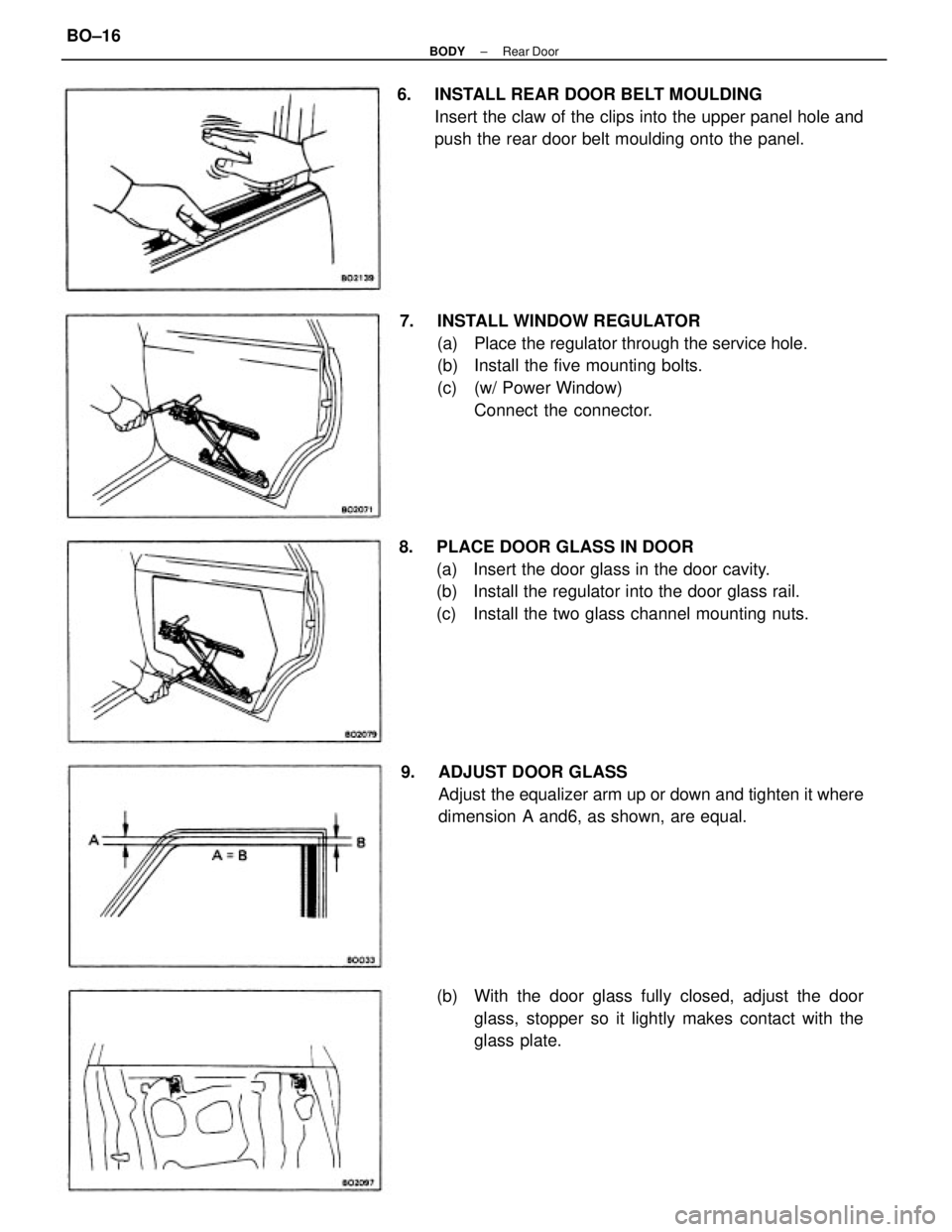
7. INSTALL WINDOW REGULATOR
(a) Place the regulator through the service hole.
(b) Install the five mounting bolts.
(c) (w/ Power Window)
Connect the connector. 6. INSTALL REAR DOOR BELT MOULDING
Insert the claw of the clips into the upper panel hole and
push the rear door belt moulding onto the panel.
8. PLACE DOOR GLASS IN DOOR
(a) Insert the door glass in the door cavity.
(b) Install the regulator into the door glass rail.
(c) Install the two glass channel mounting nuts.
9. ADJUST DOOR GLASS
Adjust the equalizer arm up or down and tighten it where
dimension A and6, as shown, are equal.
(b) With the door glass fully closed, adjust the door
glass, stopper so it lightly makes contact with the
glass plate.
± BODYRear DoorBO±16
Page 683 of 2389
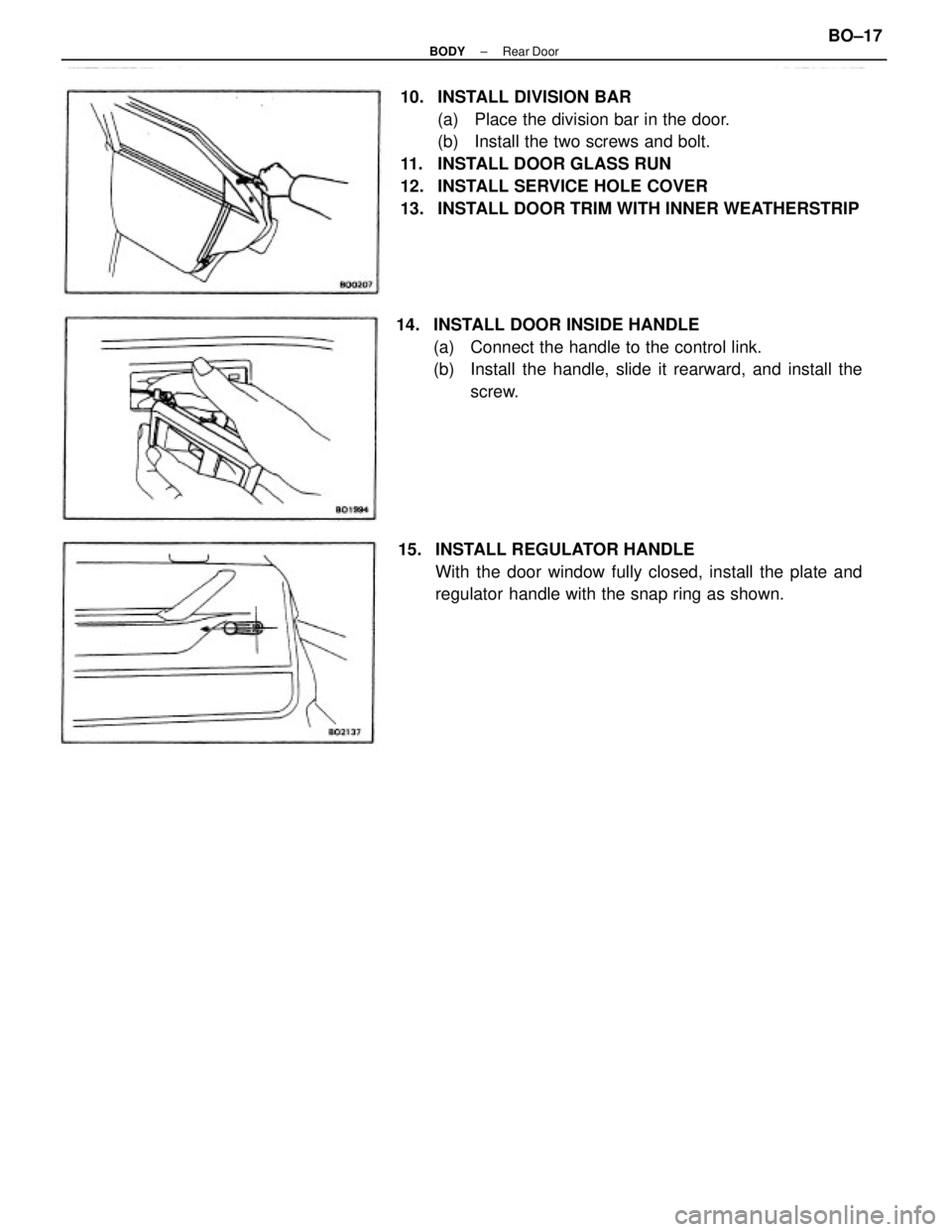
10. INSTALL DIVISION BAR
(a) Place the division bar in the door.
(b) Install the two screws and bolt.
11. INSTALL DOOR GLASS RUN
12. INSTALL SERVICE HOLE COVER
13. INSTALL DOOR TRIM WITH INNER WEATHERSTRIP
14. INSTALL DOOR INSIDE HANDLE
(a) Connect the handle to the control link.
(b) Install the handle, slide it rearward, and install the
screw.
15. INSTALL REGULATOR HANDLE
With the door window fully closed, install the plate and
regulator handle with the snap ring as shown.
± BODYRear DoorBO±17
Page 816 of 2389

HINT:
wRefer to 0/M for operation details of ANTI±THEFT SYSTEM.
wWhen the ID number has been cancelled, reset the same number after completing the operation, or in-
form the customer that it has been cancelled.ANTI±THEFT SYSTEM
operating condition.
(ID number input error 5
times) Take to designated
radio service station. While holding the 1, 4 and6
buttons in. Push and hold the
ºPVIIR VOLº knob. Check
display.
ANTI±THEFT SYSTEM
operating condition.
(ID number input error 4
times or less)
ANTI±THEFT SYSTEM not cancelled. ID number input 5 times or more?
Troubleshooting for ANTI±THEFT SYSTEM
Turn ignition key from LOCK position to ACC position.
ANTI±THEFT SYSTEM cancelled.
Check audio system again.
(Liquid Crystal Display (LCD) for Audio System)Cancel ID number, refer to each malfunction item.Cancel ID number, refer to each malfunction
item. Normal operation when radio
switch turned ON?
Take to designated radio service station.Refer to each malfunction
item.
ºSECº display disappears
after 1 second.ID number not input.
(Display D)
ID number not
input, or else
input error. After 2 seconds
Display C ± A Input ID number, check display.Forgot to press switch. Radio switch turned 4N. Display A showing?
Display B showing? ID nubmer is set.
Display A or BDisplay
EDisplay
B
Display DYe s
Ye sYe s Ye s
Ye s
± BODY ELECTRICAL SYSTEMAudio SystemBE±94
Page 907 of 2389

ANTI±LOCK BRAKE SYSTEM (A.B.S.)
Description
wThe A.B.S. is a brake system which controls the wheel cylinder hydraulic pressure of all four wheels during
sudden braking and braking on slippery road surfaces, preventing the wheels from locking. This A.B.S.
provides the following benefits:
(1) Enables steering round an obstacle with a greater degree of certainty even when panic braking.
(2) Enables stopping in a panic brake while keeping the effect upon stability and steerability to a mini-
mum, even on curves.
wThe function of the A.B.S. is to help maintain directional stability and vehicle steerability on most road
conditions. However, the system cannot prevent the vehicle from skidding if the cornering speed limit is
exceeded.
wThe A.B.S. has a longitudinal deceleration sensor to match braking characteristics to the full±time four±
wheel drive. (For 4WD)
wIn case a malfunction occurs, a diagnosis function and fail±safe system have been adopted for the A.B.S.
to increase serviceability.
2WD (SEDAN)
± BRAKE SYSTEMAnti±lock Brake System (A.B.S.)BR±56
Page 950 of 2389

4. INSTALL REAR BRAKE ASSEMBLY
(a) Install the disc brake assembly and torque the two
mounting bolts.
Torque: 475 kg±cm (34 ft±Ib, 47 N±m)
(b) Install the axle carrier mounting bolt and nut of upper
side.
Torque:. 2,100 kg±cm (152 ft±lb, 206 N±m)
2. INSTALL REAR AXLE HUB
(a) Install the backing plate with parking brake assem-
bly in place.
(b) Install a new O±ring to the axle carrier.
(c) Install the rear axle hub with the four bolts.
Torque: 820 kg±cm (59 ft±Ib, 80 N±m)
5. CONNECT SPEED SENSOR CONNECTOR
(a) Install the wire harness with clamps and bolts in
place.
(b) Insert the wire harness connector to inside of the ve-
hicle, and connect the connector.
(c) Install the seat cushion.
INSTALLATION OF REAR SPEED
SENSOR
1. INSTALL SPEED SENSOR
Install the speed sensor to the backing plate with a bolt.
Torque: 80 kg±cm (69 in.±Ib, 7.8 N±m)
3. INSTALL ROTOR DISC
Align the hole on the axle hub and service hole on the
disc, and install the rotor disc.
± BRAKE SYSTEMAnti±lock Brake System (A.B.S.)BR±99
Page 1018 of 2389
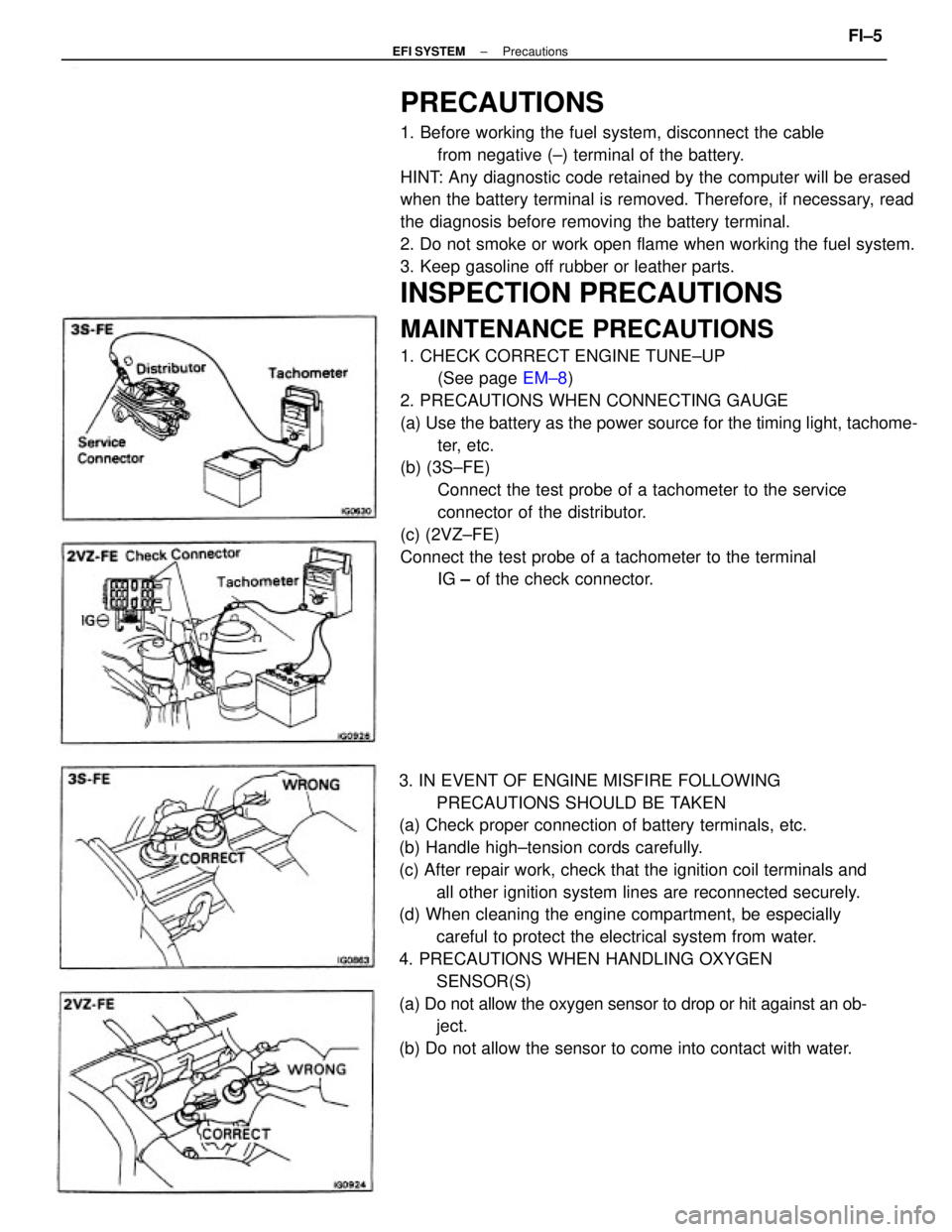
PRECAUTIONS
1. Before working the fuel system, disconnect the cable
from negative (±) terminal of the battery.
HINT: Any diagnostic code retained by the computer will be erased
when the battery terminal is removed. Therefore, if necessary, read
the diagnosis before removing the battery terminal.
2. Do not smoke or work open flame when working the fuel system.
3. Keep gasoline off rubber or leather parts.
INSPECTION PRECAUTIONS
MAINTENANCE PRECAUTIONS
1. CHECK CORRECT ENGINE TUNE±UP
(See page EM±8)
2. PRECAUTIONS WHEN CONNECTING GAUGE
(a) Use the battery as the power source for the timing light, tachome-
ter, etc.
(b) (3S±FE)
Connect the test probe of a tachometer to the service
connector of the distributor.
(c) (2VZ±FE)
Connect the test probe of a tachometer to the terminal
IG ± of the check connector.
3. IN EVENT OF ENGINE MISFIRE FOLLOWING
PRECAUTIONS SHOULD BE TAKEN
(a) Check proper connection of battery terminals, etc.
(b) Handle high±tension cords carefully.
(c) After repair work, check that the ignition coil terminals and
all other ignition system lines are reconnected securely.
(d) When cleaning the engine compartment, be especially
careful to protect the electrical system from water.
4. PRECAUTIONS WHEN HANDLING OXYGEN
SENSOR(S)
(a) Do not allow the oxygen sensor to drop or hit against an ob-
ject.
(b) Do not allow the sensor to come into contact with water.
± EFI SYSTEMPrecautionsFI±5