1969 FORD MUSTANG light
[x] Cancel search: lightPage 116 of 413
03-05-03
Steering Columns And Linkage
03-05-03
tapping the steering shaft lightly with
a plastic hammer to free the bearing
and flange from the shaft.
9. Remove the bearing and insula-
tor from the flange.
Installation
1.
Install flange bolts (square head)
in flange if they were removed. Turn
the nuts onto the bolts one complete
turn only.
2.
Position the flange onto the
steering column tube.
3.
Engage the two flange bolt heads
with the square holes in the column
tube,
then tighten the two attaching
nuts to specification.
4.
Position the bearing and insula-
tor on the shaft. Work it down onto
the shaft as far as possible, then place
a piece of 3/4 ID x 2 1/8 inch pipe
over the end of the shaft and install
the steering wheel attaching nut (Fig.
2).
5.
Tighten the nut until the bearing
is seated in the flange, then remove
the nut and pipe from the shaft.
6. Position the turn signal switch
on the flange and install the three at-
taching screws.
7.
Make certain that the wheels are
in the straight ahead position. Place
the steering wheel on the steering
shaft with the spokes in the horizontal
position. Install and torque the attach-
ing nut to specification.
8. Secure the crash pad to the
steering wheel with the two attaching
screws.
9. Connect the horn and turn signal
wires.
10.
Install the turn signal lever.
TILT WHEEL COLUMNS
Removal
1.
Disconnect the negative cable
from the battery.
2.
Remove the steering wheel with
tool T67L-3600-A (Fig. 1). Install the
spring, shipping spacer (3/4 x 1 1/8-
inch pipe) and a steering wheel attach-
ing nut on the shaft. Do not use a
knock-off type steering wheel puller or
strike the end of the steering shaft
with a hammer. Striking the puller or
shaft will damage the bearing or the
collapsible column.
3.
Remove the turn indicator lever
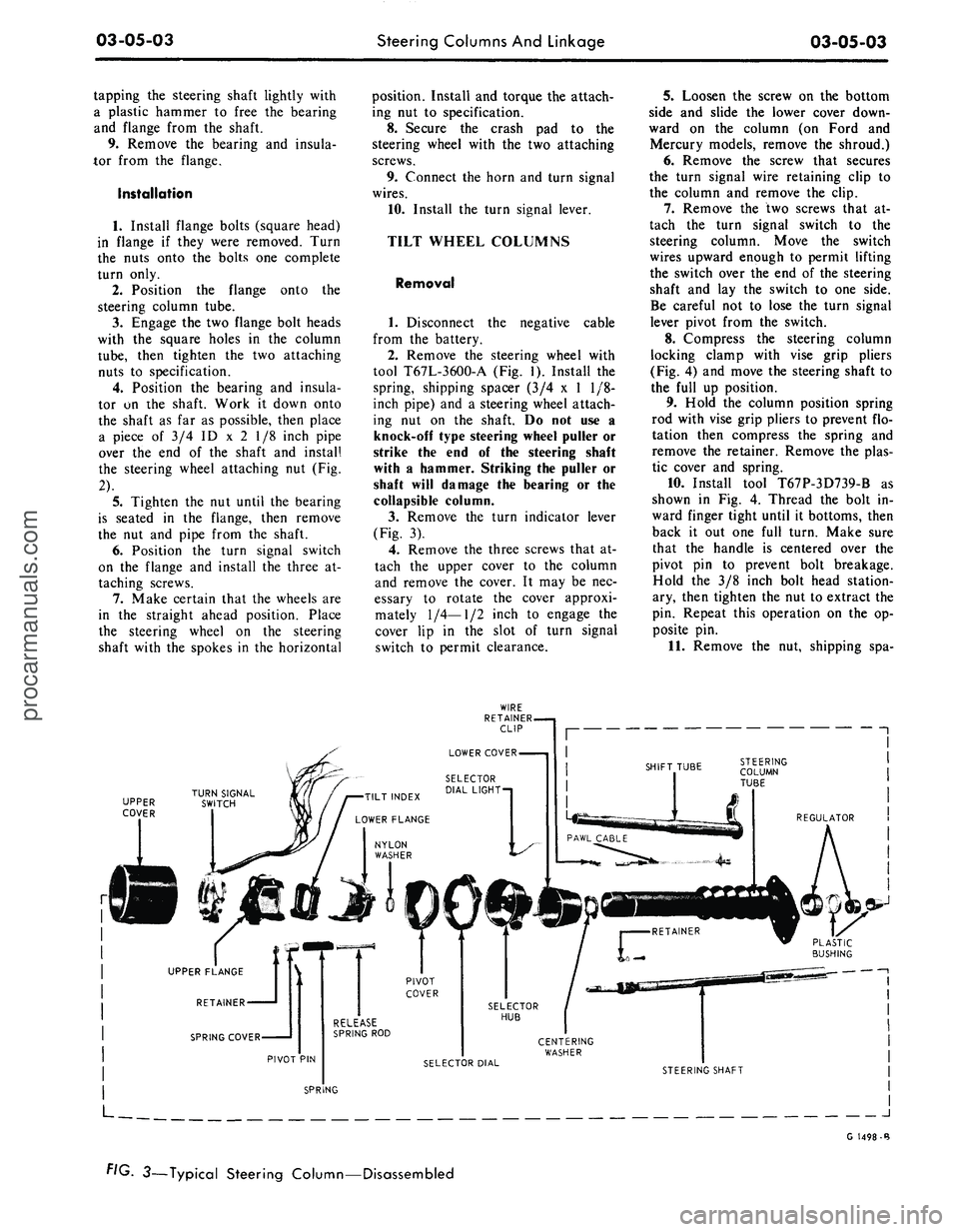
(Fig. 3).
4.
Remove the three screws that at-
tach the upper cover to the column
and remove the cover. It may be nec-
essary to rotate the cover approxi-
mately
1/4—1/2
inch to engage the
cover lip in the slot of turn signal
switch to permit clearance.
5.
Loosen the screw on the bottom
side and slide the lower cover down-
ward on the column (on Ford and
Mercury models, remove the shroud.)
6. Remove the screw that secures
the turn signal wire retaining clip to
the column and remove the clip.
7.
Remove the two screws that at-
tach the turn signal switch to the
steering column. Move the switch
wires upward enough to permit lifting
the switch over the end of the steering
shaft and lay the switch to one side.
Be careful not to lose the turn signal
lever pivot from the switch.
8. Compress the steering column
locking clamp with vise grip pliers
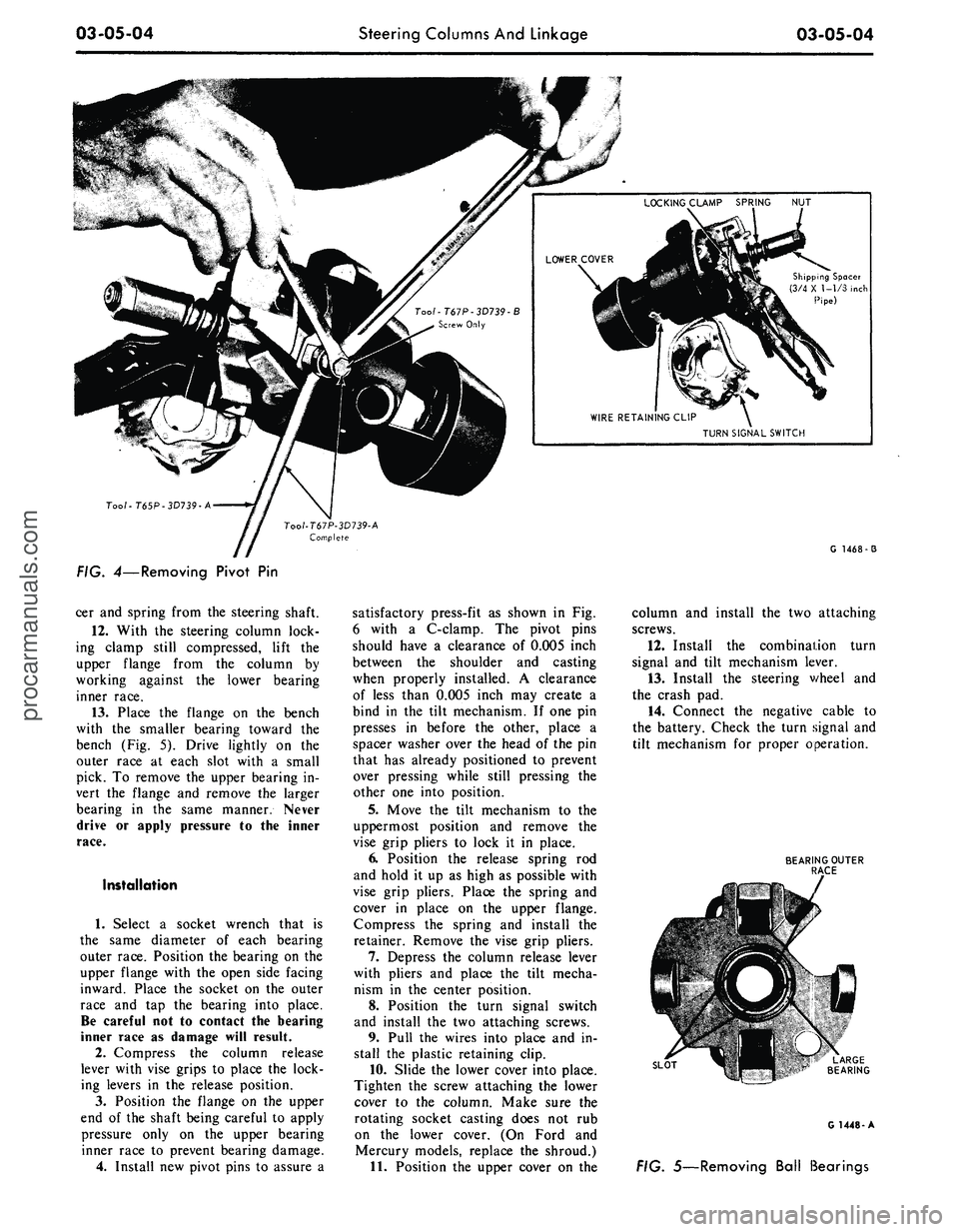
(Fig. 4) and move the steering shaft to
the full up position.
9. Hold the column position spring
rod with vise grip pliers to prevent flo-
tation then compress the spring and
remove the retainer. Remove the plas-
tic cover and spring.
10.
Install tool T67P-3D739-B as
shown in Fig. 4. Thread the bolt in-
ward finger tight until it bottoms, then
back it out one full turn. Make sure
that the handle is centered over the
pivot pin to prevent bolt breakage.
Hold the 3/8 inch bolt head station-
ary, then tighten the nut to extract the
pin. Repeat this operation on the op-
posite pin.
11.
Remove the nut, shipping spa-
UPPER
COVER
J
G 1498-B
FIG. 3—Typical Steering Column—Disassembledprocarmanuals.com
Page 117 of 413
03-05-04
Steering Columns And Linkage
03-05-04
Shipping Spacer
(3/4 X 1-1/3 inch
Pipe)
TURN SIGNAL SWITCH
Too/-T65P-3D739-A
G 1468-3
FIG. 4—Removing Pivot
Pin
cer and spring from the steering shaft.
12.
With
the
steering column lock-
ing clamp still compressed, lift
the
upper flange from
the
column
by
working against
the
lower bearing
inner race.
13.
Place
the
flange
on the
bench
with
the
smaller bearing toward
the
bench (Fig.
5).
Drive lightly
on the
outer race
at
each slot with
a
small
pick.
To
remove the upper bearing in-
vert
the
flange
and
remove
the
larger
bearing
in the
same manner. Never
drive
or
apply pressure
to the
inner
race.
Installation
1.
Select
a
socket wrench that
is
the same diameter
of
each bearing
outer race. Position the bearing on the
upper flange with the open side facing
inward. Place
the
socket
on the
outer
race
and tap the
bearing into place.
Be careful not
to
contact
the
bearing
inner race
as
damage will result.
2.
Compress
the
column release
lever with vise grips
to
place the lock-
ing levers
in the
release position.
3.
Position
the
flange
on the
upper
end
of
the shaft being careful
to
apply
pressure only
on the
upper bearing
inner race
to
prevent bearing damage.
4.
Install new pivot pins
to
assure
a
satisfactory press-fit
as
shown
in Fig.
6 with
a
C-clamp.
The
pivot pins
should have
a
clearance
of
0.005 inch
between
the
shoulder
and
casting
when properly installed.
A
clearance
of less than 0.005 inch may create
a
bind
in the
tilt mechanism.
If
one pin
presses
in
before
the
other, place
a
spacer washer over the head
of
the pin
that has already positioned
to
prevent
over pressing while still pressing
the
other one into position.
5.
Move
the
tilt mechanism
to the
uppermost position
and
remove
the
vise grip pliers
to
lock
it in
place.
6. Position
the
release spring
rod
and hold
it
up
as
high
as
possible with
vise grip pliers. Place
the
spring
and
cover
in
place
on the
upper flange.
Compress
the
spring
and
install
the
retainer. Remove the vise grip pliers.
7.
Depress
the
column release lever
with pliers
and
place
the
tilt mecha-
nism
in the
center position.
8. Position
the
turn signal switch
and install
the
two attaching screws.
9. Pull
the
wires into place and
in-
stall
the
plastic retaining clip.
10.
Slide the lower cover into place.
Tighten
the
screw attaching the lower
cover
to the
column. Make sure
the
rotating socket casting does
not rub
on
the
lower cover.
(On
Ford
and
Mercury models, replace
the
shroud.)
11.
Position the upper cover
on the
column
and
install
the
two attaching
screws.
12.
Install
the
combination turn
signal
and
tilt mechanism lever.
13.
Install
the
steering v/heel
and
the crash pad.
14.
Connect
the
negative cable
to
the battery. Check the turn signal and
tilt mechanism
for
proper operation.
BEARING OUTER
RACE
SLOT
G 1448-A
FIG. 5—Removing Ball Bearingsprocarmanuals.com
Page 121 of 413

03-05-08
Steering Columns And Linkage
03-05-08
tube.
In some instances the column
will shift into proper alignment when
the toe plate attaching nuts are loos-
ened. (Alignment is acceptable if a
.010 inch feeler blade can be passed
freely, completely around the area be-
tween the outer diameter of the steer-
ing shaft and the shift tube.) if the
misalignment condition can be attrib-
uted to this area, file or ream the dash
panel holes for greater clearance. If
the alignment is maintained after the
toe plate nuts and toe plate to column
clamp bolt and nut are torqued to the
8-12 ft-lb specification, no further ad-
justment is necessary.
4.
Remove instrument panel lower
trim panel. Vehicles equipped with a
combination radio stereo tape player
will require removal of the radio and
tape player assembly in order to gain
access to the upper R.H. steering col-
umn support bracket bolt.
5.
Loosen the seven bolts at the
steering column support bracket and
brake pedal support bracket.
6. Install a 3/16 inch diameter rod
spacer in the flex coupling to assure
proper clearance between upper and
lower steering shaft.
7.
Raise the vehicle, remove the
transmission splash shield, and visual-
ly align the column to center the
steering shaft in the column. Tighten
two toe plate attaching nuts sufficient-
ly to hold the column alignment (two
persons may be required for this oper-
ation).
8. Lower the vehicle.
9. Check the clearance between the
steering column support bracket and
the instrument panel bracket. It may
be necessary to add shims (Part Num-
ber MK-3054-A .060 inch thick, or
C3AZ-3054-A, .113 inch thick) be-
tween the support bracket and the in-
strument panel bracket to prevent
movement of the column when the
support bracket bolts are tightened.
10.
Loosen the two toe plate at-
taching nuts previously tightened. Re-
check steering column alignment. In
some instances it may be necessary to
enlarge the holes in the dash panel in
order to obtain proper column align-
ment.
11.
With the column properly al-
igned, torque the four toe plate at-
taching nuts to 4-9 ft-lbs.
12.
Torque the toe plate to steering
column clamp bolt to 3-5 ft-lbs.
13.
Recheck steering shaft to shift
tube alignment. A 0.10 inch feeler
blade should pass freely, completely
around the area between the outer di-
ameter of the steering shaft and shift-
er tube.
14.
Raise the vehicle.
15.
Adjust transmission shift link-
age.
16.
Install transmission splash
shield.
17.
Lower the vehicle.
18.
Install the radio stereo tape
player if so equipped.
19.
Install instrument panel lower
trim panel.
20.
Connect the battery.
REMOVAL AND INSTALLATION
STEERING COLUMN
FORD, MERCURY, METEOR
Removal
1.
Disconnect the battery cable
from the negative post.
2.
Disconnect the turn signal switch
wires at the connector.
3.
Disconnect the neutral start
switch and back-up light switch wires
from the switches.
4.
Disconnect the transmission con-
trol rod(s) from the lever(s) at the
lower end of the column.
5.
Remove the bolt that secures the
flex coupling to the steering gear.
6. Remove the nuts that secure the
column retainer and seal at the toe
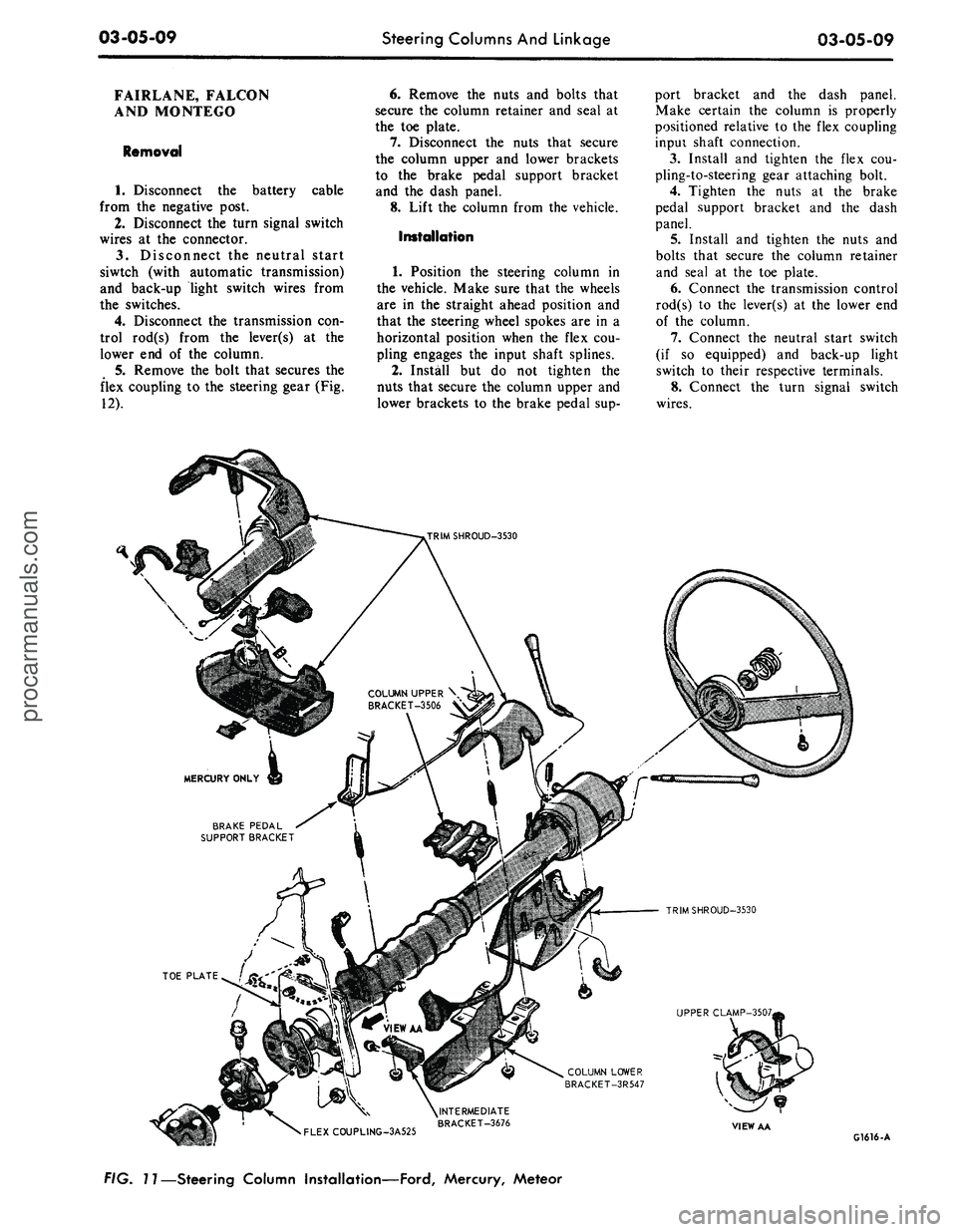
plate (Fig. 11).
7.
Ford, Meteor: Remove the two
screws that secure the lower trim
shroud to the upper trim shroud. Re-
move the two shrouds.
Mercury: Remove the two screws
that secure the lower trim shroud to
the upper trim shroud. Remove the
top shroud Disconnect the ignition
switch light bulb. Remove the ignition
and light switch bezels and spring clip
and remove the lower shroud. Discon-
nect the light switch electrical connec-
tor block.
8. Remove the two screws that se-
cure the intermediate bracket to the
column lower bracket.
9. While supporting the steering
column, remove the two nuts that se-
cure the column lower bracket to the
instrument panel. Remove the brack-
ets.
10.
Lift the steering column and
wheel from the vehicle.
Installation
1.
Position the steering column in
the vehicle. Index the block tooth on
the steering gear shaft with the corre-
sponding slot on the flex coupling. In-
stall and tighten the flex coupling-
to-steering gear attaching bolt.
2.
Place the column upper bracket
and column lower bracket in position
on the column and install but do not
tighten the four attaching nuts.
3.
Install and tighten the two nuts
that secure the column lower bracket
to the instrument panel. Make certain
the column is properly positioned rela-
tive to the flex coupling input shaft
connection.
4.
Install and tighten the screws
that secure the intermediate bracket to
the column lower bracket.
5.
Tighten the four attaching nuts
at the upper and lower brackets and
the two nuts at the upper bracket to
instrument panel. The dial pointer (if
so equipped) should be adjusted to
coincide with the selector lever.
6. Install and tighten the nuts and
bolts that secure the column retainer
and seal at the toe plate. Make sure
the steering shaft is centered in the
column before tightening the nuts.
7.
Ford, Meteor: Install and tighten
the two screws that secure the lower
trim shroud to the upper trim shroud.
Mercury: Connect the light switch
harness block. Install the ignition and
light switch bezels. Connect the igni-
tion switch light bulb. Install the top
shroud and the two screws that secure
the lower trim shroud to the upper
shroud.
8. Connect the transmission control
rod(s) to the lever(s) at the lower end
of the column.
9. Connect the neutral start switch
and back-up light switch to their re-
spective terminals.
10.
Connect the turn signal switch
wires.
11.
Connect the negative battery
cable to the battery.
12.
Check the operation of the
steering tilt mechanism if so equipped
and the switches.procarmanuals.com
Page 122 of 413
03-05-09
Steering Columns And Linkage
03-05-09
FAIRLANE, FALCON
AND MONTEGO
Removal
1.
Disconnect the battery cable
from the negative post.
2.
Disconnect the turn signal switch
wires at the connector.
3.
Disconnect the neutral start
siwtch (with automatic transmission)
and back-up light switch wires from
the switches.
4.
Disconnect the transmission con-
trol rod(s) from the lever(s) at the
lower end of the column.
5.
Remove the bolt that secures the
flex coupling to the steering gear (Fig.
12).
6. Remove the nuts and bolts that
secure the column retainer and seal at
the toe plate.
7.
Disconnect the nuts that secure
the column upper and lower brackets
to the brake pedal support bracket
and the dash panel.
8. Lift the column from the vehicle.
Installation
1.
Position the steering column in
the vehicle. Make sure that the wheels
are in the straight ahead position and
that the steering wheel spokes are in a
horizontal position when the flex cou-
pling engages the input shaft splines.
2.
Install but do not tighten the
nuts that secure the column upper and
lower brackets to the brake pedal sup-
port bracket and the dash panel.
Make certain the column is properly
positioned relative to the flex coupling
inpui shaft connection.
3.
Install and tighten the flex cou-
pling-to-steering gear attaching bolt.
4.
Tighten the nuts at the brake
pedal support bracket and the dash
panel.
5.
Install and tighten the nuts and
bolts that secure the column retainer
and seal at the toe plate.
6. Connect the transmission control
rod(s) to the lever(s) at the lower end
of the column.
7.
Connect the neutral start switch
(if so equipped) and back-up light
switch to their respective terminals.
8. Connect the turn signal switch
wires.
COLUMN UPPER \
BRACKET-3506 V
BRAKE PEDAL
SUPPORT BRACKET
TRIMSHROUD-3530
UPPER CLAMP-3507,
COLUMN LOWER
BRACKET-3R547
•
FLEXCOUPLING-3A525
^INTERMEDIATE
BRACKET-3676
VIEW AA
G1616-A
FIG. 11—Steering Column Installation—Ford, Mercury, Meteorprocarmanuals.com
Page 127 of 413

03-05-14
Steering Columns And Linkage
03-05-14
8. Connect the turn signal and
emergency flasher switch wires at the
multiple connectors. Connect the wires
to the neutral start switch. Adjust-
ments for the neutral start switch are
detailed in Group 7 of this manual.
9. Connect the tilt-column control
cable to the release cable retainer and
vacuum motor (if so equipped). To re-
move cable slack, loosen the bracket
attaching screw and pull it slightly
toward the column, then tighten the
screw. If difficulty in adjusting this
control is experienced, the retainer
slot may be filed to gain additional
travel.
10.
Install the instrument panel
steering column plate and cover and
the instrument panel lower outer fin-
ish panel.
11.
Connect the negative cable to
the battery.
12.
Start the engine and check the
operation of the steering column and
switches.
LINCOLN CONTINENTAL
Removal
1.
Disconnect the battery.
2.
Disconnect the rod from the
lever at the lower end of the selector
tube.
Loosen the clamp bolt that locks
the flexible coupling to the steering
shaft.
3.
Working from the underside of
the steering wheel spoke, remove the
two screws that secure the crash pad.
Remove the pad. Do not use a ham-
mer or knock-off type wheel puller.
Striking the puller or shaft may cause
damage to the bearings and/or col-
lapsible column. Remove the steering
wheel as shown in Fig. 15.
4.
Remove the instrument panel
steering column finish plate.
5.
Remove the four screws that at-
tach the lower retainer to the dash
panel.
6. Disconnect the turn signal switch
and emergency flasher wires at the
connectors. Disconnect the wires from
the neutral start switch.
7.
While supporting the steering
column, remove the bolts that attach
the lower clamp to the upper bracket
(Fig. 15). Lift the column from the ve-
hicle.
Installation
1.
Position the column in the vehi-
cle,
making sure that the steering
shaft engages the flex coupling.
2.
Install the column retainer-
to-dash panel attaching screws, but do
not tighten them.
3.
Install the lower clamp and the
attaching nuts. Tighten the nuts fing-
ertight.
4.
Move the lower flange as re-
quired to center the steering shaft in
the tube. Aligning procedures are de-
tailed in Part 3-1. Tighten the lower
flange attaching nuts when the shaft is
centered.
5.
Connect the shift rod to the shift
lever at the lower end of the column.
6. Install and tighten the flex cou-
pling attaching bolt.
7.
Tighten the instrument panel-
to-clamp attaching nuts.
8. Connect the turn signal and
emergency flasher switch wirss at the
multiple connectors. Connect the wires
to the neutral start switch. Adjust-
ments for the neutral start switch are
detailed in Group 7 of this manual.
9. Install the instrument panel
steering column finish plate.
10.
Install the steering wheel and
crash pad.
MAJOR REPAIR OPERATIONS
STEERING COLUMN
SHIFT TUBE REPLACEMENT
STATIONARY COLUMN
WITH STANDARD
TRANSMISSION
Removal
1.
Working from the underside of
the steering wheel spoke, remove the
two screws that secure the crash pad.
Remove the pad. (On Continental
Mark III models, pry out the crash
pad insert and remove the two screws
that secure the crash pad. Remove the
crash pad. On models equipped with
steering wheel mounted speed con-
trols,
refer to Group 16 for removal
instructions).
2.
Remove the steering wheel from
the steering shaft with tool T67L-
3600-A (Fig. 1). Then, remove the
tool from the steering wheel. Do not
use a knock-off type steering Wheel
puller or strike the end of the steering
shaft with a hammer. Striking the
puller or shaft will damage the bear-
ing or the collapsible column.
3.
Remove the steering column
from the vehicle.
4.
Remove the selector lever from
the hub (Fig. 16).
5.
Remove the bearing upper snap
ring. It may be necessary to pull the
turn signal switch out to remove the
snap ring.
6. Remove the screws that attach
the shift tube bearing, shift arms, and
shift tube to the lower end of the
steering column.
7.
Slip the shift tube and steering
shaft from the lower end of the steer-
ing column tube. The upper bearing
has a slight press fit on the steering
shaft.
8. Remove the C-washer from the
upper end of the steering shaft, and
pull the shift tube from the steering
shaft.
9. Remove the shift tube bearing
from the lower end of the tube
Installation
1.
Position the shift tube bearing
(Fig. 16) on the tube and insert the
steering shaft in the shift tube.
2.
Install the C-washer on the
upper end of the steering shaft.
3.
Insert the shift tube and steering
shaft into the steerint column tube
and install the three attaching screws
at the lower end of the steering col-
umn tube.
4.
Position the bearing and insula-
tor on the shaft if it was disturbed
during removal. Work it down onto
the shaft as far as possible, then place
a piece of 3/4 ID x 2 1/8 inch pipe
over the end of shaft and install the
steering wheel attaching nut (Fig. 2).
5.
Tighten the nut until the bearing
is seated in the flange, then remove
the nut and pipe from the shaft.
6. Position the turn signal switch
on the flange and install the three at-
taching screws. Install the upper snap
ring.
7.
Install the selector lever and the
turn signal lever in the column.
8. Adjust and install the neutral
start switch as detailed in Group 7.
9. Install the steering column in the
vehicle.procarmanuals.com
Page 137 of 413
03-06-03
Manual Steering
03-06-03
MAJOR REPAIR OPERATIONS
STEERING GEAR
DISASSEMBLY
1. Rotate the steering shaft 3 turns
from either stop.
2.
After removing the sector adjust-
ing screw locknut and the housing
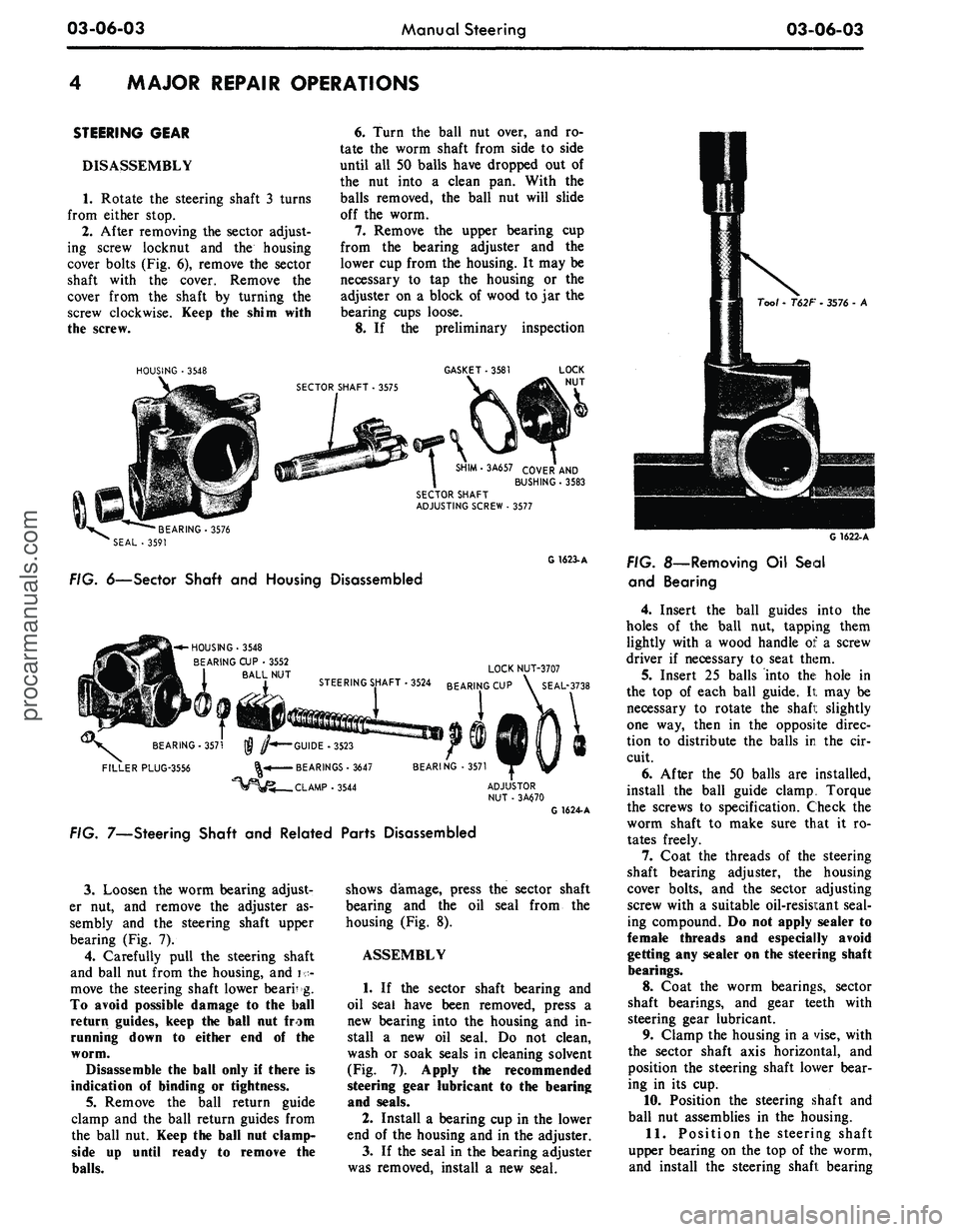
cover bolts (Fig. 6), remove the sector
shaft with the cover. Remove the
cover from the shaft by turning the
screw clockwise. Keep the shim with
the screw.
HOUSING
•
3548
6. Turn the ball nut over, and ro-
tate the worm shaft from side to side
until all 50 balls have dropped out of
the nut into a clean pan. With the
balls removed, the ball nut will slide
off the worm.
7. Remove the upper bearing cup
from the bearing adjuster and the
lower cup from the housing. It may be
necessary to tap the housing or the
adjuster on a block of wood to jar the
bearing cups loose.
8. If the preliminary inspection
GASKET
• 3581
SHIM-3A657 COVER
AND
BUSHING
•
3583
SECTOR SHAFT
ADJUSTING SCREW
.
3577
•BEARING-3576
SEAL
- 3591
G 1623-A
FIG. 6—Sector Shaft
and
Housing Disassembled
-^-HOUSING-3548
BEARING
CUP •
3552
BALL
NUT
BEARING-3571
FILLER PLUG-3556
LOCK NUT-3707
3524 BEARING
CUP \
SEAL-3738
•GUIDE -3523
• BEARINGS
•
3647
.CLAMP-3544
BEARING
• 3571
G 1624-A
FIG. 7—Steering Shaft
and
Related Parts Disassembled
3.
Loosen the worm bearing adjust-
er nut, and remove the adjuster as-
sembly and the steering shaft upper
bearing (Fig. 7).
4.
Carefully pull the steering shaft
and ball nut from the housing, and i •-
move the steering shaft lower bearr g.
To avoid possible damage to the ball
return guides, keep
the
ball
nut
from
running down
to
either
end of the
worm.
Disassemble
the
ball only
if
there
is
indication
of
binding
or
tightness.
5.
Remove the ball return guide
clamp and the ball return guides from
the ball
nut.
Keep
the
ball
nut
clamp-
side up until ready to remove the
balls.
shows damage, press the sector shaft
bearing and the oil seal from the
housing (Fig. 8).
ASSEMBLY
1. If the sector shaft bearing and
oil seal have been removed, press a
new bearing into the housing and in-
stall a new oil seal. Do not clean,
wash or soak seals in cleaning solvent
(Fig.
7).
Apply
the
recommended
steering gear lubricant
to the
bearing
and seals.
2.
Install a bearing cup in the lower
end of the housing and in the adjuster.
3.
If the seal in the bearing adjuster
was removed, install a new seal.
Tool
-
T62F
•
3576
- A
G 1622-A
FIG.
8—Removing
Oil
Seal
and Bearing
4.
Insert the ball guides into the
holes of the ball nut, tapping them
lightly with a wood handle of a screw
driver if necessary to seat them.
5.
Insert 25 balls into the hole in
the top of each ball guide. It may be
necessary to rotate the shafi: slightly
one way, then in the opposite direc-
tion to distribute the balls in the cir-
cuit.
6. After the 50 balls are installed,
install the ball guide clamp. Torque
the screws to specification. Check the
worm shaft to make sure that it ro-
tates freely.
7. Coat the threads of the steering
shaft bearing adjuster, the housing
cover bolts, and the sector adjusting
screw with a suitable oil-resisi:ant seal-
ing compound. Do not apply sealer to
female threads and especially avoid
getting any sealer on the steering shaft
bearings.
8.
Coat the worm bearings, sector
shaft bearings, and gear teeth with
steering gear lubricant.
9. Clamp the housing in a vise, with
the sector shaft axis horizontal, and
position the steering shaft lower bear-
ing in its cup.
10.
Position the steering shaft and
ball nut assemblies in the housing.
11.
Position the steering shaft
upper bearing on the top of the worm,
and install the steering shaft bearingprocarmanuals.com
Page 144 of 413
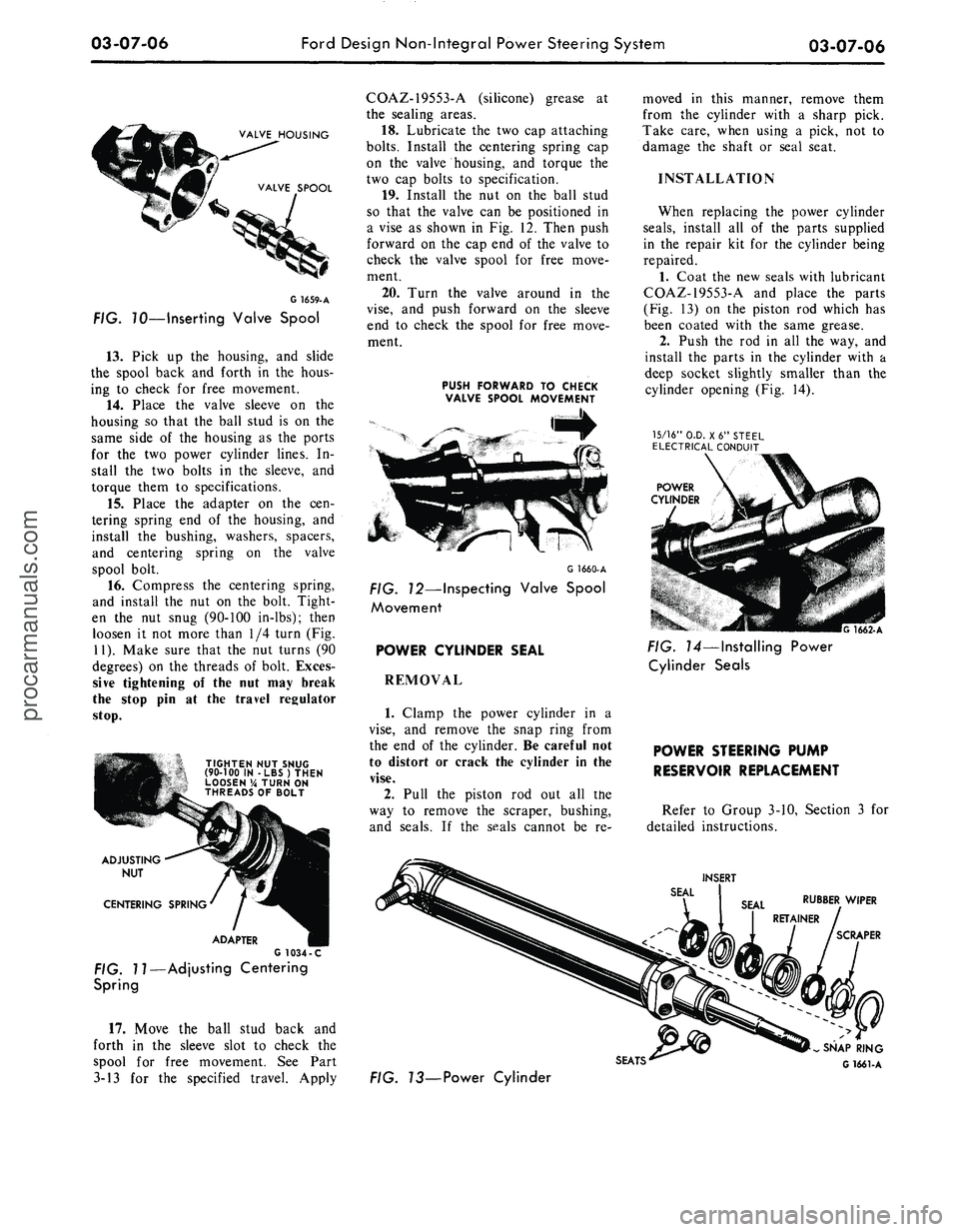
03-07-06
Ford Design Non-Integral Power Steering System
03-07-06
VALVE HOUSING
VALVE SPOOL
G
1659-
A
FIG. 70—Inserting Valve Spool
13.
Pick up the housing, and slide
the spool back and forth in the hous-
ing to check for free movement.
14.
Place the valve sleeve on the
housing so that the ball stud is on the
same side of the housing as the ports
for the two power cylinder lines. In-
stall the two bolts in the sleeve, and
torque them to specifications.
15.
Place the adapter on the cen-
tering spring end of the housing, and
install the bushing, washers, spacers,
and centering spring on the valve
spool bolt.
16.
Compress the centering spring,
and install the nut on the bolt. Tight-
en the nut snug (90-100 in-lbs); then
loosen it not more than 1/4 turn (Fig.
11).
Make sure that the nut turns (90
degrees) on the threads of bolt. Exces-
sive tightening of the nut may break
the stop pin at the travel regulator
stop.
TIGHTEN NUT SNUG
(90-100 IN -LBS) THEN
LOOSEN % TURN ON
THREADS OF BOLT
ADJUSTING
NUT
CENTERING SPRING
ADAPTER
G 1034 -C
FIG. 11—Adjusting Centering
Spring
17.
Move the ball stud back and
forth in the sleeve slot to check the
spool for free movement. See Part
3-13 for the specified travel. Apply
COAZ-19553-A (silicone) grease at
the sealing areas.
18.
Lubricate the two cap attaching
bolts.
Install the centering spring cap
on the valve housing, and torque the
two cap bolts to specification.
19.
Install the nut on the ball stud
so that the valve can be positioned in
a vise as shown in Fig. 12. Then push
forward on the cap end of the valve to
check the valve spool for free move-
ment.
20.
Turn the valve around in the
vise,
and push forward on the sleeve
end to check the spool for free move-
ment.
PUSH FORWARD TO CHECK
VALVE SPOOL MOVEMENT
G 1660-A
FIG. 12—Inspecting Valve Spool
Movement
POWER CYLINDER SEAL
REMOVAL
1.
Clamp the power cylinder in a
vise,
and remove the snap ring from
the end of the cylinder. Be careful not
to distort or crack the cylinder in the
vise.
2.
Pull the piston rod out all the
way to remove the scraper, bushing,
and seals. If the seals cannot be re-
moved in this manner, remove them
from the cylinder with a sharp pick.
Take care, when using a pick, not to
damage the shaft or seal seat.
INSTALLATION
When replacing the power cylinder
seals,
install all of the parts supplied
in the repair kit for the cylinder being
repaired.
1.
Coat the new seals with lubricant
COAZ-19553-A and place the parts
(Fig. 13) on the piston rod which has
been coated with the same grease.
2.
Push the rod in all the way, and
install the parts in the cylinder with a
deep socket slightly smaller than the
cylinder opening (Fig. 14).
15/16"
O.D. X6" STEEL
ELECTRICAL CONDUIT
POWER
CYLINDER
G 1662-A
FIG. 14—Installing Power
Cylinder Seals
POWER STEERING PUMP
RESERVOIR REPLACEMENT
Refer to Group 3-10, Section 3 for
detailed instructions.
INSERT
RUBBER WIPER
SCRAPER
SEATS'
FIG. 73—Power Cylinder
SNAP RING
G 1661-Aprocarmanuals.com
Page 145 of 413

03-08-01
Ford Design Integral Power Steering Gear
03-08-01
PART
3-8
Ford Design Integral Power
Steering Gear
COMPONENT INDEX
STEERING GEAR
Adjustments
Cleaning
and
Inspection
(See
Part 03-01)
Description
Disassembly
and
Assembly
Overhaul
Removal
and
Installation
VALVE CENTERING SHIM
Removal
and
Installation
VALVE SPOOL CENTERING CHECK
MODEL APPLICATION
All Models
Ford
08-02
08-01
08-05
08-06
08-03
08-03
08-02
Mercury
08-02
08-01
08-05
08-06
08-03
08-03
08-02
Meteor
08-02
08-01
08-05
08-06
08-03
08-03
08-02
Cougar
N/A
N/A
N/A
N/A
N/A
N/A
N/A
Fairlane
N/A
N/A
N/A
N/A
N/A
N/A
N/A
Falcon
N/A
N/A
N/A
N/A
N/A
N/A
N/A
Montego
N/A
N/A
N/A
N/A
N/A
N/A
N/A
Mustang
N/A
N/A
N/A
N/A
N/A
N/A
N/A
Lincoln-
Continental
08-02
08-01
08-05
08-06
08-03
08-03
08-02
Thunderbird
08-02
08-01
08-05
08-06
08-03
08-03
08-02
Continental-
Mark
III
08-02
08-01
08-05
08-06
08-03
08-03
08-02
DESCRIPTION
The Ford integral power steering
unit
(Fig. 1) is a
torsion-bar type
of
hydraulic assisted system. This system
furnishes power
to
reduce
the
amount
of turning effort required
at the
steer-
ing wheel.
It
also reduces road shock
and vibrations.
The torsion
bar
power steering unit
includes
a
worm
and
one-piece rack
piston, which
is
meshed
to the
gear
teeth
on the
steering sector shaft.
The
unit also includes
a
hydraulic valve,
valve actuator, input shaft
and
torsion
bar assembly which
are
mounted
on
the
end of the
worm shaft
and
operat-
ed
by the
twisting action
of the tor-
sion
bar.
The torsion-bar type
of
power steer-
ing gear
is
designed with
the one
piece
rack-piston, worm
and
sector shaft
in
one housing
and the
valve spool
in an
attaching housing
(Fig. 1).
This makes
possible internal fluid passages
bet-
ween
the
valve
and
cylinder, thus
eli-
minating
all
external lines
and
hoses,
except
the
pressure
and
return hoses
between
the
pump
and
gear assembly.
The power cylinder
is an
integral
part
of the
gear housing.
The
piston
is
double acting,
in
that fluid pressure
may
be
applied
to
either side
of the
piston.
A selective metal shim located
in
the valve housing
of the
gear
is for the
purpose
of
tailoring steering gear
ef-
forts.
If
efforts
are not
within specifi-
cations they
can be
changed
by in-
creasing
or
decreasing shim thickness
as follows:
Efforts heavy
to the
left—Increase
shim thickness.
Efforts light
to the
left—Decrease
shim thickness.
A change
of one
shim size will
in-
crease
or
decrease steering efforts
ap-
proximately
1 1/2
in-lbs.
Shims
are
available
in the
following
thicknesses
and are
notched
on the
outside diameter
for
identification:
0.0057-0.0063 inch—0 notch
0.0077-0.0083 inch—1 notch
0.0097-0.0103 inch—2 notches
0.0117-0.0123 inch—3 notches
0.0137-0.0143 inch—4 notches
Do
not use
more than
one
shim.
procarmanuals.com