1969 FORD MUSTANG brake rotor
[x] Cancel search: brake rotorPage 37 of 413

02-02-18
Brake System
02-02-18
the brake hose connector
and
bracket
assembly.
3.
Remove
the two
bolts retaining
the brake hose bracket
and
caliper
as-
sembly
to the
spindle. Take care
to
avoid loosening
the
bridge bolts that
hold
the two
halves
of the
caliper
to-
gether.
4.
Lift
the
caliper assembly
off the
rotor
and
place
it on the
bench.
Installation
1.
If the
caliper assembly
is to be
replaced, transfer
the
steel tubing
and
the bleeder screw
to the new
caliper.
2.
Position
the
caliper assembly
on
the rotor,
and
mate
the
mounting bolt
holes
in the
caliper with those
in the
spindle.
It may be
necessary
to
push
the caliper pistons into
the
cylinder
bores
to
obtain clearance between
the
shoe
and
lining assembly
and the
rotor.
The
shoe
and
lining assemblies
should
be
seated properly
on the
bridges.
3.
Install
the
caliper
to
spindle
re-
taining bolts
and
torque them
to
spec-
ification. Check
to
insure that
the
rotor runs squarely
and
centrally
be-
tween
the two
halves
of the
caliper.
These should
be
approximately 0.090-
0.120 inch clearance between
the
cali-
per
and the
rotor outside diameter
(Fig.
6).
4.
Position
the
steel transfer tube
brake hose bracket
and
caliper assem-
bly
to the
spindle. Install
the
retaining
bolts then torque them
to
specifica-
tion.
5.
Connect
the
front wheel steel
transfer tube from
the
caliper
to the
front brake hose connector. Check
the
hose
for
proper installation
(Fig. 21).
6. Bleed
the
brake system
and cen-
tralize
the
differential valve
as out-
lined
in
Part
2-1.
Check
the
master
cylinder fluid level
and add the
speci-
fied fluid,
as
required. Pump
the
brake pedal several times
to
actuate
the piston seals
and to
position
the
shoe
and
lining assemblies.
7.
Install
the
wheel
and
tire assem-
bly
and the
wheel cover.
8. Road test
the
vehicle.
DISC BRAKE SHOE
AND
LINING
ALL MODELS EXCEPT
LINCOLN CONTINENTAL
Removal
1.
Remove
the
wheel
and
tire from
the
hub and
rotor assembly.
2.
Remove
the
caliper from
the ve-
hicle following
the
procedures outlined
under Disc Brake Caliper Assembly.
3.
To
facilitate removal
of the
cali-
per assemblies,
the
piston
may
have
to
be pushed into
its
bore. Apply
a
steady inward pressure against
the
inner shoe
and
lining assembly. Main-
tain
the
pressure
for at
least
a
minute.
4.
Slide
the two
outer shoe retain-
ing clips
off the
retaining pins
(Fig.
23).
5.
Remove
the two
retaining pins
from
the
outer shoe, then remove
the
shoe from
the
stationary caliper.
6. Slide
the
inner brake shoe
out-
ward until
it is
free
of the
hold-down
springs, then remove
the
brake shoe.
7.
Remove
the
caliper locating pins
and stabilizer attaching bolts, then
re-
move
and
discard
the
stabilizer
or sta-
bilizers.
8. Remove
the
locating
pin
insula-
tors from
the
anchor plate.
Installation
When installing
new
shoes
and lin-
ings
it
will
be
necessary
to
force
the
piston
to the
bottom
of its
bore.
Apply sufficient pressure
to
overcome
the grip
of the
piston seal
on the pis-
ton.
1.
Install
new
caliper locating
pin
insulators
in the
anchor plate.
2.
Position
the
caliper assembly
in
the anchor plate.
3.
Position
the new
stabilizer
or
stabilizers
and
install
the
caliper locat-
ing pins
to
engage approximately four
threads.
If
the
caliper locating pins
are
rust-
ed
or
corroded they should
be re-
placed.
Apply water
or
isopropyl alcohol
to
the caliper locating pins before instal-
lation.
Oil or
grease must
not be
used
on
the
locating pins.
4.
Position
the
outer brake shoe
on
the caliper
and
install
the two
retain-
ing pins
and
clips.
5.
Install
the
inner brake shoe
so
that
the
ears
of
shoe
are on top of the
anchor plate bosses
and
under
the
shoe hold-down springs.
6. Position
the
shoe
and
lining
assemblies
so
that
the
caliper assem-
bly
can be
placed over
the
rotor.
Ro-
tate
a
hammer handle between
the lin-
ings
to
reset
the
stabilizers.
7.
Install
the
caliper assembly over
the rotor
and on the
spindle. Install
the
two
caliper attaching bolts,
and
torque them
to
specifications.
The
upper bolt must
be
tightened first.
In-
stall
the
safety wire
and
twist
the
ends
at least five turns. Push
the
wire ends
against
the
spindle
to
avoid interfer-
ence with
the
brake hose
and the
steering stop.
8. With moderate pressure applied
to
the
brake pedal, torque
the
stabiliz-
er attaching screws
and
caliper locat-
ing pins
to
specification.
LINCOLN CONTINENTAL
Removal
1.
Remove
the
wheel
and
tire
as-
sembly from
the hub and
rotor assem-
bly.
Be
careful
to
avoid damage
or in-
terference with
the
caliper splash
shield, bleeder screw fitting
or
transfer
tube.
2.
Remove
the two
bolts that retain
the caliper splash shield,
and
remove
the shield
(Fig. 4).
3.
To
facilitate removal
and
instal-
lation
of the
shoe
and
lining assem-
blies,
the
pistons must
be
pushed into
their bores. Apply
a
steady inward
pressure against each shoe
and
lining
assembly toward
its
respective caliper
housing
on
each side
of the
rotor
(Fig.
6).
Maintain
the
pressure
for at
least
a minute.
If the
pistons will
not go ifi
easily, force them
in
with water pump
pliers.
4.
Grasp
the
metal flange
on the
outer
end of the
shoe with
two
pairs
of pliers
and
pull
the
shoe
out of the
caliper (Fig.
25).
Installation
1.
Position
a new
shoe
and
lining
assembly
on
each side
of the
rotor
so
that
the
lining faces
the
rotor.
Be
sure
AB
AB
USE SECOND
PAIR
OF
PLIERS HERE
H 1651
A
FIG. 25—Removing Disc Brake
Shoe
and
Lining Assembly—
Lincoln Continentalprocarmanuals.com
Page 38 of 413

02-02-19
Brake System
02-02-19
that the tabs on the shoe flanges seat
fully against the caliper bridges (Fig.
25).
2.
Install the caliper splash shield
and secure the shield to the caliper
with two retaining bolts (Fig. 4).
3.
Pump the brake pedal several
times until a firm pedal is obtained
and the shoe and lining assemblies are
properly seated.
4.
Install the wheel and tire assem-
bly on the hub and rotor assembly.
5.
Check and refill the master cyl-
inder reservoir with specified brake
fluid as required.
6. Road test the car.
It should not be necessary to bleed
the system after a shoe and lining re-
placement.
FRONT WHEEL HUB AND
ROTOR ASSEMBLY-
DISC BRAKES
REMOVAL
1.
Remove the wheel and tire from
the hub (Figs. 23 and 24). Be careful
to avoid damage or interference with
the bleeder screw fitting. On Lincoln
Continental models be careful to avoid
damage to the caliper splash shield or
transfer tube.
2.
Remove the caliper assembly
from the spindle and the rotor. If the
caliper does not require servicing, it is
not necessary to disconnect the brake
hose or remove the caliper from the
vehicle. Position the caliper out of the
way, and support it with a wire to
avoid damaging the caliper or stretch-
ing the hose. Insert a clean cardboard
spacer between the linings to prevent
the piston from coming out of the cyl-
inder bore while the caliper is re-
moved.
Handle the rotor and caliper assem-
blies in such a way as to avoid defor-
mation of the rotor and nicking,
scratching or contamination of the
brake linings.
3.
Remove the grease cap from the
hub.
Remove the cotter pin, nut lock,
adjusting nut, and flat washer from
the spindle. Remove the outer bearing
cone and roller assembly.
4.
Remove the hub and rotor as-
sembly from the spindle.
INSTALLATION
1.
If the rotor is being replaced, re-
move the protective coating from the
new rotor with carburetor degreaser.
Pack a new set of bearings with speci-
fied grease (M-1C75B), and install the
inner bearing cone and roller assembly
in the inner cup. Pack grease lightly
between the lips of a new grease seal
and install the seal (Figs. 23 and 24).
If the original rotor is being in-
stalled, make sure that the grease in
the hub is clean and adequate, that
the inner bearing and grease seal are
lubricated and in good condition, and
that the rotor braking surfaces are
clean.
2.
Install the hub and rotor assem-
bly on the spindle.
3.
Lubricate and install the outer
wheel bearing, washer and adjusting
nut.
4.
Adjust the wheel bearings to
specification, and then install the nut
lock, cotter pin, and grease cap. The
wheel bearing adjustment is especially
important with disc brakes.
5. Mount the caliper assembly on
the spindle following the Disc Brake
Caliper Assembly Installation proce-
dure in this section.
DISC BRAKE ROTOR
SPLASH SHIELD
REMOVAL
1.
Remove the caliper and the hub
and rotor assembly as outlined under
Removal in the foregoing procedure
(it is not necessary to disconnect hy-
draulic connections).
2.
Remove the three bolts that at-
tach the splash shield to the spindle,
and remove the shield (Figs. 23 and
24).
3.
Remove and discard the splash
shield to spindle gasket.
INSTALLATION
1.
Install a new splash shield to
spindle gasket.
2.
If the shield is bent, straighten it
out before installation. Position the
shield to the mounting bracket, install
the attaching bolts, nuts and torque
them to specification.
3.
Install the hub and rotor assem-
bly and the caliper as outlined under
Installation in the foregoing proce-
dure.
DUAL MASTER CYLINDER—
NON POWER BRAKES
FORD, MERCURY
AND METEOR
Removal
Refer to Fig. 26.
BUSHING
HAIRPIN
RETAINER
BUSHING
STOPLIGHT SWITCH
13480
HI 637-A
FIG. 26—Dual Master Cylinder Installation— Non Power Brakes
Ford,
Mercury, and Meteorprocarmanuals.com
Page 57 of 413
02-02-38
Brake System
02-02-38
2.
Disconnect the actuator solenoid
and warning switch harness connectors
from the control module.
3.
Remove the two wiring harness
grommets from the dash panel and
push the wiring harness and connec-
tors through the openings in the dash
panel.
4.
Working in the engine compart-
ment loosen the hose clamp and re-
move the air hose from the air filter.
5.
Remove the engine air cleaner-
Loosen the hose clamp and remove
the vacuum hose from the vacuum
manifold fitting.
6. Raise the vehicle on a hoist.
7.
Disconnect the exhaust pipes
from the exhaust manifold and sup-
port with wire to provide access to the
actuator assembly.
8. Remove the bolt retaining the
actuator ground wire to the rear outer
corner of the engine right bank.
9. Loosen the tube nuts and discon-
nect the brake system hydraulic tubes
from the hydraulic valve housing.
10.
Remove the three nuts retaining
the actuator assembly to the actuator
support bracket.
11.
Remove the three bolts that re-
tain the actuator mounting bracket to
the side rail and remove the mounting
bracket.
12.
Remove the actuator assembly
from the vehicle and place it on a
bench.
13.
Remove the air and vacuum
hoses from the actuator.
INSTALLATION
1.
Install the air and vacuum hoses
on the new actuator.
2.
Place the actuator assembly into
position under the vehicle, routing the
air and vacuum hoses up between the
engine and fender apron and inserting
the solenoid leads through the holes in
the firewall.
3.
Position the ground wire to the
rear of the engine block and install re-
taining bolt.
4.
Position the actuator mounting
bracket to the frame side rail and in-
stall the three retaining bolts.
5.
Position the actuator assembly
to the mounting bracket and install
the three retaining nuts.
6. Connect the hydraulic tubes to
the hydraulic valve assembly and
tighten the tube nuts to specifications.
7.
Connect the exhaust pipes to the
exhaust manifolds.
8. Lower the vehicle.
9. Pull the actuator solenoid and
brake warning switch wiring harness
through the two holes in the dash
panel from inside the car. Seat the
wiring harness grommets in the dash
panel.
10.
Connect the actuator solenoid
and brake warning switch wiring har-
ness connectors to the control mo-
dules.
'
11.
Position the control module in
the bracket under the glove box and
install the retaining screw.
12.
In the engine compartment con-
nect the air hose to the air filter and
position the hose clamp.
13.
Connect the vacuum hose to the
engine vacuum manifold fitting. In-
stall the engine air cleaner.
14.
Bleed the rear brake system and
centralize the pressure differential
valve.
15.
Raise the rear wheels. Apply
the brakes with the rear wheels turn-
ing to verify proper operation of the
anti-skid control system.
ANTI-SKID CONTROL MODULE
REMOVAL
Refer to Fig. 39.
1.
Remove the retaining strap hold-
ing the harnesses.
2.
Remove the screw that attaches
the forward end of the control module
retainer to the support assembly.
3.
Lower the forward end of the
control module and retainer from the
support assembly; move the module
and retainer forward slightly until the
flange clears the slot in the support
assembly.
4.
Disconnect the five wiring har-
ness plugs from the control module.
5.
Remove the control module from
the vehicle.
INSTALLATION
1.
Connect the five wiring harness
plugs to the control module. Only one
arrangement is possible.
2.
Position the control module in
the retainer, orienting the module per
the markings on it, and insert the re-
tainer flange into the slot at the rear
of the support assembly.
3.
Pivot the retainer and control
module upward and align the screw
hole in the forward end of the retainer
with the hole in the support bracket
assembly. Install the retaining screw.
4.
Test the vehicle on the hoist to
verify correct operation of the skid
control system.
5.-
Secure the wiring to the module
support extension with the retaining
strap.
ANTI-SKID CONTROL SENSOR
REMOVAL
Refer to Fig. 39.
1.
Raise the vehicle on a hoist.
2.
Remove the rear wheel and tire
assembly.
3.
Remove the three Tinnerman
nuts (3) and remove the brake drum.
4.
Disconnect the sensor lead from
the rear wiring harness.
5.
Unseat the sensor lead grommet
pushing it to the inside of the brake
assembly.
6. Remove the four nuts that retain
the sensor to the backing plate and
pull the axle shaft, sensor assembly
and wheel bearing assembly from the
axle housing.
7.
Press the wheel bearing retainer
and wheel bearing off the axle shaft
(Refer to Part 4-2).
8. Remove the sensor assembly and
press the rotor off the shaft with tool
T69P-2B384-A Detail 2 and TOOL
1225-DA.
INSTALLATION
1.
Press a new rotor onto the axle
shaft. Install a new sensor assembly
on the shaft with tool T69P-
2B384-ADetail 1 and TOOL 1225-
DA, and press the bearing and bear-
ing retainer onto the shaft (Refer to
Part 4-2).
2.
Insert the axle shaft assembly in
the rear axle housing onto the four
backing plate retaining bolts, feeding
the sensor lead through the hole in the
backing plate.
3.
Seat the sensor lead grommet in
the backing plate.
4.
Install the four nuts on the re-
taining bolts and tighten to specifica-
tions.
5.
Connect the sensor lead to the
rear wiring harness and install two re-
taining straps.
6. Install the rear brake drum and
retain with the Tinnerrhan drum re-
taining nuts.
7.
Install the rear wheel and tire as-
sembly and tighten the wheel nuts to
specifications.
8. Test the vehicle on the hoist to
verify proper operation of the skid
control system.procarmanuals.com
Page 58 of 413
02-02-39
Brake System
02-02-39
MAJOR REPAIR OPERATIONS
BRAKE DRUM REFINISHING
Minor scores on a brake drum can
be removed with sandpaper. A drum
that is excessively scored or shows a
total indicator runout of over 0.007
inch should be turned down. Remove
only enough stock to eliminate the
scores and true up the drum. The refi-
nished diameter must not exceed 0.060
inch oversize.
Check the inside diameter of the
brake drum with a brake drum mi-
crometer (Tool FRE-14^1).
If the drum diameter is less than
0.030 inch oversize after refinishing^
standard lining may be installed. If
the drum diameter is 0.030—0.060
inch oversize after refinishing, oversize
lining must be installed.
After a drum is turned down, wipe
the refinished surface with a cloth
soaked in clean denatured alcohol. If
one drum is turned down, the opposite
drum on the same axle should also be
cut down to the same size.
ROTOR REFINISHING
Rotunda Disc Brake Attachment,
FRE-2249-2, is the only recommended
tool to refinish the disc brake rotors.
The step-by-step resurfacing procedure
provided with the tool must be ad-
hered to.
The finished braking surfaces of the
rotor must be flat and parallel within
0.0007 inch; lateral runout must not
exceed 0.003 inch total indicator read-
ing, and the surface finish of the brak-
ing surfaces are to be 80/15 micro
inches. The minimum limiting dimen-
sions (Figs. 11 and 12, Part 2-1) from
the inboard bearing cup to the out-
board rotor face and from the inboard
bearing cup to the inboard rotor face
must be observed when removing ma-
terial from the rotor braking surfaces.
On all models except Lincoln Con-
tinental, the limiting dimensions are to
be measured with a ball and gage bar
(Rotunda Kit FRE-70160).
BRAKE SHOE RELINING
Brake linings that are worn to with-
in 1/32 inch of the rivet head or are
less than 0.030 inch thick (bonded lin-
ing) or have been contaminated with
brake fluid, grease or oil must be re-
placed. Failure to replace worn linings
will result in a scored drum. When it
is necessary to replace linings, they
must also be replaced on the wheel on
the opposite side of the vehicle.
Inspect brake shoes for distortion,
cracks, or looseness. If this condition
exists,
the shoe must be discarded. Do
not attempt to repair a defective brake
shoe.
1.
Wash the brake shoes thoroughly
in a clean solvent. Remove all burrs
or rough spots from the shoes.
2.
Check the inside diameter of the
brake drum with a brake drum mi-
crometer (tool FRE-1431). If the di-
ameter is less than 0.030 inches over-
size,
standard lining may be installed.
If the diameter is 0.030—0.060 inches
oversize, oversize lining should be in-
stalled.
3.
Position the new lining on the
shoe.
Starting in the center, insert and
secure the rivets, working alternately
towards each end. Replacement lin-
ings are ground and no further grind-
ing is required.
4.
Check the clearance between the
shoe and lining. The lining must seat
tightly against the shoe with not more
than 0.008 inch clearance between any
two rivets.
RETAINER - 2B245
DUAL MASTER CYLINDER
DISASSEMBLY
1.
Clean the outside of the master
cylinder and remove the filler cover
and diaphragm. Pour out any brake
fluid that remains in the cylinder. Dis-
card the old brake fluid.
2.*
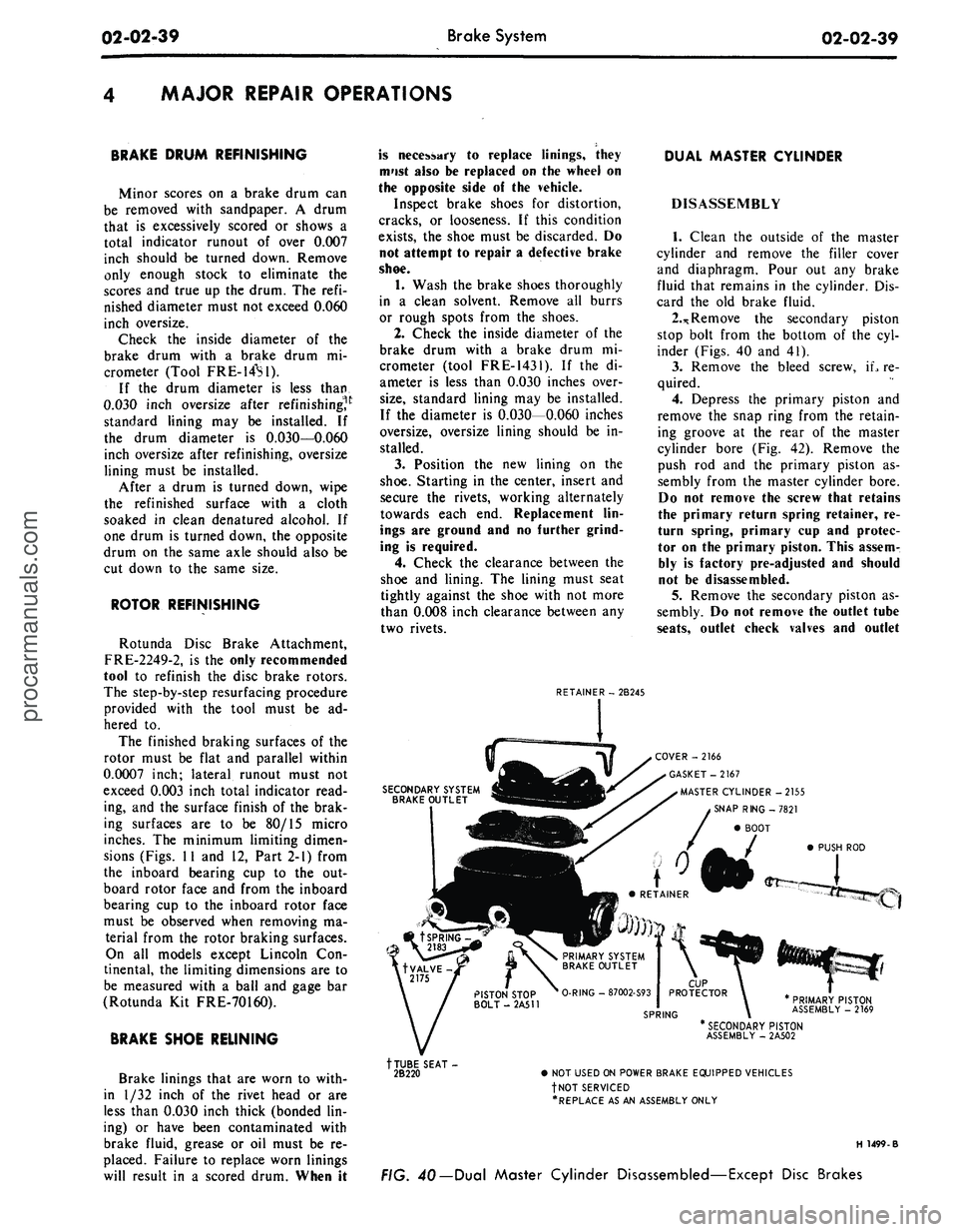
Remove the secondary piston
stop bolt from the bottom of the cyl-
inder (Figs. 40 and 41).
3.
Remove the bleed screw, iL re-
quired.
4.
Depress the primary piston and
remove the snap ring from the retain-
ing groove at the rear of the master
cylinder bore (Fig. 42). Remove the
push rod and the primary piston as-
sembly from the master cylinder bore.
Do not remove the screw that retains
the primary return spring retainer, re-
turn spring, primary cup and protec-
tor on the primary piston. This assem-
bly is factory pre-adjusted and should
not be disassembled.
5.
Remove the secondary piston as-
sembly. Do not remove the outlet tube
seats,
outlet check valves and outlet
SECONDARY SYSTEM
BRAKE OUTLET
COVER -2166
GASKET-2167
MASTER CYLINDER -2155
SNAP RING -7821
BOOT
PUSH ROD
PRIMARY PISTON
ASSEMBLY - 2169
tTUBE SEAT-
2B220
* SECONDARY PISTON
ASSEMBLY - 2A502
• NOT USED ON POWER BRAKE EQUIPPED VEHICLES
fNOT SERVICED
•REPLACE AS AN ASSEMBLY ONLY
H 1499-B
FIG. 40— Dual Master Cylinder Disassembled—Except Disc Brakesprocarmanuals.com
Page 63 of 413

02-03-02
Specifications
02-03-02
BORE DIAMETERS-BRAKE DRUM, WHEEL CYLINDER AND MASTER
Models
Ford,
Mercury
and
Meteor
Mont ego
and
Fairlane
Falcon
Mustang
and Cougar
Thunderbird
Continental Mark
III
Lincoln Continental
Taxi and Station Wagon
Other
Pass, except Conv. 250, 302 CID Engines
Pass, and Conv. 351, 390, 428 CID Eng.
Convertible 250, 302 CID Engines
Station and Ranchero
9 Inch Brake
-
Passenger Car
10 Inch Brake
•
Station Wagon
10 Inch Brake
•
Passenger Car
200 CID Engine
351,
390, 428 CID Engine
250,
302, CID Engine
CYLINDER
Brake Drum
Inside
Diameter
11.030
11.030
10.000
10.000
10.000
10.000
9.000
10.000
10.000
9.000
10.000
10.000
11.030
11.030
11.090
Boring Umit
(Max.)
®
11.090
11.090
10.060
10.060
10.060
10.060
9.060
10.060
10.060
9.060
10.060
10.060
11.090
11.090
11.130
Wheel Cylinder Bore Dia.
Front
0
1.094
L_ U25
1.125
1.094
1.094
1.094
1.062
0
1.094
1.125
1.062
®
1.094
1.125
N/A
N/A
N/A
Rear
®
0.938
0.938
0.875
0.875
0.875
0.938
0.844®
0.938
0.875
0.844®
0.875
0.875
0.938
0.938
0.938
Master Cylinder Bore Dia.
With Power
Brake
®
1.000
1.000
0.9375
0.9375
0.9375
0.9375
0.9375
0.9375
0.9375
1.000
1.000
1.000
1.000
1.000
1.000
Less Power
Brake
®
1.000
1.000
1.000
1.000
1.000
1.000
1.000
1.000
1.000
1.000
1.000
1.000
N/A
N/A
N/A
©Max. Runout
0.007
(DMax. Allowable Hone
0.003
CD2.755 For
Ford,
Mercury, Meteor with Disc Brakes.
2.381 For Fairlane, Montego, Falcon, Mustang, Cougar with Disc Brakes.
SHOE AND LINING DIMENSIONS-
DISC BRAKES-INCHES
® Front Wheel Cylinder cannot be honed on Falcon or Mustang with
9
inch Brakes.
Lining Material
Lining Size
Lining Area
-
Square Inches
per Segment
Lining Thickness • Nominal
Lining Wear Limit (Front
Surface
of
Shoe)
•
Max.
Lining Taper -Max.
Lining to Rotor Clearance
(Brakes Released)
Ford,
Mercury, Meteor
Thunderbird, Continen-
tal Mark
III
Bonded
7.38x2.27
Outer
5.36x2.03
Inner
12.25 Outer
8.44 Inner
0.394
0.030
0.125
0.000-0.010
Fairlane, Montego
Falcon,
Mustang,
Cougar
Bonded
6.82 x 1.80 Outer
4.90x1.84 Inner
11.30 Outer
8.80 Inner
0.333
Outer
0.362
Inner
0.030
0.125
0.000
• 0.010
Lining Material
Lining Size
Lining Area
Shoe and Lining Thickness
Lining Thickness
Shoe and Lining Maximum
Wear Limit
Lining Maximum Wear Limit
(from front surface
of
shoe)
Lining to Rotor Clearance
(brakes released)
Lincoln Continental
Riveted Fomoco
5.36x1.90
10.03 Sq. In/segment
0.600
nominal
0.436
nominal
0.231
0.066
0.000-0.010
CALIPER CYLINDER BORE DIAMETER -INCHES
TORQUE LIMITS-HUB TO SPINDLE
Ford,
Mercury, Meteor, Thunderbird, Continental Mark
2.755
Mustang, Cougar, Falcon, Fairlane and Montego
2.381
Lincoln Continental
1.938
ROTOR DIMENSIONS
Car Line
Ford,
Mercury, Meteor
Thunderbird, Continental Mark
III
Fairlane, Falcon, Montego, Mustang
and Cougar
Lincoln Continental
Norn.
Thickness
1.180
1.180
0.935
1.240
Diameter
Outside
11.72
11.72
11.29
11.960
Inside
7.785
7.785
7.355
7.785
Description
Hub and Drum or Rotor Assembly to
Front Wheel Spindle
Ft-Lbs
Rotate
hub
while torquing
to 17-25 ft-lbs. Backoff
the adjusting nut 1/2 turn
and retighten to 10-15
inch pounds while rotat-
ing wheel Selectively
posi-
tion
nut
retainer
on ad-
justing nut
so
that a set
of slots are in line with
cotter pin hole. Adjusting
nut should not be rotated
in this operation. Lock
ad-
justing nut and nut retain-
er with cotter pin so that
the cotter
pin end
does
not interfere with seating
of wheel static collector
in spindle hole.procarmanuals.com
Page 64 of 413

02-03-03
Specifications
02-03-03
ROTOR REFINISH
The following requirements must be met when resurfacing disc
brake rotors:
Rotunda Disc Brake Attachment FRE-2249-2 is the only approv-
ed tool to be used to ref inish the disc brake rotors. The step-by-
step resurfacing procedure provided with the tool must be adhered
t0" The finished braking surfaces of the rotor must be flat and
parallel within 0.0007
inch;
lateral runout must not exceed 0.003
inch total indicator reading, and the surface finish of the braking
surfaces are to be 15-80 micro inches.
On all models except Lincoln Continental the limiting dimen-
sion from the inner bearing cup to the inner rotor face must be
measured with a ball and gage bar (Rotunda FRE-70160).
On Lincoln Continental models the limiting dimension from the
inboard bearing cup to the inboard rotor face of 0.755 inch
mini-
mum and from the inboard bearing cup to the outboard rotor face
of 0.395 inch minimum must be observed.
TORQUE LIMITS -GENERAL -FT-LBS.
Parking Brake Control Assembly
Mounting Nuts and Bolts
Master Cylinder to Dash Panel Screw
Master Cylinder to Booster
Booster to Dash Panel
Disc Brake Caliper to Spindle Bolts
Disc Brake Rotor Splash Shield
to Spindle
Brake Hose to Caliper Connection Bolt
Caliper Locating Pins
Caliper Stabilizer to Anchor Plate
Bolt
Caliper Brake Shoe Clips
Caliper Bleeder Screws
Wheel Cylinder to Backing Plate Screws
Wheel Cylinder & Backing Plate
Anchor Pin Nut
Rear Brake Backing Plate to Axle
Housing:
Removable Carrier
Integral Type
Front Brake Backing Plate to Spindle
Wheel Cylinder Bleeder Screw
Brake Hose Connection to Front
Wheel Cylinder
Brake Line Connection to Rear Axle
Housing:
Removable Carrier
Integral Type
Hydraulic Tube Connections ®
3/8 x 24
7/16 x 24
1/2 x 20
9/16 x 18
Wheel to Hub and Drum or Hub and
Rotor Nuts
Ford-Mercury
Meteor
Cap Screw
12-19
Nuts 7-11
13-20
13-?0
13-20
Upper ©
110-140
Lower
90-120
9-14
17-25
25-35
8-11
6-10
6-15
10-20
20-30
50-70
IPo
25-40
6-15
12-20
30-40
25-35
10-15
10-15
10-17
10-17
70-115
Fair
lane-
Montego
Falcon
12-25
13-20
13-20
13-20
Upper CD
100-140
Lower
55-75
9-14
17-25
25-35
8-11
6-10
6-15
10 in. Brake
10-20
9 in. Brake
5-7
50-70
20-40
28-35
32-65 ®
Inch-lb.
12-20
12-19
12-19
10-15
10-15
10-17
10-17
4 lug
55-85
5 lug
70-115
Mustang-
Cougar
12-25
13-20
13-20
13-20
Upper ©
100-140
Lower
55-75
9-14
17-25
25-35
8-11
6-10
6-15
10 in. Brake
10-20
9 in. Brake
5-7
50-70
20-40
28-35
32-65 ®
Inch-lb.
12-20
12-19
12-19
10-15
10-15
10-17
10-17
4 lug
55-85
5 lug
70-115
Thunderbird
Continental
Mark III
1218
13-20
13-20
Upper ©
110-140
Lower
90-120
9-14
17-25
25-35
8-11
6-10
6-15
10-20
50-70
6-15
30-40
10-15
10-15
10-17
10-17
70-115
Lincoln
Continental
Dash Panel
10-20
Inst. Panel
712
13-20
13-20
100-140
9-14
7-9
6-15
10-20
30-35
6-15
10-15
10-15
10-17
10-17
70-115
® The upper bolt must be tightened first.
® On front disc brake calipers 6-15 ft-lbs.
® All hydraulic lines must be tightened to the specified torque value and be free of fluid leakage.procarmanuals.com
Page 65 of 413

02-03-04
Specifications
02-03-04
SERVICE TOOLS
Ford Tool
No.
Rotunda
HRE
8650
Tool
7000-00
Rotunda
70160
Tool 33621
Tool 4235-C
Rotunda
FRE 1431
Rotunda
FRE
22492
Former
No.
LM 119
2018-A
2162
2035N
33621
Milbar
1112-144
4235-C
J
22742 (Kent Moore)
Description
Brake
Adjusting
Gage
Brake
Cylinder
Retaining
Clamp
Brake
Adjusting
Tool
Adapter
Cap
Brake Shoe
R
&
R
Spring
Rubber
Tipped
Air
Nozzle
Ball
and
Gage
Bar
Internal
Snap Ring PMers
Inch Pound Torque
Wrench
Axle Shaft
Remover
Brake Drum
Micrometer
Bleeder
Valve Clip Spring
Disc Brake Rotor
Attachmentprocarmanuals.com
Page 72 of 413
03-01-07
Suspension — Steering, Wheels And Tires — General Service
03-01-07
upper arm shaft to the frame member
(Fig. 3, Part 3-2).
2.
Loosen the arm shaft attaching
bolts,
raise the front end of the vehicle
and lower it again. This will break the
arm shaft loose from the frame mem-
ber.
3.
With a pry bar, move the arm
shaft back into alignment with the
chalk marks made in Step 1, and
tighten the shaft attaching bolts. The
bolts should be tightened just enough
to hold the shaft in position without
preventing its being moved with the
pry bar.
Caster
1.
With the aid of a pry bar, move
the shaft in or out, as required, to
meet specifications. A movement of
approximately 3 /32 inch at either the
front or rear bolt location will change
the caster 1/2 degree. Inboard move-
ment of the front bolt, or outboard
movement of the rear bolt, will change
caster in the negative direction. Out-
board movement of the front bolt, or
inboard movement of the rear bolt,
will change caster in the positive di-
rection.
2.
When the caster is correct, tor-
que the shaft attaching bolts to speci-
fication and recheck the caster and
camber to insure that the readings
have not changed.
Camber
TURN DOWNWARD TO
INCREASE ROD LENGTH
TURN UPWARD
TO DECREASE
ROD LENGTH
TURN
DOWNWARD
TO DECREASE
ROD LENGTH
TURN UPWARD TO
INCREASE ROD LENGTH
LEFT-HAND SLEEVE
RIGHT-HAND SLEEVE
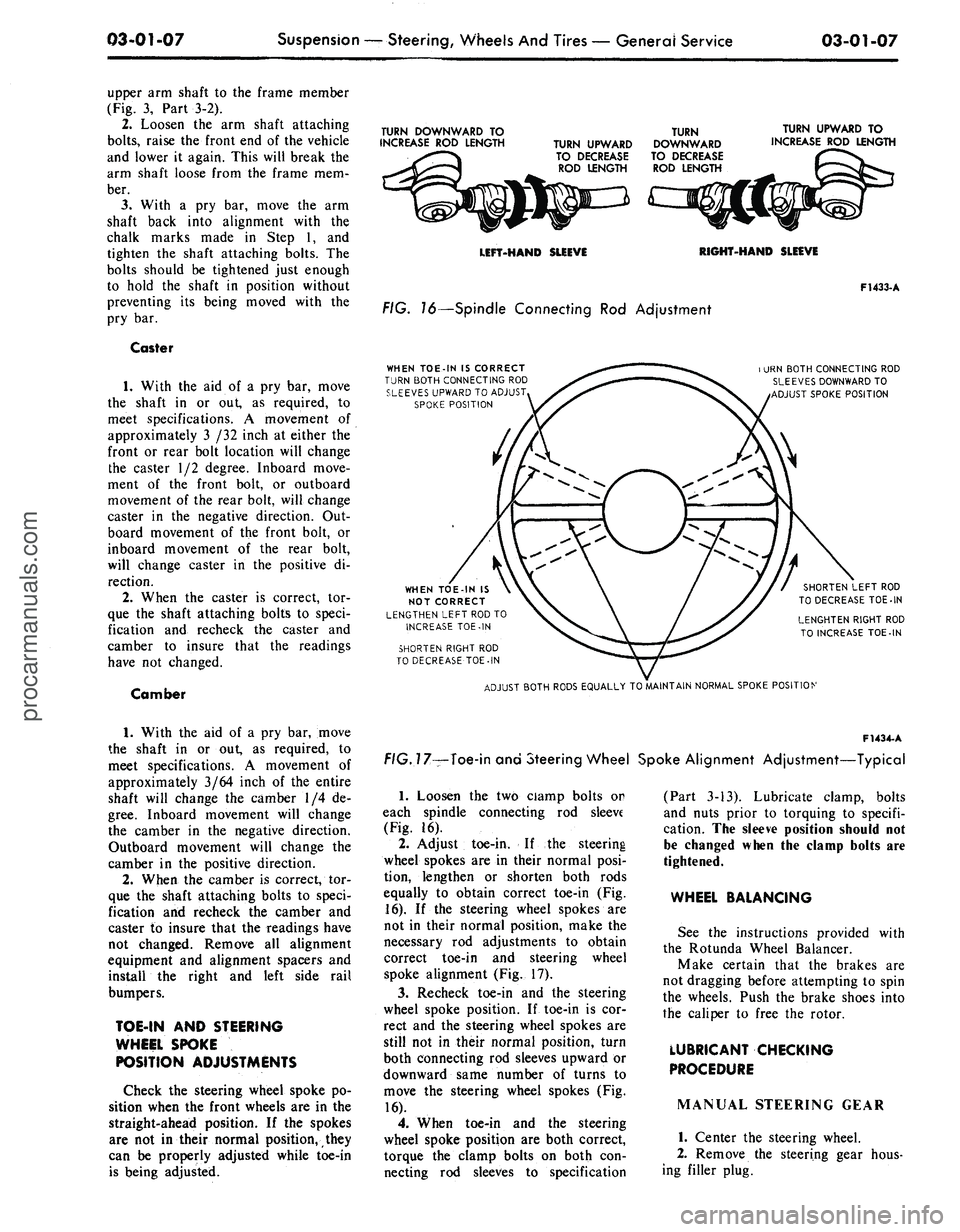
FIG. 16—Spindle Connecting Rod Adjustment
WHEN TOE-IN IS CORRECT
TURN BOTH CONNECTING ROD
SLEEVES UPWARD TO ADJUST
SPOKE POSITION
F1433-A
i URN BOTH CONNECTING ROD
SLEEVES DOWNWARD TO
ADJUST SPOKE POSITION
WHEN TOE-IN IS
NOT CORRECT
LENGTHEN LEFT ROD TO
INCREASE TOE-IN
SHORTEN RIGHT ROD
TO DECREASE TOE-IN
SHORTEN LEFT ROD
TO DECREASE TOE-IN
LENGHTEN RIGHT ROD
TO INCREASE TOE-IN
ADJUST BOTH RODS EQUALLY TO MAINTAIN NORMAL SPOKE POSITION
1.
With the aid of a pry bar, move
the shaft in or out, as required, to
meet specifications. A movement of
approximately 3/64 inch of the entire
shaft will change the camber 1/4 de-
gree.
Inboard movement will change
the camber in the negative direction.
Outboard movement will change the
camber in the positive direction.
2.
When the camber is correct, tor-
que the shaft attaching bolts to speci-
fication and recheck the camber and
caster to insure that the readings have
not changed. Remove all alignment
equipment and alignment spacers and
install the right and left side rail
bumpers.
TOE-IN AND STEERING
WHEEL SPOKE
POSITION ADJUSTMENTS
Check the steering wheel spoke po-
sition when the front wheels are in the
straight-ahead position. If the spokes
are not in their normal position, they
can be properly adjusted while toe-in
is being adjusted.
F1434-
A
f/G.77—Toe-in and Steering Wheel Spoke Alignment Adjustment—Typical
1.
Loosen the two ciamp bolts or
each spindle connecting rod sleeve
(Fig. 16).
2.
Adjust toe-in. If the steering
wheel spokes are in their normal posi-
tion, lengthen or shorten both rods
equally to obtain correct toe-in (Fig.
16).
If the steering wheel spokes are
not in their normal position, make the
necessary rod adjustments to obtain
correct toe-in and steering wheel
spoke alignment (Fig. 17).
3.
Recheck toe-in and the steering
wheel spoke position. If toe-in is cor-
rect and the steering wheel spokes are
still not in their normal position, turn
both connecting rod sleeves upward or
downward same number of turns to
move the steering wheel spokes (Fig.
16).
4.
When toe-in and the steering
wheel spoke position are both correct,
torque the clamp bolts on both con-
necting rod sleeves to specification
(Part 3-13). Lubricate clamp, bolts
and nuts prior to torquing to specifi-
cation. The sleeve position should not
be changed when the clamp bolts are
tightened.
WHEEL BALANCING
See the instructions provided with
the Rotunda Wheel Balancer.
Make certain that the brakes are
not dragging before attempting to spin
the wheels. Push the brake shoes into
the caliper to free the rotor.
LUBRICANT CHECKING
PROCEDURE
MANUAL STEERING GEAR
1.
Center the steering wheel.
2.
Remove the steering gear hous-
ing filler plug.procarmanuals.com