1967 CHEVROLET CAMARO turn
[x] Cancel search: turnPage 240 of 659

BRAKES 5-7
LATCH PLATE
DIE BLOCK
TUBE
UPSET FLARE PUNCH
RAM GUIDE
STOP PLATE
Fig.
13—Flaring Operation--Position ing Tubing
2.
Remove the tubing from the die block and deburr
the inside and outside edges.
3.
Install compression couplings on tubing and dip end
of tubing to be flared in hydraulic fluid. This lubri-
cation results in better formation of the flare.
4.
Place on-half of the die blocks in the tool body with
the counterbored ends toward the ram guide. Now
lay the tubing in the block with approximately 1/2"
protruding beyond the end.
Fit the other half of the block into the tool body,
close the latch plate and tighten the nuts "finger
tight".
5. Select the correct size upset flare punch. One end
of this punch is counterbored or hollowed out to
gauge the amount of tubing necessary to form a
double lap flare. Slip the punch into the tool body
with the gauge end toward the die blocks. Install the
ram; then tap lightly until the punch meets the die
, blocks and they are forced securely against the
stop plate (fig. 13).
6. Using the supplied wrench, draw the latch plate
nut down tight to prevent the tube from slipping.
Tightening the nuts alternately (beginning with the
nut at the closed hole in the plate) will prevent
distortion of the plate. Remove the punch and the
ram. Now reverse the punch and put it back into the
tool body. Install the ram and tap it lightly until
the face of the upset flare punch contacts the face
of the die blocks (fig. 14). This completes the
first operation. Remove the ram and the punch.
7. To complete the flare, insert the pointed finish
flare punch and the ram into the tool body. Tap
the ram until a good seat is formed (fig. 15).
NOTE:
The seat should be inspected at inter-
vals during the finishing operation to avoid
over-seating.
LATCH
DIE BLOCK
TUBE
UPSET FLARE PUNCH
RAM GUIDE
RAM
1ST OPERATION
UPSET FLARE
PUNCH
2ND OPERATION
FINISH FLARE
PUNCH
Fig.
15—Flaring Operation—First and Second Flare
BRAKE ADJUSTMENT
Service Brake
Although the brakes are self-adjusting, a preliminary
or initial adjustment may be necessary after the brakes
have been relined or replaced, or whenever the length
of the adjusting screw has been changed. The final
adjustment is made by using the self-adjusting feature.
1.
With brake drum off, disengage the actuator from
the star wheel and rotate the star wheel by spinning
or turning with a small screw driver.
2.
Recommended
a. Use special Tool J-21177; Drum-to-Brake Shoe
Clearance Gauge, to check the diameter of the
brake drum inner surface (fig. 16).
Fig.
14—Flaring Operation—First Flare
Fig.
16—Using Drum-to-Brake Shoe Clearance
Gauge Tool J-21177
CHEVROLET CHASSIS SERVICE MANUAL
Page 241 of 659

BRAKES 5-8
Fig.
17—-Checking Brake Shoe Lining Clearance
Using Tool J-21177
b.
Turn the tool to the opposite side and fit over
the brake shoes by turning the star wheel, until
the gauge just slides over the linings (fig. 17).
c. Rotate the gauge around the brake shoe lining
surface to assure prpper clearance.
Alternate
a. Using the brake drum as an adjustment fixture
turn the star wheel until the drum slides over
the brake shoes with a slight drag.
b.
Turn the star wheel 1-1/4 turns to retract the
shoes.
This will allow sufficient lining-to-drum
clearance so final adjustment may be made as
described in Step 4.
3.
Install the drum and wheel.
NOTE: 1: If lanced area in brake drum is
knocked out, be sure all metal has been re-
moved from brake compartment. Install new
hole cover in drum to prevent contamination
of the brakes.
NOTE: 2: Make certain when installing drums
that drums are installed in the same position
as when removed with the drum locating tang
in line with the locating hole in the wheel hub
(fig. 18).
4.
Make final adjustment by making numerous forward
and reverse stops, applying brakes with a firm
pedal effort until a satisfactory brake pedal height
results.
NOTE: Frequent usage of an automatic trans-
mission forward range to halt reverse vehic;..$
motion may prevent the automatic adjuster.:?
from functioning, thereby inducing low pedal
heights.
Fig.
.18—Aligning Drum Tang with Wheel Hub
Parking Broke
The rear brake assemblies serve a dual purpose in
that they are utilized both as a hydraulically operated
service brake and also as a mechanically operated
parking brake. In view of this dual purpose, the service
brake must be properly adjusted as a base for parking
brake adjustment; conversely the parking brake must
be properly adjusted for the service brake to function
as intended.
Adjustment
1.
Jack up both rear wheels.
2.
Apply parking brake, two notches from fully re-
leased position.
3.
Loosen the equalizer forward check nut, and tighten
or loosen the rear nut until a light to moderate drag
is felt when rear wheels are rotated.
4.
Tighten check nuts securely.
5.
Fully release parking brake and rotate rear wheels;
no drag should be present.
Inspection
If complete release of the parking brake is not ob-
tained, unless it is forcibly returned to its released
position, or if application effort is high, check parking
brake assembly for free operation. If operation is sticky
or a bind is experienced, correct as follows:
1.
Clean and lubricate brake cables and equalizer.
2.
Inspect brake assembly for straightness and align-
ment (replace if necessary).
3.
Clean and lubricate parking brake assembly.
4.
Check routing of cables for kinks or binding.
CHEVROLET CHASSIS SERVICE MANUAL
Page 244 of 659

BRAKES 5-11
VIEW A
VIEWB
CAMARO
Fig.
20—Parking Brake System—Camano
1.
Place parking brake lever in released position.
2.
Remove return spring at equalizer.
3.
Remove equalizer check nut, and separate cable
stud from equalizer.
4.
Remove clevis pin clip and pin from idler lever
assembly.
5. Remove two lever dash attaching screws, and remove
lever assembly from vehicle.
Installation
1.
Place lever assembly into position and secure with
the two lever to dash attaching screws.
2.
Place idler lever in position with lever assembly,
align holes and install clevis pin and clip.
3.
Position equalizer on front cable stud and secure
with check nut.
4.
Install return spring at equalizer.
5. Adjust parking brake as outlined under Maintenance
and Adjustments in this section.
6. Connect positive battery cable.
Idler Lever
Removal
NOTE:
Remove positive cable from battery
to eliminate possibility of creating short cir-
cuits under dash.
1.
Place parking brake lever in released' position.
2.
Eemove return spring at equalizer.
3.
Remove equalizer check nut, and separate cable stud
from equalizer.
4.
Remove clevis pin clip and pin from idler lever
assembly.
5. Remove cable ball from idler lever.
6. Remove pivot pin clip and pivot pin, then remove
idler lever from vehicle.
Installation
1.
Place, idler lever into position and secure with
the pivot pin and clip.
2.
Connect cable ball to idler lever.
3.
Place idler lever in position with lever assembly,
align holes and install clevis pin and clip.
4.
Position equalizer on front cable stud and secure
with check nut.
5. Install return spring at equalizer.
6. Adjust parking brake as outlined under Maintenance
and Adjustments in this section.
7. Connect positive battery cable.
Front Cable
Removal
NOTE:
Remove positive cable from battery
to eliminate possibility of creating short cir-
cuits under dash.
1.
Place parking brake lever in released position.
CHEVROLET CHASSIS SERVICE MANUAL
Page 245 of 659

BRAKES 5-12
VIEW B
Fig.
21—Parking Brake System-Chevy II
2.
Remove return spring at equalizer.
3.
Remove equalizer check nut, and separate cable
stud from equalizer.
4.
Remove clamp from underbody guide bracket. (Con-
vertible models only, also remove clamp from guide
bracket at underbody support.)
5. Remove cable retainer from underbody bracket.
6. Compress expanded conduit locking fingers at toe
pan,
remove cable ball from idler lever, and with-
draw cable from car.
Installation
1.
Position cable ball and conduit tip through cutout
in toe pan.. Make sure conduit locking fingers are
fully expanded and secured in cutout, then position
cable ball in idler lever clevis.
2.
Present parking brake lever to one notch.
3.
P}ace retainer in conduit groove so that conduit
end is secure in underbody bracket.
4.
Position cable in guide bracket(s) and secure cable
in bracket with clamp(s).
5. Place one check nut on cable stud and insert stud
into equalizer, then place second check nut on stud.
6. Connect cable return spring.
7. Adjust parking brake as outlined in this section.
8. Connect positive battery cable.
Rear Cable
Removal
1.
Place parking brake lever in released position.
2.
Disconnect front cable return spring at equalizer.
3.
Remove check nut from front cable stud, withdraw
stud from equalizer, and remove equalizer from
rear cable.
4.
Remove retainers from grooves in rear cable con-
duit, and remove cable from bracket.
5. Remove cable from center body bumper bracket
and spring clip at shock absorber lower mount.
6. Back off rear service brakes sufficiently to allow
for drum removal.
7. Remove both rear wheels and drums.
8. Remove secondary brake shoe return spring.
9. Remove secondary brake shoe hold-down spring
and pin.
10.
Remove cable end from parking brake actuating
lever.
11.
Compress expanded conduit locking fingers at flange
plate entry hole and withdraw cable.
CHEVROLET CHASSIS SERVICE MANUAL
Page 246 of 659

Installation
1.
Pass end of cable and conduit tip through flange
plate entry hole, making sure that conduit locking
fingers all expand fully.
2.
Compress retaining spring and place cable end in
actuating lever.
3.
Install secondary shoe hold-down pin and spring.
4.
Install secondary shoe return spring.
5. Install drum and wheel.
6. Snap cable conduit into spring clip at shock ab-
sorber lower mount.
7. Install cable conduit in bracket at center body bump-
er bracket.
8. Position cable conduit ends in cable bracket and
install retainers in grooves.
9. Place equalizer on cable and insert forward cable
stud. Install check nut and return spring.
NOTE:
To perform its intended function, equal-
izer must be free to slide on rear cable. Lubri-
cate cable at equalizer with chassis grease.
10.
Adjust rear service brakes and parking brake as
outlined in this section.
BRAKES 5-13
PARKING BRAKE-CORVETTE (Fig. 22)
Lever Assembly
Removal
1.
Place parking brake lever in the fully released
position.
2.
Under vehicle, unhook and remove return, spring.
3.
Remove rear nut from cable stud at equalizer and
allow front cable to hang down.
4.
Inside vehicle, remove six screws securing cover
to underbody. It is necessary to push the seat
cushion down as shown in Figure 23 to gain access
to the lower mounting screw on each side. Remove
the retainer. Lift the cover upward and to the
rear to allow seal to slide out of cover slot and
remove cover.
5. Remove trim seal from lever (fig. 24).
6. Remove screw and washer securing parking brake
alarm switch to side of lever assembly.
7. Remove four bolts securing lever assembly to under-
body and lift lever assembly upward. Remove lever
forward mounting bracket.
Fig.
22—Parking Brake System—Corvette
CHEVROLET CHASSIS SERVICE MANUAL
Page 247 of 659

BRAKES 5-14
Fig.
23—Removing or Installing Cover Lower Mounting Screws
Fig.
24—Removing or Installing Trim Seal
8. Remove front cable from lever assembly using long
nose pliers as shown in Figure 25. Remove lever
from vehicle.
Installation
1.^
Install front cable in lever assembly using long
nose pliers as shown in Figure 25. Slide slack
cable through hole and place lever assembly in
position.
2.
Place forward mounting bracket in position and
secure plate and lever assembly to underbody with
four mounting bolts.
3.
Secure parking brake alarm switch to side of lever
assembly with washer and screw (fig. 24).
4.
Install trim seal on lever (fig. 24).
5. Insert the end of the trim seal into the slot in the
cover and slide the cover forward and down into
position.
6. Place the retainer in position. Secure retainer and
cover to underbody with six screws. It is necessary
to push the seat cushion down as shown in Figure 23
to gain access to the lower mounting screw hole on
each side.
7. Under vehicle, insert front cable stud through equal-
izer assembly and secure with nut.
8. Install return spring.
9. Adjust parking brake as outlined under Maintenance
and Adjustments in this section.
Front Cable
Removal
1.
Perform the complete parking brake lever removal
procedure above.
2.
Under vehicle, remove nut, washer, and bolt se-
. curing pulley to pulley bracket (fig. 22).
3.
Remove seal grommet from underbody cable hole.
4.
Pull front cable out of vehicle.
Installation
1.
Install seal grommet around front cable.
2.
Slide front cable into position through cable hole
and work seal grommet into installed position.
3.
Under vehicle, loop front cable around pulley wheel
and secure pulley wheel to bracket with bolt, washer,
and nut (fig..22).
4.
Perform the complete parking brake lever installa-
tion procedure above.
Removal
1.
Remove the cable clip retainers on the back side of
the frame rail from each of the rear brake cable
ends.
2.
Disconnect the cable at the rear wheel flange plate.
3.
Remove the cable ball out of the recess in .the brake
lever assembly clevis.
4.
Disconnect the cables at the equalizer connector and
remove the cables.
Installation
1.
Attach the rear cable balls on the rear cable ends
to the rear wheel recess in the brake lever assembly
clevis.
2.
Attach the cable assembly to the rear wheel flange
plate.
3.
Connect the cable assemblies along the frame rail
area.
4.
Insert the cable end through the equalizer and attach
to the equalizer connector.
5. Adjust as outlined under Maintenance and
Adjustments.
6. Lubricate the cables and all moving parts for
trouble-free operation—see Lubrication, Section 0.
Fig.
25—Removing or Installing Front Cable
CHEVROLET CHASSIS SERVICE MANUAL
Page 248 of 659

BRAKES 5-15
Brake Shoes
Refer to parking brake shoe service procedures under
Disc Brakes in this section.
BRAKE PEDAL (Fig. 26)
Removal
NOTE: Refer to Section 1A for removal
air conditioning components if necessary.
of
1.
5.
b.
c.
Disconnect clutch pedal return spring (manual trans-
mission models only).
Disconnect clutch push rod at pedal.
Disconnect brake pedal return spring (Chevelle and
Camaro only).
Disconnect brake pedal from main cylinder push
rod by removing retainer and clevis pin.
Corvette only:
a. Remove steering column from vehicle as outlined
in Section 9.
Support main cylinder frdm inside engine com-
partment and remove four support brace nuts.
Remove four nuts and bolts securing support
plate to bracket and remove support plate.
d. Remove two screws securing bracket to under-
side of instrument panel and lower bracket and
pedals to floor.
Remove retainer from right side of pedal pivot
shaft.
7.
Slide clutch pedal assembly to the left and remove
from support brace.
8. Withdraw brake pedal and all nylon bushings.
Inspection
1.
Clean all metal parts with a good nontoxic cleaning
solvent.
2.
Wipe nylon bushings clean with a clean cloth.
6
CAUTION: Nylon bushings should not be treated
with cleaning agent of any nature.
3.
Inspect all nylon bushings for wear and damage.
4.
Inspect mating surface of bushings for wear and
damage—replace parts as required.
Installation
1.
Lubricate and install nylon bushings on pedal pivot
shaft, right side of support brace cutout, and through
both ends of brake pedal bore.
2.
Chevrolet, Chevy n, and Corvette: Position brake
pedal return spring on pedal arm and place pedal
assembly in support brace. Index return spring in
support brace cutout.
3.
Chevelle and Camaro: Place pedal assembly in
support brace.
4.
Slide pedal pivot shaft through support brace and
brake pedal bore.
5.
Install retainer to right side of pedal pivot shaft.
6. Corvette only:
a. Install bracket with pedal assemblies to underside
of instrument panel with two screws.
b.
Install support plate on bracket with four bolts
and nuts. • • ' •
c. Place main cylinder in position and install four
bracket and cylinder mounting bolts; secure en-
tire assembly with four nuts.
d. Install steering column in vehicle as outlined
in Section 9.
7.
Chevelle and Camaro: Install brake pedal return
spring.
8. On manual transmission models, connect clutch pedal
push rod to pedal bracket and install retainer. In-
stall clutch pedal return spring.
9. Adjust brake pedal free travel as outlined in this
section. Adjust stoplight switch as outlined in Section
CHEVROLET
CHEVELLE
Fig.
26—Brake Pedal Installation
CHEVROLET CHASSIS SERVICE MANUAL
Page 249 of 659
BRAKES 5-16
6Y. Adjust clutch pedal travel as outlined in
Section 7.
SHOES AND LININGS
Organic Linings
NOTE:
If brake drums are worn severely, it
may be necessary to retract the adjusting screw.
To gain access to the adjusting screw star
wheel, knock out the lanced area in the web of
the brake drum using a chisel or similar tool.
Release the actuator from the star wheel by
lifting with a small screw driver and back off
the star wheel with a second screw driver (press
down on the handle to retract shoes).
CAUTION: After knocking out the metal, be
sure to remove it from the inside of the drum .
and clean all metal from the brake compartment.
A new hole cover must be installed when drum
is reinstalled.
Removal
1.
Raise the vehicle and plate on jack stands.
2.
Loosen check nuts at parking brake equalizer suffi-
ciently to remove, all tension from brake cable.
3.
Remove brake drums.
NOTE:
Since there are wheel cylinder piston
stops to prevent pistons from leaving cylinders,
it is not necessary to install wheel cylinder
clamps when brake shoes are removed; however,
brake pedal must not be depressed while drums
are removed.
4.
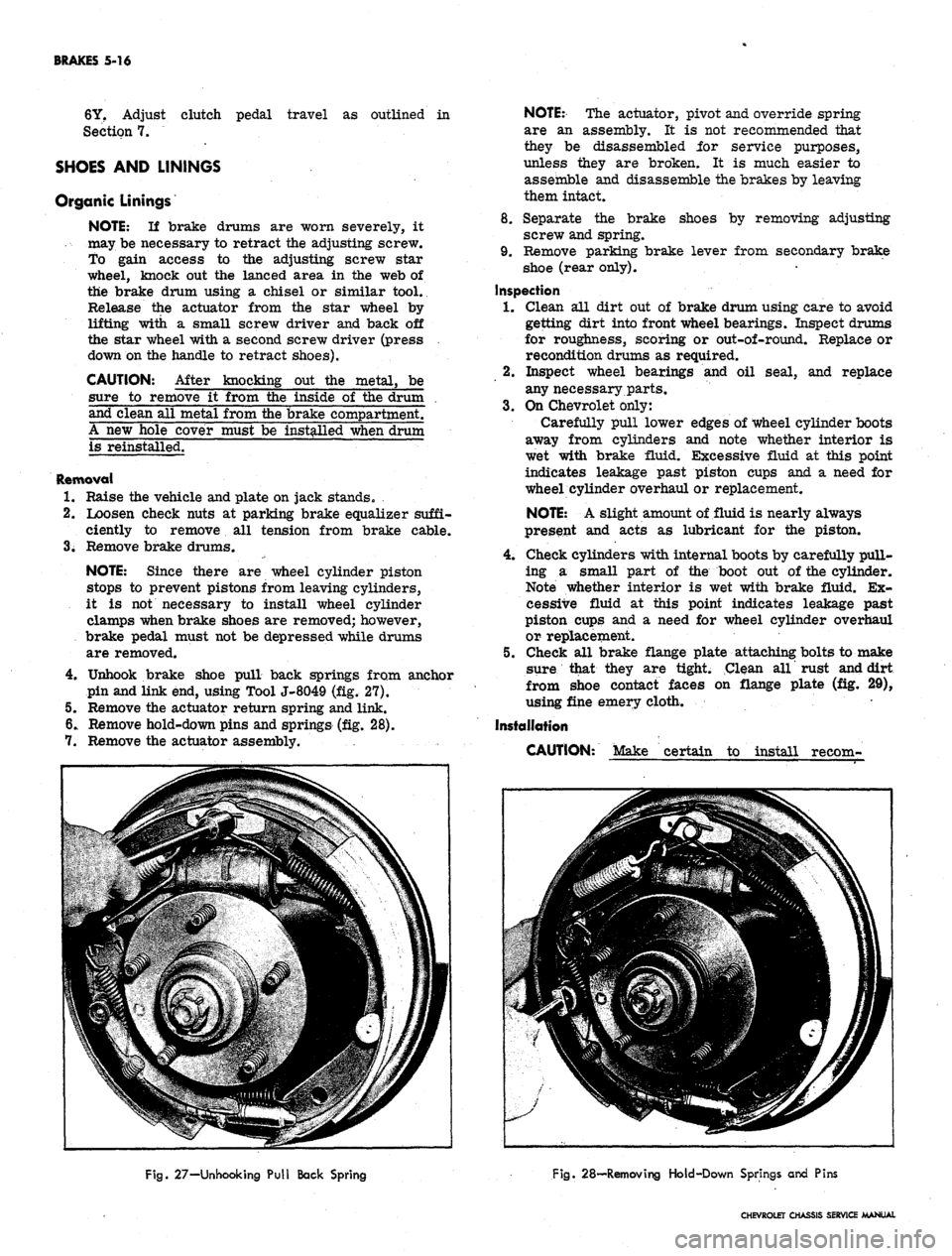
Unhook brake shoe pull back springs from anchor
pin and link end, using Tool J-8049 (fig. 27).
5. Remove the actuator return spring and link.
6. Remove hold-down pins and springs (fig. 28).
7. Remove the actuator assembly.
NOTE:
The actuator, pivot and override spring
are an assembly. It is not recommended that
they be disassembled for service purposes,
unless they are broken. It is much easier to
assemble and disassemble the brakes by leaving
them intact.
8. Separate the brake shoes by removing adjusting
screw and spring.
9. Remove parking brake lever from secondary brake
shoe (rear only).
Inspection
1.
Clean all dirt out of brake drum using care to avoid
getting dirt into front wheel bearings. Inspect drums
for roughness, scoring or out-of-round. Replace or
recondition drums as required.
2.
Inspect wheel bearings and oil seal, and replace
any necessary parts.
3.
On Chevrolet only:
Carefully pull lower edges of wheel cylinder boots
away from cylinders and note whether interior is
wet with brake fluid. Excessive fluid at this point
indicates leakage past piston cups and a need for
wheel cylinder overhaul or replacement.
NOTE:
A slight amount of fluid is nearly always
present and acts as lubricant for the piston.
4.
Check cylinders with internal boots by carefully pull-
ing a small part of the boot out of the cylinder.
Note whether interior is wet with brake fluid. Ex-
cessive fluid at this point indicates leakage past
piston cups and a need for wheel cylinder overhaul
or replacement.
5. Check all brake flange plate attaching bolts to make
sure that they are tight. Clean all rust and dirt
from shoe contact faces on flange plate (fig. 29),
using fine emery cloth.
Installation
CAUTION: Make certain to install recom-
Fig.
27-Unhooking Pull Back Spring
Fig.
28—Removing Hold-Down Springs and Pins
CHEVROLET CHASSIS SERVICE MANUAL