2024 CHEVROLET SILVERADO EV ECO mode
[x] Cancel search: ECO modePage 264 of 429
Chevrolet Silverado EV Owner Manual (GMNA-Localizing-U.S./Canada-
16702912) - 2024 - CRC - 1/17/23
Driving and Operating 263
Following Distance Indicator
If equipped, the following distance to a
moving vehicle ahead in your path is
indicated in following time in seconds on
the Driver Information Center (DIC). See
Driver Information Center (DIC) (Base Level)
0129 or
Driver Information Center (DIC) (Uplevel)
0 130. The minimum following time is
0.5 seconds away.
If there is no vehicle detected ahead, or the
vehicle ahead is out of sensor range, dashes
will be displayed.
Unnecessary Alerts
FCA may provide unnecessary alerts for
turning vehicles, vehicles in other lanes,
objects that are not vehicles, or shadows.
These alerts are normal operation and the
vehicle does not need service.
Cleaning the System
If the FCA system does not seem to operate
properly, this may correct the issue:
.Clean the outside of the windshield in
front of the rearview mirror.
.Clean the entire front of the vehicle.
.Clean the headlamps.
Automatic Emergency
Braking (AEB)
The AEB system may help avoid or reduce
the harm caused by front-end crashes. AEB
also includes Intelligent Brake Assist (IBA).
When the system detects a vehicle ahead in
your path that is traveling in the same
direction that you may be about to crash
into, it can provide a boost to braking or
automatically brake the vehicle. This can
help avoid or lessen the severity of crashes
when driving in a forward gear. Depending
on the situation, the vehicle may
automatically brake moderately or hard.
Always wear a seat belt and ensure that all
passengers are properly restrained. This
automatic emergency braking can only occur
if a vehicle is detected. This is shown by the
FCA vehicle ahead indicator being lit. See
Forward Collision Alert (FCA) System 0261.
The system works when driving in a forward
gear above 4 km/h (2 mph). It can detect
vehicles up to approximately 60 m (197 ft).
{Warning
AEB is an emergency crash preparation
feature and is not designed to avoid
crashes. Do not rely on AEB to brake the
vehicle. AEB will not brake outside of its
operating speed range and only responds
to detected vehicles.
AEB may not:
.Detect a vehicle ahead on winding or
hilly roads.
.Detect all vehicles, especially vehicles
with a trailer, tractors, muddy
vehicles, etc.
.Detect a vehicle when weather limits
visibility, such as in fog, rain, or snow.
.Detect a vehicle ahead if it is partially
blocked by pedestrians or other
objects.
Complete attention is always required
while driving, and you should be ready to
take action and apply the brakes and/or
steer the vehicle to avoid crashes.
Page 277 of 429
Chevrolet Silverado EV Owner Manual (GMNA-Localizing-U.S./Canada-
16702912) - 2024 - CRC - 1/17/23
276 Driving and Operating
To turn LKA on and off, pressAon the
instrument panel to the left of the steering
wheel. If equipped, the indicator light on the
button comes on when LKA is on and turns
off when LKA is disabled. In some vehicles,
you must press the button for more than
three seconds to turn LKA off.
LKA is not available when Terrain Mode,
Snow/Ice Mode, or Off-Road Mode is
selected.
See Driver Mode Control 0209. See
Four-Wheel Steering 0210.
When attempting to enable LKA in any of
the above conditions, LKA UNAVAILABLE will
display.
When on,
Ais white, if equipped,
indicating that the system is not ready to
assist.
Ais green if LKA is ready to
assist. LKA may assist by gently turning the
steering wheel if the vehicle approaches a
detected lane marking.
Ais amber when
assisting. It may also provide a Lane
Departure Warning (LDW) alert by flashing
Aamber if the vehicle crosses a
detected lane marking. Additionally, there
may be three beeps, or the driver seat may
pulse three times, on the right or left,
depending on the lane departure direction. Take Steering
The LKA system does not continuously steer
the vehicle. If LKA does not detect active
driver steering, an alert and chime may be
provided. Steer the vehicle to dismiss. LKA
may become temporarily unavailable after
repeated take steering alerts.
When the System Does Not Seem to
Work Properly
The system performance may be
affected by:
.Close vehicles ahead.
.Sudden lighting changes, such as when
driving through tunnels.
.Banked roads.
.Roads with poor lane markings, such as
two-lane roads.
If the LKA system is not functioning
properly when lane markings are clearly
visible, cleaning the windshield may help.
A camera blocked message may display if
the camera is blocked. Some driver
assistance systems may have reduced
performance or not work at all. An LKA or
LDW unavailable message may display if the
systems are temporarily unavailable. This
message could be due to a blocked camera. The LKA system does not need service. Clean
the outside of the windshield behind the
rearview mirror.
LKA assistance and/or LDW alerts may occur
due to tar marks, shadows, cracks in the
road, temporary or construction lane
markings, or other road imperfections. This
is normal system operation; the vehicle does
not need service. Turn LKA off if these
conditions continue.
Surround Vision Recorder
If equipped, this system records the 360°
camera views to an SD card. Only images
are recorded, no sound. An SD card will be
needed for this system. The minimum
recommended SD card specifications are at
least 64GB with FAT32 file system, Class V30
or greater.
Page 279 of 429
Chevrolet Silverado EV Owner Manual (GMNA-Localizing-U.S./Canada-
16702912) - 2024 - CRC - 1/17/23
278 Driving and Operating
.All files can be viewed on the playback
app or when the SD card is read by a
personal computer (PC).
.Once the SD card is full, the oldest files
will be overwritten.
To Delete Data : Remove the SD card from
the vehicle and insert into a PC to manually
delete the file.
Error messages can occur if:
.No SD card is present.
.An empty SD card is present.
.The video files are the wrong format.
.The video files are corrupt.
.The SD card is full.
.There is a system error.
Other files should not be stored on the
same SD card as the surround vision
recorder files. Storing other files on the
same card may increase recording start up
and playback time or result in a loss of
data. An error message may be displayed if
no surround vision recorded video file is
available for playback.
Charging
When to Charge
When the high voltage battery is low, the
following charging messages may display on
the Driver Information Center (DIC):
CHARGE VEHICLE SOON : The battery needs
to be charged soon.
REDUCED ACCELERATION DRIVE WITH CARE :
The accelerator pedal response is reduced
and the remaining range value changes to
LOW, charge the vehicle immediately. See
Propulsion Power Messages 0136.
OUT OF ENERGY, CHARGE VEHICLE NOW :
The battery charge is fully depleted. The
vehicle will slow to a stop. Brake and
steering assist will continue operating. Once
stopped, turn the vehicle off.
Plug-In Charging
Plug-in charge times vary based on the
battery condition, charge level, and the
outside temperature. See Charging0123 for
charge mode selection.
Do not allow the vehicle to remain in
temperature extremes for long periods
without being driven or plugged in. When temperatures are below 0 °C (32 °F) and
above 32 °C (90 °F), plug in the vehicle to
maximize high voltage battery life.
In extreme temperature conditions, a full
charge will take additional time.
Charging will slow down as the battery fills
up. Charge the battery to 80% for daily
driving, or when driving in mountainous
terrain. The vehicle can be charged above
80% for long trips when not driving in
mountainous terrain.
It is normal to hear fans, pumps, and
electrical devices clicking while the vehicle is
turned off and charging.
The vehicle does not require indoor charging
area ventilation before, during, or after
charging.
The vehicle cannot be driven while the
charge cord is plugged into the vehicle.Caution
To avoid damage to the vehicle, make
sure the charging cord plug is in good
condition, is not worn or damaged, and is
connected securely to the vehicle's
charging port. If vehicle charging is
(Continued)
Page 295 of 429
Chevrolet Silverado EV Owner Manual (GMNA-Localizing-U.S./Canada-
16702912) - 2024 - CRC - 1/17/23
294 Driving and Operating
Driving Characteristics and
Towing Tips
{Warning
You can lose control when towing a
trailer if the correct equipment is not
used or the vehicle is not driven properly.
For example, if the trailer is too heavy or
the trailer brakes are inadequate for the
load, the vehicle may not stop as
expected. You and others could be
seriously injured. The vehicle may also be
damaged, and the repairs would not be
covered by the vehicle warranty. Pull a
trailer only if all the steps in this section
have been followed. Ask your dealer for
advice and information about towing a
trailer with the vehicle.
Driving with a Trailer
Trailering is different than just driving the
vehicle by itself. Trailering affects handling,
acceleration, braking, and durability.
Successful and safe trailering requires proper
use of the correct equipment.The following information has many
time-tested, important trailering tips and
safety rules. Many of these are important
for your safety and that of your passengers.
Read this section carefully before towing a
trailer.
When towing a trailer:
.Become familiar with, and follow all state
and local laws that apply to trailer
towing. These requirements vary from
state to state.
.State laws may require the use of
extended side view mirrors. If your
visibility is limited or restricted while
towing, install extended side view mirrors
on your vehicle, even if not required.
.Do not tow a trailer during the first
800 km (500 mi) of vehicle use to prevent
damage to vehicle.
.Do not drive over 800 km/h (50 mph) and
do not make starts at full throttle during
the first 800 km (500 mi) of trailer
towing.
.Tow in D (Drive). Tow/Haul Mode is
recommended for heavier trailers. See
Driver Mode Control
0209.
.One-Pedal Driving can be a useful feature
when towing. See One-Pedal Driving
0 203. The following advanced driver assistance
features should be turned off when towing
a trailer, and may turn off automatically
when a trailer is detected:
.Park Assist
.Reverse Automatic Braking (RAB)
.Rear Cross Traffic Alert (RCTA)
.Rear Cross Traffic Braking (RCTB)
.Lane Change Alert (LCA)
.Super Cruise and Adaptive Cruise Control
(ACC), unless equipped with trailering
functionality, see
Adaptive Cruise Control
(Advanced) 0217.
Automatic Emergency Braking (AEB) and
Front Pedestrian Braking (FPB) should be set
to Alert unless equipped with Super Cruise.
Do not use Automatic Parking Assist (APA)
while towing a trailer.
Towing a trailer requires experience. The
combination of the vehicle and trailer is
longer and not as responsive as the vehicle
itself. Become familiar with handling and
braking of the combination by driving on a
level road surface before driving on public
roads.
Page 304 of 429
Chevrolet Silverado EV Owner Manual (GMNA-Localizing-U.S./Canada-
16702912) - 2024 - CRC - 1/17/23
Driving and Operating 303
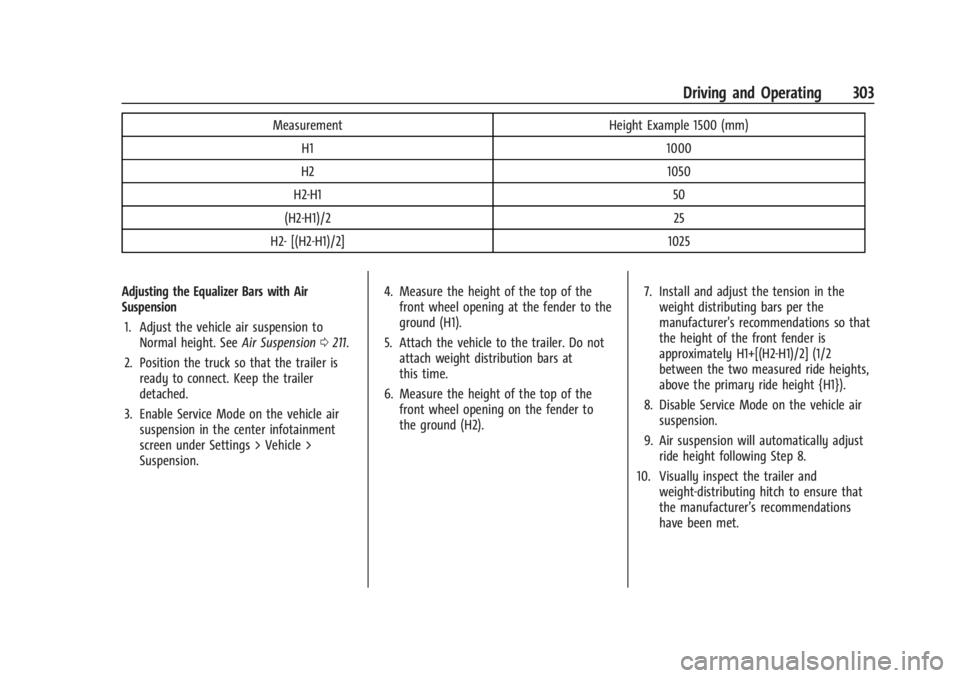
MeasurementHeight Example 1500 (mm)
H1 1000
H2 1050
H2-H1 50
(H2-H1)/2 25
H2- [(H2-H1)/2] 1025
Adjusting the Equalizer Bars with Air
Suspension 1. Adjust the vehicle air suspension to Normal height. See Air Suspension0211.
2. Position the truck so that the trailer is ready to connect. Keep the trailer
detached.
3. Enable Service Mode on the vehicle air suspension in the center infotainment
screen under Settings > Vehicle >
Suspension. 4. Measure the height of the top of the
front wheel opening at the fender to the
ground (H1).
5. Attach the vehicle to the trailer. Do not attach weight distribution bars at
this time.
6. Measure the height of the top of the front wheel opening on the fender to
the ground (H2). 7. Install and adjust the tension in the
weight distributing bars per the
manufacturer's recommendations so that
the height of the front fender is
approximately H1+[(H2-H1)/2] (1/2
between the two measured ride heights,
above the primary ride height {H1}).
8. Disable Service Mode on the vehicle air suspension.
9. Air suspension will automatically adjust ride height following Step 8.
10. Visually inspect the trailer and weight-distributing hitch to ensure that
the manufacturer’s recommendations
have been met.
Page 311 of 429
Chevrolet Silverado EV Owner Manual (GMNA-Localizing-U.S./Canada-
16702912) - 2024 - CRC - 1/17/23
310 Driving and Operating
of these aftermarket devices on vehicle
handling or trailer brake performance is not
known.
{Warning
Use of aftermarket electronic trailer sway
control devices could result in reduced
trailer brake performance, loss of trailer
brakes, or other malfunctions, and result
in a crash. You or others could be
seriously injured or killed. Before using
one of these devices:
.Ask the device or trailer manufacturer
if the device has been thoroughly
tested for compatibility with the
make, model, and year of your vehicle
and any optional equipment installed
on your vehicle.
.Before driving, check the trailer brakes
are working properly, if equipped.
Drive the vehicle with the trailer
attached on a level road surface that
is free of traffic at about 32-40 km/h
(20-25 mph) and fully apply the
manual trailer brake apply lever. Also,
check the trailer brake lamps and
other lamps are functioning correctly.(Continued)
Warning (Continued)
.If the trailer brakes are not operating
properly at any time, or if a DIC
message indicates problems with the
trailer connections or trailer brakes,
carefully pull the vehicle over to the
side of the road when traffic
conditions allow.
Trailer Tires
Special Trailer (ST) tires differ from vehicle
tires. Trailer tires are designed with stiff
sidewalls to help prevent sway and to
support heavy loads. These features can
make it difficult to determine if the trailer
tire pressures are low only based on a visual
inspection.
Always check all trailer tire pressures before
each trip when the tires are cool. Low trailer
tire pressure is a leading cause of trailer tire
blow-outs.
If the vehicle is equipped with a trailer tire
pressure monitoring system, see the trailer
tire pressure monitoring system description
and the trailering app. Trailer tires deteriorate over time. The trailer
tire sidewall will show the week and year
the tire was manufactured. Many trailer tire
manufacturers recommend replacing tires
more than six years old.
Overloading is another leading cause of
trailer tire blow-outs. Never load your trailer
with more weight than the tires are
designed to support. The load rating is
located on the trailer tire sidewall.
Always know the maximum speed rating for
the trailer tires before driving. This may be
significantly lower than the vehicle tire
speed rating. The speed rating may be on
the trailer tire sidewall. If the speed rating is
not shown, the default trailer tire speed
rating is 105 km/h (65 mph).
Trailering App
Trailer Light App
If equipped, the Trailering App is on the
infotainment home screen.
Page 313 of 429
Chevrolet Silverado EV Owner Manual (GMNA-Localizing-U.S./Canada-
16702912) - 2024 - CRC - 1/17/23
312 Driving and Operating
See“Integrated Trailer Brake Control
System” section under Towing Equipment
0 301.
Trailering App
If equipped, the Trailering App is on the
Home Page of the infotainment home
screen.
If equipped, this feature allows profiles for
connected trailers to be created to view
status, to store and track trailer usage
information, and to set up towing assist
features.
The Trailering App welcome page appears
when the Trailering App is opened for the
first time from the infotainment home
screen.
When a trailer is electrically connected and
a trailer profile has not been created, there
is an option to create a profile, use a guest
profile, or select Accessory/No trailer.
When a trailer is electrically connected after
a Trailer Profile has been created, the trailer
detection pop-up appears with a list of all of
the custom Trailer Profiles made on the
vehicle. To load an existing Trailer Profile,
select one of the Trailer Profiles listed,
or load the Guest Trailer Profile by selecting GUEST TRAILER. Touching Accessory/No
trailer selects Accessory/No trailer as the
active Trailer Profile and dismisses the
pop-up.
Create a Trailer Profile
1. Touch Add Trailer on the trailer detection pop-up or touch + Add Trailer in the
Trailering App.
2. Follow the on-screen instructions to set up a profile.
3. After a profile is created, set up for additional trailer features may become
available, such as Tow/Haul mode
reminder, Trailer Tire Pressure
Monitoring System, maintenance
reminders, or camera views and guides.
Import a Trailer Profile 1. Touch Import on the trailer detection pop-up or touch Import in the
Trailering App.
2. Follow the on-screen instructions to import a profile.
3. After a profile is imported, it can be selected from the trailer list. The Tow/
Haul mode reminder, Brake Gain Setting
and Trailer Tire Pressure sensor learning,
if equipped, do not import.
Trailer Feature Setup
Tow/Haul Mode Reminder
To turn the Tow/Haul Mode Reminder
setting on, touch Yes. To turn it off,
touch No.
Trailer Tire Monitoring
If the TTPMS is detected, touch the Trailer
Tire Monitoring icon to set up trailer tire
monitoring.
1. Select trailer tire speed rating.
2. Enter trailer tire manufacturing date number.
3. Follow the on-screen instructions to complete the trailer tire sensor learn
process.
The trailer tire pressure sensors can transmit
up to 7 m (23 feet) from the hitch receiver of
the vehicle.
A trailer must be electrically connected to
the vehicle before starting the
sensor-to-vehicle learn process.
After selecting Start from the Learn Sensors
screen, use the Tool Method or the Manual
Method (described below) to learn each
TTPMS sensor, during which the current tire
number will be highlighted. The vehicle has
Page 326 of 429
Chevrolet Silverado EV Owner Manual (GMNA-Localizing-U.S./Canada-
16702912) - 2024 - CRC - 1/13/23
Vehicle Care 325
Warning (Continued)
High voltage components are identified
by labels. Do not remove, open, take
apart, or modify these components. High
voltage cable or wiring has orange
covering. Do not probe, tamper with, cut,
or modify high voltage cable or wiring.
{Warning
Unexpected wheel motion and/or
direction when one or more wheels are
off the ground for service work may
result in injury. The vehicle may:
.Allow the wheels to rotate
unexpectedly in either direction
regardless of mode selection.
.Allow the wheels to rotate in reaction
to attempts to rotate the tire(s)
manually.
.Resist attempts to rotate the wheels
manually.(Continued)
Warning (Continued)
Before lifting the vehicle to do your own
service work, turn the vehicle off or place
the vehicle in the Service Mode. To place
the vehicle in Service Mode, see “Service
Mode” underPower Modes 0197.
{Warning
It can be dangerous to work on your
vehicle if you do not have the proper
knowledge, service manual, tools,
or parts. Always follow owner’s manual
procedures and consult the service
manual for your vehicle before doing any
service work.
If doing some of your own service work, use
the proper service manual. It tells you much
more about how to service the vehicle than
this manual can. To order the proper service
manual, see Publication Ordering
Information 0404. This vehicle has an airbag system. Before
attempting to do your own service work,
see
Servicing the Airbag-Equipped Vehicle
0 68.
Keep a record with all parts receipts and list
the mileage and the date of any service
work performed. See Maintenance Records
0 393.
Underhood Compartment
Overview
There are several items you should check
periodically located under the hood.
For instructions on opening the hood, see
Hood 019.
{Warning
You or others could be injured if caught
in the path of the power hood. Make
sure there is no one in the way of the
hood as it is opening and closing.