2024 CHEVROLET SILVERADO EV stop start
[x] Cancel search: stop startPage 206 of 429
Chevrolet Silverado EV Owner Manual (GMNA-Localizing-U.S./Canada-
16702912) - 2024 - CRC - 1/17/23
Driving and Operating 205
Braking in Emergencies
ABS allows steering and braking at the same
time. In many emergencies, steering can
help even more than braking.
Electric Parking Brake
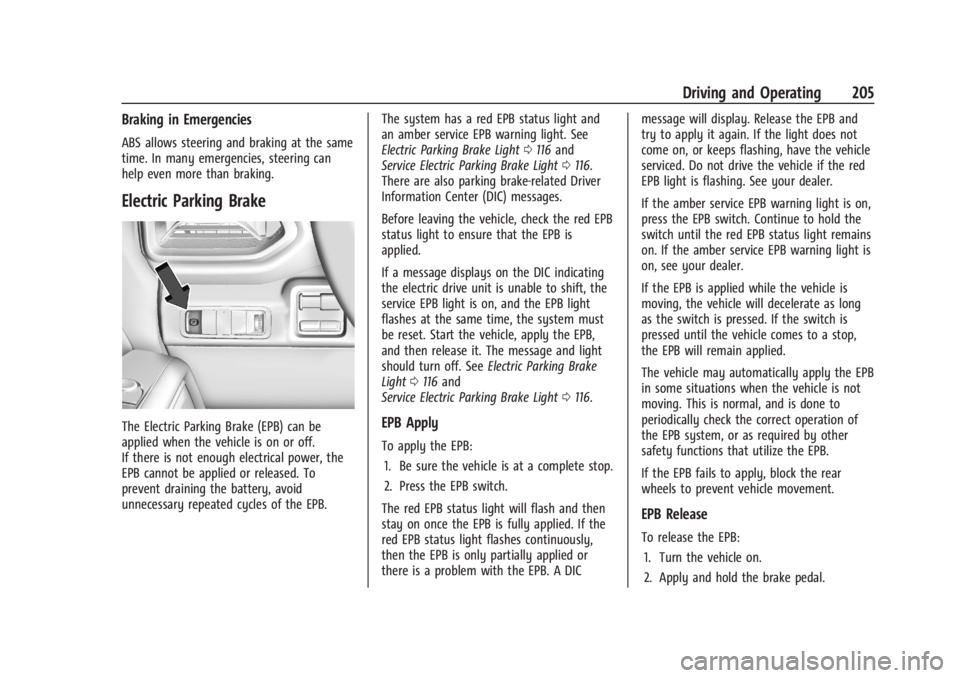
The Electric Parking Brake (EPB) can be
applied when the vehicle is on or off.
If there is not enough electrical power, the
EPB cannot be applied or released. To
prevent draining the battery, avoid
unnecessary repeated cycles of the EPB.The system has a red EPB status light and
an amber service EPB warning light. See
Electric Parking Brake Light
0116 and
Service Electric Parking Brake Light 0116.
There are also parking brake-related Driver
Information Center (DIC) messages.
Before leaving the vehicle, check the red EPB
status light to ensure that the EPB is
applied.
If a message displays on the DIC indicating
the electric drive unit is unable to shift, the
service EPB light is on, and the EPB light
flashes at the same time, the system must
be reset. Start the vehicle, apply the EPB,
and then release it. The message and light
should turn off. See Electric Parking Brake
Light 0116 and
Service Electric Parking Brake Light 0116.EPB Apply
To apply the EPB:
1. Be sure the vehicle is at a complete stop.
2. Press the EPB switch.
The red EPB status light will flash and then
stay on once the EPB is fully applied. If the
red EPB status light flashes continuously,
then the EPB is only partially applied or
there is a problem with the EPB. A DIC message will display. Release the EPB and
try to apply it again. If the light does not
come on, or keeps flashing, have the vehicle
serviced. Do not drive the vehicle if the red
EPB light is flashing. See your dealer.
If the amber service EPB warning light is on,
press the EPB switch. Continue to hold the
switch until the red EPB status light remains
on. If the amber service EPB warning light is
on, see your dealer.
If the EPB is applied while the vehicle is
moving, the vehicle will decelerate as long
as the switch is pressed. If the switch is
pressed until the vehicle comes to a stop,
the EPB will remain applied.
The vehicle may automatically apply the EPB
in some situations when the vehicle is not
moving. This is normal, and is done to
periodically check the correct operation of
the EPB system, or as required by other
safety functions that utilize the EPB.
If the EPB fails to apply, block the rear
wheels to prevent vehicle movement.
EPB Release
To release the EPB:
1. Turn the vehicle on.
2. Apply and hold the brake pedal.
Page 207 of 429
Chevrolet Silverado EV Owner Manual (GMNA-Localizing-U.S./Canada-
16702912) - 2024 - CRC - 1/17/23
206 Driving and Operating
3. Press the EPB switch.
The EPB is released when the red parking
brake status light is off.
If the amber service EPB warning light is on,
release the EPB by pressing and holding the
EPB switch. Continue to hold the switch
until the red parking brake status light is
off. If either light stays on after release is
attempted, see your dealer.
Caution
Driving with the parking brake on can
overheat the brake system and cause
premature wear or damage to brake
system parts. Make sure that the parking
brake is fully released and the brake
warning light is off before driving.
If you are towing a trailer and parking on a
hill, see Driving Characteristics and Towing
Tips 0294.
Automatic EPB Release
The EPB automatically releases if the vehicle
is running, placed into gear, and an attempt
is made to drive away. Avoid rapid
acceleration when the EPB is applied, to
preserve parking brake lining life.
Brake Assist
Brake Assist detects rapid brake pedal
applications due to emergency braking
situations and provides additional braking to
activate the Antilock Brake System (ABS) if
the brake pedal is not pushed hard enough
to activate ABS normally. Minor noise, brake
pedal pulsation, and/or pedal movement
during this time may occur. Continue to
apply the brake pedal as the driving
situation dictates. Brake Assist disengages
when the brake pedal is released.
Hill Start Assist (HSA)
{Warning
Do not rely on the HSA feature. HSA does
not replace the need to pay attention
and drive safely. You may not hear or
feel alerts or warnings provided by this
system. Failure to use proper care when
driving may result in injury, death,
or vehicle damage. See Defensive Driving
0 183.
When the vehicle is stopped on a grade, Hill
Start Assist (HSA) prevents the vehicle from
rolling in an unintended direction during the
transition from brake pedal release to accelerator pedal apply. The brakes release
when the accelerator pedal is applied. If the
accelerator pedal is not applied within a few
minutes, the Electric Parking Brake will
apply. The brakes may also release under
other conditions. Do not rely on HSA to hold
the vehicle.
HSA is available when the vehicle is facing
uphill in a forward gear, or when facing
downhill in R (Reverse). The vehicle must
come to a complete stop on a grade for HSA
to activate.
Regenerative Braking
Regenerative braking takes some of the
energy from the moving vehicle and turns it
back into electrical energy. This energy is
then stored back into the high voltage
battery system, contributing to increased
energy efficiency.
Regenerative power may be limited when
the battery is near full charge or cold. See
“Regenerative Power Limited”
underPower
Indicator Gauge 0111. Regenerative braking
supplements your vehicle’s conventional
brakes, especially when going downhill. See
Hill and Mountain Roads 0190.
Page 209 of 429
Chevrolet Silverado EV Owner Manual (GMNA-Localizing-U.S./Canada-
16702912) - 2024 - CRC - 1/17/23
208 Driving and Operating
ESC activates when the vehicle senses a
difference between the intended path and
the direction the vehicle is actually traveling.
ESC selectively applies braking pressure to
one or more of the vehicle wheel brakes to
assist the driver in keeping the vehicle on
the intended path. Trailer Sway Control
(TSC) is also on automatically when the
vehicle is started. SeeTrailer Sway Control
(TSC) 0309.
If cruise control is being used and traction
control or ESC begins to limit wheel spin,
cruise control will disengage. Cruise control
may be turned back on when road
conditions allow.
Both systems come on automatically when
the vehicle is started and begins to move.
The systems may be heard or felt while
they are operating or while performing
diagnostic checks. This is normal and does
not mean there is a problem with the
vehicle.
It is recommended to leave both systems on
for normal driving conditions, but it may be
necessary to turn TCS off if the vehicle gets
stuck in sand, mud, ice, or snow. See If the
Vehicle Is Stuck 0192 and “Turning the
Systems Off and On” later in this section.
The indicator light for both systems is in the
instrument cluster. This light:
.Flashes when TCS is limiting wheel spin
.Flashes when ESC is activated
.Turns on and stay on when either system
is not working
See Traction Control System (TCS)/Electronic
Stability Control Light 0118.
If either system fails to turn on or to
activate, a message displays in the Driver
Information Center (DIC), and
dcomes on
and stays on to indicate that the system is
inactive and is not assisting the driver in
maintaining control. Adjust driving
accordingly.
If
dcomes on and stays on:
1. Stop the vehicle.
2. Turn the vehicle off and wait 15 seconds.
3. Start the vehicle.
4. Drive the vehicle. If
dcomes on and stays on, see your
dealer as soon as possible.
Turning the Systems Off and On
Caution
Do not repeatedly brake or accelerate
heavily when TCS is off. The vehicle
driveline could be damaged.
To turn Traction (TCS) on and off, in the
controls app on the infotainment home
screen, select Controls > DRIVE & PARK >
Traction Control. To turn ESC on or off,
select
Tnext to the Traction Control menu.
The following options appear:
.Traction Control Off
.Traction Control and ESC Off
.Traction Control and ESC On
The traction off light
idisplays in the
instrument cluster when the traction control
is turned off. When the traction control is
turned back on, the traction off light
i
displayed in the instrument cluster will turn
off. See Traction Off Light 0118.
If TCS is actively limiting wheel spin when
disabled, the system will not turn off until
the wheels stop spinning.
Page 226 of 429
Chevrolet Silverado EV Owner Manual (GMNA-Localizing-U.S./Canada-
16702912) - 2024 - CRC - 1/17/23
Driving and Operating 225
attention is on the road ahead, ACC
automatically resumes. For more
information, see“Attention to the Road" in
Super Cruise 0227. If necessary, briefly press
and release the thumbwheel up to +RES or
apply the accelerator pedal to resume ACC.
If stopped for more than two minutes, or if
the driver door is opened and the driver
seat belt is unbuckled, the ACC system
automatically applies the Electric Parking
Brake (EPB) to hold the vehicle. The EPB
light will turn on. To release the EPB, press
the accelerator pedal. See Electric Parking
Brake 0205.
A DIC warning message may display
indicating to shift to P (Park) before exiting
the vehicle.
{Warning
If ACC has stopped the vehicle, and if ACC
is disengaged, turned off, or canceled, the
vehicle will no longer be held at a stop.
The vehicle can move. When ACC is
holding the vehicle at a stop, always be
prepared to manually apply the brakes.
{Warning
Leaving the vehicle without placing it in
P (Park) can be dangerous. Do not leave
the vehicle while it is being held at a
stop by ACC. Always place the vehicle in
P (Park) and turn it off before leaving the
vehicle.
ACC Override
If you apply the accelerator pedal while ACC
is engaged, the ACC indicator light turns
blue in the instrument cluster and the HUD,
if equipped, indicating that ACC braking will
not occur. ACC will resume operation when
the accelerator pedal is released.
{Warning
The ACC will not automatically apply the
brakes if your foot is resting on the
accelerator pedal. You could crash into a
vehicle ahead of you. Curves in the Road
{Warning
On curves, ACC may not detect a vehicle
ahead in your lane. You could be startled
if the vehicle accelerates up to the set
speed, especially when following a vehicle
exiting or entering exit ramps. You could
lose control of the vehicle or crash. Do
not use ACC while driving on an entrance
or exit ramp. Always be ready to use the
brakes if necessary.
{Warning
On curves, ACC may respond to a vehicle
in another lane, or may not have time to
react to a vehicle in your lane. You could
crash into a vehicle ahead of you, or lose
control of your vehicle. Give extra
attention in curves and be ready to use
the brakes if necessary. Select an
appropriate speed while driving in curves.
ACC may operate differently when the
vehicle approaches a sharp curve in the road
ahead. If the ACC system detects that a
Page 237 of 429
Chevrolet Silverado EV Owner Manual (GMNA-Localizing-U.S./Canada-
16702912) - 2024 - CRC - 1/17/23
236 Driving and Operating
First Alert
.If the steering wheel light bar flashes green, the system has detected that your head and eyes may not
be directed toward the road.
.The flashing will stop when the system detects that your head and eyes appear to be directed toward
the road.
Second Alert
.If the steering wheel light bar flashes green for too long, Super Cruise will alert the driver to take
control of steering immediately by flashing the light bar red. Also, either beeps will sound or the Safety
Alert Seat will vibrate. To view available settings from the infotainment screen, touch Settings > Vehicle,
then touch “Alert Type” or“Collision/Detection Systems.”
.Take over steering, then Super Cruise may disengage or the steering wheel light bar will flash blue to
indicate the need for a driver override. Do not take hands off the steering wheel until the steering
wheel light bar is green.
.To re-engage Super Cruise after disengagement, pressZ. See “Using Super Cruise” previously in this
section.
Third Alert
.If the steering wheel light bar flashes red for too long, a voice command will tell you to take control of
the vehicle.
.Take control of the steering immediately; ACC and Super Cruise will disengage.
.A DIC message will indicate that Super Cruise is locked out. Super Cruise cannot be re-engaged until the
next time you start the vehicle.
.Continued failure to take over steering will cause the vehicle to brake to a stop and OnStar will be
called. The brake lamps and hazard warning flashers will come on.
.Take control of the vehicle and continue driving.
Page 258 of 429
Chevrolet Silverado EV Owner Manual (GMNA-Localizing-U.S./Canada-
16702912) - 2024 - CRC - 1/17/23
Driving and Operating 257
is applied, or the vehicle is shifted into
P (Park). To start driving away, press the
brakes and shift into D (Drive).
Certain vehicle conditions and driver
interferences may also cancel automatic
parking:
.The driver manually steers the vehicle.
.The maximum allowed speed is exceeded.
.There is a failure with the APA system.
.Electronic stability control or antilock
brakes are activated.
.The parking brake is applied.
.Driver unbuckles the seat belt and opens
the door.
System Limitations
Automatic Parking Assist has certain
limitations. The system cannot:
.Continue to operate if the maneuver
speed exceeds 5 km/h (3 mph).
.Detect whether a parking space is legal or
restricted.
.Detect pavement markings or lines.
.Park the vehicle closely lined up with the
vehicle next to it, particularly if the spot
is approached at an angle or if the
parking space is angled.
.Park exactly centered in a very large spot.
.Always detect short curbs.
.Operate while towing any trailer.
.Function the vehicle is raised or lowered
by air suspension,if equipped.
When the System Does Not Seem to Work
Properly
If the vehicle does not reverse into the
expected parking space, the system could be
maneuvering the vehicle into a previously
detected space.
Remote Auto Parking
If equipped, the vehicle can complete the
automatic parking maneuvers while the
driver authorizes the maneuver via the
myChevrolet app on a compatible mobile
phone outside of the vehicle. The driver can
also activate an automatic parallel or
perpendicular unparking maneuver via the
myChevrolet app. The driver must always be
prepared to cancel the automatic maneuver
if necessary.
Remote Auto Parking works the same way
and has the same limitations as the
standard APA feature described above. The
main difference is that you must instead
exit the vehicle and use the
myChevrolet app.
{Warning
When using the remote parking feature,
stay within a short distance and visually
monitor the vehicle until parking is
complete. Do not leave the vehicle
unsupervised during remote parking.
How to Activate Remote Auto Parking
To activate Remote Auto Parking, press
O
on the infotainment screen for the system
to begin searching for a parking space while
driving forward at no greater than
30 km/h (18 mph). APA searches for parking
spaces to the left or right of the vehicle up
to the sensors’ ranges of 1.5 m (5 ft). To
choose or change the parking mode or side,
make a selection in the infotainment
display.
After completely passing an eligible parking
spot, a beep sounds and a notification to
stop the vehicle is displayed in the driver
information center. Generally, Remote Auto
Parking selects the nearest empty parking
spot behind the vehicle, but under some
conditions may select a space that is further
back. Slow down and bring the vehicle to a
complete stop to begin.
Page 259 of 429
Chevrolet Silverado EV Owner Manual (GMNA-Localizing-U.S./Canada-
16702912) - 2024 - CRC - 1/17/23
258 Driving and Operating
Follow the instructions in the vehicle’s
infotainment display. Select the option to
supervise the maneuver remotely. When
prompted, check all your belongings and
exit the vehicle. Press and hold the
authorization button on the myChevrolet
app to allow the maneuver to complete. As
the vehicle automatically steers, brakes,
accelerates, and shifts gears into the parking
spot, stay in close proximity of the vehicle,
and check surroundings. Be prepared to
release the authorization button, or cancel
the maneuver, to avoid vehicles, pedestrians,
or objects.
Once automatic parking is finished and the
vehicle has come to a full stop, a message
will be displayed indicating parking is
complete.
How to Activate Remote Unparking
To activate the unparking maneuver
remotely, launch Remote Auto Parking from
the myChevrolet app. A screen will be
displayed for unparking options. Similar to
automatic parking, follow the displayed
instructions, press and hold the
authorization button, check surroundings as
the vehicle unparks.Once automatic unparking is finished and
the vehicle has come to a full stop, a
message will be displayed indicating
unparking is complete. The vehicle is now
positioned such that the path to exit the
parking spot is free of obstructions. Enter
the vehicle to start driving away.
How to Cancel Remote Automatic Parking or
Automatic Unparking
To cancel automatic parking or automatic
unparking at any time, press the cancel
button on the myChevrolet app. Remote
Auto Parking applies the parking brake and
shifts into P (Park) to hold the vehicle.
Reverse Automatic Braking (RAB)
Backing Warning and Reverse Automatic
Braking (RAB)
Vehicles with Adaptive Cruise Control (ACC)
have the Backing Warning System and
Reverse Automatic Braking (RAB) system.
When in R (Reverse), Backing Warning alerts
of rear objects at vehicle speeds greater
than 8 km/h (5 mph), and RAB may
automatically brake hard at speeds between
1-32 km/h (0.5-20 mph).
The Backing Warning System will beep once
from the rear when an object is first
detected, or pulse twice on both sides of the
Safety Alert Seat. When the system detects
a potential crash, beeps will be heard from
the rear, or five pulses will be felt on both
sides of the Safety Alert Seat. There may
also be a brief, sharp application of the
brakes.
{Warning
The Backing Warning System only
operates at speeds greater than 8 km/h
(5 mph). It does not detect children,
pedestrians, bicyclists, animals, or objects
below the bumper or that are too close
or too far from the vehicle. In some
situations, such as at higher backing
speeds, there may not be enough time
for the short, sharp application of the
vehicle brake system to occur. To prevent
injury, death, or vehicle damage, even
with the Backing Warning System, always
check the area around the vehicle and
check all mirrors before backing.
Page 278 of 429
Chevrolet Silverado EV Owner Manual (GMNA-Localizing-U.S./Canada-
16702912) - 2024 - CRC - 1/17/23
Driving and Operating 277
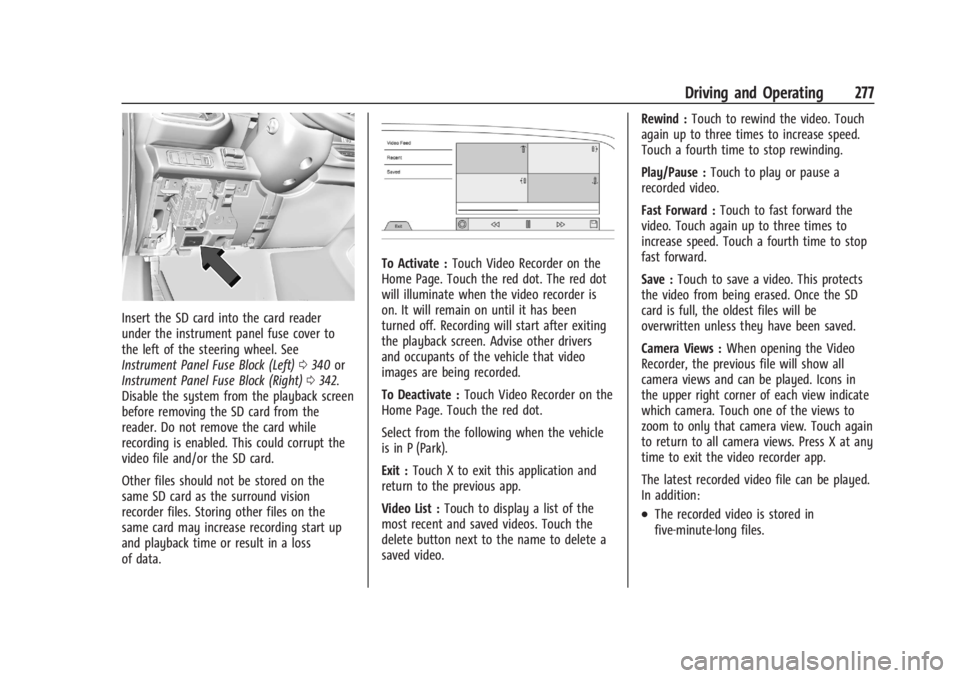
Insert the SD card into the card reader
under the instrument panel fuse cover to
the left of the steering wheel. See
Instrument Panel Fuse Block (Left)0340 or
Instrument Panel Fuse Block (Right) 0342.
Disable the system from the playback screen
before removing the SD card from the
reader. Do not remove the card while
recording is enabled. This could corrupt the
video file and/or the SD card.
Other files should not be stored on the
same SD card as the surround vision
recorder files. Storing other files on the
same card may increase recording start up
and playback time or result in a loss
of data.
To Activate : Touch Video Recorder on the
Home Page. Touch the red dot. The red dot
will illuminate when the video recorder is
on. It will remain on until it has been
turned off. Recording will start after exiting
the playback screen. Advise other drivers
and occupants of the vehicle that video
images are being recorded.
To Deactivate : Touch Video Recorder on the
Home Page. Touch the red dot.
Select from the following when the vehicle
is in P (Park).
Exit : Touch X to exit this application and
return to the previous app.
Video List : Touch to display a list of the
most recent and saved videos. Touch the
delete button next to the name to delete a
saved video. Rewind :
Touch to rewind the video. Touch
again up to three times to increase speed.
Touch a fourth time to stop rewinding.
Play/Pause : Touch to play or pause a
recorded video.
Fast Forward : Touch to fast forward the
video. Touch again up to three times to
increase speed. Touch a fourth time to stop
fast forward.
Save : Touch to save a video. This protects
the video from being erased. Once the SD
card is full, the oldest files will be
overwritten unless they have been saved.
Camera Views : When opening the Video
Recorder, the previous file will show all
camera views and can be played. Icons in
the upper right corner of each view indicate
which camera. Touch one of the views to
zoom to only that camera view. Touch again
to return to all camera views. Press X at any
time to exit the video recorder app.
The latest recorded video file can be played.
In addition:
.The recorded video is stored in
five-minute-long files.