2024 CHEVROLET CORVETTE wheel
[x] Cancel search: wheelPage 186 of 362
Chevrolet Corvette Owner Manual (GMNA-Localizing-U.S./Canada/Mexico-
17272984) - 2024 - CRC - 2/20/23
Driving and Operating 185
The vehicle will not shift into P (Park) if it is
moving too fast. Stop the vehicle and shift
into P (Park).
To shift into and out of P (Park), seeShifting
Into Park 0181 and
Shifting out of Park 0182.
R : Use this gear to back up.
If the vehicle is shifted into R (Reverse) while
the speed is too high, the vehicle will shift
into N (Neutral). Reduce vehicle speed and
try the shift again.
To shift into R (Reverse): 1. Bring the vehicle to a complete stop.
2. Pull the R (Reverse) switch on the center console.
To shift out of R (Reverse): 1. Bring the vehicle to a complete stop.
2. Shift into the desired gear.
At low vehicle speeds, R (Reverse) can be
used to rock the vehicle back and forth to
get out of snow, ice, or sand without
damaging the transmission. See If the
Vehicle Is Stuck 0173. N :
In this position, the engine does not
connect with the wheels. To restart the
engine when the vehicle is already moving,
use N (Neutral) only.
{Warning
Shifting into a drive gear while the
engine is running at high speed is
dangerous. Unless your foot is firmly on
the brake pedal, the vehicle could move
very rapidly. You could lose control and
hit people or objects. Do not shift into a
drive gear while the engine is running at
high speed.
Caution
Shifting out of P (Park) or N (Neutral) with
the engine running at high speed may
damage the transmission. The repairs
would not be covered by the vehicle
warranty. Be sure the engine is not
running at high speed when shifting the
vehicle.
Caution
The vehicle is not designed to stay in
N (Neutral) for extended periods of time.
It will automatically shift into P (Park).
To shift into N (Neutral), press and hold the
N (Neutral) switch until the N indicator
is red.
To shift out of N (Neutral): 1. Bring the vehicle to a complete stop.
2. Shift into the desired gear.
Maintaining N (Neutral) with Engine Off
This vehicle includes a method of keeping
the vehicle in N (Neutral) while the engine
is off.
This method is not to be used for vehicle
towing. If the vehicle needs to be towed,
see Transporting a Disabled Vehicle 0303.
Driver Remains in Vehicle : To place the
vehicle in N (Neutral) with the engine off
and the vehicle occupied:
1. Ensure the vehicle is on level ground, the engine is running and the vehicle is in
P (Park).
Page 188 of 362
Chevrolet Corvette Owner Manual (GMNA-Localizing-U.S./Canada/Mexico-
17272984) - 2024 - CRC - 2/20/23
Driving and Operating 187
Manual Mode
Manual Paddle Shift
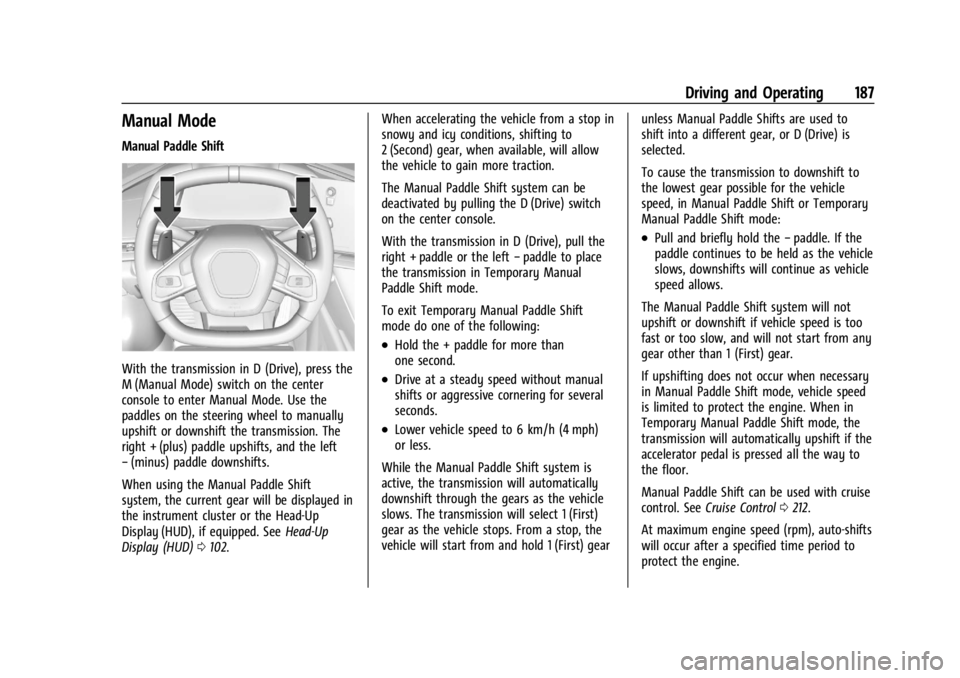
With the transmission in D (Drive), press the
M (Manual Mode) switch on the center
console to enter Manual Mode. Use the
paddles on the steering wheel to manually
upshift or downshift the transmission. The
right + (plus) paddle upshifts, and the left
−(minus) paddle downshifts.
When using the Manual Paddle Shift
system, the current gear will be displayed in
the instrument cluster or the Head-Up
Display (HUD), if equipped. See Head-Up
Display (HUD) 0102. When accelerating the vehicle from a stop in
snowy and icy conditions, shifting to
2 (Second) gear, when available, will allow
the vehicle to gain more traction.
The Manual Paddle Shift system can be
deactivated by pulling the D (Drive) switch
on the center console.
With the transmission in D (Drive), pull the
right + paddle or the left
−paddle to place
the transmission in Temporary Manual
Paddle Shift mode.
To exit Temporary Manual Paddle Shift
mode do one of the following:
.Hold the + paddle for more than
one second.
.Drive at a steady speed without manual
shifts or aggressive cornering for several
seconds.
.Lower vehicle speed to 6 km/h (4 mph)
or less.
While the Manual Paddle Shift system is
active, the transmission will automatically
downshift through the gears as the vehicle
slows. The transmission will select 1 (First)
gear as the vehicle stops. From a stop, the
vehicle will start from and hold 1 (First) gear unless Manual Paddle Shifts are used to
shift into a different gear, or D (Drive) is
selected.
To cause the transmission to downshift to
the lowest gear possible for the vehicle
speed, in Manual Paddle Shift or Temporary
Manual Paddle Shift mode:
.Pull and briefly hold the
−paddle. If the
paddle continues to be held as the vehicle
slows, downshifts will continue as vehicle
speed allows.
The Manual Paddle Shift system will not
upshift or downshift if vehicle speed is too
fast or too slow, and will not start from any
gear other than 1 (First) gear.
If upshifting does not occur when necessary
in Manual Paddle Shift mode, vehicle speed
is limited to protect the engine. When in
Temporary Manual Paddle Shift mode, the
transmission will automatically upshift if the
accelerator pedal is pressed all the way to
the floor.
Manual Paddle Shift can be used with cruise
control. See Cruise Control 0212.
At maximum engine speed (rpm), auto-shifts
will occur after a specified time period to
protect the engine.
Page 191 of 362
Chevrolet Corvette Owner Manual (GMNA-Localizing-U.S./Canada/Mexico-
17272984) - 2024 - CRC - 2/20/23
190 Driving and Operating
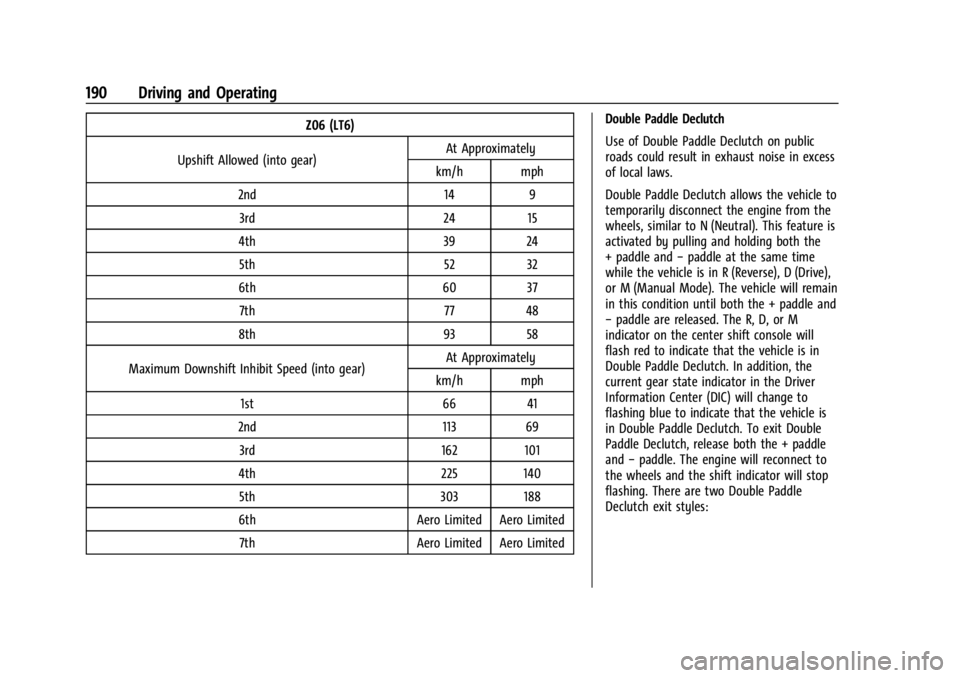
Z06 (LT6)
Upshift Allowed (into gear) At Approximately
km/h mph
2nd 14 9 3rd 24 15
4th 39 24 5th 52 32
6th 60 37 7th 77 48
8th 93 58
Maximum Downshift Inhibit Speed (into gear) At Approximately
km/h mph
1st 66 41
2nd 113 69 3rd 162 101
4th 225 140 5th 303 188
6th Aero Limited Aero Limited 7th Aero Limited Aero Limited Double Paddle Declutch
Use of Double Paddle Declutch on public
roads could result in exhaust noise in excess
of local laws.
Double Paddle Declutch allows the vehicle to
temporarily disconnect the engine from the
wheels, similar to N (Neutral). This feature is
activated by pulling and holding both the
+ paddle and
−paddle at the same time
while the vehicle is in R (Reverse), D (Drive),
or M (Manual Mode). The vehicle will remain
in this condition until both the + paddle and
− paddle are released. The R, D, or M
indicator on the center shift console will
flash red to indicate that the vehicle is in
Double Paddle Declutch. In addition, the
current gear state indicator in the Driver
Information Center (DIC) will change to
flashing blue to indicate that the vehicle is
in Double Paddle Declutch. To exit Double
Paddle Declutch, release both the + paddle
and −paddle. The engine will reconnect to
the wheels and the shift indicator will stop
flashing. There are two Double Paddle
Declutch exit styles:
Page 192 of 362
Chevrolet Corvette Owner Manual (GMNA-Localizing-U.S./Canada/Mexico-
17272984) - 2024 - CRC - 2/20/23
Driving and Operating 191
Standard Exit :Engine power is reapplied to
the wheels gently to support normal vehicle
operation on public roads. This occurs when
paddles are released under any of the these
conditions:
.Accelerator pedal is fully released
.Vehicle speed is above 10 km/h (6 mph)
.Vehicle is in R (Reverse)
.Paddles are released separately
If the vehicle was in Temporary Manual
Paddle Shift mode before entering Double
Paddle Declutch, the vehicle will return to
D (Drive) with automatic shifting upon
exiting Double Paddle Declutch.
Rapid Exit : This is intended for use at a
closed course race track and not on public
roads. Engine power is reapplied to the
wheels quickly to support spirited driving.
The rate of launch is dependent on how
much the accelerator pedal is pressed when
the paddles are released. The further the
accelerator pedal is pressed, the greater the
rate of launch. Tire spin may occur if the
Traction Control System (TCS) is turned off
while performing a Rapid Exit. Rapid Exit
launch occurs when all of the following
conditions are met:
.Vehicle speed is below 10 km/h (6 mph)
.Vehicle is in D (Drive) or
M (Manual Mode)
.Both paddles are released at the
same time
With the accelerator fully pressed and the
engine at the rev limiter, peak performance
only occurs if the paddles are released
within a short period of time after reaching
the rev limit (i.e., a few seconds).
Manual Launch : While the vehicle is in
Double Paddle Declutch, Manual Launch can
be activated to gain more precise control
over the engine speed to prepare for a
Standard or Rapid Exit. To activate this
feature, first enter Double Paddle Declutch,
then release and repull either the + paddle
or −paddle while keeping the opposite
paddle held. The Performance Transmission
Active Light will illuminate in the gauge
cluster to indicate that Manual Launch has
been activated. See Performance
Transmission Active 093. When Manual
Launch is active, the engine will respond
differently when the accelerator pedal is
pressed compared to normal Double Paddle
Declutch. The accelerator pedal must be
pressed further to increase the engine rpm
and a lower engine rpm limit will be
applied. This feature also provides faster engine response during a Rapid Exit if any
of the Performance Traction Management
(PTM) modes or Electronic Stability Control
(ESC) Off has been selected. To exit Manual
Launch, release both the + paddle and
−
paddle. The vehicle will also exit Double
Paddle Declutch and the engine will
reconnect to the wheels. A Standard Exit or
Rapid Exit will be performed based on the
same conditions listed previously.
{Warning
When exiting Double Paddle Declutch, the
vehicle may move rapidly. You could lose
control and cause a crash with nearby
people or objects. Be ready to release the
accelerator pedal or apply the brakes
immediately if the vehicle moves too
quickly. Do not use the Double Paddle
Declutch when people or objects are near.
Drive Systems
All-Wheel Drive
If equipped with E-Ray, advanced electric
All-Wheel Drive (eAWD) delivers power to all
four wheels and adjusts automatically to the
driving conditions. The eAWD system
continuously varies the drive power to the
Page 193 of 362
Chevrolet Corvette Owner Manual (GMNA-Localizing-U.S./Canada/Mexico-
17272984) - 2024 - CRC - 2/20/23
192 Driving and Operating
front and rear wheels to maximize driving
efficiency and improve driving dynamics.
Your vehicle has exceptional driving
capability, but care must always be taken to
adjust driving style to the traffic and road
conditions.
The vehicle eAWD settings may be
customized for the driver mode selected. See
Driver Mode Control0196 for more
information.
Brakes
Electric Brake Boost
Vehicles equipped with electric brake boost
have hydraulic brake circuits that are
electronically controlled when the brake
pedal is applied during normal operation.
The system performs routine tests and turns
off within a few minutes after the vehicle is
turned off. Noise may be heard during this
time. If the brake pedal is pressed during
the tests or when the electric brake boost
system is off, a noticeable change in pedal
force and travel may be felt. This is normal.
Antilock Brake System (ABS)
The Antilock Brake System (ABS) helps
prevent a braking skid and maintain steering
while braking hard.
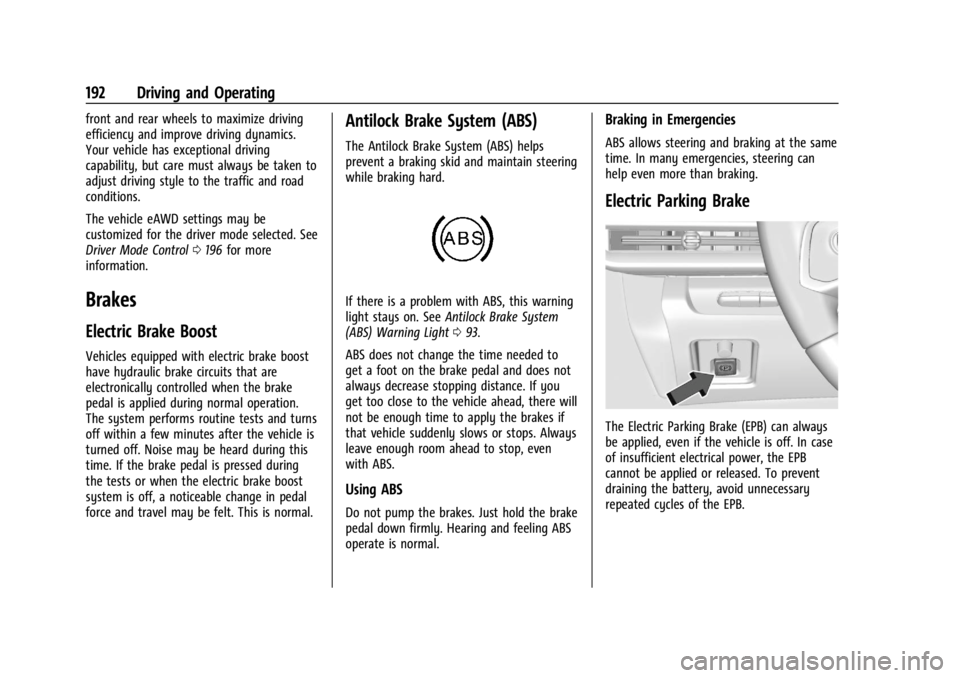
If there is a problem with ABS, this warning
light stays on. See Antilock Brake System
(ABS) Warning Light 093.
ABS does not change the time needed to
get a foot on the brake pedal and does not
always decrease stopping distance. If you
get too close to the vehicle ahead, there will
not be enough time to apply the brakes if
that vehicle suddenly slows or stops. Always
leave enough room ahead to stop, even
with ABS.
Using ABS
Do not pump the brakes. Just hold the brake
pedal down firmly. Hearing and feeling ABS
operate is normal.
Braking in Emergencies
ABS allows steering and braking at the same
time. In many emergencies, steering can
help even more than braking.
Electric Parking Brake
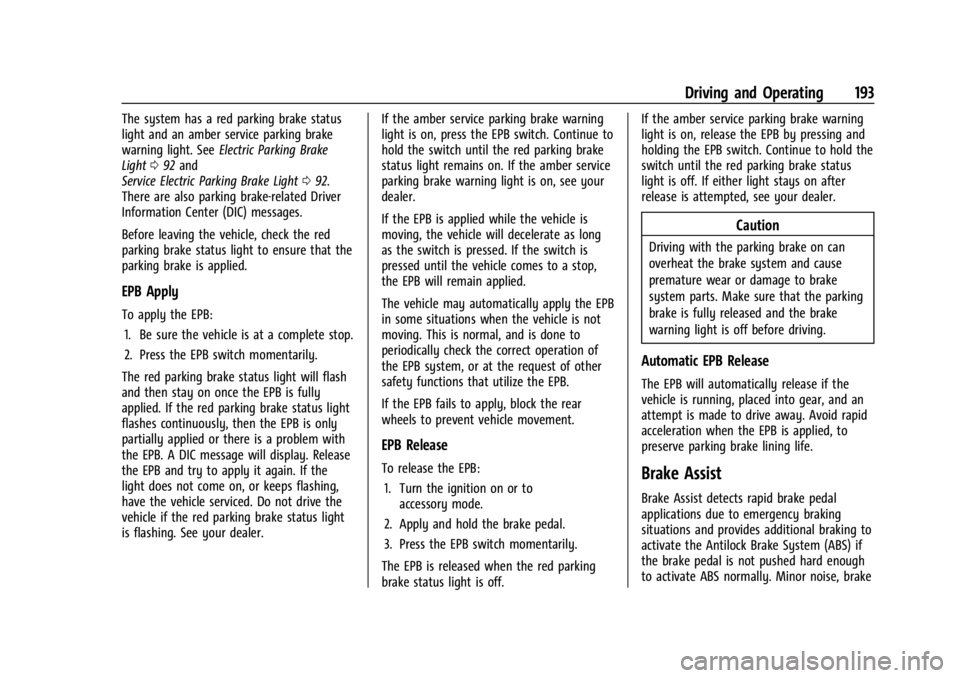
The Electric Parking Brake (EPB) can always
be applied, even if the vehicle is off. In case
of insufficient electrical power, the EPB
cannot be applied or released. To prevent
draining the battery, avoid unnecessary
repeated cycles of the EPB.
Page 194 of 362
Chevrolet Corvette Owner Manual (GMNA-Localizing-U.S./Canada/Mexico-
17272984) - 2024 - CRC - 2/20/23
Driving and Operating 193
The system has a red parking brake status
light and an amber service parking brake
warning light. SeeElectric Parking Brake
Light 092 and
Service Electric Parking Brake Light 092.
There are also parking brake-related Driver
Information Center (DIC) messages.
Before leaving the vehicle, check the red
parking brake status light to ensure that the
parking brake is applied.
EPB Apply
To apply the EPB:
1. Be sure the vehicle is at a complete stop.
2. Press the EPB switch momentarily.
The red parking brake status light will flash
and then stay on once the EPB is fully
applied. If the red parking brake status light
flashes continuously, then the EPB is only
partially applied or there is a problem with
the EPB. A DIC message will display. Release
the EPB and try to apply it again. If the
light does not come on, or keeps flashing,
have the vehicle serviced. Do not drive the
vehicle if the red parking brake status light
is flashing. See your dealer. If the amber service parking brake warning
light is on, press the EPB switch. Continue to
hold the switch until the red parking brake
status light remains on. If the amber service
parking brake warning light is on, see your
dealer.
If the EPB is applied while the vehicle is
moving, the vehicle will decelerate as long
as the switch is pressed. If the switch is
pressed until the vehicle comes to a stop,
the EPB will remain applied.
The vehicle may automatically apply the EPB
in some situations when the vehicle is not
moving. This is normal, and is done to
periodically check the correct operation of
the EPB system, or at the request of other
safety functions that utilize the EPB.
If the EPB fails to apply, block the rear
wheels to prevent vehicle movement.
EPB Release
To release the EPB:
1. Turn the ignition on or to accessory mode.
2. Apply and hold the brake pedal.
3. Press the EPB switch momentarily.
The EPB is released when the red parking
brake status light is off. If the amber service parking brake warning
light is on, release the EPB by pressing and
holding the EPB switch. Continue to hold the
switch until the red parking brake status
light is off. If either light stays on after
release is attempted, see your dealer.
Caution
Driving with the parking brake on can
overheat the brake system and cause
premature wear or damage to brake
system parts. Make sure that the parking
brake is fully released and the brake
warning light is off before driving.
Automatic EPB Release
The EPB will automatically release if the
vehicle is running, placed into gear, and an
attempt is made to drive away. Avoid rapid
acceleration when the EPB is applied, to
preserve parking brake lining life.
Brake Assist
Brake Assist detects rapid brake pedal
applications due to emergency braking
situations and provides additional braking to
activate the Antilock Brake System (ABS) if
the brake pedal is not pushed hard enough
to activate ABS normally. Minor noise, brake
Page 195 of 362
Chevrolet Corvette Owner Manual (GMNA-Localizing-U.S./Canada/Mexico-
17272984) - 2024 - CRC - 2/20/23
194 Driving and Operating
pedal pulsation, and/or pedal movement
during this time may occur. Continue to
apply the brake pedal as the driving
situation dictates. Brake Assist disengages
when the brake pedal is released.
Hill Start Assist (HSA)
{Warning
Do not rely on the HSA feature. HSA does
not replace the need to pay attention
and drive safely. You may not hear or
feel alerts or warnings provided by this
system. Failure to use proper care when
driving may result in injury, death,
or vehicle damage. SeeDefensive Driving
0 157.
When the vehicle is stopped on a grade, Hill
Start Assist (HSA) prevents the vehicle from
rolling in an unintended direction during the
transition from brake pedal release to
accelerator pedal apply. The brakes release
when the accelerator pedal is applied. If the
accelerator pedal is not applied within a few
minutes, the Electric Parking Brake will
apply. The brakes may also release under
other conditions. Do not rely on HSA to hold
the vehicle. HSA is available when the vehicle is facing
uphill in a forward gear, or when facing
downhill in R (Reverse). The vehicle must
come to a complete stop on a grade for HSA
to activate.
Regenerative Braking
E-Ray models have a regenerative braking
system that activates when the brake pedal
is applied.
Regenerative braking captures some of the
energy from the moving vehicle and turns it
back into electrical energy. This energy is
then stored back into the high voltage
battery system, contributing to increased
energy efficiency.
The brake system uses regenerative braking,
conventional hydraulic braking, or a
combination of both as appropriate.
When the brake pedal is applied, a slight
sound may be heard. This is normal.
Ride Control Systems
Traction Control/Electronic
Stability Control
The vehicle has a Traction Control
System (TCS) and a StabiliTrak/Electronic
Stability Control (ESC) system. These
systems help limit wheel spin and assist the
driver in maintaining control, especially on
slippery road conditions.
TCS activates if it senses that the rear
wheels are spinning too much or are
beginning to lose traction. When this
happens, TCS applies the brakes to the
spinning wheel and reduces engine power
(by closing the throttle and managing
engine spark) to limit wheel spin.
StabiliTrak/ESC activates when the vehicle
senses a difference between the intended
path and the direction the vehicle is actually
traveling. StabiliTrak/ESC selectively applies
braking pressure to any one of the vehicle
wheel brakes to assist the driver in keeping
the vehicle on the intended path.
Page 196 of 362
Chevrolet Corvette Owner Manual (GMNA-Localizing-U.S./Canada/Mexico-
17272984) - 2024 - CRC - 2/20/23
Driving and Operating 195
If cruise control is being used when TCS
begins to limit wheel spin, the cruise control
will automatically disengage. Cruise control
may be reengaged when road conditions
allow. SeeCruise Control 0212.
If the driver disables TCS, cruise control will
disengage. Cruise control will also be
disabled if Performance Traction
Management (PTM) is selected, or if
StabiliTrak is turned off.
Both systems come on automatically when
the vehicle is started and begins to move.
The systems may be heard or felt while
they are operating or while performing
diagnostic checks. This is normal and does
not mean there is a problem with the
vehicle.
It is recommended to leave both systems on
for normal driving conditions, but it may be
necessary to turn TCS off if the vehicle gets
stuck in sand, mud, ice, or snow. See If the
Vehicle Is Stuck 0173 and “Turning the
Systems Off and On” later in this section.
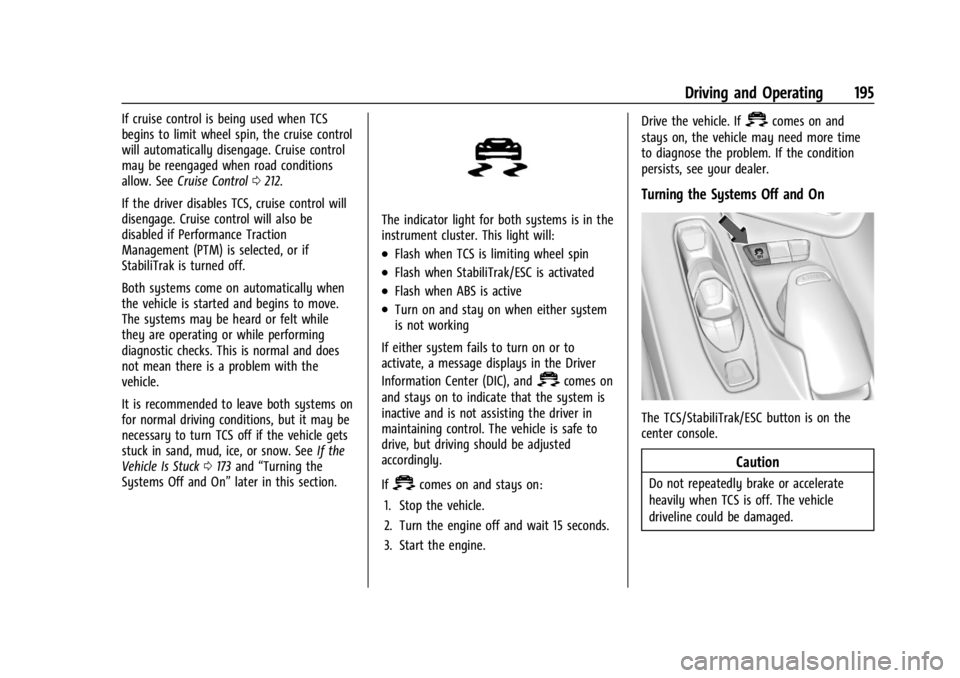
The indicator light for both systems is in the
instrument cluster. This light will:
.Flash when TCS is limiting wheel spin
.Flash when StabiliTrak/ESC is activated
.Flash when ABS is active
.Turn on and stay on when either system
is not working
If either system fails to turn on or to
activate, a message displays in the Driver
Information Center (DIC), and
=comes on
and stays on to indicate that the system is
inactive and is not assisting the driver in
maintaining control. The vehicle is safe to
drive, but driving should be adjusted
accordingly.
If
=comes on and stays on:
1. Stop the vehicle.
2. Turn the engine off and wait 15 seconds.
3. Start the engine. Drive the vehicle. If
=comes on and
stays on, the vehicle may need more time
to diagnose the problem. If the condition
persists, see your dealer.
Turning the Systems Off and On
The TCS/StabiliTrak/ESC button is on the
center console.
Caution
Do not repeatedly brake or accelerate
heavily when TCS is off. The vehicle
driveline could be damaged.