2023 TOYOTA HIGHLANDER engine
[x] Cancel search: enginePage 284 of 552

2844-5. Using the driving support systems
Meter control switches
Turning the RCTA function on/off.
When the RCTA function is dis-
abled, the RCTA OFF indicator illu-
minates.
Outside rear view mirror indi-
cators
If a vehicle is detected as
approaching from the left or right
behind the vehicle, both outside
rear view mirror indicators will blink
and a buzzer will sound.
Center Display
If a vehicle approaching from the
right or left at the rear of the vehicle
is detected, the RCTA icon
( P.285) for the det ected side will
be displayed on the Center Display.
This illustration shows an example
of a vehicle approaching from both
sides of the vehicle.
The RCTA can be enabled/dis-
abled on of the multi-infor-
mation display. ( P.494)
When the RCTA function is dis-
abled, the RCTA OFF indicator (
P.76) illuminates. (Each time the
engine switch is turned off then
changed to ON, t he RCTA function
will be enabled a utomatically.)
■Outside rear vie w mirror indica-
tor visibility
In strong sunlight, the outside rear
view mirror indicator may be difficult
to see.
■Hearing the RCTA buzzer
The RCTA buzzer may be difficult to
hear over loud noises, such as if the
audio system volume is high.
■When “Rear Cross Traffic Alert
Unavailable” is shown on the
multi-information display
Ice, snow, mud, etc., may be
attached to the rear bumper around
the sensors. ( P.271) Removing
the ice, snow, mud, etc., from the
attached to the rear bumper around
the sensors to normal.
Additionally, the function may not
function normally when used in
extremely hot or cold environments.
■When “Rear Cross Traffic Alert
Malfunction Visit Your Dealer”
is shown on the multi-informa-
tion display
There may be a sensor malfunction
or misaligned. Have the vehicle
inspected at a Toyota dealer.
■Rear side radar sensors
P.271
■Operation of the RCTA function
The RCTA function uses rear side radar sensors to detect vehicles
approaching from the right or left at the rear of the vehicle a nd alerts
the driver of the presence of such vehicles by flashing the out side
rear view mirror indicators and sounding a buzzer.
Turning the RCTA func-
tion on/off
RCTA function
Page 286 of 552

2864-5. Using the driving support systems
The buzzer can alert the driver
of faster vehicles approaching
from farther away.
Example:
■The RCTA function is opera-
tional when
The RCTA function operates when
all of the followin g conditions are
met:
●The engine swit ch is in ON.
●The RCTA function is on.
●The shift lever is in R.
●The vehicle speed is less than
approximately 9 mph (15 km/h).
●The approaching vehicle speed is
between approximately 5 mph (8
km/h) and 34 mph (56 km/h).
■Setting the buzzer volume
(vehicles with In tuitive parking
assist)
The buzzer volume can be adjusted
on the multi-information display.
The volume of the RCTA buzzer can
be adjusted on of the multi-infor-
mation display.( P.494)
■Muting a buzzer temporarily
(vehicles with Intuitive parking
assist)
A mute button will be displayed on
the multi-informatio n display when a
vehicle or an object is detected. To
mute the buzzer, press .
The buzzers for the RCTA function
and Intuitive parking assist will be
muted simultaneously.
Mute will be cancele d automatically
in the following situations:
●When the shift lever is changed.
●When the vehicle speed exceeds
a certain speed.
●When there is a malfunction in a
sensor or the system is temporar-
ily unavailable.
●When the operati ng function is
disabled manually.
●When the engine switch is turned
off.
■Conditions under which the
system will not detect a vehicle
The RCTA function is not designed
to detect the follo wing types of vehi-
cles and/or objects:
●Vehicles approaching from directly
behind
●Vehicles backing up in a parking
space next to your vehicle
●Vehicles that the sensors cannot
detect due to obstructions
Approaching
vehicle speed Approximate
alert distance
34 mph (56
km/h) (fast)131 ft. (40 m)
5 mph (8 km/h) (slow)18 ft. (5.5 m)
Page 287 of 552

2874-5. Using the driving support systems
4
Driving
●Guardrails, walls, signs, parked
vehicles and similar stationary
objects
*
●Small motorcycles, bicycles,
pedestrians, etc.*
●Vehicles moving away from your
vehicle
●Vehicles approaching from the
parking spaces next to your vehi-
cle
*
●The distance between the sensor
and approaching vehicle gets too
close
*: Depending on the conditions, detection of a vehicle and/or
object may occur.
■Situations in which the system
may not operate properly
The RCTA function may not detect
vehicles correctly in the following
situations:
●When the sensor is misaligned
due to a strong impact to the sen-
sor or its surrounding area
●When mud, snow, ice, a sticker,
etc.,is covering the sensor or sur-
rounding area on the position
above the rear bumper
●When driving on a road surface
that is wet with standing water
during bad weather, such as
heavy rain, snow, or fog
●When multiple vehicles are
approaching with only a small gap
between each vehicle
●When a vehicle is approaching at
high speed
●When equipment that may obstruct a sensor is installed, such
as a towing eyelet, bumper pro-
tector (an additional trim strip,
etc.), bicycle car
rier, or snow plow
●When backing up on a slope with
a sharp change in grade
●When backing out of a sharp
angle parking spot
●Immediately after the RCTA func-
tion is turned on
●Immediately after the engine is
started with the RCTA function on
●When the sensors cannot detect a
vehicle due to obstructions
●When towing a trailer
●When there is a significant differ-
ence in height between your vehi-
cle and the vehicle that enters the
detection area
●When a sensor or the area around
a sensor is extremely hot or cold
●If the suspension has been modi-
fied or tires of a size other than
specified are installed
Page 291 of 552
2914-5. Using the driving support systems
4
Driving
The Parking Support Brake can
be enabled/disabled on the
multi-information display. All of
the Parking Support Brake func-
tions (static objects and
rear-crossing vehicles) are
enabled/disabled simultane-
ously.
Use the meter control switches
to enable/disable the parking
support brake. (P.102)
1 Select of the multi-infor-
mation display and then
press .
2 Press or to select
and then press .
When the Parking Support Brake is
disabled, the PKSB OFF indicator
( P.76) illuminates on the instru-
ment cluster.
To re-enable the system when it was disabled, select on the
multi-information
display, select
and turn it on. If the system is dis-
abled, it will remain off even if the
engine switch is turned to ON after
the engine switch has been turned
off.
If the engine output restriction con-
trol or brake control operates, a
buzzer will sound and a message
will be displayed on the audio sys-
tem screen and multi-information
display, to alert the driver.
Depending on the situation, engine
output restriction control will oper-
ate to either limit acceleration or
restrict output as much as possible.
Engine output restriction con-
trol is operating (acceleration
restriction)
Acceleration greater than a certain
amount is restric ted by the system.
Audio system screen (Panoramic
view monitor) (if equipped): No
warning displayed
Multi-information display: “Object
Detected Acceleration Reduced”
PKSB OFF indicator: Not illumi-
nated
Buzzer: Does not sound
Engine output restriction con-
trol is operating (output
restricted as much as possi-
ble)
The system has determined that
stronger-than-normal brake opera-
NOTICE
■If “PKSB Unavailable” is dis-
played on the multi-informa-
tion display and the PKSB
OFF indicator is flashing
If this message is displayed
immediately after the engine
switch is changed to ON, operate
the vehicle carefully, paying atten-
tion to your surroundings. It may
be necessary to drive the vehicle
for a certain amount of time
before the system returns to nor-
mal. (If the system is not return to
normal after driving for a while,
clean the sensors and their sur-
rounding area on the bumpers.)
Enabling/Disabling the
Parking Support Brake
Displays and buzzers for
engine output restriction
control and brake control
Page 292 of 552

2924-5. Using the driving support systems
tion is necessary.
Audio system screen (Panoramic
view monitor) (if equipped):
“BRAKE!”
Multi-information display/Head-up
display (if equip ped): “BRAKE!”
PKSB OFF indicator: Not illumi-
nated
Buzzer: Short beep
Brake control is operating
The system determ ined that emer-
gency braking is necessary.
Audio system screen (Panoramic
view monitor) (if equipped):
“BRAKE!”
Multi-information display/Head-up
display (if equip ped): “BRAKE!” PKSB OFF indicator: Not illumi-
nated
Buzzer: Short beep
Vehicle stopped by system
operation
The vehicle has been stopped by
brake control operation.
Audio system screen (Panoramic
view monitor) (if equipped): “Press
Brake Pedal”
Multi-information display/Head-up
display (if equipped): “Switch to
Brake” (If the acce lerator pedal is
not depressed, “Press Brake Pedal”
will be displayed.)
PKSB OFF indicato r: Illuminated
Buzzer: Short beep
If the Parking Support Brake dete rmines that a collision with a
detected object is possible, the engine output will be restrict ed to
restrain any increase in the vehicle speed. (Engine output restriction
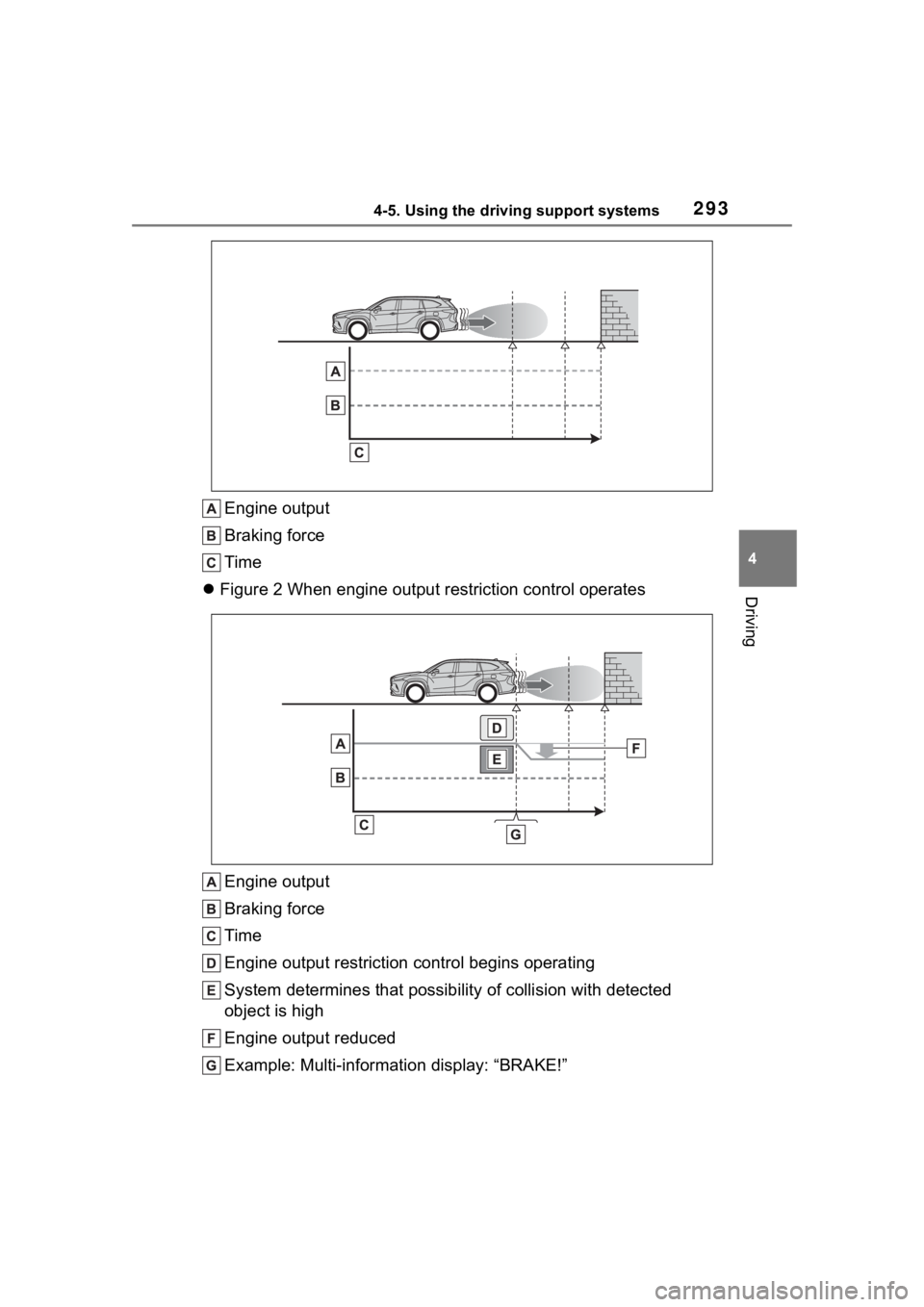
control: See figure 2.)
Additionally, if the accelerator pedal continues to be depresse d, the
brakes will be applied automatica lly to reduce the vehicle speed.
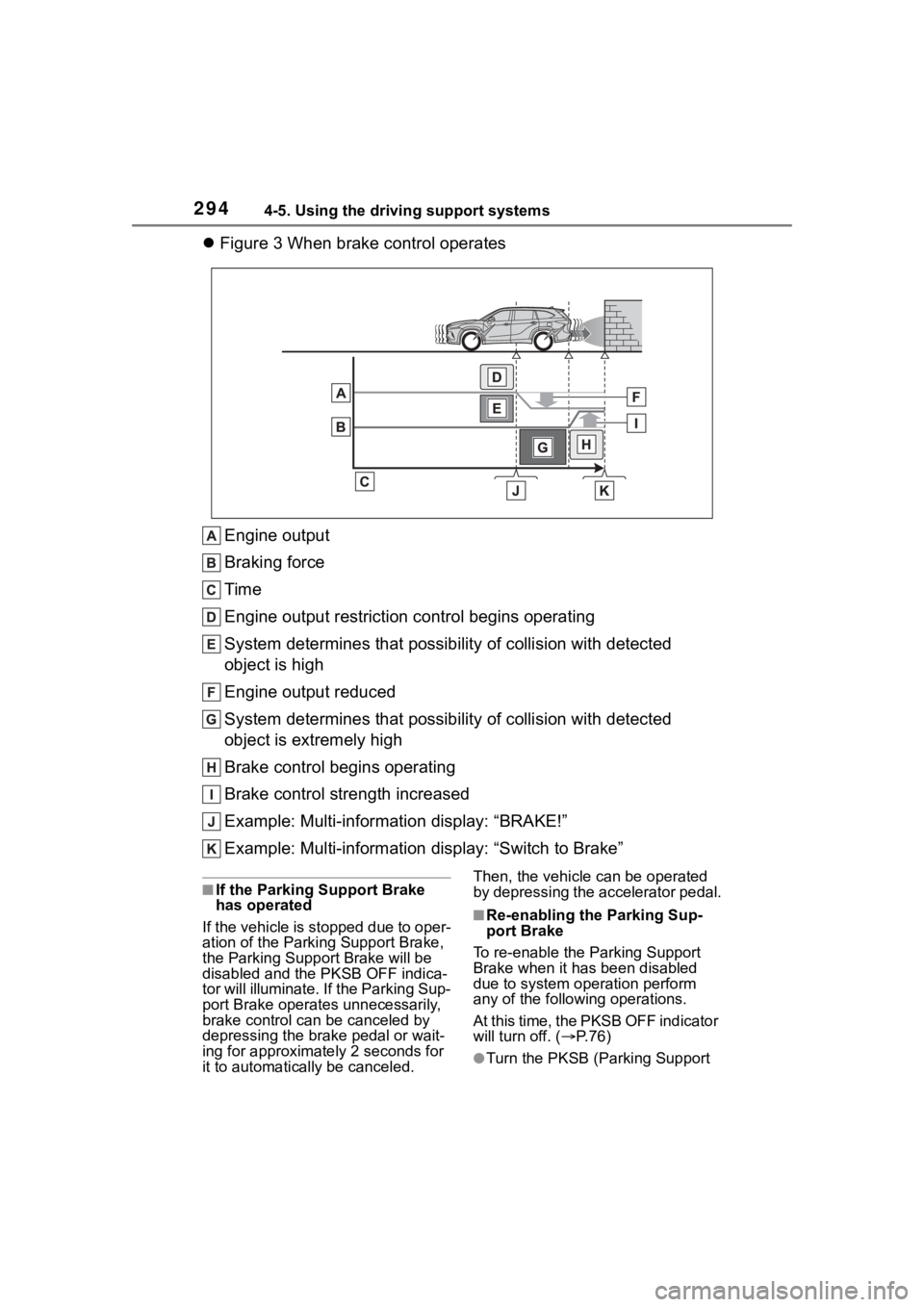
(Brake control: See figure 3.)
Figure 1 When the PKSB (Parking Support Brake) is disabled
System overview
Page 293 of 552
2934-5. Using the driving support systems
4
Driving
Engine output
Braking force
Time
Figure 2 When engine output restriction control operates
Engine output
Braking force
Time
Engine output restriction control begins operating
System determines that possibility of collision with detected
object is high
Engine output reduced
Example: Multi-informa tion display: “BRAKE!”
Page 294 of 552
2944-5. Using the driving support systems
Figure 3 When brake control operates
Engine output
Braking force
Time
Engine output restriction control begins operating
System determines that possibility of collision with detected
object is high
Engine output reduced
System determines that possibility of collision with detected
object is extremely high
Brake control begins operating
Brake control strength increased
Example: Multi-informa tion display: “BRAKE!”
Example: Multi-information display: “Switch to Brake”
■If the Parking Support Brake
has operated
If the vehicle is stopped due to oper-
ation of the Parki ng Support Brake,
the Parking Suppor t Brake will be
disabled and the PKSB OFF indica-
tor will illuminate. If the Parking Sup-
port Brake operates unnecessarily,
brake control can be canceled by
depressing the brake pedal or wait-
ing for approximately 2 seconds for
it to automatically be canceled. Then, the vehicle can be operated
by depressing the accelerator pedal.
■Re-enabling the Parking Sup-
port Brake
To re-enable the Parking Support
Brake when it has been disabled
due to system operation perform
any of the following operations.
At this time, the PKSB OFF indicator
will turn off. ( P. 7 6 )
●Turn the PKSB (Parking Support
Page 298 of 552
2984-5. Using the driving support systems
■The Parking Support Brake
function (static object) will
operate when
The function will operate when the
PKSB OFF indicator is not illumi-
nated or flashing ( P.75, 76) and all
of the following conditions are met:
●Engine output restriction control
• The Parking Support Brake is
enabled.
• The vehicle speed is approxi- mately 9 mph (15 km/h) or less.
• There is a static object in the trav- eling direction o f the vehicle and
approximately 6 to 13 ft. (2 to 4 m)
away.
• The Parking Support Brake deter- mines that a stronger-than-nor-
mal brake operation is necessary
to avoid a collision.
●Brake control
• Engine output restri ction control is
operating.
• The Parking Support Brake deter- mines that an immediate brake
operation is necessary to avoid a
collision.
■The Parking Support Brake
function (static objects) will
stop operating when
The function will st op operating if
any of the following conditions are
met:
●Engine output restriction control
• The Parking Support Brake is dis- abled.
• The system determines that the collision has become avoidable
with normal brake operation.
• The static object is no longer
approximately 6 to 13 ft. (2 to 4 m)
away from the vehicle or in the
traveling direction of the vehicle.
●Brake control
• The Parking Support Brake is dis-
abled.
• Approximately 2 seconds have elapsed since the vehicle was
stopped by brake control.
• The brake pedal is depressed after the vehicle is stopped by
brake control.
• The static object is no longer approximately 6 to 13 ft. (2 to 4 m)
away from the vehicle or in the
traveling direction of the vehicle.
■Detection range of the Parking
Support Brake function (static
objects)
The detection range of the Parking
Support Brake function (static
objects) differs from the detection
range of the intuitive parking assist.
( P.280) Therefore, even if the intu-
itive parking assist detects an object
and provides a warning, the Parking
Support Brake function (static
objects) may not start operating.
■Situations in which the system
may not operate properly
P.278
■Situations in which the system
may operate even if there is no
possibility of a collision
P.279
WARNING
■If the Parking Support Brake
function (static objects) oper-
ates unnecessarily, such as
at a railroad crossing
P. 2 9 4
■Notes when washing the vehi-
cle
P. 2 7 7